
SpringBoot系列教程web篇之404、500异常页面配置
接着前面几篇web处理请求的博文,本文将说明,当出现异常的场景下,如404请求url不存在,,403无权,500服务器异常时,我们可以如何处理
I. 环境搭建
首先得搭建一个web应用才有可能继续后续的测试,借助SpringBoot搭建一个web应用属于比较简单的活;
创建一个maven项目,pom文件如下
<parent>

    <groupId>org.springframework.boot</groupId>

    <artifactId>spring-boot-starter-parent</artifactId>

    <version>2.1.7</version>

    <relativePath/> <!-- lookup parent from update -->

</parent>

<properties>

    <project.build.sourceEncoding>UTF-8</project.build.sourceEncoding>

    <project.reporting.outputEncoding>UTF-8</project.reporting.outputEncoding>

    <spring-cloud.version>Finchley.RELEASE</spring-cloud.version>

    <java.version>1.8</java.version>

</properties>

<dependencies>

    <dependency>

        <groupId>org.springframework.boot</groupId>

        <artifactId>spring-boot-starter-web</artifactId>

    </dependency>

    <dependency>

        <groupId>com.alibaba</groupId>

        <artifactId>fastjson</artifactId>

        <version>1.2.45</version>

    </dependency>

</dependencies>

<build>

    <pluginManagement>

        <plugins>

            <plugin>

                <groupId>org.springframework.boot</groupId>

                <artifactId>spring-boot-maven-plugin</artifactId>

            </plugin>

        </plugins>

    </pluginManagement>

</build>

<repositories>

    <repository>

        <id>spring-milestones</id>

        <name>Spring Milestones</name>

        <url>https://repo.spring.io/milestone</url>

        <snapshots>

            <enabled>false</enabled>

        </snapshots>

    </repository>

</repositories>
依然是一般的流程,pom依赖搞定之后,写一个程序入口
/**

 * Created by @author yihui in 15:26 19/9/13.

 */

@SpringBootApplication

public class Application {

    public static void main(String[] args) {

        SpringApplication.run(Application.class);

    }

}
II. 异常页面配置
在SpringBoot项目中,本身提供了一个默认的异常处理页面,当我们希望使用自定义的404,500等页面时,可以如何处理呢?
1. 默认异常页面配置
在默认的情况下,要配置异常页面非常简单,在资源路径下面,新建 error 目录,在下面添加400.html, 500html页面即可
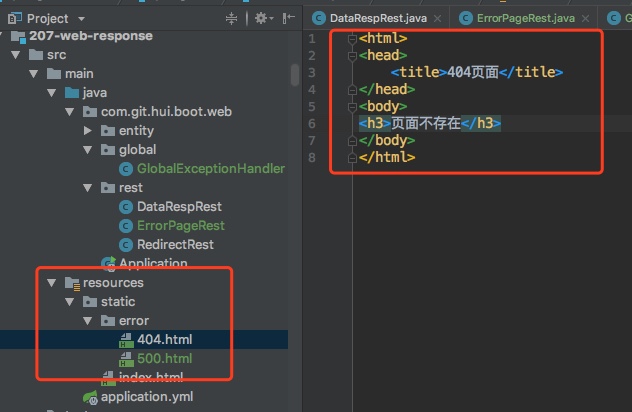
项目结构如上,注意这里的实例demo是没有使用模板引擎的,所以我们的异常页面放在static目录下;如果使用了如FreeMaker模板引擎时,可以将错误模板页面放在template目录下
接下来实际测试下是否生效, 我们先定义一个可能出现服务器500的服务
@Controller

@RequestMapping(path = "page")

public class ErrorPageRest {

    @ResponseBody

    @GetMapping(path = "divide")

    public int divide(int sub) {

        System.out.println("divide1");

        return 1000 / sub;

    }

}
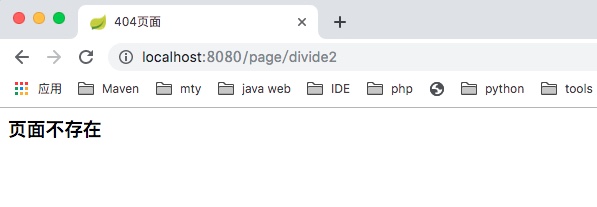
请求一个不存在的url,返回我们定义的400.html页面
<html>

<head>

    <title>404页面</title>

</head>

<body>

<h3>页面不存在</h3>

</body>

</html>
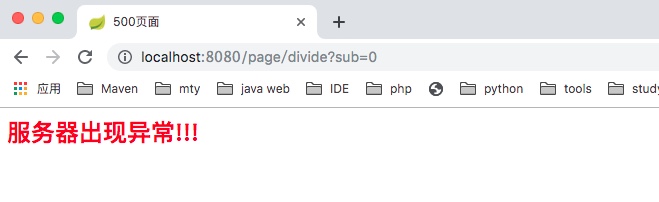
请求一个服务器500异常,返回我们定义的500.html页面
<html>

<head>

    <title>500页面</title>

</head>

<body>

<h2 style="color: red;">服务器出现异常!!!</h2>

</body>

</html>
2. BasicErrorController
看上面的使用比较简单,自然会有个疑问,这个异常页面是怎么返回的呢?
从项目启动的日志中,注意一下RequestMappingHandlerMapping

可以发现里面有个/error的路径不是我们自己定义的,从命名上来看,这个多半就是专门用来处理异常的Controller -> BasicErrorController, 部分代码如下
@Controller

@RequestMapping("${server.error.path:${error.path:/error}}")

public class BasicErrorController extends AbstractErrorController {

	@Override

	public String getErrorPath() {

		return this.errorProperties.getPath();

	}

	@RequestMapping(produces = "text/html")

	public ModelAndView errorHtml(HttpServletRequest request,

			HttpServletResponse response) {

		HttpStatus status = getStatus(request);

		Map<String, Object> model = Collections.unmodifiableMap(getErrorAttributes(

				request, isIncludeStackTrace(request, MediaType.TEXT_HTML)));

		response.setStatus(status.value());

		ModelAndView modelAndView = resolveErrorView(request, response, status, model);

		return (modelAndView != null) ? modelAndView : new ModelAndView("error", model);

	}

	@RequestMapping

	@ResponseBody

	public ResponseEntity<Map<String, Object>> error(HttpServletRequest request) {

		Map<String, Object> body = getErrorAttributes(request,

				isIncludeStackTrace(request, MediaType.ALL));

		HttpStatus status = getStatus(request);

		return new ResponseEntity<>(body, status);

	}

}
这个Controller中,一个返回网页的接口,一个返回Json串的接口;我们前面使用的应该是第一个,那我们什么场景下会使用到第二个呢?
- 通过制定请求头的
Accept,来限定我们只希望获取json的返回即可

3. 小结
本篇内容比较简单,归纳为两句话如下
- 将自定义的异常页面根据http状态码命名,放在
/error目录下 - 在异常状况下,根据返回的http状态码找到对应的异常页面返回
II. 其他
0. 项目
a. 系列博文
- 190930-SpringBoot 系列教程 web 篇之 404、500 异常页面配置
- 190929-SpringBoot 系列教程 web 篇之重定向
- 190913-SpringBoot 系列教程 web 篇之返回文本、网页、图片的操作姿势
- 190905-SpringBoot 系列教程 web 篇之中文乱码问题解决
- 190831-SpringBoot 系列教程 web 篇之如何自定义参数解析器
- 190828-SpringBoot 系列教程 web 篇之 Post 请求参数解析姿势汇总
- 190824-SpringBoot 系列教程 web 篇之 Get 请求参数解析姿势汇总
- 190822-SpringBoot 系列教程 web 篇之 Beetl 环境搭建
- 190820-SpringBoot 系列教程 web 篇之 Thymeleaf 环境搭建
- 190816-SpringBoot 系列教程 web 篇之 Freemaker 环境搭建
- 190421-SpringBoot 高级篇 WEB 之 websocket 的使用说明
- 190327-Spring-RestTemplate 之 urlencode 参数解析异常全程分析
- 190317-Spring MVC 之基于 java config 无 xml 配置的 web 应用构建
- 190316-Spring MVC 之基于 xml 配置的 web 应用构建
- 190213-SpringBoot 文件上传异常之提示 The temporary upload location xxx is not valid
b. 项目源码
- 工程:https://github.com/liuyueyi/spring-boot-demo
- 项目: https://github.com/liuyueyi/spring-boot-demo/blob/master/spring-boot/207-web-response
1. 一灰灰Blog
尽信书则不如,以上内容,纯属一家之言,因个人能力有限,难免有疏漏和错误之处,如发现bug或者有更好的建议,欢迎批评指正,不吝感激
下面一灰灰的个人博客,记录所有学习和工作中的博文,欢迎大家前去逛逛
- 一灰灰Blog个人博客 https://blog.hhui.top
- 一灰灰Blog-Spring专题博客 http://spring.hhui.top

SpringBoot系列教程web篇之404、500异常页面配置的更多相关文章
- SpringBoot系列教程web篇之过滤器Filter使用指南扩展篇
前面一篇博文介绍了在 SpringBoot 中使用 Filter 的两种使用方式,这里介绍另外一种直接将 Filter 当做 Spring 的 Bean 来使用的方式,并且在这种使用方式下,Filte ...
- SpringBoot系列教程Web篇之开启GZIP数据压缩
本篇可以归纳在性能调优篇,虽然内容非常简单,但效果可能出乎预料的好: 分享一个真实案例,我们的服务部署在海外,国内访问时访问服务时,响应有点夸张:某些返回数据比较大的接口,耗时在 600ms+上,然而 ...
- SpringBoot系列教程web篇Listener四种注册姿势
java web三要素Filter, Servlet前面分别进行了介绍,接下来我们看一下Listener的相关知识点,本篇博文主要内容为SpringBoot环境下,如何自定义Listener并注册到s ...
- SpringBoot系列教程web篇Servlet 注册的四种姿势
原文: 191122-SpringBoot系列教程web篇Servlet 注册的四种姿势 前面介绍了 java web 三要素中 filter 的使用指南与常见的易错事项,接下来我们来看一下 Serv ...
- SpringBoot系列教程web篇之过滤器Filter使用指南
web三大组件之一Filter,可以说是很多小伙伴学习java web时最早接触的知识点了,然而学得早不代表就用得多.基本上,如果不是让你从0到1写一个web应用(或者说即便从0到1写一个web应用) ...
- SpringBoot系列教程web篇之自定义异常处理HandlerExceptionResolver
关于Web应用的全局异常处理,上一篇介绍了ControllerAdvice结合@ExceptionHandler的方式来实现web应用的全局异常管理: 本篇博文则带来另外一种并不常见的使用方式,通过实 ...
- SpringBoot系列教程web篇之全局异常处理
当我们的后端应用出现异常时,通常会将异常状况包装之后再返回给调用方或者前端,在实际的项目中,不可能对每一个地方都做好异常处理,再优雅的代码也可能抛出异常,那么在 Spring 项目中,可以怎样优雅的处 ...
- SpringBoot系列教程web篇之重定向
原文地址: SpringBoot系列教程web篇之重定向 前面介绍了spring web篇数据返回的几种常用姿势,当我们在相应一个http请求时,除了直接返回数据之外,还有另一种常见的case -&g ...
- SpringBoot系列教程web篇之Get请求参数解析姿势汇总
一般在开发web应用的时候,如果提供http接口,最常见的http请求方式为GET/POST,我们知道这两种请求方式的一个显著区别是GET请求的参数在url中,而post请求可以不在url中:那么一个 ...
随机推荐
- Spring cloud stream【消息分组】
上篇文章我们简单的介绍了stream的使用,发现使用还是蛮方便的,但是在上个案例中,如果有多个消息接收者,那么消息生产者发送的消息会被多个消费者都接收到,这种情况在某些实际场景下是有很大问题的,比 ...
- Is Safari on iOS 6 caching $.ajax results? post Cache
https://stackoverflow.com/questions/12506897/is-safari-on-ios-6-caching-ajax-results Since the upgra ...
- Ribbon自带负载均衡策略
IRule这是所有负载均衡策略的父接口,里边的核心方法就是choose方法,用来选择一个服务实例. AbstractLoadBalancerRuleAbstractLoadBalancerRule是一 ...
- (知识点4)C++ 中vector
1.定义vector<vector<int>> M; 2.添加元素这里是vector的嵌套使用,本质是vector元素里的每个元素也是vector类型,所以抓住本质来添加元素就 ...
- LeetCode 934. Shortest Bridge
原题链接在这里:https://leetcode.com/problems/shortest-bridge/ 题目: In a given 2D binary array A, there are t ...
- 华三NAT总结
1.保证网络之间的连通性,可以用动态路由协议使网络连通. 2.配置一条默认路由到外网. ip route-static 0.0.0.0 0 210.33.44.2 3.进入连接外网的端口,把这个端口设 ...
- 再见Spring Boot 1.x
记得很早很早之前有过一次面试,面试前端说自己喜欢JavaScript,然后面试官问,你知道当前JavaScript最新标准和规范吗?我无言以对,因为平时没有关注认真对待这些信息,然后就没有然后了. 或 ...
- nginx 配置ssl
单向SSL配置实例: server{ listen ssl; server_name www..com; root /data/wwwroot/www..com/ ; index index.html ...
- 为arm-linux开发板挂载基于nfs的根文件系统
linux4.14内核,首先设置kernel的bootargs,在make menuconfig中有三种方式来配置: 第一种方式为如果uboot中设置了bootargs环境变量,就采用uboot的bo ...
- Chrome调试工具Developer Tools——前端必备神器
本文链接:https://blog.csdn.net/u012542647/article/details/79401485 今天要给大家介绍一个神器,就是谷歌浏览器(Chorme)自带的前端调试工具 ...