
ELK之es常用查询语句
参考:https://www.cnblogs.com/kyleinjava/p/10497042.html
https://blog.csdn.net/luanpeng825485697/article/details/83411704
elasticsearch定义了两种查询方式
一.索引(index),type,document相关语句
1,列出所有索引状态
GET /_cat/indices?v
可以使用kibana的dev tools

health status index                       uuid                   pri rep docs.count docs.deleted store.size pri.store.size

yellow open   metricbeat-6.3.1-2019.09.30 AzJBakNPSP-OqcByGT9xOw   1   1      53244            0       10mb           10mb

yellow open   watcher_alarms              AIc2q3VhTLedzu6ljScOjA   5   1          0            0      1.2kb          1.2kb

yellow open   website                     Big3pMt4QTmx4rCii_7jqw   5   1          0            0      1.1kb          1.1kb

yellow open   metricbeat-6.3.1-2019.09.29 Lv8UC-H7Q4GRShXvCKVwkg   1   1     135000            0     25.4mb         25.4mb

yellow open   watcher_alarms-2019.09.27   kJOeaPQXRAOI17qB11eL-A   5   1       1033            0    383.6kb        383.6kb

yellow open   watcher_alarms-2019.09.26   GAAJ8Uc1QvuoxjUWau6Dcg   5   1       1876            0    619.9kb        619.9kb

green  open   .kibana                     3DFTWNpIQ4yMq3wYNmxfPw   1   0        130            2    292.4kb        292.4kb

yellow open   watcher_alarms-2019.09.28   H4KySJ6lQqaKYb6r7-8TzA   5   1         43            0    593.6kb        593.6kb

yellow open   system-log-2019.09          uCdgYBmASpCjxO9-DyGyOg   5   1      49005            0     42.7mb         42.7mb

yellow open   watcher_alarms-2019.09.29   eYDS-TN4RLqOpY0D1OExEQ   5   1        133            0    319.9kb        319.9kb
字段说明
health:健康状态 red,yellow,green

status:状态open

index:索引名

uuid:唯一标识符uuid

pri:主分片数

rep:副本数

docs.count:总计多少条日志

docs.deleted:删除记录

store.size:存储该index文件的大小

pri.store.size:主存储大小
2,查询索引详细信息
GET /index1,index2     查询索引index1和索引index2的基本信息

GET /_all    查询所有的基本信息

GET /s*    使用通配符来查询所有以s开头的索引信息
3,创建索引
setting中可以设置索引的的主分片数number_of_shards默认为5,和主分片的副本数number_of_replicas默认是1;
mapping中主要设置各个type的映射关系
PUT /my_index

{

    "settings": {... any setting ...}

    "mappings": {

        "type_one": {... any mappings ...},

        "type_two":  {... any mappings ...},

        ...

    }

}
创建一个索引gb
PUT /gb

{

  "mappings": {

    "tweet" : {

      "properties" : {

        "tweet" : {

          "type" :    "text",

          "analyzer": "english"

        },

        "date" : {

          "type" :   "date"

        },

        "name" : {

          "type" :   "text"

        },

        "user_id" : {

          "type" :   "long"

        }

      }

    }

  }

}
创建成功提示
{

  "acknowledged": true,

  "shards_acknowledged": true,

  "index": "index1"

}
查看刚创建的索引gb的详细信息
GET /gb
{

  "gb": {

    "aliases": {},

    "mappings": {

      "tweet": {

        "properties": {

          "date": {

            "type": "date"

          },

          "name": {

            "type": "text"

          },

          "tweet": {

            "type": "text",

            "analyzer": "english"

          },

          "user_id": {

            "type": "long"

          }

        }

      }

    },

    "settings": {

      "index": {

        "creation_date": "1569814449442",

        "number_of_shards": "5",

        "number_of_replicas": "1",

        "uuid": "841k18xLSHOOltY_1UKrSA",

        "version": {

          "created": "6020499"

        },

        "provided_name": "index1"

      }

    }

  }

}
4,删除索引
DELETE /index1 #删除索引index1

DELETE /_all #删除所有索引,慎用

DELETE /*
5,在索引的映射中增加一个字段
PUT /gb/_mapping/tweet

{

  "properties": {

    "tag": {

      "type": "text",

      "index": false

    }

  }

}
运行成功返回
{

  "acknowledged": true

}
增加字段之前的映射mapping信息
使用命令 查看
GET /gb/_mapping
返回
{

  "gb": {

    "mappings": {

      "tweet": {

        "properties": {

          "date": {

            "type": "date"

          },

          "name": {

            "type": "text"

          },

          "tweet": {

            "type": "text",

            "analyzer": "english"

          },

          "user_id": {

            "type": "long"

          }

        }

      }

    }

  }

}
添加成功以后查看
{

  "gb": {

    "mappings": {

      "tweet": {

        "properties": {

          "date": {

            "type": "date"

          },

          "name": {

            "type": "text"

          },

          "tag": {

            "type": "text",

            "index": false

          },

          "tweet": {

            "type": "text",

            "analyzer": "english"

          },

          "user_id": {

            "type": "long"

          }

        }

      }

    }

  }

}

6,查看某个type的映射关系
GET /{index}/_mapping/{type}
GET /gb/_mapping/tweet

///返回

{

  "gb": {

    "mappings": {

      "tweet": {

        "properties": {

          "date": {

            "type": "date"

          },

          "name": {

            "type": "text"

          },

          "tag": {

            "type": "text",

            "index": false

          },

          "tweet": {

            "type": "text",

            "analyzer": "english"

          },

          "user_id": {

            "type": "long"

          }

        }

      }

    }

  }

}
7,在索引文档中添加或者替换文档
在添加的时候id并不是必须的,如果没有id则会随机产生一个id需要使用POST才能随机生成id
往索引gb里面添加一条数据指定id为1
PUT /gb/tweet/1

{

  "username":"liuym",

  "user_id":16

}
返回
{

  "_index": "gb",

  "_type": "tweet",

  "_id": "1",

  "_version": 1,

  "result": "created",

  "_shards": {

    "total": 2,

    "successful": 1,

    "failed": 0

  },

  "_seq_no": 0,

  "_primary_term": 1

}
搜索刚刚添加的数据
GET /gb/_server
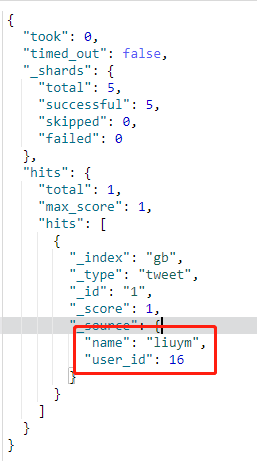
也可以通过GET方式查询id查看
GET /gb/tweet/1

///返回

{

  "_index": "gb",

  "_type": "tweet",

  "_id": "1",

  "_version": 1,

  "found": true,

  "_source": {

    "username": "liuym",

    "user_id": 16

  }

}
也可以只查看_source中部分字段,例如只查看name
GET /gb/tweet/1?_source=name
8,更新索引文档中的内容
PUT /{index}/{type}/{id}

POST  /{index}/{type}/{id}/_update
一种是使用PUT方法旧数据全部覆盖,使用新数据代替
PUT /gb/tweet/1

{

  "name":"zhangsan",

  "user_id":8

}
修改后内容
{

  "_index": "gb",

  "_type": "tweet",

  "_id": "1",

  "_version": 6,

  "found": true,

  "_source": {

    "name": "zhangsan",

    "user_id": 9

  }

}
一种是通过POST方式,只对部分字段进行修改
POST gb/tweet/1/_update

{

 "doc":{

   "username": "zhansan"

 }

}
PS:注意最后加更新_update 内部需要加doc
9,删除文档
DELETE /{index}/{type}/{id}
删除id为1的文档
DELETE /gb/tweet/1
返回
{

  "_index": "gb",

  "_type": "tweet",

  "_id": "1",

  "_version": 14,

  "result": "deleted",

  "_shards": {

    "total": 2,

    "successful": 1,

    "failed": 0

  },

  "_seq_no": 14,

  "_primary_term": 1

}
查看没有数据了
GET /gb/tweet/1
返回
{

  "_index": "gb",

  "_type": "tweet",

  "_id": "1",

  "found": false

}
found为false就是没有发现
10,批处理
批量添加
POST /gb/tweet/_bulk

{"index":{"_id":"1"}}

{"name":"zhangsan"}

{"index":{"_id":"2"}}

{"name":"lisi"}
返回
{

  "took": 39,

  "errors": false,

  "items": [

    {

      "index": {

        "_index": "gb",

        "_type": "tweet",

        "_id": "1",

        "_version": 1,

        "result": "created",

        "_shards": {

          "total": 2,

          "successful": 1,

          "failed": 0

        },

        "_seq_no": 6,

        "_primary_term": 1,

        "status": 201

      }

    },

    {

      "index": {

        "_index": "gb",

        "_type": "tweet",

        "_id": "2",

        "_version": 1,

        "result": "created",

        "_shards": {

          "total": 2,

          "successful": 1,

          "failed": 0

        },

        "_seq_no": 4,

        "_primary_term": 1,

        "status": 201

      }

    }

  ]

}
查看
GET /gb/_search
返回
{

  "took": 3,

  "timed_out": false,

  "_shards": {

    "total": 5,

    "successful": 5,

    "skipped": 0,

    "failed": 0

  },

  "hits": {

    "total": 2,

    "max_score": 1,

    "hits": [

      {

        "_index": "gb",

        "_type": "tweet",

        "_id": "2",

        "_score": 1,

        "_source": {

          "name": "lisi"

        }

      },

      {

        "_index": "gb",

        "_type": "tweet",

        "_id": "1",

        "_score": 1,

        "_source": {

          "name": "zhangsan"

        }

      }

    ]

  }

}
批量更新与删除
POST /gb/tweet/_bulk

{"update":{"_id":"1"}}

{"doc":{"name":"wangwu"}}

{"delete":{"_id":"2"} }
修改_id为1的name字段,删除_id为2的数据
返回
{

  "took": 48,

  "errors": false,

  "items": [

    {

      "update": {

        "_index": "gb",

        "_type": "tweet",

        "_id": "1",

        "_version": 2,

        "result": "updated",

        "_shards": {

          "total": 2,

          "successful": 1,

          "failed": 0

        },

        "_seq_no": 7,

        "_primary_term": 1,

        "status": 200

      }

    },

    {

      "delete": {

        "_index": "gb",

        "_type": "tweet",

        "_id": "2",

        "_version": 2,

        "result": "deleted",

        "_shards": {

          "total": 2,

          "successful": 1,

          "failed": 0

        },

        "_seq_no": 5,

        "_primary_term": 1,

        "status": 200

      }

    }

  ]

}
查看是否修改成功
GET /gb/tweet/_search
返回
{

  "took": 1,

  "timed_out": false,

  "_shards": {

    "total": 5,

    "successful": 5,

    "skipped": 0,

    "failed": 0

  },

  "hits": {

    "total": 1,

    "max_score": 1,

    "hits": [

      {

        "_index": "gb",

        "_type": "tweet",

        "_id": "1",

        "_score": 1,

        "_source": {

          "name": "wangwu"

        }

      }

    ]

  }

}
修改字段成功并且删除了_id为2的数据
11,批量导入大量数据
curl -H "Content-Type: application/json" -XPOST "localhost:9200/bank/account/_bulk?pretty&refresh" --data-binary "@accounts.json"
12,查询文档数
#查询所有文档数

GET /_count
返回
{

  "count": 759185,

  "_shards": {

    "total": 61,

    "successful": 61,

    "skipped": 0,

    "failed": 0

  }

}
#查询索引gb中的文档数

GET /gb/_count
#查询某个type的文档数

GET /gb/tweet/_count
二,简单查询
1,使用GET请求
GET /gb/tweet/_search
返回
{

  "took": 2,    #查询执行时间单位是毫秒

  "timed_out": false, #查询是否超时

  "_shards": {  #表示查询参与的分片总数,以及这些分片成功了多少个失败了多少个

    "total": 5,

    "successful": 5,

    "skipped": 0,

    "failed": 0

  },

  "hits": {  #所有查询到的结果

    "total": 1, #匹配的文档总数

    "max_score": 1, #结果中最大评分

    "hits": [

      {

        "_index": "gb", #索引名称

        "_type": "tweet", #type名称

        "_id": "1",      #id名称

        "_score": 1,   #评分

        "_source": {   #存储的数据源信息

          "name": "wangwu"

        }

      }

    ]

  }

}
2,同时查询多索引多类型的数据
GET /_search  #在所有索引中搜索所有的类型

GET /gb/_search #在gb索引中搜索所有的类型

GET /gb,us/_search #在 gb 和 us 索引中搜索所有的文档

GET /g*,u*/_search #在任何以 g 或者 u 开头的索引中搜索所有的类型

GET /gb/tweet/_search #在gb索引中搜索tweet类型

GET /gb,us/user,tweet/_search在 gb 和 us 索引中搜索 user 和 tweet 类型

GET /_all/user,tweet/_search在所有的索引中搜索 user 和 tweet 类型
3,不查询文档的元数据,只查询source部分的数据
GET /{index}/{type}/{id}/_source
示例
GET /gb/tweet/1/_source
返回
{

  "name": "wangwu"

}
三,请求体查询
1,查询所有文档
默认评分是1,可以通过设置boost来,由于有些代理服务器不支持GET请求带请求体,所以实际中还是要用POST请求。
GET /gb/_search

{

  "query": {

    "match_all": {}

  }

}
返回
{

  "took": 11,

  "timed_out": false,

  "_shards": {

    "total": 5,

    "successful": 5,

    "skipped": 0,

    "failed": 0

  },

  "hits": {

    "total": 1,

    "max_score": 1,

    "hits": [

      {

        "_index": "gb",

        "_type": "tweet",

        "_id": "1",

        "_score": 1,

        "_source": {

          "name": "wangwu"

        }

      }

    ]

  }

}
2,分页查询所有文档
GET /system-log-2019.09/_search

{

  "query": {

    "match_all": {}

  },

  "from": 0,

  "size": 2

}
从头开始,每次显示2条第一页返回如下
{

  "took": 0,

  "timed_out": false,

  "_shards": {

    "total": 5,

    "successful": 5,

    "skipped": 0,

    "failed": 0

  },

  "hits": {

    "total": 60361,

    "max_score": 1,

    "hits": [

      {

        "_index": "system-log-2019.09",

        "_type": "doc",

        "_id": "X9GKbG0BHXMu0O5TBI8U",

        "_score": 1,

        "_source": {

          "message": "Sep 26 15:14:25 salt-test systemd: Reloading.",

          "@version": "1",

          "type": "system-log",

          "host": "salt-test",

          "path": "/var/log/messages",

          "@timestamp": "2019-09-26T07:14:25.503Z"

        }

      },

      {

        "_index": "system-log-2019.09",

        "_type": "doc",

        "_id": "YNGKbG0BHXMu0O5TBI8U",

        "_score": 1,

        "_source": {

          "message": """Sep 26 15:14:25 salt-test filebeat: 2019-09-26T15:14:25.362+0800#011ERROR#011pipeline/output.go:100#011Failed to connect to backoff(elasticsearch(http://192.168.1.4:9200)): Connection marked as failed because the onConnect callback failed: 400 Bad Request: {"error":{"root_cause":[{"type":"invalid_index_name_exception","reason":"Invalid index name [_ilm], must not start with '_', '-', or '+'","index_uuid":"_na_","index":"_ilm"}],"type":"invalid_index_name_exception","reason":"Invalid index name [_ilm], must not start with '_', '-', or '+'","index_uuid":"_na_","index":"_ilm"},"status":400}""",

          "@version": "1",

          "type": "system-log",

          "host": "salt-test",

          "path": "/var/log/messages",

          "@timestamp": "2019-09-26T07:14:25.503Z"

        }

      }

    ]

  }

}
3,条件查询并排序
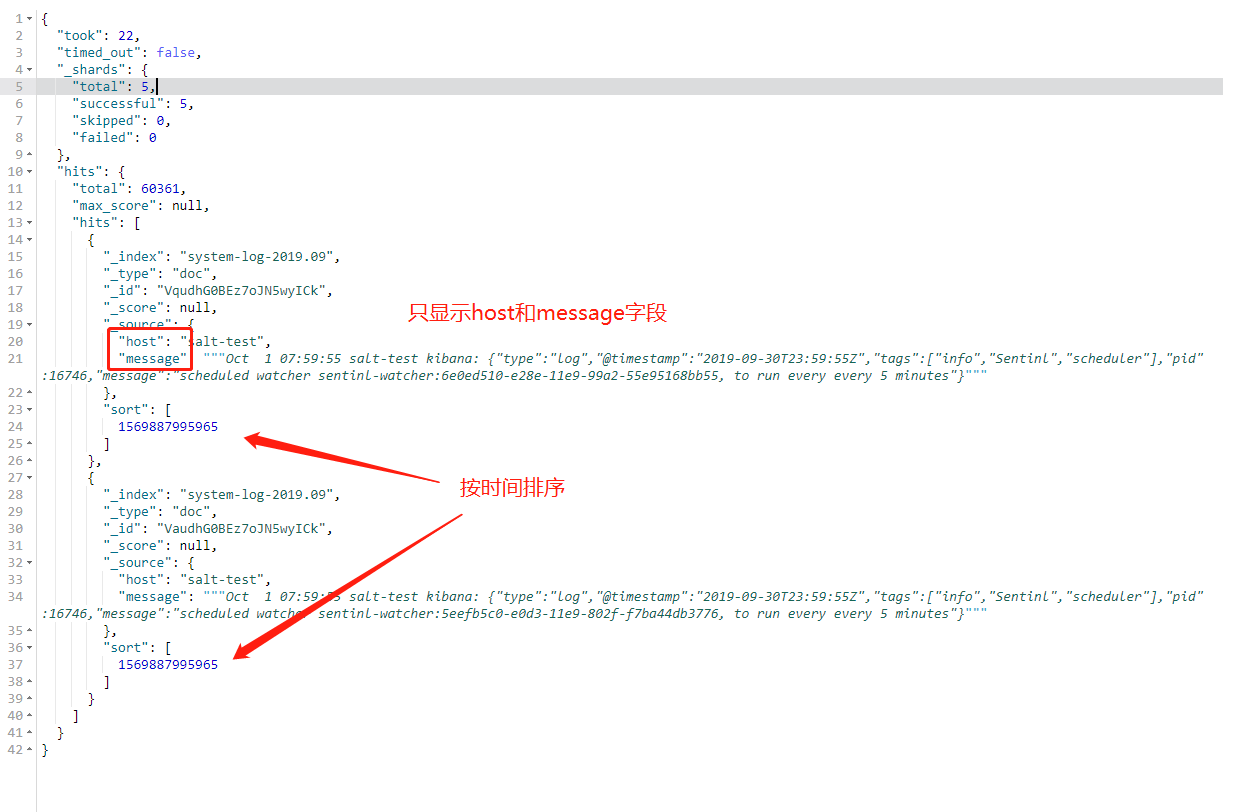
查询host名为salt-test的主机,只显示message和host字段,按时间倒序排列,从头开始页大小为2
GET /system-log-2019.09/_search

{

  "query": {

    "match": {

      "host":"salt-test"

    }

  },

  "_source": [

    "host",

    "@timestamp"

    ],

  "sort": [

    {

        "@timestamp": "desc"

    }

  ],

  "from": 0,

  "size": 2

}
4,全文检索
索引中只要有任意一个匹配拆分后词就可以出现在结果中,只是匹配都越高越的排越前面
GET /gb/_search

{

  "query": {

    "match": {

      "name":"wangwu"

    }

  }

}
ELK之es常用查询语句的更多相关文章
- 23个MySQL常用查询语句
23个MySQL常用查询语句 一查询数值型数据: SELECT * FROM tb_name WHERE sum > 100; 查询谓词:>,=,<,<>,!=,!> ...
- Hibernate常用查询语句
Hibernate常用查询语句 Hib的检索方式1'导航对象图检索方式.通过已经加载的对象,调用.iterator()方法可以得到order对象如果是首次执行此方法,Hib会从数据库加载关联的orde ...
- MySQL常用查询语句汇总(不定时更新)
在这篇文章中我会通过一些例子来介绍日常编程中常用的SQL语句 目录: ## 1.数据库的建立 ## 1.数据库的建立 实例将ER图的形式给出: 由此转换的4个关系模式: ...
- mysql—常用查询语句总结
关于MySQL常用的查询语句 一查询数值型数据: ; 查询谓词:>,=,<,<>,!=,!>,!<,=>,=< 二查询字符串 SELECT * FROM ...
- Cisco 路由交换 常用查询语句
基本信息查询语句 #查看全配置信息 #show running-configure #查看vlan信息 #show vlan brief #查看物理直连信息 #show cdp neighbors d ...
- pg_sql常用查询语句整理
#pg_sql之增删改查 #修改: inset into table_name (id, name, age, address ) select replace(old_id,old_id,new_i ...
- Mysql 常用查询语句
SELECT * FROM table1 ,,,,,,,,) ) SELECT * FROM table3 WHERE t3Date >= '2011-08-10' SELECT * FROM ...
- MySQL常用查询语句集合《转》
一查询数值型数据: SELECT * FROM tb_name WHERE sum > 100; 查询谓词:>,=,<,<>,!=,!>,!<,=>,= ...
- ORACLE数据库管理常用查询语句
/*查看表空间的名称及大小*/ SELECT t.tablespace_name, round(SUM(bytes / (1024 * 1024)), 0) ts_size FROM dba_tabl ...
随机推荐
- Tomcat 部署多个web项目
1.若Tomcat的端口设置为10000,则http://localhost:10000访问的目录是 webapps 2.Service.xml中host内配置Context标签,path+docba ...
- Codevs 3002 石子归并 3(DP四边形不等式优化)
3002 石子归并 3 时间限制: 1 s 空间限制: 256000 KB 题目等级 : 钻石 Diamond 题目描述 Description 有n堆石子排成一列,每堆石子有一个重量w[i], 每次 ...
- DP(第三版(较简单))
突然很想找点DP题(被虐虐) 前言 我竟然还能想起来当时是怎么做的233,题都是随便找的,跟以前的代码重了就重了吧,反正风格变了qaq [2017-11-18]其实本来打算写好多好多的水题来着,不过要 ...
- 洛谷 P1086 花生采摘 题解
P1086 花生采摘 题目描述 鲁宾逊先生有一只宠物猴,名叫多多.这天,他们两个正沿着乡间小路散步,突然发现路边的告示牌上贴着一张小小的纸条:"欢迎免费品尝我种的花生!――熊字". ...
- spark,hadoop集群安装注意
安装步骤严格参看厦门大学数据实验室教程 Spark 2.0分布式集群环境搭建(Python版) 安装Hadoop并搭建好Hadoop集群环境 遇到的问题 1.ubuntu 安装后升级.python是3 ...
- Class T泛型和通配符泛型的区别
平时看java源代码的时候,如果碰到泛型的话,我想? T K V E这些是经常出现的,但是有时想不起来代表什么意思,今天整理下: ? 表示不确定的java类型. T 表示java类型. K V 分别代 ...
- for循环实战性能优化之使用Map集合优化
笔者在<for循环实战性能优化>中提出了五种提升for循环性能的优化策略,这次我们在其中嵌套循环优化小循环驱动大循环的基础上,借助Map集合高效的查询性能来优化嵌套for循环 ...
- C++2.0新特性(五)——<Rvalue_reference和move语义>
一.Rvalue_reference(右值引用)和move语义 1.左右值概念区分 左值:表达式结束后依然存在的对象,我们也叫做变量: 右值:表达式结束后就不存在的临时对象. 2.判断左值和右值 能对 ...
- macOS 系统下载地址
macOS Catalina macOS Mojave macOS High Sierra macOS Sierra 点击可以直接在MAC App Store下载,如果不能下载就多试几次.
- [Vue warn]: Avoid using non-primitive value as key
<el-select v-model="addform.province" placeholder="请选择省份" multiple> ...