
基于FPGA Manager的Zynq PL程序写入方案
本文主要描述了如何在Linux系统启动以后,在线将bitstream文件更新到ZYNQ PL的过程及方法。相关内容主要译自xilinx-wiki,其中官网给出了两种方法,分别为Device Tree Overlay和Sysfs interface。由于项目需要,暂只对sysfs interface在线烧录的执行过程作简要介绍和实践,并附有相关的配置脚本文件,更多详情请参照Solution Zynq PL Programming With FPGA Manager。
内核配置
为保证FPGA Manager可正常使用,需要按图中配置内核相关选项。(在zynq_defconfig里面,这些选项是默认使能的)
配置 Zynq FPGA Manager:
选择:Device Drivers ---> FPGA Configuration Framework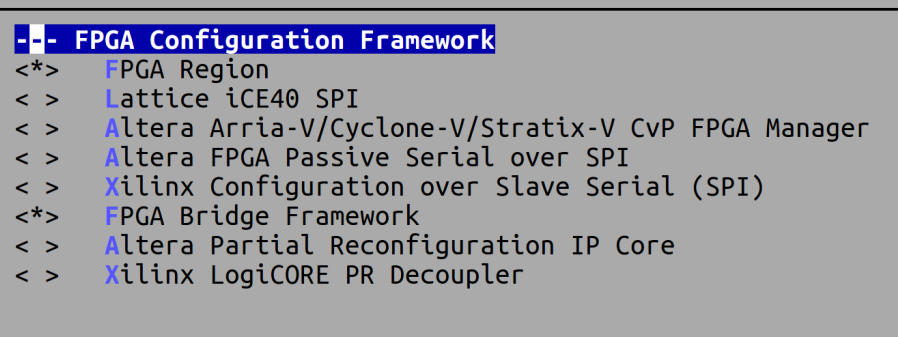
配置Contiguous Memory Allocator:
CONFIG_CMA
Kernel Features --> Contiguous Memory Allocator
CONFIG_DMA_CMA
Select: Device Drivers --> Generic Driver Options → DMA Contiguous Memory Allocator
工具准备
- bootgen
映像文件准备
- FSBL
- u-boot
- Linux内核映像(uImage)
- 该映像可参考http://www.wiki.xilinx.com/Zynq+Linux创建
- Bin文件
使用Bootgen工具,将.bit文件转换成.bin文件
bootgen -image Full_Bitstream.bif -arch zynq -process_bitstream bin
其中,Full_Bitstream.bif文件应包含下列内容
all:

{

        design_1_wrapper.bit /* Bitstream file name */

}
执行过程
设置flags为Full Bitstream模式
echo 0 > /sys/class/fpga_manager/fpga0/flags
通过sysfs提供的接口,下载Bitstream文件到PL
mkdir -p /lib/firmware

cp /media/design_1_wrapper.bit.bin /lib/firmware/

echo design_1_wrapper.bit.bin > /sys/class/fpga_manager/fpga0/firmware
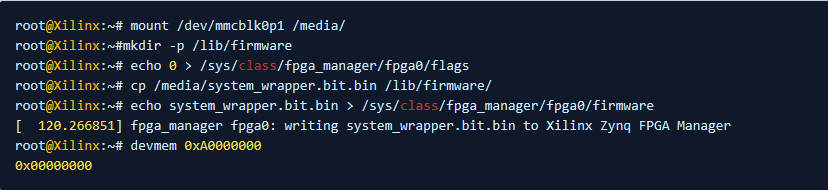
正常输出如下:
参考脚本
为便于项目使用,笔者将上述过程形成以下两个脚本,其中makebitbin.sh可将.bit文件转换为.bin文件,具体使用方法为:

注意,该脚本执行前需要配置好Bootgen工具才可以正常使用!
脚本如下:
#!/bin/bash

###############################################################################

#

# Copyright (C) 2019  by Luego Zhang <zhanglucc@foxmail.com>

#

# This program is free software; you can redistribute it and/or modify

# it under the terms of the GNU General Public License as published by

# the Free Software Foundation; either version 2 of the License, or

# (at your option) any later version.

#

# Reference:

# https://xilinx-wiki.atlassian.net/wiki/spaces/A/pages/18841645/Solution+Zynq+PL+Programming+With+FPGA+Manager

################################################################################

# => Force locale language to be set to English. This avoids issues when doing

# text and string processing.

export LC_ALL=C LANGUAGE=C LANG=C

# => Help and information

usage() {

    printf "

NAME

        $(basename ${BASH_SOURCE}) - generating .bin from .bit file using Bootgen

SYNOPSIS

        $(basename ${BASH_SOURCE}) [option] filename

DESCRIPTION

        In order to load bitstream files to PL through Linux, we need to get one

        type of file with suffix like '.bit.bin'. Run this script and .bin will

        be generated with the given file(.bit) using Bootgen.

        Please run this script in PC.

OPTIONS

        --help    Display this help message

EXAMPLE

Version : 191031v1.0

 "

    exit 0;

}

expr "$*" : ".*--help"  > /dev/null && usage

# => Setting the development environment variables

if [ ! "${ZN_CONFIG_DONE}" ]; then

    printf "\033[31m[ERROR]\033[0m Please source the settings64.sh script first\n"

    exit 1

else

    # => Setting zynq-7000 development envirionment variables

    if [ -f "${ZN_SCRIPTS_DIR}/xilinx/export_xilinx_env.sh" ]; then

    source ${ZN_SCRIPTS_DIR}/xilinx/export_xilinx_env.sh

    else

    error_exit "Could not  find file ${ZN_SCRIPTS_DIR}/xilinx/export_xilinx_env.sh"

    exit 1

    fi

fi

ZN_SCRIPT_NAME="$(basename ${BASH_SOURCE})"

ZN_SCRIPT_PATH="$(dirname ${BASH_SOURCE})"

################################################################################

# => The beginning

print_info "[ $(date "+%Y/%m/%d %H:%M:%S") ] Starting ${BASH_SOURCE}\n"

# => Check user input is correct

[[ -f $1 ]] || error_exit "$1 not found, please check that the filename is correct\n"

echo_info "1. Create fullbitstream.bif "

BIF_FILE=${ZN_SCRIPT_PATH}/fullbitstream.bif

echo "//arch = zynq; split = yes; format = .bit.bin"       > ${BIF_FILE}

echo "all:"                                                >>${BIF_FILE}

echo "{"                                                   >>${BIF_FILE}

echo " $1"                                                 >>${BIF_FILE}

echo "}"                                                   >>${BIF_FILE}

echo_info "2. Generate .bif file for Bootgen"

bootgen -image fullbitstream.bif -arch zynq -process_bitstream bin -w

# => The end

print_info "[ $(date "+%Y/%m/%d %H:%M:%S") ] Finished ${ZN_SCRIPT_NAME}\n"
makebitbin.sh
另一个脚本为load-fpga-image.sh,该脚本应在开发板上运行,具体使用方法为:
将load-fpga-image.sh脚本和上一步生成的blinkblink.bit.bin文件共同copy至开发板的同一目录下,然后按以下方法执行脚本:
./load-fpga-image.sh blinkblink.bit.bin
即可,参考脚本如下:
#!/bin/bash

###############################################################################

#

# Copyright (C) 2019  by Luego Zhang <zhanglucc@foxmail.com>

#

# This program is free software; you can redistribute it and/or modify

# it under the terms of the GNU General Public License as published by

# the Free Software Foundation; either version 2 of the License, or

# (at your option) any later version.

#

# Reference:

# https://xilinx-wiki.atlassian.net/wiki/spaces/A/pages/18841645/  \

#       Solution+Zynq+PL+Programming+With+FPGA+Manager

################################################################################

# => Force locale language to be set to English. This avoids issues when doing

# text and string processing.

export LC_ALL=C LANGUAGE=C LANG=C

# => Help and information

usage() {

        printf "

NAME

        $(basename ${BASH_SOURCE}) - load fullbitstream file to PL through Linux

SYNOPSIS

        $(basename ${BASH_SOURCE}) [option] bitstream_file

DESCRIPTION

        Load bitstream file to PL using sysfs interface through Linux.

        Be careful the type of bitstream_file is .bit.bin file which is generated

        by Bootgen and bitstream_file should be in the same path with the script.

        Please run this script on the board!

OPTIONS

        --help    Display this help message

EXAMPLE

Version : 191031v1.0

 "

    exit 0;

}

expr "$*" : ".*--help"  > /dev/null && usage

#------------------------------------------------------------------------------

# => Check system environment and make sure fpga manager runs well

FPGA_MGR_PATH=/sys/class/fpga_manager/fpga0

if [ ! -d ${FPGA_MGR_PATH} ]; then

    printf "\033[31m[ERROR]\033[0m FPGA Manager is not found, please check the driver!"

    exit 1

fi

# => Check that user input is correct

if [ ! -f "$1" ]; then

    printf "\033[31m[ERROR]\033[0m '$1' not found, please check if the file exists\n"

    exit 1

fi

ZN_SCRIPT_NAME="$(basename ${BASH_SOURCE})"

ZN_SCRIPT_PATH="$(dirname ${BASH_SOURCE})"

BITSTREAM="$1"

FPGA_MGR_FLAGS=${FPGA_MGR_PATH}/flags

FPGA_MGR_FIRMWARE=${FPGA_MGR_PATH}/firmware

################################################################################

# => The beginning

echo  "\033[32m[ $(date "+%Y/%m/%d %H:%M:%S") ]\033[0m Starting ${ZN_SCRIPT_NAME}\n"

# => Set flags for Full Bitstream

echo 0 > $FPGA_MGR_FLAGS

read flag <<<$(cat $FPGA_MGR_FLAGS)

[ "$flag" = "" ] || $(echo "[error] invalid mode, please check ${FPGA_MGR_FLAGS}" && exit 1)

# => Loading Bitstream into PL

mkdir -p /lib/firmware/ && cp ./$BITSTREAM /lib/firmware/

echo $BITSTREAM > $FPGA_MGR_FIRMWARE

# => The end

printf "\033[32m[ $(date "+%Y/%m/%d %H:%M:%S") ]\033[0m Finished ${ZN_SCRIPT_NAME}\n"
load-fpga-image
基于FPGA Manager的Zynq PL程序写入方案的更多相关文章
- 基于FPGA的按键扫描程序
最近在学习FPGA,就试着写了个按键扫描的程序.虽说有过基于单片机的按键扫描处理经验,对于按键的处理还是有一些概念.但是单片机程序的编写通常都采用C写,也有用汇编,而FPGA却是采用VHDL或者Ver ...
- 基于FPGA的线阵CCD实时图像采集系统
基于FPGA的线阵CCD实时图像采集系统 2015年微型机与应用第13期 作者:章金敏,张 菁,陈梦苇2016/2/8 20:52:00 关键词: 实时采集 电荷耦合器件 现场可编程逻辑器件 信号处理 ...
- S02_CH07_ ZYNQ PL中断请求
S02_CH07_ ZYNQ PL中断请求 7.1 ZYNQ 中断介绍 7.1.1 ZYNQ中断框图 可以看到本例子中PL到PS部分的中断经过ICD控制器分发器后同时进入CPU1 和CPU0.从下面的 ...
- 基于FPGA的SPI FLASH控制器设计
1.SPI FLASH的基本特征 本文实现用FPGA来设计SPI FLASH,FLASH型号为W25Q128BV.支持3种通信方式,SPI.Dual SPI和Quad SPI.FLASH的存储单元无法 ...
- 基于 SailingEase WinForm Framework 开发客户端程序(3:实现菜单/工具栏按钮的解耦及状态控制)
本系列文章将详细阐述客户端应用程序的设计理念,实现方法. 本系列文章以 SailingEase WinForm Framework 为基础进行设计并实现,但其中的设计理念及方法,亦适用于任何类型的客 ...
- 基于FPGA的音频信号的FIR滤波(Matlab+Modelsim验证)
1 设计内容 本设计是基于FPGA的音频信号FIR低通滤波,根据要求,采用Matlab对WAV音频文件进行读取和添加噪声信号.FFT分析.FIR滤波处理,并分析滤波的效果.通过Matlab的分析验证滤 ...
- 基于FPGA的DW8051移植(三)
总结一下问题: 1) http://www.cnblogs.com/sepeng/p/4137405.html 基于FPGA的DW8051移植(一)里面用modelsim观测波形发现程序进入了ida ...
- 基于FPGA的红外遥控解码与PC串口通信
基于FPGA的红外遥控解码与PC串口通信 zouxy09@qq.com http://blog.csdn.net/zouxy09 这是我的<电子设计EDA>的课程设计作业(呵呵,这个月都拿 ...
- 基于FPGA的OLED真彩色动态图像显示的实现
源:基于FPGA的OLED真彩色动态图像显示的实现 作为第3代显示器,有机电致发光器件(Organic Light Emitting Diode,OLED)由于其主动发光.响应快.高亮度.全视角.直流 ...
随机推荐
- LOJ3097 SNOI2019 通信 题解
题目链接 费用流,当建边需要依靠位置和权值两个偏序关系时,可以用cdq分治优化建边. 代码: #include<bits/stdc++.h> using namespace std; #d ...
- Xcode9/iOS 11 无线调试方法
1.确保手机已经升级到 iOS 11 ,Xcode 已经升级到 9.0 版本,用手机连接电脑,打开 Xcode 选择路径如下图 2.勾选 Connect via network ,勾选之后拔掉手机. ...
- ES6 - 开篇
一些关于es6简单的介绍与了解.初始认知有限,循序完善. ES6: 又叫ES2015,是2015年推出的JavaScript新版本. 相应的,后边推出的ES7.8.9.10等都依次是上一版本发出后一年 ...
- js 创建xml元素
function createXML(pathData) { var xmlDOM = createXMLDOM(); //参考:http://iceworldvip.blog.51cto.com/5 ...
- 《Genius》
Einstein is genius. 爱因斯坦是天才,这是一个毫无疑问的命题.他在专利局空闲之余写下的相对论,可以让我们学习很久一段时间,而且还不一定能学懂. 这部十集的电视连续剧是 ...
- JavaScript初探系列(五)——this指向
一.涵义 this关键字是一个非常重要的语法点.毫不夸张地说,不理解它的含义,大部分开发任务都无法完成.this可以用在构造函数之中,表示实例对象.除此之外,this还可以用在别的场合.但不管是什么场 ...
- Spring Cloud 学习--Hystrix应用
上一篇介绍了Hystrix基本功能和单独使用的方式,今天继续学习如何将Hystrix融入SpringCloud组件中去. 在Ribbon上使用熔断器 在 pom.xml 文件中引入 hystrix 的 ...
- Mac OSX下增加TCP连接数
查看 max files: $ sysctl -a | grep files kern.maxfiles = 12288 kern.maxfilesperproc = 10240 修改: $ sudo ...
- How to Use Convolutional Neural Networks for Time Series Classification
How to Use Convolutional Neural Networks for Time Series Classification 2019-10-08 12:09:35 This blo ...
- WireMock和Spring MVC模拟器
WireMock和Spring MVC模拟器 Spring Cloud Contract提供了一个方便的类,可以将JSON WireMock存根加载到Spring MockRestServiceSer ...