
CSS图片垂直居中方法
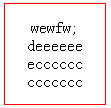
让div里面的多行文本垂直居中的方法:
div{height:100px;width:100px;border:solid 1px red;text-align:center; display:table-cell;vertical-align:middle}
下面是网上好不容易找的多种办法:
看到问此问题的很多,所以花点时间整理下,欢迎大家提意见,做补充修改,谢谢!
/*lesliezmz整理的方法 2010-01-19*/
当writing-mode为tb-rl 时,文档流是从上到下,从右到左书写。然后设置text-align: center就可以实现垂直方向上的居中。算是一个小技巧吧。
原帖链接:IE6下用writing-mode实现 未知高度替换元素垂直居中。
<!DOCTYPE html PUBLIC "-//W3C//DTD XHTML 1.0 Transitional//EN" "http://www.w3.org/TR/xhtml1/DTD/xhtml1-transitional.dtd">

<html xmlns="http://www.w3.org/1999/xhtml">

<head>

<title>利用定位来显示垂直局中的图片</title>

<style type="text/css">

.miao {

  width:500px;

  height:220px;

  line-height:220px;

  border: 1px solid;

  text-align: center;

}

.miao img {

  vertical-align: middle;

}

</style>

<!--[if IE 6]>

<style type="text/css">

  .miao span {

    border: 1px solid red;

    height: 100%; /* 要保证和父元素高度一样才行 */

    writing-mode: tb-rl;

    vertical-align: middle;

  }

</style>

<![endif]-->

</head>

<body>

<h1>固定高宽的容器中,图片垂直局中。</h1>

<p>使用的绝对定位和相对定位的方法</p>

<div class="miao">

    <span><img src="http://bbs.blueidea.com/images/default/logo.gif" alt="Logo" /></span>你知道的太多了你知道的太多了你知道的太多了

</div>

<hr />

<div class="miao">

    <span><img src="http://bbs.blueidea.com/images/default/logo.gif" alt="Logo" /></span>你知道的太多了你知道的太多了你知道的太多了

</div>

<hr />

<div class="miao">

    <span><img src="http://www.google.cn/intl/zh-CN/images/logo_cn.gif" alt="Google" /></span>你知道的太多了

</div>

</body>

</html>
/*yoom 粘贴开始 2010-01-18*/
因为Opera,FF3,IE8均支持display:talbe;这些特性了,因此改进的办法是:
<!DOCTYPE html PUBLIC "-//W3C//DTD XHTML 1.0 Transitional//EN" "http://www.w3.org/TR/xhtml1/DTD/xhtml1-transitional.dtd">

<html xmlns="http://www.w3.org/1999/xhtml">

<head>

<meta http-equiv="Content-Type" content="text/html; charset=utf-8" />

<title>利用定位来显示垂直局中的图片</title>

<style type="text/css">

.miao{width:170px;height:100px;display:table;text-align:center;border:solid 1px red;}

.miao span{display:table-cell;vertical-align:middle;border:solid 1px blue;}

.miao span img{border:dashed 1px green;}

</style>

<!--[if lte IE 7]>

<style type="text/css">

.miao{position:relative;overflow:hidden;}

.miao span{position:absolute;left:50%;top:50%;}

.miao span img{position:relative;left:-50%;top:-50%;}

</style>

<![endif]-->

</head>

<body>

<h1>固定高宽的容器中,图片垂直局中。</h1>

<p>绿色容器是span,目的是使自己的左上角与容器中心点对齐。红色是具体图片,再次设置负值使自己的中心点和父容器的中心点重合,最终达到垂直局中的目的。</p>

<div class="miao">

    <span><img src="http://bbs.blueidea.com/images/default/logo.gif" alt="Logo" /></span>

</div>

<hr />

<div class="miao" style="width:300px;height:80px;">

    <span><img src="ttp://bbs.blueidea.com/images/default/logo.gif" alt="Logo" /></span>

</div>

<hr />

<div class="miao" style="width:500px;height:220px;">

    <span><img src="http://www.google.cn/intl/zh-CN/images/logo_cn.gif" alt="Google" /></span>

</div>

</body>

</html>
如果不喜欢条件注释,可自行将代码以css hack的方式拼凑起来。
原帖链接:未知高宽的图片垂直局中
/*yoom 粘贴结束*/
<!DOCTYPE html PUBLIC "-//W3C//DTD XHTML 1.0 Transitional//EN" "http://www.w3.org/TR/xhtml1/DTD/xhtml1-transitional.dtd">

<style type="text/css">

<!--

* {margin:0;padding:0}

div {

    width:500px;

    height:500px;

    border:1px solid #ccc;

    overflow:hidden;

    position:relative;

    display:table-cell;

    text-align:center;

    vertical-align:middle

    }

div p {

    position:static;

    +position:absolute;

    top:50%

    }

img {

    position:static;

    +position:relative;

    top:-50%;left:-50%;

    width:276px;

    height:110px

    }

-->

</style>

<div><p><img src="http://www.google.com/intl/en/images/logo.gif" /></p></div>
标准浏览器下另类方法:
<!DOCTYPE html PUBLIC "-//W3C//DTD XHTML 1.0 Transitional//EN" "http://www.w3.org/TR/xhtml1/DTD/xhtml1-transitional.dtd">

<style type="text/css">

<!--

body {

    margin:0;padding:0

    }

div {

    width:500px;

    height:500px;

    line-height:500px;

    border:1px solid #ccc;

    overflow:hidden;

    position:relative;

    text-align:center;

    margin:auto

    }

div p {

    position:static;

    +position:absolute;

    top:50%

    }

img {

    position:static;

    +position:relative;

    top:-50%;left:-50%;

    width:276px;

    height:110px;

    vertical-align:middle

    }

p:after {

    content:".";font-size:1px;

    visibility:hidden

    }

-->

</style>

<div><p><img src="http://www.google.com/intl/en/images/logo.gif"/></p></div>
标准浏览器严格型申明下:
<!DOCTYPE html PUBLIC "-//W3C//DTD XHTML 1.0 Strict//EN" "http://www.w3.org/TR/xhtml1/DTD/xhtml1-strict.dtd">

<style type="text/css">

<!--

* {margin:0;padding:0}

div {

    width:500px;

    height:500px;

    line-height:500px;

    border:1px solid #ccc;

    overflow:hidden;

    position:relative;

    text-align:center;

    }

div p {

    position:static;

    +position:absolute;

    top:50%;

    vertical-align:middle

    }

img {

    position:static;

    +position:relative;

    top:-50%;left:-50%;

    width:276px;

    height:110px;

    vertical-align:middle

    }

-->

</style>

<div><p><img src="http://www.google.com/intl/en/images/logo.gif" /></p></div>
利用字体大小的方法:
<!DOCTYPE html PUBLIC "-//W3C//DTD XHTML 1.0 Strict//EN" "http://www.w3.org/TR/xhtml1/DTD/xhtml1-strict.dtd">

<style type="text/css">

* {margin:0;padding:0;}

div {

    width:500px;text-align:center;border:1px solid #f00;line-height:500px;

    height:500px;font-size:500px

    }

*>div{

    font-size:12px

    }

div img {

    vertical-align:middle

    }

</style>

<div>

<img src="http://www.google.com/intl/en/images/logo.gif" />

</div>
display:inline-block 方法
<!DOCTYPE html PUBLIC "-//W3C//DTD XHTML 1.0 Strict//EN" "http://www.w3.org/TR/xhtml1/DTD/xhtml1-strict.dtd">

<style type="text/css">

div {

    display:table-cell;

    height:300px;

    width:500px;

    text-align:center;

    border:1px solid #000;

    vertical-align:middle

    }

</style>

<!--[if IE]>

<style type="text/css">

i {

    display:inline-block;

    height:100%;

    vertical-align:middle

    }

img {

    vertical-align:middle

    }

</style>

<![endif]-->

<div>

<i></i>

    <img src="http://www.baidu.com/img/logo.gif" alt=""/>

</div>
最简单当然是背景图片的方法拉。
<!DOCTYPE html PUBLIC "-//W3C//DTD XHTML 1.0 Strict//EN" "http://www.w3.org/TR/xhtml1/DTD/xhtml1-strict.dtd">

<style type="text/css">

* {margin:0;padding:0;}

div {

    width:500px;border:1px solid #f00;

    height:500px;

    background:url("http://www.google.com/intl/en/images/logo.gif") center no-repeat

    }

</style>

<div>

</div>
CSS图片垂直居中方法的更多相关文章
- CSS图片垂直居中方法整理集合
原帖链接:http://bbs.blueidea.com/thread-2666987-1-1.html 1.因为Opera,FF3,IE8均支持display:talbe;这些特性了,因此改进的办法 ...
- css图片垂直居中
css图片垂直居中一.style代码 .case-pic{ height: 125px; position: relative; text-align: center } .case-pic span ...
- css水平垂直居中方法(一)
第五种方法: 首先设置一个div,设置其的width与height,为了方便观察,我定义了div的背景色为red,代码如下: <!doctype html> <html lang=& ...
- css 图片垂直居中总结
1.利用vertical-align:middle: 父级元素设置成display:table-cell; 同级元素设置一个span标签 设置display:inline-block:图片样式设置ve ...
- CSS——图片替换方法比较
图片替换主要是指将文字替换成图片的技术,即在html语句中使用文字,浏览器显示时用对应的图片显示.其意义在于便于做网站优化(SEO),文字才是搜索引擎寻找的主要对象. 经典的替换方法: Fahrner ...
- CSS元素垂直居中方法总结
坚持,坚持,坚持... 以上为自我鼓励,哈哈... ------------------------------------------------- 相信没有真正是尝试过的人应该都和我一样,觉得居中 ...
- css元素垂直居中方法
1.Line-height 适用情景:单行文字垂直居中技巧 这个方式应该是最多人知道的了,常见于单行文字的应用,像是按钮这一类对象,或者是下拉框.导航此类元素最常见到的方式了.此方式的原理是在于将单行 ...
- CSS——图片替换方法:Fahrner图片替换法(FIR)
Html: <h1 id="fir"><span>Fahrner Image Replacement</span></h1> CSS ...
- css上下垂直居中方法总结
<!DOCTYPE html> <html lang="en"> <head> <meta charset="UTF-8&quo ...
随机推荐
- Spring MVC+Maven+Freemarker+Mybatis开发环境搭建
版权声明:本文为博主原创文章,未经博主允许不得转载. 目录(?)[-] 创建一个Spring MVC项目 集成Freemarker 集成Mybatis Mybatis自动生成工具 利用STS( ...
- magic矩阵
魔方矩阵 魔方矩阵是有相同的行数和列数,并在每行每列.对角线上的和都相等.你能构造任何大小(除了2x2)的魔方矩阵. 1.历史 魔方又称幻方.纵横图.九宫图,最早记录于我国古代的洛书.据说 ...
- 机器翻译 2010年NOIP全国联赛提高组
题目描述 Description 小晨的电脑上安装了一个机器翻译软件,他经常用这个软件来翻译英语文章. 这个翻译软件的原理很简单,它只是从头到尾,依次将每个英文单词用对应的中文含义 来替换.对于每个英 ...
- LeetCode(228) Summary Ranges
Given a sorted integer array without duplicates, return the summary of its ranges. For example, give ...
- Python笔记本
Python 的主提示符( >>> )和次提示符( ... ).主提示符是解释器告诉你它在等你输入下一个语句,次提示符告诉你解释器正在等待你输入当前语句的其它部分. 下划线(_)在解 ...
- [PA2014] [BZOJ 3709]~[BZOJ 3719] 合集
今天起尝试做套题喵~ (当然是因为被最大流的题目弄得恶心死了) 一共是 10 道题一道一道做 预计 3~4 内做完 尽情期待 [BZOJ 3709]Bohater 一眼就能感受到贪心的气息 因为很直观 ...
- Android开发之多级下拉列表菜单实现(仿美团,淘宝等)
注:本文转载于:http://blog.csdn.net/minimicall/article/details/39484493 我们在常用的电商或者旅游APP中,例如美团,手机淘宝等等,都能够看的到 ...
- 转载:javascript 拖拽排序,简洁示例备忘
转载自:http://blog.csdn.net/wang4978/article/details/6721157 <html> <head> <title>拖动行 ...
- 一个LINUX狂人的语录(个人认为很精辟)
http://blog.chinaunix.net/uid-57160-id-2734431.html?page=2 我已经半年没有使用 Windows 的方式工作了.Linux 高效的完成了我所有的 ...
- OpenJudge计算概论-最长平台
/*=========================================================== 最长平台 总时间限制: 1000ms 内存限制: 65536kB 描述 已知 ...