
2.Kali安装VMware tools(详细+异常处理)
dnt@MT:~$ cd /media/cdrom0 进入光驱内
dnt@MT:/media/cdrom0$ ls 查看当前目录下有哪些内容
manifest.txt run_upgrader.sh VMwareTools-9.6.2-1688356.tar.gz vmware-tools-upgrader-32 vmware-tools-upgrader-64
dnt@MT:/media/cdrom0$ cp VMwareTools*.tar.gz /home 拷贝VWTools到home目录下(注意大小写)
dnt@MT:/media/cdrom0$ cd
dnt@MT:~$ ls
Desktop dnt VMwareTools-9.6.2-1688356.tar.gz
dnt@MT:~$ gzip -d VMwareTools*.tar.gz 把.gz解压成tar(文件大小会变大)
dnt@MT:~$ ls
Desktop dnt VMwareTools-9.6.2-1688356.tar
dnt@MT:~$ tar -xvf VMwareTools*.tar 解压文件并显示详细解压过程
dnt@MT:~$ ls
Desktop dnt VMwareTools-9.6.2-1688356.tar vmware-tools-distrib
dnt@MT:~$ cd vmware* 进入 vmware-tools-distrib 目录下
dnt@MT:~/vmware-tools-distrib$ ls
bin doc etc FILES INSTALL installer lib vmware-install.pl
dnt@MT:~/vmware-tools-distrib$ su 切换到root账号
密码:
root@MT:/home/dnt/vmware-tools-distrib# ./vmware*.pl 运行安装包(具体的如下图所示)
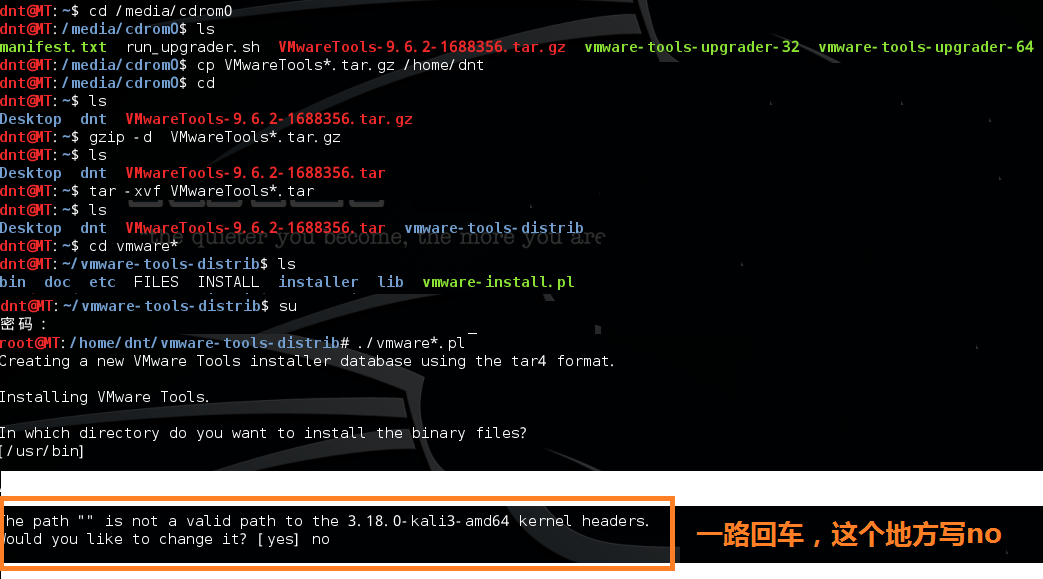
root@MT:reboot 重启一下
注意这个情况:(装过tools但失败了)
root@MT:/home/dnt/vmware-tools-distrib# ./vmware*.pl
A previous installation of VMware Tools has been detected.
The previous installation was made by the tar installer (version 4).
Keeping the tar4 installer database format.
You have a version of VMware Tools installed. Continuing this install will
first uninstall the currently installed version. Do you wish to continue?
(yes/no) [yes]
Error: Unable to find the binary installation directory (answer BINDIR)
in the installer database file "/etc/vmware-tools/locations".
Uninstall failed. Please correct the failure and re run the install.
Execution aborted.
解决方法:
root@MT:/home/dnt/vmware-tools-distrib# rm -rf /etc/vmware-tools
root@MT:/home/dnt/vmware-tools-distrib# rm -rf /tmp/vm*
root@MT:/home/dnt/vmware-tools-distrib# ./vmware*.pl

参考资料:
http://blog.sina.com.cn/s/blog_4fd50c390101897e.html
http://kb.vmware.com/selfservice/search.do?cmd=displayKC&docType=kc&docTypeID=DT_KB_1_1&externalId=2101470
详细信息如下:
root@HackerKali:/media/cdrom0# cp VMwareTools*.tar.gz /home
root@HackerKali:/media/cdrom0# cd
root@HackerKali:~# ls
Desktop
root@HackerKali:~# cd /home
root@HackerKali:/home# ls
dnt VMwareTools-9.6.2-1688356.tar.gz
root@HackerKali:/home# gzip -d VMwareTools*.tar.gz
root@HackerKali:/home# ls
dnt VMwareTools-9.6.2-1688356.tar
root@HackerKali:/home# tar -xvf VMwareTools*.tar
root@HackerKali:/home# cd vmware*
root@HackerKali:/home/vmware-tools-distrib# ls
bin doc etc FILES INSTALL installer lib vmware-install.pl
root@HackerKali:/home/vmware-tools-distrib# ./vmware*.pl
Creating a new VMware Tools installer database using the tar4 format.
Installing VMware Tools.
In which directory do you want to install the binary files?
[/usr/bin]
What is the directory that contains the init directories (rc0.d/ to rc6.d/)?
[/etc]
What is the directory that contains the init scripts?
[/etc/init.d]
In which directory do you want to install the daemon files?
[/usr/sbin]
In which directory do you want to install the library files?
[/usr/lib/vmware-tools]
The path "/usr/lib/vmware-tools" does not exist currently. This program is
going to create it, including needed parent directories. Is this what you want?
[yes]
In which directory do you want to install the documentation files?
[/usr/share/doc/vmware-tools]
The path "/usr/share/doc/vmware-tools" does not exist currently. This program
is going to create it, including needed parent directories. Is this what you
want? [yes]
The installation of VMware Tools 9.6.2 build-1688356 for Linux completed
successfully. You can decide to remove this software from your system at any
time by invoking the following command: "/usr/bin/vmware-uninstall-tools.pl".
Before running VMware Tools for the first time, you need to configure it by
invoking the following command: "/usr/bin/vmware-config-tools.pl". Do you want
this program to invoke the command for you now? [yes]
Initializing...
Making sure services for VMware Tools are stopped.
Stopping Thinprint services in the virtual machine:
Stopping Virtual Printing daemon: done
Stopping VMware Tools services in the virtual machine:
Guest operating system daemon: done
Unmounting HGFS shares: done
Guest filesystem driver: done
update-rc.d: using dependency based boot sequencing
insserv: Service cups has to be enabled to start service vmware-tools-thinprint
insserv: exiting now!
update-rc.d: error: insserv rejected the script header
WARNING: The installer initially used the 'udpate-rc.d' to setup the
vmware-tools service. That command cannot be found. Please re-install the
'sysv-rc' package. This script will now attempt to manually setup the
vmware-tools service.The module vmci has already been installed on this system by another installer
or package and will not be modified by this installer.
The module vsock has already been installed on this system by another installer
or package and will not be modified by this installer.
The module vmxnet3 has already been installed on this system by another
installer or package and will not be modified by this installer.
The module pvscsi has already been installed on this system by another
installer or package and will not be modified by this installer.
The module vmmemctl has already been installed on this system by another
installer or package and will not be modified by this installer.
The VMware Host-Guest Filesystem allows for shared folders between the host OS
and the guest OS in a Fusion or Workstation virtual environment. Do you wish
to enable this feature? [yes]
Before you can compile modules, you need to have the following installed...
make
gcc
kernel headers of the running kernel
Searching for GCC...
Detected GCC binary at "/usr/bin/gcc".
The path "/usr/bin/gcc" appears to be a valid path to the gcc binary.
Would you like to change it? [no]
Searching for a valid kernel header path...
The path "" is not a valid path to the 3.18.0-kali3-amd64 kernel headers.
Would you like to change it? [yes] no
WARNING: This program cannot compile any modules for the following reason(s)...
- This program could not find a valid path to the kernel headers of the running
kernel. Please ensure that the header files for the running kernel are
installed on this sytem.
[ Press Enter key to continue ]
The filesystem driver (vmhgfs module) is used only for the shared folder
feature. The rest of the software provided by VMware Tools is designed to work
independently of this feature.
If you wish to have the shared folders feature, you can install the driver by
running vmware-config-tools.pl again after making sure that gcc, binutils, make
and the kernel sources for your running kernel are installed on your machine.
These packages are available on your distribution's installation CD.
[ Press Enter key to continue ]
The vmxnet driver is no longer supported on kernels 3.3 and greater. Please
upgrade to a newer virtual NIC. (e.g., vmxnet3 or e1000e)
The vmblock enables dragging or copying files between host and guest in a
Fusion or Workstation virtual environment. Do you wish to enable this feature?
[yes]
VMware automatic kernel modules enables automatic building and installation of
VMware kernel modules at boot that are not already present. This feature can be
enabled/disabled by re-running vmware-config-tools.pl.
Would you like to enable VMware automatic kernel modules?
[no]
Disabling timer-based audio scheduling in pulseaudio.
Detected X server version 1.12.4
Distribution provided drivers for Xorg X server are used.
Skipping X configuration because X drivers are not included.
Creating a new initrd boot image for the kernel.
update-initramfs: Generating /boot/initrd.img-3.18.0-kali3-amd64
Starting Virtual Printing daemon: done
Checking acpi hot plug done
Starting VMware Tools services in the virtual machine:
Switching to guest configuration: done
Blocking file system: done
Guest operating system daemon: done
The configuration of VMware Tools 9.6.2 build-1688356 for Linux for this
running kernel completed successfully.
You must restart your X session before any mouse or graphics changes take
effect.
You can now run VMware Tools by invoking "/usr/bin/vmware-toolbox-cmd" from the
command line.
To enable advanced X features (e.g., guest resolution fit, drag and drop, and
file and text copy/paste), you will need to do one (or more) of the following:
1. Manually start /usr/bin/vmware-user
2. Log out and log back into your desktop session; and,
3. Restart your X session.
Enjoy,
--the VMware team
Found VMware Tools CDROM mounted at /media/cdrom0. Ejecting device /dev/sr0 ...
umount: /media/cdrom0: device is busy.
(In some cases useful info about processes that use
the device is found by lsof(8) or fuser(1))
/usr/bin/eject: unmount of `/media/cdrom0' failed
Eject Failed: If possible manually eject the Tools installer from the guest
cdrom mounted at /media/cdrom0 before canceling tools install on the host.
root@HackerKali:/home/vmware-tools-distrib#
2.Kali安装VMware tools(详细+异常处理)的更多相关文章
- CentOS 安装 VMware Tools 详细方法
点击虚拟机,选择安装vmware Tools工具 弹出上面的界面,右键选择奖上面的vmwaraTools.tar.gz解压到你要解压的目录下面 记得一定要使用root用户,进入到解压的目录 然后执行 ...
- Linux命令行模式下安装VMware Tools详细步骤
在Linux命令行模式安装VMware Tools 方法/步骤1: 首先启动CentOS 7,在VMware中点击上方"VM",点击"Install VMware Too ...
- kali安装vmware tools
昨天在网上搜了半天如何在kail下安装tools工具,结果都没有成功,今天就来说说我是怎么安装成功的. 1.按照网上的办法只能到这一步,一直提示找不到路径,点了回车也会照常出现这样的情况. Searc ...
- Kali 使用ssh,安装vmware tools 和字体重叠
Kali一直是我所爱,说说遇到的问题吧 第一个:字体重叠 gnome-tweak-tool --打开工具 第二个:ssh 修改sshd_config文件,命令为: vi /etc/ssh/sshd_c ...
- Kali Linux安装VMWare Tools
操作环境: 虚拟机操作系统: Kali Linux 2017.2 虚拟化软件: VMWare workstation 14 pro 加载光盘 在VMWare上依次点击"虚拟机->安装V ...
- Kali Linux下安装VMware Tools
引言 Kali Linux是基于Debian的Linux发行版, 设计用于数字取证和渗透測试.安装Kali Linux非常easy,可是安装VMware Tools的过程就有点麻烦了,由于在安装中途会 ...
- 无法安装 VMware Tools。尝试访问安装 VMware Tools 所需的图像文件“/usr/lib/vmware/isoimages/linuxPreGlibc25.iso”时出错: 2 (No such file or directory)。请参考产品文档或知识库文章 2129825,了解关于如何获取该客户机操作系统的 VMware Tools 软件包的详细信息。
无法安装 VMware Tools.尝试访问安装 VMware Tools 所需的图像文件"/usr/lib/vmware/isoimages/linuxPreGlibc25.iso&quo ...
- kali linux与虚拟机Vmware安装vmware tools(主机与虚拟机的文件拖拽)
一.打开虚拟机任务栏"虚拟机"-----点击安装Vmware tools 二.回到开启的kali linux系统中,找到vmware tools CD文件夹,拖拽出文件中的压缩文件 ...
- 在vmware 6.5+ubuntu12.04上安装VMware tools出现问题的分析
笔者已经写了一篇关于安装"VMware Tools",以实现文件共享的文章,那篇文章对于你实现共享操作是足够了, 所以,倘若你赶时间不如直接去在虚拟机的linux中利用VMware ...
随机推荐
- input[tyle="file"]样式修改及上传文件名显示
默认的上传样式我们总觉得不太好看,根据需求总想改成和上下结构统一的风格…… 实现方法和思路: 1.在input元素外加a超链接标签 2.给a标签设置按钮样式 3.设置input[type='file' ...
- 用MongoDB分析合肥餐饮业
看了<从数据角度解析福州美食>后难免心痒,动了要分析合肥餐饮业的念头,因此特地写了Node.js爬虫爬取了合肥的大众点评数据.分析数据库我并没有采用MySQL而是用的MongoDB,是因为 ...
- 使用po模式读取豆瓣读书最受关注的书籍,取出标题、评分、评论、题材 按评分从小到大排序并输出到txt文件中
#coding=utf-8from time import sleepimport unittestfrom selenium import webdriverfrom selenium.webdri ...
- 微信公众号开发(一)--验证服务器地址的Java实现
现在主流上都用php写微信公众号后台,其实作为后端语言之一的java也可以实现. 这篇文章将对验证服务器地址这一步做出实现. 参考资料:1.慕课网-<初识java微信公众号开发>,2.微信 ...
- 【SAP业务模式】之ICS(五):定价配置
本篇博文讲述ICS业务中的定价配置. 1.定义销售订单类型 目录:SPRO-销售与分销-销售-销售凭证-销售凭证抬头-定义销售凭证类型 事务代码:VOV8 2.定义销售订单类型 目录:SPRO-销售与 ...
- Android 算法 关于递归和二分法的小算法
// 1. 实现一个函数,在一个有序整型数组中二分查找出指定的值,找到则返回该值的位置,找不到返回 -1. package demo; public class Mytest { public st ...
- JAVA设计模式之模板模式
在阎宏博士的<JAVA与模式>一书中开头是这样描述模板方法(Template Method)模式的: 模板方法模式是类的行为模式.准备一个抽象类,将部分逻辑以具体方法以及具体构造函数的形式 ...
- grep 查找bash脚本中的注释代码
出于安全性的考虑,不建议在bash脚本中注释掉不使用的代码.也就是说如果某段代码不使用了,那么应该删除掉,而不是简单地注释掉.假如你突然意识到这一点,而以前并没有遵从这个原则,现在需要找出脚本中的注释 ...
- POJ1149 PIGS [最大流 建图]
PIGS Time Limit: 1000MS Memory Limit: 10000K Total Submissions: 20662 Accepted: 9435 Description ...
- Android连接网络打印机进行打印
首先这是网络打印工具类,通过Socket实现,多说一句,网络打印机端口号一般默认的是9100 package com.Ieasy.Tool; import android.annotation.Sup ...