
MyEclipse Hibernate 学习总结
最近在学习Hibernate,先把学习的过程记录一下,方便自己以后复习.
1.使用工具
MyEclipse 10
2.
1)新建Java程序
2)右键程序,选择MyEclipse-> Add Hibernate Capabilities.
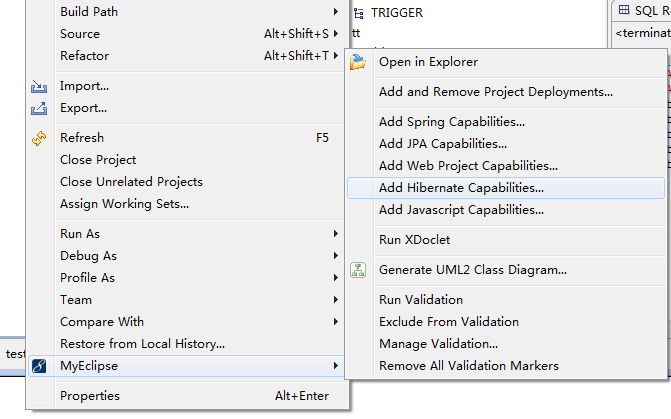
会自动生成HibernateSessionFactory.java文件和hibernate.cfg.xml文件
package com.water.testhibernate;

import org.hibernate.HibernateException;

import org.hibernate.Session;

import org.hibernate.cfg.Configuration;

/**

 * Configures and provides access to Hibernate sessions, tied to the

 * current thread of execution.  Follows the Thread Local Session

 * pattern, see {@link http://hibernate.org/42.html }.

 */

public class HibernateSessionFactory {

    /**

     * Location of hibernate.cfg.xml file.

     * Location should be on the classpath as Hibernate uses

     * #resourceAsStream style lookup for its configuration file.

     * The default classpath location of the hibernate config file is

     * in the default package. Use #setConfigFile() to update

     * the location of the configuration file for the current session.

     */

    private static String CONFIG_FILE_LOCATION = "/hibernate.cfg.xml";

	private static final ThreadLocal<Session> threadLocal = new ThreadLocal<Session>();

    private  static Configuration configuration = new Configuration();

    private static org.hibernate.SessionFactory sessionFactory;

    private static String configFile = CONFIG_FILE_LOCATION;

	static {

    	try {

			configuration.configure(configFile);

			sessionFactory = configuration.buildSessionFactory();

		} catch (Exception e) {

			System.err

					.println("%%%% Error Creating SessionFactory %%%%");

			e.printStackTrace();

		}

    }

    private HibernateSessionFactory() {

    }

	/**

     * Returns the ThreadLocal Session instance.  Lazy initialize

     * the <code>SessionFactory</code> if needed.

     *

     *  @return Session

     *  @throws HibernateException

     */

    public static Session getSession() throws HibernateException {

        Session session = (Session) threadLocal.get();

		if (session == null || !session.isOpen()) {

			if (sessionFactory == null) {

				rebuildSessionFactory();

			}

			session = (sessionFactory != null) ? sessionFactory.openSession()

					: null;

			threadLocal.set(session);

		}

        return session;

    }

	/**

     *  Rebuild hibernate session factory

     *

     */

	public static void rebuildSessionFactory() {

		try {

			configuration.configure(configFile);

			sessionFactory = configuration.buildSessionFactory();

		} catch (Exception e) {

			System.err

					.println("%%%% Error Creating SessionFactory %%%%");

			e.printStackTrace();

		}

	}

	/**

     *  Close the single hibernate session instance.

     *

     *  @throws HibernateException

     */

    public static void closeSession() throws HibernateException {

        Session session = (Session) threadLocal.get();

        threadLocal.set(null);

        if (session != null) {

            session.close();

        }

    }

	/**

     *  return session factory

     *

     */

	public static org.hibernate.SessionFactory getSessionFactory() {

		return sessionFactory;

	}

	/**

     *  return session factory

     *

     *	session factory will be rebuilded in the next call

     */

	public static void setConfigFile(String configFile) {

		HibernateSessionFactory.configFile = configFile;

		sessionFactory = null;

	}

	/**

     *  return hibernate configuration

     *

     */

	public static Configuration getConfiguration() {

		return configuration;

	}

}
创建Grade文件
public class Grade implements Serializable {

	private int gid;

	private String gname;

	private String gdesc;

	private Set<Student> students;

	public int getGid() {

		return gid;

	}

	public void setGid(int gid) {

		this.gid = gid;

	}

	public String getGname() {

		return gname;

	}

	public void setGname(String gname) {

		this.gname = gname;

	}

	public String getGdesc() {

		return gdesc;

	}

	public void setGdesc(String gdesc) {

		this.gdesc = gdesc;

	}

	public Grade() {

		super();

	}

	public Set<Student> getStudents() {

		return students;

	}

	public void setStudents(Set<Student> students) {

		this.students = students;

	}

	public Grade(int gid, String gname, String gdesc) {

		super();

		this.gid = gid;

		this.gname = gname;

		this.gdesc = gdesc;

	}

	public Grade(String gname, String gdesc) {

		super();

		this.gname = gname;

		this.gdesc = gdesc;

	}

}
创建Grade.hbm.xml文件
<?xml version="1.0"?>

<!DOCTYPE hibernate-mapping PUBLIC

	"-//Hibernate/Hibernate Mapping DTD 3.0//EN"

	"http://www.hibernate.org/dtd/hibernate-mapping-3.0.dtd">

<hibernate-mapping>

	<class name="com.water.model.Grade" table="grade">

		<id name="gid" column="gid" type="java.lang.Integer">

			<generator class="increment"></generator>

		</id>

		<property name="gname" type="java.lang.String">

			<column name="gname" length="20" not-null="true"></column>

		</property>

		<property name="gdesc">

			<column name="gdesc"></column>

		</property>

		<!-- 配置一对多关联关系 -->

		<set name="students" table="student">

			<key column="gid"></key>

			<one-to-many class="com.water.model.Student"/>

		</set>

	</class>

</hibernate-mapping>
创建Student文件
public class Student implements Serializable {

	private int sid;

	private String sname;

	private String sex;

	// 在多方定义一个一方的引用

	private Grade grade;

	public Grade getGrade() {

		return grade;

	}

	public void setGrade(Grade grade) {

		this.grade = grade;

	}

	public int getSid() {

		return sid;

	}

	public void setSid(int sid) {

		this.sid = sid;

	}

	public String getSname() {

		return sname;

	}

	public void setSname(String sname) {

		this.sname = sname;

	}

	public String getSex() {

		return sex;

	}

	public void setSex(String sex) {

		this.sex = sex;

	}

	public Student() {

		super();

	}

	public Student(String sname, String sex) {

		super();

		this.sname = sname;

		this.sex = sex;

	}

}
创建Student.hbm.xml 文件
<?xml version="1.0"?>

<!DOCTYPE hibernate-mapping PUBLIC

	"-//Hibernate/Hibernate Mapping DTD 3.0//EN"

	"http://www.hibernate.org/dtd/hibernate-mapping-3.0.dtd">

<hibernate-mapping>

	<class name="com.water.model.Student" table="student">

		<id name="sid" column="sid" type="java.lang.Integer">

			<generator class="increment"></generator>

		</id>

		<property name="sname" type="java.lang.String">

			<column name="sname" length="20" not-null="true"></column>

		</property>

		<property name="sex">

			<column name="sex"></column>

		</property>

		<!-- 配置多对一关联关系 -->

		<!-- <many-to-one name="grade" class="com.water.model.Grade" column="gid" cascade="all"></many-to-one> -->

	</class>

</hibernate-mapping>
最后hibernate.cfg.xml文件的配置如下:
<?xml version='1.0' encoding='UTF-8'?>

<!DOCTYPE hibernate-configuration PUBLIC

          "-//Hibernate/Hibernate Configuration DTD 3.0//EN"

          "http://hibernate.sourceforge.net/hibernate-configuration-3.0.dtd">

<!-- Generated by MyEclipse Hibernate Tools.                   -->

<hibernate-configuration>

<session-factory>

	<property name="dialect">org.hibernate.dialect.MySQLDialect</property>

	<property name="connection.driver_class">com.mysql.jdbc.Driver</property>

	<property name="connection.username">root</property>

	<property name="connection.password">root</property>

	<property name="show_sql">true</property>

	<!-- create and update the database automaticlly -->

	<property name="hbm2ddl.auto">update</property>

	<property name="myeclipse.connection.profile">ms_sql</property>

	<property name="connection.url">jdbc:mysql://localhost:3306/mysql</property>

	<mapping resource="com/water/model/Student.hbm.xml" />

	<mapping resource="com/water/model/Grade.hbm.xml" />

</session-factory>

</hibernate-configuration>
<property name="connection.username">root</property>数据库用户名
<property name="connection.password">root</property> 数据库密码
<property name="connection.url">jdbc:mysql://localhost:3306/mysql</property> mysql为数据库名
创建测试类Test.java
public class Test {

	public static void main(String[] args) {

		add();

	}

		public static void add(){

			Grade g=new Grade("software developer", "Java Android");

			Student stu1=new Student("zhasan", "boy");

			Student stu2=new Student("lisi", "girl");

			Session session=HibernateSessionFactory.getSession();

			Transaction tx=session.beginTransaction();

			session.save(g);

			session.save(stu1);

			session.save(stu2);

			tx.commit();

			HibernateSessionFactory.closeSession();

		}

}
运行后的效果如下:

说明已经插入成功.
MyEclipse Hibernate 学习总结的更多相关文章
- Hibernate学习之——搭建log4j日志环境
昨天讲了Hibernate开发环境的搭建以及实现一个Hibernate的基础示例,但是你会发现运行输出只有sql语句,很多输出信息都看不见.这是因为用到的是slf4j-nop-1.6.1.jar的实现 ...
- Hibernate学习笔记(二)
2016/4/22 23:19:44 Hibernate学习笔记(二) 1.1 Hibernate的持久化类状态 1.1.1 Hibernate的持久化类状态 持久化:就是一个实体类与数据库表建立了映 ...
- Hibernate学习笔记(一)
2016/4/18 19:58:58 Hibernate学习笔记(一) 1.Hibernate框架的概述: 就是一个持久层的ORM框架. ORM:对象关系映射.将Java中实体对象与关系型数据库中表建 ...
- Hibernate 学习笔记一
Hibernate 学习笔记一 今天学习了hibernate的一点入门知识,主要是配置domain对象和表的关系映射,hibernate的一些常用的配置,以及对应的一个向数据库插入数据的小例子.期间碰 ...
- MyEclipse Spring 学习总结三 SpringMVC
MyEclipse Spring 学习总结三 SpringMVC 一.SpringMVC原理 1.Springmvc 框架介绍 1)Spring 框架停工了构建Web应用程序的全功能MVC模块.Spr ...
- Hibernate学习笔记-Hibernate HQL查询
Session是持久层操作的基础,相当于JDBC中的Connection,通过Session会话来保存.更新.查找数据.session是Hibernate运作的中心,对象的生命周期.事务的管理.数据库 ...
- Hibernate 报错:this project is not a myeclipse hibernate project . assuming hibernate 3 cap
问题描述: web 项目中 打开 hibernate.cfg.xml 文件时 提示:The project is not a myEclipse hibernate project. 并且:在 db ...
- 我的hibernate学习记录(二)
通过上一篇文章我的hibernate学习记录(一)基本上的入门了hibernate,但是,里面还有还多东西是通过迷迷糊糊的记忆,或者说copy直接弄进去的,所以这篇文章就需要对上篇的一些文件.对象进行 ...
- Hibernate学习(二)关系映射----基于外键的单向一对一
事实上,单向1-1与N-1的实质是相同的,1-1是N-1的特例,单向1-1与N-1的映射配置也非常相似.只需要将原来的many-to-one元素增加unique="true"属性, ...
随机推荐
- VirtualizingStackPanel
<FlipView x:Name="flipView1" ItemsSource="{Binding}" ScrollViewer.HorizontalS ...
- Python MySQL ORM QuickORM hacking
# coding: utf-8 # # Python MySQL ORM QuickORM hacking # 说明: # 以前仅仅是知道有ORM的存在,但是对ORM这个东西内部工作原理不是很清楚, ...
- VundleVim的安装与使用
git:https://github.com/VundleVim/Vundle.vim vundle是一款vim编辑器的插件管理软,用起来很方便的原因有几点: 1)只要知道插件名称,就能搜索到并下载安 ...
- 《JavaScript模式》第2章 基本技巧
@by Ruth92(转载请注明出处) 第2章 基本技巧 一.编写可维护的代码 阅读性好 具有一致性 预见性好 看起来如同一个人编写 有文档 编写注释 编写 API 文档 @namespace:用于命 ...
- Tomcat9源码编译及导入Eclipse(转)
1.下载tomcat源码.建议下载最新版本tomcat9. svn地址:http://svn.apache.org/repos/asf/tomcat/tc9.0.x/branches/gsoc-jas ...
- hadoop之mapReduce踩坑集合
居然没有把这个目录,之前还想爆粗口的,还是算了. 上苷酸菜: 1.对于mapreduce中FileInputFormat只输入input文件根目录的方法尝试. 很简单好吧: step1: FileIn ...
- Linux系统入门学习:在CentOS上安装phpMyAdmin
问题:我正在CentOS上运行一个MySQL/MariaDB服务,并且我想要通过网络接口来用phpMyAdmin来管理数据库.在CentOS上安装phpMyAdmin的最佳方法是什么? phpMyAd ...
- Sprint第二个冲刺(第七天)
一.Sprint 计划会议: 现在简单的说下今天的会议情况:组员们除了完善之前做的功能,还打算实现把轮播图迁移到一个fragment中,方便管理.现在也准备着手实现商家上传商品的图片这个功能,虽说现在 ...
- 转:struts标签之select详解
<html:select>生成HTML<select>元素 <html:option>:生成HTML<option>元素 <html:option ...
- JavaWeb学习记录(二十三)——文件上传与下载
一.导入jar包