
Golang 图片上绘制文字
之前介绍过使用 FreeType-go 来绘制字(http://www.cnblogs.com/ghj1976/p/3445568.html), 现在相关的包被做了整合,主要是整合到了 github.com/golang/freetype 和 golang.org/x/image/font 这里了,所以就有了这篇博客。
例子代码在: https://github.com/golang/freetype/blob/master/example/freetype/main.go
package main
import (
"bufio"
"flag"
"fmt"
"image"
"image/color"
"image/draw"
"image/png"
"io/ioutil"
"log"
"os""github.com/golang/freetype"
"golang.org/x/image/font"
)var (
dpi = flag.Float64("dpi", 72, "screen resolution in Dots Per Inch")
fontfile = flag.String("fontfile", "../../testdata/luxisr.ttf", "filename of the ttf font")
hinting = flag.String("hinting", "none", "none | full")
size = flag.Float64("size", 12, "font size in points")
spacing = flag.Float64("spacing", 1.5, "line spacing (e.g. 2 means double spaced)")
wonb = flag.Bool("whiteonblack", false, "white text on a black background")
)var text = []string{
"’Twas brillig, and the slithy toves",
"测试中文字 ……&^_^",
"Did gyre and gimble in the wabe;",
"All mimsy were the borogoves,",
"And the mome raths outgrabe.",
"",
"“Beware the Jabberwock, my son!",
"The jaws that bite, the claws that catch!",
"Beware the Jubjub bird, and shun",
"The frumious Bandersnatch!”",
"",
"He took his vorpal sword in hand:",
"Long time the manxome foe he sought—",
"So rested he by the Tumtum tree,",
"And stood awhile in thought.",
"",
"And as in uffish thought he stood,",
"The Jabberwock, with eyes of flame,",
"Came whiffling through the tulgey wood,",
"And burbled as it came!",
"",
"One, two! One, two! and through and through",
"The vorpal blade went snicker-snack!",
"He left it dead, and with its head",
"He went galumphing back.",
"",
"“And hast thou slain the Jabberwock?",
"Come to my arms, my beamish boy!",
"O frabjous day! Callooh! Callay!”",
"He chortled in his joy.",
"",
"’Twas brillig, and the slithy toves",
"Did gyre and gimble in the wabe;",
"All mimsy were the borogoves,",
"And the mome raths outgrabe.",
}func main() {
flag.Parse()// Read the font data.
fontBytes, err := ioutil.ReadFile(*fontfile)
if err != nil {
log.Println(err)
return
}
f, err := freetype.ParseFont(fontBytes)
if err != nil {
log.Println(err)
return
}// Initialize the context.
fg, bg := image.Black, image.White
ruler := color.RGBA{0xdd, 0xdd, 0xdd, 0xff}
if *wonb {
fg, bg = image.White, image.Black
ruler = color.RGBA{0x22, 0x22, 0x22, 0xff}
}
rgba := image.NewRGBA(image.Rect(0, 0, 640, 480))
draw.Draw(rgba, rgba.Bounds(), bg, image.ZP, draw.Src)
c := freetype.NewContext()
c.SetDPI(*dpi)
c.SetFont(f)
c.SetFontSize(*size)
c.SetClip(rgba.Bounds())
c.SetDst(rgba)
c.SetSrc(fg)
switch *hinting {
default:
c.SetHinting(font.HintingNone)
case "full":
c.SetHinting(font.HintingFull)
}// Draw the guidelines.
for i := 0; i < 200; i++ {
rgba.Set(10, 10+i, ruler)
rgba.Set(10+i, 10, ruler)
}// Draw the text.
pt := freetype.Pt(10, 10+int(c.PointToFixed(*size)>>6))
for _, s := range text {
_, err = c.DrawString(s, pt)
if err != nil {
log.Println(err)
return
}
pt.Y += c.PointToFixed(*size * *spacing)
}// Save that RGBA image to disk.
outFile, err := os.Create("out.png")
if err != nil {
log.Println(err)
os.Exit(1)
}
defer outFile.Close()
b := bufio.NewWriter(outFile)
err = png.Encode(b, rgba)
if err != nil {
log.Println(err)
os.Exit(1)
}
err = b.Flush()
if err != nil {
log.Println(err)
os.Exit(1)
}
fmt.Println("Wrote out.png OK.")
}
执行效果如下:
./testFont2 -fontfile="字体管家淘淘体.ttf"
执行效果:

./testFont2 -fontfile="6f14c8f349377d5ebe2b0a5e2851a6f6.ttf"
执行效果:
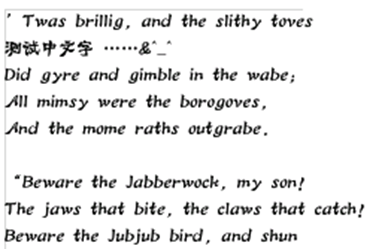
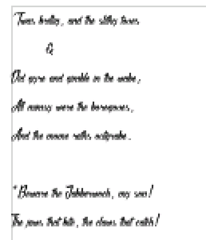
./testFont2 -fontfile="Sliced by Hand.ttf"
执行效果,这个字体不支持中文,就会出现下面情况:
一些免费的字体库下载
英文字体库
http://www.freefontspro.com/cn/
中文字体库
Golang 图片上绘制文字的更多相关文章
- Android 使用Canvas在图片上绘制文字
一个小应用,在图片上绘制文字,以下是绘制文字的方法,并且能够实现自动换行,字体自动适配屏幕大小 private void drawNewBitmap(ImageView imageView, Stri ...
- C#实现图片叠加,图片上嵌入文字,文字生成图片的方法
/// <summary> /// 图片叠加 /// </summary> /// <param name="sender"& ...
- C# 在Bitmap上绘制文字出现锯齿的问题
解决锯齿问题主要是修改Graphics的属性 修复绘制图片锯齿问题可以修改 g.SmoothingMode = System.Drawing.Drawing2D.SmoothingMode.AntiA ...
- 图像处理---《在图片上打印文字 putText()》
图像处理---<在图片上打印文字 putText()> 目的:想在处理之后的图像上打印输出结果. 方法: (1)只在图像上打印 数字.字母的话: 1.Mat ...
- python如何在图片上添加文字(中文和英文)
Python在图片上添加文字的两种方法:OpenCV和PIL 一.OpenCV方法 1.安装cv2 pip install opencv-python 2.利用putText方法来实现在图片的指定位置 ...
- C#图像处理(1):在图片上加文字和改变文字的方向
C#在图片上加文字,代码如下: /// <summary> /// 图片上方加文字,文字将会被180度反转 /// </summary> /// <param name= ...
- python 图片上添加文字
import PIL from PIL import ImageFont from PIL import Image from PIL import ImageDraw #设置字体,如果没有,也可以不 ...
- 使用Qpaint在图片上写文字
开发过程中需要实现在图片上叠加文字,可以采用Qpaint在图片上写文字,然后将图片显示在上面.再将Qlabel加到Qwidget中.效果如下 //创建对象,加载图片 QPixmap pix; pix. ...
- 函数putText()在图片上写文字
#include <iostream> #include <opencv2/opencv.hpp> using namespace std; using namespace c ...
随机推荐
- 如何面试程序员 zhuan zai
zhuan zai http://blog.csdn.net/cuibo1123/article/details/41931909aia 面试对于大多数开发人员来说是一项很基本的技能.一次失败的招聘 ...
- 计时器Chronometer和时钟(AnalogClock和DigitalClock)
计时器Chronometer和时钟(AnalogClock和DigitalClock) (1)Android提供了两个时钟组件:AnalogClock和DigitalClock,DigitalCloc ...
- android数据存储之File
android中使用File进行存储主要使用到OpenFileOutput和OpenFileInput两个方法,下面直接用一个例子来说明一下. (1)布局文件main.xml文件 <?xml v ...
- nginx 一般网站部署常用参数设置
#user nobody;worker_processes 2; #error_log logs/error.log;#error_log logs/error.log notice;#error_l ...
- C语言常用的小代码
圆周率Pi tan(Pi/4)=1 => Pi=4*arctan(1) 反正切函数arctan()在C语言里表示为atan(),为保证精度取圆周率的代码如下: const double Pi = ...
- mysql四种事务隔离级的说明
·未提交读(Read Uncommitted):允许脏读,也就是可能读取到其他会话中未提交事务修改的数据 ·提交读(Read Committed):只能读取到已经提交的数据.Oracle等多数数据库默 ...
- oracle的listener.ora sqlnet.ora tnsnames.ora三个文件的关联性
学习:http://www.cnblogs.com/william-lee/archive/2010/10/20/1856261.html 之前因为安装的是windows server 2008 r2 ...
- java生成随机字符串uuid
GUID是一个128位长的数字,一般用16进制表示.算法的核心思想是结合机器的网卡.当地时间.一个随即数来生成GUID.从理论上讲,如果一台机器每秒产生10000000个GUID,则可以保证(概率意义 ...
- servlet & filter & listener & interceptor
web.xml 的加载顺序是:context- param -> listener -> filter -> servlet * Servlet 对URL生效,用户处理用户的URL请 ...
- 程序员书单_J2EE专题
Enterprise JavaBeans 3.0中文版(第5版) http://download.csdn.net/detail/shenzhq1980/9104015 J2EE设计模式 http:/ ...