
Osmocom-BB中cell_log的多种使用姿势
转载留做备份,原文地址:http://92ez.com/?action=show&id=23342
翻阅osmocom-bb源码的时候注意到,在cell_log中有非常多我们从来没有注意到的功能。这些功能看起来并不是适合我们当前的使用环境。例如,在cell_log里面有GPS的扫描。我们目前所接触到的还没有涉及到GPS设备的使用。当然,osmocom-bb的功能是非常强大的,如果只是简单的搞个GSM嗅探,那未必也太大材小用,所以如果你手头上有GPS设备,不妨可以试一试,嗅探的信息入库,同时加上GPS信息,这样一来,收集的信息是不是瞬间变得有用的多,对于二次定向攻击我想没有比这个更好地吧。
好吧,废话不多说,我们来看看cell_log到底有啥神奇的功能。开始就说到我们可以使用-h参数调出帮助信息,那我们就试一下
root@kbdancer:~/projects/GSM/gsmweb1.# ./cell_log -h

Copyright (C)  Andreas Eversberg


License GPLv2+: GNU GPL version  or later <http://gnu.org/licenses/gpl.html>

This is free software: you are free to change and redistribute it.

There is NO WARRANTY, to the extent permitted by law.


Usage: ./cell_log

 Some help...

  -h --help     this text

  -s --socket       /tmp/osmocom_l2. Path to the unix domain socket (l2)

  -i --gsmtap-ip    The destination IP used for GSMTAP.

  -d --debug        Change debug flags.


Application specific

  -l --logfile LOGFILE  Logfile for the cell log.

  -r --rach RACH    Nr. of RACH bursts to send.

  -n --no-rach      Send no rach bursts.

  -g --gpsd-host HOST   127.0.0.1. gpsd host.

  -p --port PORT    . gpsd port

  -f --gps DEVICE   /dev/ttyACM0. GPS serial device.

  -b --baud BAUDRAT The baud rate of the GPS device

  -B --band BAND    Select scan band, one of: all (default), , , , .

  -G --log-gprs     Log some GPRS if available

  -O --only-scan    Do a scan and show available ARFCNs, no data logging

  -w --wait-time TIME   Time to wait in each cell
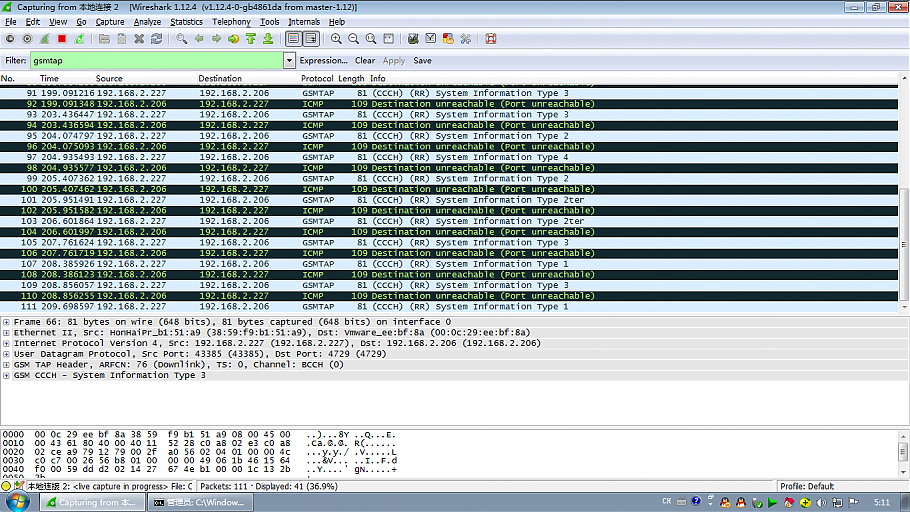
确实是很丰富很详细的帮助。我们一条条的阅读。-s和-h参数就不多说了,跟osmocon里面的是一样的,上一篇文章有介绍。先看-i参数,这个参数可以指定用于接受GSMTAP信息的机器的IP地址。比如我们有个虚拟机,虚拟机里面装个wireshark,我们想用wireshark来进行GSMTAP解析,这里就可以直接使用-i参数来指定虚拟机的IP
root@kbdancer:~/projects/GSM/gsmweb1.# ./cell_log -i 192.168.2.206 -O

Copyright (C)  Andreas Eversberg

License GPLv2+: GNU GPL version  or later <http://gnu.org/licenses/gpl.html>

This is free software: you are free to change and redistribute it.

There is NO WARRANTY, to the extent permitted by law.

Failed to connect to '/tmp/osmocom_sap'.

Failed during sap_open(), no SIM reader

<000e> cell_log.c: Scanner initialized

Mobile initialized, please start phone now!

<000e> cell_log.c: Measure from  to

<000e> cell_log.c: Measure from  to

<000e> cell_log.c: Measure from  to

<000e> cell_log.c: Measurement done
我们看下测试截图,指定到win虚拟机里面
好了,接着我们看-d参数,这个参数跟osmocon里面的-d参数使用方法是一样的,用来显示debug信息,不多说。
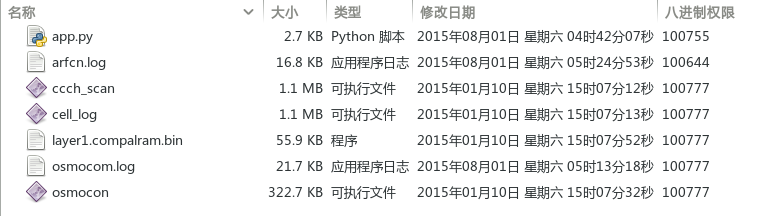
然后我们来看一些功能性的参数,第一个就是-l参数,这个参数就是记录cell_log所产生的一些日志,这个也很有用,我们在使用python脚本获取ARFCN扫描结果的时候就是可以用-l参数,这样扫描结果就会存储到文件,我们只需要读取文件就可以快速的获取到扫描结果了,而且根据测试发现,cell_log是实时写入文件的,所以可以动态获取到已经扫描出来的ARFCN,而不需要等到扫描结束。我们测试下
root@kbdancer:~/projects/GSM/gsmweb1.# ./cell_log -l arfcn.log -O

Copyright (C)  Andreas Eversberg

License GPLv2+: GNU GPL version  or later <http://gnu.org/licenses/gpl.html>

This is free software: you are free to change and redistribute it.

There is NO WARRANTY, to the extent permitted by law.

Failed to connect to '/tmp/osmocom_sap'.

Failed during sap_open(), no SIM reader

<000e> cell_log.c: Scanner initialized

Mobile initialized, please start phone now!

<000e> cell_log.c: Measure from  to

<000e> cell_log.c: Measure from  to

<000e> cell_log.c: Measure from  to

<000e> cell_log.c: Measurement done
这样会直接在文件所在的目录下面生成一个arfcn.log文件
查看下具体内容
[power]

time

arfcn  - - - - - - - - - - - -

arfcn  - - - - - - - - - - - -

arfcn  - - - - - - - - - - - -

arfcn  - - - - - - - - - - - -

arfcn  - - - - - - - - - - - -

arfcn  - - - - - - - - - - - -

arfcn  - - - - - - - - - - - -

arfcn  - - - - - - - - - - - -

arfcn  - - - - - - - - - - - -

arfcn  - - - - - - - - - - - -

arfcn  - - - - -

arfcn  - - - - - - - - - - - -

arfcn  - - - - - - - - - - - -

arfcn  - - - - - - - - - - - -

arfcn  - - - - - - - - - - - -

arfcn  - - - - - - - - - - - -

arfcn  - - - - - - - - - - - -

arfcn  - - - - - - - - - - - -

arfcn  - - - - - - - - - - - -

arfcn  - - - - - - - - - - - -

arfcn  - - - - - - - - - - - -

arfcn  - - - - - - - - - - - -

arfcn  - - - - - - - - - - - -

arfcn  - - - - - - - - - - - -

arfcn  - - - - - - - - - - - -

arfcn  - - - - - - - - - - - -

arfcn  - - - - - - - - - - - -

arfcn  - - - - - - - - - - - -

arfcn  - - - - - - - - - - - -

arfcn  - - - - - - - - - - - -

arfcn  - - - - - - - - - - - -

arfcn  - - - - - - - - - - - -

arfcn  - - - - - - - - - - - -

arfcn  - - - - - - - - - - - -

arfcn  - - - - - - - - - - - -

arfcn  - - - - - - - - - - - -

arfcn  - - - - - - - - - - - -

arfcn  - - - - - - - - - - - -

arfcn  - - - - - - - - - - - -

arfcn  - - - - - - - - - - - -

arfcn  - - - - - - - - - - - -

arfcn  - - - - - - - - - - - -

arfcn  - -

arfcn  - - - - - - - - - - - -

arfcn  - - - - - - - - - - - -

arfcn  - - - - - - - - - - - -

arfcn  - - - - - - - - - - - -

arfcn  - - - - - - - - - - - -

arfcn  - - - - - - - - -

[sysinfo]

arfcn

time

bsic ,

rxlev -

mcc  mnc

si2ter    bf                2b 2b 2b 2b

si3   1b da   f0   dd d0     4e a5   1c  2b 2b

[sysinfo]

arfcn

time

bsic ,

rxlev -

mcc  mnc

si3   1b    f0    d0  0a 5c        b0
文件中记录了详细的ARFCN信息,读取非常的方便。接下来我们看参数-r,这个参数的解释是
-r --rach RACH Nr. of RACH bursts to send.
RACH是个什么鬼?查阅资料得知,RACH的中文名称叫做“随机接入信道“,这里给出一个百科
RACH(Random Access Channel)即随机接入信道,是一种上行传输信道。RACH在整个小区内进行接收,常用于PAGING回答和MS主叫/登录的接入等。
具体的用途这里就不说了,篇幅有限,有兴趣的可以去查阅相关资料了解下。具体能用来干啥,博主暂时还没研究出来,待我仔细查阅资料搞明白之后再补上相关细节。
接下来就是参数-n了,这个参数表示不发送rach信息出去,具体作用有待研究。
继续看参数-g,这个参数代表的是gpsd服务的IP地址,比如我们有个GPS设备,访问GPS设备并从设备上获取相关信息的时候就需要通过-g参数指定GPS服务的host,也就是IP地址。博主这里没有GPS设备,所以暂时无法测试。
下面要看的是参数-p,这个参数其实是跟-g参数配合使用的,作用是指定GPS设备的端口,一般GPS设备都是在一个默认的端口(2947)上传递数据的,如果这个端口被修改,则需要使用-p参数指定端口。
接着看-f参数,这个参数是指定GPS设备的标识,默认的是/dev/ttyACM0。
参数-b就是指定GPS设备的俄波特率
参数-B是指定扫描的频段,默认是扫描所有频段,可选频段为900, 1800, 850, 1900四个。
参数-G的把GPS日志记录下来
参数-O标示只扫描而不记录扫描日志
参数-w指的是扫描每个基站时候所等待的时间
好了,上面就是cell_log的所有参数,基本意思解释清楚了,希望能够需要的朋友一些参考。
Osmocom-BB中cell_log的多种使用姿势的更多相关文章
- NSString -- UILabel中字体有多种颜色,字符串自动计算高度/换行
一:UILabel中字体有多种颜色 UILabel *label = [[UILabel alloc] init]; label.frame = CGRectMake(, , , ); label.b ...
- Javascript中判断数组的正确姿势
在 Javascript 中,如何判断一个变量是否是数组? 最好的方式是用 ES5 提供的 Array.isArray() 方法(毕竟原生的才是最屌的): var a = [0, 1, 2]; con ...
- Perl删除数组中元素的多种方法
Perl中的数组元素起始引用序号为0,@array的第一个元素为$array[0],依次递增,最后一个元素为$array[-1]或者$#array.如果要删除一个数组中已有的元素,可以用以下几个函数来 ...
- Intellij IDEA中使用Protobuf的正确姿势
一..proto文件语法高亮显示 需要安装Protobuf Support插件 依次点击Intellij中的"File"-->"Settings"--&g ...
- Java 8中处理集合的优雅姿势——Stream
在Java中,集合和数组是我们经常会用到的数据结构,需要经常对他们做增.删.改.查.聚合.统计.过滤等操作.相比之下,关系型数据库中也同样有这些操作,但是在Java 8之前,集合和数组的处理并不是很便 ...
- 彻底搞懂 etcd 系列文章(二):etcd 的多种安装姿势
0 专辑概述 etcd 是云原生架构中重要的基础组件,由 CNCF 孵化托管.etcd 在微服务和 Kubernates 集群中不仅可以作为服务注册与发现,还可以作为 key-value 存储的中间件 ...
- visual studio 2013 中配置OpenCV2.4.13 姿势
首先在path中添加 “C:\OpenCV\opencv\build\x64\vc12\bin” (地址随实际变化) 注:添加的都是*86不使用*64 在visualstudio 2013中配置 ...
- 在Windows中安装NodeJS的正确姿势
NodeJS已经非常流行了,而且可以预见他将继续受到追捧.这确实是一个不错的创举,想想看他现在能做什么吧 1.服务器程序(典型的就是用来做网站或者restful服务,主打就是多线程,非阻塞,最后,一个 ...
- iOS中解析json多种方法
我感觉JSON解析,重要的是JSON解析之后对结果的处理JSON解析后是个dictionary,但是字典中有可能包含字典和数组,数组中还可以包含字典.向客户端请求的返回数据解析下面就简单介绍一下JSO ...
随机推荐
- 2.2 利用项目模板创建ASP.NET MVC项目
1.启动VS2012,点击“文件|新建|项目”. 2.在新建项目的窗口中,选择ASP.NET MVC 4应用程序. 3.在新ASP.NET MVC 4项目窗口中的“选择模板”列表中选择“基本”模板,在 ...
- jmeter 构建一个LDAP测试计划
添加用户 第一步你想做的每一个JMeter测试计划是添加一个线程组元素. 线程组告诉JMeter的用户数量你想模拟,用户应该发送的次数 请求,他们应该发送的请求的数量. 继续添加ThreadGroup ...
- Reverse Linked List II [LeetCode]
Reverse a linked list from position m to n. Do it in-place and in one-pass. For example:Given 1-> ...
- jQuery 2.0.3 源码分析 Deferrred概念
转载http://www.cnblogs.com/aaronjs/p/3348569.html JavaScript编程几乎总是伴随着异步操作,传统的异步操作会在操作完成之后,使用回调函数传回结果,而 ...
- Android receiver
可以在代码文件中声明一个receiver,也可以在manifest中声明一个,前者中的receiver只有在该activity launch起来以后才会监听其所感兴趣的事件, 而如果在androidM ...
- 再不用担心DataRow类型转换和空值了(使用扩展方法解决高频问题)
在使用DataRow读取数据时,通常会遇到数据可能为Null, 但是又需要转换为如int等其它类型的数据,因此就通常会写这样的代码: if (dr[name] != DBNull.Value & ...
- wait(), notify(),sleep详解
在JAVA中,是没有类似于PV操作.进程互斥等相关的方法的.JAVA的进程同步是通过synchronized()来实现的,需要说明的是,JAVA的synchronized()方法类似于操作系统概念中的 ...
- 如何查看,关闭和开启selinux
以下介绍一下SELinux相关的工具/usr/bin/setenforce 修改SELinux的实时运行模式setenforce 1 设置SELinux 成为enforcing模式setenforce ...
- RAID5和RAID10,哪种RAID更适合你(上)
[IT168 专稿]存储是目前IT产业发展的一大热点,而RAID技术是构造高性能.海量存储的基础技术,也是构建网络存储的基础技术.专家认为,磁盘阵列的性能优势得益于磁盘运行的并行性,提高设备运行并行度 ...
- c++实现之 -- 文章TF-IDF值的计算
首先,是关键词的选取: 好吧这个我这模型实在是太简单了,但还是讲一讲比较好呢... 我们现在手头有的是一堆百度百科词条w的DF(w, c)值,c是整个百科词条...原因是...方便嘛~(而且人家现成的 ...