
CXF:通过WebService上传文件,包括大文件的处理
参考网上文章,用CXF发布上传文件接口,并上传大文件的测试。
框架:spring3.1+cxf2.7.6
1.定义文件类实体
import javax.activation.DataHandler;

import javax.xml.bind.annotation.XmlMimeType;

/**

 * CXF上传和下载文件对象包装类 由于CXF的DataHandler无法获取文件名和文件类型,需要在上传和下载时附带文件名

 *

 */

public class CxfFileWrapper {

    // 文件名

    private String fileName = null;

    // 文件扩展名

    private String fileExtension = null;

    // 文件二进制数据

    private DataHandler file = null;

    public final String getFileName() {

        return fileName;

    }

    public final void setFileName(String fileName) {

        this.fileName = fileName;

    }

    public final String getFileExtension() {

        return fileExtension;

    }

    public final void setFileExtension(String fileExtension) {

        this.fileExtension = fileExtension;

    }

    // 注解该字段为二进制流

    @XmlMimeType("application/octet-stream")

    public final DataHandler getFile() {

        return file;

    }

    public final void setFile(DataHandler file) {

        this.file = file;

    }

}
2.定义服务接口
import javax.jws.WebMethod;

import javax.jws.WebParam;

import javax.jws.WebService;

import net.bwda.domain.upload.CxfFileWrapper;

@WebService(name = "FileWS", serviceName = "FileWS")

public interface FileWS {

    /**

     * 文件上传

     * @param file 文件上传包装类

     * @return 上传成功返回true,上传失败返回false。

     */

    @WebMethod

    boolean upload(@WebParam(name = "file") CxfFileWrapper file);

    /**

     * 文件下载

     * @return 文件

     */

    @WebMethod

    CxfFileWrapper download();

}

import java.io.BufferedOutputStream;

import java.io.File;

import java.io.FileOutputStream;

import java.io.InputStream;

import java.io.OutputStream;

import javax.activation.DataHandler;

import javax.activation.DataSource;

import javax.activation.FileDataSource;

import org.springframework.stereotype.Component;

import org.springframework.stereotype.Service;

import net.bwda.domain.upload.CxfFileWrapper;

import net.bwda.service.upload.FileWS;

@Service

@Component("fileWS")

public class FileWSImpl implements FileWS {

    public boolean upload(CxfFileWrapper file){

        boolean result = true;

        OutputStream os = null;

        InputStream is = null;

        BufferedOutputStream bos = null;

        try {

            is = file.getFile().getInputStream();

            File dest = new File("d:\\upload\\" + file.getFileName());

            os = new FileOutputStream(dest);

            bos = new BufferedOutputStream(os);

            byte[] buffer = new byte[1024*1024];

            int len = 0;

            while ((len = is.read(buffer)) != -1) {

                bos.write(buffer, 0, len);

            }

            bos.flush();

        } catch (Exception e) {

            e.printStackTrace();

            result = false;

        } finally {

            if(bos != null){

                try{

                    bos.close();

                }catch(Exception e){

                }

            }

            if(os != null){

                try{

                    os.close();

                }catch(Exception e){

                }

            }

            if(is != null){

                try{

                    is.close();

                }catch(Exception e){

                }

            }

        }

        return result;

    }

    public CxfFileWrapper download() {

        //下载文件的路径

         String filePath = "D:\\test.xlsx";

        CxfFileWrapper fileWrapper = new CxfFileWrapper();

        fileWrapper.setFileName("test.xlsx");

        fileWrapper.setFileExtension("xlsx");

        DataSource source = new FileDataSource(new File(filePath));

        fileWrapper.setFile(new DataHandler(source));

        return fileWrapper;

    }

}
3.定义CXF配置文件
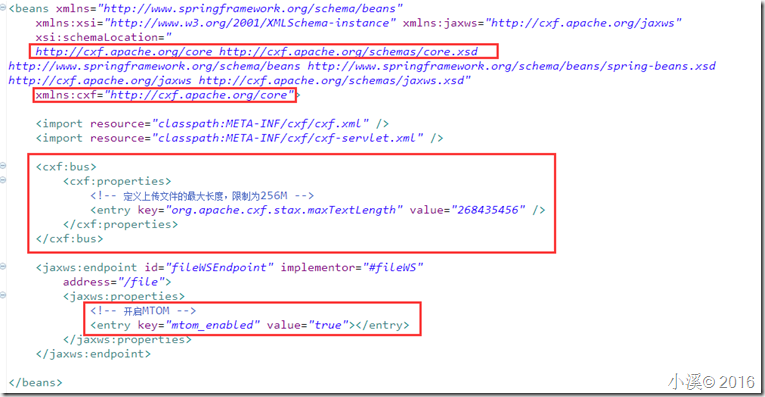
<beans xmlns="http://www.springframework.org/schema/beans"

    xmlns:xsi="http://www.w3.org/2001/XMLSchema-instance" xmlns:jaxws="http://cxf.apache.org/jaxws"

    xsi:schemaLocation="

    http://cxf.apache.org/core http://cxf.apache.org/schemas/core.xsd

http://www.springframework.org/schema/beans http://www.springframework.org/schema/beans/spring-beans.xsd

http://cxf.apache.org/jaxws http://cxf.apache.org/schemas/jaxws.xsd"

    xmlns:cxf="http://cxf.apache.org/core">

    <import resource="classpath:META-INF/cxf/cxf.xml" />

    <import resource="classpath:META-INF/cxf/cxf-servlet.xml" />

    <cxf:bus>

        <cxf:properties>

            <!-- 定义上传文件的最大长度,限制为256M -->

            <entry key="org.apache.cxf.stax.maxTextLength" value="268435456" />

        </cxf:properties>

    </cxf:bus>

    <jaxws:endpoint id="fileWSEndpoint" implementor="#fileWS"

        address="/file">

        <jaxws:properties>

            <!-- 开启MTOM -->

            <entry key="mtom_enabled" value="true"></entry>

        </jaxws:properties>

    </jaxws:endpoint>

</beans>
更多CXF配置,可参见:https://cxf.apache.org/docs/security.html。
4.生成客户端代码
d:\apache-cxf-2.7.6\bin\wsdl2java.bat -frontend jaxws21 -p com..test.webservice.file -client http://localhost:9080/filemark/webservice/file?wsdl
5.根据自动上传的代码上传文件测试
/**

 * Please modify this class to meet your needs

 * This class is not complete

 */

import java.io.File;

import java.net.URL;

import javax.activation.DataHandler;

import javax.activation.DataSource;

import javax.activation.FileDataSource;

import javax.xml.namespace.QName;

/**

 * This class was generated by Apache CXF 2.7.6

 * 2016-11-10T18:37:44.270+08:00

 * Generated source version: 2.7.6

 *

 */

public final class FileWS_FileWSImplPort_Client {

    private static final QName SERVICE_NAME = new QName("http://upload.serviceimpl.bwda.net/", "FileWSImplService");

    private FileWS_FileWSImplPort_Client() {

    }

    public static void main(String args[]) throws java.lang.Exception {

        URL wsdlURL = FileWSImplService.WSDL_LOCATION;

        FileWSImplService ss = new FileWSImplService(wsdlURL, SERVICE_NAME);

        FileWS port = ss.getFileWSImplPort();

        {

        System.out.println("Invoking upload...");

        net.bwda.Test.webservice.CxfFileWrapper _upload_file = new CxfFileWrapper();

        _upload_file.setFileName("test.csv");

        _upload_file.setFileExtension("csv");

        DataSource source = new FileDataSource(new File("d:\\test.csv"));

        _upload_file.setFile(new DataHandler(source));

        boolean _upload__return = port.upload(_upload_file);

        System.out.println("upload.result=" + _upload__return);

        }

        System.exit(0);

    }

}
CXF:通过WebService上传文件,包括大文件的处理的更多相关文章
- 使用SAS和JavaScript前端上传Azure Bolb大文件
问题描述: Azure Storage Rest API提供了对于大文件分块上传方法,分别使用Put Block和Put Block List实现相关功能 参考链接: Uploading Large ...
- 如何免费上传4G以上大文件至百度云网盘
百度云网盘的容量高达2048G,因而如今使用百度云网盘的用户也越来越多, 但是百度云中如果要上传超过4G的大文件,必须要升级VIP才行,但这需要收费.那么,超过4G以上的大文件我们该怎样上传到百度云呢 ...
- ASPCMS不能上传2M以上大文件修改!
\admin_aspcms\editor\upload.asp修改80行左右maxattachsize=xxxxxxxx'最大上传大小,默认是2M前提是IIS上传大小已修 其他有关IIS方面的修改: ...
- git上传超过100m大文件
1.git出错如下错误时 执行如下可解决错误: git rm --cache '大文件路径' git commit --amend -CHEAD git push 2.当必须上传大文件时.需借助git ...
- 精讲RestTemplate第6篇-文件上传下载与大文件流式下载
本文是精讲RestTemplate第6篇,前篇的blog访问地址如下: 精讲RestTemplate第1篇-在Spring或非Spring环境下如何使用 精讲RestTemplate第2篇-多种底层H ...
- 20160113006 asp.net实现ftp上传代码(解决大文件上传问题)
using System;using System.Configuration;using System.Data;using System.Linq;using System.Web;using S ...
- 居于H5的多文件、大文件、多线程上传解决方案
文件上传在web应用中是比较常见的功能,前段时间做了一个多文件.大文件.多线程文件上传的功能,使用效果还不错,总结分享下. 一. 功能性需求与非功能性需求 要求操作便利,一次选择多个文件进行上传: 支 ...
- 前端上传视频、图片、文件等大文件 组件Plupload使用指南
demo:https://blog.csdn.net/qq_30100043/article/details/78491993 Plupload上传插件中文帮助文档网址:http://www.phpi ...
- Delphi调用JAVA的WebService上传XML文件(XE10.2+WIN764)
相关资料:1.http://blog.csdn.net/luojianfeng/article/details/512198902.http://blog.csdn.net/avsuper/artic ...
随机推荐
- jQuery.Deferred 源码分析
作者:禅楼望月(http://www.cnblogs.com/yaoyinglong ) 1 引子 观察者模式是我们日常开发中经常用的模式.这个模式由两个主要部分组成:发布者和观察者.通过观察者模式, ...
- 使用Spark分析拉勾网招聘信息(三): BMR 入门
简述 本文,意在以最小的篇幅,来帮助对大数据和Spark感兴趣的小伙伴,能尽快搭建一个可用的Spark开发环境.力求言简意赅.文章,不敢自称BMR的最佳实践,但绝对可以帮助初学者,迅速入门,能够专心于 ...
- 局部页面传值Model
1:新建个局部页面,将这里页面的Model数据传递过去,在局部页面进行和一般页面一样的操作就行. 这里和HTML.Action不一样,对于HTML.action来说,它是新建了一个action来进行传 ...
- 优化MySchool数据库总结
- LeetCode - 207. Course Schedule
207. Course Schedule Problem's Link ---------------------------------------------------------------- ...
- 使用MVVM-Sidekick开发Universal App(一)
终于要迈进Universal的大坑了,还有点小激动呢. CurrencyExchanger 掌中汇率是我前几年发布在Windows Phone商店中的一个应用,当时是WP7版本,下载链接:http:/ ...
- jquery 进阶
1.0 jquery的ajax同步和异步区别 2.0 cdnjquery加载失败加载本地 <script type="text/javascript" src="/ ...
- Entity Framework 实体框架的形成之旅--基于泛型的仓储模式的实体框架(1)
很久没有写博客了,一些读者也经常问问一些问题,不过最近我确实也很忙,除了处理日常工作外,平常主要的时间也花在了继续研究微软的实体框架(EntityFramework)方面了.这个实体框架加入了很多特性 ...
- WCF双工通讯以及客户端间的间接通讯
由于学习计划安排不当,对WCF的认知一直停滞不前,最近工作上又用回了WCF,重拾一下,看到蒋老师介绍双工通讯的博文,实践一下,积累一下.原想着WCF的双工通讯就是原本的客户端能调用服务端的方法之余,服 ...
- Java总结篇系列:Java多线程(三)
本文主要接着前面多线程的两篇文章总结Java多线程中的线程安全问题. 一.一个典型的Java线程安全例子 public class ThreadTest { public static void ma ...