
如何制定tomcat部署时自己定义的docBase路径
装了tomcat后发现tomcat安装在系统跟路径地下,每次部署的时候挺麻烦的,于是想指定一个自己定义的应用部署的路径:
以下是如何指定,相关文档请查看https://tomcat.apache.org/tomcat-4.1-doc/appdev/deployment.html
注意你的tomcat的版本,我在网上查的时候由于自己的版本是7.0.6,而部署的方法有几个版本,3.1和4.1就不一样
先讲我自己的是7.0.6版本部署方式是打开tomcat的根目录在conf文件夹底下修改server.xml文件在 最下面的</Host>标签上面添加一个指定docBase路径的
context flag:如
<Context path="" docBase="~/Documents/javaProject/webapps/" reloadable="true" />
注意两个小细节:
一个是指定docBase时不要忘记了这个docBase是一个文件夹所以如上webapps后面要加上/
另外一个是docBase下要有一个WEB-INF文件夹结构里面的结构和tomcat跟目录底下的webapps的一致。
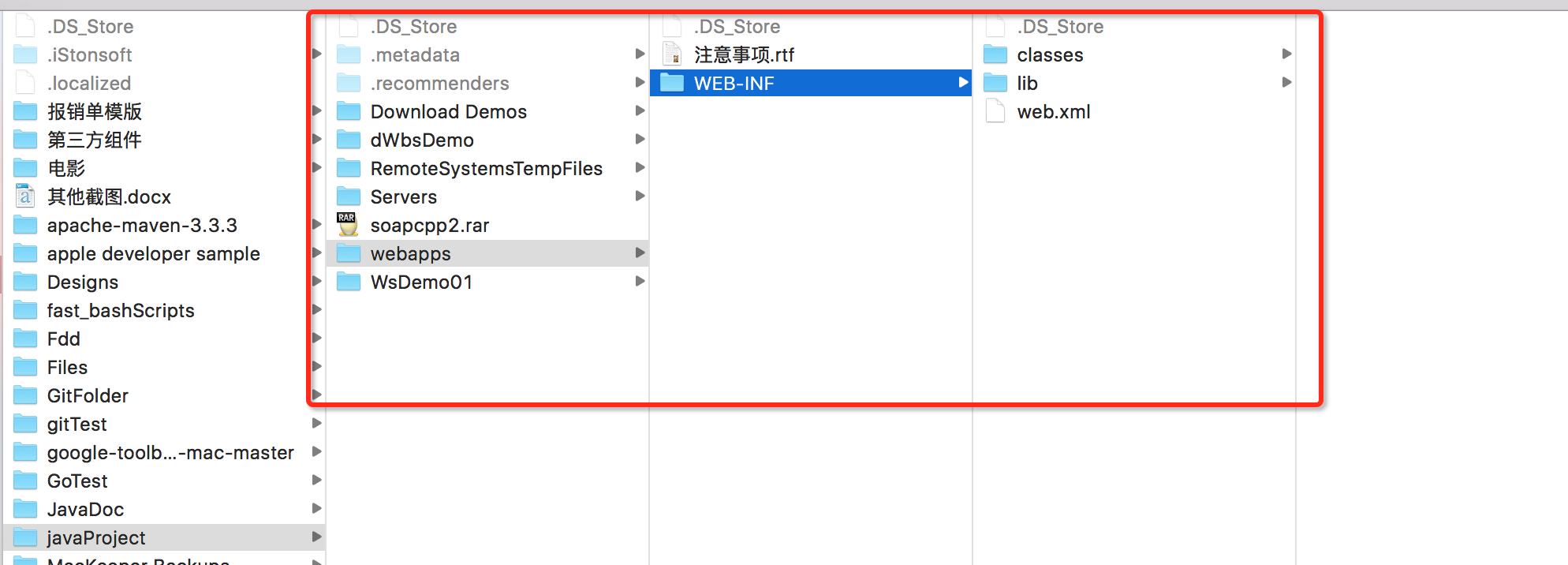
这样以后你的java class 和application 依赖的jar包就可以分别放在这个WEB-INF文件夹底下的class和lib下了
现在讲讲3.1版本的tomcat是怎么弄的:
3.1版本的tomcat也是添加context flag,但是添加的位置是在tomcatroot/conf文件夹下的apps.xml中,由于有可能这个文件夹底下没有这个文件
这时候你需要自己创建一个这样的文件创建完后再往里面添加
  <?xml version="1.0" encoding="ISO-8859-1"?>

    <webapps>

 <Context path="" docBase="~/Documents/javaProject/webapps/"  reloadable="true" />

    </webapps>
这样就好了(由于我的是7.0.6版本所以没有试成功)

补充一下 用tomcat部署的应用可以指定的几个属性(都是用context flag来配置的)

path:这个是指定访问哪个web应用用的
docBase:指定你发布的应用程序在哪里
debug:跟tomcat的log相关
reloadble:设置为true,tomcat会自动检测你WEB-INF/class下的class文件或WEB-INF/lib中的jar包是否有新的更新,如果有的话tomcat会自动关闭并将更新加载完后重启(大概意思是这样的)

trusted:访问tomcat内部类(一般情况是管理员对tomcat的操作)

翻译都是什么鬼(见原文:)
- path. The context path for your application, which is the prefix of a request URI that tells Tomcat which application should be used to process this request. For example, if you set your path to "/catalog", any request URI beginning with "/catalog" will be processed by this application. This attribute is requrired, and must start with a slash ('/') character.
- docBase. The document root directory for this web application. This can be a relative path (relative to the directory in which Tomcat is started), or an absolute path, to the directory containing your app. On a Windows platform, you MUST use the drive prefix and a colon when specifying an absolute path. This attribute is required.
- debug. Debugging detail level (from "0" to "9") that defines how verbose Tomcat's logging messages will be when your application is initialized, started, and shut down. The default value is "0" (minimal logging) if you do not specify a different value.
- reloadable. Set to "true" if you want Tomcat to watch for changes to Java class files in the WEB-INF/classes directory, or JAR files in the WEB-INF/lib directory. If such a change is noted, Tomcat will shut down and reload your application automatically, picking up these changes. The default value ("false") means that such changes will be ignored. NOTE: While this feature is very useful during development, it requires overhead to do the checking. This capability should generally not be used in deployed production applications.
- trusted. Set to "true" if this application requires access to Tomcat 3.3 internal classes. Normally, this will only be required for the administration application that ships with Tomcat.
如何制定tomcat部署时自己定义的docBase路径的更多相关文章
- Tomcat部署时war和war exploded的区别
转自徐刘根的Tomcat部署时war和war exploded区别以及平时踩得坑 一.war和war exploded的区别 在使用IDEA开发项目的时候,部署Tomcat的时候通常会出现下边的情况: ...
- tomcat 部署时修改服务器时间
tomcat 在部署时修改了服务器时间 会出现以下状况 1.session 失效 2.修改的文件不会正确被tomcat热部署进去
- IDEA Tomcat部署时war和war exploded区别以及平时踩得坑
war和war exploded的区别 在使用IDEA开发项目的时候,部署Tomcat的时候通常会出现下边的情况: 是选择war还是war exploded 这里首先看一下他们两个的区别: war模式 ...
- 170223、Tomcat部署时war和war exploded区别以及平时踩得坑
war和war exploded的区别 在使用IDEA开发项目的时候,部署Tomcat的时候通常会出现下边的情况: 是选择war还是war exploded 这里首先看一下他们两个的区别: war模式 ...
- Tomcat部署时war和war exploded区别及验证
war和war exploded的区别 在使用IDEA开发项目的时候,部署Tomcat的时候通常会出现下边的情况: 是选择war还是war exploded 这里首先看一下他们两个的区别: war模式 ...
- IDEA中Tomcat部署时war和war exploded区别
原理说明 war模式:将WEB工程以包的形式上传到服务器 :war exploded模式:将WEB工程以当前文件夹的位置关系上传到服务器: 含义解释 war模式这种可以称之为是发布模式,看名字也知道, ...
- Tomcat部署时war和war exploded区别以及平时踩得坑
war和war exploded的区别 在使用IDEA开发项目的时候,部署Tomcat的时候通常会出现下边的情况: 是选择war还是war exploded 这里首先看一下他们两个的区别: war模式 ...
- Tomcat部署时war和war exploded区别以及打包后路径问题
感谢原文作者:keven_deng 原文链接:https://blog.csdn.net/keven_deng/article/details/104830664 war和war exploded的区 ...
- JDK和Tomcat部署时,版本不同的问题解决
问题: 在以Tomcat作为Web容器,启动java Web工程时,遇到下面问题:org.eclipse.jdt.internal.compiler.classfmt.ClassFormatExcep ...
随机推荐
- Laravel4中的Validator
不管写接口还是写web页面,实质都是传入参数,然后进行业务逻辑,然后再输出具体内容.所以,对参数的验证是不可避免的一个环节,比如传过来的email是不是为空,是不是合法的email格式?laravel ...
- Socket开发框架之消息的回调处理
在一般的Socket应用里面,很多时候数据的发送和接收是分开处理的,也就是我们发送一个消息,不知道这个请求消息什么时候得到应答消息,而且收到对应的应答消息的时候,如果操作界面的内容,也是需要特别处理的 ...
- asp.net后台注册js的四种方法
1. 用Response.Write方法 代码如下: Response.Write("<script type='text/javascript'>alert("kel ...
- WinForm对话框
WinForm 对话框控件colorDialog - 颜色选择对话框 使用代码如下: private void 字体颜色ToolStripMenuItem_Click(object sender, E ...
- QTableWidget的美化
FriendTable->setFrameShape(QFrame::NoFrame); //设置边框 FriendTable->setHorizontalHeaderLabels( ...
- Liskov替换原则
一.定义 子类型必须能替换掉它们的基类型 二.提取公共部分的方法代替继承 如果一组类都支持一个公共的职责,那么它们应该从一个公共的超类继承该职责. 如果公共的超类不存在,那么就创建一个,并把公共的职责 ...
- ASP.NET MVC SSO单点登录设计与实现(转载)
实验环境配置 HOST文件配置如下: 127.0.0.1 app.com127.0.0.1 sso.com IIS配置如下: 应用程序池采用.Net Framework 4.0 注意IIS绑定的域名, ...
- SSH实例(2)
在WebContent\WEB-INF\下新建两个文件:applicationContext.xml和web.xml. web.xml: <?xml version="1.0" ...
- Using Recursive Common table expressions to represent Tree structures
http://www.postgresonline.com/journal/archives/131-Using-Recursive-Common-table-expressions-to-repre ...
- FireMonkey ListView 自动计算行高
说明:展示 ListView 视其每一行 Item 的 Detail 字串长度自动调整高度(可每行高度不同). 适用:Delphi XE7 / XE8 源码下载:[原创]ListView_自动计算行高 ...