
android Fragment 使用
一 、Fragment的理解
Fragment 与activity 相似,但比activity 多出几个方法 ,Fragment的生命周期小于activity
一个Activity 中可以包含多个Fragment ,fragment 就像一个个积木,可以组合成一个大的玩具Activity。
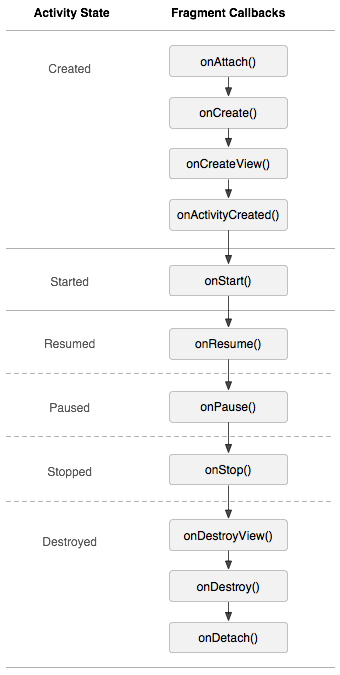
activity oncreate onstart onResume onPause onstop ondestroy onRestart
1. onAttach() 当Fragment和Activity建立关联的时候调用。
2. onCreateView() 为Fragment创建视图(加载布局)时调用。
3. onActivityCreated() 确保与Fragment相关联的Activity一定已经创建完毕的时候调用。
4. onDestroyView() 当与Fragment关联的视图被移除的时候调用。
5. onDetach() 当Fragment和Activity解除关联的时候调用。
二、 Fragment 实际使用例子
1、 准备 一个xml 文件
首先,创建一个工程,叫做FragmentTest,然后创建一个left_fragment.xml文件,代码如下:
  <?xml version="1.0" encoding="utf-8"?>

<LinearLayout xmlns:android="http://schemas.android.com/apk/res/android"

    android:layout_width="match_parent"

    android:layout_height="match_parent">

        <Button

            android:id="@+id/button"

            android:layout_width="wrap_content"

            android:layout_height="wrap_content"

            android:layout_gravity="center_horizontal"

            android:text="点我"

            />

</LinearLayout>
2、创建一个LeftFragment 类 继承于 Fragment 类 ,包选择 android.app.Fragment 。 V4 下面的Fragment是为了兼容低版本的安卓系统。
重写 oncreateView() 方法,将 left_fragment.xml 文件添加到布局中
 public class LeftFragment extends Fragment {

     @Nullable

     @Override

     public View onCreateView(LayoutInflater inflater, ViewGroup container, Bundle savedInstanceState) {

         View view = inflater.inflate(R.layout.left_fragment, container, false);

         return view;

     }

 }
同理,在准备right_fragment
3、 在Activity 中加入fragment 。同样,首先建立 activity_main.xml 文件
 ?xml version="1.0" encoding="utf-8"?>

 <LinearLayout xmlns:android="http://schemas.android.com/apk/res/android"

     xmlns:tools="http://schemas.android.com/tools"

     android:layout_width="match_parent"

     android:layout_height="match_parent"

  android:orientation="horizontal">

    <fragment

        android:id="@+id/left_fragment"

        android:name="com.example.fragmenttest.LeftFragment"

        android:layout_width="0dp"

        android:layout_weight="1"

        android:layout_height="match_parent"

        ></fragment>

     <FrameLayout

         android:id="@+id/right_framelayout"

         android:layout_width="0dp"

         android:layout_height="match_parent"

         android:layout_weight="1" >

         <fragment

             android:id="@+id/right_fragment"

             android:name="com.example.fragmenttest.RightFragment"

             android:layout_width="match_parent"

             android:layout_height="match_parent"

             ></fragment>

     </FrameLayout>

 </LinearLayout>
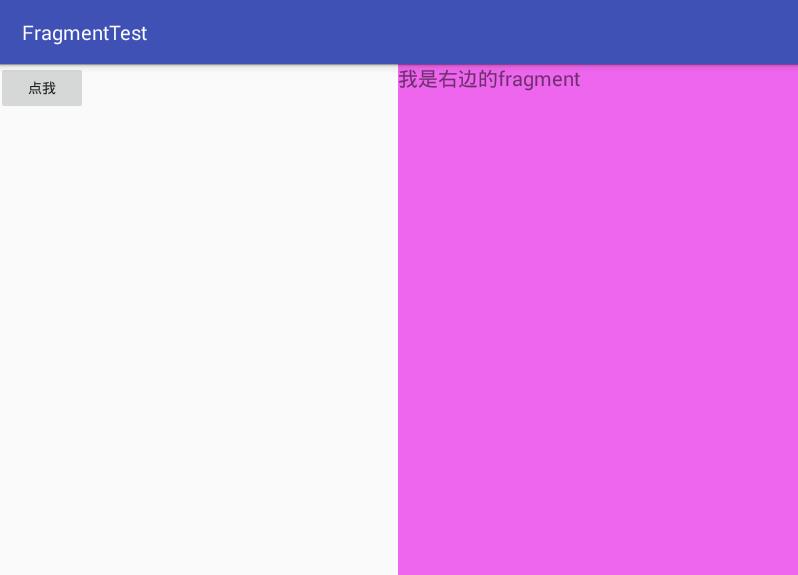
4、运行程序 ,主页面加载完 activity_main.xml 会显示如下界面。
三、动态加载替换 fragment
上面的例子,我们是在activity_main.xml文件中写死了fragment
1、还是准备好xml文件 other_fragment.xml
 <?xml version="1.0" encoding="utf-8"?>

 <LinearLayout xmlns:android="http://schemas.android.com/apk/res/android"

     android:layout_width="match_parent"

     android:background="#CFEDDB"

     android:layout_height="match_parent">

         <TextView

             android:layout_width="wrap_content"

             android:layout_height="wrap_content"

             android:layout_gravity="center_horizontal"

             android:textSize="20sp"

             android:text="我是另一个的fragment"

             />

 </LinearLayout>
2、Othe_Fragment 类
1 public class LeftFragment extends Fragment {

2     @Nullable

3     @Override

4     public View onCreateView(LayoutInflater inflater, ViewGroup container, Bundle savedInstanceState) {

5         View view = inflater.inflate(R.layout.other_fragment, container, false);

6         return view;

7     }

8 }
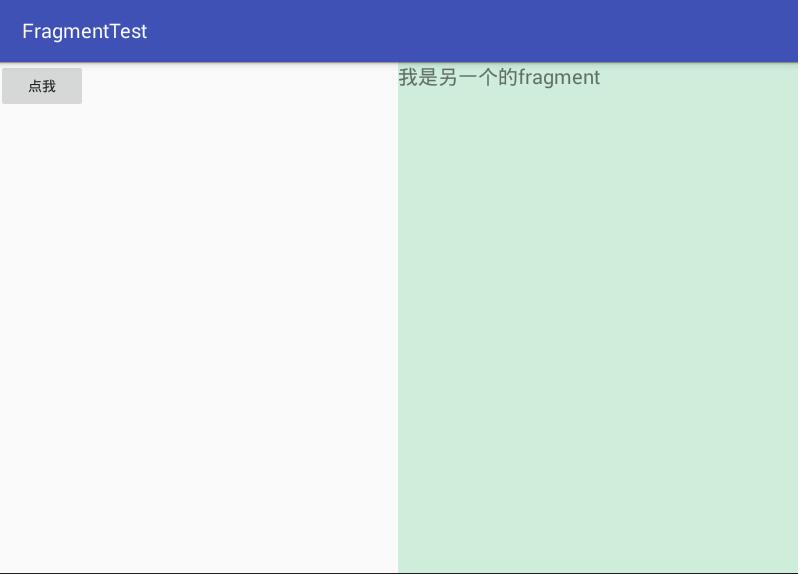
3、 MainActivity中给按钮设置点击事件,动态添加Fragment的代码逻辑都放在了点击事件中。
  private Button button;

     @Override

     protected void onCreate(Bundle savedInstanceState) {

         super.onCreate(savedInstanceState);

         setContentView(R.layout.activity_main);

         button = (Button) this.findViewById(R.id.button);

         button.setOnClickListener(new View.OnClickListener() {

             @Override

             public void onClick(View v) {

                 //总共分5步

                 //创建fragment对象

                 OtherFragment otherFragment = new OtherFragment();

                 //获取FragmentManager管理器

                 FragmentManager fragmentManager = getFragmentManager();

                 //开启事务

                 FragmentTransaction fragmentTransaction = fragmentManager.beginTransaction();

                 //替换碎片文件

                 fragmentTransaction.replace(R.id.right_framelayout,otherFragment);

                 //提交事务

                 fragmentTransaction.commit();

             }

         });

     }
运行如下
android Fragment 使用的更多相关文章
- 【Android自学日记】【转】Android Fragment 真正的完全解析(下)
上篇博客中已经介绍了Fragment产生原因,以及一些基本的用法和各种API,如果你还不了解,请看:Android Fragment 真正的完全解析(上). 本篇将介绍上篇博客提到的:如何管理Frag ...
- Android Fragment使用(四) Toolbar使用及Fragment中的Toolbar处理
Toolbar作为ActionBar使用介绍 本文介绍了在Android中将Toolbar作为ActionBar使用的方法. 并且介绍了在Fragment和嵌套Fragment中使用Toolbar作为 ...
- Android Fragment使用(三) Activity, Fragment, WebView的状态保存和恢复
Android中的状态保存和恢复 Android中的状态保存和恢复, 包括Activity和Fragment以及其中View的状态处理. Activity的状态除了其中的View和Fragment的状 ...
- Android Fragment使用(二) 嵌套Fragments (Nested Fragments) 的使用及常见错误
嵌套Fragment的使用及常见错误 嵌套Fragments (Nested Fragments), 是在Fragment内部又添加Fragment. 使用时, 主要要依靠宿主Fragment的 ge ...
- Android Fragment使用(一) 基础篇 温故知新
Fragment使用的基本知识点总结, 包括Fragment的添加, 参数传递和通信, 生命周期和各种操作. Fragment使用基础 Fragment添加 方法一: 布局里的标签 标识符: tag, ...
- Android Fragment应用实战
现在Fragment的应用真的是越来越广泛了,之前Android在3.0版本加入Fragment的时候,主要是为了解决Android Pad屏幕比较大,空间不能充分利用的问题,但现在即使只是在手机上, ...
- Android Fragment 真正的完全解析(下)
转载请标明出处:http://blog.csdn.net/lmj623565791/article/details/37992017 上篇博客中已经介绍了Fragment产生原因,以及一些基本的用法和 ...
- Android Fragment
1.Fragment必须是依存与Activity而存在的,因此Activity的生命周期会直接影响到Fragment的生命周期. 2.Fragment 生命周期: 首页 最新文章 在线课程 业界 开发 ...
- Android Fragment应用实战,使用碎片向ActivityGroup说再见
转载请注明出处:http://blog.csdn.net/guolin_blog/article/details/13171191 现在Fragment的应用真的是越来越广泛了,之前Android在3 ...
- Android Fragment完全解析
转载请注明出处:http://blog.csdn.net/guolin_blog/article/details/8881711 我们都知道,Android上的界面展示都是通过Activity实现的, ...
随机推荐
- docker好文收藏
深入浅出Docker(一):Docker核心技术预览 2. 核心技术预览 Docker核心是一个操作系统级虚拟化方法, 理解起来可能并不像VM那样直观.我们从虚拟化方法的四个方面:隔离性.可配额/可度 ...
- ssh无密码通信设置
■单向登陆配置:1.在本地机器中的~/.ssh/目录下执行下命令#ssh-keygen -t dsa然后全部回车,采用默认值.生成了一对密钥,id_dsa和id_dsa.pub,存放在用户目录的~/. ...
- EXC_ARM_DA_ALIGN
ios 版本上的问题 armv7 ipad2 int64 t = *(int64*)pBuff; 如果pBuff不是8字节对齐的地址就 crash 变通的方法是通过memcpy __sync_fe ...
- Python中的浅拷贝 深拷贝
浅拷贝只拷贝父对象,子对象的地址空间不改变,包括下面三种: 1. copy 从下面的例子可以看出对象c从a拷贝,当对象a增加一个列表元素之后,c对象没有改变, 而当对象a中的子列表改变时,对象c的子列 ...
- J2EE环境配置与工具使用
一.Java SDK安装 J2SE最新版安装地址:http://www.oracle.com/technetwork/java/javase/downloads/index.html,包括JDK和JR ...
- c++模板函数实例化的偏序机制
一:废话 今天在stackoverflow上看到一个关于c++模板specialization的问题: http://stackoverflow.com/questions/18283851/temp ...
- UISegmentedControl 的使用
/** 设置选择器 */ - (void)setUpSegmentCtr { UISegmentedControl *segmentCtr = [[UISegmentedControl alloc] ...
- iis配置js支持读取json文件配置
默认情况下,iis不支持解析.json文件,这就需要我们自己在iis下配置方法一:iis配置1.点击开始菜单选择控制面板: 2.控制面板内点击管理工具,选择Internet信息服务(IIS)管理器. ...
- js事件监听/鼠标滚轮/行为/冒泡/键盘的兼容性写法
addEvent:function(el,type,fn,capture) { if (window.addEventListener) { if (type === "mousewheel ...
- apache 集成ssl 配置 https 证书
http://zhangge.net/4890.html 后面遇到 问题点一: it`s work 是因为没配置ssl访问站点路径 /alidata/server/httpd/conf/extra/ ...