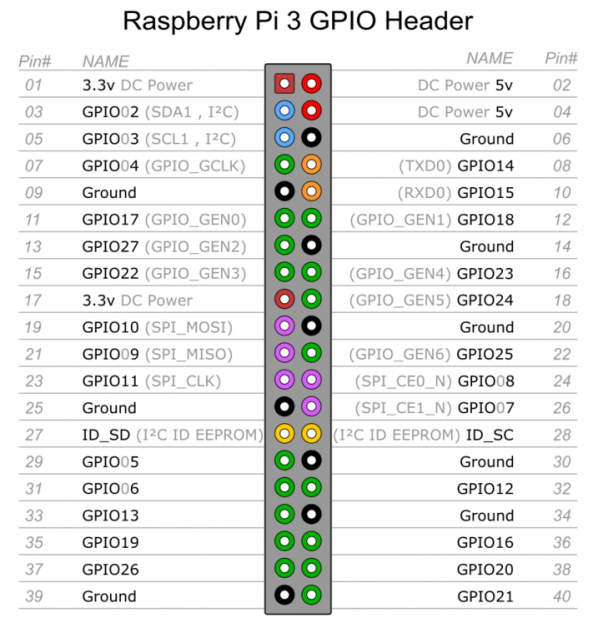
树莓派3B针脚说明

LCD1602接线说明

VSS,接地
VDD,接5V电源
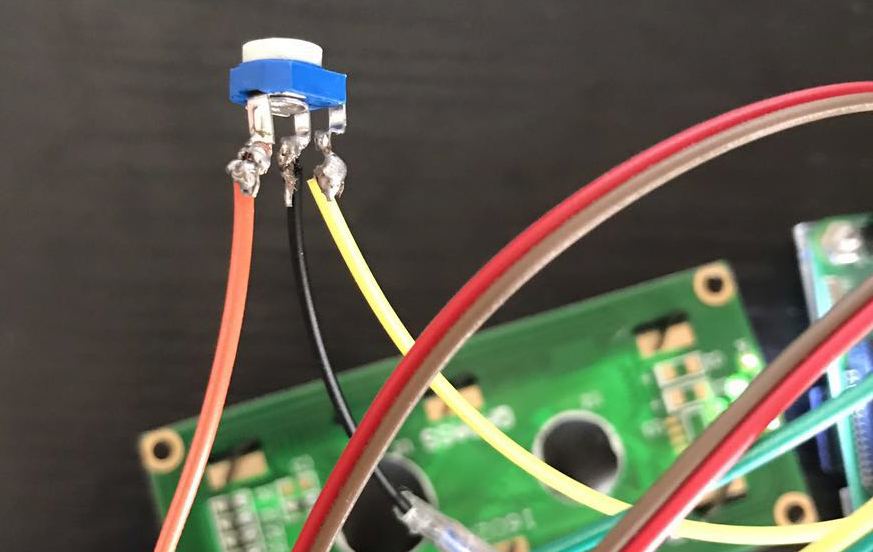
VO,液晶对比度调节,接电位器中间的引脚,电位器两边的引脚分别接5V和接地。
RS,寄存器选择,接GPIO14
RW,读写选择,接地,表示写模式
EN,使能信号,接GPIO15
D0,数据位0,4位工作模式下不用,不接
D1,数据位1,4位工作模式下不用,不接
D2,数据位2,4位工作模式下不用,不接
D3,数据位3,4位工作模式下不用,不接
D4,数据位4,接GPIO17
D5,数据位5,接GPIO18
D6,数据位6,接GPIO27
D7,数据位7,接GPIO22
A,液晶屏背光+,接5V
K,液晶屏背光-,接地

调整电位器

  因为缺少1个5V的线,直接破皮拧一根进去就行,电位器调整到屏幕显示正常的对比度即可,第一次玩烙铁,焊的略丑…
lcd1602.py
#!/usr/bin/python
 
#
# based on code from lrvick and LiquidCrystal
# lrvic - https://github.com/lrvick/raspi-hd44780/blob/master/hd44780.py
# LiquidCrystal - https://github.com/arduino/Arduino/blob/master/libraries/LiquidCrystal/LiquidCrystal.cpp
#
 
from time import sleep
 
class lcd1602:
 
# commands
LCD_CLEARDISPLAY = 0x01
LCD_RETURNHOME = 0x02
LCD_ENTRYMODESET = 0x04
LCD_DISPLAYCONTROL = 0x08
LCD_CURSORSHIFT = 0x10
LCD_FUNCTIONSET = 0x20
LCD_SETCGRAMADDR = 0x40
LCD_SETDDRAMADDR = 0x80
 
# flags for display entry mode
LCD_ENTRYRIGHT = 0x00
LCD_ENTRYLEFT = 0x02
LCD_ENTRYSHIFTINCREMENT = 0x01
LCD_ENTRYSHIFTDECREMENT = 0x00
 
# flags for display on/off control
LCD_DISPLAYON = 0x04
LCD_DISPLAYOFF = 0x00
LCD_CURSORON = 0x02
LCD_CURSOROFF = 0x00
LCD_BLINKON = 0x01
LCD_BLINKOFF = 0x00
 
# flags for display/cursor shift
LCD_DISPLAYMOVE = 0x08
LCD_CURSORMOVE = 0x00
 
# flags for display/cursor shift
LCD_DISPLAYMOVE = 0x08
LCD_CURSORMOVE = 0x00
LCD_MOVERIGHT = 0x04
LCD_MOVELEFT = 0x00
 
# flags for function set
LCD_8BITMODE = 0x10
LCD_4BITMODE = 0x00
LCD_2LINE = 0x08
LCD_1LINE = 0x00
LCD_5x10DOTS = 0x04
LCD_5x8DOTS = 0x00


def __init__(self, pin_rs=14, pin_e=15, pins_db=[17, 18, 27, 22], GPIO = None):
# Emulate the old behavior of using RPi.GPIO if we haven't been given
# an explicit GPIO interface to use
if not GPIO:
import RPi.GPIO as GPIO
self.GPIO = GPIO
self.pin_rs = pin_rs
self.pin_e = pin_e
self.pins_db = pins_db
 
self.GPIO.setmode(GPIO.BCM)
self.GPIO.setwarnings(False)
self.GPIO.setup(self.pin_e, GPIO.OUT)
self.GPIO.setup(self.pin_rs, GPIO.OUT)
 
for pin in self.pins_db:
self.GPIO.setup(pin, GPIO.OUT)
 
self.write4bits(0x33) # initialization
self.write4bits(0x32) # initialization
self.write4bits(0x28) # 2 line 5x7 matrix
self.write4bits(0x0C) # turn cursor off 0x0E to enable cursor
self.write4bits(0x06) # shift cursor right
 
self.displaycontrol = self.LCD_DISPLAYON | self.LCD_CURSOROFF | self.LCD_BLINKOFF
 
self.displayfunction = self.LCD_4BITMODE | self.LCD_1LINE | self.LCD_5x8DOTS
self.displayfunction |= self.LCD_2LINE
 
""" Initialize to default text direction (for romance languages) """
self.displaymode = self.LCD_ENTRYLEFT | self.LCD_ENTRYSHIFTDECREMENT
self.write4bits(self.LCD_ENTRYMODESET | self.displaymode) # set the entry mode
 
self.clear()
 
 
def begin(self, cols, lines):
 
if (lines > 1):
self.numlines = lines
self.displayfunction |= self.LCD_2LINE
self.currline = 0
 
 
def home(self):
 
self.write4bits(self.LCD_RETURNHOME) # set cursor position to zero
self.delayMicroseconds(3000) # this command takes a long time!
 
 
def clear(self):
 
self.write4bits(self.LCD_CLEARDISPLAY) # command to clear display
self.delayMicroseconds(3000) # 3000 microsecond sleep, clearing the display takes a long time
 
 
def setCursor(self, col, row):
 
self.row_offsets = [ 0x00, 0x40, 0x14, 0x54 ]
 
if ( row > self.numlines ):
row = self.numlines - 1 # we count rows starting w/0
 
self.write4bits(self.LCD_SETDDRAMADDR | (col + self.row_offsets[row]))
 
 
def noDisplay(self):
""" Turn the display off (quickly) """
 
self.displaycontrol &= ~self.LCD_DISPLAYON
self.write4bits(self.LCD_DISPLAYCONTROL | self.displaycontrol)
 
 
def display(self):
""" Turn the display on (quickly) """
 
self.displaycontrol |= self.LCD_DISPLAYON
self.write4bits(self.LCD_DISPLAYCONTROL | self.displaycontrol)
 
 
def noCursor(self):
""" Turns the underline cursor on/off """
 
self.displaycontrol &= ~self.LCD_CURSORON
self.write4bits(self.LCD_DISPLAYCONTROL | self.displaycontrol)
 
 
def cursor(self):
""" Cursor On """
 
self.displaycontrol |= self.LCD_CURSORON
self.write4bits(self.LCD_DISPLAYCONTROL | self.displaycontrol)
 
 
def noBlink(self):
""" Turn on and off the blinking cursor """
 
self.displaycontrol &= ~self.LCD_BLINKON
self.write4bits(self.LCD_DISPLAYCONTROL | self.displaycontrol)
 
 
def noBlink(self):
""" Turn on and off the blinking cursor """
 
self.displaycontrol &= ~self.LCD_BLINKON
self.write4bits(self.LCD_DISPLAYCONTROL | self.displaycontrol)
 
 
def DisplayLeft(self):
""" These commands scroll the display without changing the RAM """
 
self.write4bits(self.LCD_CURSORSHIFT | self.LCD_DISPLAYMOVE | self.LCD_MOVELEFT)
 
 
def scrollDisplayRight(self):
""" These commands scroll the display without changing the RAM """
 
self.write4bits(self.LCD_CURSORSHIFT | self.LCD_DISPLAYMOVE | self.LCD_MOVERIGHT);
 
 
def leftToRight(self):
""" This is for text that flows Left to Right """
 
self.displaymode |= self.LCD_ENTRYLEFT
self.write4bits(self.LCD_ENTRYMODESET | self.displaymode);
 
 
def rightToLeft(self):
""" This is for text that flows Right to Left """
self.displaymode &= ~self.LCD_ENTRYLEFT
self.write4bits(self.LCD_ENTRYMODESET | self.displaymode)
 
 
def autoscroll(self):
""" This will 'right justify' text from the cursor """
 
self.displaymode |= self.LCD_ENTRYSHIFTINCREMENT
self.write4bits(self.LCD_ENTRYMODESET | self.displaymode)
 
 
def noAutoscroll(self):
""" This will 'left justify' text from the cursor """
 
self.displaymode &= ~self.LCD_ENTRYSHIFTINCREMENT
self.write4bits(self.LCD_ENTRYMODESET | self.displaymode)
 
 
def write4bits(self, bits, char_mode=False):
""" Send command to LCD """
 
self.delayMicroseconds(1000) # 1000 microsecond sleep
 
bits=bin(bits)[2:].zfill(8)
 
self.GPIO.output(self.pin_rs, char_mode)
 
for pin in self.pins_db:
self.GPIO.output(pin, False)
 
for i in range(4):
if bits[i] == "1":
self.GPIO.output(self.pins_db[::-1][i], True)
 
self.pulseEnable()
 
for pin in self.pins_db:
self.GPIO.output(pin, False)
 
for i in range(4,8):
if bits[i] == "1":
self.GPIO.output(self.pins_db[::-1][i-4], True)
 
self.pulseEnable()
 
 
def delayMicroseconds(self, microseconds):
seconds = microseconds / float(1000000) # divide microseconds by 1 million for seconds
sleep(seconds)
 
 
def pulseEnable(self):
self.GPIO.output(self.pin_e, False)
self.delayMicroseconds(1) # 1 microsecond pause - enable pulse must be > 450ns
self.GPIO.output(self.pin_e, True)
self.delayMicroseconds(1) # 1 microsecond pause - enable pulse must be > 450ns
self.GPIO.output(self.pin_e, False)
self.delayMicroseconds(1) # commands need > 37us to settle
 
 
def message(self, text):
""" Send string to LCD. Newline wraps to second line"""
 
for char in text:
if char == '\n':
self.write4bits(0xC0) # next line
else:
self.write4bits(ord(char),True)
 
 
if __name__ == '__main__':
 
lcd = lcd1602()
lcd.clear()
lcd.message("hello world!")
1602.py
#!/usr/bin/python
 
from lcd1602 import *
from datetime import *
import commands
 
def get_cpu_temp():
tmp = open('/sys/class/thermal/thermal_zone0/temp')
cpu = tmp.read()
tmp.close()
return '{:.2f}'.format( float(cpu)/1000 ) + ' C'
 
def get_gpu_temp():
tmp = commands.getoutput('vcgencmd measure_temp|awk -F= \'{print $2}\'').replace('\'C','')
gpu = float(tmp)
return '{:.2f}'.format( gpu ) + ' C'
 
def get_time_now():
return datetime.now().strftime(' %H:%M:%S\n %Y-%m-%d')
 
def get_ip_info():
return commands.getoutput('ifconfig wlan0|grep inet|awk -Faddr: \'{print $2}\'|awk \'{print $1}\'')
 
def get_mem_info():
total= commands.getoutput('free -m|grep Mem:|awk \'{print $2}\'')
free = commands.getoutput('free -m|grep cache:|awk \'{print $4}\'')
return 'MEM:\n ' + free +' / '+ total +' M'
 
lcd = lcd1602()
lcd.clear()
 
if __name__ == '__main__':
 
while(1):
lcd.clear()
lcd.message( get_ip_info() )
sleep(5)
 
lcd.clear()
lcd.message( get_time_now() )
sleep(5)
 
lcd.clear()
lcd.message( get_mem_info() )
sleep(5)
 
lcd.clear()
lcd.message( 'CPU: ' + get_cpu_temp()+'\n' )
lcd.message( 'GPU: ' + get_gpu_temp() )
sleep(5)

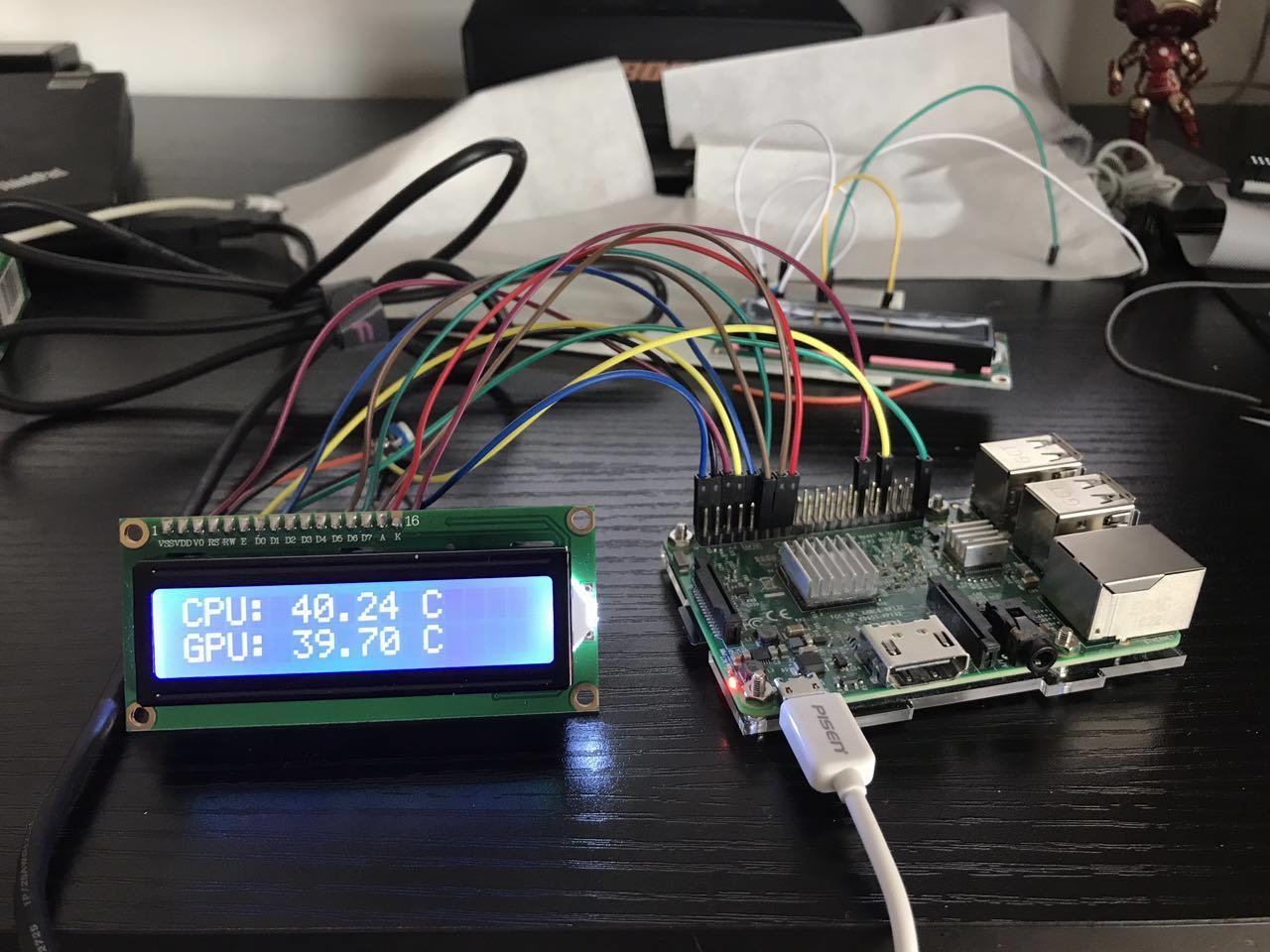
  将以上两个文件保存在同一个目录下,运行1602.py即可打印信息到LCD上。

效果图
参考链接

http://www.cnblogs.com/xiaowuyi/p/4051238.html
https://www.6zou.net/tech/raspberry-pi-lcd1602-system-monitor.html

为树莓派3B添加LCD1602液晶屏的更多相关文章

  1. 树莓派3b添加python时间同步脚本

    树莓派没有电池,因此断电后系统时间会停止,直到你开机后又继续计时,所以会造成系统时间和实际时间有很大的误差. 因为项目需要用到本地时间,精度要求不高不想折腾(如果需要高精度,需要安装ntp),所以考虑 ...

  2. [记录]学习树莓派3B接DHT11和LCD1602和修改树莓派时区

    前提 树莓派系统安装好 apache web 服务器,如未安装,可在树莓派内执行sudo apt-get install apache2 进行安装apache 也可以通过命令获取GPIO信息: gpi ...

  3. 使用Python控制1602液晶屏实时显示时间(附PyCharm远程调试)

    前言 原创文章,转载引用务必注明链接.水平有限,如有疏漏,欢迎指正. 本文介绍一下UP板的GPIO资源使用,以及一个使用Python演示一个简单的demo. 本文使用Markdown写成,为获得更好的 ...

  4. 树莓派3b在rt-thread上移植LittlevGL

    树莓派3b在rt-thread上移植LittlevGL 目录 树莓派3b在rt-thread上移植LittlevGL 1.本文概述 2.资源准备 3.上手体验 4.rt-thread与lvgl进行无缝 ...

  5. s3c2440液晶屏驱动 (内核自带) linux-4.1.24

    自带有一部分驱动的配置信息,只要修改这部分就能支援 不同的液晶屏 - /arch/arm/mach-s3c24xx/mach-smdk2440.c 另一部分在 /drivers/video/fbdev ...

  6. 树莓派3B+(一)

    第一步:安装raspbian系统 介绍:Raspbian是为树莓派设计,基于Debian的操作系统,由一个小团队开发.其不隶属于树莓派基金会,但被列为官方支持的操作系统. 下载地址:https://w ...

  7. ARM40-A5应用——fbset与液晶屏参数的适配【转】

    转自:https://blog.csdn.net/vonchn/article/details/80784579 ARM40-A5应用——fbset与液晶屏参数的适配 2018.6.18 版权声明:本 ...

  8. 树莓派3b安装Nginx和php7和百度语音合成模块

    1.安装sox系统mp3音频播放模块(项目需要) sudo apt-get install lame sudo apt-get install sox sudo apt-get install lib ...

  9. 树莓派3B+首次登陆通过网络

    树莓派3B+默认串口不能登录,即使可使用可需要通过连线方式连接,如何才能直接通过网络ssh登录树莓派呢? 串口问题及使用 树莓派3的UART串口的使用问题,该串口问题的官方反馈及回复请参考这两篇官方博 ...

随机推荐

  1. apscheduler(定时任务) 基于redis持久化配置操作

    apscheduler(定时任务) 基于redis持久化配置操作 安装模块 pip install apscheduler 导入模块配置 ## 配置redis模块 from apscheduler.j ...

  2. uni-app开发经验分享十二: Android平台应用启动时读写手机存储、访问设备信息(如IMEI)等权限策略及提示信息

    Android平台从6.0(API23)开始系统对权限的管理更加严格,所有涉及敏感权限都需要用户授权允许才能获取.因此一些应用基础业务逻辑需要的权限会在应用启动时申请,并引导用户允许. 读写手机存储权 ...

  3. Kubernetes之GlusterFS集群文件系统高可用安装,提供动态卷存储

    GlusterFS高可用安装 一. 准备工作 安装好的k8s集群,提供其中三个节点给GFS,这三个节点都至少有一个可用的裸块设备 在k8s所有节点安装所需要的组件 # ubuntu16.04 add- ...

  4. JavaScript常用API

    JavaScript常用API 节点属性 文档节点 事件监听.一出事件 获取元素方法

  5. SpringMVC Tomcat 启动时报错:java.lang.IllegalStateException: Error starting child

    大概原因如下: 1.Controller里RequestMapping("/test")前面没有"/"; 2.jar包冲突,比如我的将数据库连接版本由5.1.6 ...

  6. 文件夹copy器(多进程版)

    import multiprocessing import os import time import random def copy_file(queue, file_name,source_fol ...

  7. Excel 如何实现以万为单位 保留两位小数 且不四舍五入

    数据科学交流群,群号:189158789,欢迎各位对数据科学感兴趣的小伙伴的加入! =TEXT(INT(I18/100)*1000,"0!.00,万") 将I18替换成你要转化的单 ...

  8. Web漏洞扫描-Burp Suite

    Web漏洞扫描-Burp Suite 一.Burp Suite概述 二.功能及特点 三.Burp Suite安装 四.Burp Suite使用 一.Burp Suite概述 安全渗透界使用最广泛的漏扫 ...

  9. JYM虚拟机性能监控与故障处理工具

    虚拟机性能监控与故障处理工具 一.jps:虚拟机进程状况工具 常用指令 二.jstat:虚拟机统计信息监视工具 常用指令 三.jinfo:配置信息工具 四.jmap:Java内存映像工具 常用指令 五 ...

  10. Spring5源码,@ModelAttribute

    一.什么是@ModelAttribute注解 二.@ModelAttribute注解相关代码详解 一.什么是@ModelAttribute注解 @ModelAttribute注解主要用来将请求转换为使 ...