
maven文件合集
maven项目目录结构
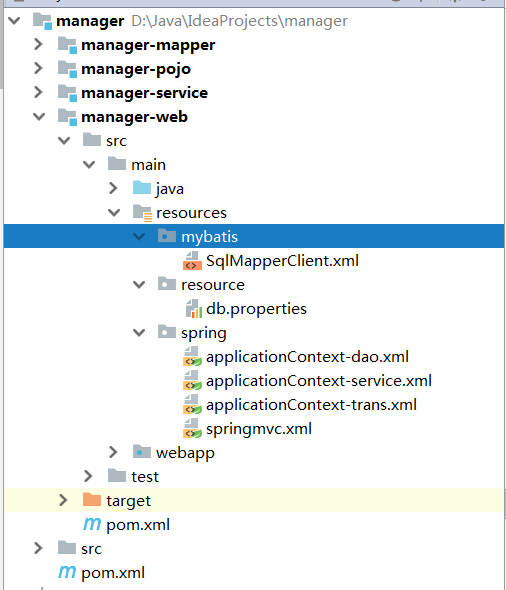
聚合项目的pom.xml
<?xml version="1.0" encoding="UTF-8"?>

<project xmlns="http://maven.apache.org/POM/4.0.0" xmlns:xsi="http://www.w3.org/2001/XMLSchema-instance"

  xsi:schemaLocation="http://maven.apache.org/POM/4.0.0 http://maven.apache.org/xsd/maven-4.0.0.xsd">

  <modelVersion>4.0.0</modelVersion>

  <groupId>com.ldf</groupId>

  <artifactId>manager</artifactId>

  <packaging>pom</packaging>

  <version>1.0-SNAPSHOT</version>

  <modules>

    <module>manager-pojo</module>

    <module>manager-service</module>

    <module>manager-web</module>

    <module>manager-mapper</module>

  </modules>

  <!--对依赖的坐标做集中管理-->

  <properties>

    <junit.version>4.12</junit.version>

    <spring.version>4.1.3.RELEASE</spring.version>

    <mybatis.version>3.2.8</mybatis.version>

    <mybatis.spring.version>1.2.2</mybatis.spring.version>

    <mysql.version>5.1.32</mysql.version>

    <druid.version>1.0.9</druid.version>

    <jstl.version>1.2</jstl.version>

    <servlet.version>2.5</servlet.version>

    <jsp.version>2.0</jsp.version>

    <tomcat.version>2.2</tomcat.version>

  </properties>

  <dependencyManagement>

    <dependencies>

      <dependency>

        <groupId>junit</groupId>

        <artifactId>junit</artifactId>

        <version>${junit.version}</version>

      </dependency>

      <!--mybatis-->

      <dependency>

        <groupId>org.mybatis</groupId>

        <artifactId>mybatis</artifactId>

        <version>${mybatis.version}</version>

      </dependency>

      <dependency>

        <groupId>org.mybatis</groupId>

        <artifactId>mybatis-spring</artifactId>

        <version>${mybatis.spring.version}</version>

      </dependency>

      <!--mysql-->

      <dependency>

        <groupId>mysql</groupId>

        <artifactId>mysql-connector-java</artifactId>

        <version>${mysql.version}</version>

      </dependency>

      <dependency>

        <groupId>com.alibaba</groupId>

        <artifactId>druid</artifactId>

        <version>${druid.version}</version>

      </dependency>

      <!--spring-->

      <dependency>

        <groupId>org.springframework</groupId>

        <artifactId>spring-context</artifactId>

        <version>${spring.version}</version>

      </dependency>

      <dependency>

        <groupId>org.springframework</groupId>

        <artifactId>spring-beans</artifactId>

        <version>${spring.version}</version>

      </dependency>

      <dependency>

        <groupId>org.springframework</groupId>

        <artifactId>spring-jdbc</artifactId>

        <version>${spring.version}</version>

      </dependency>

      <dependency>

        <groupId>org.springframework</groupId>

        <artifactId>spring-webmvc</artifactId>

        <version>${spring.version}</version>

      </dependency>

      <dependency>

        <groupId>org.springframework</groupId>

        <artifactId>spring-aspects</artifactId>

        <version>${spring.version}</version>

      </dependency>

      <dependency>

        <groupId>org.springframework</groupId>

        <artifactId>spring-test</artifactId>

        <version>${spring.version}</version>

      </dependency>

      <!--jsp&servlet-->

      <dependency>

        <groupId>jstl</groupId>

        <artifactId>jstl</artifactId>

        <version>${jstl.version}</version>

      </dependency>

      <dependency>

        <groupId>javax.servlet</groupId>

        <artifactId>servlet-api</artifactId>

        <version>${servlet.version}</version>

      </dependency>

      <dependency>

        <groupId>javax.servlet</groupId>

        <artifactId>jsp-api</artifactId>

        <version>${jsp.version}</version>

      </dependency>

    </dependencies>

  </dependencyManagement>

  <build>

    <!--资源拷贝插件-->

    <resources>

      <resource>

        <directory>src/main/java</directory>

        <includes>

          <include>**/*.xml</include>

        </includes>

      </resource>

      <resource>

        <directory>src/main/resources</directory>

        <includes>

          <include>**/*.xml</include>

          <include>**/*.properties</include>

        </includes>

      </resource>

    </resources>

    <!--tomcat插件-->

      <plugins>

        <plugin>

          <groupId>org.apache.tomcat.maven</groupId>

          <artifactId>tomcat7-maven-plugin</artifactId>

          <version>${tomcat.version}</version>

        </plugin>

      </plugins>

  </build>

</project>
SqlMapperClient.xml
<?xml version="1.0" encoding="UTF-8" ?>

<!DOCTYPE configuration

        PUBLIC "-//mybatis.org//DTD Config 3.0//EN"

        "http://mybatis.org/dtd/mybatis-3-config.dtd">

<configuration>

    <!--分页插件-->

</configuration>
db.properties
jdbc.driver=com.mysql.jdbc.Driver

jdbc.url=jdbc:mysql://localhost:3306/mytest?characterEncoding=utf-8

jdbc.username=root

jdbc.password=root
applicationContext-dao.xml
<?xml version="1.0" encoding="UTF-8"?>

<beans xmlns="http://www.springframework.org/schema/beans"

       xmlns:xsi="http://www.w3.org/2001/XMLSchema-instance"

       xmlns:context="http://www.springframework.org/schema/context"

       xsi:schemaLocation="http://www.springframework.org/schema/beans

        http://www.springframework.org/schema/beans/spring-beans-3.2.xsd

        http://www.springframework.org/schema/context

        http://www.springframework.org/schema/context/spring-context-3.2.xsd">

    <!--配置解析properties文件的工具类-->

    <context:property-placeholder location="classpath:resource/db.properties"/>

    <!--配置数据源-->

    <bean id="dataSource" class="com.alibaba.druid.pool.DruidDataSource">

        <property name="url" value="${jdbc.url}"/>

        <property name="username" value="${jdbc.username}"/>

        <property name="password" value="${jdbc.password}"/>

        <property name="driverClassName" value="${jdbc.driver}"/>

        <property name="maxActive" value="10"/>

        <property name="minIdle" value="5"/>

    </bean>

    <!--创建mybatis的上下文对象-->

    <bean class="org.mybatis.spring.SqlSessionFactoryBean">

        <property name="dataSource" ref="dataSource"/>

        <property name="configLocation" value="classpath:mybatis/SqlMapperClient.xml"/>

    </bean>

    <!--扫描mybatis的接口与映射配置文件-->

    <bean class="org.mybatis.spring.mapper.MapperScannerConfigurer">

        <property name="basePackage" value="com.ldf.mapper"/>

    </bean>

</beans>
applicationContext-service.xml
<?xml version="1.0" encoding="UTF-8"?>

<beans xmlns="http://www.springframework.org/schema/beans"

       xmlns:xsi="http://www.w3.org/2001/XMLSchema-instance"

       xmlns:context="http://www.springframework.org/schema/context"

       xsi:schemaLocation="http://www.springframework.org/schema/beans

        http://www.springframework.org/schema/beans/spring-beans-3.2.xsd

        http://www.springframework.org/schema/context

        http://www.springframework.org/schema/context/spring-context-3.2.xsd">

    <!--注册扫描@Service的包-->

    <context:component-scan base-package="com.ldf.service"/>

</beans>
applicationContext-trans.xml
<?xml version="1.0" encoding="UTF-8"?>

<beans xmlns="http://www.springframework.org/schema/beans"

       xmlns:xsi="http://www.w3.org/2001/XMLSchema-instance"

       xmlns:aop="http://www.springframework.org/schema/aop"

       xmlns:tx="http://www.springframework.org/schema/tx"

       xsi:schemaLocation="http://www.springframework.org/schema/beans

        http://www.springframework.org/schema/beans/spring-beans-3.2.xsd

        http://www.springframework.org/schema/aop

        http://www.springframework.org/schema/aop/spring-aop-3.2.xsd

        http://www.springframework.org/schema/tx

        http://www.springframework.org/schema/tx/spring-tx-3.2.xsd">

    <!--配置事务管理器-->

    <bean id="transactionManager"

          class="org.springframework.jdbc.datasource.DataSourceTransactionManager">

        <property name="dataSource" ref="dataSource"/>

    </bean>

    <!--配置事务传播行为-->

    <tx:advice id="advice" transaction-manager="transactionManager">

        <tx:attributes>

            <tx:method name="update*" propagation="REQUIRED" />

            <tx:method name="delete*" propagation="REQUIRED" />

            <tx:method name="insert*" propagation="REQUIRED" />

            <!-- <tx:method name="*" propagation="REQUIRED" /> -->

        </tx:attributes>

    </tx:advice>

    <!-- 配置拦截service -->

    <aop:config>

        <aop:advisor advice-ref="advice"

                     pointcut="execution(* com.ldf.service.*.*(..))" />

    </aop:config>

</beans>
springMvc.xml
<?xml version="1.0" encoding="UTF-8"?>

<beans xmlns="http://www.springframework.org/schema/beans"

       xmlns:xsi="http://www.w3.org/2001/XMLSchema-instance" xmlns:mvc="http://www.springframework.org/schema/mvc"

       xmlns:context="http://www.springframework.org/schema/context"

       xsi:schemaLocation="http://www.springframework.org/schema/beans

        http://www.springframework.org/schema/beans/spring-beans-3.2.xsd

        http://www.springframework.org/schema/mvc

        http://www.springframework.org/schema/mvc/spring-mvc-3.2.xsd

        http://www.springframework.org/schema/context

        http://www.springframework.org/schema/context/spring-context-3.2.xsd">

    <!-- 组建扫描,扫描带有注解的类 -->

    <context:component-scan base-package="com.ldf.controller"/>

    <!-- annotation-driven:默认创建了多个对象:RequestMappingHandlerMapping,RequestMappingHandlerAdapter

        也就提供对json格式支持

     -->

    <mvc:annotation-driven/>

    <!-- 配置视图解析器 -->

    <bean class="org.springframework.web.servlet.view.InternalResourceViewResolver">

        <property name="prefix" value="/WEB-INF/jsp/"></property>

        <property name="suffix" value=".jsp"></property>

    </bean>

    <!--静态资源映射-->

    <mvc:resources mapping="/css/**" location="/WEB-INF/css/"/>

    <mvc:resources mapping="/js/**" location="/WEB-INF/js/"/>

</beans>
web.xml
<?xml version="1.0" encoding="UTF-8"?>

<web-app xmlns:xsi="http://www.w3.org/2001/XMLSchema-instance"

         xmlns="http://java.sun.com/xml/ns/javaee" xmlns:web="http://java.sun.com/xml/ns/javaee/web-app_2_5.xsd"

         xsi:schemaLocation="http://java.sun.com/xml/ns/javaee http://java.sun.com/xml/ns/javaee/web-app_2_5.xsd"

         id="WebApp_ID" version="2.5">

  <!--上下文参数,告诉spring配置文件路径-->

  <context-param>

    <param-name>contextConfigLocation</param-name>

    <param-value>classpath:spring/applicationContext-*.xml</param-value>

  </context-param>

  <listener>

    <listener-class>org.springframework.web.context.ContextLoaderListener</listener-class>

  </listener>

  <!--配置springmvc-->

  <servlet>

    <servlet-name>springmvc</servlet-name>

    <servlet-class>org.springframework.web.servlet.DispatcherServlet</servlet-class>

    <init-param>

      <param-name>contextConfigLocation</param-name>

      <param-value>classpath:spring/springmvc.xml</param-value>

    </init-param>

    <load-on-startup>1</load-on-startup>

  </servlet>

  <servlet-mapping>

    <servlet-name>springmvc</servlet-name>

    <url-pattern>/</url-pattern>

  </servlet-mapping>

  <!--编码过滤器-->

  <filter>

    <filter-name>encoding</filter-name>

    <filter-class>org.springframework.web.filter.CharacterEncodingFilter</filter-class>

    <init-param>

      <param-name>encoding</param-name>

      <param-value>utf-8</param-value>

    </init-param>

  </filter>

  <filter-mapping>

    <filter-name>encoding</filter-name>

    <url-pattern>/*</url-pattern>

  </filter-mapping>

  <!--欢迎页面-->

  <welcome-file-list>

    <welcome-file>index.html</welcome-file>

    <welcome-file>index.htm</welcome-file>

    <welcome-file>index.jsp</welcome-file>

    <welcome-file>default.html</welcome-file>

    <welcome-file>default.htm</welcome-file>

    <welcome-file>default.jsp</welcome-file>

  </welcome-file-list>

</web-app>
maven文件合集的更多相关文章
- Maven问题合集
背景:总结maven使用过程中的相关问题,方便以后查询! 1 问题汇总 今天在导入github上下载的maven项目时候,出现了一堆错误,一时间不知道该如何下手. 根据错误提示,发现是一些依赖的jar ...
- Python3 移动文件——合集
文件/文件夹操作头文件 import os import shutil 参考 Python3批量移动指定文件到指定文件夹
- 掘金 Android 文章精选合集
掘金 Android 文章精选合集 掘金官方 关注 2017.07.10 16:42* 字数 175276 阅读 50053评论 13喜欢 669 用两张图告诉你,为什么你的 App 会卡顿? - A ...
- 【Android】开发中个人遇到和使用过的值得分享的资源合集
Android-Classical-OpenSource Android开发中 个人遇到和使用过的值得分享的资源合集 Trinea的OpenProject 强烈推荐的Android 开源项目分类汇总, ...
- Lucene搜索方式大合集
package junit; import java.io.File; import java.io.IOException; import java.text.ParseException; imp ...
- C#的winform小合集
C#的winform小合集 博主很懒,又想记录一下自己的所做所为,仅此而已,供自己日后所看.这个是博主自主学习C#所写的一些小程序,有好玩的,也有一些无聊闲得蛋疼所作的. 内容介绍 C#入门窗口输出h ...
- Python之路【第二十四篇】:Python学习路径及练手项目合集
Python学习路径及练手项目合集 Wayne Shi· 2 个月前 参照:https://zhuanlan.zhihu.com/p/23561159 更多文章欢迎关注专栏:学习编程. 本系列Py ...
- [转载]VIM命令合集
Vim命令合集 http://www.cnblogs.com/softwaretesting/archive/2011/07/12/2104435.html 命令历史 以:和/开头的命令都有历史纪录, ...
- 【转】Ubuntu常用软件合集
[转]Ubuntu常用软件合集 Ubuntu常用软件合集 我用的使Ubuntu-Kylin14.04,原因呢主要是觉得使本土化的,自带了日历.输入法.优客助手等易于上手的应用.也省的每次安装完原生的系 ...
随机推荐
- luogu P4724 模板 三维凸包
LINK:三维凸包 一个非常古老的知识点.估计也没啥用. 大体上了解了过程 能背下来就背下来吧. 一个bf:暴力枚举三个点 此时只需要判断所有的点都在这个面的另外一侧就可以说明这个面是三维凸包上的面了 ...
- ZROI 提高十连测 DAY3
由于我不太会写 觉得从比赛开始就冷静分析.然后看完三道题心态有点爆炸没有紧扣题目的性质. 这个心态是不可取的尽量不要有畏难心理 不要草草的写暴力. LINK:[最长01子序列](http://zhen ...
- 【机器学习的Tricks】随机权值平均优化器swa与pseudo-label伪标签
文章来自公众号[机器学习炼丹术] 1 stochastic weight averaging(swa) 随机权值平均 这是一种全新的优化器,目前常见的有SGB,ADAM, [概述]:这是一种通过梯度下 ...
- Ef Core增加Sql方法
[AttributeUsage(AttributeTargets.Class|AttributeTargets.Method)] public class DbFunAttribute : Attri ...
- 【BZOJ3307】雨天的尾巴 题解(树链剖分+树上差分)
题目链接 题目大意:给定一颗含有$n$个结点的树,每次选择两个结点$x$和$y$,对从$x$到$y$的路径上发放一带$z$类型的物品.问完成所有操作后每个结点发放最多的时哪种物品. 普通的树链剖分貌似 ...
- linux下的node版本管理利器:nvm
nvm是一款node版本管理工具,简单来说,如果你想在一个环境下安装多个node版本,并向自由地切换相关版本,那你就需要使用nvm进行版本管理,有点类似pyenv,也是一款python版本管理工具. ...
- 数据结构进阶:ST表
简介 ST 表是用于解决 可重复贡献问题 的数据结构. 什么是可重复贡献问题? 可重复贡献问题 是指对于运算 \(\operatorname{opt}\) ,满足 \(x\operatorname ...
- Java日志框架(二)
最流行的日志框架解决方案 按笔者理解,现在最流的日志框架解决方案莫过于SLF4J + LogBack.其有以下几个优点: LogBack 自身实现了 SLF4J 的日志接口,不需要 SLF4J 去做进 ...
- .NET和.NET Core Web APi FormData多文件上传对比
前言 最近因维护.NET和.NET Core项目用到文件上传功能,虽说也做过,但是没做过什么对比,借此将二者利用Ajax通过FormData上传文件做一个总结,通过视图提交表单太简单,这里不做阐述,希 ...
- 搭建MyBatis开发环境及基本的CURD
目录 一.MyBatis概述 1. MyBatis 解决的主要问题 二.快速开始一个 MyBatis 1. 创建mysql数据库和表 2. 创建maven工程 3. 在pom.xml文件中添加信息 4 ...