
004.Nginx日志配置及状态监控
一 Nginx请求简介
1.1 请求头部
  1 [root@nginx ~]# curl -v www.odocker.com

  2 * About to connect() to www.odocker.com port 80 (#0)	#关于本次连接信息

  3 *   Trying 113.31.119.149...

  4 * Connected to www.odocker.com (113.31.119.149) port 80 (#0)

  5 > GET / HTTP/1.1				#HTTP版本

  6 > User-Agent: curl/7.29.0			#客户端信息

  7 > Host: www.odocker.com				#请求的服务端主机

  8 > Accept: */*					#如上为请求

  9 >

 10 < HTTP/1.1 200 OK				#返回http版本

 11 < Server: nginx/1.16.1				#服务端Web类型

 12 < Date: Fri, 06 Mar 2020 13:09:40 GMT		#日期时间

 13 < Content-Type: text/html			#返回的类型

 14 < Content-Length: 13				#长度

 15 < Last-Modified: Thu, 05 Mar 2020 11:12:26 GMT	#日期时间

 16 < Connection: keep-alive			#长连接

 17 < ETag: "5e60de9a-d"				#Etag

 18 < Accept-Ranges: bytes				#大小单位

 19 <

 20 <h1>www</h1>					#具体内容

 21 * Connection #0 to host www.odocker.com left intact
二 日志配置
2.1 日志相关配置
2.2 access_log配置
- access_log path [format [buffer=size [flush=time]]];
- access_log path format gzip[=level] [buffer=size] [flush=time];
- access_log syslog:server=address[,parameter=value] [format];
- access_log off; #不记录日志
- gzip:压缩等级。
- buffer:设置内存缓存区大小。
- flush:保存在缓存区中的最长时间。
2.3 log_format配置
- log_format name string ……;
  1 ……

  2     log_format  main  '$remote_addr - $remote_user [$time_local] "$request" '

  3                       '$status $body_bytes_sent "$http_referer" '

  4                       '"$http_user_agent"';

  5 ……
  1 ……

  2     log_format  proxy  '$remote_addr - $remote_user [$time_local] "$request" '

  3                       '$status $body_bytes_sent "$http_referer" '

  4                       '"$http_user_agent" "$http_user_agent" ';

  5 ……
2.4 open_log_file_cache配置
- open_log_file_cache max=N [inactive=time] [min_uses=N] [valid=time];
- open_log_file_cache off;
2.5 log_not_found配置
2.6 log_subrequest配置
2.7 rewrite_log配置
2.8 error_log配置
三 状态监控
3.1 配置监控
  1 [root@nginx01 ~]# vi /etc/nginx/conf.d/status.conf

  2 server {

  3     server_name  status.linuxds.com;

  4

  5     error_page  404 403 500 502 503 504  /error.html;

  6     location = /error.html {

  7         root    /usr/share/nginx/html;

  8     }

  9

 10     location / {

 11         root    /usr/share/nginx/blog;

 12         index   index.html;

 13     }

 14     location /ok {

 15         alias   /usr/share/nginx/yes;

 16         index   index.html;

 17     }

 18     location /mystatus {

 19         stub_status on;

 20         access_log off;

 21     }

 22 }
  1 [root@nginx01 ~]# nginx -t -c /etc/nginx/nginx.conf

  2 [root@nginx01 ~]# nginx -s reload
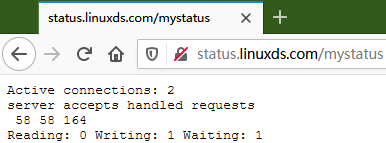
- Active connections:当前活跃的连接数。
- server:表示Nginx启动到现在共处理了90个连接。
- accepts:表示Nginx启动到现在共成功创建90次握手。
- handled requests:表示总共处理了19次请求。
- Reading:Nginx读取到客户端的 Header 信息数。
- Writing:Nginx返回给客户端的 Header 信息数。
- Waiting:Nginx开启keep-alive长连接情况下, 既没有读也没有写, 建立连接情况。
004.Nginx日志配置及状态监控的更多相关文章
- nginx日志配置
nginx日志配置 http://www.ttlsa.com/linux/the-nginx-log-configuration/ 日志对于统计排错来说非常有利的.本文总结了nginx日志相关的配置如 ...
- (转)nginx日志配置指令详解
这篇文章主要介绍了nginx日志配置指令详解,nginx有一个非常灵活的日志记录模式,每个级别的配置可以有各自独立的访问日志,需要的朋友可以参考下日志对于统计排错来说非常有利的.本文总结了nginx日 ...
- nginx日志配置指令详解
这篇文章主要介绍了nginx日志配置指令详解,nginx有一个非常灵活的日志记录模式,每个级别的配置可以有各自独立的访问日志,需要的朋友可以参考下日志对于统计排错来说非常有利的.本文总结了nginx日 ...
- Nginx https加密以及nginx日志配置与管理
Nginx https加密以及nginx日志配置与管理 使用Nginx的优点Nginx作为WEB服务器,Nginx处理静态文件.索引文件.自动索引的效率非常高.Nginx作为代理服务器,Nginx可以 ...
- nginx日志配置[转]
* * * sh /home/zyf/sh/cut_nginx_log.sh 这样就每天的0点1分把nginx日志重命名为日期格式,并重新生成今天的新日志文件。 日志对于统计排错来说非常有利的。本文 ...
- Nginx日志配置及日志切割
日志配置 日志对于统计排错来说非常有利的.本文总结了nginx日志相关的配置如access_log.log_format.open_log_file_cache.log_not_found.log_s ...
- 死磕nginx系列-nginx日志配置
nginx access日志配置 access_log日志配置 access_log用来定义日志级别,日志位置.语法如下: 日志级别: debug > info > notice > ...
- Nginx日志配置与切割
访问日志主要记录客户端访问Nginx的每一个请求,格式可以自定义.通过访问日志,你可以得到用户地域来源.跳转来源.使用终端.某个URL访问量等相关信息. Nginx中访问日志相关指令主要有两条,一条是 ...
- nginx别名配置,状态配置,include优化
一.nginx帮助参数 下面是关于/application/nginx/sbin/nginx 的参数帮助 [root@A conf]# /application/nginx/sbin/nginx -h ...
随机推荐
- 面试题64:求 1 + 2 + ... + n
这道题目条件限制严格,需要发散思维...但是作者是以 C++ 语言特性来做讲解的,对于 Java 狗只能说稍微有点参考意义吧!
- 黎活明8天快速掌握android视频教程--19_采用ListView实现数据列表显示
1.首先整个程序也是采用mvc的框架 DbOpenHelper 类 package dB; import android.content.Context; import android.databas ...
- 阿里巴巴--mysql中Mysql模糊查询like效率,以及更高效的写法
在使用msyql进行模糊查询的时候,很自然的会用到like语句,通常情况下,在数据量小的时候,不容易看出查询的效率,但在数据量达到百万级,千万级的时候,查询的效率就很容易显现出来.这个时候查询的效率就 ...
- [转]理解神经网络:从神经元到RNN、CNN、深度学习
神经网络是目前最流行的机器学习算法之一.随着时间的推移,证明了神经网络在精度和速度方面,比其他的算法性能更好.并且形成了很多种类,像CNN(卷积神经网络),RNN,自编码,深度学习等等.神经网络对于数 ...
- WPF中的Data Binding调试指南
大家平时做WPF开发,相信用Visual studio的小伙伴比较多.XAML里面曾经在某些特殊版本的Visual Studio中是可以加断点进行调试的,不过目前多数版本都不支持在XAML加断点来调试 ...
- P5676 [GZOI2017]小z玩游戏【Tarjan】
小z玩游戏 Tarjan算是板子题吧,但是要稍微做一些修改,建边需要多考虑,建立"虚点". 题目描述 小 z 很无聊. 小 z 要玩游戏. 小 z 有\(N\)个新游戏,第\(i\ ...
- ASP.NET MVC 中解决Session,Cookie等依赖的方式
原文:https://blog.csdn.net/mzl87/article/details/90580869 本文将分别介绍在MVC中使用Filter和Model Binding两种方式来说明如何解 ...
- JavaScript中bool类型的转化
JavaScript 中 if() 圆括号中的表达式将被看做布尔值来处理.这时就涉及到一些转化的问题. 1.特殊值undefined和null变成false. 2.数字0和NaN变成false. 3. ...
- (私人收藏)java实例、知识点、面试题、SHH、Spring、算法、图书管理系统、综合参考
https://pan.baidu.com/s/1hkmgJU6pf2sBjNV1NlOaNgr6l2 Java趣味编程100例java经典选择题100例及答案java面试题大全java排序算法大全j ...
- 基础设计模式-02 UML图
在学习设计模式的时候,经常会涉及到类,接口之间关系的梳理,UML图就是一个很好的方式: 1.类,抽象类,接口 类: 抽象类: 接口: 1.抽象类斜体表示: 2.“+”表示public,"-& ...