
Android 比较好看的注册登录界面
各位看官姥爷:
对于一款android手机app而言,美观的界面使得用户有好的使用体验,而一款好看的注册登录界面也会给用户好的用户体验,那么话不多说,直接上代码
首先是一款简单的界面展示
1.登陆界面
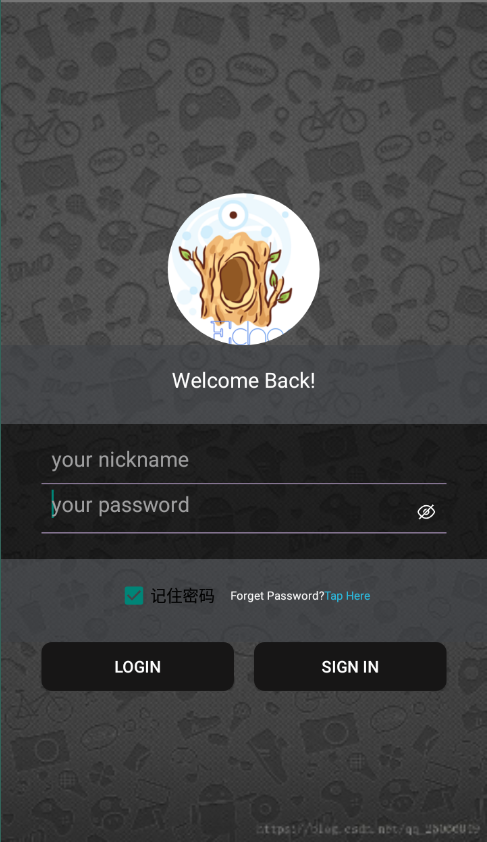
2.注册界面

好的,那么我们废话不多说 ,直接上代码吧:
1.登录界面
LoginActivity.xml
2.注册界面


<?xml version="1.0" encoding="utf-8"?>

<LinearLayout xmlns:android="http://schemas.android.com/apk/res/android"

    android:layout_width="match_parent"

    android:layout_height="match_parent"

    android:orientation="vertical">

    <androidx.appcompat.widget.Toolbar

        android:layout_width="match_parent"

        android:layout_height="?attr/actionBarSize"

        android:background="@color/blue">

        <RelativeLayout

            android:layout_width="match_parent"

            android:layout_height="wrap_content">

            <ImageButton

                android:id="@+id/IV_backtologin"

                android:layout_width="40dp"

                android:layout_height="40dp"

                android:backgroundTint="#0000"

                android:src="@mipmap/back"

                android:tint="@color/white" />

            <TextView

                android:id="@+id/reg_title"

                android:layout_width="wrap_content"

                android:layout_height="wrap_content"

                android:layout_centerInParent="true"

                android:text="用户注册"

                android:textColor="@color/white"

                android:textSize="18sp"

                android:textStyle="bold" />

            <Button

                android:id="@+id/bt_re_register"

                android:layout_width="60dp"

                android:layout_height="40dp"

                android:layout_marginLeft="72dp"

                android:layout_marginTop="5dp"

                android:layout_toRightOf="@+id/reg_title"

                android:background="@drawable/buttonstyle"

                android:text="注册"

                android:textColor="@color/white" />

        </RelativeLayout>

    </androidx.appcompat.widget.Toolbar>

    <ImageView

        android:id="@+id/IV_user_icno_register"

        android:layout_width="100dp"

        android:layout_height="100dp"

        android:layout_gravity="center"

        android:layout_marginTop="30dp"

        android:background="?android:attr/selectableItemBackground"

        android:clickable="true"

        android:scaleType="fitXY"

        android:src="@mipmap/usericon_default" />

    <!--tips-->

    <LinearLayout

        android:layout_width="wrap_content"

        android:layout_height="wrap_content"

        android:layout_marginLeft="25dp"

        android:orientation="vertical">

        <TextView

            android:layout_width="wrap_content"

            android:layout_height="wrap_content"

            android:text="基本信息 |"

            android:textColor="@color/black"

            android:textStyle="bold" />

        <View

            android:layout_width="70dp"

            android:layout_height="1dp"

            android:layout_marginTop="2dp"

            android:background="@color/light_grey" />

    </LinearLayout>

    <!--昵称-->

    <LinearLayout

        android:layout_width="match_parent"

        android:layout_height="wrap_content"

        android:layout_marginLeft="25dp"

        android:layout_marginTop="15dp"

        android:layout_marginRight="25dp"

        android:background="@drawable/reg_et_style"

        android:orientation="horizontal">

        <TextView

            android:layout_width="0dp"

            android:layout_height="wrap_content"

            android:layout_gravity="center"

            android:layout_weight="1"

            android:gravity="center"

            android:text="昵 称:" />

        <EditText

            android:id="@+id/et_reg_nickname"

            android:layout_width="0dp"

            android:layout_height="wrap_content"

            android:layout_gravity="center"

            android:layout_weight="3"

            android:hint="字母或者数字昵称"

            android:maxLines="1"

            android:singleLine="true" />

    </LinearLayout>

    <!--密码-->

    <LinearLayout

        android:layout_width="match_parent"

        android:layout_height="wrap_content"

        android:layout_marginLeft="25dp"

        android:layout_marginTop="5dp"

        android:layout_marginRight="25dp"

        android:background="@drawable/reg_et_style"

        android:orientation="horizontal">

        <TextView

            android:layout_width="0dp"

            android:layout_height="wrap_content"

            android:layout_gravity="center"

            android:layout_weight="1"

            android:gravity="center"

            android:text="密 码:" />

        <EditText

            android:id="@+id/et_reg_pass"

            android:layout_width="0dp"

            android:layout_height="wrap_content"

            android:layout_gravity="center"

            android:layout_weight="3"

            android:hint="键入您的密码"

            android:maxLines="1"

            android:singleLine="true" />

    </LinearLayout>

    <!--tips-->

    <LinearLayout

        android:layout_width="wrap_content"

        android:layout_height="wrap_content"

        android:layout_marginLeft="25dp"

        android:layout_marginTop="15dp"

        android:orientation="vertical">

        <TextView

            android:layout_width="wrap_content"

            android:layout_height="wrap_content"

            android:text="详细信息 |"

            android:textColor="@color/black"

            android:textStyle="bold" />

        <View

            android:layout_width="70dp"

            android:layout_height="1dp"

            android:layout_marginTop="2dp"

            android:background="@color/light_grey" />

    </LinearLayout>

    <!--姓名-->

    <LinearLayout

        android:layout_width="match_parent"

        android:layout_height="wrap_content"

        android:layout_marginLeft="25dp"

        android:layout_marginTop="15dp"

        android:layout_marginRight="25dp"

        android:background="@drawable/reg_et_style"

        android:orientation="horizontal">

        <TextView

            android:layout_width="0dp"

            android:layout_height="wrap_content"

            android:layout_gravity="center"

            android:layout_weight="1"

            android:gravity="center"

            android:text="真实姓名:" />

        <EditText

            android:id="@+id/et_reg_username"

            android:layout_width="0dp"

            android:layout_height="wrap_content"

            android:layout_gravity="center"

            android:layout_weight="3"

            android:hint="真实姓名"

            android:maxLines="1"

            android:singleLine="true" />

    </LinearLayout>

    <!--性别-->

    <LinearLayout

        android:layout_width="match_parent"

        android:layout_height="wrap_content"

        android:layout_marginLeft="25dp"

        android:layout_marginTop="5dp"

        android:layout_marginRight="25dp"

        android:background="@drawable/reg_et_style"

        android:orientation="horizontal">

        <TextView

            android:layout_width="0dp"

            android:layout_height="wrap_content"

            android:layout_gravity="center"

            android:layout_weight="1"

            android:gravity="center"

            android:text="性 别:" />

        <RadioGroup

            android:id="@+id/reg_userSex"

            android:layout_width="0dp"

            android:layout_height="wrap_content"

            android:layout_weight="3"

            android:orientation="horizontal">

            <RadioButton

                android:layout_width="wrap_content"

                android:layout_height="wrap_content"

                android:text="男" />

            <RadioButton

                android:layout_width="wrap_content"

                android:layout_height="wrap_content"

                android:text="女" />

        </RadioGroup>

    </LinearLayout>

    <!--地址-->

    <LinearLayout

        android:layout_width="match_parent"

        android:layout_height="wrap_content"

        android:layout_marginLeft="25dp"

        android:layout_marginTop="5dp"

        android:layout_marginRight="25dp"

        android:background="@drawable/reg_et_style"

        android:orientation="horizontal">

        <TextView

            android:layout_width="0dp"

            android:layout_height="wrap_content"

            android:layout_gravity="center"

            android:layout_weight="1"

            android:gravity="center"

            android:text="地 址:" />

        <EditText

            android:id="@+id/et_reg_add"

            android:layout_width="0dp"

            android:layout_height="wrap_content"

            android:layout_gravity="center"

            android:layout_weight="3"

            android:hint="--省--市--县"

            android:maxLines="1"

            android:singleLine="true" />

    </LinearLayout>

    <!--电话-->

    <LinearLayout

        android:layout_width="match_parent"

        android:layout_height="wrap_content"

        android:layout_marginLeft="25dp"

        android:layout_marginTop="5dp"

        android:layout_marginRight="25dp"

        android:background="@drawable/reg_et_style"

        android:orientation="horizontal">

        <TextView

            android:layout_width="0dp"

            android:layout_height="wrap_content"

            android:layout_gravity="center"

            android:layout_weight="1"

            android:gravity="center"

            android:text="联系方式:" />

        <EditText

            android:id="@+id/et_reg_tel"

            android:layout_width="0dp"

            android:layout_height="wrap_content"

            android:layout_gravity="center"

            android:layout_weight="3"

            android:hint="###-####-####"

            android:inputType="number"

            android:maxLines="1"

            android:singleLine="true" />

    </LinearLayout>

    <!--验证码-->

    <LinearLayout

        android:layout_width="match_parent"

        android:layout_height="wrap_content"

        android:layout_marginLeft="25dp"

        android:layout_marginTop="5dp"

        android:layout_marginRight="25dp"

        android:background="@drawable/reg_et_style"

        android:orientation="horizontal">

        <!-- 第四个文本编辑框  输入验证码 -->

        <LinearLayout

            android:layout_width="match_parent"

            android:layout_height="wrap_content"

            android:layout_marginTop="10dp"

            android:orientation="horizontal">

            <TextView

                android:layout_width="wrap_content"

                android:layout_height="wrap_content"

                android:layout_gravity="center"

                android:paddingLeft="25dp"

                android:text="验 证 码:" />

            <EditText

                android:id="@+id/et_registeractivity_phoneCodes"

                android:layout_width="0dp"

                android:layout_height="50dp"

                android:layout_marginLeft="10dp"

                android:layout_marginTop="5dp"

                android:layout_marginRight="10dp"

                android:layout_weight="3"

                android:hint="右图4位验证码"

                android:maxLines="1"

                android:paddingLeft="10dp" />

            <ImageView

                android:id="@+id/iv_registeractivity_showCode"

                android:layout_width="0dp"

                android:layout_height="70dp"

                android:layout_marginTop="-10dp"

                android:layout_weight="1.5"

                android:clickable="true"

                android:onClick="onClick" />

        </LinearLayout>

    </LinearLayout>

    <TextView

        android:layout_width="wrap_content"

        android:layout_height="wrap_content"

        android:layout_gravity="end"

        android:layout_marginRight="25dp"

        android:text="@string/register_pic_tips"

        android:textSize="8sp" />

</LinearLayout>
RegActivity.xml
Android 比较好看的注册登录界面的更多相关文章
- UI4_注册登录界面
// // ViewController.h // UI4_注册登录界面 // // Created by zhangxueming on 15/7/3. // Copyright (c) 2015年 ...
- Android studio 开发一个用户登录界面
Android studio 开发一个用户登录界面 activity_main.xml <?xml version="1.0" encoding="utf-8&qu ...
- Android开发实例之miniTwitter登录界面的实现
原文: http://www.jizhuomi.com/android/example/134.html 本文要演示的Android开发实例是如何完成一个Android中的miniTwitter登录界 ...
- Android 仿 窗帘效果 和 登录界面拖动效果 (Scroller类的应用) 附 2个DEMO及源码
在android学习中,动作交互是软件中重要的一部分,其中的Scroller就是提供了拖动效果的类,在网上,比如说一些Launcher实现滑屏都可以通过这个类去实现.下面要说的就是上次Scroller ...
- Android 仿 窗帘效果 和 登录界面拖动效果 (Scroller类的应用) 附 2个DEMO及源代码
在android学习中,动作交互是软件中重要的一部分.当中的Scroller就是提供了拖动效果的类,在网上.比方说一些Launcher实现滑屏都能够通过这个类去实现.以下要说的就是上次Scroller ...
- Android 记住密码和自动登录界面的实现(SharedPreferences 的用法)
原文:http://blog.csdn.net/liuyiming_/article/details/7704923 SharedPreferences介绍: SharedPreferences是An ...
- RxSwift 实战操作【注册登录】
前言 看了前面的文章,相信很多同学还不知道RxSwift该怎么使用,这篇文件将带领大家一起写一个 注册登录(ps:本例子采用MVVM)的例子进行实战.本篇文章是基于RxSwift3.0写的,采用的是C ...
- vue2.0+koa2+mongodb实现注册登录
前言 前段时间和公司一个由技术转产品的同事探讨他的职业道路,对我说了一句深以为然的话: "不要把自己禁锢在某一个领域,技术到产品的转变,首先就是思维上的转变.你一直做前端,数据的交互你只知道 ...
- Android studio登录界面
打开Android studio,你需要建立两个类LoginMainAcitivity.java和SuccessMainActivity.java,和与之相对应的xml布局文件login_main.x ...
随机推荐
- csv的读写操作
cvs简介: CSV 全称 Comma-Separated Values,中文叫逗号分隔值或字符分隔值,它以纯文本形式存储表格数据(数字和文本),其本质就是一个字符序列,可以由任意数目的记录组成,记录 ...
- Redis 实战 —— 12. 降低内存占用
简介 降低 Redis 的内存占用有助于减少创建快照和加载快照所需的时间.提升载入 AOF 文件和重写 AOF 文件时的效率.缩短从服务器进行同步所需的时间(快照. AOF 文件重写在 持久化选项 中 ...
- linux 下解决mysql root 权限无法远程连接问题
问题描述:MySQL数据库安装成功后,在服务器本地可以连接成功,但是使用工具navicat无法进行远程连接,如图: 原因:MySQL默认只允许root帐户在本地登录,如果要在其它机器上连接mysql, ...
- Memcached 缓存系统简介
memcached官网:http://memcached.org/ What is Memcached? Memcached是一个自由开源的,高性能,高并发,分布式内存对象缓存系统. Memcache ...
- StringTable---字符串常量池的垃圾回收跟踪案例
引言 很多人认为jvm字符串常量不会被回收的,其实这个说法的有误区的,我们通过一些jvm参数可以看到StringTable的垃圾回收. 案例说明 参数说明 参数 说明 -Xmx10m 堆空间大小 -X ...
- 树的直径&树的重心
树的直径 定义 那么树上最远的两个点,他们之间的距离,就被称之为树的直径. 树的直径的性质 1. 直径两端点一定是两个叶子节点. 2. 距离任意点最远的点一定是直径的一个端点,这个基于贪心求直径方法的 ...
- 【poj 2752】Seek the Name, Seek the Fame(字符串--KMP)
题意:给出一个字符串str,求出str中存在多少子串,使得这些子串既是str的前缀,又是str的后缀.从小到大依次输出这些子串的长度. 解法:利用KMP中next[ ]数组的性质,依次找到前缀.后缀匹 ...
- java swing JDialog 和 java.util.concurrent的使用
参考链接: Java-Swing的JFrame的一些插件使用详解 java swing JDialog 使用 ScheduledExecutorService定时周期执行指定的任务 swing JDi ...
- AWS注册到连接
1. 注册AWS账号 https://www.cnblogs.com/cmt/p/13912814.html 2.注册完成之后,选择实例 Ubuntu,下载xxx.pem文件,查看实例得到ip 比如我 ...
- 超详细 DNS 协议解析
尽人事,听天命.博主东南大学研究生在读,热爱健身和篮球,正在为两年后的秋招准备中,乐于分享技术相关的所见所得,关注公众号 @ 飞天小牛肉,第一时间获取文章更新,成长的路上我们一起进步 本文已收录于 C ...