
SpringSecurity中的Authentication信息与登录流程
本篇文章参考于【江南一点雨】的公众号。
Authentication
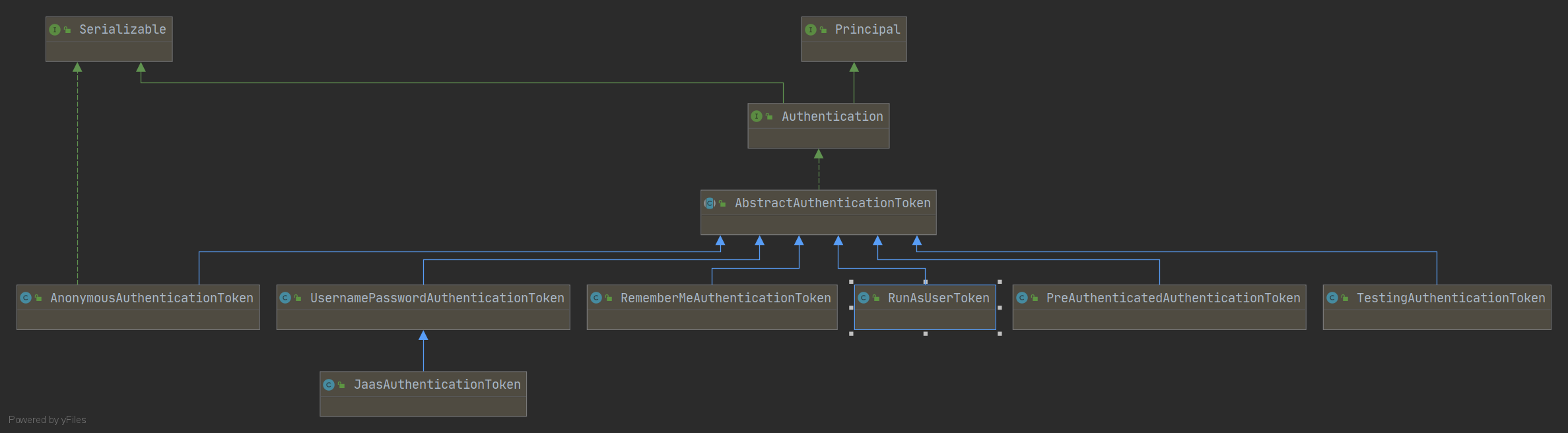
使用SpringSecurity可以在任何地方注入Authentication进而获取到当前登录的用户信息,可谓十分强大。
在Authenticaiton的继承体系中,实现类UsernamePasswordAuthenticationToken 算是比较常见的一个了,在这个类中存在两个属性:principal和credentials,其实分别代表着用户和密码。【当然其他的属性存在于其父类中,如authorities和details。】
我们需要对这个对象有一个基本地认识,它保存了用户的基本信息。用户在登录的时候,进行了一系列的操作,将信息存与这个对象中,后续我们使用的时候,就可以轻松地获取这些信息了。
那么,用户信息如何存,又是如何取的呢?继续往下看吧。
登录流程
一、与认证相关的UsernamePasswordAuthenticationFilter
通过Servlet中的Filter技术进行实现,通过一系列内置的或自定义的安全Filter,实现接口的认证与授权。
比如:UsernamePasswordAuthenticationFilter
	public Authentication attemptAuthentication(HttpServletRequest request,

			HttpServletResponse response) throws AuthenticationException {

		if (postOnly && !request.getMethod().equals("POST")) {

			throw new AuthenticationServiceException(

					"Authentication method not supported: " + request.getMethod());

		}

		//获取用户名和密码

		String username = obtainUsername(request);

		String password = obtainPassword(request);

		if (username == null) {

			username = "";

		}

		if (password == null) {

			password = "";

		}

		username = username.trim();

		//构造UsernamePasswordAuthenticationToken对象

		UsernamePasswordAuthenticationToken authRequest = new UsernamePasswordAuthenticationToken(

				username, password);

		// 为details属性赋值

		setDetails(request, authRequest);

		// 调用authenticate方法进行校验

		return this.getAuthenticationManager().authenticate(authRequest);

	}
获取用户名和密码
从request中提取参数,这也是SpringSecurity默认的表单登录需要通过key/value形式传递参数的原因。
	@Nullable

	protected String obtainPassword(HttpServletRequest request) {

		return request.getParameter(passwordParameter);

	}

	@Nullable

	protected String obtainUsername(HttpServletRequest request) {

		return request.getParameter(usernameParameter);

	}
构造UsernamePasswordAuthenticationToken对象
传入获取到的用户名和密码,而用户名对应UPAT对象中的principal属性,而密码对应credentials属性。
UsernamePasswordAuthenticationToken authRequest = new UsernamePasswordAuthenticationToken(

    username, password);

//UsernamePasswordAuthenticationToken 的构造器

public UsernamePasswordAuthenticationToken(Object principal, Object credentials) {

    super(null);

    this.principal = principal;

    this.credentials = credentials;

    setAuthenticated(false);

}
为details属性赋值
// Allow subclasses to set the "details" property 允许子类去设置这个属性

setDetails(request, authRequest);

protected void setDetails(HttpServletRequest request,

                          UsernamePasswordAuthenticationToken authRequest) {

    authRequest.setDetails(authenticationDetailsSource.buildDetails(request));

}

//AbstractAuthenticationToken 是UsernamePasswordAuthenticationToken的父类

public void setDetails(Object details) {

    this.details = details;

}
details属性存在于父类之中,主要描述两个信息,一个是remoteAddress 和sessionId。
	public WebAuthenticationDetails(HttpServletRequest request) {

		this.remoteAddress = request.getRemoteAddr();

		HttpSession session = request.getSession(false);

		this.sessionId = (session != null) ? session.getId() : null;

	}
调用authenticate方法进行校验
this.getAuthenticationManager().authenticate(authRequest)
二、ProviderManager的校验逻辑
public Authentication authenticate(Authentication authentication)

    throws AuthenticationException {

    Class<? extends Authentication> toTest = authentication.getClass();

    AuthenticationException lastException = null;

    AuthenticationException parentException = null;

    Authentication result = null;

    Authentication parentResult = null;

    boolean debug = logger.isDebugEnabled();

    for (AuthenticationProvider provider : getProviders()) {

        //获取Class,判断当前provider是否支持该authentication

        if (!provider.supports(toTest)) {

            continue;

        }

        //如果支持,则调用provider的authenticate方法开始校验

        result = provider.authenticate(authentication);

		//将旧的token的details属性拷贝到新的token中。

        if (result != null) {

            copyDetails(authentication, result);

            break;

        }

    }

    //如果上一步的结果为null,调用provider的parent的authenticate方法继续校验。

    if (result == null && parent != null) {

        result = parentResult = parent.authenticate(authentication);

    }

    if (result != null) {

        if (eraseCredentialsAfterAuthentication

            && (result instanceof CredentialsContainer)) {

            //调用eraseCredentials方法擦除凭证信息

            ((CredentialsContainer) result).eraseCredentials();

        }

        if (parentResult == null) {

            //publishAuthenticationSuccess将登录成功的事件进行广播。

            eventPublisher.publishAuthenticationSuccess(result);

        }

        return result;

    }

}
获取Class,判断当前provider是否支持该authentication。
如果支持,则调用provider的authenticate方法开始校验,校验完成之后,返回一个新的Authentication。
将旧的token的details属性拷贝到新的token中。
如果上一步的结果为null,调用provider的parent的authenticate方法继续校验。
调用eraseCredentials方法擦除凭证信息,也就是密码,具体来说就是让credentials为空。
publishAuthenticationSuccess将登录成功的事件进行广播。
三、AuthenticationProvider的authenticate
public Authentication authenticate(Authentication authentication)

		throws AuthenticationException {

    //从Authenticaiton中提取登录的用户名。

	String username = (authentication.getPrincipal() == null) ? "NONE_PROVIDED"

			: authentication.getName();

    //返回登录对象

	user = retrieveUser(username,(UsernamePasswordAuthenticationToken) authentication);

    //校验user中的各个账户状态属性是否正常

	preAuthenticationChecks.check(user);

    //密码比对

	additionalAuthenticationChecks(user,(UsernamePasswordAuthenticationToken) authentication);

    //密码比对

	postAuthenticationChecks.check(user);

	Object principalToReturn = user;

    //表示是否强制将Authentication中的principal属性设置为字符串

	if (forcePrincipalAsString) {

		principalToReturn = user.getUsername();

	}

    //构建新的UsernamePasswordAuthenticationToken

	return createSuccessAuthentication(principalToReturn, authentication, user);

}
- 从Authenticaiton中提取登录的用户名。
retrieveUser方法将会调用loadUserByUsername方法,这里将会返回登录对象。preAuthenticationChecks.check(user);校验user中的各个账户状态属性是否正常,如账号是否被禁用,账户是否被锁定,账户是否过期等。additionalAuthenticationChecks用于做密码比对,密码加密解密校验就在这里进行。postAuthenticationChecks.check(user);用于密码比对。forcePrincipalAsString表示是否强制将Authentication中的principal属性设置为字符串,默认为false,也就是说默认登录之后获取的用户是对象,而不是username。- 构建新的
UsernamePasswordAuthenticationToken。
用户信息保存
我们来到UsernamePasswordAuthenticationFilter 的父类AbstractAuthenticationProcessingFilter 中,
public void doFilter(ServletRequest req, ServletResponse res, FilterChain chain)

		throws IOException, ServletException {

	HttpServletRequest request = (HttpServletRequest) req;

	HttpServletResponse response = (HttpServletResponse) res;

	Authentication authResult;

	try {

        //实际触发了上面提到的attemptAuthentication方法

		authResult = attemptAuthentication(request, response);

		if (authResult == null) {

			return;

		}

		sessionStrategy.onAuthentication(authResult, request, response);

	}

    //登录失败

	catch (InternalAuthenticationServiceException failed) {

		unsuccessfulAuthentication(request, response, failed);

		return;

	}

	catch (AuthenticationException failed) {

		unsuccessfulAuthentication(request, response, failed);

		return;

	}

	if (continueChainBeforeSuccessfulAuthentication) {

		chain.doFilter(request, response);

	}

    //登录成功

	successfulAuthentication(request, response, chain, authResult);

}
关于登录成功调用的方法:
protected void successfulAuthentication(HttpServletRequest request,

		HttpServletResponse response, FilterChain chain, Authentication authResult)

		throws IOException, ServletException {

    //将登陆成功的用户信息存储在SecurityContextHolder.getContext()中

	SecurityContextHolder.getContext().setAuthentication(authResult);

	rememberMeServices.loginSuccess(request, response, authResult);

	// Fire event

	if (this.eventPublisher != null) {

		eventPublisher.publishEvent(new InteractiveAuthenticationSuccessEvent(

				authResult, this.getClass()));

	}

    //登录成功的回调方法

	successHandler.onAuthenticationSuccess(request, response, authResult);

}
我们可以通过SecurityContextHolder.getContext().setAuthentication(authResult);得到两点结论:
- 如果我们想要获取用户信息,我们只需要调用
SecurityContextHolder.getContext().getAuthentication()即可。 - 如果我们想要更新用户信息,我们只需要调用
SecurityContextHolder.getContext().setAuthentication(authResult);即可。
用户信息的获取
前面说到,我们可以利用Authenticaiton轻松得到用户信息,主要有下面几种方法:
- 通过上下文获取。
SecurityContextHolder.getContext().getAuthentication();
- 直接在Controller注入Authentication。
@GetMapping("/hr/info")

public Hr getCurrentHr(Authentication authentication) {

    return ((Hr) authentication.getPrincipal());

}
为什么多次请求可以获取同样的信息
前面已经谈到,SpringSecurity将登录用户信息存入SecurityContextHolder 中,本质上,其实是存在ThreadLocal中,为什么这么说呢?
原因在于,SpringSecurity采用了策略模式,在SecurityContextHolder 中定义了三种不同的策略,而如果我们不配置,默认就是MODE_THREADLOCAL模式。
public static final String MODE_THREADLOCAL = "MODE_THREADLOCAL";

public static final String MODE_INHERITABLETHREADLOCAL = "MODE_INHERITABLETHREADLOCAL";

public static final String MODE_GLOBAL = "MODE_GLOBAL";

public static final String SYSTEM_PROPERTY = "spring.security.strategy";

private static String strategyName = System.getProperty(SYSTEM_PROPERTY);

private static void initialize() {

    if (!StringUtils.hasText(strategyName)) {

        // Set default

        strategyName = MODE_THREADLOCAL;

    }

    if (strategyName.equals(MODE_THREADLOCAL)) {

        strategy = new ThreadLocalSecurityContextHolderStrategy();

    }

}

private static final ThreadLocal<SecurityContext> contextHolder = new ThreadLocal<>();
了解这个之后,又有一个问题抛出:ThreadLocal能够保证同一线程的数据是一份,那进进出出之后,线程更改,又如何保证登录的信息是正确的呢。
这里就要说到一个比较重要的过滤器:SecurityContextPersistenceFilter,它的优先级很高,仅次于WebAsyncManagerIntegrationFilter。也就是说,在进入后面的过滤器之前,将会先来到这个类的doFilter方法。
public class SecurityContextPersistenceFilter extends GenericFilterBean {

	public void doFilter(ServletRequest req, ServletResponse res, FilterChain chain)

			throws IOException, ServletException {

		HttpServletRequest request = (HttpServletRequest) req;

		HttpServletResponse response = (HttpServletResponse) res;

        if (request.getAttribute(FILTER_APPLIED) != null) {

			// 确保这个过滤器只应对一个请求

			chain.doFilter(request, response);

			return;

		}

        //分岔路口之后,表示应对多个请求

		HttpRequestResponseHolder holder = new HttpRequestResponseHolder(request,

				response);

        //用户信息在 session 中保存的 value。

		SecurityContext contextBeforeChainExecution = repo.loadContext(holder);

		try {

            //将当前用户信息存入上下文

			SecurityContextHolder.setContext(contextBeforeChainExecution);

			chain.doFilter(holder.getRequest(), holder.getResponse());

		}

		finally {

            //收尾工作,获取SecurityContext

			SecurityContext contextAfterChainExecution = SecurityContextHolder

					.getContext();

            //清空SecurityContext

			SecurityContextHolder.clearContext();

            //重新存进session中

			repo.saveContext(contextAfterChainExecution, holder.getRequest(),

					holder.getResponse());

		}

	}

}
SecurityContextPersistenceFilter继承自GenericFilterBean,而GenericFilterBean则是 Filter 的实现,所以SecurityContextPersistenceFilter作为一个过滤器,它里边最重要的方法就是doFilter了。- 在
doFilter方法中,它首先会从 repo 中读取一个SecurityContext出来,这里的 repo 实际上就是HttpSessionSecurityContextRepository,读取SecurityContext的操作会进入到readSecurityContextFromSession(httpSession)方法中。 - 在这里我们看到了读取的核心方法
Object contextFromSession = httpSession.getAttribute(springSecurityContextKey);,这里的springSecurityContextKey对象的值就是SPRING_SECURITY_CONTEXT,读取出来的对象最终会被转为一个SecurityContext对象。 SecurityContext是一个接口,它有一个唯一的实现类SecurityContextImpl,这个实现类其实就是用户信息在 session 中保存的 value。- 在拿到
SecurityContext之后,通过SecurityContextHolder.setContext方法将这个SecurityContext设置到ThreadLocal中去,这样,在当前请求中,Spring Security 的后续操作,我们都可以直接从SecurityContextHolder中获取到用户信息了。 - 接下来,通过
chain.doFilter让请求继续向下走(这个时候就会进入到UsernamePasswordAuthenticationFilter过滤器中了)。 - 在过滤器链走完之后,数据响应给前端之后,finally 中还有一步收尾操作,这一步很关键。这里从
SecurityContextHolder中获取到SecurityContext,获取到之后,会把SecurityContextHolder清空,然后调用repo.saveContext方法将获取到的SecurityContext存入 session 中。
总结:
每个请求到达服务端的时候,首先从session中找出SecurityContext ,为了本次请求之后都能够使用,设置到SecurityContextHolder 中。
当请求离开的时候,SecurityContextHolder 会被清空,且SecurityContext 会被放回session中,方便下一个请求来获取。
资源放行的两种方式
用户登录的流程只有走过滤器链,才能够将信息存入session中,因此我们配置登录请求的时候需要使用configure(HttpSecurity http),因为这个配置会走过滤器链。
http.authorizeRequests()

        .antMatchers("/hello").permitAll()

        .anyRequest().authenticated()
而 configure(WebSecurity web)不会走过滤器链,适用于静态资源的放行。
@Override

public void configure(WebSecurity web) throws Exception {

 	web.ignoring().antMatchers("/index.html","/img/**","/fonts/**","/favicon.ico");

}
SpringSecurity中的Authentication信息与登录流程的更多相关文章
- SCP免密传输和SSH登录流程详解
SCP免密传输和SSH登录协议详解 在linux下开发时,经常需要登录到其他的设备上,例如虚拟机内ubuntu.树莓派等等,经常涉及到传输文件的操作,传输文件有很多中方法,如物理磁盘拷贝,基于网络的s ...
- CAS详细登录流程(转)
转:https://www.cnblogs.com/lihuidu/p/6495247.html 4.CAS的详细登录流程 上图是3个登录场景,分别为:第一次访问www.qiandu.com.第二次访 ...
- Spring Security 的注册登录流程
Spring Security 的注册登录流程 数据库字段设计 主要数据库字段要有: 用户的 ID 用户名称 联系电话 登录密码(非明文) UserDTO对象 需要一个数据传输对象来将所有注册信息发送 ...
- Spring Security源码解析一:UsernamePasswordAuthenticationFilter之登录流程
一.前言 spring security安全框架作为spring系列组件中的一个,被广泛的运用在各项目中,那么spring security在程序中的工作流程是个什么样的呢,它是如何进行一系列的鉴权和 ...
- ASP.net 完整登录流程
登录流程 using System; using System.Collections.Generic; using System.Linq; using System.Web; using Syst ...
- 本页面用来演示如何通过JS SDK,创建完整的QQ登录流程,并调用openapi接口
QQ登录将用户信息存储在cookie中,命名为__qc__k ,请不要占用 __qc__k : 1) :: 在页面顶部引入JS SDK库: 将“js?”后面的appid参数(示例代码中的:100229 ...
- 这个案例写出来,还怕跟面试官扯不明白 OAuth2 登录流程?
昨天和小伙伴们介绍了 OAuth2 的基本概念,在讲解 Spring Cloud Security OAuth2 之前,我还是先来通过实际代码来和小伙伴们把 OAuth2 中的各个授权模式走一遍,今天 ...
- 微信小程序登录流程解析
小程序可以通过微信官方提供的登录能力方便地获取微信提供的用户身份标识openid,快速建立小程序内的用户体系. 登录流程时序: 1.首先,调用 wx.login获取code ,判断用户是否授权读取用户 ...
- 微信小程序的登录流程
一.背景 传统的web开发实现登陆功能,一般的做法是输入账号密码.或者输入手机号及短信验证码进行登录 服务端校验用户信息通过之后,下发一个代表登录态的 token 给客户端,以便进行后续的交互,每当t ...
随机推荐
- 019_go语言中的方法
代码演示 package main import "fmt" type rect struct { width, heigh int } func (r *rect) area() ...
- PHP7 生产环境队列 Beanstalkd 正确使用姿势
应用场景 为什么要用呢,有什么好处?这应该放在最开头说,一件东西你只有了解它是干什么的,适合干什么,才能更好的与自己的项目相结合,用到哪里学到哪里,学了不用等于不会,我们平时就应该多考虑一些这样的问题 ...
- Linux学习笔记之ubuntu如何在vi中写入中文注释
点击左边设置system settings,再点击Language Suppotr 点击Remind Me Later 选择ibus 然后关闭,在终端写入ibus-setup,弹出设置框,选择INPU ...
- Nexus3 上传的文件在哪里
上传文件 ojdbc7.jar,上传步骤略. 服务器上默认的文件存放路径是: nexus/sonatype-work/nexus3/blobs/default/content/ 一堆文件夹,根据时间确 ...
- java循环语句while与do-while
一 while循环 while循环语句和选择结构if语句有些相似,都是根据条件判断来决定是否执行大括号内的执行语句. 区别在于,while语句会反复地进行条件判断,只要条件成立,{}内的执行语句就会执 ...
- ALGEBRA-2 有限维向量空间
关键词:张成.线性无关.基.维度 linear span: V中任意一组向量的span都是V的子空间(对加法和数乘封闭) linear independent 线性无关 https://www.zy ...
- 【Codeforces】CF Round #592 (Div. 2) - 题解
Problem - A Tomorrow is a difficult day for Polycarp: he has to attend \(a\) lectures and \(b\) prac ...
- HotSpot的垃圾回收器
如果说收集算法是内存回收的方法论,那么垃圾收集器就是内存回收的具体实现.这里讨论的收集器基于JDK 1.7 Update 14之后的 HotSpot 虚拟机,这个虚拟机包含的所有收集器如下图所示 上图 ...
- 4 IDEA环境应用
第4章 IDEA环境应用 spark shell仅在测试和验证我们的程序时使用的较多,在生产环境中,通常会在IDE中编制程序,然后打成jar包,然后提交到集群,最常用的是创建一个Maven项目,利用M ...
- Docker入门教程-Linux环境安装Nginx及入门使用
介绍 Nginx("engine x")是一款是由俄罗斯的程序设计师Igor Sysoev所开发高性能的 Web和 反向代理 服务器,也是一个 IMAP/POP3/SMTP 代理服 ...