
【UML】Use Case Diagrams
文章目录
- Use Case Diagrams
- Introduction
- Use case Diagram
- Use Case Diagrams - Actors
- Use Case Diagrams – Use Cases
- Use Case Modeling: Core Elements
- Use Case Diagram – Example1 (Library)
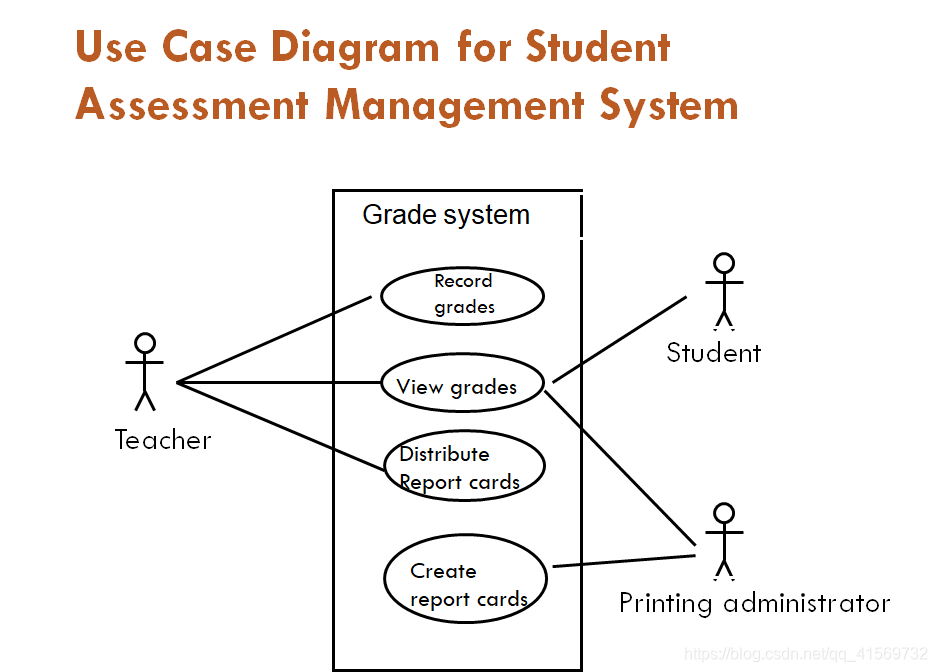
- Use Case Diagram for Student Assessment Management System
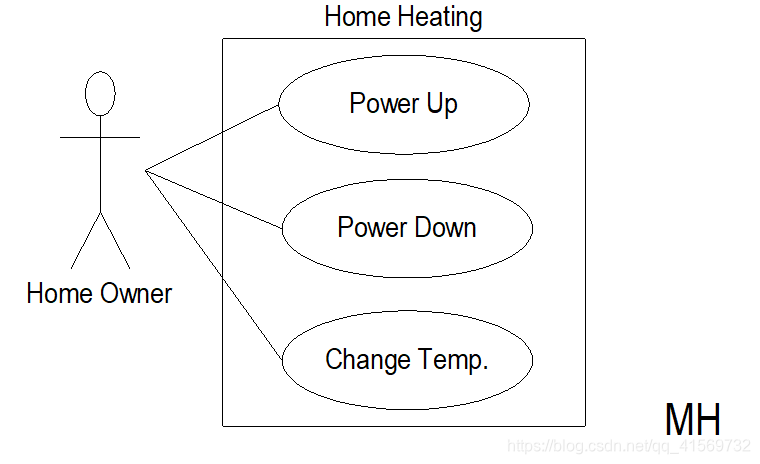
- Home Heating Use-Case Diagram
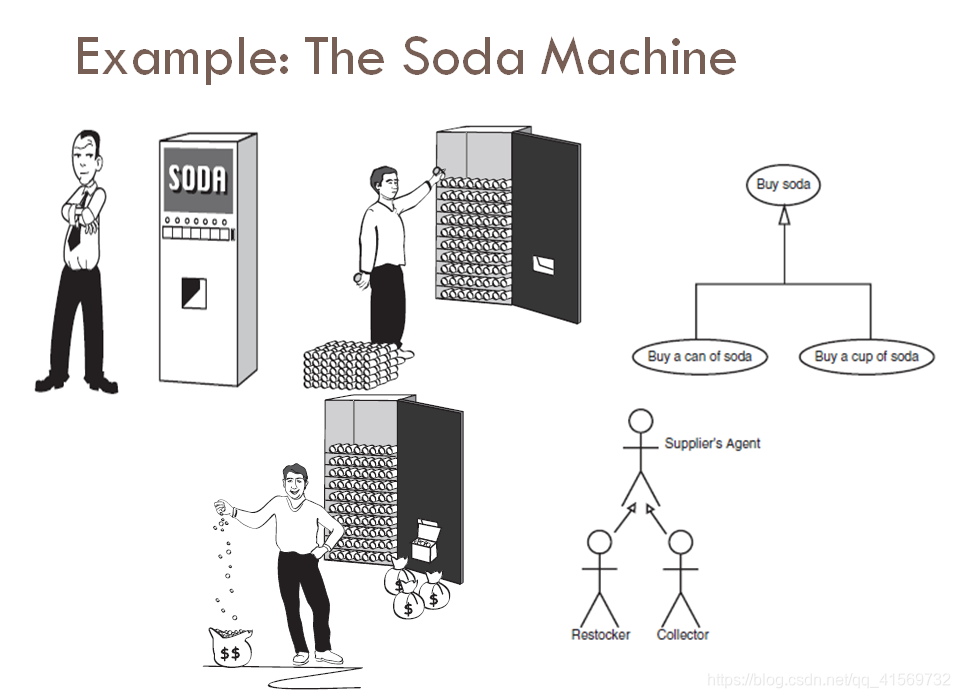
- Example: The Soda Machine
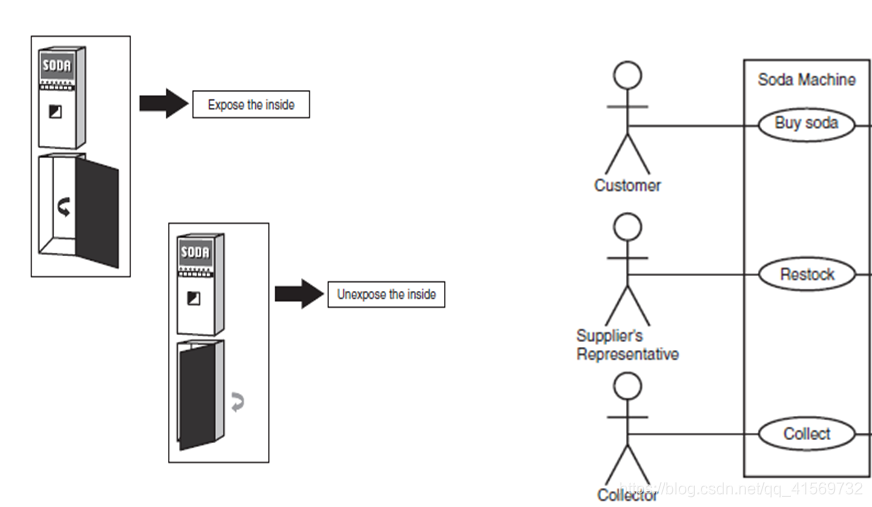
- Example
- Use Case Diagram Example
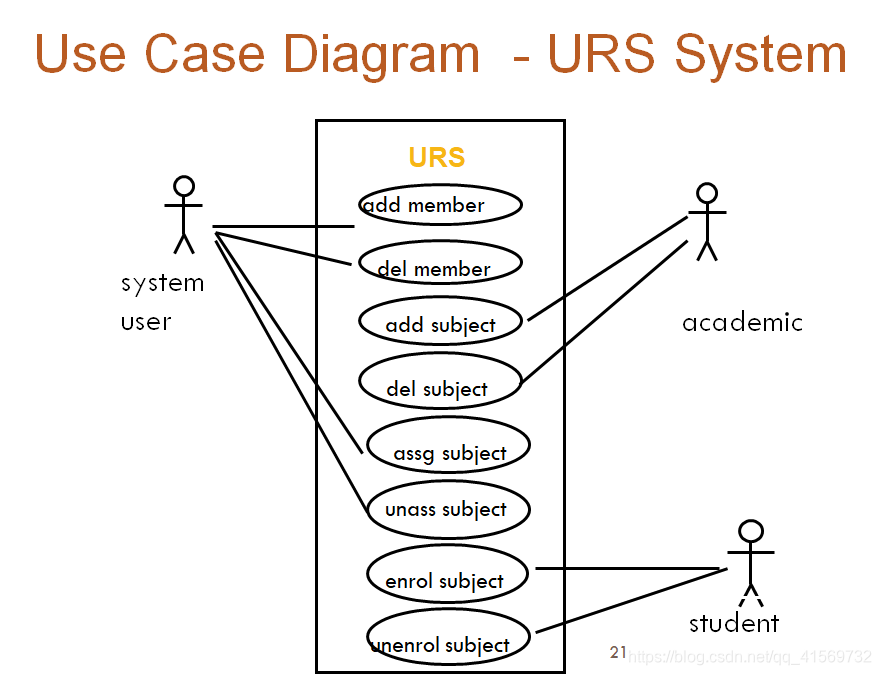
- University Record System (URS)
- Use Case Diagram - URS System
UML
Use Case Diagrams
Use case diagrams are one of the diagrams in the UML for modeling the dynamic aspects of systems.(Activity diagrams,state diagrams,sequence diagrams,and communication diagrams are four other kinds of diagrams in the UML for modeling the dynamic aspects of system.) Use case diagrams are central to modeling the behavior fo a system, a subsystem,or a class. Each one shows a set fo use cases and actors and their relationships.
Introduction
- Use case diagrams are a set of use cases, actors and their relationships.
- They represent the use case view of a system.
- A use case represents a particular functionality of a system.
- So use case diagram is used to describe the relationships among the functionalities and their internal/external controllers. These controllers are known as actors.
- It Organizes the behaviors of the system
Use case Diagram
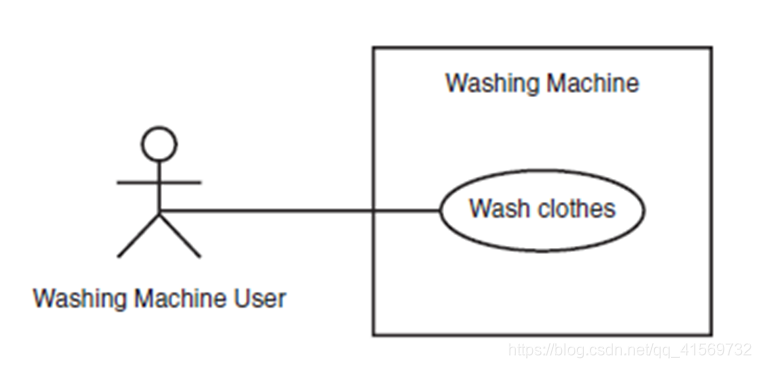
Use Case Diagrams - Actors
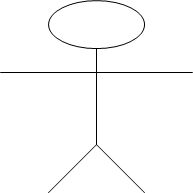
An actor is a user of the system playing a particular role.
Actor is shown with a stick figure.
Student
Use Case Diagrams – Use Cases
Use case is a particular activity a user can do on the system.
Is represented by an ellipse. 椭圆
Following are two use cases for a library system.
Use Cases

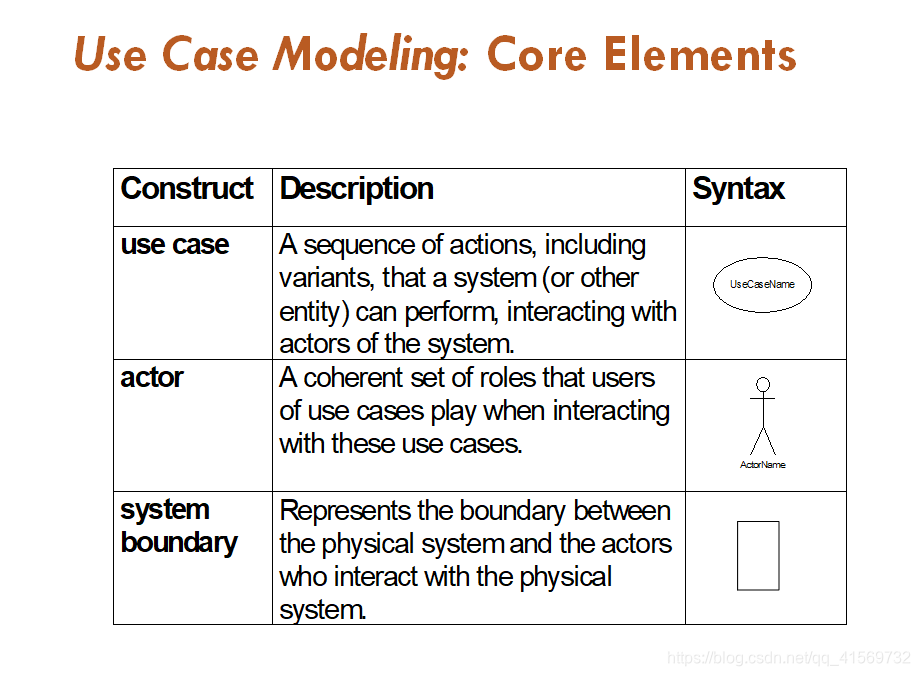
Use Case Modeling: Core Elements
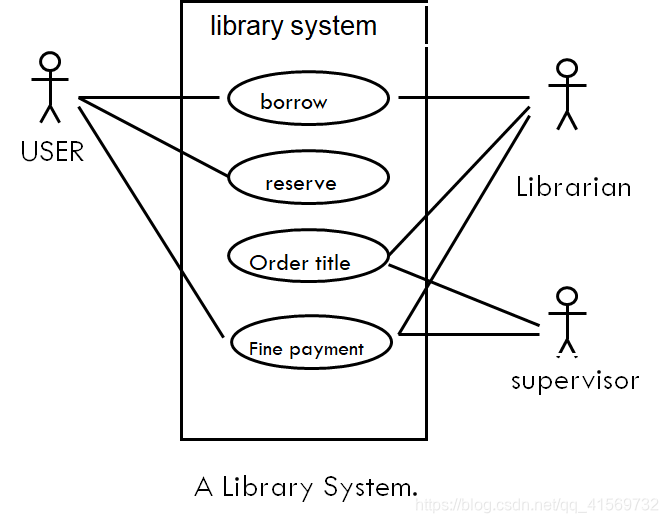
Use Case Diagram – Example1 (Library)
Use Case Diagram for Student Assessment Management System
Home Heating Use-Case Diagram
Example: The Soda Machine
Example
Use Case Diagram Example
University Record System (URS)
A University record system should keep information about its students and academic staff.
Records for all university members are to include their id number, surname, given name, email, address, date of birth, and telephone number.
Students and academic staff each have their own unique ID number: studN (students), acadN (academic employee), where N is an integer (N>0).
In addition to the attributes mentioned above:
Students will also have a list of subjects they are enrolled in. A student cannot be enrolled in any more than 10 subjects.
Academic employees will have a salary, and a list of subjects they teach. An academic can teach no more than 3 subjects.
Use Case Diagram - URS System
【UML】Use Case Diagrams的更多相关文章
- 【UML】NO.46.EBook.5.UML.1.006-【UML 大战需求分析】- 用例图(Use Case Diagram)
1.0.0 Summary Tittle:[UML]NO.46.EBook.1.UML.1.006-[UML 大战需求分析]- 用例图(Use Case Diagram) Style:DesignPa ...
- 【UML】-NO.40.UML.1.UML.1.001-【UML】- uml
1.0.0 Summary Tittle:[UML]-NO.40.UML.1.UML.1.001-[UML]- uml Style:DesignPattern Series:DesignPattern ...
- 【UML】NO.54.EBook.6.UML.2.002-【Thinking In UML 大象 第二版】- UML 核心元素
1.0.0 Summary Tittle:[UML]NO.54.EBook.6.UML.2.002-[Thinking In UML 大象 第二版]- UML 核心元素 Style:DesignPat ...
- 【UML】NO.70.EBook.9.UML.4.001-【PowerDesigner 16 从入门到精通】- 基础概念
1.0.0 Summary Tittle:[UML]NO.70.EBook.9.UML.4.001-[PowerDesigner 16 从入门到精通]- 基础概念 Style:DesignPatte ...
- 【UML】概念、关联、画画(一)
最近画UML画画,于UML观看视频后还没有学会.它是的结果UML九图是不是太懂,我想加深绘制过程的理解,我一个新的水平. 现在我觉得是时候..地介绍一下UML.了解一下它的基本内容.达到深入浅出的效果 ...
- 【UML】NO.55.EBook.8.UML.3.001-【UML和模式应用 第3版】
1.0.0 Summary Tittle:[UML]NO.54.EBook.8.UML.3.001-[UML和模式应用 第3版] Style:DesignPattern Series:DesignPa ...
- 【UML】NO.71.EBook.9.UML.4.002-【PowerDesigner 16 从入门到精通】- RQM
1.0.0 Summary Tittle:[UML]NO.71.EBook.9.UML.4.002-[PowerDesigner 16 从入门到精通]- RQM Style:DesignPatter ...
- 【UML】NO.50.EBook.5.UML.1.010-【UML 大战需求分析】- 考勤系统
1.0.0 Summary Tittle:[UML]NO.50.EBook.1.UML.1.010-[UML 大战需求分析]- 考勤系统 Style:DesignPattern Series:Desi ...
- 【UML】NO.51.EBook.5.UML.1.011-【UML 大战需求分析】- 时序图(Timing Diagram)
1.0.0 Summary Tittle:[UML]NO.51.EBook.1.UML.1.011-[UML 大战需求分析]- 时序图(Timing Diagram) Style:DesignPatt ...
随机推荐
- 20201204-3 opp编程好处
面向对象编程(Object-Oriented Programming )介绍 对于编程语言的初学者来讲, OOP不是一个很容易理解的编程方式,大家虽然都按老师讲的都知道0OP的三大特性是 继承.封装. ...
- Python 学习笔记 之 随着学习不断更新的Python特性搜集
大小写敏感 缩进敏感--tab和空格不要混用,最好使用4个空格进行缩进.可使用vim配置缩进字符为4个空格 编写py文件时注意文件的编码,UTF-8 without BOM, 并且记得声明coding
- 闭关修炼180天--手写IOC和AOP(xml篇)
闭关修炼180天--手写IOC和AOP(xml篇) 帝莘 首先先分享一波思维导图,涵盖了一些Spring的知识点,当然这里并不全面,后期我会持续更新知识点. 在手写实现IOC和AOP之前(也就是打造一 ...
- angular8 页面滚动到某一个特定位置
背景:使用angular8安装的 Fuse-v8.0.0-demo 后台的框架 锚点: id='nearby' 流程:无论是点击触发方法也好,还是直接调用方法也好,这里只写 引入: import {C ...
- 一个小技巧助您减少if语句的状态判断
作者:依乐祝 首发地址:https://www.cnblogs.com/yilezhu/p/14174990.html 在进行项目的开发的过程中, if 语句是少不了的,但我们始终要有一颗消灭 if ...
- 深入理解MySQL系列之索引
索引 查找一条数据的过程 先看下InnoDB的逻辑存储结构: 表空间:可以看做是InnoDB存储引擎逻辑结构的最高层,所有的数据都存放在表空间中.默认有个共享表空间ibdata1.如果启用innodb ...
- Git常用命令大全,迅速提升你的Git水平
原博文 https://mp.weixin.qq.com/s/hYjGyIdLK3UCEVF0lRYRCg 示例 初始化本地git仓库(创建新仓库) git init ...
- 【代码周边】Idea设置类注解和方法注解(带图)
Idea版本: 类注解 打开setting→Editor→Code Style→File and Code Templates /** * Created with IntelliJ IDEA. * ...
- [leetcode]355. Design Twitter设计实现一个微博系统
//先定义一个数据结构,代表一条微博,有两个内容:发布者id,微博id(代表微博内容) class TwitterData { int userId; int twitterId; public Tw ...
- How to install android studio on ubuntu14.04
First: open the web page: https://developer.android.com/studio/index.html download the Android Studi ...