
项目实战接口开发SpringBoot
一、springboot官方demo开发
- 依赖包和父:pom.xml
<dependencies>

    <dependency>

        <groupId>org.springframework.boot</groupId>

        <artifactId>spring-boot-starter-parent</artifactId>

        <version>2.7.14</version>

    </dependency>

    <dependency>

        <groupId>org.springframework.boot</groupId>

        <artifactId>spring-boot-starter-web</artifactId>

        <version>2.7.14</version>

    </dependency>

</dependencies>
- 新建 SampleController.java
import org.springframework.boot.*;

import org.springframework.boot.autoconfigure.EnableAutoConfiguration;

import org.springframework.stereotype.Controller;

import org.springframework.web.bind.annotation.RequestMapping;

import org.springframework.web.bind.annotation.ResponseBody;

@Controller

@EnableAutoConfiguration

public class SampleController {

    @RequestMapping("/")

    @ResponseBody

    String home(){

        return "Hello World!";

    }

    public static void main(String[] args) {

        SpringApplication.run(SampleController.class,args);

    }

}
- 运行结果

说明:内置了web服务器
二、使用SpringBoot开发get方法接口
返回cookie信息的get接口开发
- 新建Application.java 入口
import org.springframework.boot.SpringApplication;

import org.springframework.boot.autoconfigure.SpringBootApplication;

import org.springframework.context.annotation.ComponentScan;

@SpringBootApplication

@ComponentScan("com.course.server")

public class Application {

    public static void main(String[] args) {

        SpringApplication.run(Application.class,args);

    }

}
- com.course.server 新建MyGetMethod.java
@RestController

public class MyGetMethod{

    @RequestMapping(value="/getCookies",method=RequestMethod.GET)

    public String getCookies(){

        return "恭喜你获得cookies信息成功";

    }

}
- Resource下新建文件:application.properties
server.port=${port:8888}
启动后访问

获得cookies
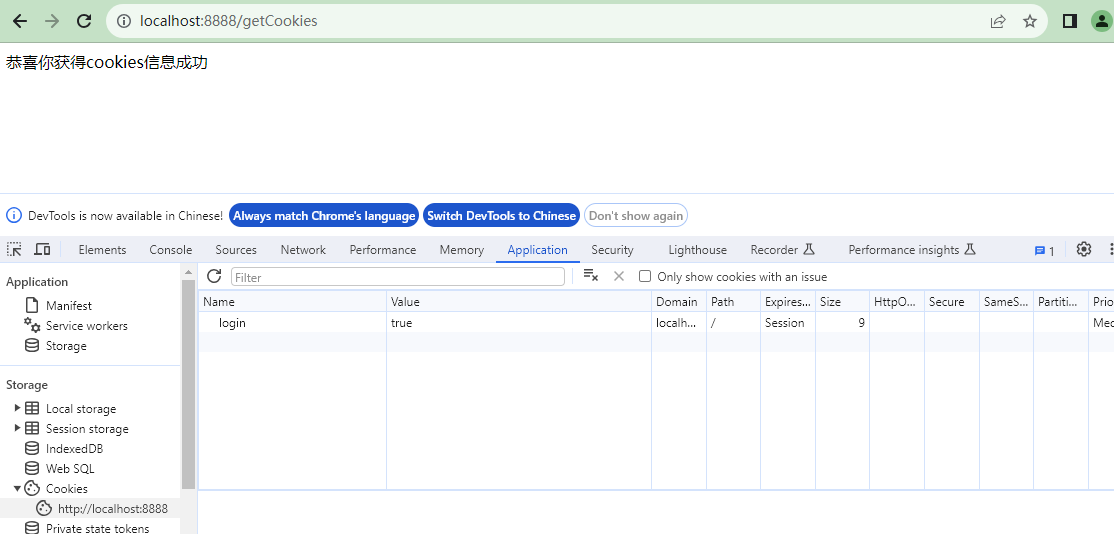
修改com.course.server.MyGetMethod.java 代码:
package com.course.server;

import org.springframework.web.bind.annotation.RequestMapping;

import org.springframework.web.bind.annotation.RequestMethod;

import org.springframework.web.bind.annotation.RestController;

import javax.servlet.http.Cookie;

import javax.servlet.http.HttpServletResponse;

@RestController

public class MyGetMethod {

    @RequestMapping(value = "/getCookies",method= RequestMethod.GET)

    public String getCookies(HttpServletResponse response){

        // HttpServletRequest 装请求信息得类

        // HttpServletResponse 装响应信息得类

        Cookie cookie = new Cookie("login", "true");

        response.addCookie(cookie);

        return "恭喜你获得cookies信息成功";

    }

}
运行:
三、一个要求携带cookie信息访问的get接口开发
- MyGetMethod.java 新增方法:
@RestController

public class MyGetMethod{

    @RequestMapping(value="/get/with/Cookies",method=RequestMethod.GET)

    public String getWithCookies(HttpServletRequest request){

        // HttpServletRequest 装请求信息的类

        // HttpServletResponse 装响应信息的类

        Cookie[] cookies = request.getCookies();

        if(Objects.isNull(cookies)){

            return "你必须携带cookies信息来";

        }

        for(Cookie cookie:cookies){

            if(cookie.getName().equals("login") &&

             cookie.getValue().equals("true")){

                 return "恭喜你访问成功!";

             }

        }

        return "你必须携带cookies信息来";

    }

}
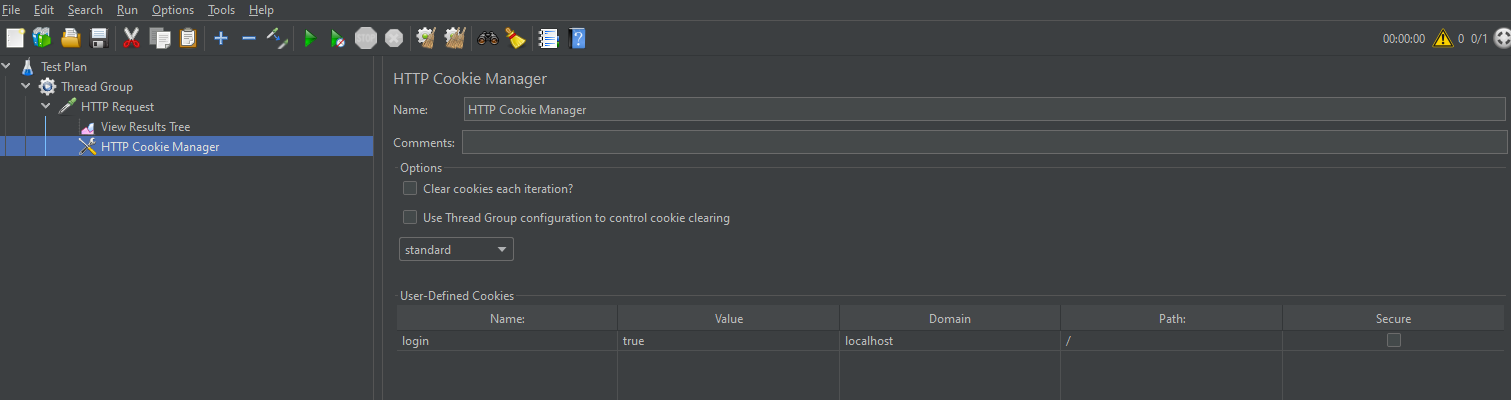
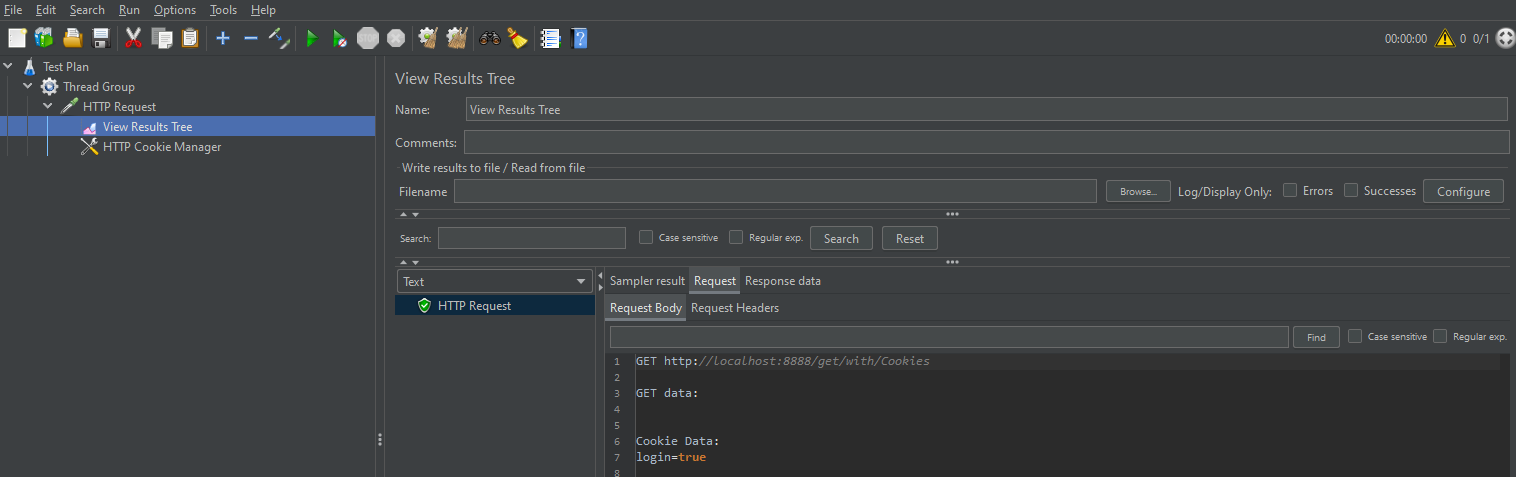
- Jemeter访问
1)加一个线程组
2)加一个HTTP请求
3)加一个HTTP Cookie管理器
4)加一个查看结果树
四、需要携带参数的get请求两种开发方式
4.1 方式1:url:key=value&key=value
@RestController

public class MyGetMethod{

    @RequestMapping(value="/get/with/param",method=RequestMethod.GET)

    public Map<String,Integer> getList(@RequestParam Integer start,

                                       @RequestParam Integer end){

        Map<String,Integer> myList = new HashMap<>();

        myList.put("鞋",500);

        myList.put("衣服",200);

        myList.put("干脆面",1);

        return myList;

    }

}
结果:

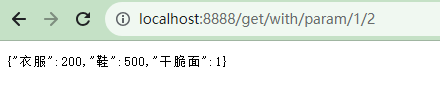
4.2 方式2:url:ip:port/get/with/param/10/20
@RequestMapping(value = "/get/with/param/{start}/{end}",method = RequestMethod.GET)

public Map<String,Integer> getList(@RequestParam(required = false) Integer start,

                                   @RequestParam(required = false) Integer end){

    Map<String,Integer> myList = new HashMap<>();

    myList.put("鞋",500);

    myList.put("衣服",200);

    myList.put("干脆面",1);

    return myList;

}
结果:
五、使用SpringBoot开发post方法接口
- 新增MyPostMethod.java
import io.swagger.annotations.Api;

import org.springframework.web.bind.annotation.RequestMapping;

import org.springframework.web.bind.annotation.RestController;

import javax.servlet.http.Cookie;

@RestController

@RequestMapping("/v1")

public class MyPostMethod{

    // 这个变量用来装我们的cookies信息

    private static Cookie cookie;

    // 用户登录成功获取到cookies,然后再访问其他接口获取到列表

    @RequestMapping(value="/login",method=RequestMethod.POST)

    @ApiOperation(value="登陆接口,成功后获取cookies信息",httpMethod="POST")

    public String login(HttpServletResponse response,

                        @RequestParam(value="userName",required=true) String userName,

                        @RequestParam(value="password",required=true) String password){

        if(userName.equals("zhangsan")&&password.equals("123456")){

            cookie = new Cookie("login","true");

            response.addCookie(cookie);

            return "恭喜你登录成功了!";

        }

        return "用户名或者密码错误!";

    }

}
- 在Jmeter中测试该接口

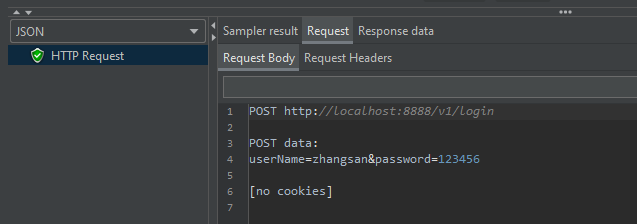

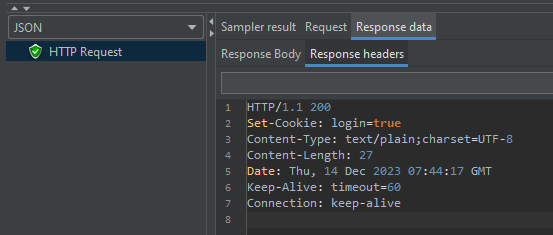
六、Cookie验证和返回用户列表的post接口开发
- 新增lombok依赖
<dependency>

    <groupId>org.projectlombok</groupId>

    <artifactId>lombok</artifactId>

    <version>RELEASE</version>

    <scope>compile</scope>

</dependency>
- 新增类 com/course/bean/User.java
package com.course.bean;

import lombok.Data;

@Data

public class User {

    private String userName;

    private String password;

    private String name;

    private String age;

    private String sex;

}
- 新增类 com/course/server/MyPostMethod.java
package com.course.server;

import com.course.bean.User;

import org.springframework.web.bind.annotation.*;

import javax.servlet.http.Cookie;

import javax.servlet.http.HttpServletRequest;

import javax.servlet.http.HttpServletResponse;

@RestController

@RequestMapping("/v1")

public class MyPostMethod {

    // 这个变量用来装我们的cookies信息

    private static Cookie cookie;

    // 用户登录成功获取到cookies,然后再访问其他接口获取到列表

    @RequestMapping(value="/login",method= RequestMethod.POST)

    public String login(HttpServletResponse response,

                        @RequestParam(value="userName",required=true) String userName,

                        @RequestParam(value="password",required=true) String password){

        if(userName.equals("zhangsan")&&password.equals("123456")){

            cookie = new Cookie("login","true");

            response.addCookie(cookie);

            return "恭喜你登录成功了!";

        }

        return "用户名或者密码错误!";

    }

    @RequestMapping(value="/getUserList",method = RequestMethod.POST)

    public String getUserList(HttpServletRequest request,

                            @RequestBody User u){

        // 获取cookies

        Cookie[] cookies = request.getCookies();

        // 验证cookies是否合法

        for (Cookie c:cookies){

            if (c.getName().equals("login") && c.getValue().equals("true") && u.getUserName().equals("zhangsan") && u.getPassword().equals("123456")){

                User user = new User();

                user.setName("lisi");

                user.setAge("14");

                user.setSex("man");

                return user.toString();

            }

        }

        return "参数不合法";

    }

}
- 启动Application.java
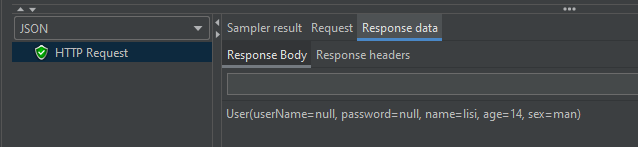
- 使用Jemeter测试接口
1)新建线程组
2)新增HTTP Header Manager

3)新增HTTP Cookie Manager

4)新增HTTP Request
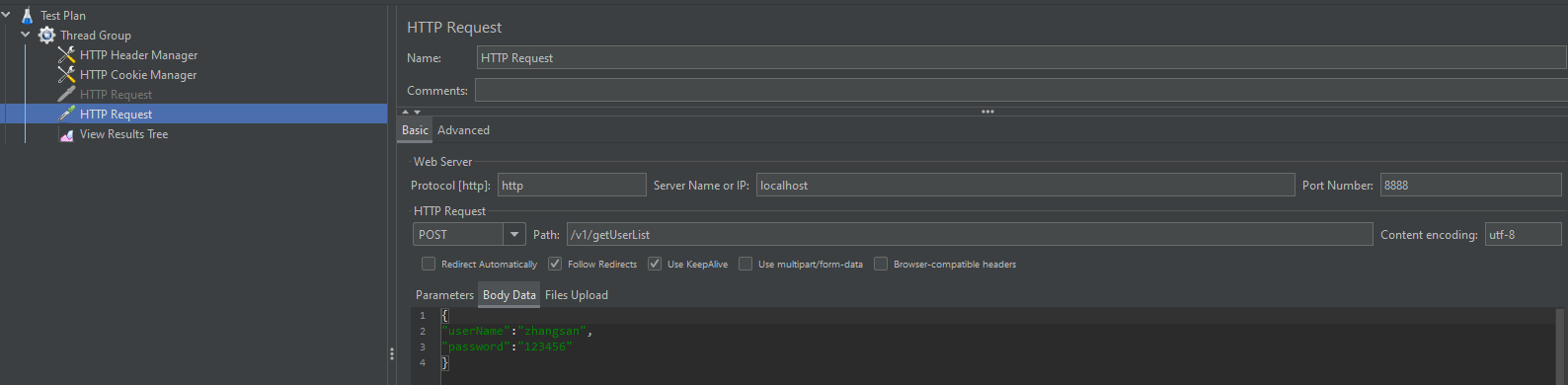
5)添加结果树
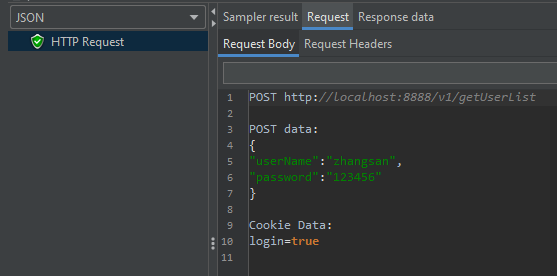
项目实战接口开发SpringBoot的更多相关文章
- 实战接口开发:python + flask + mysql + redis(根据反馈,持续细化更新。。。)
前言 自动化已经成为测试的必备技能之一了,所以,很多想跳槽的测试朋友都在自学,特别是最实用的接口自动化, 但是很多人因为没有可以练手的项目而苦恼,最终导致缺乏实战经验,其实,完全可以自己开发个简单项目 ...
- 【Spring Cloud & Alibaba全栈开源项目实战】:SpringBoot整合ELK实现分布式登录日志收集和统计
一. 前言 其实早前就想计划出这篇文章,但是最近主要精力在完善微服务.系统权限设计.微信小程序和管理前端的功能,不过好在有群里小伙伴的一起帮忙反馈问题,基础版的功能已经差不多,也在此谢过,希望今后大家 ...
- luffy项目的接口开发
处理跨域请求 主要的思路: 设置一个基于CORS的中间件来处理,关于跨域的产生与处理手段 settings.py: MIDDLEWARE = [ 'django.middleware.security ...
- Laravel实现大型商城网站之用户注册短信发送项目实战功能开发
确定短信运营商 我这里采用的云片,不过大家使用其它的也可以. 首先自己注册一个帐号,然后找到这个 点击开始接入,完成新手引导过程. 第二部的签名和模板必须填写,类似我下面填写的这样 值得注意的是这个模 ...
- React.js 入门与实战之开发适配PC端及移动端新闻头条平台课程上线了
原文发表于我的技术博客 我在慕课网的「React.js 入门与实战之开发适配PC端及移动端新闻头条平台」课程已经上线了,文章中是目前整个课程的大纲,以后此课程还会保持持续更新,此大纲文档也会保持更新, ...
- Java 18套JAVA企业级大型项目实战分布式架构高并发高可用微服务电商项目实战架构
Java 开发环境:idea https://www.jianshu.com/p/7a824fea1ce7 从无到有构建大型电商微服务架构三个阶段SpringBoot+SpringCloud+Solr ...
- 基于Linux下的C语言项目实战--本地账号管理系统
C语言开发项目实战: C语言是一门通用计算机编程语言,广泛应用于底层开发.C语言的设计目标是提供一种能以简易的方式编译.处理低级存储器.产生少量的机器码以及不需要任何运行环境支持便能运行的编程语言.尽 ...
- SpringBoot项目后台对接微信支付开发——微信统一下单接口开发
开始没找到微信支付的sdk.自己根据官方给的接口文档纯手写,各种xml转JSON,JSON转xml,加密解密,签名....整个人都是崩溃的 开发的第三天,发现有官方的sdk.心情一下子豁然开朗,整个人 ...
- SpringBoot电商项目实战 — 前后端分离后的优雅部署及Nginx部署实现
在如今的SpringBoot微服务项目中,前后端分离已成为业界标准使用方式,通过使用nginx等代理方式有效的进行解耦,并且前后端分离会为以后的大型分布式架构.弹性计算架构.微服务架构.多端化服务(多 ...
- Spring Boot微服务电商项目开发实战 --- 分布式开发要避的那些坑
今天已经进入第七讲了,整个微服务架构的搭建工作也基本完成.那到目前为止究竟使用了那些技术及实现了什么功能呢?我们先回顾一下. 使用的技术:SpringBoot.Dubbo.Zookeeper.Redi ...
随机推荐
- mpi转以太网连接300PLC在气动系统中的应用
mpi转以太网连接300PLC在气动系统中的应用 某企业装备有限公司 摘要 工业通讯迅速发展的今天,MPI转以太网通讯已经发展为成熟,稳定,高效通讯 方式,兴达易控自主研发的MPI转以太网模块MPI- ...
- 300PLC转以太网作为RTU主站连接智能电表
300PLC转以太网作为RTU主站连接智能电表 现场介绍: 西门子300PLC转以太网通过兴达易控MPI-ETH-XD1.0PLUS PLC转以太网模块把安科瑞的智能电表接入到300PLC里,读取电表 ...
- C++ 转换构造函数
在 C++ 中如果一个构造函数只有一个参数,那么这个构造函数就是转换构造函数(Converting Constructor),这个构造函数可以将参数类型转换成构造函数所在的类对应的类型. 举个例子,假 ...
- 传统的MVC开发模式和前后端分离开发模式
1. 引言 在当今互联网时代,移动应用和网页应用的发展极大地推动了前后端分离开发模式的兴起.传统的后端渲染方式已经不能满足用户对高性能和优质用户体验的需求,于是前后端分离逐渐成为了一种主流的开发模式. ...
- MySQL innoDB 间隙锁产生的死锁问题
背景 线上经常偶发死锁问题,当时处理一张表,也没有联表处理,但是有两个mq入口,并且消息体存在一样的情况,频率还不是很低,这么一个背景,我非常容易怀疑到,两个消息同时近到这一个事务里面导致的,但是是偶 ...
- 深入理解 python 虚拟机:原来虚拟机是这么实现闭包的
深入理解 python 虚拟机:原来虚拟机是这么实现闭包的 在本篇文章当中主要从虚拟机层面讨论函数闭包是如何实现的,当能够从设计者的层面去理解闭包就再也不用死记硬背一些闭包的概念了,因为如果你理解闭包 ...
- 11. 用Rust手把手编写一个wmproxy(代理,内网穿透等), 实现健康检查
11. 用Rust手把手编写一个wmproxy(代理,内网穿透等), 实现健康检查 项目 ++wmproxy++ gite: https://gitee.com/tickbh/wmproxy gith ...
- P8679 [蓝桥杯 2019 省 B] 填空问题 题解
P8679 [蓝桥杯 2019 省 B] 填空问题 题解 题目传送门 欢迎大家指出错误并联系这个蒟蒻 更新日志 2023-05-25 21:02 文章完成 2023-05-27 11:34 文章通过审 ...
- Maze 1D 题解
题目大意 在数轴上给定一串行动指令,类型有两种:向左移动一个单位 / 向右移动一个单位.要求最后一步到达一个没有到达过的位置.可以在数轴上放置若干个障碍物阻碍移动,问在放置的障碍物最少的情况下有多少放 ...
- 如何在云服务上快速拥有洛甲WAF(Web防火墙)
如何在云服务上快速拥有洛甲WAF(Web防火墙) 洛甲WAF是基于openresty的web防火墙,通过配合后台保护您的数据安全,详情参考节点服务器 luojiawaf_lua(nginx+lua) ...