
在LCD上的任意位置显示一张任意大小的jpg图片
/*************************************************

 *

 *   file name:lcdshowjpg.c

 *   author   :momolyl@126.com

 *   date     :2024/05/13

 *   brief    :完成libjpeg库的移植,并设计程序实现在LCD上的任意位置显示一张任意大小的jpg图片,注意不要越界。

 *   note     :None

 *

 *   CopyRight (c) 2024    momolyl@126.com    All Right Reseverd

 *

 **************************************************/

#include <stdio.h>

#include <stdlib.h>

#include <sys/types.h>

#include <sys/stat.h>

#include <fcntl.h>

#include <unistd.h>

#include <sys/mman.h>

/*

 * Include file for users of JPEG library.

 * You will need to have included system headers that define at least

 * the typedefs FILE and size_t before you can include jpeglib.h.

 * (stdio.h is sufficient on ANSI-conforming systems.)

 * You may also wish to include "jerror.h".

 */

#include "include/jpeglib.h"

int *lcd_mp;

// 成功返回1 失败返回0

int read_JPEG_file(char *filename, int start_x, int start_y)

{

  /* This struct contains the JPEG decompression parameters and pointers to

   * working space (which is allocated as needed by the JPEG library).

   */

  struct jpeg_decompress_struct cinfo;

  /* We use our private extension JPEG error handler.

   * Note that this struct must live as long as the main JPEG parameter

   * struct, to avoid dangling-pointer problems.

   */

  struct jpeg_error_mgr jerr;

  /* More stuff */

  FILE *infile;          /* source file */

  unsigned char *buffer; /* Output row buffer */

  int row_stride;        /* physical row width in output buffer */

  /* In this example we want to open the input file before doing anything else,

   * so that the setjmp() error recovery below can assume the file is open.

   * VERY IMPORTANT: use "b" option to fopen() if you are on a machine that

   * requires it in order to read binary files.

   */

  if ((infile = fopen(filename, "rb")) == NULL)

  {

    fprintf(stderr, "can't open %s\n", filename);

    return 0;

  }

  /* Step 1: allocate and initialize JPEG decompression object */

  /* We set up the normal JPEG error routines, then override error_exit. */

  cinfo.err = jpeg_std_error(&jerr);

  /* Now we can initialize the JPEG decompression object. */

  jpeg_create_decompress(&cinfo);

  /* Step 2: specify data source (eg, a file) */

  jpeg_stdio_src(&cinfo, infile);

  /* Step 3: read file parameters with jpeg_read_header() */

  (void)jpeg_read_header(&cinfo, TRUE);

  /* We can ignore the return value from jpeg_read_header since

   *   (a) suspension is not possible with the stdio data source, and

   *   (b) we passed TRUE to reject a tables-only JPEG file as an error.

   * See libjpeg.txt for more info.

   */

  /* Step 4: set parameters for decompression */

  /* In this example, we don't need to change any of the defaults set by

   * jpeg_read_header(), so we do nothing here.

   */

  /* Step 5: Start decompressor */

  (void)jpeg_start_decompress(&cinfo);

  /* We can ignore the return value since suspension is not possible

   * with the stdio data source.

   */

  /* We may need to do some setup of our own at this point before reading

   * the data.  After jpeg_start_decompress() we have the correct scaled

   * output image dimensions available, as well as the output colormap

   * if we asked for color quantization.

   * In this example, we need to make an output work buffer of the right size.

   */

  /* JSAMPLEs per row in output buffer */

  row_stride = cinfo.output_width * cinfo.output_components; // 计算一行的大小

  /* Make a one-row-high sample array that will go away when done with image */

  buffer = calloc(1, row_stride);

  /* Step 6: while (scan lines remain to be read) */

  /*           jpeg_read_scanlines(...); */

  /* Here we use the library's state variable cinfo.output_scanline as the

   * loop counter, so that we don't have to keep track ourselves.

   */

  int data = 0;

  while (cinfo.output_scanline < cinfo.output_height)

  {

    /* jpeg_read_scanlines expects an array of pointers to scanlines.

     * Here the array is only one element long, but you could ask for

     * more than one scanline at a time if that's more convenient.

     */

    (void)jpeg_read_scanlines(&cinfo, &buffer, 1); // 从上到下,从左到右  RGB RGB RGB RGB

    for (int i = 0; i < cinfo.output_width; ++i) // 012 345

    {

      data |= buffer[3 * i] << 16;    // R

      data |= buffer[3 * i + 1] << 8; // G

      data |= buffer[3 * i + 2];      // B

      // 把像素点写入到LCD的指定位置

      lcd_mp[800 * start_y + start_x + 800 * (cinfo.output_scanline - 1) + i] = data;

      data = 0;

    }

  }

  /* Step 7: Finish decompression */

  (void)jpeg_finish_decompress(&cinfo);

  /* We can ignore the return value since suspension is not possible

   * with the stdio data source.

   */

  /* Step 8: Release JPEG decompression object */

  /* This is an important step since it will release a good deal of memory. */

  jpeg_destroy_decompress(&cinfo);

  /* After finish_decompress, we can close the input file.

   * Here we postpone it until after no more JPEG errors are possible,

   * so as to simplify the setjmp error logic above.  (Actually, I don't

   * think that jpeg_destroy can do an error exit, but why assume anything...)

   */

  fclose(infile);

  /* At this point you may want to check to see whether any corrupt-data

   * warnings occurred (test whether jerr.pub.num_warnings is nonzero).

   */

  /* And we're done! */

  return 1;

}

int main(int argc, char const *argv[])

{

  // 1.打开LCD   open

  int lcd_fd = open("/dev/fb0", O_RDWR);

  // 2.对LCD进行内存映射  mmap

  lcd_mp = (int *)mmap(NULL, 800 * 480 * 4, PROT_READ | PROT_WRITE, MAP_SHARED, lcd_fd, 0);

  // 3.显示一张jpg

  read_JPEG_file("demo.jpg", 267, 100);

  return 0;

}
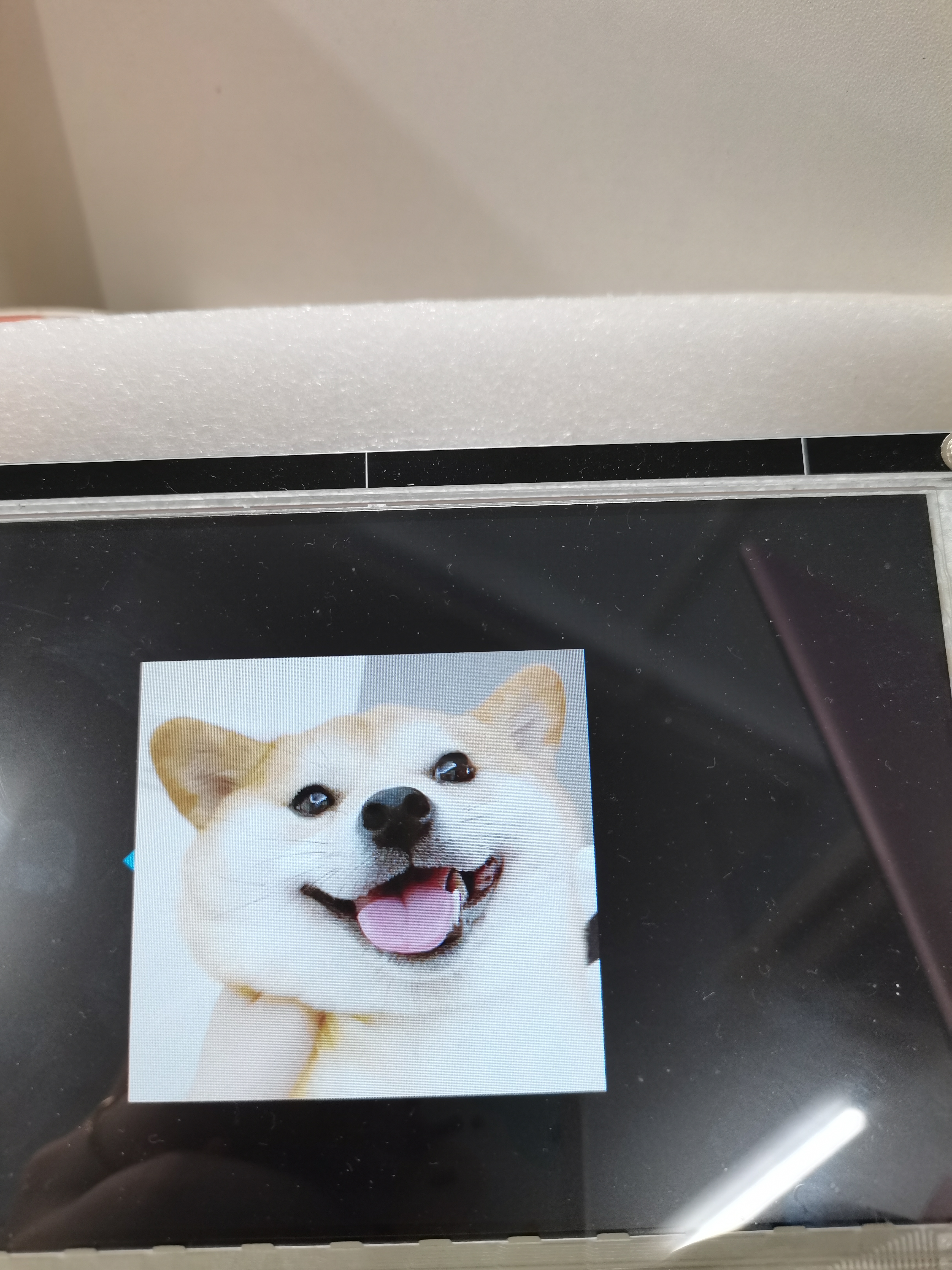
运行结果:
在LCD上的任意位置显示一张任意大小的jpg图片的更多相关文章
- Delphi XE7实现的任意位置弹出菜单
Delphi XE7中目前还没有弹出菜单组件,这个弹出菜单应用很普遍,在JAVA开发的安卓程序中很简单就可以用上了,应该说是一个标准控件.看了一些例子,但是都不能满足我想在任意位置弹出菜单需求,于是自 ...
- 8位灰度图在LCD上显示
一.概述 1.灰度 灰度使用黑色调表示物体,即用黑色为基准色,不同的饱和度的黑色来显示图像.每个灰度对象都具有从 0%(白色)到灰度条100%(黑色)的亮度值. 使用黑白或灰度扫描仪生成的图像通常以灰 ...
- 如何在html中把一个图片或者表格覆盖在一张已有图片上的任意位置
如何在html中把一个图片或者表格覆盖在一张已有图片上的任意位置 <div style="position:relative;"> <img src=&quo ...
- 自制单片机之十六……将文字或图形转成LCD上使用的C51字模数据
这一讲说说如何用取模软件将图形转成数据吧,有很多人反复问我这个问题,我就再罗嗦下吧! 取字模的软件有很多款.有的只能将文字转成字模数据,有的既可将文本文字转字模也能将图片转成点阵数据.在这里我就介绍一 ...
- 点击任意位置关闭(CocosCreator)
推荐阅读: 我的CSDN 我的博客园 QQ群:704621321 我的个人博客 今天,接触到一个新功能,当弹出某个弹框时,需要点击除弹框的剩余任意位置,来关闭该弹框,例如:当红框内 ...
- WPF Popup 右下角提示框 定时消失 ,以及任意位置定位
------------恢复内容开始------------ 好久没写WPF的博客了,其实有很多心得要总结下,但是懒..... 今天工作需要,需要实现一个 1 右下角的提示窗口,然后过三五秒自动消失这 ...
- C语言中链表任意位置怎么插入数据?然后写入文件中?
链表插入示意图:(图是个人所画)因为链表指针指来指去,难以理解,所以辅助画图更加方便. 插入某个学号后面图: 定义的结构体: struct student { ]; //学生学号 ]; //学生姓名 ...
- iOS修改手机定位(非越狱任意位置)
利用开发者的一些调试功能,我们可以修改非越狱的苹果手机定位,模拟任意位置. 经测试,此方法仅限开发者调试使用,并不能长时间修改手机定位. 1. 首先需要了解一些坐标系的知识 iOS,原生坐标系为 WG ...
- Java swing 如何将一个按钮放置到弹出框框的任意位置?(Absolute layout 布局的使用)
准备: Absolute layout 绝对布局,绝对布局中控件的可以在任意位置放置 如何制作下面那种样子的 弹出框? ---------------------------------------- ...
- eclipse导入maven项目,资源文件位置显示不正确
eclipse导入maven项目后,资源文件位置显示不正确,如下图所示 解决方法: 在resources上右键Build Path,选择Use as Source Folder即可正确显示资源文件
随机推荐
- 用 Visual C++ 2022 和 CMake 编译 CUnit 静态库
准备工作 源代码获取 CUnit 是知名的 C 语言单元测框架,其源代码最初发布在 sourceforge 上,网址为:https://sourceforge.net/projects/cunit/ ...
- 架构师必知的11种API性能优化方法
前言 接口性能优化是后端开发人员经常碰到的一道面试题,因为它是一个跟开发语言无关的公共问题. 这个问题既可以很简单,也可以相当复杂. 有时候,只需要添加一个索引就能解决. 有时候,代码需要进行重构. ...
- LLM并行训练3-数据并行
前置知识 混合精度训练 在参数存储时采取fp32, 开始进行fp/bp时转成fp16运算, 拿到fp16梯度后再转回fp32更新参数. ZeRO对显存占用的估算: 模型状态: Weights(fp16 ...
- 3568F-视频开发案例
- mac navicat免激活版
Navicat 12 第一步:终端执行 sudo spctl --master-disable 第二步:下载安装即可使用 https://pan.baidu.com/s/1tHq-wqAIggD0Fo ...
- eclipse注释取消注释
方法一:使用Ctrl+/快捷键 1 第1步:在Eclipse中拖动鼠标,选中需要注释的代码,通常为连续多行代码. 2 第2步:按住Ctrl+/快捷键,如图所示. 3 第3步:会发现所选代码被&qu ...
- 轻松掌握useAsyncData获取异步数据
title: 轻松掌握useAsyncData获取异步数据 date: 2024/7/12 updated: 2024/7/12 author: cmdragon excerpt: 摘要:本文详细介绍 ...
- 基于EF Core存储的Serilog持久化服务
前言 Serilog是 .NET 上的一个原生结构化高性能日志库,这个库能实现一些比内置库更高度的定制.日志持久化是其中一个非常重要的功能,生产环境通常很难挂接调试器或者某些bug的触发条件很奇怪.为 ...
- 诺基亚8110 4G手机强制格式化方法
关机状态下,先按住上键,再按住开机键,出现开机动画时松开开机键,出现硬割界面下键选择第一个wipe用开机键确认yes,再次出现硬格界面,下键选择第二个wipe用开机键确认yes,再次出现硬格界面开机键 ...
- Django集成的密码找回功能
要实现忘记密码功能,您需要进行以下修改: 添加忘记密码链接到登录页面. 创建密码丢失修改页面. 创建密码修改页面. 编写相应的视图函数来处理密码丢失修改和密码修改逻辑. 编写发送验证信息到邮箱的逻辑. ...