
[转帖]Nginx 性能测试
https://plantegg.github.io/2022/10/10/Nginx%E6%80%A7%E8%83%BD%E6%B5%8B%E8%AF%95/
压测工具选择 wrk ,apache ab压nginx单核没问题,多核的话 ab 自己先到瓶颈。另外默认关闭 access.log 避免 osq(osq 优化的自旋锁)。
Nginx 官方测试数据
普通测试数据参考官方数据,不再多做测试
RPS for HTTP Requests
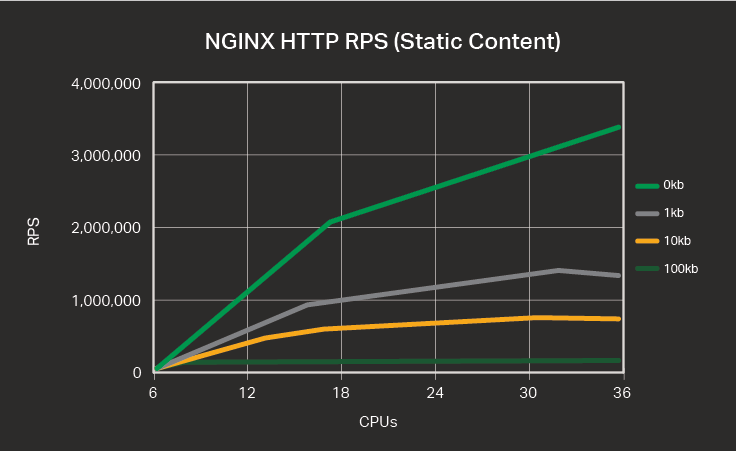
The table and graph below show the number of HTTP requests for varying numbers of CPUs and varying request sizes, in kilobytes (KB).
| CPUs | 0 KB | 1 KB | 10 KB | 100 KB |
|---|---|---|---|---|
| 1 | 145,551 | 74,091 | 54,684 | 33,125 |
| 2 | 249,293 | 131,466 | 102,069 | 62,554 |
| 4 | 543,061 | 261,269 | 207,848 | 88,691 |
| 8 | 1,048,421 | 524,745 | 392,151 | 91,640 |
| 16 | 2,001,846 | 972,382 | 663,921 | 91,623 |
| 32 | 3,019,182 | 1,316,362 | 774,567 | 91,640 |
| 36 | 3,298,511 | 1,309,358 | 764,744 | 91,655 |
RPS for HTTPS Requests
HTTPS RPS is lower than HTTP RPS for the same provisioned bare‑metal hardware because the data encryption and decryption necessary to secure data transmitted between machines is computationally expensive.
Nonetheless, continued advances in Intel architecture – resulting in servers with faster processors and better memory management – mean that the performance of software for CPU‑bound encryption tasks continually improves compared to dedicated hardware encryption devices.
Though RPS for HTTPS are roughly one‑quarter less than for HTTP at the 16‑CPU mark, “throwing hardware at the problem” – in the form of additional CPUs – is more effective than for HTTP, for the more commonly used file sizes and all the way up to 36 CPUs.
| CPUs | 0 KB | 1 KB | 10 KB | 100 KB |
|---|---|---|---|---|
| 1 | 71,561 | 40,207 | 23,308 | 4,830 |
| 2 | 151,325 | 85,139 | 48,654 | 9,871 |
| 4 | 324,654 | 178,395 | 96,808 | 19,355 |
| 8 | 647,213 | 359,576 | 198,818 | 38,900 |
| 16 | 1,262,999 | 690,329 | 383,860 | 77,427 |
| 32 | 2,197,336 | 1,207,959 | 692,804 | 90,430 |
| 36 | 2,175,945 | 1,239,624 | 733,745 | 89,842 |
参考配置参数
|
1
2
3
4
5
6
7
8
9
10
11
12
13
14
15
16
17
18
19
20
21
22
23
24
25
26
27
28
29
30
31
32
33
34
35
36
37
38
39
40
41
42
43
44
45
46
47
48
49
50
51
52
53
54
55
56
57
|
user nginx;
worker_processes 4;
worker_cpu_affinity 00000000000000000000000000001111;
# Load dynamic modules. See /usr/share/doc/nginx/README.dynamic.
include /usr/share/nginx/modules/*.conf;
events {
use epoll;
accept_mutex off;
worker_connections 102400;
}
http {
access_log off;
sendfile on;
sendfile_max_chunk 512k;
tcp_nopush on;
keepalive_timeout 60;
keepalive_requests 100000000000;
#在 nginx.conf 中增加以下开销能提升短连接 RPS
open_file_cache max=10240000 inactive=60s;
open_file_cache_valid 80s;
open_file_cache_min_uses 1;
include /etc/nginx/mime.types;
default_type application/octet-stream;
# Load modular configuration files from the /etc/nginx/conf.d directory.
# See http://nginx.org/en/docs/ngx_core_module.html#include
# for more information.
include /etc/nginx/conf.d/*.conf;
server {
listen 80 default_server;
listen [::]:80 default_server;
server_name _;
root /usr/share/nginx/html;
# Load configuration files for the default server block.
include /etc/nginx/default.d/*.conf;
location / {
#return 200 'a';
#root /usr/share/nginx/html;
#index index.html index.htm;
}
error_page 404 /404.html;
location = /40x.html {
}
error_page 500 502 503 504 /50x.html;
location = /50x.html {
}
}
|
https 配置
解开https默认配置注释 // sed -i “57,81s/#(.*)/\1/“ /etc/nginx/nginx.conf
|
1
2
3
4
5
6
7
8
9
10
11
12
13
14
15
16
17
18
19
20
21
22
23
24
25
26
27
28
29
|
# Settings for a TLS enabled server.
#
# server {
# listen 443 ssl http2 default_server;
# listen [::]:443 ssl http2 default_server;
# server_name _;
# root /usr/share/nginx/html;
#
# ssl_certificate "/etc/pki/nginx/server.crt";
# ssl_certificate_key "/etc/pki/nginx/private/server.key";
# ssl_session_cache shared:SSL:1m;
# ssl_session_timeout 10m;
# ssl_ciphers HIGH:!aNULL:!MD5;
# ssl_prefer_server_ciphers on;
#
# # Load configuration files for the default server block.
# include /etc/nginx/default.d/*.conf;
#
# location / {
# }
#
# error_page 404 /404.html;
# location = /40x.html {
# }
#
# error_page 500 502 503 504 /50x.html;
# location = /50x.html {
# }
# }
|
生成秘钥文件和配置https
|
1
2
3
4
5
6
7
8
9
10
11
12
13
|
mkdir /etc/pki/nginx/ /etc/pki/nginx/private -p
openssl genrsa -des3 -out server.key 2048 #会有两次要求输入密码,输入同一个即可
openssl rsa -in server.key -out server.key
openssl req -new -key server.key -out server.csr
openssl req -new -x509 -key server.key -out server.crt -days 3650
openssl req -new -x509 -key server.key -out ca.crt -days 3650
openssl x509 -req -days 3650 -in server.csr -CA ca.crt -CAkey server.key -CAcreateserial -out server.crt
cp server.crt /etc/pki/nginx/
cp server.key /etc/pki/nginx/private
启动nginx
systemctl start nginx
|
创建ecdsa P256 秘钥和证书
|
1
|
openssl req -x509 -sha256 -nodes -days 365 -newkey ec:<(openssl ecparam -name prime256v1) -keyout ecdsa.key -out ecdsa.crt -subj "/C=CN/ST=Beijing/L=Beijing/O=Example Inc./OU=Web Security/CN=example1.com"
|
https 长连接
|
1
|
wrk -t 32 -c 1000 -d 30 --latency https://$serverIP:443
|
https 短连接
|
1
|
wrk -t 32 -c 1000 -d 30 -H 'Connection: close' --latency https://$serverIP:443
|
不同 CPU 型号下 Nginx 静态页面的处理能力
对比不同 CPU 型号下 Nginx 静态页面的处理能力。静态文件下容易出现 同一文件上的 自旋锁(OSQ),null 测试场景表示直接返回,不读取文件
|
1
|
wrk -t12 -c400 -d30s http://100.81.131.221:18082/index.html //参数可以调整,目标就是将 CPU 压满
|
软中断在 node0 上,intel E5和 M的对比,在M上访问单个文件锁竞争太激烈,改成请求直接 return 后多核能保持较好的线性能力(下表中 null标识)
| CPUs(括号中为core序号) | E5-2682 | E5-2682 null | M | M null | AMD 7t83 null | AMD 7t83 | ft s2500 on null |
|---|---|---|---|---|---|---|---|
| 1(0) | 69282/61500.77 | 118694/106825 | 74091 | 135539/192691 | 190568 | 87190 | 35064 |
| 2(1,2) | 130648 us 31% | 233947 | 131466 | 365315 | |||
| 2(1对HT) | 94158 34% | 160114 | 217783 | ||||
| 4(0-3) | 234884/211897 | 463033/481010 | 499507/748880 | 730189 | 323591 | ||
| 8(0-7) | 467658/431308 | 923348/825002 | 1015744/1529721 | 1442115 | 650780 | ||
| 8(0-15) | 1689722/1363031 | 1982448/3047778 | 2569314 | 915399 |
测试说明:
- 压测要将多个核打满,有时候因为软中断的挤占会导致部分核打不满
- 要考虑软中断对CPU使用的挤占/以及软中断跨node的影响
- 测试结果两组数字的话,前者为nginx、软中断分别在不同的node
- E5/M 软中断绑 node1,测试结果的两组数据表示软中断和nginx跨node和同node(同 node时软中断和nginx尽量错开)
- null 指的是 nginx 直接返回 200,不从文件读取html,保证没有文件锁
- AMD 软中断总是能跟着绑核的nginx进程跑
- 压测要将多个核打满,有时候因为软中断的挤占会导致部分核打不满
M是裸金属ECS,moc卡插在Die1上,所以软中断默认绑在 Die1 上,测试强行将软中断绑定到 Die0 实际测试结果和绑定在 Die1 性能一样,猜测改了驱动将网络包的描述符没有按硬件绑死而是跟软中断就近分配。
sendfile 和 tcp_nopush
tcp_nopush 对性能的影响
M上,返回很小的 html页面,如果 tcp_nopush=on 性能能有20%的提升,并且开启后 si% 使用率从10%降到了0. Tcp_nodelay=on 就基本对性能没啥影响
TCP_NOPUSH 是 FreeBSD 的一个 socket 选项,对应 Linux 的 TCP_CORK,Nginx 里统一用
tcp_nopush来控制它。启用它之后,数据包会累计到一定大小之后才会发送,减小了额外开销,提高网络效率。To keep everything logical, Nginx tcp_nopush activates the TCP_CORK option in the Linux TCP stack since the TCP_NOPUSH one exists on FreeBSD only.
nginx on M 8核,http 长连接,访问极小的静态页面(AMD 上测试也是 sendfile off 性能要好30%左右)
| tcp_nopush on | tcp_nopush off | |
|---|---|---|
| sendfile on | 46万(PPS 44万) | 37万(PPS 73万) |
| sendfile off | 49万(PPS 48万) | 49万(PPS 48万) |
问题:为什么 sendfile off 性能反而好?(PPS 明显低了)
答:一次请求Nginx要回复header+body, header在用户态内存,body走sendfile在内核态内存,nginx没有机会合并header+body, sendfile on后导致每次请求要回复两个tcp包。而 sendfile off的时候虽然有用户态内核态切换、copy,但是有机会把 header/body 合并成一个tcp包
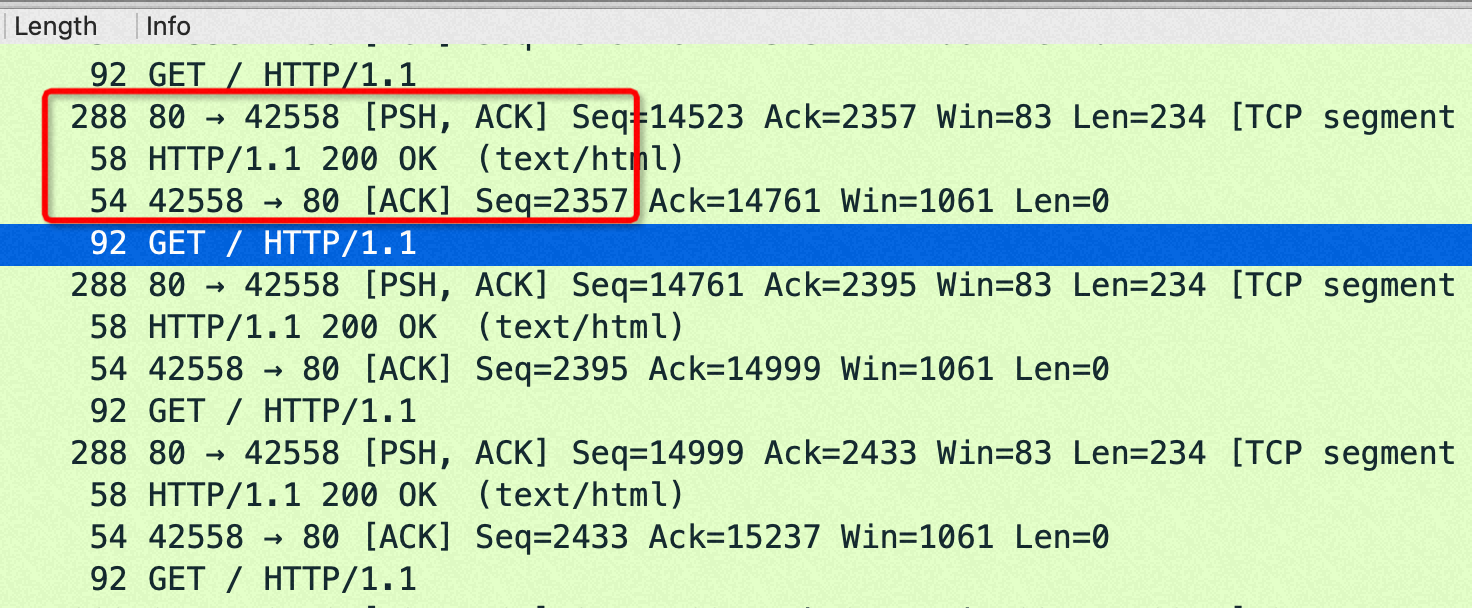
从抓包来看,sendfile on的时候每次 http get都是回复两个包:1) http 包头(len:288)2)http body(len: 58)
sendfile off的时候每次 http get都是回复一个包: http 包头+body(len:292=288+4)
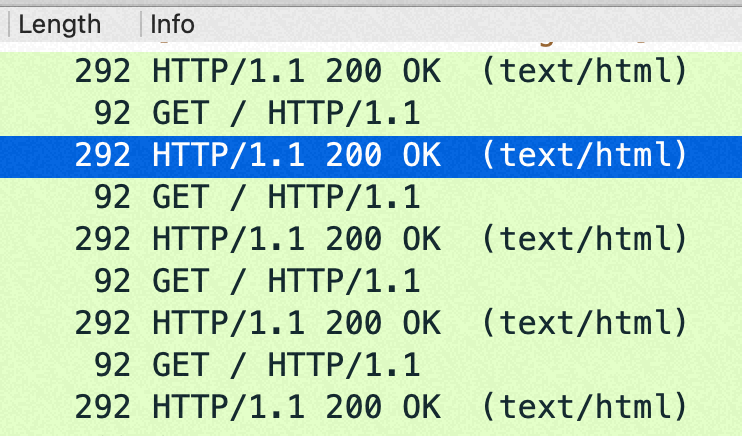
在这个小包场景,如果sendfile=off 后,回包在http层面就已经合并从1个了,导致内核没机会再次 cork(合并包);如果sendfile=on 则是每次请求回复两个tcp包,如果设置了 nopush 会在内核层面合并一次。
如果不是访问磁盘上的静态页面,而是直接 return某个内存的内容的话,sendfile on/off 对性能没有影响,原理也如上,不需要访问磁盘,也就没有机会分两个包发送包头和body了。
分析参考数据
以下数据都是变换不同的 sendfile、tcp_nopush等组合来观察QPS、setsockopt、PPS来分析这些参数起了什么作用
|
1
2
3
4
5
6
7
8
9
10
11
12
13
14
15
16
17
18
19
20
21
22
23
24
25
26
27
28
29
30
31
32
33
34
35
36
37
38
39
40
41
42
43
44
45
46
47
48
49
50
51
52
53
54
|
//tcp_nopush off; QPS 37万 很明显 pps 比46万高了将近1倍,这是因为 tcp_cork 合并了小包
//nginx 创建连接设置的 sock opt
#cat strace.log.88206
08:31:19.632581 setsockopt(3, SOL_TCP, TCP_NODELAY, [1], 4) = 0 <0.000013>
#tsar --traffic --live -i1
Time ---------------------traffic--------------------
Time bytin bytout pktin pktout pkterr pktdrp
30/09/22-07:00:22 52.9M 122.8M 748.2K 726.8K 0.00 0.00
30/09/22-07:00:23 52.9M 122.7M 748.1K 726.2K 0.00 0.00
30/09/22-07:00:24 53.0M 122.9M 749.2K 727.2K 0.00 0.00
30/09/22-07:00:25 53.0M 122.8M 749.3K 726.6K 0.00 0.00
30/09/22-07:00:26 52.9M 122.8M 748.2K 727.1K 0.00 0.00
30/09/22-07:00:27 53.1M 123.0M 750.5K 728.0K 0.00 0.00
//tcp_nopush on; QPS 46万
#tsar --traffic --live -i1
Time ---------------------traffic--------------------
Time bytin bytout pktin pktout pkterr pktdrp
30/09/22-07:00:54 40.2M 127.6M 447.6K 447.6K 0.00 0.00
30/09/22-07:00:55 40.2M 127.5M 447.1K 447.1K 0.00 0.00
30/09/22-07:00:56 40.1M 127.4M 446.8K 446.8K 0.00 0.00
//sendfile on ,tcp_nopush on, quickack on; QPS 46万
#ip route change 172.16.0.0/24 dev eth0 quickack 1
#ip route
default via 172.16.0.253 dev eth0
169.254.0.0/16 dev eth0 scope link metric 1002
172.16.0.0/24 dev eth0 scope link quickack 1
192.168.5.0/24 dev docker0 proto kernel scope link src 192.168.5.1
//nginx 创建连接设置的 sock opt
#cat strace.log.85937
08:27:44.702111 setsockopt(3, SOL_TCP, TCP_CORK, [1], 4) = 0 <0.000011>
08:27:44.702353 setsockopt(3, SOL_TCP, TCP_CORK, [0], 4) = 0 <0.000013>
#tsar --traffic -i1 --live
Time ---------------------traffic--------------------
Time bytin bytout pktin pktout pkterr pktdrp
08/10/22-03:27:23 40.7M 152.9M 452.6K 905.2K 0.00 0.00
08/10/22-03:27:24 40.7M 152.9M 452.6K 905.2K 0.00 0.00
08/10/22-03:27:25 40.6M 152.8M 452.3K 904.5K 0.00 0.00
08/10/22-03:27:26 40.6M 152.7M 452.1K 904.1K 0.00 0.00
08/10/22-03:27:27 40.6M 152.7M 452.0K 904.0K 0.00 0.00
08/10/22-03:27:28 40.7M 153.1M 453.2K 906.5K 0.00 0.00
//sendfile on , quickack on; QPS 42万
#tsar --traffic -i1 --live
Time ---------------------traffic--------------------
Time bytin bytout pktin pktout pkterr pktdrp
08/10/22-04:02:53 57.9M 158.7M 812.3K 1.2M 0.00 0.00
08/10/22-04:02:54 58.3M 159.6M 817.3K 1.2M 0.00 0.00
08/10/22-04:02:55 58.2M 159.4M 816.0K 1.2M 0.00 0.00
|
This behavior is confirmed in a comment from the TCP stack source about TCP_CORK:
When set indicates to always queue non-full frames. Later the user clears this option and we transmit any pending partial frames in the queue. This is meant to be used alongside sendfile() to get properly filled frames when the user (for example) must write out headers with a write() call first and then use sendfile to send out the data parts. TCP_CORK can be set together with TCP_NODELAY and it is stronger than TCP_NODELAY.
perf top 数据
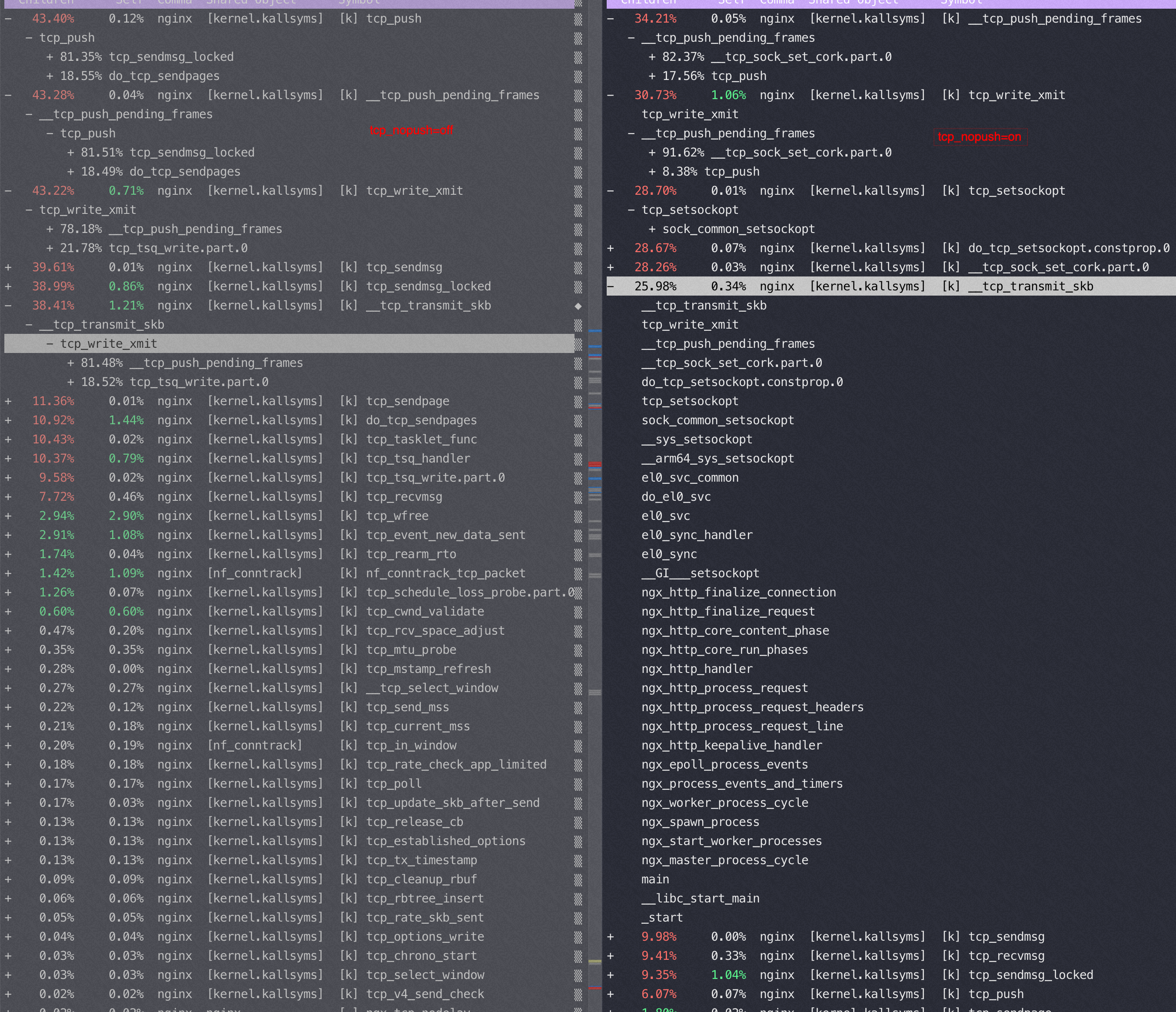
以下都是 sendfile on的时候变换 tcp_nopush 参数得到的不同 perf 数据
tcp_nopush=off:(QPS 37万)
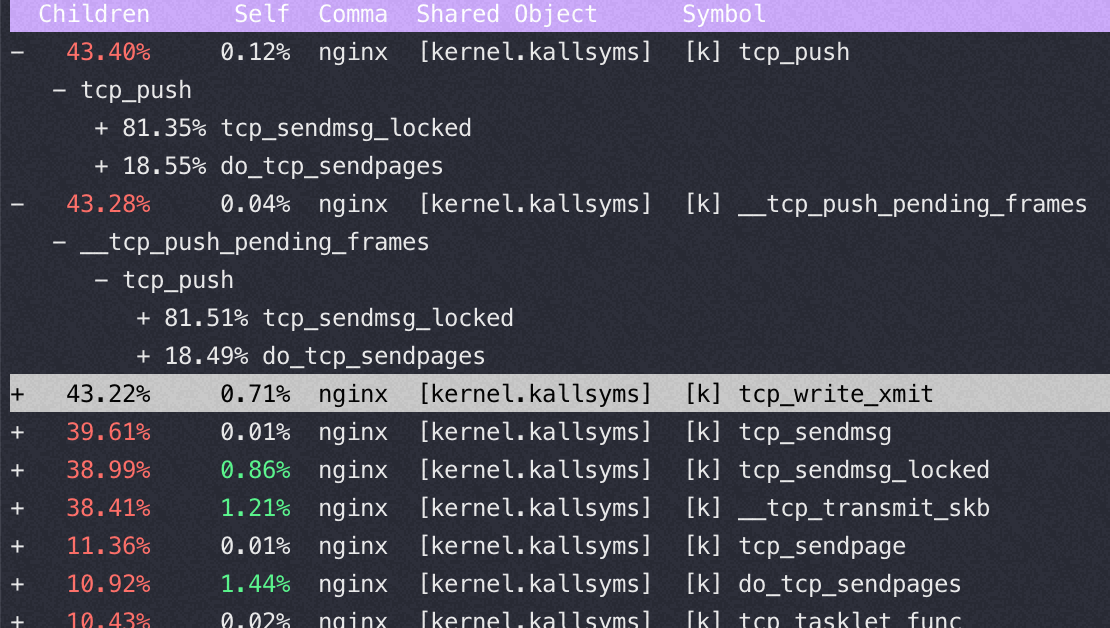
tcp_nopush=on:(QPS 46万)
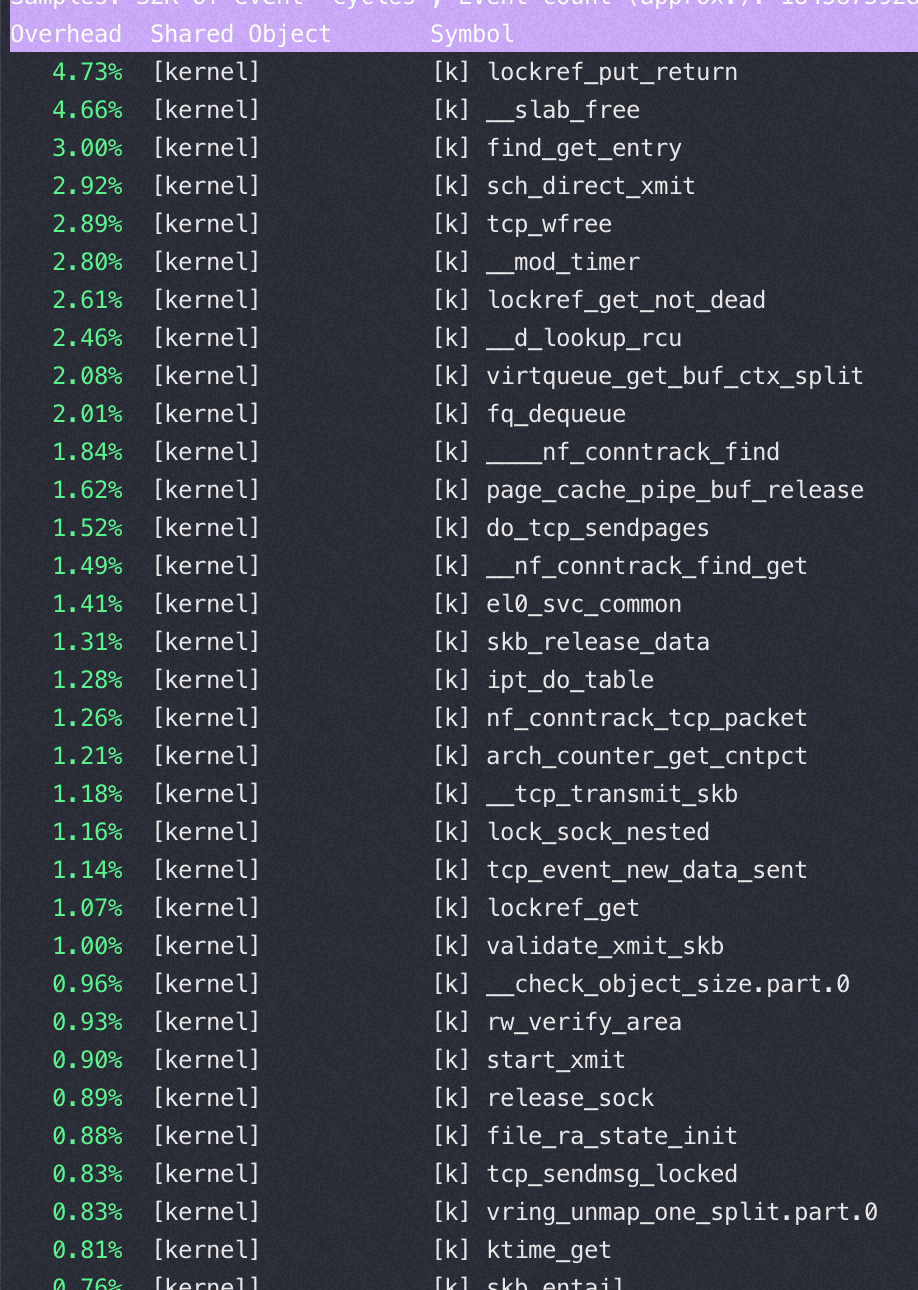
对比一下,在sendfile on的时候,用不同而push 参数对应的 tcp 栈
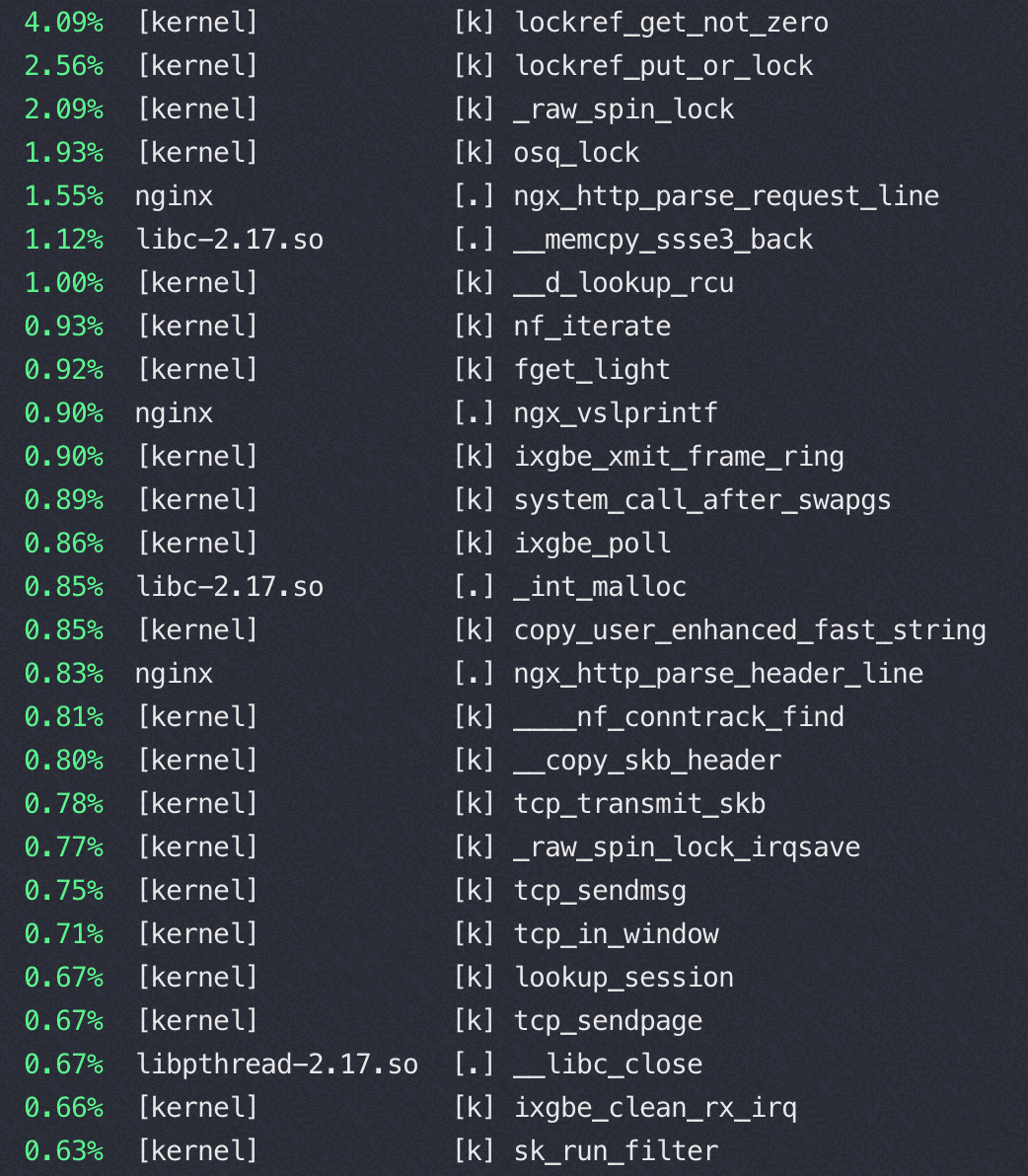
Nginx 在16核后再增加核数性能提升很少的分析
16核 perf top
32核 perf top
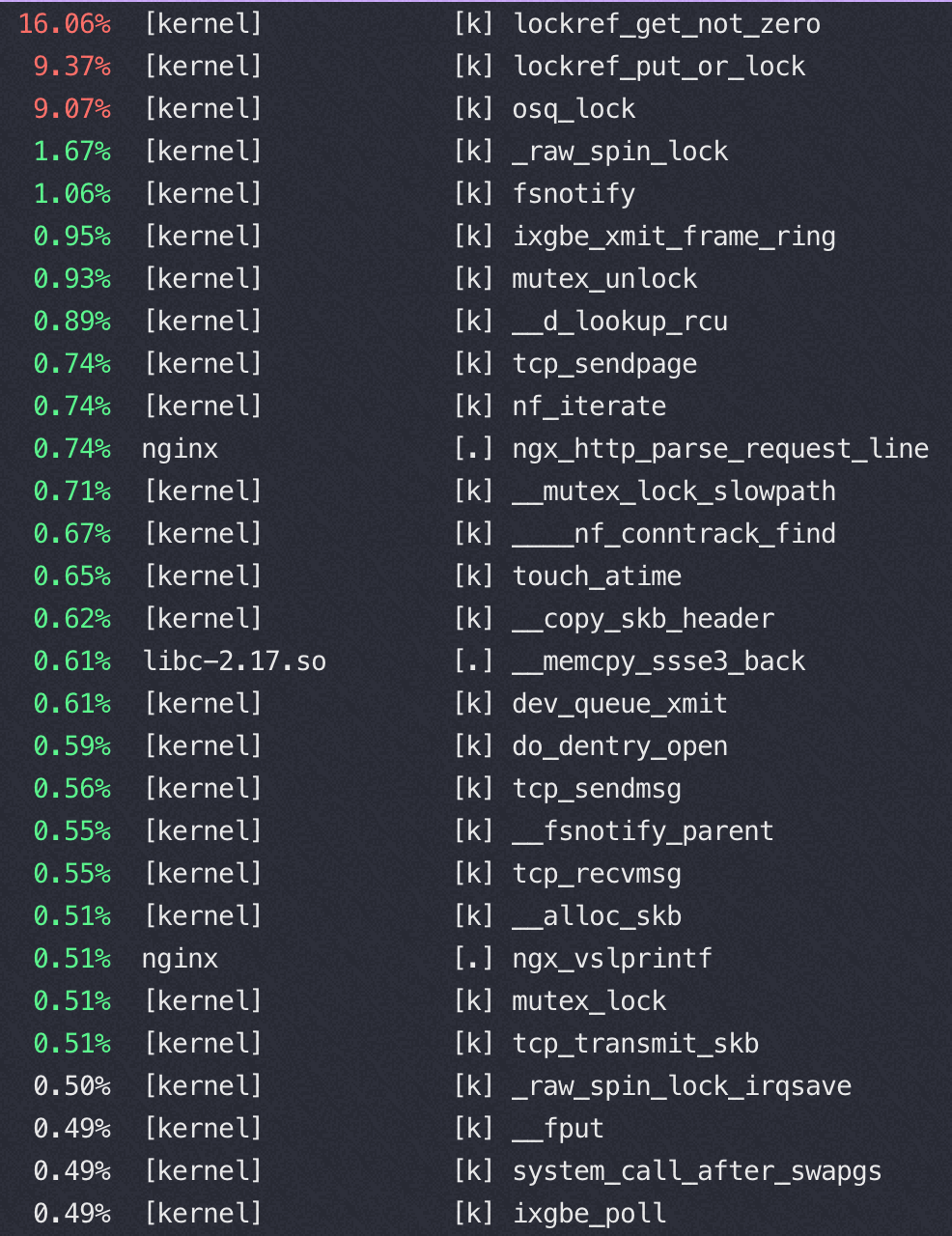
从以上两个perf top 对比可以看到内核锁消耗增加非常明显
这是因为读写文件锁 osq_lock ,比如nginx需要写日志访问 access.log,需要加锁
osq(optimistci spinning queue)是基于MCS算法的一个具体实现,osq_lock 是Linux 中对MCS的实现
|
1
2
3
4
5
6
7
8
9
|
location / {
return 200 '<!DOCTYPE html><h2>null!</h2>\n'; #直接内存返回,不读磁盘文件,避免文件锁
# because default content-type is application/octet-stream,
# browser will offer to "save the file"...
# if you want to see reply in browser, uncomment next line
# add_header Content-Type text/plain;
root /usr/share/nginx/html;
index index.html index.htm;
}
|
ARM下这个瓶颈更明显
M上用40-64 core 并发的时候 perf top都是如下图,40 core以上网络瓶颈,pps 达到620万(离ECS规格承诺的1200万还很远),CPU压不起来了
|
1
2
3
4
5
6
7
8
9
10
11
12
13
14
15
16
17
18
19
20
21
22
23
|
#tsar --traffic -i1 --live
Time ---------------------traffic--------------------
Time bytin bytout pktin pktout pkterr pktdrp
16/09/22-12:41:07 289.4M 682.8M 3.2M 3.2M 0.00 0.00
16/09/22-12:41:08 285.5M 674.4M 3.1M 3.1M 0.00 0.00
16/09/22-12:41:09 285.0M 672.6M 3.1M 3.1M 0.00 0.00
16/09/22-12:41:10 287.5M 678.3M 3.1M 3.1M 0.00 0.00
16/09/22-12:41:11 289.2M 682.0M 3.2M 3.2M 0.00 0.00
16/09/22-12:41:12 290.1M 685.1M 3.2M 3.2M 0.00 0.00
16/09/22-12:41:13 288.3M 680.4M 3.1M 3.1M 0.00 0.00
#ethtool -l eth0
Channel parameters for eth0:
Pre-set maximums:
RX: 0
TX: 0
Other: 0
Combined: 32 //所以用不满64 core,依据上面的测试数据推算64队列的话那么基本可以跑到1200万pps
Current hardware settings:
RX: 0
TX: 0
Other: 0
Combined: 32
|
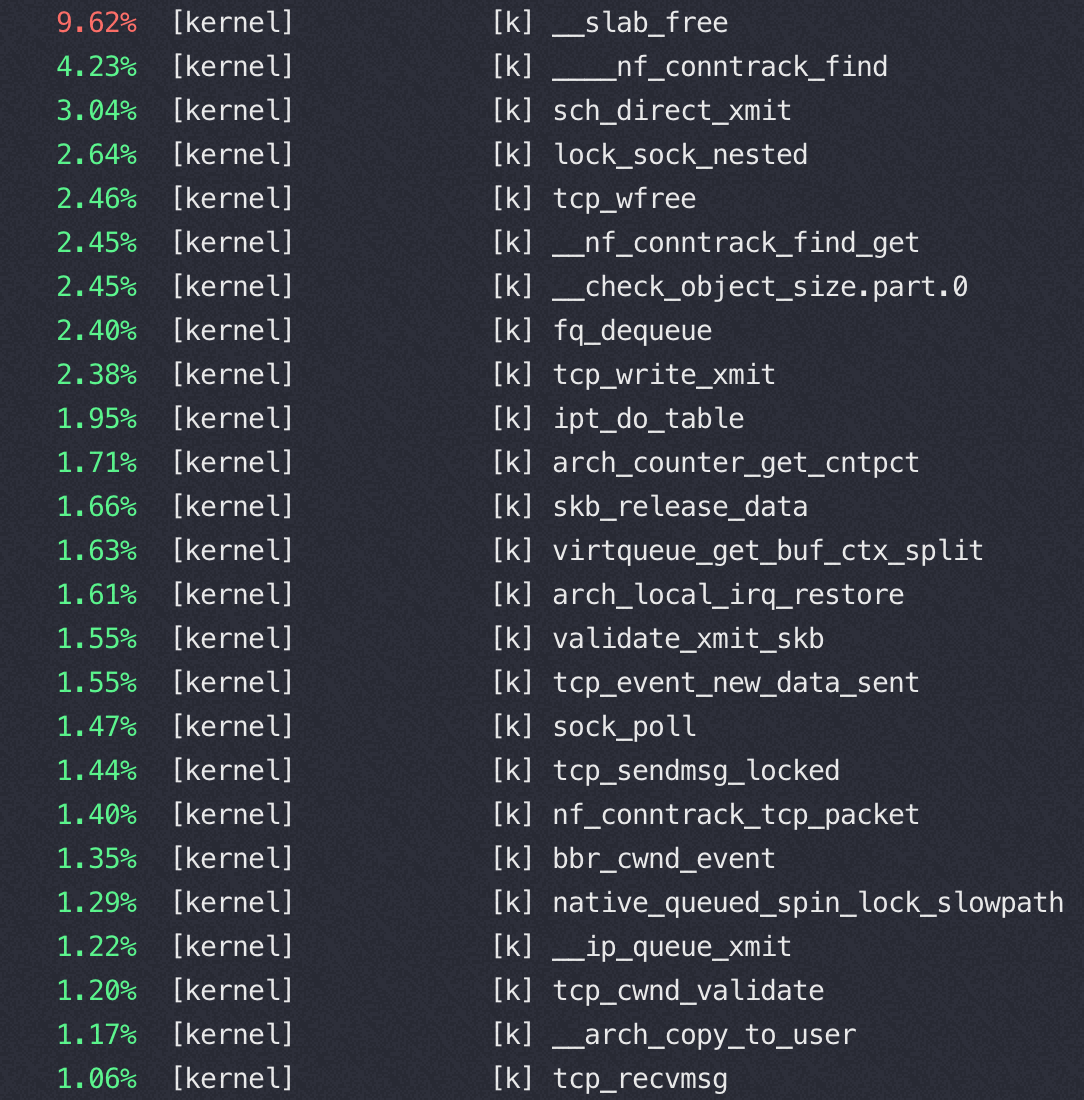
文件锁的竞争
Nginx 在M 上使用 16 core的时候完全压不起来,都是内核态锁竞争,16core QPS 不到23万,线性能力很差(单核68000)
从下图可以看到 sys 偏高,真正用于 us 的 CPU 太少,而内核态 CPU 消耗过高的是 osq_lock(写日志文件锁相关)
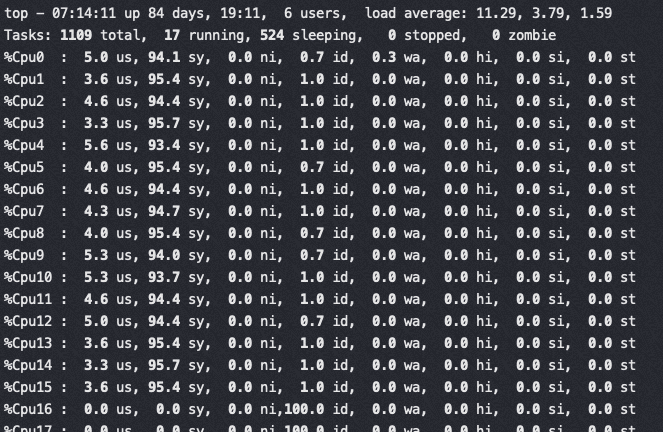
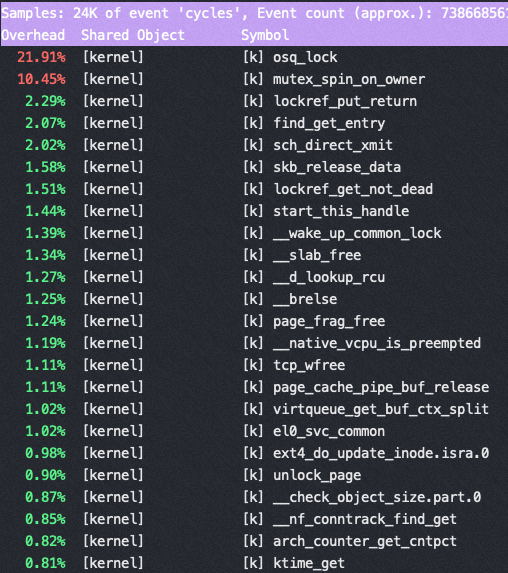
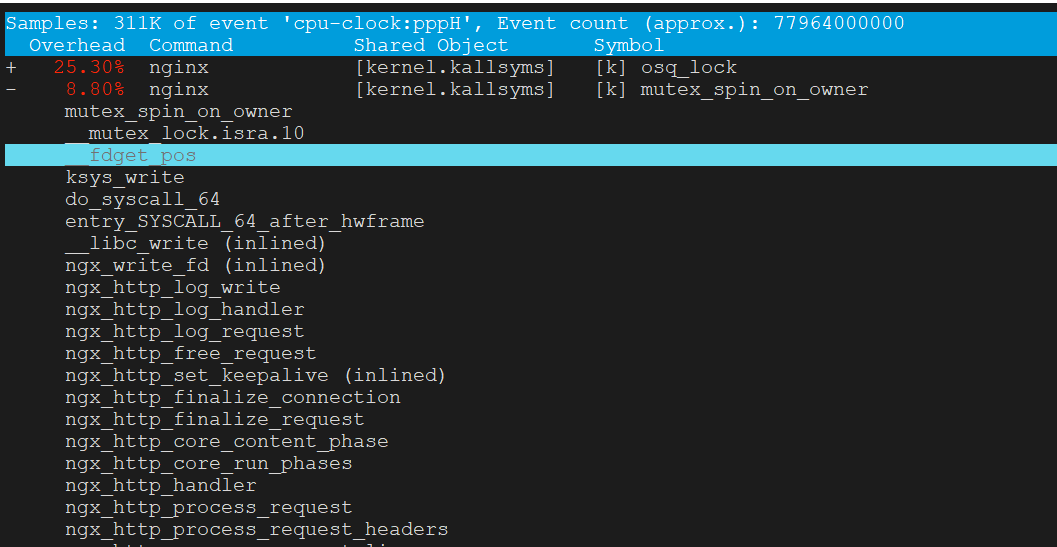
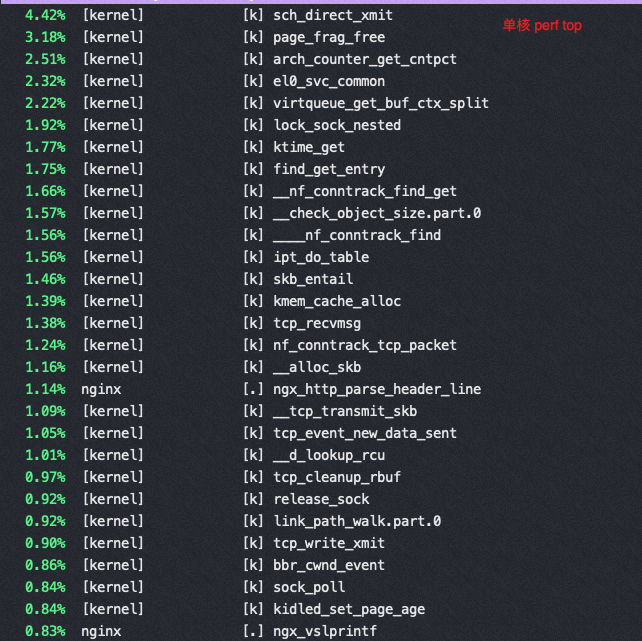
16核对应的perf状态
|
1
2
3
4
5
6
7
8
9
10
11
12
13
14
15
|
Performance counter stats for process id '49643':
2479.448740 task-clock (msec) # 0.994 CPUs utilized
233 context-switches # 0.094 K/sec
0 cpu-migrations # 0.000 K/sec
0 page-faults # 0.000 K/sec
3,389,330,461 cycles # 1.367 GHz
1,045,248,301 stalled-cycles-frontend # 30.84% frontend cycles idle
1,378,321,174 stalled-cycles-backend # 40.67% backend cycles idle
3,877,095,782 instructions # 1.14 insns per cycle
# 0.36 stalled cycles per insn
<not supported> branches
2,128,918 branch-misses # 0.00% of all branches
2.493168013 seconds time elapsed
|
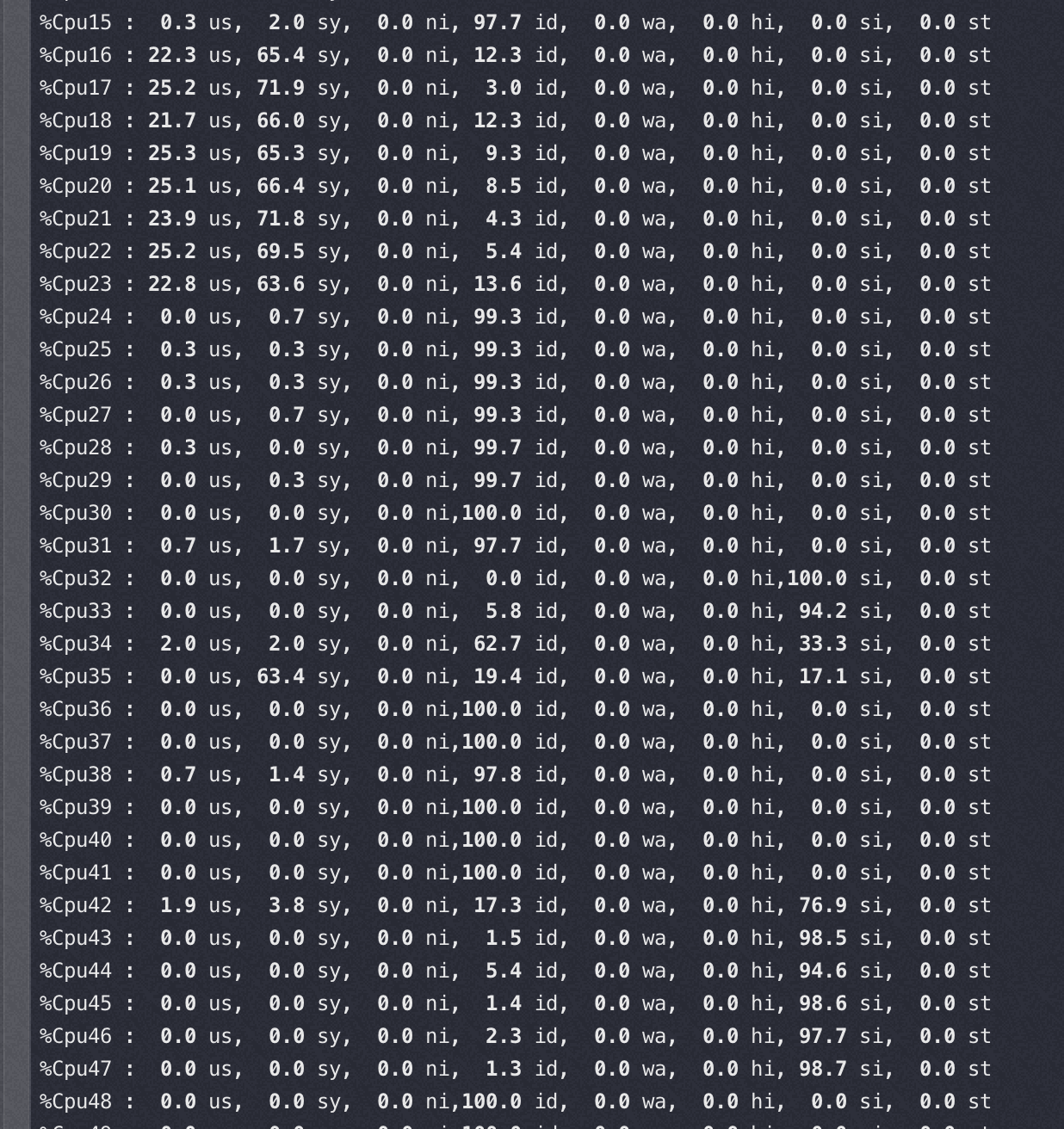
软中断和 nginx 所在 node 关系
以下两种情况的软中断都绑在 32-47 core上
软中断和 nginx 在同一个node,这时基本看不到多少 si%
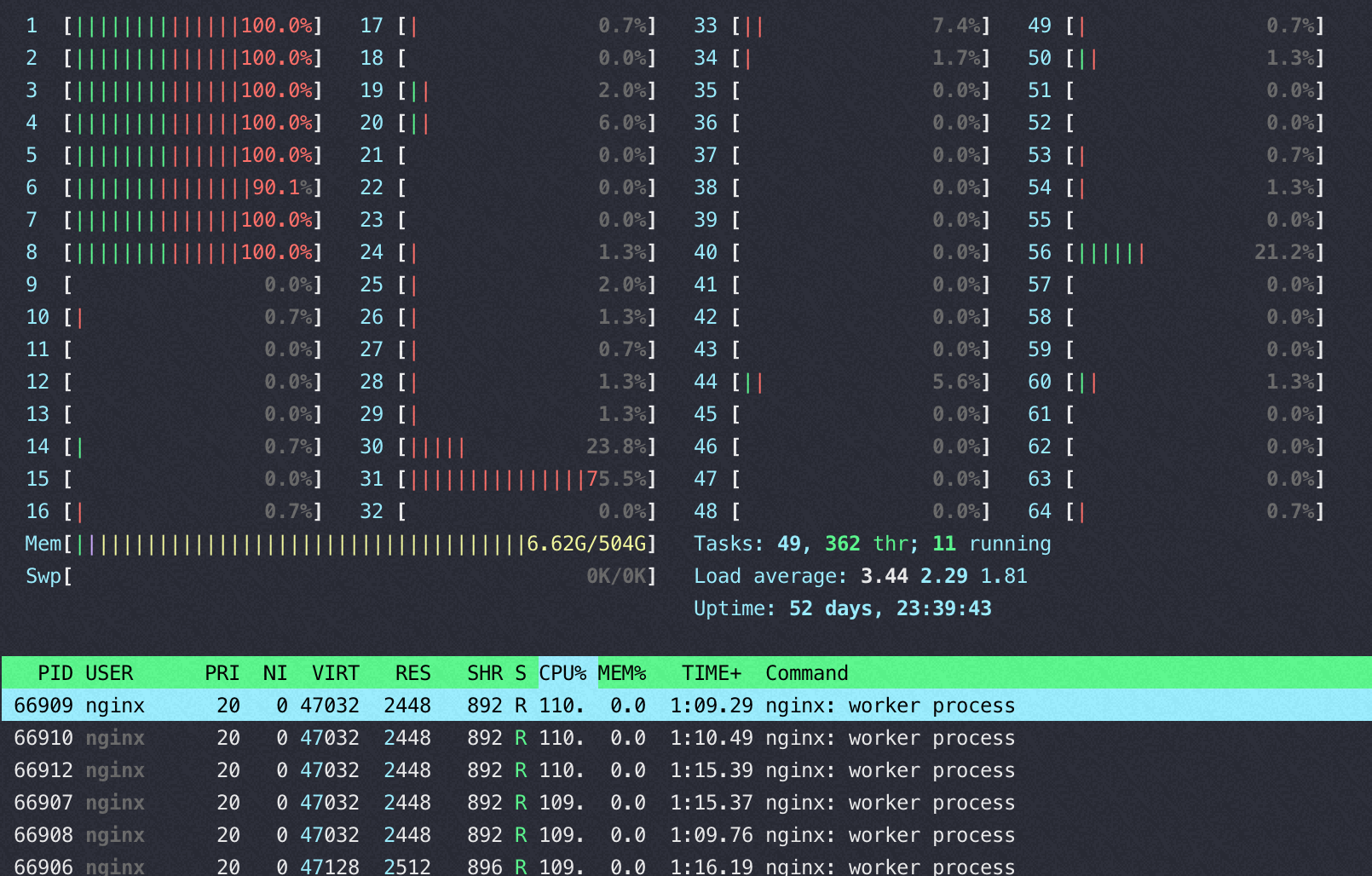
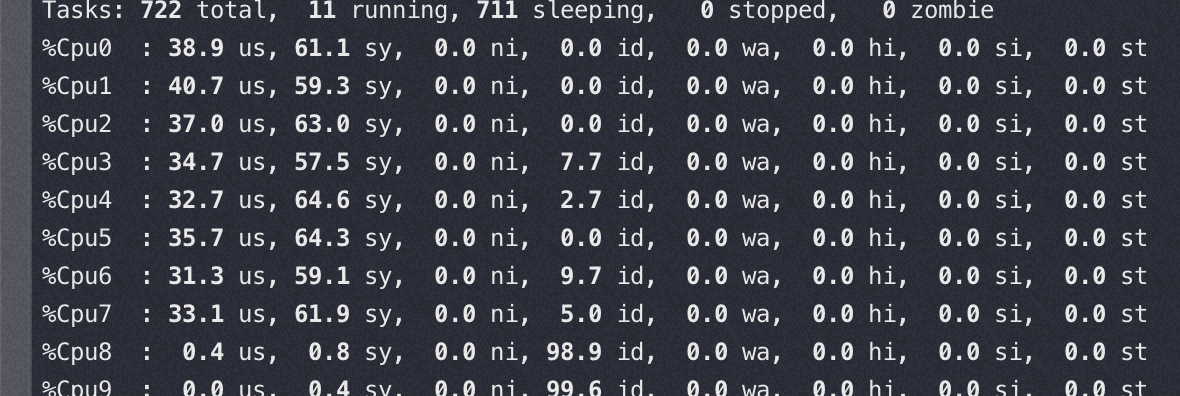
软中断和 nginx 跨node(性能相当于同node的70-80%), 软中断几乎快打满 8 个核了,同时性能还差
网络描述符、数据缓冲区,设备的关系
网络描述符的内存分配跟着设备走(设备插在哪个node 就就近在本 node 分配描述符的内存), 数据缓冲区内存跟着队列(中断)走, 如果队列绑定到DIE0, 而设备在DIE1上,这样在做DMA通信时, 会产生跨 DIE 的交织访问.
总结
要考虑软中断、以及网卡软中断队列数量对性能的影响
sendfile不一定导致性能变好了
参考资料
完善的Nginx在AWS Graviton上的测试报告https://armkeil.blob.core.windows.net/developer/Files/pdf/white-paper/guidelines-for-deploying-nginx-plus-on-aws.pdf
[转帖]Nginx 性能测试的更多相关文章
- [转帖]Nginx rewrite模块深入浅出详解
Nginx rewrite模块深入浅出详解 https://www.cnblogs.com/beyang/p/7832460.html rewrite模块(ngx_http_rewrite_modul ...
- [转帖]nginx服务器安装及配置文件详解
nginx服务器安装及配置文件详解 http://seanlook.com/2015/05/17/nginx-install-and-config/ 发表于 2015-05-17 | 更新于: 2 ...
- [转帖]nginx配置ssl加密(单/双向认证、部分https)
nginx配置ssl加密(单/双向认证.部分https) https://segmentfault.com/a/1190000002866627 nginx下配置ssl本来是很简单的,无论是去认证 ...
- [转帖]Nginx的超时keeplive_timeout配置详解
Nginx的超时keeplive_timeout配置详解 https://blog.csdn.net/weixin_42350212/article/details/81123932 Nginx ...
- [转帖]nginx upstream模块--负载均衡
nginx upstream模块--负载均衡 https://www.cnblogs.com/linjiqin/p/5494783.html Module ngx_http_upstream_modu ...
- [转帖]Nginx 的 TCP 负载均衡介绍
Nginx 的 TCP 负载均衡介绍 https://www.cnblogs.com/felixzh/ 前几天同事问 nginx的代理 当时以为只有http的 现在看起来还有tcp的可以使用tcp 代 ...
- [转帖]Nginx安装及配置详解 From https://www.cnblogs.com/zhouxinfei/p/7862285.html
Nginx安装及配置详解 nginx概述 nginx是一款自由的.开源的.高性能的HTTP服务器和反向代理服务器:同时也是一个IMAP.POP3.SMTP代理服务器:nginx可以作为一个HTTP ...
- [转帖]Nginx 的配置文件详解.
nginx配置文件nginx.conf超详细讲解 https://www.cnblogs.com/liang-wei/p/5849771.html #nginx进程,一般设置为和cpu核数一样w ...
- Nginx性能测试
环境:Centos 7.0 Nginx 1.6.2 测试工具:siege 3.0.7 配置1: I3-3110M 4G 测试1(100用户,1000请求): 平均响应:0.06s 并发数:59.19 ...
- [转帖]nginx学习,看这一篇就够了:下载、安装。使用:正向代理、反向代理、负载均衡。常用命令和配置文件
nginx学习,看这一篇就够了:下载.安装.使用:正向代理.反向代理.负载均衡.常用命令和配置文件 2019-10-09 15:53:47 冯insist 阅读数 7285 文章标签: nginx学习 ...
随机推荐
- 华为云CCE集群健康中心:一个有专家运维经验的云原生可观测平台
本文分享自华为云社区<新一代云原生可观测平台之华为云CCE集群健康中心>,作者:云容器大未来. "Kubernetes运维确实复杂,这不仅需要深入理解各种概念.原理和最佳实践,还 ...
- 跟我学Python图像处理丨5种图像阈值化处理及算法对比
摘要:本篇文章主要讲解Python调用OpenCV实现图像阈值化处理操作,包括二进制阈值化.反二进制阈值化.截断阈值化.反阈值化为0.阈值化为0. 本文分享自华为云社区<[Python图像处理] ...
- 云小课 | 使用ROMA API,API管理从此不用愁!
阅识风云是华为云信息大咖,擅长将复杂信息多元化呈现,其出品的一张图(云图说).深入浅出的博文(云小课)或短视频(云视厅)总有一款能让您快速上手华为云.更多精彩内容请单击此处. 摘要:ROMA API致 ...
- 分享两个常见的搜索算法:BFS和DFS
摘要:本文为大家分享两个常见的搜索算法:BFS和DFS. 本文分享自华为云社区<BFS和DFS算法初探>,作者: ayin. 本次分享两个常见的搜索算法: 1.BFS 即广度优先搜索 2. ...
- 关于HTTPS认证,这里解决你所有疑惑
摘要:从签发证书到数据加密交互,按流程的进展讲解HTTPS认证过程内容和原理. 本文分享自华为云社区<故事+图文,一次性解决你对HTTPS认证过程的所有疑惑>,作者:breakDraw. ...
- Sublime Text 汉化 中文
Ctrl+Shift+P 安装 ChineseLocalizations 包 如下图 或者 Preferences -> Package Control
- ThreadLocal 本地线程变量详解
概述 ThreadLocal 意为本地线程变量,即该变量只属于当前线程,对其他线程隔离 我们知道,一个普通变量如果被多线程访问会存在存在线程安全问题,这时我们可以使用 Synchronize 来保证该 ...
- MB51增强
一.在MB51报表中新增列 包含文件RM07DOCS_GENERATED的itab结构中,新增字段 在RM07DOCS中的detail_list子例程中添加查询逻辑 在子例程build_fieldca ...
- Spark Final-Examination Note
重点 4567,Special 4,5 3道编程题,分值 35(基本书上,不超纲) 选填各 20分,简答 5 题/25分,编程题 3题/35分. 简答题参考每章课后习题 第 1 章简答题 1. 请阐述 ...
- vue学习笔记 三、文件和目录结构
系列导航 vue学习笔记 一.环境搭建 vue学习笔记 二.环境搭建+项目创建 vue学习笔记 三.文件和目录结构 vue学习笔记 四.定义组件(组件基本结构) vue学习笔记 五.创建子组件实例 v ...