
centos环境tomcat配置SSL
环境: centos7.9 tomcat9 jdk1.8
一.阿里云申请 免费SSL
443 80端口加入安全组
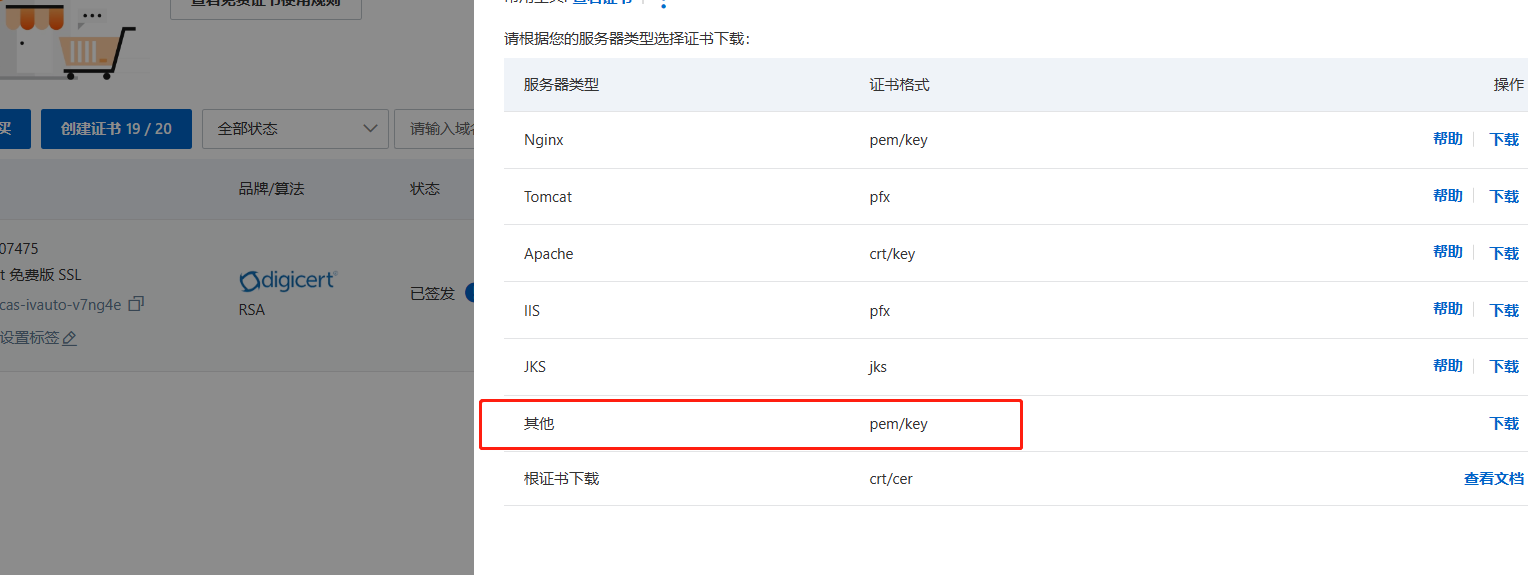
阿里云申请免费ssl 下载后解压将localhost-rsa.pfx上传至tomcat 的 /usr/local/tomcat/apache-tomcat-9/conf/ 下
配置service.xml
修改 redirectPort="443"
            <Connector port="80" protocol="HTTP/1.1"

               connectionTimeout="20000"

               redirectPort="443"

               maxParameterCount="1000"

               />
新增 Connector 可以将xxx.pfx文件 修改为localhost-rsa.pfx
    <Connector port="443" protocol="org.apache.coyote.http11.Http11NioProtocol"

               maxThreads="150" SSLEnabled="true"

               maxParameterCount="1000"

               >

        <SSLHostConfig>

            <Certificate certificateKeystoreFile="/usr/local/tomcat/apache-tomcat-9/conf/localhost-rsa.pfx"

                         certificateKeystorePassword="密码"

                         type="RSA" />

        </SSLHostConfig>

    </Connector>
<?xml version="1.0" encoding="UTF-8"?>
<!--
Licensed to the Apache Software Foundation (ASF) under one or more
contributor license agreements. See the NOTICE file distributed with
this work for additional information regarding copyright ownership.
The ASF licenses this file to You under the Apache License, Version 2.0
(the "License"); you may not use this file except in compliance with
the License. You may obtain a copy of the License at
http://www.apache.org/licenses/LICENSE-2.0
Unless required by applicable law or agreed to in writing, software
distributed under the License is distributed on an "AS IS" BASIS,
WITHOUT WARRANTIES OR CONDITIONS OF ANY KIND, either express or implied.
See the License for the specific language governing permissions and
limitations under the License.
-->
<!-- Note: A "Server" is not itself a "Container", so you may not
define subcomponents such as "Valves" at this level.
Documentation at /docs/config/server.html
-->
<Server port="8005" shutdown="SHUTDOWN">
<Listener className="org.apache.catalina.startup.VersionLoggerListener" />
<!-- Security listener. Documentation at /docs/config/listeners.html
<Listener className="org.apache.catalina.security.SecurityListener" />
-->
<!-- APR library loader. Documentation at /docs/apr.html -->
<Listener className="org.apache.catalina.core.AprLifecycleListener" SSLEngine="on" />
<!-- Prevent memory leaks due to use of particular java/javax APIs-->
<Listener className="org.apache.catalina.core.JreMemoryLeakPreventionListener" />
<Listener className="org.apache.catalina.mbeans.GlobalResourcesLifecycleListener" />
<Listener className="org.apache.catalina.core.ThreadLocalLeakPreventionListener" />
<!-- Global JNDI resources
Documentation at /docs/jndi-resources-howto.html
-->
<GlobalNamingResources>
<!-- Editable user database that can also be used by
UserDatabaseRealm to authenticate users
-->
<Resource name="UserDatabase" auth="Container"
type="org.apache.catalina.UserDatabase"
description="User database that can be updated and saved"
factory="org.apache.catalina.users.MemoryUserDatabaseFactory"
pathname="conf/tomcat-users.xml" />
</GlobalNamingResources>
<!-- A "Service" is a collection of one or more "Connectors" that share
a single "Container" Note: A "Service" is not itself a "Container",
so you may not define subcomponents such as "Valves" at this level.
Documentation at /docs/config/service.html
-->
<Service name="Catalina">
<!--The connectors can use a shared executor, you can define one or more named thread pools-->
<!--
<Executor name="tomcatThreadPool" namePrefix="catalina-exec-"
maxThreads="150" minSpareThreads="4"/>
-->
<!-- A "Connector" represents an endpoint by which requests are received
and responses are returned. Documentation at :
Java HTTP Connector: /docs/config/http.html
Java AJP Connector: /docs/config/ajp.html
APR (HTTP/AJP) Connector: /docs/apr.html
Define a non-SSL/TLS HTTP/1.1 Connector on port 8080
-->
<Connector port="80" protocol="HTTP/1.1"
connectionTimeout="20000"
redirectPort="443"
maxParameterCount="1000"
/>
<!-- A "Connector" using the shared thread pool-->
<!--
<Connector executor="tomcatThreadPool"
port="8080" protocol="HTTP/1.1"
connectionTimeout="20000"
redirectPort="8443"
maxParameterCount="1000"
/>
-->
<!-- Define an SSL/TLS HTTP/1.1 Connector on port 8443
This connector uses the NIO implementation. The default
SSLImplementation will depend on the presence of the APR/native
library and the useOpenSSL attribute of the AprLifecycleListener.
Either JSSE or OpenSSL style configuration may be used regardless of
the SSLImplementation selected. JSSE style configuration is used below.
-->
<Connector port="443" protocol="org.apache.coyote.http11.Http11NioProtocol"
maxThreads="150" SSLEnabled="true"
maxParameterCount="1000"
>
<SSLHostConfig>
<Certificate certificateKeystoreFile="/usr/local/tomcat/apache-tomcat-9/conf/localhost-rsa.pfx"
certificateKeystorePassword="n3ng517h"
type="RSA" />
</SSLHostConfig>
</Connector>
<!-- Define an SSL/TLS HTTP/1.1 Connector on port 8443 with HTTP/2
This connector uses the APR/native implementation which always uses
OpenSSL for TLS.
Either JSSE or OpenSSL style configuration may be used. OpenSSL style
configuration is used below.
-->
<!--
<Connector port="8443" protocol="org.apache.coyote.http11.Http11AprProtocol"
maxThreads="150" SSLEnabled="true"
maxParameterCount="1000"
>
<UpgradeProtocol className="org.apache.coyote.http2.Http2Protocol" />
<SSLHostConfig>
<Certificate certificateKeyFile="conf/localhost-rsa-key.pem"
certificateFile="conf/localhost-rsa-cert.pem"
certificateChainFile="conf/localhost-rsa-chain.pem"
type="RSA" />
</SSLHostConfig>
</Connector>
-->
<!-- Define an AJP 1.3 Connector on port 8009 -->
<!--<Connector protocol="AJP/1.3"
address="::1"
port="8009"
redirectPort="443"
maxParameterCount="1000"
/> -->
<!-- An Engine represents the entry point (within Catalina) that processes
every request. The Engine implementation for Tomcat stand alone
analyzes the HTTP headers included with the request, and passes them
on to the appropriate Host (virtual host).
Documentation at /docs/config/engine.html -->
<!-- You should set jvmRoute to support load-balancing via AJP ie :
<Engine name="Catalina" defaultHost="localhost" jvmRoute="jvm1">
-->
<Engine name="Catalina" defaultHost="localhost">
<!--For clustering, please take a look at documentation at:
/docs/cluster-howto.html (simple how to)
/docs/config/cluster.html (reference documentation) -->
<!--
<Cluster className="org.apache.catalina.ha.tcp.SimpleTcpCluster"/>
-->
<!-- Use the LockOutRealm to prevent attempts to guess user passwords
via a brute-force attack -->
<Realm className="org.apache.catalina.realm.LockOutRealm">
<!-- This Realm uses the UserDatabase configured in the global JNDI
resources under the key "UserDatabase". Any edits
that are performed against this UserDatabase are immediately
available for use by the Realm. -->
<Realm className="org.apache.catalina.realm.UserDatabaseRealm"
resourceName="UserDatabase"/>
</Realm>
<Host name="localhost" appBase="webapps"
unpackWARs="true" autoDeploy="true">
<!-- SingleSignOn valve, share authentication between web applications
Documentation at: /docs/config/valve.html -->
<!--
<Valve className="org.apache.catalina.authenticator.SingleSignOn" />
-->
<!-- Access log processes all example.
Documentation at: /docs/config/valve.html
Note: The pattern used is equivalent to using pattern="common" -->
<Valve className="org.apache.catalina.valves.AccessLogValve" directory="logs"
prefix="localhost_access_log" suffix=".txt"
pattern="%h %l %u %t "%r" %s %b" />
<Context path="" docBase="/usr/local/tomcat/apache-tomcat-9/webapps/blog"/>
</Host>
</Engine>
</Service>
</Server>
二.下载安装JDK,yum安装后面依赖缺少时还要重新配置环境变量
(1)查看是否已安装jdk JDK1.8 验证 mx1f
mx1f
rpm -qa | grep jdk
(2)查看jdk版本
java -version
(3)删除所有旧版本jdk
- 删除java的安装目录
#卸载所有openjdk相关文件输入

yum -y remove java-1.8.0-openjdk*

#卸载tzdata-java

yum -y remove tzdata-java.noarch
- vi /etc/profile 删除关于java的配置
- source /etc/profile 立刻生效; java -version 此时查不到
- 下载后解压 配置jdk 环境 在 /etc/ 下修改profile 将如下粘贴到最后
export JAVA_HOME=/usr/local/java/jdk8

export JRE_HOME=/usr/local/java/jdk8/jre

export CLASSPATH=.:$JAVA_HOME/lib/dt.jar:$JAVA_HOME/lib/tools.jar

export PATH=$JAVA_HOME/bin:$JAVA_HOME/jre/bin:$PATH:$HOME/bin
一些问题
1.Failed to initialize component [Connector[HTTP/1.1-443]] ;
- 检查上述文件的por是否正确
- 查看catalina.2023-08-03.log 日志信息,例如: 命名写错了FileNotFoundException该正后就行了
2.The Apache Tomcat Native library which allows using OpenSSL was not found on the java.library.path: [/usr/java/packages/lib/am
原因:缺少依赖 需要配置安装依赖 可参考
1、安装 openssl
yum install apr-devel openssl-devel
2、安装 tomcat-native
tomcat-native 下载解压安装。tomcat-native-1.2.23-src.tar.gz
# 解压

tar xzcf tomcat-native-1.2.23-src.tar

# 进入/native下

cd tomcat-native-1.2.23-src/native

# 安装

./configure

# 安装

make && make install
3、配置 tomcat 的 setenv.sh 文件
在tomcat安装目录的bin /usr/local/tomcat/apache-tomcat-9/bin/ 下setenv.sh 文件则新建一个
export LD_LIBRARY_PATH=$LD_LIBRARY_PATH:/usr/local/apr/lib
4. minio无法使用 Unsupported or unrecognized SSL message
无解决 准备换阿里云存储或者其他 OSS云存储
centos环境tomcat配置SSL的更多相关文章
- CentOS环境Tomcat配置JDK的另一种方式
如下图catalina.sh中的描述,JAVA_HOME环境变量可以配置在CATALINA_BASE/bin/目录下的setenv.sh文件中(默认这个文件是不存在的) 创建文件setenv.sh,在 ...
- Linux配置tomcat (centos配置java环境 tomcat配置篇 总结三)
♣下载安装tomcat7 ♣设置启动和关闭 ♣设置用户名和密码 ♣发布java web项目 声明:这篇教程是建立在前两篇教程的基础上的,所以,还没安装工具和jdk,可以先看这个系列的前面两篇(去到文末 ...
- TOMCAT配置SSL认证为HTTPS协议服务
1 . 问题概述 很多安全性要求较高的系统,都会使用安全套接字层(SSL)进行信息交换, Sun为了解决在Internet上的实现安全信息传输的解决方案.它实现了SSL和TSL(传输层安全)协议 ...
- 华为云服务器为Tomcat配置SSL
近期由于开发小程序需要在云服务器上配置https访问协议,也遇到了一点小问题,把配置过程记录一下:SSL 证书申请下来之后会有 .jks .crt .pfx .pem为后缀的文件(如何申请SSL证书这 ...
- 单点登录 SSO, 自动登录 , java 加密,ssl原理, Tomcat配置SSL
韩梦飞沙 韩亚飞 313134555@qq.com yue31313 han_meng_fei_sha 单点登录的英文简称为SSO(single sign on),单点登录功能使得用户只要登录 ...
- Tomcat配置SSL
Tomcat配置SSL 查询网上资料配置如下: <Connector port="8443" protocol="HTTP/1.1" maxThreads ...
- Nginx和Tomcat配置SSL实现https访问
环境:CentOS 7 Nginx版本: nginx/1.18.0 1. 安装nginx 详细步骤可以参考如下官网:http://nginx.org/en/linux_packages.html#RH ...
- 实战Tomcat配置SSL,使用openssl制作证书
制作证书以及Tomcat配置 搭建openssl环境,下载openssl并设置环境变量方便命令行的使用: 修改openssl配置文件,设置dir目录,如设置dir=e:/temp/openssl_ca ...
- Mac下tomcat配置ssl
最近在搞单点登录CAS,第一步就是需要给tomcat配置证书.但是,第一次配置就遇到了个问题排插了一下午.下面来存一份文档,以备以后遇到. 一.首先准备好环境 java环境:配置好环境变量,找到jdk ...
- linux apache Tomcat配置SSL(https)步骤
https简介 它是由Netscape开发并内置于其浏览器中,用于对数据进行压缩和解压操作,并返回网络上传送回的结果.HTTPS实际上应用了Netscape的安全套接字层(SSL)作为HTTP应用层的 ...
随机推荐
- 【Azure K8S | AKS】在中国区AKS上遇见ImagePullBackOff时的替代方案
问题描述 在AKS集群中部署calico时候,遇见 ImagePullBackOff 问题. 在创建POD calico-typha-horizontal-autoscale 时候遇见拉取镜像失败问题 ...
- C#多线程(10):读写锁
目录 ReaderWriterLockSlim ReaderWriterLockSlim 常用方法 订单系统示例 并发字典写示例 ReaderWriterLock 本篇的内容主要是介绍 ReaderW ...
- 如何查看apk安装包源代码??Android反编译apk,解包,打包,签名一体化实测 ,修改图片音频软件名称版本号等入门
首先下载反编译工具包 下载地址 链接: https://zly520.lanzoui.com/ibtuxhf7rab 一.反编译工具介绍 首先 如果你想改动图片音频之类的,见末尾! 1.apktoo ...
- 2022 Gartner RPA魔力象限,弘玑Cyclone位置飞跃国产RPA进击全球
文/王吉伟 7月25日,国际权威分析机构Gartner发布了2022全球RPA魔力象限报告(Gartner RPA MQ),UiPath.Automation Anywhere.微软等来自全球的15家 ...
- 通过debug搞清楚.vue文件怎么变成.js文件
前言 我们每天写的vue代码都是写在vue文件中,但是浏览器却只认识html.css.js等文件类型.所以这个时候就需要一个工具将vue文件转换为浏览器能够认识的js文件,想必你第一时间就想到了web ...
- (转载)Transfer-Encoding:chunked详解
原文链接:Transfer-Encoding:chunked详解_transfer-encoding: chunked_公众号:流花鬼的博客-CSDN博客 概念 分块传输编码(Chunked tran ...
- 使用 Docker 部署 File Browser 文件管理系统
1)File Browser 介绍 官网:https://filebrowser.org/ GitHub:https://github.com/filebrowser/filebrowser 今天为大 ...
- IDEA导入项目jar包=来自本地仓库-一直报红线的解决办法
一.问题由来 现在开发的Java项目全部都是再内网进行开发,和互联网是完全物理隔绝的,所以在最开始配置IDEA的时候,项目中需要导入的Jar包 都是从本地仓库中进行导入,在maven的配置文件里面配置 ...
- 2023中山市第三届香山杯网络安全大赛初赛wp
序 被带飞了 PWN move 先往变量 sskd 写入 0x20 字节,往第二个输入点输入 0x12345678 即可进入到第三个输入点,存在 0x8 字节的溢出.思路是在第一个输入点布置 rop ...
- gcc编译stm32 f103出现错误init.c:(.text.__libc_init_array+0x20): undefined reference to `_init'
解决方法: 方法一:去掉makefile中的编译选项:-nostartfiles 方法二:方法一不凑效的情况下,添加编译选型:--specs=nano.specs