
CSS – W3Schools 学习笔记 (3)
CSS Rounded Corners
它是用来画圆角的, 假设有 1 给正方形, 100px.
border-top-left-radius: 30px;
before  after
after 
也可以用 percentage.

如果是正方形, 4 个角 50% 就变成圆形了.
常见的圆角按钮:

它是依据高度的 50% 来设定的, 不可以写 border-radius: 50%. 这个意思是 width 50%, height 50%, 正确的是全部 height 50%
 <-- 错误的
正确的写法是 border-radius: calc(100px / 2); 必须要知道高度才行.
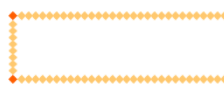
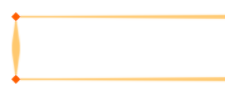
CSS Border Images
border: 10px solid transparent;

border-image: url(border.png) 30 round;
让 border-color 变成 transparent 加上 border-image 就可以了.
30 表示 where to slice the image
round 表示图片重复, 另一个是 stretched 拉紧.
image

round (repeat)
stretched
CSS Multiple Backgrounds
background image 是可以 multiple 的

用逗号分开 1, 2
越靠前的越在上层, 用户越看见.
shorthand 的写法

Background Size
backgroud size 可以控制 background image 大小
background-size: 100px 80px;
也可以写 contain or cover
Background-origin Property
set background image render 位置
background-origin: content-box
border-box, 从 border 开始
padding-box (default), 从 padding 开始
content-box, 从内容开始
Background-clip Property
和 origin 一样, 也是 border-box, padding-box, content-box, 只是它是用来做 paint 的, 比如 color
background-clip: content-box;
CSS Color Keywords
transparent, currentcolor, inherit
transparent 相对于 rgba(0,0,0,0)
currentcolor 对应 color 属性值
inherit 就是跟 parent
CSS Gradients
Gradients 是渐变 color
3 大种类:
Linear Gradients (goes down/up/left/right/diagonally)
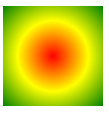
Radial Gradients (defined by their center)
Conic Gradients (rotated around a center point)
Linear Gradients

background-image: linear-gradient(to left, red, yellow);
它是 background-image 来的哦, 不是 color
最少 2 种颜色才能渐变.
默认是 top to bottom, 有很多 pattern, 比如 left to right, diagonal (对角线), degree 等
background-image: linear-gradient(to right, red 50%, yellow);
red 50% 从开始一直是纯红色到 50%, 然后渐变去黄色

background-image: linear-gradient(to right, red 25%, yellow 50%);
表示开始到 25% 纯红, 然后渐变去黄, 从 50% 的位置开始变成纯黄

Radial Gradients
Conic Gradients

CSS Shadow Effects
Text Shadow
h1 {

  text-shadow: 2px 2px 5px red;

}
分别代表: horizontal, vertical, blur, color

没有 blur 的情况下, shadow 就是这样的, 看得出原理了.
通过逗号就可以写 multiple shadow 了.
Box Shadow
div {

  box-shadow: 10px 10px 5px 12px grey inset;

}
horizontal, vertical, blur, spread radius, color
horizontal, vertical 可以了解为 offset
blur 是指颜色展开 gradient 多长, 比如这个是 blur 100px 的意思

spread 非常像 border, 但不像 blur 那样是 gradient, 它是真实的颜色. 下面是 spread 20px blur 20px 的效果, blue 会在 spread 之后发生.

特别的地方是, 它的 default color 不是 background-color 而是 color (字体颜色) 哦.
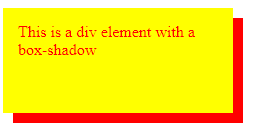
spread radius 是让影子更大,
before 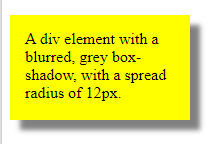 after
after 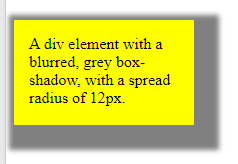
inset 是让 shadow 在里面, 效果很奇葩的
before 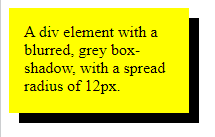 after
after 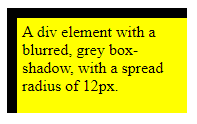
也是可以 multiple shadow 哦
常见的用法
box-shadow: 0 0 8px 0px red;
效果, 左边发光

material 3 card


  box-shadow: 0 1px 2px 0 rgba($color: black, $alpha: 0.3),

    0 2px 6px 2px rgba($color: black, $alpha: 0.15);
效果

一边 shadow
参考: stackoverflow – How can I add a box-shadow on one side of an element?

box-shadow: 10px 0 10px -10px red;
关键就是 -10px spread, 它让 4 边都吃进去. 然后 10px blur 又长出来. 最后 10px 右就只有边被推出来, 所以看见了 shadow.
CSS Text Effects
什么时候 text 会 overflow?
一个有 width 的 p, 如果内容超过了. 它会自动 new line.
p {

  width: 200px;

}
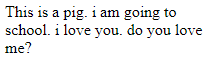
white-space: nowrap;
可以禁止 auto new lin, then 它就会 overflow

overflow: hidden;
overflow 之后字就被 cut 掉了

ellipsis
默认是 clip 就是剪掉
text-overflow: ellipsis;
ellipsis 就会变成点点点

单个 word 太长, 也会 text overflow
就算没有 nowrap, 字太长也会 text overflow
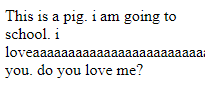
word-wrap
word-wrap: break-word;
通过 break-word 可以强制 new line
word-break
word-break: break-all;
默认是 keep-all, 就是完整的 word 才可以 new line.
break-all 就是只要碰到边就把任何字给 break 了. 对比 word-wrap 只有在遇到超长字才会 break word.
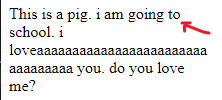
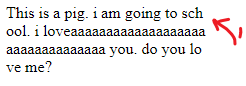
第 1 张是 keep-all, 第 2 张是 break-all
CSS Web Fonts

电脑常用的是 TTF/OTF
TTF 比较古老, Apple, Microsoft 一起出的, OTF 基于 TTF 是 MIcrosoft 出的.
Web 通常用 WOFF, 基于 TTF/OTF 做过优化. 新版是 WOFF2.
之前有提过, 要嘛用 build-in 字体, 要嘛 font-awesome, google font.(通过 link url)
如果要用自家的那么就需要 @font-face, 其实 font-awesome 和 google font 的 link url 也是 build @font-face 来的.
@font-face {

  font-family: myFirstFont;

  src: url(sansation_light.woff);

}

div {

  font-family: myFirstFont;

}
Bold 要另外写.
@font-face {

  font-family: myFirstFont;

  src: url(sansation_bold.woff);

  font-weight: bold;

}
所以通常会有很多 @font-face 的. 看你要用到多少种.
CSS 2D Transforms
translate(x,y)
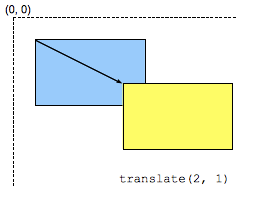
放 minus 就是往左和上移动.
rotate(20deg)
旋转 20 度
scaleX(2)
x 是 width, default value 是 1 , 2 就是放大一倍 x2 的意思
scaleY(0.5)
y 是 height, 0.5 就是缩小了一倍 x0.5 的意思
scale(x,y)
x, y 一起 set
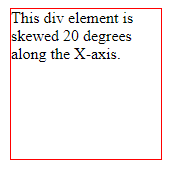
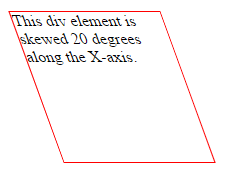
skewX(20deg), skewY(), skew()
skewX 是这样的效果, 不知道什么场景会用到啦. 现在知道了
matrix(scaleX(1),skewY(0),skewX(0),scaleY(1),translateX(0),translateY(0))
一起 set. 没有就放 default value 0,
Apply Multiple 2D Transforms
要 set 多个就用空格做分隔符
transform: scaleX(0.5) scaleY(0.5);
CSS 3D Transforms
rotateX(10deg), rotateY(10deg), rotateZ(10deg)
效果看不懂, 只知道它和 2D 的 rotate(10deg) 差很多.
CSS Transitions
5 个属性可以用
transition-property
transition-property: width;
watch propety width, 改变的时候就会有 animation
transition-delay
trasition-delay: 1s
delay 1 秒才触发
transition-duration
transition-duration: 1s
整个 animation 过程用时 1 秒
transition-timing-function
过度的体验, 比如 ease-in, ease-out 那些

transition
shorthand property
transition: width 2s linear 1s;
property, duration, function, delay
Apply Multiple
transition: width 1s, height 1s;

transition-property: width, height;

transition-duration: 1s, 1s;
property, shorthand 写法都是加逗号
CSS Animations
@keyframes
animation 过程的 style
@keyframes example {

  from {background-color: red;}

  to {background-color: yellow;}

}
@keyframes example {

  0%   {background-color:red; left:0px; top:0px;}

  25%  {background-color:yellow; left:200px; top:0px;}

  50%  {background-color:blue; left:200px; top:200px;}

  75%  {background-color:green; left:0px; top:200px;}

  100% {background-color:red; left:0px; top:0px;}

}
可以写任何 style property, % 就是 duration 到那个 % 时要出什么 style
animation-name, duration, delay, timing-function
div:hover {

  animation-name: example;

  animation-duration: 4s;

  animation-delay: 2s;

  animation-timing-function: ease-in-out;

}
name 对应 @keyframes 的名字, duration, delay, timing-function 和 transition 一样.
animation-iteration-count
animation 跑完, 就会回到原本的 style. 要跑多几次就用 iteration
animation-iteration-count: 2;
animation-iteration-count: infinite; 无限次
animation-direction
normal, reverse, alternate, alternate-reverse
reverse 是从最后一个 @keyframes style 跑到第一个, 反过来执行.
alternate 是在最少跑 2 次才有用的, 第 1 次正常跑, 第 2 次 reverse 跑, 以此类推
alternate-reverse 是第一次跑 reverse, 第 2 次正常跑
animation-fill-mode
animation 跑完, 就会回到原本的 style.

by default, animation 的 style, 只会在 animation 过程中有效, 之前, 之后都不会有, 但 fill-mode 可以调.
animation-fill-mode: none, forwards, backwards, both
forwards 是跑完 animation 后把最后一个 keyframs's style apply 去 element. (注: apply 了就 lock 着了, 无法用 js 之类的去改它哦)
backwards 是当 delay 期间, 它会提前去拿 first keyframe's style 去 apply.
both 是 2 forwards + backwards
animation
shorthand property
animation: 3s ease-in 1s 2 reverse both paused slidein;
duration | easing-function | delay | iteration-count | direction | fill-mode | play-state | name (timeline 没有)
CSS Styling Images
Filters
img {

  filter: grayscale(100%); // 黑白照

  filter: blur(4px); // 变萌

}
还有许多 effects, 但常用的就只有上面 2 个, 更多参考.
Flip image
镜子效果是通过 scaleX 来做的.
img:hover {

  transform: scaleX(-1);

}

CSS The object-fit Property
object-fit 用来设定当具体的图片比 img element width, height 大 (同时 aspect ratio 也不一样) 的情况下要如果显示.
contain
上下或左右黑黑, 图片完整保留, 只是变小了.
cover
没有黑黑, 但是图片被 clip 了, 也变小了. (它会尽可能保留中间的内容)
fill
这个是 default, 图片会变形走样.
none
跟 cover 有点像, 只是它不会变小, 它就直接 clip 中间.
scale-down
the image is scaled down to the smallest version of none or contain. (不是很明白)
真实的情况下, 大部分 img element 只会设置 width 或 height, 比较少情况 2 个都 set. 如果只是 set 其中 1 个, 那么是不需要 object-fit 设定的, 图片会自动按比例缩写.
CSS The object-position Property
object-position 通常搭配 cover 来用, 由于 cover 默认是取中心, 可能不一定美. 那么就可以通过 object-position 来调整.
object-position: 50% 100%;
用 % 来控制, horizontal, vertical (通常指需要控制 1 边, 另一边就放 100% 可以了)
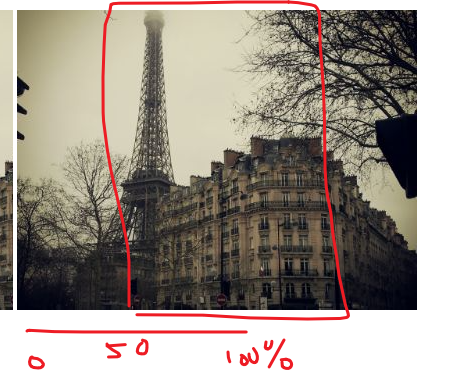
percent 的玩法是上面这样.
CSS Masking
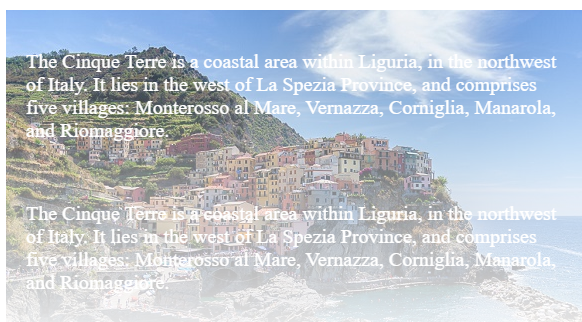
masking 是在图片上盖一层东西, 可以是一张图, 或者一个遮罩层.
它可以做出这些效果
<div class="mask1">

    <img src="img_5terre.jpg" alt="Cinque Terre" width="600" height="400">

</div>
.mask1 {

  -webkit-mask-image: url(w3logo.png);

  mask-image: url(w3logo.png);

  -webkit-mask-repeat: no-repeat;

  mask-repeat: no-repeat;

}
CSS Variables - The var() Function
var(name, fallback value)
:root {

  --blue: #1e90ff;

}

body { background-color: var(--blue, red); }
Local variable
button {

  --blue: #0000ff; /* local variable will override global */

  color: var(--blue);

}
Modify by Javascript
<script>

// Get the root element

var r = document.querySelector(':root');

// Create a function for getting a variable value

function myFunction_get() {

  // Get the styles (properties and values) for the root

  var rs = getComputedStyle(r);

  // Alert the value of the --blue variable

  alert("The value of --blue is: " + rs.getPropertyValue('--blue'));

}

// Create a function for setting a variable value

function myFunction_set() {

  // Set the value of variable --blue to another value (in this case "lightblue")

  r.style.setProperty('--blue', 'lightblue');

}

</script>
Modify by Media Query
@media screen and (min-width: 450px) {

   :root {

    --blue: lightblue;

  }

}
CSS Media Queries
CSS2 Introduced Media Types, TV, printer, computer, handset 等, 不过最后只有 printer 支持的比较好.
CSS3 Introduced Media Queries 它不是通过 type, 而是匹配
width, height of the viewport
width, height of the device
orientation, resolution
格式:
@media not|only mediatype and (expressions) {

  CSS-Code;

}
写 link 也是一个方式
<link rel="stylesheet" media="mediatype and|not|only (expressions)" href="print.css">
举例:
@media screen and (min-width: 480px)
min-width 就相等于 screen 必须超过或等于 480. 就运行下面的 style
反着看就好理解了. min 相等于 >=, max 相等于 <=
CSS Flex Container
Figma 的 Auto Layout 就是用 flex 实现的.
原理是 container + items 来实现布局.
flex-direction
column, row, column-reverse, row-reverse.
打直, 或者打横排列
缺点是只能选一边, 有些场景会排不了, 得要用 grid.
flex-wrap
wrap, nowrap
wrap 是当 item 超出 container 时会 new line, 类似 word-wrap.
nowrap 则会强行挤压 item.
flex-flow
flex-flow 是 shorthand for direction 和 wrap
flex-flow: row wrap;
justify-content
center, flex-start, flex-end, space-around, space-between
horizontal 左中右 align, 还有左右分开.
align-items
center, flex start, flex-end, stretch (拉紧), baseline
vertical 上中下 align, stretch 是上到下覆盖完
align-content
align content 是当有超过 1 个 row 的时候用的
space-between, space-around, stretch, center, flex-start, flex-end
它表达的是多个 row, align-items 和 justify-content 表达的是 1 个 row.
flex 实现居中
用 center 就可以了.
.flex-container {

  display: flex;

  height: 300px;

  justify-content: center;

  align-items: center;

}
CSS Flex Items
order

flex-grow
用来做比例
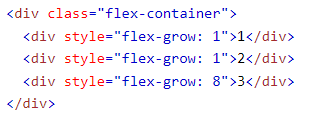
1,1,8 相等于 width 10%, 10%, 80%
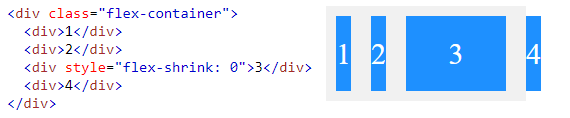
flex-shrink
当 container 小的时候, 会自动压缩 item, shrink 0 可以阻止它
flex-basis
The flex-basis property specifies the initial length of a flex item.
<div style="flex-basis: 200px">3</div>
不是很清楚什么用, 效果和给 width 200px 一样.
flex
shorthand of flex-grow, flex-shrink, and flex-basis
flex: 0 0 200px
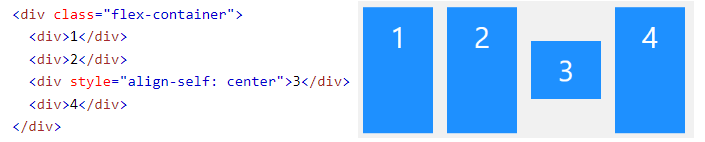
align-self
align-self 就是特别设置一个 item 要怎样 vertical align
CSS – W3Schools 学习笔记 (3)的更多相关文章
- css居中学习笔记
css居中学习笔记 一.水平居中 以下面的代码为例: <body> <div class="parent"> <div class="chi ...
- CSS 3 学习笔记
css 3 学习笔记 文本: word-wrap : normal | break-word取值:normal: 控制连续文本换行.break-word: 内容将在边界内换行.如果需要,词 ...
- (2)《Head First HTML与CSS》学习笔记---img与基于标准的HTML5
1.浏览器处理图像的过程: 1.服务器获取文件,显示出文本结构,以及预留默认的大小给<img>(如果该<img>有width-1值和height-1值,则根据这个值提前设好页面 ...
- CSS入门学习笔记
CSS入门学习笔记一.CSS简介1.什么是CSS?2.为什么使用CSS?3.CSS的作用二.CSS语法1.CSS基础语法2.CSS注释语法3.CSS应用方法三.CSS选择器1.元素选择器2.类选择器3 ...
- 【干货】Html与CSS入门学习笔记1-3
从23号开始用了4天时间看完了<Head First Html与CSS>这本书,本书讲解方式深入浅出,便于理解,结合习题,便于记忆,是一本不错的入门书.下面是本书的学习笔记: 一.认识HT ...
- (6)《Head First HTML与CSS》学习笔记---结尾、《HTML5权威指南》读书笔记
1.内联元素的外边距.内边距与块元素稍有不同. 如果一个内联元素四周都增加外边距,只能看到左边和右边会增加空间:你也可以对内联元素的上下增加内边距,不过这个内边距不会影响包围它的其他内联元素的间距—— ...
- HTML&CSS基础学习笔记1.16-单元格间距和表格主体
上一篇讲html学习笔记,讲过了合并单元格,那么今天就来介绍下如何控制单元格的间距,以及表格主体的相关知识. 单元格间距 在上个知识点的显示结果中你可能发现了,单元格与单元格之间有一小段空白.这是由& ...
- HTML&CSS基础学习笔记—创建列表
创建一张表格 很多时候我们需要在网页上展示一些数据,使用表格可以很好的来展示数据. 在HTML中<table>标签定义 表格. <table> </table> 添 ...
- HTML&CSS基础学习笔记1.32-选择器是什么
选择器是什么 选择器是CSS样式为了定位页面上的任意元素的一种方法. 选择器主要分为:元素标签选择器.通用选择器.类选择器.ID选择器.属性选择器.组合选择器.伪类选择器.伪元素选择器. 先做个了解, ...
- HTML&CSS基础学习笔记1.31-像素和相对长度
像素和相对长度 之前的笔记中,我们提到过用属性width.height来设置图片的尺寸,它们的单元都是”px(像素)”.长度单位总结一下,目前比较常用到px(像素).em.% 百分比,要注意其实这三种 ...
随机推荐
- Netcode for Entities如何添加自定义序列化,让GhostField支持任意类型?以int3为例(1.2.3版本)
一句话省流:很麻烦也很抽象,能用内置支持的类型就尽量用. 首先看文档.官方文档里一开头就列出了所有内置的支持的类型:Ghost Type Templates 其中Entity类型需要特别注意一下:在同 ...
- vscode取消json文件注释下划线
使用 vscode 打开一个json文件,如果有单行或多行注释,则会显示红色下划线,解决办法如下: 方法1 点击底部的JSON,选择 JSON with Comments 即可,然后红色下划线消失,底 ...
- lombok到底都用来做什么
前言:我使用lombok一般都是用在实体类的外面写个@data省得写getsettostring方法,今天详细了解一下关于lombok的有一些实用技巧 @Cleanup //用于IO流的关闭,给局部变 ...
- STM32F103 SPI详解及示例代码
1 SPI协议详解 SPI是串行外设接口(Serial Peripheral Interface)的缩写,是美国摩托罗拉公司(Motorola)最先推出的一种同步串行传输规范,也是一种单片机外设芯片串 ...
- vue加载三维模型
创建项目 我使用的是Vue CLI3,具体创建不再赘述,网上教程很多 下载SuperMap iClient3D for WebGL产品包 链接:http://support.supermap.com. ...
- 【Java】MultiThread 多线程 Re01
学习参考: https://www.bilibili.com/video/BV1ut411T7Yg 一.线程创建的四种方式: 1.集成线程类 /** * 使用匿名内部类实现子线程类,重写Run方法 * ...
- 【ActiveJdbc】03
一.查询API 简单条件筛选: List<Person> list = Person.where("name = 'John'") 动态参数条件: List<Pe ...
- @ComponentScan
@ComponentScan 是一个注解,用于Spring框架,它允许开发者指定Spring应该扫描哪个包或包下的子包来寻找组件(如@Component.@Service.@Repository等注解 ...
- 10-canva绘制数据点
1 <!DOCTYPE html> 2 <html lang="en"> 3 <head> 4 <meta charset="U ...
- springcloud集成grpc(一)
码云地址:https://gitee.com/lpxs/lp-springcloud.git 有问题可以多沟通:136358344@qq.com. GRPC简介 是谷歌开源的一个高性能的.通用的RPC ...