
MySQL bit类型增加索引后查询结果不正确案例浅析
昨天同事遇到的一个案例,这里简单描述一下:一个表里面有一个bit类型的字段,同事在优化相关SQL的过程中,给这个表的bit类型的字段新增了一个索引,然后测试验证
时,居然发现SQL语句执行结果跟不加索引不一样。加了索引后,SQL语句没有查询出一条记录,删除索引后,SQL语句就能查询出几十条记录。下面我们构造一个简单
的例子,重现一下这个案例
我们先创建表student_attend,初始化一些数据。这篇文章的测试环境为MySQL 8.0.35社区版。
CREATE TABLE `student_attend` (
  `id` int NOT NULL AUTO_INCREMENT COMMENT '自增编号',
  `std_id` int DEFAULT NULL COMMENT '学号',
  `class_id` int DEFAULT NULL COMMENT '课程编号',
  `is_attend` bit(1) DEFAULT b'1' COMMENT '是否缺陷考勤',
  PRIMARY KEY (`id`)
) ENGINE=InnoDB;

insert into student_attend(std_id, class_id, is_attend)
select 1001, 1, 1 from dual union all
select 1001, 2, 0 from dual union all
select 1001, 3, 1 from dual union all
select 1001, 4, 1 from dual union all
select 1001, 5, 1 from dual union all
select 1001, 6, 0 from dual union all
select 1002, 1, 1 from dual union all
select 1002, 2, 1 from dual union all
select 1003, 1, 0 from dual union all
select 1003, 2, 0 from dual;
如下所示,假设我们要查询is_attend=1的所有学生信息,那么可以有下面三种写法
mysql> select * from student_attend where is_attend=1;
+----+--------+----------+----------------------+
| id | std_id | class_id | is_attend            |
+----+--------+----------+----------------------+
|  1 |   1001 |        1 | 0x01                 |
|  3 |   1001 |        3 | 0x01                 |
|  4 |   1001 |        4 | 0x01                 |
|  5 |   1001 |        5 | 0x01                 |
|  7 |   1002 |        1 | 0x01                 |
|  8 |   1002 |        2 | 0x01                 |
+----+--------+----------+----------------------+
6 rows in set (0.00 sec)

mysql> select * from student_attend where is_attend=b'1';
+----+--------+----------+----------------------+
| id | std_id | class_id | is_attend            |
+----+--------+----------+----------------------+
|  1 |   1001 |        1 | 0x01                 |
|  3 |   1001 |        3 | 0x01                 |
|  4 |   1001 |        4 | 0x01                 |
|  5 |   1001 |        5 | 0x01                 |
|  7 |   1002 |        1 | 0x01                 |
|  8 |   1002 |        2 | 0x01                 |
+----+--------+----------+----------------------+
6 rows in set (0.00 sec)

#遇到问题的SQL写法
mysql> select * from student_attend where is_attend='1';
+----+--------+----------+----------------------+
| id | std_id | class_id | is_attend            |
+----+--------+----------+----------------------+
|  1 |   1001 |        1 | 0x01                 |
|  3 |   1001 |        3 | 0x01                 |
|  4 |   1001 |        4 | 0x01                 |
|  5 |   1001 |        5 | 0x01                 |
|  7 |   1002 |        1 | 0x01                 |
|  8 |   1002 |        2 | 0x01                 |
+----+--------+----------+----------------------+
6 rows in set (0.00 sec)

mysql>
接下来,我们在字段is_attend上创建索引ix_student_attend_n1,如下所示
create index ix_student_attend_n1 on student_attend(is_attend);
然后我们继续测试验证,就能出现我前文所说的情况,如需所示,最后一个SQL,它的返回记录数为0.
mysql> select * from student_attend where is_attend=1;
+----+--------+----------+----------------------+
| id | std_id | class_id | is_attend            |
+----+--------+----------+----------------------+
|  1 |   1001 |        1 | 0x01                 |
|  3 |   1001 |        3 | 0x01                 |
|  4 |   1001 |        4 | 0x01                 |
|  5 |   1001 |        5 | 0x01                 |
|  7 |   1002 |        1 | 0x01                 |
|  8 |   1002 |        2 | 0x01                 |
+----+--------+----------+----------------------+
6 rows in set (0.00 sec)

mysql> select * from student_attend where is_attend=b'1';
+----+--------+----------+----------------------+
| id | std_id | class_id | is_attend            |
+----+--------+----------+----------------------+
|  1 |   1001 |        1 | 0x01                 |
|  3 |   1001 |        3 | 0x01                 |
|  4 |   1001 |        4 | 0x01                 |
|  5 |   1001 |        5 | 0x01                 |
|  7 |   1002 |        1 | 0x01                 |
|  8 |   1002 |        2 | 0x01                 |
+----+--------+----------+----------------------+
6 rows in set (0.00 sec)

mysql> select * from student_attend where is_attend='1';
Empty set (0.00 sec)

mysql>
其实第一次见到这种情况的时候,我还是有点震惊的,因为在我的观念中,索引只会影响执行计划,不会影响查询结果,但是现在的情况是
索引的存在影响了SQL的查询结果。那么为什么会出现这种情况呢?
首先看了一下执行计划,如下所示,从执行计划看,它既没有走全表扫描也没有走索引,仅仅有"message": "no matching row in const table"提示,如果仅仅分析
执行计划,我们得不到更多的有用信息
mysql> explain
    -> select * from student_attend where is_attend='1';
+----+-------------+-------+------------+------+---------------+------+---------+------+------+----------+--------------------------------+
| id | select_type | table | partitions | type | possible_keys | key  | key_len | ref  | rows | filtered | Extra                          |
+----+-------------+-------+------------+------+---------------+------+---------+------+------+----------+--------------------------------+
|  1 | SIMPLE      | NULL  | NULL       | NULL | NULL          | NULL | NULL    | NULL | NULL |     NULL | no matching row in const table |
+----+-------------+-------+------------+------+---------------+------+---------+------+------+----------+--------------------------------+
1 row in set, 1 warning (0.00 sec)

mysql>
mysql> explain format=json
    -> select * from student_attend where is_attend='1'\G
*************************** 1. row ***************************
EXPLAIN: {
  "query_block": {
    "select_id": 1,
    "message": "no matching row in const table"
  } /* query_block */
}
1 row in set, 1 warning (0.00 sec)

mysql> show warnings\G
*************************** 1. row ***************************
  Level: Note
   Code: 1003
Message: /* select#1 */ select `kerry`.`student_attend`.`id` AS `id`,`kerry`.`student_attend`.`std_id` AS `std_id`,`kerry`.`student_attend`.`class_id` AS `class_id`,`kerry`.`student_attend`.`is_attend` AS `is_attend` from `kerry`.`student_attend` where (`kerry`.`student_attend`.`is_attend` = '1')
1 row in set (0.00 sec)

mysql>
那么我们使用trace跟踪分析一下优化器如何选择执行计划。看看其详细执行过程,如下所示
mysql> SET OPTIMIZER_TRACE="enabled=on",END_MARKERS_IN_JSON=on;
Query OK, 0 rows affected (0.00 sec)

mysql> SET OPTIMIZER_TRACE_MAX_MEM_SIZE=1000000;
Query OK, 0 rows affected (0.00 sec)

mysql> select * from student_attend where is_attend='1';
Empty set (0.00 sec)

mysql> SELECT * FROM INFORMATION_SCHEMA.OPTIMIZER_TRACE \G;
*************************** 1. row ***************************
                            QUERY: select * from student_attend where is_attend='1'
                            TRACE: {
  "steps": [
    {
      "join_preparation": {
        "select#": 1,
        "steps": [
          {
            "expanded_query": "/* select#1 */ select `student_attend`.`id` AS `id`,`student_attend`.`std_id` AS `std_id`,`student_attend`.`class_id` AS `class_id`,`student_attend`.`is_attend` AS `is_attend` from `student_attend` where (`student_attend`.`is_attend` = '1')"
          }
        ] /* steps */
      } /* join_preparation */
    },
    {
      "join_optimization": {
        "select#": 1,
        "steps": [
          {
            "condition_processing": {
              "condition": "WHERE",
              "original_condition": "(`student_attend`.`is_attend` = '1')",
              "steps": [
                {
                  "transformation": "equality_propagation",
                  "resulting_condition": "(`student_attend`.`is_attend` = '1')"
                },
                {
                  "transformation": "constant_propagation",
                  "resulting_condition": "(`student_attend`.`is_attend` = '1')"
                },
                {
                  "transformation": "trivial_condition_removal",
                  "resulting_condition": "(`student_attend`.`is_attend` = '1')"
                }
              ] /* steps */
            } /* condition_processing */
          },
          {
            "substitute_generated_columns": {
            } /* substitute_generated_columns */
          },
          {
            "table_dependencies": [
              {
                "table": "`student_attend`",
                "row_may_be_null": false,
                "map_bit": 0,
                "depends_on_map_bits": [
                ] /* depends_on_map_bits */
              }
            ] /* table_dependencies */
          },
          {
            "ref_optimizer_key_uses": [
              {
                "table": "`student_attend`",
                "field": "is_attend",
                "equals": "'1'",
                "null_rejecting": true
              }
            ] /* ref_optimizer_key_uses */
          },
          {
            "rows_estimation": [
              {
                "table": "`student_attend`",
                "range_analysis": {
                  "table_scan": {
                    "rows": 10,
                    "cost": 3.35
                  } /* table_scan */,
                  "potential_range_indexes": [
                    {
                      "index": "PRIMARY",
                      "usable": false,
                      "cause": "not_applicable"
                    },
                    {
                      "index": "ix_student_attend_n1",
                      "usable": true,
                      "key_parts": [
                        "is_attend",
                        "id"
                      ] /* key_parts */
                    }
                  ] /* potential_range_indexes */,
                  "setup_range_conditions": [
                    {
                      "impossible_condition": {
                        "cause": "value_out_of_range"
                      } /* impossible_condition */
                    }
                  ] /* setup_range_conditions */,
                  "impossible_range": true
                } /* range_analysis */,
                "rows": 0,
                "cause": "impossible_where_condition"
              }
            ] /* rows_estimation */
          }
        ] /* steps */,
        "empty_result": {
          "cause": "no matching row in const table"
        } /* empty_result */
      } /* join_optimization */
    },
    {
      "join_execution": {
        "select#": 1,
        "steps": [
        ] /* steps */
      } /* join_execution */
    }
  ] /* steps */
}
MISSING_BYTES_BEYOND_MAX_MEM_SIZE: 0
          INSUFFICIENT_PRIVILEGES: 0
1 row in set (0.00 sec)

ERROR:
No query specified

mysql>
mysql> SET optimizer_trace="enabled=off";
Query OK, 0 rows affected (0.01 sec)
从trace的详细信息看,这个过程中发生了隐式转换:下面这个过程就是发生了类型转换

由于发生类型转换过程中(字符串转换为bit类型)遇到了数据截断错误(从value_out_of_range等信息就可以看出),如下截图所示
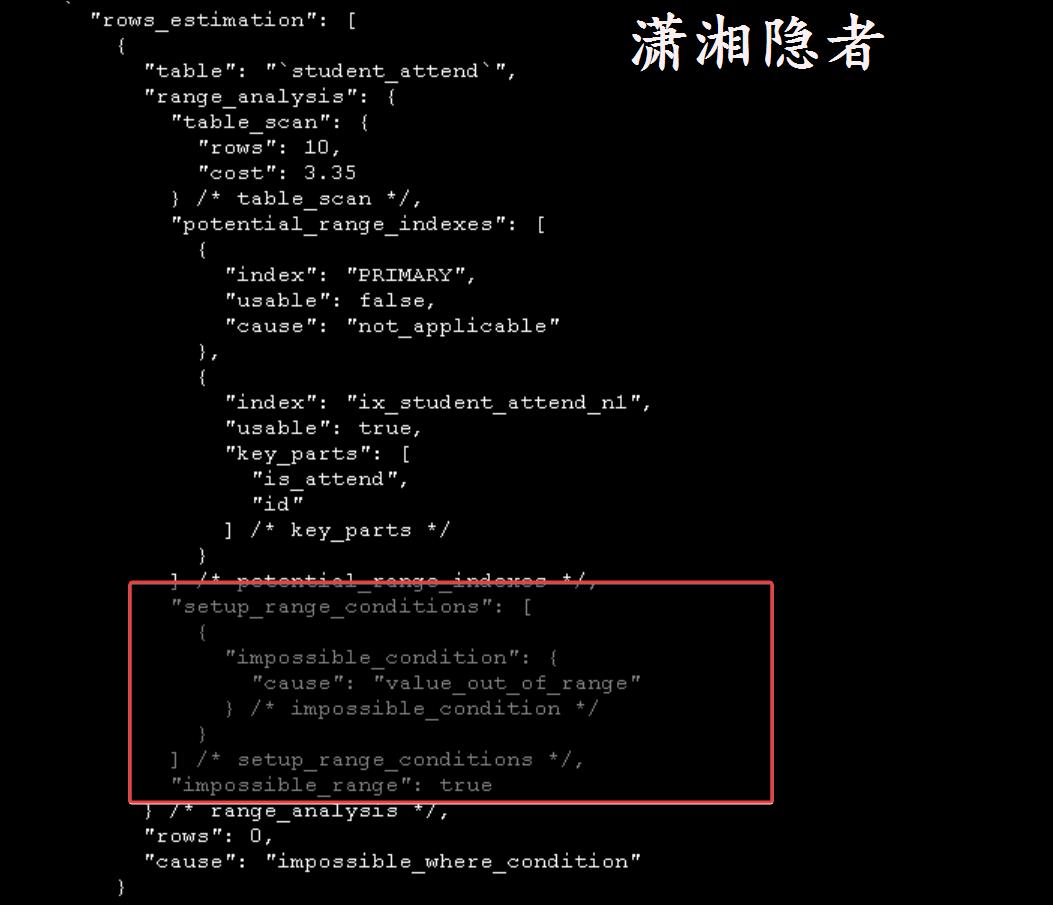
而优化器应该是根据一定的逻辑判断,得到这个值不存在索引中,从而就判断没有匹配的记录,直接返回空的结果集了,根本不去走扫描全表或走索引查找等操作。
        "empty_result": {
          "cause": "no matching row in const table"
        } /* empty_result */
当然这里仅仅是根据trace的信息做的一个判断,如有错误或不谨慎的地方,敬请谅解。毕竟没有深入分析过源码。
那么为什么没有索引的话,SQL语句的结果就是正确的呢? 难道没有发生类型转换吗? 难度没有发生数据截断错误吗?那么我们就继续trace跟踪分析看看,如下所示
mysql> drop index ix_student_attend_n1 on student_attend;
Query OK, 0 rows affected (0.03 sec)
Records: 0  Duplicates: 0  Warnings: 0

mysql> SET OPTIMIZER_TRACE="enabled=on",END_MARKERS_IN_JSON=on;
Query OK, 0 rows affected (0.00 sec)

mysql> SET OPTIMIZER_TRACE_MAX_MEM_SIZE=1000000;
Query OK, 0 rows affected (0.00 sec)

mysql> select * from student_attend where is_attend='1';
+----+--------+----------+----------------------+
| id | std_id | class_id | is_attend            |
+----+--------+----------+----------------------+
|  1 |   1001 |        1 | 0x01                 |
|  3 |   1001 |        3 | 0x01                 |
|  4 |   1001 |        4 | 0x01                 |
|  5 |   1001 |        5 | 0x01                 |
|  7 |   1002 |        1 | 0x01                 |
|  8 |   1002 |        2 | 0x01                 |
+----+--------+----------+----------------------+
6 rows in set (0.00 sec)

mysql> SELECT * FROM INFORMATION_SCHEMA.OPTIMIZER_TRACE \G;
*************************** 1. row ***************************
                            QUERY: select * from student_attend where is_attend='1'
                            TRACE: {
  "steps": [
    {
      "join_preparation": {
        "select#": 1,
        "steps": [
          {
            "expanded_query": "/* select#1 */ select `student_attend`.`id` AS `id`,`student_attend`.`std_id` AS `std_id`,`student_attend`.`class_id` AS `class_id`,`student_attend`.`is_attend` AS `is_attend` from `student_attend` where (`student_attend`.`is_attend` = '1')"
          }
        ] /* steps */
      } /* join_preparation */
    },
    {
      "join_optimization": {
        "select#": 1,
        "steps": [
          {
            "condition_processing": {
              "condition": "WHERE",
              "original_condition": "(`student_attend`.`is_attend` = '1')",
              "steps": [
                {
                  "transformation": "equality_propagation",
                  "resulting_condition": "(`student_attend`.`is_attend` = '1')"
                },
                {
                  "transformation": "constant_propagation",
                  "resulting_condition": "(`student_attend`.`is_attend` = '1')"
                },
                {
                  "transformation": "trivial_condition_removal",
                  "resulting_condition": "(`student_attend`.`is_attend` = '1')"
                }
              ] /* steps */
            } /* condition_processing */
          },
          {
            "substitute_generated_columns": {
            } /* substitute_generated_columns */
          },
          {
            "table_dependencies": [
              {
                "table": "`student_attend`",
                "row_may_be_null": false,
                "map_bit": 0,
                "depends_on_map_bits": [
                ] /* depends_on_map_bits */
              }
            ] /* table_dependencies */
          },
          {
            "ref_optimizer_key_uses": [
            ] /* ref_optimizer_key_uses */
          },
          {
            "rows_estimation": [
              {
                "table": "`student_attend`",
                "table_scan": {
                  "rows": 10,
                  "cost": 0.25
                } /* table_scan */
              }
            ] /* rows_estimation */
          },
          {
            "considered_execution_plans": [
              {
                "plan_prefix": [
                ] /* plan_prefix */,
                "table": "`student_attend`",
                "best_access_path": {
                  "considered_access_paths": [
                    {
                      "rows_to_scan": 10,
                      "access_type": "scan",
                      "resulting_rows": 10,
                      "cost": 1.25,
                      "chosen": true
                    }
                  ] /* considered_access_paths */
                } /* best_access_path */,
                "condition_filtering_pct": 100,
                "rows_for_plan": 10,
                "cost_for_plan": 1.25,
                "chosen": true
              }
            ] /* considered_execution_plans */
          },
          {
            "attaching_conditions_to_tables": {
              "original_condition": "(`student_attend`.`is_attend` = '1')",
              "attached_conditions_computation": [
              ] /* attached_conditions_computation */,
              "attached_conditions_summary": [
                {
                  "table": "`student_attend`",
                  "attached": "(`student_attend`.`is_attend` = '1')"
                }
              ] /* attached_conditions_summary */
            } /* attaching_conditions_to_tables */
          },
          {
            "finalizing_table_conditions": [
              {
                "table": "`student_attend`",
                "original_table_condition": "(`student_attend`.`is_attend` = '1')",
                "final_table_condition   ": "(`student_attend`.`is_attend` = '1')"
              }
            ] /* finalizing_table_conditions */
          },
          {
            "refine_plan": [
              {
                "table": "`student_attend`"
              }
            ] /* refine_plan */
          }
        ] /* steps */
      } /* join_optimization */
    },
    {
      "join_execution": {
        "select#": 1,
        "steps": [
        ] /* steps */
      } /* join_execution */
    }
  ] /* steps */
}
MISSING_BYTES_BEYOND_MAX_MEM_SIZE: 0
          INSUFFICIENT_PRIVILEGES: 0
1 row in set (0.00 sec)

ERROR:
No query specified

mysql> SET optimizer_trace="enabled=off";
Query OK, 0 rows affected (0.00 sec)
从上面trace信息来看,似乎执行计划先进行全表扫描,然后过滤记录,输出信息里面没有value_out_of_range这类信息,似乎没有发生数据截断。具体步骤跟之前的trace信息有很大不同。具体只看到了下面这些信息,但是更多信息我也看不出来。不清楚底层到底做了啥。

小结
关于bit类型的字段,我们写SQL的时候,不要使用字符串,避免发生隐式类型转换。正确的写法应该是下面这种方式
select * from student_attend where is_attend=b'1';
或
select * from student_attend where is_attend=1;
DBA在给bit类型创建索引的时候也必须谨慎处理,跟开发和Support人员多协商沟通,告知他们可能出现这种情况,因为你可能没法控制开发人员写出这样的SQL。
MySQL bit类型增加索引后查询结果不正确案例浅析的更多相关文章
- mysql 添加索引后 在查询的时候是mysql就自动从索引里面查询了。还是查询的时候有单 独的参数查询索引?
MYSQL在创建索引后对索引的使用方式分为两种:1 由数据库的查询优化器自动判断是否使用索引:2 用户可在写SQL语句时强制使用索引 下面就两种索引使用方式进行说明第一种,自动使用索引.数据库在收到查 ...
- mysql之数据库添加索引优化查询效率
项目中如果表中的数据过多的话,会影响查询的效率,那么我们需要想办法优化查询,通常添加索引就是我们的选择之一: 1.添加PRIMARY KEY(主键索引) mysql>ALTER TABLE `t ...
- mysql在group by分组后查询第二条/第三条乃至每组中任意一条数据
昨天老板让我查询项目中(众筹),没人刚发起感召后,前三笔钱的入账时间和金额,这把大哥整懵逼了,group by在某些方面是好使,但这次不能为我所用了,获取第一笔进账是简单,可以用group by 直接 ...
- MYSQL SET类型字段的SQL查询某个字段保函某个值的查询
1.column set('hot','crazy','smart') //column字段(set属性)三个值 2.select * from table where FIND_IN_SET('h ...
- mysql大数据分表后查询
当数据量猛增的时候,大家都会选择库表散列等等方式去优化数据读写速度,举例说明: 1亿条数据,分100张表 1.首先创建100张表 $i=0;while($i<=99){echo "$n ...
- MySQL的视图和索引
MySQL的视图 简单来说MySQL的视图就是对SELECT 命令的定义的一个快捷键,我们查询时会用到非常复杂的SELECT语句,而这个语句我们以后还会经常用到,我们可以经这个语句生产视图.视图是一个 ...
- MYSQL的事务和索引
事务 什么是事务 事务就是将一组SQL语句放在同一批次内去执行 如果一个SQL语句出错,则该批次内的所有SQL都将被取消执行 MySQL事务处理只支持InnoDB和BDB数据表类型 事务的ACID原则 ...
- Mysql常见四种索引的使用
提到MySQL优化,索引优化是必不可少的.其中一种优化方式 --索引优化,添加合适的索引能够让项目的并发能力和抗压能力得到明显的提升. 我们知道项目性能的瓶颈主要是在"查(select)&q ...
- MySql(九)索引
一.索引的介绍 数据库中专门用于帮助用户快速查找数据的一种数据结构.类似于字典中的目录,查找字典内容时可以根据目录查找到数据的存放位置吗,然后直接获取. 二 .索引的作用 约束和加速查找 三.常见的几 ...
- MySQL数据库篇之索引原理与慢查询优化之一
主要内容: 一.索引的介绍 二.索引的原理 三.索引的数据结构 四.聚集索引与辅助索引 五.MySQL索引管理 六.测试索引 七.正确使用索引 八.联合索引与覆盖索引 九.查询优化神器--explai ...
随机推荐
- [Py] Python 字符串 str 和 字节 bytes 的互转
字节转字符串: st = str(data, encoding = "utf8") print(st) print(type(str)) # <class 'str'> ...
- WPF 简单实现一个支持删除自身的应用
我准备写一个逗比的应用,然而我担心被小伙伴看到这个应用的文件从而知道是我写的,于是我就需要实现让应用能自删除的功能.核心实现方法就是调用 cmd 传入命令行,等待几秒之后删除文件 应用程序在运行时,是 ...
- 一个完整的可以输出移动端当前省市(地理坐标)的html页面
<!doctype html> <html lang="en"> <head> <meta charset="UTF-8&quo ...
- htts证书申请
https://freessl.cn/ 教程: https://www.bilibili.com/video/BV1Ug411673P/?spm_id_from=333.337.search-card ...
- postgresql性能优化2:sql语句和缓存配置
1.看执行计划 EXPLAIN, 此命令用于查看SQL的执行计划 总的来说sql的执行计划是一个树形层次结构, 一般来说阅读上遵从层级越深越优先, 同一层级由上到下的原则. 来跟着铁蛋老师读: 层级越 ...
- 几行命令用minikube快速搭建可测试的kubernetes单节点环境
几行命令用minikube快速搭建可测试的kubernetes单节点环境 需要docker环境,https://www.cnblogs.com/xiaofei12/p/17544579.html,网速 ...
- TCP协议分析工具TcpEngine V1.2.0使用教程
概述 目前主流的网络数据分析工具主要有两类,一类是http协议分析工具,如fiddler,这类工具擅长对字符串类型协议分析:另一类是原始网络数据包的监听分析,如Wireshark,这类工具擅长分析网络 ...
- 80x86汇编—汇编程序基本框架
文章目录 First Program 指令系统 伪指令 数值表达式 程序框架解释 int 21 中断 通过一个基本框架解释各个指令和用处,方便复习.所以我认为最好的学习顺序就是先看一段完整的汇编代码程 ...
- 4G EPS 中建立 UE 与 eNB 之间的 RRC 连接
目录 文章目录 目录 前文列表 RRC 连接 Radio Bearer SRB UE 与 eNB 建立 RRC 连接的流程 前文列表 <4G EPS 中的小区搜索> <4G EPS ...
- PageOffice6最简集成代码(Asp.Net)
本文描述了PageOffice产品在普通的Asp.Net项目中如何集成调用. 新建Asp.Net项目:PageOffice6-Net-Simple 在您的web项目的"依赖项-包-管理NuG ...