
ASP.NET Core -中间件(Middleware)使用
ASP.NET Core开发,开发并使用中间件(Middleware)。
中间件是被组装成一个应用程序管道来处理请求和响应的软件组件。
每个组件选择是否传递给管道中的下一个组件的请求,并能之前和下一组分在管道中调用之后执行特定操作。
具体如图:

开发中间件(Middleware)
今天我们来实现一个记录ip 的中间件。
1.新建一个asp.net core项目,选择空的模板。
2.新建一个类: RequestIPMiddleware.cs

    public class RequestIPMiddleware

    {

        private readonly RequestDelegate _next;

        private readonly ILogger _logger;

        public RequestIPMiddleware(RequestDelegate next, ILoggerFactory loggerFactory)

        {

            _next = next;

            _logger = loggerFactory.CreateLogger<RequestIPMiddleware>();

        }

        public async Task Invoke(HttpContext context)

        {

            _logger.LogInformation("User IP: " + context.Connection.RemoteIpAddress.ToString());

            await _next.Invoke(context);

        }

    }
3.再新建一个:RequestIPExtensions.cs
    public static class RequestIPExtensions

    {

        public static IApplicationBuilder UseRequestIP(this IApplicationBuilder builder)

        {

            return builder.UseMiddleware<RequestIPMiddleware>();

        }

    }
这样我们就编写好了一个中间件。
使用中间件(Middleware)
1.使用
在 Startup.cs 添加 app.UseRequestIP()
        public void Configure(IApplicationBuilder app, ILoggerFactory loggerfactory)

        {

            loggerfactory.AddConsole(minLevel: LogLevel.Information);

            app.UseRequestIP();//使用中间件

            app.Run(async (context) =>

            {

                await context.Response.WriteAsync("Hello World!");

            });

        }
然后运行程序,我选择使用Kestrel 。
访问:http://localhost:5000/
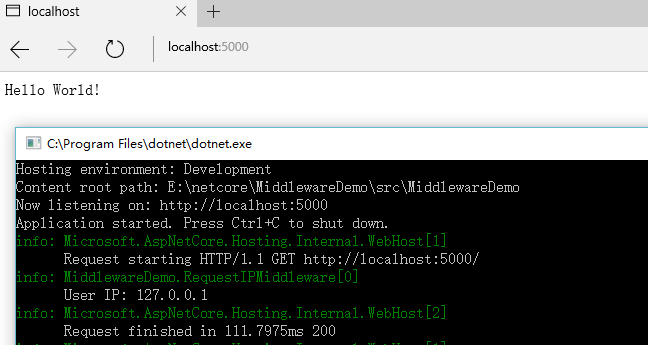
成功运行。
二、Asp.Net Core使用中间件拦截处理请求
public class OuterImgMiddleware

{

    public static string RootPath { get; set; } //配置文件读取绝对位置

    private readonly RequestDelegate _next;

    public OuterImgMiddleware(RequestDelegate next, IHostingEnvironment env)

    {

        //  _wwwrootFolder = env.WebRootPath;

        _next = next;

    }

    public async Task Invoke(HttpContext context)

    {

        var path = context.Request.Path.ToString();

        var headersDictionary = context.Request.Headers;

        if (context.Request.Method == "GET")

            if (!string.IsNullOrEmpty(path) && path.Contains("/upload/logo"))

            {

                //var unauthorizedImagePath = Path.Combine(RootPath, path);

                var unauthorizedImagePath = RootPath + path;

                await context.Response.SendFileAsync(unauthorizedImagePath);

                return;

            }

        await _next(context);

    }

}
public static class MvcExtensions

{

    public static IApplicationBuilder UseOutImg(this IApplicationBuilder builder)

    {

        return builder.UseMiddleware<OuterImgMiddleware>();

    }

}
同上在Configure()中注册使用就可以了。
更多:
Asp.Net Core 通过自定义中间件防止图片盗链的实例(转)
在ASP.NET Core2.0中使用百度在线编辑器UEditor(转)
Asp.Net Core WebAPI入门整理(四)参数获取
ASP.NET Core -中间件(Middleware)使用的更多相关文章
- ASP.NET Core中间件(Middleware)实现WCF SOAP服务端解析
ASP.NET Core中间件(Middleware)进阶学习实现SOAP 解析. 本篇将介绍实现ASP.NET Core SOAP服务端解析,而不是ASP.NET Core整个WCF host. 因 ...
- ASP.NET Core 入门教程 9、ASP.NET Core 中间件(Middleware)入门
一.前言 1.本教程主要内容 ASP.NET Core 中间件介绍 通过自定义 ASP.NET Core 中间件实现请求验签 2.本教程环境信息 软件/环境 说明 操作系统 Windows 10 SD ...
- ASP.NET Core 入门笔记10,ASP.NET Core 中间件(Middleware)入门
一.前言 1.本教程主要内容 ASP.NET Core 中间件介绍 通过自定义 ASP.NET Core 中间件实现请求验签 2.本教程环境信息 软件/环境 说明 操作系统 Windows 10 SD ...
- ASP.NET Core 中间件Diagnostics使用
ASP.NET Core 中间件(Middleware)Diagnostics使用.对于中间件的介绍可以查看之前的文章ASP.NET Core 开发-中间件(Middleware). Diagnost ...
- ASP.NET Core 中间件Diagnostics使用 异常和错误信息
ASP.NET Core 中间件(Middleware)Diagnostics使用.对于中间件的介绍可以查看之前的文章ASP.NET Core 开发-中间件(Middleware). Diagnost ...
- ASP.NET Core 中间件自定义全局异常处理
目录 背景 ASP.NET Core过滤器(Filter) ASP.NET Core 中间件(Middleware) 自定义全局异常处理 .Net Core中使用ExceptionFilter .Ne ...
- [转帖]ASP.NET Core 中间件(Middleware)详解
ASP.NET Core 中间件(Middleware)详解 本文为官方文档译文,官方文档现已非机器翻译 https://docs.microsoft.com/zh-cn/aspnet/core/ ...
- 在ASP.NET Core使用Middleware模拟Custom Error Page功能
一.使用场景 在传统的ASP.NET MVC中,我们可以使用HandleErrorAttribute特性来具体指定如何处理Action抛出的异常.只要某个Action设置了HandleErrorAtt ...
- [转]ASP.NET Core 中间件详解及项目实战
本文转自:http://www.cnblogs.com/savorboard/p/5586229.html 前言 在上篇文章主要介绍了DotNetCore项目状况,本篇文章是我们在开发自己的项目中实际 ...
随机推荐
- vue系列之获取多选框中被选中的值
多个勾选框,绑定到同一个数组: <input type="checkbox" id="jack" value="Jack" v-mod ...
- webpack 3之hash、chunkhash和contenthash三者的区别
在使用webpack 3中,文件名的hash值可以有三种hash生成方式,那具体使用哪一种呢? 1.hash 如果都使用hash的话,所有文件的hash都是一样的,而且每次修改任何一个文件,所有文件名 ...
- 使用caffe模型测试图片(python接口)
1.加载相关模块 1.1 加载numpy import numpy as np 1.2 加载caffe 有两种方法. 方法一(静态导入): 找到当前环境使用的python的site-packages目 ...
- Fiddler抓包9-保存会话(save)
前言 为什么要保存会话呢?举个很简单的场景,你在上海测试某个功能接口的时候,发现了一个BUG,而开发这个接口的开发人员是北京的一家合作公司.你这时候给对方开发提bug, 如何显得专业一点,能让对方心服 ...
- 转发(Forward)和重定向(Redirect)的区别
转发是服务器行为,重定向是客户端行为. 转发(Forword) :通过RequestDispatcher对象的forward(HttpServletRequest request,HttpServle ...
- asp.net core2.0大白话带你入门
本系列包括: 1.新建asp.net core项目2.web项目目录解读3.配置访问地址4.环境变量详解5.配置文件6.日志7.DI容器8.服务的生命周期9.session的使用10.cookie的使 ...
- java面试题大全-基础方面 答案自己写
Java基础方面: 1.作用域public,private,protected,以及不写时的区别 2.Anonymous Inner Class (匿名内部类) 是否可以extends(继承)其它类, ...
- hdu 1251:统计难题[【trie树】||【map】
<题目链接> 统计难题 Time Limit: 4000/2000 MS (Java/Others) Memory Limit: 131 ...
- 001.Keepalived简介
一 Keepalived 定义 Keepalived 是一个基于VRRP协议来实现的LVS服务高可用方案,可以解决静态路由出现的单点故障问题.一个LVS服务会有2台服务器运行Keepalived,一台 ...
- zip&ftp命令
zip: C:\Users\IBM_ADMIN>zip -09r Oracle.zip ./Oracle/* C:\Users\IBM_ADMIN>ftp ftp> open adm ...