
ASP.NET Core -中间件(Middleware)使用
ASP.NET Core开发,开发并使用中间件(Middleware)。
中间件是被组装成一个应用程序管道来处理请求和响应的软件组件。
每个组件选择是否传递给管道中的下一个组件的请求,并能之前和下一组分在管道中调用之后执行特定操作。
具体如图:

开发中间件(Middleware)
今天我们来实现一个记录ip 的中间件。
1.新建一个asp.net core项目,选择空的模板。
2.新建一个类: RequestIPMiddleware.cs

    public class RequestIPMiddleware

    {

        private readonly RequestDelegate _next;

        private readonly ILogger _logger;

        public RequestIPMiddleware(RequestDelegate next, ILoggerFactory loggerFactory)

        {

            _next = next;

            _logger = loggerFactory.CreateLogger<RequestIPMiddleware>();

        }

        public async Task Invoke(HttpContext context)

        {

            _logger.LogInformation("User IP: " + context.Connection.RemoteIpAddress.ToString());

            await _next.Invoke(context);

        }

    }
3.再新建一个:RequestIPExtensions.cs
    public static class RequestIPExtensions

    {

        public static IApplicationBuilder UseRequestIP(this IApplicationBuilder builder)

        {

            return builder.UseMiddleware<RequestIPMiddleware>();

        }

    }
这样我们就编写好了一个中间件。
使用中间件(Middleware)
1.使用
在 Startup.cs 添加 app.UseRequestIP()
        public void Configure(IApplicationBuilder app, ILoggerFactory loggerfactory)

        {

            loggerfactory.AddConsole(minLevel: LogLevel.Information);

            app.UseRequestIP();//使用中间件

            app.Run(async (context) =>

            {

                await context.Response.WriteAsync("Hello World!");

            });

        }
然后运行程序,我选择使用Kestrel 。
访问:http://localhost:5000/
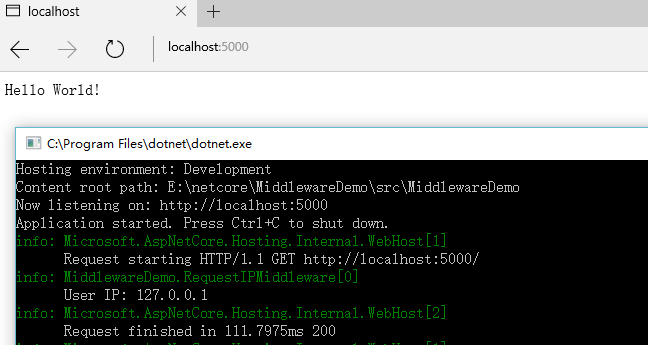
成功运行。
二、Asp.Net Core使用中间件拦截处理请求
public class OuterImgMiddleware

{

    public static string RootPath { get; set; } //配置文件读取绝对位置

    private readonly RequestDelegate _next;

    public OuterImgMiddleware(RequestDelegate next, IHostingEnvironment env)

    {

        //  _wwwrootFolder = env.WebRootPath;

        _next = next;

    }

    public async Task Invoke(HttpContext context)

    {

        var path = context.Request.Path.ToString();

        var headersDictionary = context.Request.Headers;

        if (context.Request.Method == "GET")

            if (!string.IsNullOrEmpty(path) && path.Contains("/upload/logo"))

            {

                //var unauthorizedImagePath = Path.Combine(RootPath, path);

                var unauthorizedImagePath = RootPath + path;

                await context.Response.SendFileAsync(unauthorizedImagePath);

                return;

            }

        await _next(context);

    }

}
public static class MvcExtensions

{

    public static IApplicationBuilder UseOutImg(this IApplicationBuilder builder)

    {

        return builder.UseMiddleware<OuterImgMiddleware>();

    }

}
同上在Configure()中注册使用就可以了。
更多:
Asp.Net Core 通过自定义中间件防止图片盗链的实例(转)
在ASP.NET Core2.0中使用百度在线编辑器UEditor(转)
Asp.Net Core WebAPI入门整理(四)参数获取
ASP.NET Core -中间件(Middleware)使用的更多相关文章
- ASP.NET Core中间件(Middleware)实现WCF SOAP服务端解析
ASP.NET Core中间件(Middleware)进阶学习实现SOAP 解析. 本篇将介绍实现ASP.NET Core SOAP服务端解析,而不是ASP.NET Core整个WCF host. 因 ...
- ASP.NET Core 入门教程 9、ASP.NET Core 中间件(Middleware)入门
一.前言 1.本教程主要内容 ASP.NET Core 中间件介绍 通过自定义 ASP.NET Core 中间件实现请求验签 2.本教程环境信息 软件/环境 说明 操作系统 Windows 10 SD ...
- ASP.NET Core 入门笔记10,ASP.NET Core 中间件(Middleware)入门
一.前言 1.本教程主要内容 ASP.NET Core 中间件介绍 通过自定义 ASP.NET Core 中间件实现请求验签 2.本教程环境信息 软件/环境 说明 操作系统 Windows 10 SD ...
- ASP.NET Core 中间件Diagnostics使用
ASP.NET Core 中间件(Middleware)Diagnostics使用.对于中间件的介绍可以查看之前的文章ASP.NET Core 开发-中间件(Middleware). Diagnost ...
- ASP.NET Core 中间件Diagnostics使用 异常和错误信息
ASP.NET Core 中间件(Middleware)Diagnostics使用.对于中间件的介绍可以查看之前的文章ASP.NET Core 开发-中间件(Middleware). Diagnost ...
- ASP.NET Core 中间件自定义全局异常处理
目录 背景 ASP.NET Core过滤器(Filter) ASP.NET Core 中间件(Middleware) 自定义全局异常处理 .Net Core中使用ExceptionFilter .Ne ...
- [转帖]ASP.NET Core 中间件(Middleware)详解
ASP.NET Core 中间件(Middleware)详解 本文为官方文档译文,官方文档现已非机器翻译 https://docs.microsoft.com/zh-cn/aspnet/core/ ...
- 在ASP.NET Core使用Middleware模拟Custom Error Page功能
一.使用场景 在传统的ASP.NET MVC中,我们可以使用HandleErrorAttribute特性来具体指定如何处理Action抛出的异常.只要某个Action设置了HandleErrorAtt ...
- [转]ASP.NET Core 中间件详解及项目实战
本文转自:http://www.cnblogs.com/savorboard/p/5586229.html 前言 在上篇文章主要介绍了DotNetCore项目状况,本篇文章是我们在开发自己的项目中实际 ...
随机推荐
- mysql中的几种join 及 full join问题
[注意]:Oracle数据库支持full join,mysql是不支持full join的,但仍然可以同过左外连接+ union+右外连接实现 初始化SQL语句: /*join 建表语句*/ ...
- linux下的文件结构
linux下的文件结构,看看每个文件夹都是干吗用的/bin 二进制可执行命令/dev 设备特殊文件/etc 系统管理和配置文件/etc/rc.d 启动的配置文件和脚本/home 用户主目录的基点,比如 ...
- HTTP常见响应状态码
200 : (OK) 服务器已成功处理了请求. 通常,这表示服务器提供了请求的网页. 201 : (Created) 请求成功并且服务器创建了新的资源. 301 : (Moved Permanentl ...
- 步步为营-42-通过DataAdapter实现增删查改
说明:通过DataAdapter或者dataset连接数据库,实现对数据增删改查操作. 以前写过一篇步步为营-23-通过GridView实现增删改 1:SqlDataAdapter DataTabl ...
- javaFX中解决填充(拉伸)问题
1.margin设置实现 在项目过程中,遇到此问题,如图: 如果窗口缩小,HBox(左边的包含TitledPane那部分)看不到底部 如果窗口拉大,下面就出现空白,HBox高度没拉神 办法:对包含HB ...
- 【【C++ Primer 第15章】 虚析构函数
学习资料 • C++中基类的析构函数为什么要用virtual虚析构函数 虚析构函数 1. 正文 直接的讲,C++中基类采用virtual虚析构函数是为了防止内存泄漏.具体地说,如果派生类中申请了内存空 ...
- PTA之求单链表结点的阶乘和
本题要求实现一个函数,求单链表L结点的阶乘和.这里默认所有结点的值非负,且题目保证结果在int范围内. 时间限制: 400ms 内存限制: 64MB 代码长度限制: 16KB 函数接口定义: int ...
- HTML5游戏 看你有多“色” 开发
所有文章搬运自我的个人主页:sheilasun.me 在极客学院看到了这个游戏,在网上找到这个游戏玩了好久真的比较上瘾,于是自己也试着做了一下,可以戳这里试玩→看你有多色 游戏规则: 找出颜色不同的方 ...
- [转] 为什么javascript是单线程的却能让AJAX异步调用?
为什么JavaScript是单线程的却能让AJAX异步发送和回调请求,还有setTimeout也看起来像是多线程的? function foo() { console.log( 'first' ); ...
- POJ 2377 Bad Cowtractors (Kruskal)
题意:给出一个图,求出其中的最大生成树= =如果无法产生树,输出-1. 思路:将边权降序再Kruskal,再检查一下是否只有一棵树即可,即根节点只有一个 #include <cstdio> ...