
Django 前台通过json 取出后台数据
转载自:https://my.oschina.net/esdn/blog/814111
步骤1:后台数据通过 JSON 序列化成字符串
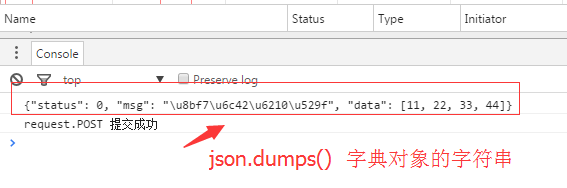
注意:1、json是1个字符串
2、通过json.dumps('xxx') 序列化成 1个字符串的 '字典对象'
views.py
def ajax(request):

    if request.method=='POST':

        print(request.POST)

        data={'status':0,'msg':'请求成功','data':[11,22,33,44]}

        return HttpResponse(json.dumps(data))

    else:

        return render(request,'ajax.html')
此时tempates 中ajax.html 代码 详细查看:https://my.oschina.net/esdn/blog/814094
此时浏览器返回的数据
步骤2:前台取出后台序列化的字符串
方法1:正则表达式 (不推荐)
方法2:jQuery.parseJSON() ,需要import json
转换成1个JQuery可识别的字典(对象) 通过 对象. xxx 取值 (推荐)
views.py序列化:return HttpResponse(json.dumps(data))
ajax.html 取值:var obj=jQuery.parseJSON(arg)
console.log(obj.status)
修改后的tempates 中ajax.html 代码
<script type='text/javascript'>

	function DoAjax(){

			var temp=$('#na').val()

			$.ajax({

				url:'/ajax/',           //url相当于 form 中的 action

				type:'POST',            //type相当于form 中的 method

				data:{dat:temp},       // data:传人的数据 dat为任意设置的内容,相当于模版中的{author:lee}

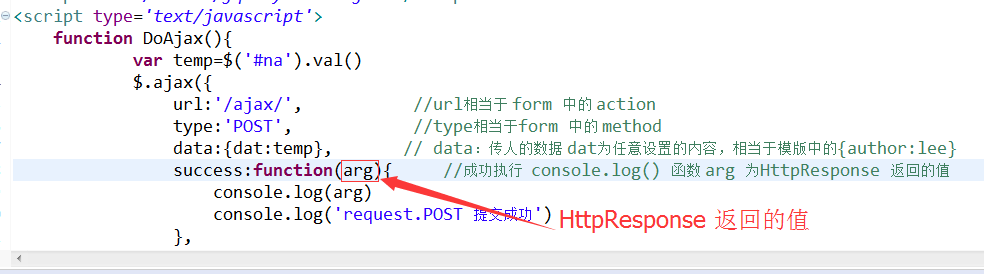
				success:function(arg){     //成功执行  console.log() 函数 arg 为HttpResponse 返回的值

					var obj=jQuery.parseJSON(arg)    //转化成JS识别的对象

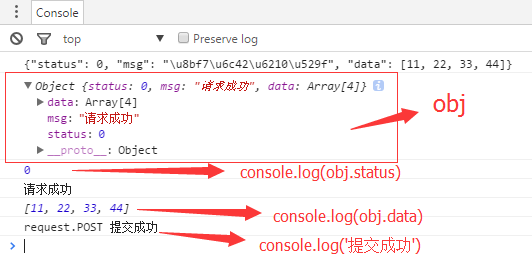
                    console.log(obj)          //打印obj

					console.log(arg)              //json.dumps(data) 序列化后的数据

					console.log(obj.status)       //取json.dumps(data)字典的值status

					console.log(obj.msg)

					console.log(obj.data)

					console.log('request.POST 提交成功')

				},

				error:function(){            //失败

					console.log('失败')

				}

			});

		}

</script>
此时前台浏览器 显示数据
方法3:content_type='application/json'
views.py序列化:return HttpResponse(json.dumps(data),content_type='application/json')
浏览器F12有变色提示
或:HttpResponse(json.dumps(data),content_type='type/json') 浏览器F12无变色提示
ajax.html 取值 arg.xxx
方法4:使用JsonRespon 包 (最简单) 前台通过 arg.xxx 取值
views.py 序列化: return JsonResponse(data)
ajax.html 取值:arg.xxx
区别:HttpResponse 需要dumps
JsonResponse 不需要dumps
views.py
from django.shortcuts import render

from django.http import JsonResponse

def ajax(request):

    if request.method=='POST':

        print(request.POST)

        data={'status':0,'msg':'请求成功','data':[11,22,33,44]} #假如传人的数据为一字典

        #return HttpResponse(json.dumps(data))      #原来写法,需要dumps

        return JsonResponse(data)                  #后来写法

    else:

        return render(request,'ajax.html')
templates 中的 ajax.html
<script type='text/javascript'>

	function DoAjax(){

			var temp=$('#na').val()

			$.ajax({

				url:'/ajax/',           //url相当于 form 中的 action

				type:'POST',            //type相当于form 中的 method

				data:{dat:temp},       // data:传人的数据 dat为任意设置的内容,相当于模版中的{author:lee}

				success:function(arg){     //成功执行  console.log() 函数 arg 为HttpResponse 返回的值

					//var obj=jQuery.parseJSON(arg)

					//console.log(arg)              //json.dumps(data) 序列化后的数据

					console.log(arg.msg)

					/*

					console.log(obj)

					console.log(obj.status)       //取json.dumps(data)字典的值status

					console.log(obj.msg)

					console.log(obj.data)*/

					console.log('request.POST 提交成功')

				},

				error:function(){            //失败

					console.log('失败')

				}

			});

		}

</script>
Django 前台通过json 取出后台数据的更多相关文章
- Django 前端通过json 取出后端数据
Django 前端通过json 取出后端数据 前端通过json 取出后端数据 步骤1:后台数据通过 JSON 序列化成字符串a 注意:1.json是1个字符串 2.通过json.dumps('xx ...
- 前台传JSON到后台
现在,有一个需求,我需要将表格中选中行的数据中的一部分传直接传到控制器中,然后保存到另外一张表中.一开始,我就想到在前台使用ajax构造json数据,然后控制器直接通过list接收. 选中界面中的行, ...
- 前台通过ajax获取后台数据,PHP如何返回中文数据
现在经常使用Ajax调用后台php获取后台数据,但是PHP返回的数据如果含有中文的话,Ajax会无法识别,那咋整呢,我用的是比较笨的方法,但是实用: 方法一: echo urldecode(json_ ...
- django中使用json.dumps处理数据时,在前台遇到字符转义的问题
django后台代码: import json ctx['dormitory_list'] = json.dumps([{", "is_checked": 1}, {&q ...
- Json传递后台数据的问题
在后台我有两个类: public Class Person { private String name; private Address address;//一个自定义的类 //getter和sett ...
- 如何使用ajax将json传入后台数据
首先采用jquery内部封装好的方法是比较简单的,我们只需做的就是修改里面的一些配置: 对$.ajax()的解析: $.ajax({ type: "POST", //提交方式 co ...
- [django]主次表如何取出对方数据[主表obj.子表__set()]
[sql]mysql管理手头手册,多对多sql逻辑 国家--城市例子 class Country(models.Model): name = models.CharField(max_length=3 ...
- 根据id查询数据(向前台返回json格式的数据)
/** *@description 根据主键查询Bean */ @RequestMapping(value="/getBean/{getId}") public void getB ...
- 【SpringMVC学习09】SpringMVC与前台的json数据交互
json数据格式在接口调用中.html页面中比较常用,json格式比较简单,解析也比较方便,所以使用很普遍.在springmvc中,也支持对json数据的解析和转换,这篇文章主要总结一下springm ...
随机推荐
- js判断字符串与字符串相互包含,以及数组是否包含某个元素;
需求:判端一个字符串是否包含另一个字符串? 实现: var str = "adc"; 判断str 中是否包含 "c" if( str.indexOf(&quo ...
- flex属性的学习
1.需要记住的属性和值. ------------------------------------------------------------- 方向横和纵 flex-direction: row ...
- cyberduck的SSH登录
1.通过配置SSH秘钥. 2.不点匿名(不要点匿名),如果非要填一个名字的话,你写root就行. 3.书签.
- js数组,字符串,json互相转换函数有哪些
js数组,字符串,json互相转换函数有哪些 一.总结 一句话总结: JSON.stringify(arr) JSON.parse(jsonString) str.split('') array.jo ...
- c# DLL封装并调用
1.封装自己的dll: a.打开visual studio - 文件 - 新建 - 项目- 类库 - 名称MyTestDll: b.右键Class1.cs - 修改为 TestDll.cs; c.在里 ...
- (8)进程---Queue队列
# IPC Inter-Process Communication # 实现进程之间通信的两种机制: # 管道 Pipe 用的很少 # 队列 Queue 队列的特征:现进先出,栈属于后进后出 基本语法 ...
- [maven] introduction to the standard directory layout
The next section documents the directory layout expected by Maven and the directory layout created b ...
- Python 编程快速上手 第十一章 Web scrapping
前言 这一章讲了如何在 Web 上抓取相关的信息,工具是三个模块: webbrowser 模块:用于打开浏览器指定页面 requests 模块:用于下载文件 Beautiful Soup 模块:用于解 ...
- English trip V1 - 9.Do you Ever Say Never? 你有没有说永远不会? Teacher:Lamb Key: Adverbs of frequency (频率副词)
In this lesson you will learn to describe what you do at home. 在本课中,您将学习如何描述您在家中所做的事情. 课上内容(Lesson) ...
- 电脑用U盘启动
除了根据提示按DEL或者F2进入到BIOS界面更改设置之外. 还可以在开机时按F8或F12进入到引导界面,可直接选择USB. 当把登录用户登录,其他用户都被禁用时,电脑登不进去.要制作启动U盘,进入到 ...