
ES系列十一、ES的index、store、_source、copy_to和all的区别
1.基本概念
1.1._source
存储的原始数据。_source中的内容就是搜索api返回的内容,如:
{
 "query":{
  "term":{
   "title":"test"
  }
 }
}
结果:
{

    "took": ,

    "timed_out": false,

    "_shards": {

        "total": ,

        "successful": ,

        "skipped": ,

        "failed":

    },

    "hits": {

        "total": ,

        "max_score": 0.2876821,

        "hits": [

            {

                "_index": "book3",

                "_type": "english",

                "_id": "3nuFZ2UBYLvVFwGWZHcJ",

                "_score": 0.2876821,

                "_source": {

                    "title": "test!"

                }

            }

        ]

    }

}
默认情况下,Elasticsearch里面有2份内容,一份是原始文档,也就是_source字段里的内容,我们在Elasticsearch中搜索文档,查看的文档内容就是_source中的内容。另一份是倒排索引,倒排索引中的数据结构是倒排记录表,记录了词项和文档之间的对应关系。
1.2.index:索引
index使用倒排索引存储的是,分析器分析完的词和文档的对应关系。如图:
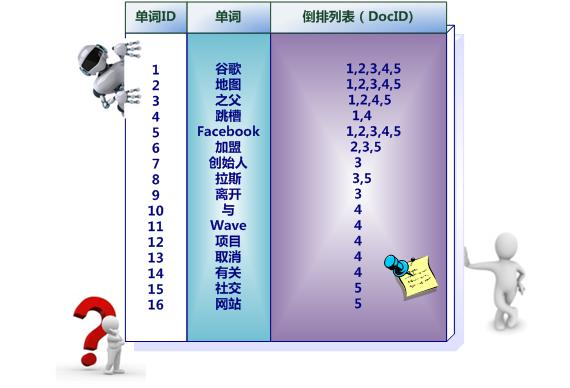
在搜索排序的时候,查询倒排索引要比快。
那么文档索引到Elasticsearch的时候,默认情况下是对所有字段创建倒排索引的(动态mapping解析出来为数字类型、布尔类型的字段除外),某个字段是否生成倒排索引是由字段的index属性控制的,在Elasticsearch 5之前,index属性的取值有三个:
- analyzed:字段被索引,会做分词,可搜索。反过来,如果需要根据某个字段进搜索,index属性就应该设置为analyzed。
- not_analyzed:字段值不分词,会被原样写入索引。反过来,如果某些字段需要完全匹配,比如人名、地名,index属性设置为not_analyzed为佳。
- no:字段不写入索引,当然也就不能搜索。反过来,有些业务要求某些字段不能被搜索,那么index属性设置为no即可。
ES6.3 index属性支持false和true,false不能搜索相当于no,true可以索引。默认使用standar分词
1.3.store
默认为no,被store标记的fields被存储在和index不同的fragment中,以便于快速检索。虽然store占用磁盘空间,但是减少了计算。store的值可以取yes/no或者true/false,默认值是no或者false。
如果在{"store":yes}的情况下,ES会对该字段单独存储倒排索引,每次根据ID检索的时候,会多走一次IO来从倒排索引取数据。
而如果_source enabled 情况下,ES可以直接根据Client类来解析_source JSON,只需一次IO就将所有字段都检索出来了。
如果需要高亮处理,这里就要说到store属性,store属性用于指定是否将原始字段写入索引,默认取值为no。如果在Lucene中,高亮功能和store属性是否存储息息相关,因为需要根据偏移位置到原始文档中找到关键字才能加上高亮的片段。在Elasticsearch,因为_source中已经存储了一份原始文档,可以根据_source中的原始文档实现高亮,在索引中再存储原始文档就多余了,所以Elasticsearch默认是把store属性设置为no。
注意:如果想要对某个字段实现高亮功能,_source和store至少保留一个。
1.4._all
_all: 在6.0+ 中 , 该字段 默认被禁用,建议使用copy_to。再说_all字段,顾名思义,_all字段里面包含了一个文档里面的所有信息,是一个超级字段。以图中的文档为例,如果开启_all字段,那么title+content会组成一个超级字段,这个字段包含了其他字段的所有内容,空格隔开。当然也可以设置只存储某几个字段到_all属性里面或者排除某些字段。适合一次搜索整个文档。
2.配置
2.1._source配置
_source字段默认是存储的, 什么情况下不用保留_source字段?如果某个字段内容非常多,业务里面只需要能对该字段进行搜索,最后返回文档id,查看文档内容会再次到mysql或者hbase中取数据,把大字段的内容存在Elasticsearch中只会增大索引,这一点文档数量越大结果越明显,如果一条文档节省几KB,放大到亿万级的量结果也是非常可观的。
如果想要关闭_source字段,在mapping中的设置如下:
{

    "yourtype":{

        "_source":{

            "enabled":false

        },

        "properties": {

            ...

        }

    }

}
如果只想存储某几个字段的原始值到Elasticsearch,可以通过incudes参数来设置,在mapping中的设置如下:
{

    "yourtype":{

        "_source":{

            "includes":["field1","field2"]

        },

        "properties": {

            ...

        }

    }

}
同样,可以通过excludes参数排除某些字段:
{

    "yourtype":{

        "_source":{

            "excludes":["field1","field2"]

        },

        "properties": {

            ...

        }

    }

}
测试,首先创建一个索引:
PUT book2
设置mapping,禁用_source:
POST book2/english/_mapping

{

   "book2": {

      "_source": {

         "enabled": false

      }

   }

}
插入数据:
POST /book2/english/

{

    "title":"test!",

    "content":"test good Hellow"

}
搜索"test"
POST book2/_search

{

    "query":{

        "term":{

            "title":"test"

        }

    }

}
结果,只返回了id,没有_suorce,任然可以搜索到。
{

    "took": ,

    "timed_out": false,

    "_shards": {

        "total": ,

        "successful": ,

        "skipped": ,

        "failed":

    },

    "hits": {

        "total": ,

        "max_score": 0.2876821,

        "hits": [

            {

                "_index": "book2",

                "_type": "english",

                "_id": "zns1Z2UBYLvVFwGW4Hea",

                "_score": 0.2876821

            }

        ]

    }

}
当_source=false,store和index必须有一个为true,原始数据不保存,倒排索引必须要存储,否则去哪里查询呢,验证下:
POST book3/english/_mapping

{

    "english":{

        "_source": {

         "enabled": false

      },

       "properties": {

         "content":{

             "type":"text",

            "store":"false",

            "index":"no"

        },

         "title":{

             "type":"text",

            "store":"false",

            "index":"no"

        }

      }

    }

}
报错:
{

    "error": {

        "root_cause": [

            {

                "type": "illegal_argument_exception",

                "reason": "Could not convert [content.index] to boolean"

            }

        ],

        "type": "illegal_argument_exception",

        "reason": "Could not convert [content.index] to boolean",

        "caused_by": {

            "type": "illegal_argument_exception",

            "reason": "Failed to parse value [no] as only [true] or [false] are allowed."

        }

    },

    "status":

}
2.2._all配置(copy_to)
- _all: 在6.0+ 中 , 该字段 默认被禁用,同时在创建index的时候不能 enable;_all 字段能捕获所有字段,它将所有其他字段的值连接成一个大字符串,使用空格作为分隔符,然后 进行分析和索引,但不存储。这意味着它可以被搜索,但不能被检索。 建议使用 copy_to 实现 用户自定义的_all 功能
{

   "yourtype": {

      "_all": {

         "enabled": true

      },

      "properties": {

            ...

      }

   }

}
也可以通过在字段中指定某个字段是否包含在_all中:
{

   "yourtype": {

      "properties": {

         "field1": {

             "type": "string",

             "include_in_all": false

          },

          "field2": {

             "type": "string",

             "include_in_all": true

          }

      }

   }

}
如果要把字段原始值保存,要设置store属性为true,这样索引会更大,需要根据需求使用。下面给出测试代码。
创建test索引:
DELETE  book2

PUT book2
copy_to语法:
POST book2/english/_mapping

{

    "english":{

       "properties": {

         "content":{

             "type":"text",

             "copy_to":"all_text"

        },

         "title":{

             "type":"text",

             "copy_to":"all_text"

        },

        "all_text":{

             "type":"text"

        }

      }

    }

}
插入数据:
POST /book2/english/

{

    "title":"test!",

    "content":"test good Hellow"

}
查询:
POST book2/_search{
    "query":{
        "term":{
            "all_text":"test"
        }
    }
}
结果:
{

    "took": ,

    "timed_out": false,

    "_shards": {

        "total": ,

        "successful": ,

        "skipped": ,

        "failed":

    },

    "hits": {

        "total": ,

        "max_score": 0.39556286,

        "hits": [

            {

                "_index": "book2",

                "_type": "english",

                "_id": "0HtjZ2UBYLvVFwGWl3f7",

                "_score": 0.39556286,

                "_source": {

                    "title": "test!god",

                    "content": "test good Hellow"

                }

            },

            {

                "_index": "book2",

                "_type": "english",

                "_id": "z3tjZ2UBYLvVFwGWWXd3",

                "_score": 0.39556286,

                "_source": {

                    "title": "test!",

                    "content": "test good Hellow"

                }

            }

        ]

    }

}
2.3.index和score配置
"index":false设置不可搜索
POST book3/english/_mapping

{

    "english":{

        "_source": {

         "enabled": false

      },

       "properties": {

         "content":{

            "type":"text",

            "store":true,

            "index":false

        },

         "title":{

             "type":"text",

            "store":true,

            "index":false

        }

      }

    }

}
查询:
POST book3/_search

{

    "query":{

        "term":{

            "content":"test"

        }

    }

}

结果:

{

    "error": {

        "root_cause": [

            {

                "type": "query_shard_exception",

                "reason": "failed to create query: {\n  \"term\" : {\n    \"content\" : {\n      \"value\" : \"test\",\n      \"boost\" : 1.0\n    }\n  }\n}",

                "index_uuid": "FvNPHNb7Sa6H757_lKRhpg",

                "index": "book3"

            }

        ],

        "type": "search_phase_execution_exception",

        "reason": "all shards failed",

        "phase": "query",

        "grouped": true,

        "failed_shards": [

            {

                "shard": ,

                "index": "book3",

                "node": "R8t6R20XQritJB_5QVQsvg",

                "reason": {

                    "type": "query_shard_exception",

                    "reason": "failed to create query: {\n  \"term\" : {\n    \"content\" : {\n      \"value\" : \"test\",\n      \"boost\" : 1.0\n    }\n  }\n}",

                    "index_uuid": "FvNPHNb7Sa6H757_lKRhpg",

                    "index": "book3",

                    "caused_by": {

                        "type": "illegal_argument_exception",

                        "reason": "Cannot search on field [content] since it is not indexed."

                    }

                }

            }

        ]

    },

    "status":

}
正确配置:
POST book3/english/_mapping

{

    "english":{

        "_source": {

         "enabled": false

      },

       "properties": {

         "content":{

            "type":"text",

            "store":true,

            "index":"true"

        },

         "title":{

            "type":"text",

            "store":true,

            "index":"true"

        }

      }

    }

}
高亮:
{

    "query":{

        "term":{

            "title":"test"

        }

    },

    "highlight":{

        "fields":{

            "title":{}

        }

    }

}
结果:
{

    "took": ,

    "timed_out": false,

    "_shards": {

        "total": ,

        "successful": ,

        "skipped": ,

        "failed":

    },

    "hits": {

        "total": ,

        "max_score": 0.2876821,

        "hits": [

            {

                "_index": "book3",

                "_type": "english",

                "_id": "2nt_Z2UBYLvVFwGWfXcn",

                "_score": 0.2876821,

                "highlight": {

                    "title": [

                        "<em>test</em>!"

                    ]

                }

            }

        ]

    }

}
ES系列十一、ES的index、store、_source、copy_to和all的区别的更多相关文章
- ES系列目录
ES系列一.CentOS7安装ES 6.3.1 ES系列二.CentOS7安装ES head6.3.1 ES系列三.基本知识准备 ES系列四.ES6.3常用api之文档类api ES系列五.ES6.3 ...
- 十一、.net core(.NET 6)搭建ElasticSearch(ES)系列之ElasticSearch、head-master、Kibana环境搭建
搭建ElasticSearch+Kibana环境 前提条件:已经配置好JDK环境以及Nodejs环境.如果还未配置,请查看我的上一篇博客内容,有详细配置教程. 先下载ElasticSearch(以下文 ...
- ES系列十六、集群配置和维护管理
一.修改配置文件 1.节点配置 1.vim elasticsearch.yml # ======================== Elasticsearch Configuration ===== ...
- ES系列四、ES6.3常用api之文档类api
1.Index API: 创建并建立索引 PUT twitter/tweet/ { "user" : "kimchy", "post_date&quo ...
- ES系列十七、logback+ELK日志搭建
一.ELK应用场景 在复杂的企业应用服务群中,记录日志方式多种多样,并且不易归档以及提供日志监控的机制.无论是开发人员还是运维人员都无法准确的定位服务.服务器上面出现的种种问题,也没有高效搜索日志内容 ...
- OpenGL ES 系列教程
http://www.linuxgraphics.cn/graphics/opengles_tutorial_index.html 本文收集了一套 OpenGL ES 系列教程. www.play3d ...
- [ES]Python查询ES导出数据为Excel
版本 elasticsearch==5.5.0 python==3.7 说明 用python查询es上存储的状态数据,将查询到的数据用pandas处理成excel code # -*- coding: ...
- struts2官方 中文教程 系列十一:使用XML进行表单验证
在本教程中,我们将讨论如何使用Struts 2的XML验证方法来验证表单字段中用户的输入.在前面的教程中,我们讨论了在Action类中使用validate方法验证用户的输入.使用单独的XML验证文件让 ...
- ES scroll(ES游标) 解决深分页
ES scroll(ES游标) 解决深分页. Why 当Elasticsearch响应请求时,它必须确定docs的顺序,排列响应结果.如果请求的页数较少(假设每页20个docs), Elasticse ...
随机推荐
- 初探typescript
学习任何知识都不是一蹴而就的.typescript也是如此.今天我们来初步的了解一下typescript的安装与编译.以及基础的语法知识. 第一步:安装ts 第二步:在安装好的文件夹里面,写上ts文件 ...
- NO.11 复制时勿忘其每个成分
1.Coping 函数应该确保复制对象内的"每一个成员变量",和调用合适的 "base class"构造函数(base class 某些成员往往是private ...
- jdk8的特性stream().map()
转: https://blog.csdn.net/sanchan/article/details/70753645 java8的optional的使用: http://www.jdon.com/ide ...
- 自动检测ie低版本,并显示升级浏览器的自定义页面,当用f12再把浏览器版本提高的时候,又会自动显示正常的页面。
代码: <!--[if lte IE 9 ]> <div class=""> //这里面可以添加自己定义的内容 </div> <scrip ...
- 漏洞评估工具Nexpose的配置使用
nexpose是领先的漏洞评估工具之一.Nexpose社区版是一个免费的程序,其他版本是收费的.在这篇文章中,我们将使用Nexpose免费社区版,里面有扫描32主机的能力.用户界面干净.报告强大.像大 ...
- Dom--属性以及创建标签
一.Dom属性 1.1 设置属性(setAttribute) 设置某个标签的属性,setAttribute(key,value) <body> <div> <input ...
- LoadRunner进行参数化的九种方式取值和连接数据库取值
一.连接mysql数据库取值 1.首先安装odbc驱动 链接: https://pan.baidu.com/s/1WAYd4ygQqIrbB08S01hSkg 提取码: gdfs 2.操作步骤如下图: ...
- JDBC中的那些设计模式
一.单例模式获取数据库连接 1.关于单例模式的定义 保证一个类仅有一个实例,并提供访问它的全局访问点.Java里面实现的单例是一个虚拟机的范围.因为装载类的功能时虚拟机,所以一个虚拟机在听过自己的Cl ...
- CentOS6.x网易163yum源配置
一.备份原yum源 [root@yancy ~]# mv /etc/yum.repos.d/CentOS-Base.repo /etc/yum.repos.d/CentOS-Base.repo.$(d ...
- bzoj千题计划301:bzoj4259: 残缺的字符串
https://www.lydsy.com/JudgeOnline/problem.php?id=4259 令通配符=0 f[i+m-1]=Σ (a[i+j]-b[m-1-j])^2 * a[i+j] ...