
【Spring Security】五、自定义过滤器
在之前的几篇security教程中,资源和所对应的权限都是在xml中进行配置的,也就在http标签中配置intercept-url,试想要是配置的对象不多,那还好,但是平常实际开发中都往往是非常多的资源和权限对应,而且写在配置文件里面写改起来还得该源码配置文件,这显然是不好的。因此接下来,将用数据库管理资源和权限的对应关系。数据库还是接着之前的,用mysql数据库,因此也不用另外引入额外的jar包。
一、数据库表的设计
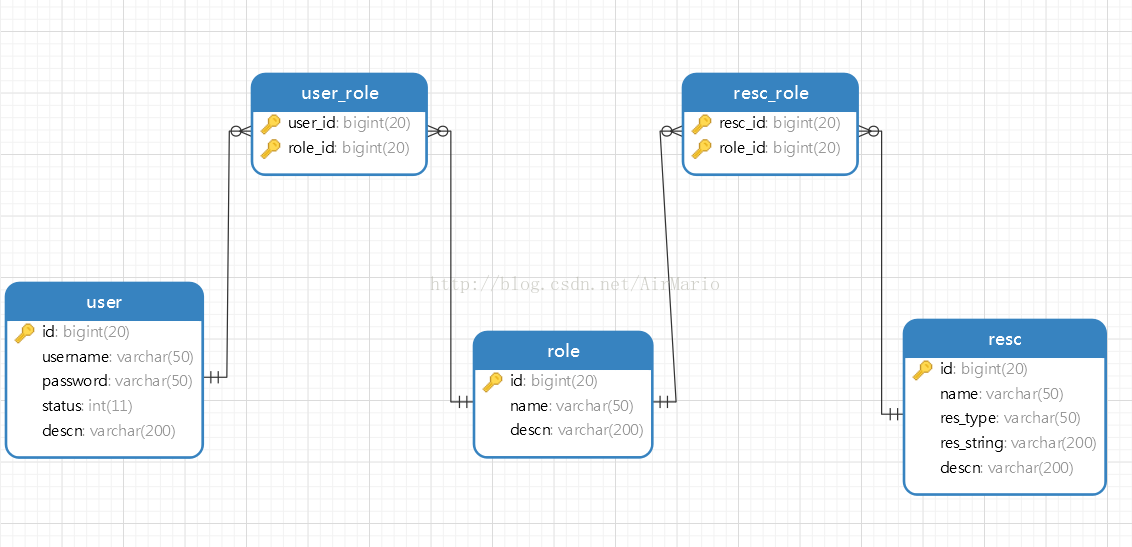
DROP TABLE IF EXISTS `resc`;
CREATE TABLE `resc` (
  `id` ) ',
  `name` ) DEFAULT NULL,
  `res_type` ) DEFAULT NULL,
  `res_string` ) DEFAULT NULL,
  `descn` ) DEFAULT NULL,
  PRIMARY KEY (`id`)
) ENGINE=InnoDB DEFAULT CHARSET=utf8;

-- ----------------------------
-- Records of resc
-- ----------------------------
, '', 'URL', '/page/admin.jsp', '管理员页面');
, '', 'URL', '/page/user.jsp', '用户页面');
, null, 'URL', '/page/test.jsp', '测试页面');

-- ----------------------------
-- Table structure for resc_role
-- ----------------------------
DROP TABLE IF EXISTS `resc_role`;
CREATE TABLE `resc_role` (
  `resc_id` ) ',
  `role_id` ) ',
  PRIMARY KEY (`resc_id`,`role_id`),
  KEY `fk_resc_role_role` (`role_id`),
  CONSTRAINT `fk_resc_role_role` FOREIGN KEY (`role_id`) REFERENCES `role` (`id`),
  CONSTRAINT `fk_resc_role_resc` FOREIGN KEY (`resc_id`) REFERENCES `resc` (`id`)
) ENGINE=InnoDB DEFAULT CHARSET=utf8;

-- ----------------------------
-- Records of resc_role
-- ----------------------------
, );
, );
, );
, );

-- ----------------------------
-- Table structure for role
-- ----------------------------
DROP TABLE IF EXISTS `role`;
CREATE TABLE `role` (
  `id` ) ',
  `name` ) DEFAULT NULL,
  `descn` ) DEFAULT NULL,
  PRIMARY KEY (`id`)
) ENGINE=InnoDB DEFAULT CHARSET=utf8;

-- ----------------------------
-- Records of role
-- ----------------------------
, 'ROLE_ADMIN', '管理员角色');
, 'ROLE_USER', '用户角色');
, 'ROLE_TEST', '测试角色');

-- ----------------------------
-- Table structure for t_c3p0
-- ----------------------------
DROP TABLE IF EXISTS `t_c3p0`;
CREATE TABLE `t_c3p0` (
  `a` ) DEFAULT NULL
) ENGINE=InnoDB DEFAULT CHARSET=utf8;

-- ----------------------------
-- Records of t_c3p0
-- ----------------------------

-- ----------------------------
-- Table structure for user
-- ----------------------------
DROP TABLE IF EXISTS `user`;
CREATE TABLE `user` (
  `id` ) ',
  `username` ) DEFAULT NULL,
  `password` ) DEFAULT NULL,
  `status` ) DEFAULT NULL,
  `descn` ) DEFAULT NULL,
  PRIMARY KEY (`id`)
) ENGINE=InnoDB DEFAULT CHARSET=utf8;

-- ----------------------------
-- Records of user
-- ----------------------------
, , '管理员');
, , '用户');
, , '测试');

-- ----------------------------
-- Table structure for user_role
-- ----------------------------
DROP TABLE IF EXISTS `user_role`;
CREATE TABLE `user_role` (
  `) ',
  `role_id` ) ',
  PRIMARY KEY (`user_id`,`role_id`),
  KEY `fk_user_role_role` (`role_id`),
  CONSTRAINT `fk_user_role_role` FOREIGN KEY (`role_id`) REFERENCES `role` (`id`),
  CONSTRAINT `fk_user_role_user` FOREIGN KEY (`user_id`) REFERENCES `user` (`id`)
) ENGINE=InnoDB DEFAULT CHARSET=utf8;

-- ----------------------------
-- Records of user_role
-- ----------------------------
, );
, );
, );
, );
二、实现从数据库中读取资源信息
Spring Security需要的数据无非就是pattern和access类似键值对的数据,就像配置文件中写的那样:
<intercept-url pattern="/login.jsp" access="IS_AUTHENTICATED_ANONYMOUSLY" />1
<intercept-url pattern="/admin.jsp" access="ROLE_ADMIN" />
<intercept-url pattern="/**" access="ROLE_USER" />
其实当项目启动时,Spring Security所做的就是在系统初始化时,将以上XML中的信息转换为特定的数据格式,而框架中其他组件可以利用这些特定格式的数据,用于控制之后的验证操作。现在我们将这些信息存储在数据库中,因此就要想办法从数据库中查询这些数据,所以根据security数据的需要,只需要如下sql语句就可以:
select re.res_string,r.name from role r,resc re,resc_role rr where r.id=rr.role_id and re.id=rr.resc_id
在数据中执行这条语句做测试,得到如下结果:
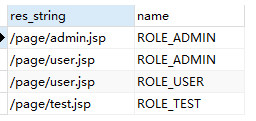
这样的格式正是security所需要的数据。
三 构建一个数据库的操作的类
package com.sunny.auth;

import java.sql.ResultSet;
import java.sql.SQLException;
import java.util.ArrayList;
import java.util.Collection;
import java.util.LinkedHashMap;
import java.util.List;

import javax.sql.DataSource;

import org.springframework.jdbc.core.support.JdbcDaoSupport;
import org.springframework.jdbc.object.MappingSqlQuery;
import org.springframework.security.access.ConfigAttribute;
import org.springframework.security.access.SecurityConfig;
import org.springframework.security.web.util.AntPathRequestMatcher;
import org.springframework.security.web.util.RequestMatcher;

public class JdbcRequestMapBulider extends JdbcDaoSupport{
    //查询资源和权限关系的sql语句
    private String resourceQuery = "";

    //查询资源
    @SuppressWarnings("unchecked")
    public List<Resource> findResources() {
        ResourceMapping resourceMapping = new ResourceMapping(getDataSource(), resourceQuery);
        return resourceMapping.execute();
    }

    //拼接RequestMap
    public LinkedHashMap<RequestMatcher, Collection<ConfigAttribute>> buildRequestMap() {
        LinkedHashMap<RequestMatcher, Collection<ConfigAttribute>> requestMap = new LinkedHashMap<>();

        List<Resource> resourceList = this.findResources();
        for (Resource resource : resourceList) {
            RequestMatcher requestMatcher = this.getRequestMatcher(resource.getUrl());
            List<ConfigAttribute> list = new ArrayList<ConfigAttribute>();
            list.add(new SecurityConfig(resource.getRole()));
            requestMap.put(requestMatcher, list);
        }
        return requestMap;
    }
    //通过一个字符串地址构建一个AntPathRequestMatcher对象
    protected RequestMatcher getRequestMatcher(String url) {
        return new AntPathRequestMatcher(url);
    }

    public String getResourceQuery() {
        return resourceQuery;
    }
    public void setResourceQuery(String resourceQuery) {
        this.resourceQuery = resourceQuery;
    }

    /**
     * 内部类,用于封装访问地址和权限
     * @ClassName: Resource
     * @Description: TODO(这里用一句话描述这个类的作用)
     * @author Sunny
     * @date 2018年7月4日 下午2:42:59
     *
     */
    private class Resource {
        private String url;//资源访问的地址
        private String role;//所需要的权限

        public Resource(String url, String role) {
            this.url = url;
            this.role = role;
        }
        public String getUrl() {
            return url;
        }
        public String getRole() {
            return role;
        }
    }

    @SuppressWarnings("rawtypes")
    private class ResourceMapping extends MappingSqlQuery {
        protected ResourceMapping(DataSource dataSource, String resourceQuery) {
            super(dataSource, resourceQuery);
            compile();
        }
        //对结果集进行封装处理
        protected Object mapRow(ResultSet rs, int rownum) throws SQLException {
            String url = rs.getString(1);
            String role = rs.getString(2);
            Resource resource = new Resource(url, role);
            return resource;
        }
    }
}
说明:
- resourceQuery是查询数据的sql语句,该属性在配置bean的时候传入即可。
- 内部创建了一个resource来封装数据。
- getRequestMatcher方法就是用来创建RequestMatcher对象的
- buildRequestMap方法用来最后拼接成LinkedHashMap<RequestMatcher, Collection<ConfigAttribute>>供security使用。
四、替换原有功能的切入点
在将这部之前,先得了解大概下security的运行过程,security实现控制的功能其实就是通过一系列的拦截器来实现的,当用户登陆的时候,会被AuthenticationProcessingFilter拦截,调用AuthenticationManager的实现类,同时AuthenticationManager会调用ProviderManager来获取用户验证信息,其中不同的Provider调用的服务不同,因为这些信息可以是在数据库上,可以是在LDAP(轻量目录访问协议)服务器上,可以是xml配置文件上等,这个例子中是数据库;如果验证通过后会将用户的权限信息放到spring的全局缓存SecurityContextHolder中,以备后面访问资源时使用。当访问资源,访问url时,会通过AbstractSecurityInterceptor拦截器拦截,其中会调用FilterInvocationSecurityMetadataSource的方法来获取被拦截url所需的全部权限,其中FilterInvocationSecurityMetadataSource的常用的实现类为DefaultFilterInvocationSecurityMetadataSource,这个类中有个很关键的东西就是requestMap,也就是我们上面所得到的数据,在调用授权管理器AccessDecisionManager,这个授权管理器会通过spring的全局缓存SecurityContextHolder获取用户的权限信息,还会获取被拦截的url和被拦截url所需的全部权限,然后根据所配的策略,如果权限足够,则返回,权限不够则报错并调用权限不足页面。
根据源码debug跟踪得出,其实资源权限关系就放在DefaultFilterInvocationSecurityMetadataSource的requestMap,中的,这个requestMap就是我们JdbcRequestMapBulider.buildRequestMap()方法所需要的数据类型,因此就想到了我们自定义一个类继承FilterInvocationSecurityMetadataSource接口,将数据查出的数据放到requestMap中去。制定类MyFilterInvocationSecurityMetadataSource继承FilterInvocationSecurityMetadataSource和InitializingBean接口。
package com.sunny.auth;

import java.util.Collection;
import java.util.HashSet;
import java.util.List;
import java.util.Map;
import java.util.Set;

import javax.servlet.http.HttpServletRequest;

import org.springframework.beans.factory.InitializingBean;
import org.springframework.security.access.ConfigAttribute;
import org.springframework.security.web.FilterInvocation;
import org.springframework.security.web.access.intercept.FilterInvocationSecurityMetadataSource;
import org.springframework.security.web.util.RequestMatcher;

public class MyFilterInvocationSecurityMetadataSource implements FilterInvocationSecurityMetadataSource, InitializingBean{
    private final static List<ConfigAttribute> NULL_CONFIG_ATTRIBUTE = null;
    // 资源权限集合
    private Map<RequestMatcher, Collection<ConfigAttribute>> requestMap;

    //查找数据库权限和资源关系
    private JdbcRequestMapBulider builder;

    /*
     * 更具访问资源的地址查找所需要的权限
     */
    @Override
    public Collection<ConfigAttribute> getAttributes(Object object) throws IllegalArgumentException {
        final HttpServletRequest request = ((FilterInvocation) object).getRequest();

        Collection<ConfigAttribute> attrs = NULL_CONFIG_ATTRIBUTE;
        for (Map.Entry<RequestMatcher, Collection<ConfigAttribute>> entry : requestMap.entrySet()) {
            if (entry.getKey().matches(request)) {
                attrs = entry.getValue();
                break;
            }
        }
        return attrs;
    }

    /*
     * 获取所有的权限
     */
    @Override
    public Collection<ConfigAttribute> getAllConfigAttributes() {
        Set<ConfigAttribute> allAttributes = new HashSet<ConfigAttribute>();
        for (Map.Entry<RequestMatcher, Collection<ConfigAttribute>> entry : requestMap.entrySet()) {
            allAttributes.addAll(entry.getValue());
        }
        System.out.println("拥有权限:"+allAttributes.toString());
        return allAttributes;
    }

    @Override
    public boolean supports(Class<?> clazz) {
        return FilterInvocation.class.isAssignableFrom(clazz);
    }
    //绑定requestMap
    protected Map<RequestMatcher, Collection<ConfigAttribute>> bindRequestMap() {
        return builder.buildRequestMap();
    }

    @Override
    public void afterPropertiesSet() throws Exception {
        this.requestMap = this.bindRequestMap();
    }

    public void refreshResuorceMap() {
        this.requestMap = this.bindRequestMap();
    }

    /******************* GET & SET *******************************/
    public JdbcRequestMapBulider getBuilder() {
        return builder;
    }
    public void setBuilder(JdbcRequestMapBulider builder) {
        this.builder = builder;
    }
}
说明:
- requestMap这个属性就是用来存放资源权限的集合
- builder为JdbcRequestMapBulider类型,用来查找数据库权限和资源关系
- 其他的代码中都有详细的注释
五、配置文件
spring-dataSource.xml保持不变
<?xml version="1.0" encoding="UTF-8"?>
<beans:beans xmlns="http://www.springframework.org/schema/security"
xmlns:beans="http://www.springframework.org/schema/beans" xmlns:xsi="http://www.w3.org/2001/XMLSchema-instance"
xsi:schemaLocation="http://www.springframework.org/schema/beans
http://www.springframework.org/schema/beans/spring-beans-3.0.xsd
http://www.springframework.org/schema/context
http://www.springframework.org/schema/context/spring-context-3.1.xsd
http://www.springframework.org/schema/tx
http://www.springframework.org/schema/tx/spring-tx-3.0.xsd
http://www.springframework.org/schema/security
http://www.springframework.org/schema/security/spring-security.xsd">
<!-- 数据源 -->
<beans:bean id="dataSource" class="com.mchange.v2.c3p0.ComboPooledDataSource" destroy-method="close">
<!-- 此为c3p0在spring中直接配置datasource c3p0是一个开源的JDBC连接池 -->
<beans:property name="driverClass" value="com.mysql.jdbc.Driver" />
<beans:property name="jdbcUrl" value="jdbc:mysql://localhost:3306/springsecurity?useUnicode=true&characterEncoding=UTF-8" />
<beans:property name="user" value="root" />
<beans:property name="password" value="" />
<beans:property name="maxPoolSize" value="50"></beans:property>
<beans:property name="minPoolSize" value="10"></beans:property>
<beans:property name="initialPoolSize" value="10"></beans:property>
<beans:property name="maxIdleTime" value="25000"></beans:property>
<beans:property name="acquireIncrement" value="1"></beans:property>
<beans:property name="acquireRetryAttempts" value="30"></beans:property>
<beans:property name="acquireRetryDelay" value="1000"></beans:property>
<beans:property name="testConnectionOnCheckin" value="true"></beans:property>
<beans:property name="idleConnectionTestPeriod" value="18000"></beans:property>
<beans:property name="checkoutTimeout" value="5000"></beans:property>
<beans:property name="automaticTestTable" value="t_c3p0"></beans:property>
</beans:bean>
</beans:beans>
spring-context.xml修改如下
<?xml version="1.0" encoding="UTF-8"?>
<beans:beans xmlns="http://www.springframework.org/schema/security"
    xmlns:beans="http://www.springframework.org/schema/beans" xmlns:xsi="http://www.w3.org/2001/XMLSchema-instance"
    xsi:schemaLocation="http://www.springframework.org/schema/beans
                        http://www.springframework.org/schema/beans/spring-beans-3.0.xsd
                        http://www.springframework.org/schema/context
                        http://www.springframework.org/schema/context/spring-context-3.1.xsd
                        http://www.springframework.org/schema/tx
                        http://www.springframework.org/schema/tx/spring-tx-3.0.xsd
                        http://www.springframework.org/schema/security
                        http://www.springframework.org/schema/security/spring-security.xsd">
    <!-- 不需要访问权限 -->
    <http pattern="/page/login.jsp" security="none"></http>
    <http auto-config="false">
        <form-login login-page="/page/login.jsp" default-target-url="/page/admin.jsp" authentication-failure-url="/page/login.jsp?error=true" />
        <logout invalidate-session="true" logout-success-url="/page/login.jsp" logout-url="/j_spring_security_logout" />
        <!-- 通过配置custom-filter来增加过滤器,before="FILTER_SECURITY_INTERCEPTOR"表示在SpringSecurity默认的过滤器之前执行。 -->
        <custom-filter ref="filterSecurityInterceptor" before="FILTER_SECURITY_INTERCEPTOR" />
    </http>

    <!-- 认证过滤器 -->
    <beans:bean id="filterSecurityInterceptor" class="org.springframework.security.web.access.intercept.FilterSecurityInterceptor">
        <!-- 用户拥有的权限 -->
        <beans:property name="accessDecisionManager" ref="accessDecisionManager" />
        <!-- 用户是否拥有所请求资源的权限 -->
        <beans:property name="authenticationManager" ref="authenticationManager" />
        <!-- 资源与权限对应关系 -->
        <beans:property name="securityMetadataSource" ref="securityMetadataSource" />
    </beans:bean>

    <!-- 授权管理器 -->
    <beans:bean id="accessDecisionManager" class="com.sunny.auth.MyAccessDecisionManager">
    </beans:bean>

     <!--自定义的切入点-->
    <beans:bean id="securityMetadataSource" class="com.sunny.auth.MyFilterInvocationSecurityMetadataSource">
        <beans:property name="builder" ref="builder"></beans:property>
    </beans:bean>

    <beans:bean id="builder" class="com.sunny.auth.JdbcRequestMapBulider">
        <beans:property name="dataSource" ref="dataSource" />
        <beans:property name="resourceQuery"
        value="select re.res_string,r.name from role r,resc re,resc_role rr where
                r.id=rr.role_id and re.id=rr.resc_id" />
    </beans:bean>

     <!--认证管理-->
    <authentication-manager alias="authenticationManager">
        <authentication-provider>
            <jdbc-user-service data-source-ref="dataSource" id="usersService"
                users-by-username-query="select username,password,status as enabled from user where username = ?"
                authorities-by-username-query="select user.username,role.name from user,role,user_role
                                       where user.id=user_role.user_id and
                                       user_role.role_id=role.id and user.username=?" />
        </authentication-provider>
    </authentication-manager>

</beans:beans>
1.http中的custom-filter是特别要注意的,就是通过这个标签来增加过滤器的,其中before="FILTER_SECURITY_INTERCEPTOR"表示在SpringSecurity默认的过滤器之前执行。
package com.sunny.auth;

import java.util.Collection;
import java.util.Iterator;

import org.springframework.security.access.AccessDecisionManager;
import org.springframework.security.access.AccessDeniedException;
import org.springframework.security.access.ConfigAttribute;
import org.springframework.security.authentication.InsufficientAuthenticationException;
import org.springframework.security.core.Authentication;
import org.springframework.security.core.GrantedAuthority;

public class MyAccessDecisionManager implements AccessDecisionManager{
    /*
     * 该方法决定该权限是否有权限访问该资源,其实object就是一个资源的地址,authentication是当前用户的
     * 对应权限,如果没登陆就为游客,登陆了就是该用户对应的权限
     */
    @Override
    public void decide(Authentication authentication, Object object, Collection<ConfigAttribute> configAttributes)
            throws AccessDeniedException, InsufficientAuthenticationException {
        if(configAttributes == null) {
            return;
        }
        //所请求的资源拥有的权限(一个资源对多个权限)
        Iterator<ConfigAttribute> iterator = configAttributes.iterator();
        while(iterator.hasNext()) {
            ConfigAttribute configAttribute = iterator.next();
            //访问所请求资源所需要的权限
            String needPermission = configAttribute.getAttribute();
            System.out.println("访问"+object.toString()+"需要的权限是:" + needPermission);
            //用户所拥有的权限authentication
            Collection<? extends GrantedAuthority> authorities = authentication.getAuthorities();
            for(GrantedAuthority ga : authorities) {
                if(needPermission.equals(ga.getAuthority())) {
                    return;
                }
            }
        }
        //没有权限
        throw new AccessDeniedException("没有权限访问! ");

    }

    @Override
    public boolean supports(ConfigAttribute attribute) {
        return true;
    }

    @Override
    public boolean supports(Class<?> clazz) {
        return true;
    }
}
pom.xml中增加
            <!-- j2ee -->
            <dependency>
                <groupId>javax.servlet</groupId>
                <artifactId>javax.servlet-api</artifactId>
                <version>3.1.0</version>
            </dependency>
web.xml默认页面仍然是
五 结果
admin能访问的页面有admin.jsp、user.jsp;
user能访问的有user.jsp;
test能访问的有test.jsp。
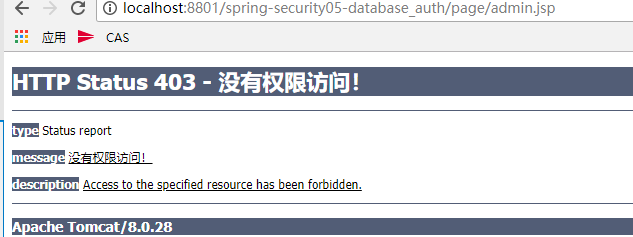
如果权限不足,会提示“没有权限访问!”
【Spring Security】五、自定义过滤器的更多相关文章
- Spring Security(四) —— 核心过滤器源码分析
摘要: 原创出处 https://www.cnkirito.moe/spring-security-4/ 「老徐」欢迎转载,保留摘要,谢谢! 4 过滤器详解 前面的部分,我们关注了Spring Sec ...
- Spring Security 中的过滤器
本文基于 spring-security-core-5.1.1 和 tomcat-embed-core-9.0.12. Spring Security 的本质是一个过滤器链(filter chain) ...
- Spring Security(2):过滤器链(filter chain)的介绍
上一节中,主要讲了Spring Security认证和授权的核心组件及核心方法.但是,什么时候调用这些方法呢?答案就是Filter和AOP.Spring Security在我们进行用户认证以及授予权限 ...
- spring cloud gateway自定义过滤器
在API网关spring cloud gateway和负载均衡框架ribbon实战文章中,主要实现网关与负载均衡等基本功能,详见代码.本节内容将继续围绕此代码展开,主要讲解spring cloud g ...
- spring security 11种过滤器介绍
1.HttpSessionContextIntegrationFilter 位于过滤器顶端,第一个起作用的过滤器. 用途一,在执行其他过滤器之前,率先判断用户的session中是否已经存在一个Secu ...
- Spring Security :CsrfFilter过滤器
spring security框架提供的默认登录页面,会有一个name属性值为_csrf的隐藏域: 这是框架在用户访问登录页面之前就生成的,保存在内存中,当用户提交表单的时候会跟着一起提交: 然后会经 ...
- Spring Security(五) —— 动手实现一个 IP_Login
摘要: 原创出处 https://www.cnkirito.moe/spring-security-5/ 「老徐」欢迎转载,保留摘要,谢谢! 5 动手实现一个IP_Login 在开始这篇文章之前,我们 ...
- Spring Security:Servlet 过滤器(三)
3)Servlet 过滤器 Spring Security 过滤器链是一个非常复杂且灵活的引擎.Spring Security 的 Servlet 支持基于 Servlet 过滤器,因此通常首先了解过 ...
- Spring Security配置个过滤器也这么卷
以前胖哥带大家用Spring Security过滤器实现了验证码认证,今天我们来改良一下验证码认证的配置方式,更符合Spring Security的设计风格,也更加内卷. CaptchaAuthent ...
- spring security 3 自定义认证,授权示例
1,建一个web project,并导入所有需要的lib. 2,配置web.xml,使用Spring的机制装载: <?xml version="1.0" encoding=& ...
随机推荐
- Vue系列之 => vue组件创建
创建方式 一 <!DOCTYPE html> <html lang="en"> <head> <meta charset="UT ...
- html5-内联框架
<!DOCTYPE html><html lang="en"><head> <meta charset="UTF-8&qu ...
- hdu4784
题意: 给了一个图 从1号节点走到N号节点,然后,每个地方有买卖盐的差价,然后求 到达N的最大价值,一旦走到N这个点就不能再走了,或者走到不能再别的世界走1和N这两个点,然后接下来 用一个 四维的数组 ...
- hdu5125 树状数组+dp
hdu5125 他说的是n个人每个人都有两个气球a,b,气球各自都有相应的体积,现在让他们按照序号排列好来,对他们的a气球体积值计算最长上升子序列,对于这整个排列来说有m次机会让你将a气球替换成b气 ...
- hdu5289 单调队列
这题说的是给了 n个数 然后让你计算出所有区间中那些数的最大值减最小值小于k这样的区间有多少个 /* 这样我们给我们在处理过程中的区间做一些处理 我们在处理即将进来的数的时候我们并不知道他是不是我们区 ...
- .net nancy
官网 文档 入门教程 参考
- 特征点方法 - Harris和SURF的手工实现
整理去年做的小项目,纪念我的图像处理入门. 因为要在DSP上实现,所以完全手工C代码垒起来的,还要保证和PC端跑的结果一样,觉得可能特殊场景会有用,上传github,没有依赖任何库: 格式注释什么的暂 ...
- 批量下载网站图片的Python实用小工具(下)
引子 在 批量下载网站图片的Python实用小工具 一文中,讲解了开发一个Python小工具来实现网站图片的并发批量拉取.不过那个工具仅限于特定网站的特定规则,本文将基于其代码实现,开发一个更加通用的 ...
- flask 使用宏渲染表单(包含错误信息)
在模板中渲染表单时,有大量的工作: 1.调用字段属性,获取<input>定义 2.调用对应的label属性,获取<label>定义 3.渲染错误消息 为了避免为每一个字段重复这 ...
- JDBC-day02
JDBC:数据库连接 java database connectivity ###properties 属性对象,用于读取*.properties属性配置文件中的数据 -为什么使用:之前写法是把数 ...