
[React] 12 - Redux: async & middleware
这里只是简单地了解中间件的概念,对于异步,貌似之后要讲的saga更胜一筹。
reducer计算新状态的策略:
- Action 发出以后,Reducer 立即算出 State,这叫做同步;
- Action 发出以后,过一段时间再执行 Reducer,这就是异步。
何为中间件
一、安插中间件的位置
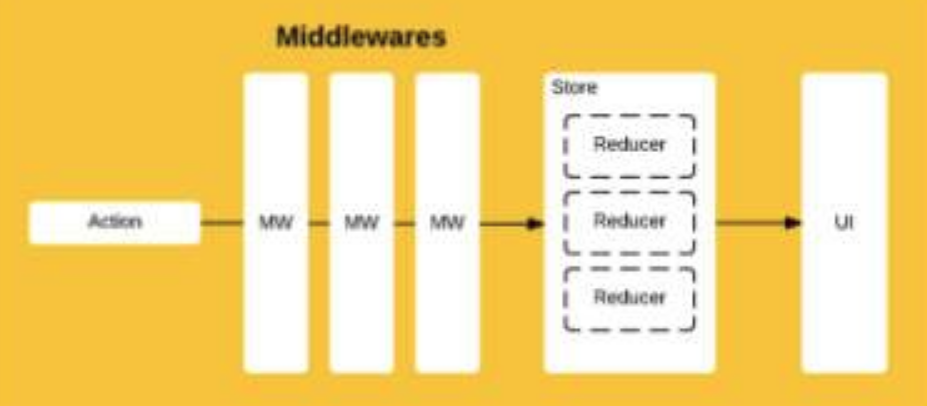
middleware提供的是位于 action 被发起之后,到达 reducer 之前的扩展点。
- 原程序
const Counter = ({ value, onIncrement, onDecrement }) => (

  <div>

  <h1>{value}</h1>

  <button onClick={onIncrement}>+</button>

  <button onClick={onDecrement}>-</button>

  </div>

);

...............................................................

/**
  * 更新过程:

  * action + old state ==> new state

  * 也可以考虑combineReducers的形式

  */

const reducer = (state = 0, action) => {

  switch (action.type) {

    case 'INCREMENT': return state + 1;                 // step 2: how to implement this action --> automatically trigger step 3: UI

    case 'DECREMENT': return state - 1;

    default: return state;

  }

};

...............................................................

const store = createStore(reducer);


/**
  * 渲染过程:
  * 既接收动作,也处理界面更新
  * 当然,具体的更新html还要归于具体的html代码,也就是最上面的Counter组件的定义
  */

const render = () => {

  ReactDOM.render(

    <Counter

      value={store.getState()}                       // step 3: render new ui based on new state

      onIncrement={() =>store.dispatch({type: 'INCREMENT'})}    // step 1: receive action --> automatically trigger step 2: reducer

      onDecrement={() => store.dispatch({type: 'DECREMENT'})}

    />,

    document.getElementById('root')

  );

};

render();

store.subscribe(render);
- 功能增强
对store.dispatch做了新的定义:
--- 不仅给store发送信号action。
--- 而且附带了log的功能。
let next = store.dispatch;

store.dispatch = function dispatchAndLog(action) {

  console.log('dispatching', action);

  next(action);

  console.log('next state', store.getState());

}
再理解如下文字:
(1)Reducer:纯函数,只承担计算 State 的功能,不合适承担其他功能,也承担不了,因为理论上,纯函数不能进行读写操作。
(2)View:与 State 一一对应,可以看作 State 的视觉层,也不合适承担其他功能。
(3)Action:消息的载体,让reducer的纯函数去操作,自己不用干活er。
二、中间件的用法
作为createStore的参数来注册。
applyMiddlewares(...),Redux 的原生方法,作用是将所有中间件组成一个数组,依次执行。
const store = createStore(

  reducer,

  initial_state,                   // 有第二参数则表示整个程序的初始状态

  applyMiddleware(logger)

);


const store = createStore(

  reducer,

  applyMiddleware(thunk, promise, logger)  // 这里的log一定要放在最后

);
三、实例分析
通过中间件,增强Log的用法。
- 在reducer之前执行
store.dispatch ==> middleware --> logger ==> "action fired."
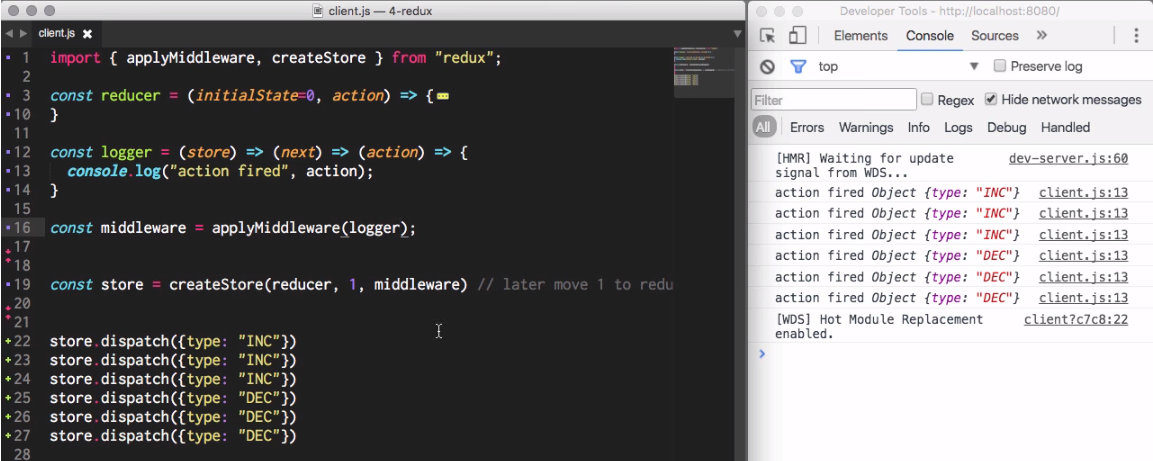
- 添加 next(action)
其实就是一个多层嵌套返回函数的函数,
柯里化 - 使用箭头的写法在函数式编程,对柯里化更详细的介绍可以看一看这篇 张鑫旭的博客。
第一个(最外层)方法的参数是一个包含dispatch和getState字段(方法)的对象,其实就是store对象,所以也可以写成:
# 一个Redux中间件的基本写法

store => next => action => {

  ...

};
参数next是一个方法,作用是:通知下一个Redux中间件对这次的action进行处理。
next(action),如果一个中间件中没有执行next(action),则action会停止向后续的中间件传递,并阻止reducer的执行(store将不会因为本次的action而更新)。
import { applyMiddleware, createStore } from "redux";

const reducer = (initialState=0, action) => {

  if (action.type === "INC") {

    return initialState + 1;

  } else if (action.type === "DEC") {

    return initialState - 1;

  } else if (action.type === "MULT") {

    throw new Error("AHHHH!!");

  }

  return initialState;

}

-------------------------------------------------------------

const logger = (store) => (next) => (action) => {

  console.log("Logged", action);

  return next(action);

};

const errorHandler = (store) => (next) => (action) => {

  try {

    return next(action);

  } catch(e) {

    console.log("ERROR!", e);

  }

};

const middleware= applyMiddleware(

  logger,

  errorHandler

)

-------------------------------------------------------------

const store = createStore(reducer, middleware)

store.subscribe(() => {

  console.log("store changed", store.getState());

})

store.dispatch({type: "INC"})

store.dispatch({type: "INC"})

store.dispatch({type: "INC"})

store.dispatch({type: "DEC"})

store.dispatch({type: "DEC"})

store.dispatch({type: "DEC"})

store.dispatch({type: "MULT"})

store.dispatch({type: "DEC"})
- redux-logger 使用
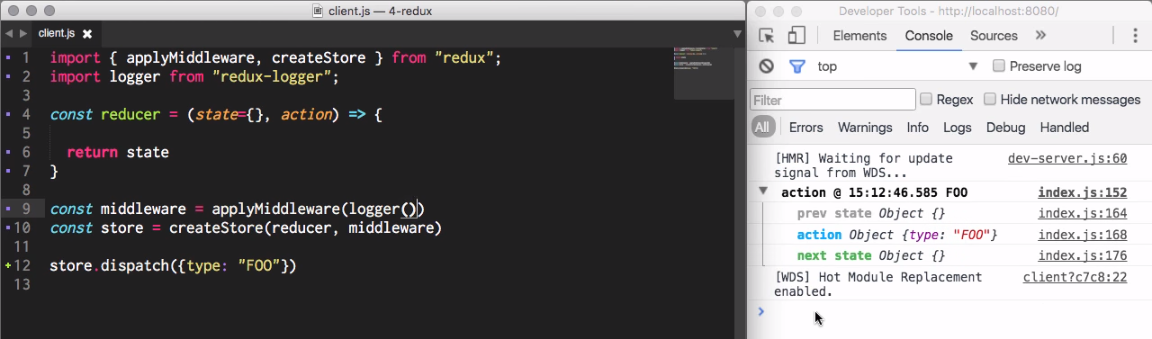
异步操作实现
一、用户送出第一个 Action
Ref: RUAN的博文可能更容易理解些
如果发送的信号(action)涉及到服务端,那么异步就是不可避免的事情。
- 整个异步操作的思路:
第一个action:操作开始时,送出一个 Action,触发 State 更新为"正在操作"状态,View 重新渲染

第二个action:操作结束后,再送出一个 Action,触发 State 更新为"操作结束"状态,View 再一次重新渲
- 异步需要三种action,三种 Action 可以有两种不同的写法:
// 写法一:名称相同,参数不同

{ type: 'FETCH_POSTS' }

{ type: 'FETCH_POSTS', status: 'error', error: 'Oops' }

{ type: 'FETCH_POSTS', status: 'success', response: { ... } }

// 写法二:名称不同

{ type: 'FETCH_POSTS_REQUEST' }

{ type: 'FETCH_POSTS_FAILURE', error: 'Oops' }

{ type: 'FETCH_POSTS_SUCCESS', response: { ... } }
- State 也要进行改造,反映不同的操作状态:
let state = {

  // ...

  isFetching: true,      // 表示是否在抓取数据

  didInvalidate: true,    // 表示数据是否过时

  lastUpdated: 'xxxxxxx'   // 表示上一次更新时间

};
二、自动送出第二个 Action
- 代码背景
异步操作至少要送出两个 Action:
- 用户触发第一个 Action,这个跟同步操作一样,没有问题;
- 如何才能在操作结束时,系统自动送出第二个 Action 呢?
# 异步组件的例子

class AsyncApp extends Component {

  componentDidMount() {

    const { dispatch, selectedPost } = this.props

    dispatch(fetchPosts(selectedPost))  // fetchPosts是送给server的信号(action)
  }

// ...
- Step 1 - 返回的是一个函数,而非”对象”
What kind of ActionCreator it is?
(1) 先发出一个Action(requestPosts(postTitle)) ----> 然后进行异步操作。
(2) 拿到结果后,先将结果转成 JSON 格式 ----> 然后再发出一个 Action( receivePosts(postTitle, json))。
const fetchPosts = postTitle => (dispatch, getState) => {

  dispatch(requestPosts(postTitle));

  return fetch(`/some/API/${postTitle}.json`)

    .then(response => response.json())

    .then(json => dispatch(receivePosts(postTitle, json)));

  };

};
- Step 2 - 如何使用
// 使用方法一

store.dispatch( fetchPosts('reactjs') );

// 使用方法二

store.dispatch( fetchPosts('reactjs') ).then(() =>

  console.log(store.getState())

);
返回的函数的参数:dispatch和getState这两个 Redux 方法,而非 Action 的内容。
- 注意事项
(1)fetchPosts 返回了一个函数,而普通的 Action Creator 默认返回一个对象。
(2)返回的函数的参数是dispatch和getState这两个 Redux 方法,普通的 Action Creator 的参数是 Action 的内容。
(3)在返回的函数之中,先发出一个 Action(requestPosts(postTitle)),表示操作开始。
(4)异步操作结束之后,再发出一个 Action(receivePosts(postTitle, json)),表示操作结束。
三、中间件帮助"参数扩展"
- redux-thunk:方案一,使参数支持 “函数"
通过中间件redux-thunk,改造store.dispatch,使得后者可以接受函数作为参数。
import { createStore, applyMiddleware } from 'redux';

import thunk   from 'redux-thunk';

import reducer from './reducers';

// Note: this API requires redux@>=3.1.0

const store = createStore(    // 其实就是返回了一个特殊的store,是store.dispatch支持函数作为参数了

  reducer,

  applyMiddleware(thunk)

);
- redux-promise:方案二,使参数支持 “Promise对象”
让 Action Creator 返回一个 Promise 对象,乃另一种异步操作的解决方案 through 使用redux-promise中间件。
import { createStore, applyMiddleware } from 'redux';

import promiseMiddleware  from 'redux-promise';

import reducer            from './reducers';

const store = createStore(

  reducer,

  applyMiddleware(promiseMiddleware)

);
详情请见:[JS] ECMAScript 6 - Async : compare with c#
所谓
Promise,简单说就是一个容器,里面保存着某个未来才会结束的事件(通常是一个异步操作)的结果。
接受 Promise 对象作为参数,有两种写法:
** 写法一,返回值是一个 Promise 对象。
const fetchPosts =

  (dispatch, postTitle) => new Promise(function (resolve, reject) {

     dispatch(requestPosts(postTitle));

     return fetch(`/some/API/${postTitle}.json`)

       .then(response => {

         type: 'FETCH_POSTS',

         payload: response.json()

       });

});
** 写法二,Action 对象的payload属性是一个 Promise 对象。
import { createAction } from 'redux-actions';

class AsyncApp extends Component {

  componentDidMount() {

    const { dispatch, selectedPost } = this.props

    // 发出同步 Action

    dispatch(requestPosts(selectedPost));

    // 发出异步 Action, 只有等到操作结束,这个 Action 才会实际发出;
    // 注意,createAction的第二个参数必须是一个 Promise 对象。
    dispatch(createAction(

      'FETCH_POSTS',                      // 第一个参数

      fetch(`/some/API/${postTitle}.json`)    // 第二个参数

        .then(response => response.json())

    ));

  }
代码举例子:payload属性是一个 Promise 对象
----> Without promise, 发送完信号后,还要听过axios.then...catch...定义”返回状态处理“函数。
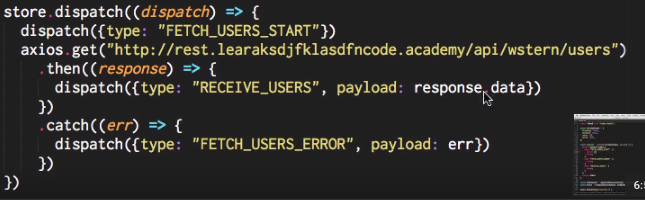
----> With promise, 如下使用axios (基于promise的http库)。
import { applyMiddleware, createStore } from "redux";

import axios   from "axios";

import logger  from "redux-logger";

import thunk   from "redux-thunk";

import promise from "redux-promise-middleware";

const initialState = {

  fetching: false,

  fetched:  false,

  users:    [],

  error:    null,

};


// 改变state的部分value

const reducer = (state=initialState, action) => {

  switch (action.type) {
    /**
     * 因为使用了promise,所以默认使用promise的性质
     * 其中包括了promise的三个状态定义:pending, rejected, fulfilled
     */

    case "FETCH_USERS_PENDING": {

      return {...state, fetching: true}

      break;

    }

    case "FETCH_USERS_REJECTED": {

      return {...state, fetching: false, error: action.payload}

      break;

    }

    case "FETCH_USERS_FULFILLED": {

      return {

        ...state,

        fetching: false,

        fetched:  true,

        users:    action.payload,

      }

      break;

    }

  }

  return state

}

const middleware = applyMiddleware(promise(), thunk, logger())

const store = createStore(reducer, middleware)


// 因为promise,这里就省去了

store.dispatch({

  type: "FETCH_USERS",  # 自定发送”添加promose默认后缀“后的信号(action)

  payload: axios.get("http://rest.learncode.academy/api/wstern/users")

})
[React] 12 - Redux: async & middleware的更多相关文章
- [React] 14 - Redux: Redux Saga
Ref: Build Real App with React #14: Redux Saga Ref: 聊一聊 redux 异步流之 redux-saga [入门] Ref: 从redux-thun ...
- react脚手架改造(react/react-router/redux/eslint/karam/immutable/es6/webpack/Redux DevTools)
公司突然组织需要重新搭建一个基于node的论坛系统,前端采用react,上网找了一些脚手架,或多或少不能满足自己的需求,最终在基于YeoMan的react脚手架generator-react-webp ...
- 深入理解React、Redux
深入理解React.ReduReact+Redux非常精炼,良好运用将发挥出极强劲的生产力.但最大的挑战来自于函数式编程(FP)范式.在工程化过程中,架构(顶层)设计将是一个巨大的挑战.要不然做出来的 ...
- 基于react+react-router+redux+socket.io+koa开发一个聊天室
最近练手开发了一个项目,是一个聊天室应用.项目虽不大,但是使用到了react, react-router, redux, socket.io,后端开发使用了koa,算是一个比较综合性的案例,很多概念和 ...
- [React] 15 - Redux: practice IM
本篇属于私人笔记. client 引导部分 一.assets: 音频,图片,字体 ├── assets │ ├── audios │ ├── fonts │ └── images 二.main&quo ...
- React 与 Redux 在生产环境中的实践总结
React 与 Redux 在生产环境中的实践总结 前段时间使用 React 与 Redux 重构了我们360netlab 的 开放数据平台.现将其中一些技术实践经验总结如下: Universal 渲 ...
- immutable.js 在React、Redux中的实践以及常用API简介
immutable.js 在React.Redux中的实践以及常用API简介 学习下 这个immutable Data 是什么鬼,有什么优点,好处等等 mark : https://yq.aliyu ...
- react native redux 草稿
Provider > Provider > 使组件层级中的 方法都能够获得 Redux store.正常情况下,你的根组件应该嵌套在 Provider 中才能使用 方法. 如果你真的不想把 ...
- 实例讲解react+react-router+redux
前言 总括: 本文采用react+redux+react-router+less+es6+webpack,以实现一个简易备忘录(todolist)为例尽可能全面的讲述使用react全家桶实现一个完整应 ...
随机推荐
- SourceTree + Beynod Compare解决Git冲突的方法
https://www.cnblogs.com/yufeng218/p/6523422.html
- Linux及MacOSX中使用zsh
via : http://leochin.com/linux-macosx-shell-zsh/ Linux及MacOSX中使用zsh zsh是另一种Shell,类似bash,tcsh等等,只是多了一 ...
- 用 Prettier 统一团队的代码风格~
使用 prettier 自動調整 JavaScript 樣式 GFM 格式说明 为什么你不能缺少Linter(以及代码美化工具) 使用 prettier 自動調整 JavaScript 樣式 Reac ...
- .NET “底层”异步编程模式——异步编程模型(Asynchronous Programming Model,APM)
本文内容 异步编程类型 异步编程模型(APM) 参考资料 首先澄清,异步编程模式(Asynchronous Programming Patterns)与异步编程模型(Asynchronous Prog ...
- WPF腾讯视频通话开发
一.IntPtr.HandleC#中的IntPtr类型称为“平台特定的整数类型”,它们用于本机资源,如窗口句柄. 1.WPF窗口句柄IntPtr wnip = new System.Windows.I ...
- 机器学习中的规则化范数(L0, L1, L2, 核范数)
目录: 一.L0,L1范数 二.L2范数 三.核范数 今天我们聊聊机器学习中出现的非常频繁的问题:过拟合与规则化.我们先简单的来理解下常用的L0.L1.L2和核范数规则化.最后聊下规则化项参数的选择问 ...
- CCNA实验3.单臂路由器
拓扑图: 一.交换机配置 通过路由器子接口的方式实现vlan之间的路由. conf t vlan 10 vlan 20 int f0/1 switchport access vlan 10 int f ...
- Python之道(一)之安装Python
"Python之道"首先介绍一下在windows系统下怎样安装Python开发环境. (1)下载MSI安装文件 进入网址www.python.org,点击Downloads进入下载 ...
- tmux手册中文翻译
man tmux可以看到最详细的tmux介绍,本文翻译自tmux手册. tmux全名叫"terminal multiplexer",终端多路复用器. tmux的命令格式为: tmu ...
- Nginx配置静态资源
静态服务器 静态服务器概念非常简单:当用户请求静态资源时,把文件内容回复给用户. 但是,要把静态服务做到极致,需要考虑的方面非常多: 正确书写header:设置content-type.过期时间等 效 ...