
使用 RSA 非对称加密保证数据不被篡改 java 例子代码
原理: 对原始数据 生成有序的json 字符串,然后取 摘要,然后 对摘要 进项 分对称加密。( 不对原数据加密是应为 原数据太大,加解密速度太慢,非对称加密都不 挺慢的。在摘要函数具有雪崩效应 ,原文发生点点的改变都会引起 摘要的剧烈变化 )
注意事项:因为使用的 对json 排序。而不是 传统的 from 表单方式。虽然 让请求响应都支持了json 变得统一,但是,这里又一个明显的容易缺陷。json 的 value 中 字符串带有 引号,数字类型没有引号。所以 这可能 应为 数据类型不一样造成验签失败。所以应该 全部使用 字符串。如果都有 引号就没有这种问题了。
备注:这个适用于 2个 系统之间 的数据交流。2 系统之间的数据交流最明显的特点就是 没有登录, 请求是无状态的,只能 通过请求参数来识别 请求是否合法。 这个 方式安全的 大前提 是自己的私钥 永远只有自己知道。
备注2: 这种方式侧重是数据不被篡改,而不是 保证数据不被泄露。 如果需要保证数据不被泄露 ,那么 发送请求和响应数据 的时候应该使用对方的公钥加密,对方收到请求以后使用自己的私钥解密。而且 加密的 原文 应该是整个 原始字符串,而不是 原文的摘要。
目录结构:
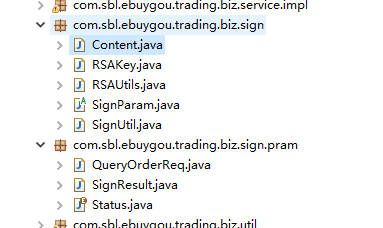
RSAUtils.java: 生成公私玥,加密解密 的工具类
package com.sbl.ebuygou.trading.biz.sign;

import org.apache.commons.codec.binary.Base64;

import org.apache.commons.io.IOUtils;

import javax.crypto.Cipher;

import java.io.ByteArrayOutputStream;

import java.security.*;

import java.security.interfaces.RSAPrivateKey;

import java.security.interfaces.RSAPublicKey;

import java.security.spec.InvalidKeySpecException;

import java.security.spec.PKCS8EncodedKeySpec;

import java.security.spec.X509EncodedKeySpec;

import java.util.HashMap;

import java.util.Map;

public class RSAUtils {

    public static final String CHARSET = "UTF-8";

    public static final String RSA_ALGORITHM = "RSA";

    public static Map<String, String> createKeys(int keySize){

        //为RSA算法创建一个KeyPairGenerator对象

        KeyPairGenerator kpg;

        try{

            kpg = KeyPairGenerator.getInstance(RSA_ALGORITHM);

        }catch(NoSuchAlgorithmException e){

            throw new IllegalArgumentException("No such algorithm-->[" + RSA_ALGORITHM + "]");

        }

        //初始化KeyPairGenerator对象,密钥长度

        kpg.initialize(keySize);

        //生成密匙对

        KeyPair keyPair = kpg.generateKeyPair();

        //得到公钥

        Key publicKey = keyPair.getPublic();

        String publicKeyStr = Base64.encodeBase64URLSafeString(publicKey.getEncoded());

        //得到私钥

        Key privateKey = keyPair.getPrivate();

        String privateKeyStr = Base64.encodeBase64URLSafeString(privateKey.getEncoded());

        Map<String, String> keyPairMap = new HashMap<String, String>();

        keyPairMap.put("publicKey", publicKeyStr);

        keyPairMap.put("privateKey", privateKeyStr);

        return keyPairMap;

    }

    /**

     * 得到公钥

     * @param publicKey 密钥字符串(经过base64编码)

     * @throws Exception

     */

    public static RSAPublicKey getPublicKey(String publicKey) throws NoSuchAlgorithmException, InvalidKeySpecException {

        //通过X509编码的Key指令获得公钥对象

        KeyFactory keyFactory = KeyFactory.getInstance(RSA_ALGORITHM);

        X509EncodedKeySpec x509KeySpec = new X509EncodedKeySpec(Base64.decodeBase64(publicKey));

        RSAPublicKey key = (RSAPublicKey) keyFactory.generatePublic(x509KeySpec);

        return key;

    }

    /**

     * 得到私钥

     * @param privateKey 密钥字符串(经过base64编码)

     * @throws Exception

     */

    public static RSAPrivateKey getPrivateKey(String privateKey) throws NoSuchAlgorithmException, InvalidKeySpecException {

        //通过PKCS#8编码的Key指令获得私钥对象

        KeyFactory keyFactory = KeyFactory.getInstance(RSA_ALGORITHM);

        PKCS8EncodedKeySpec pkcs8KeySpec = new PKCS8EncodedKeySpec(Base64.decodeBase64(privateKey));

        RSAPrivateKey key = (RSAPrivateKey) keyFactory.generatePrivate(pkcs8KeySpec);

        return key;

    }

    /**

     * 公钥加密

     * @param data

     * @param publicKey

     * @return

     */

    public static String publicEncrypt(String data, RSAPublicKey publicKey){

        try{

            Cipher cipher = Cipher.getInstance(RSA_ALGORITHM);

            cipher.init(Cipher.ENCRYPT_MODE, publicKey);

            return Base64.encodeBase64URLSafeString(rsaSplitCodec(cipher, Cipher.ENCRYPT_MODE, data.getBytes(CHARSET), publicKey.getModulus().bitLength()));

        }catch(Exception e){

            throw new RuntimeException("加密字符串[" + data + "]时遇到异常", e);

        }

    }

    /**

     * 私钥解密

     * @param data

     * @param privateKey

     * @return

     */

    public static String privateDecrypt(String data, RSAPrivateKey privateKey){

        try{

            Cipher cipher = Cipher.getInstance(RSA_ALGORITHM);

            cipher.init(Cipher.DECRYPT_MODE, privateKey);

            return new String(rsaSplitCodec(cipher, Cipher.DECRYPT_MODE, Base64.decodeBase64(data), privateKey.getModulus().bitLength()), CHARSET);

        }catch(Exception e){

            throw new RuntimeException("解密字符串[" + data + "]时遇到异常", e);

        }

    }

    /**

     * 私钥加密

     * @param data

     * @param privateKey

     * @return

     */

    public static String privateEncrypt(String data, RSAPrivateKey privateKey){

        try{

            Cipher cipher = Cipher.getInstance(RSA_ALGORITHM);

            cipher.init(Cipher.ENCRYPT_MODE, privateKey);

            return Base64.encodeBase64URLSafeString(rsaSplitCodec(cipher, Cipher.ENCRYPT_MODE, data.getBytes(CHARSET), privateKey.getModulus().bitLength()));

        }catch(Exception e){

            throw new RuntimeException("加密字符串[" + data + "]时遇到异常", e);

        }

    }

    /**

     * 公钥解密

     * @param data

     * @param publicKey

     * @return

     */

    public static String publicDecrypt(String data, RSAPublicKey publicKey){

        try{

            Cipher cipher = Cipher.getInstance(RSA_ALGORITHM);

            cipher.init(Cipher.DECRYPT_MODE, publicKey);

            return new String(rsaSplitCodec(cipher, Cipher.DECRYPT_MODE, Base64.decodeBase64(data), publicKey.getModulus().bitLength()), CHARSET);

        }catch(Exception e){

            throw new RuntimeException("解密字符串[" + data + "]时遇到异常", e);

        }

    }

    private static byte[] rsaSplitCodec(Cipher cipher, int opmode, byte[] datas, int keySize){

        int maxBlock = 0;

        if(opmode == Cipher.DECRYPT_MODE){

            maxBlock = keySize / 8;

        }else{

            maxBlock = keySize / 8 - 11;

        }

        ByteArrayOutputStream out = new ByteArrayOutputStream();

        int offSet = 0;

        byte[] buff;

        int i = 0;

        try{

            while(datas.length > offSet){

                if(datas.length-offSet > maxBlock){

                    buff = cipher.doFinal(datas, offSet, maxBlock);

                }else{

                    buff = cipher.doFinal(datas, offSet, datas.length-offSet);

                }

                out.write(buff, 0, buff.length);

                i++;

                offSet = i * maxBlock;

            }

        }catch(Exception e){

            throw new RuntimeException("加解密阀值为["+maxBlock+"]的数据时发生异常", e);

        }

        byte[] resultDatas = out.toByteArray();

        IOUtils.closeQuietly(out);

        return resultDatas;

    }

}
SignUtil.java : 签名和核心 工具类
package com.sbl.ebuygou.trading.biz.sign;

import java.security.NoSuchAlgorithmException;

import java.security.interfaces.RSAPrivateKey;

import java.security.interfaces.RSAPublicKey;

import java.security.spec.InvalidKeySpecException;

import org.apache.commons.codec.digest.DigestUtils;

import com.alibaba.fastjson.JSONObject;

import com.alibaba.fastjson.TypeReference;

import com.alibaba.fastjson.serializer.SerializerFeature;

import com.sbl.ebuygou.trading.biz.sign.pram.QueryOrderReq;

/**

 * 签名工具

 *

 * @author ZHANGYUKUN

 *

 */

public class SignUtil {

	/**

	 * 生成签名

	 *

	 * @param sortData

	 *            原始加密字符串

	 * @param privateKeyStr

	 *            私钥字符串

	 * @return 加密后的 对象

	 */

	public static <T extends SignParam> T getSignObject(T signParam, String privateKeyStr) {

		String sign = getSign(signParam, privateKeyStr);

		signParam.setSign(sign);

		return signParam;

	}

	/**

	 * 生成签名

	 *

	 * @param sortData

	 *            原始加密字符串

	 * @param privateKeyStr

	 *            私钥字符串

	 * @return 加密后的 sign字符串

	 */

	public static <T extends SignParam> String getSign(T signParam, String privateKeyStr) {

		String sortData = getSortData(signParam);

		RSAPrivateKey privateKey = null;

		try {

			privateKey = RSAUtils.getPrivateKey(privateKeyStr);

		} catch (NoSuchAlgorithmException | InvalidKeySpecException e) {

			e.printStackTrace();

		}

		String sortDataMd5 = DigestUtils.md5Hex(sortData);

		return RSAUtils.privateEncrypt(sortDataMd5, privateKey);

	}

	/**

	 * 核对签名

	 *

	 * @param resultStr

	 *            带有 sign 的json 字符串

	 * @param publicKeyStr

	 *            公钥字符串

	 * @return

	 */

	public static <T extends SignParam > boolean checkSign(String resultStr,String publicKeyStr , TypeReference< T >  typeReference) {

		Content content = SignUtil.getSortData(resultStr,  typeReference );

		return checkSign(content.getSortData(), content.getSign(),publicKeyStr);

	}

	/**

	 * 核对签名

	 *

	 * @param sortData

	 *            原始加密字符串

	 * @param sige

	 *            签名字符串

	 * @param publicKeyStr

	 *            公钥字符串

	 *

	 * @return true 验签成功 ,false 验签失败

	 */

	public static boolean checkSign(String sortData, String sige, String publicKeyStr) {

		RSAPublicKey publicKey = null;

		try {

			publicKey = RSAUtils.getPublicKey(publicKeyStr);

		} catch (NoSuchAlgorithmException | InvalidKeySpecException e) {

			e.printStackTrace();

		}

		String data = null;

		try {

			data = RSAUtils.publicDecrypt(sige, publicKey);

		} catch (Exception e) {

			e.printStackTrace();

			return false;

		}

		String sortDataMd5 = DigestUtils.md5Hex(sortData);

		if (data.equals(sortDataMd5)) {

			return true;

		}

		return false;

	}

	/**

	 * 得到排序的 用于签名的 原始 json 字符串

	 *

	 * @param signParam

	 *            可以签名的对象

	 * @return 排序了的 原始 加密字符串

	 */

	public static <T extends SignParam> String getSortData(T signParam) {

		signParam.setSign(null);

		return JSONObject.toJSONString(signParam, SerializerFeature.SortField);

	}

	/**

	 * 得到排序的 用于签名的 原始 json 字符串

	 *

	 * @param resultStr

	 *            带有 签名的 原始字符串

	 * @return Content 里面带有 原始签名字符串 和签名

	 */

	public static <T extends SignParam> Content getSortData(String resultStr, TypeReference<T> typeReference) {

		T signResult = JSONObject.parseObject(resultStr, typeReference);

		String sign = signResult.getSign();

		signResult.setSign(null);

		String sortData = getSortData(signResult);

		Content content = new Content();

		content.setSign(sign);

		content.setSortData(sortData);

		return content;

	}

}
Content.java: 存放 原始签名 json 字符串和 签名 的 辅助类
package com.sbl.ebuygou.trading.biz.sign;

public class Content {

	/**

	 * 签名

	 */

	private String sign;

	/**

	 * 原始的 签名 json 字符串

	 */

	private String sortData;

	public String getSign() {

		return sign;

	}

	public void setSign(String sign) {

		this.sign = sign;

	}

	public String getSortData() {

		return sortData;

	}

	public void setSortData(String sortData) {

		this.sortData = sortData;

	}

}
RSAKey.java: 存放 公私玥的地方( 我这里省事就只用了一组公私玥,正常应该2 对 , 各自 持有自己的私钥,公钥 ,和对方的 公钥)
package com.sbl.ebuygou.trading.biz.sign;

public class RSAKey {

	public static final String publicKey = "MIGfMA0GCSqGSIb3DQEBAQUAA4GNADCBiQKBgQCWLw2S_98GLHAe3ZvVCh3rdJ36A0BHwLehAK5j1378peDDOdz1oIsHyprRsGvnXh9aWZAhKemIUkimK-WtbD4VVmOsfayoSL17c_CZIL7Yd6tfSBiobbXb4m-bt0wGZRzh0L7IMpwIukzmWcyo0BNGdEe6CLDb6gvc6IOwJ_JBuQIDAQAB";

	public static final String privateKey ="MIICdgIBADANBgkqhkiG9w0BAQEFAASCAmAwggJcAgEAAoGBAJYvDZL_3wYscB7dm9UKHet0nfoDQEfAt6EArmPXfvyl4MM53PWgiwfKmtGwa-deH1pZkCEp6YhSSKYr5a1sPhVWY6x9rKhIvXtz8Jkgvth3q19IGKhttdvib5u3TAZlHOHQvsgynAi6TOZZzKjQE0Z0R7oIsNvqC9zog7An8kG5AgMBAAECgYADa0bP1etp5JEY4sqtavGLbrg5_OD1wTls_Or7cuh9L_mR-DtDjEgeAUrNA0sxlT75e5iAaMfcRqNIxS8RZ6lyIfhaRlzV2L0baBzL718INpHuc5_zqxX1aFIKScQylX4YAVGwk4AG6NU9rlzNd8wHqH9P7lFQdfsc_cd72CQE0QJBAM8o_hfIUxIHdfNFpvMTkZ9-xEHlDBOaQkjWMu7WCHQ1xiNMR1stSqHLItyG3vk4N3MISAyY9L270dy3E_hR9OsCQQC5l0sZ3L9TB6tibzo2xL39jeOCA7BrrFSThF81KRAujlCgHcKGV64po6YLmjxaX5z77xJOPSyc8YGgppVjH8rrAkEAq_6Q2BYOQk3HdC9EKVT59r49G6ibmjrdBbQxnXI-mp164BuYsu6rpCEP1KB1x90QzIT3rN3hdRXXa7Tk86q3-QJAWCZcLXSEC1PhO2fJJqpb80qpfN9ztDCuG0MMVZuja_l8ohCAjH6o4m4wN-KSN_qh_aeX8kFsJz8uare0zNgU8QJAEZroY4DiiFdIxIA2S5gKDcvZlkl6ePSZzMbPw35wVrE9NqqL7l3S1TfZ9PnAhU70S2IW0ZMM0DdiAX5-zb3t_A";

}
SignParam.java:定义的统一的可以签名的对象的抽象(请求对象和响应对象都应该继承这个类 )。
package com.sbl.ebuygou.trading.biz.sign;

/**

 * 带有签名的参数

 * @author ZHANGYUKUN

 *

 */

public abstract class SignParam {

	/**

	 * 签名

	 */

	private String sign;

	public String getSign() {

		return sign;

	}

	public void setSign(String sign) {

		this.sign = sign;

	}

}
上面5 个类是固定的。下面的类根据业务自由拓展.
QueryOrderReq.java : 查询订单请求参数( 不同 的 请求定义不通接请求参数 )
package com.sbl.ebuygou.trading.biz.sign.pram;

import com.sbl.ebuygou.trading.biz.sign.SignParam;

/**

 * 查询订单请求

 * @author ZHANGYUKUN

 *

 */

public class QueryOrderReq extends SignParam {

	/**

	 * 订单Id

	 */

	private String orderId;

	public String getOrderId() {

		return orderId;

	}

	public void setOrderId(String orderId) {

		this.orderId = orderId;

	}

}
SignResult.java:带有签名的 统一返回 ,请求 没有固定格式,为了拓展,返回 固定格式便于对方解析( 备注:请求是多变的,但是响应 都是类似的。 基本都是 有个状态,有个原因 ,有个数据 )。
package com.sbl.ebuygou.trading.biz.sign.pram;

import com.sbl.ebuygou.trading.biz.sign.RSAKey;

import com.sbl.ebuygou.trading.biz.sign.SignParam;

import com.sbl.ebuygou.trading.biz.sign.SignUtil;

/**

 * 签名的结果集

 *

 * @author ZHANGYUKUN

 *

 * @param <T>

 */

public class SignResult<T> extends SignParam {

	/**

	 * 状态

	 */

	private Status status;

	/**

	 * 备注

	 */

	private String  mark;

	/**

	 * 数据

	 */

	private T data;

	public T getData() {

		return data;

	}

	public void setData(T data) {

		this.data = data;

	}

	public Status getStatus() {

		return status;

	}

	public void setStatus(Status status) {

		this.status = status;

	}

	public String getMark() {

		return mark;

	}

	public void setMark(String mark) {

		this.mark = mark;

	}

	/**

	 * 得到一个成功的结果集

	 *

	 * @param data 数据

	 * @param privateKeyStr 私钥字符串

	 * @return

	 */

	public static <T> SignResult<T> getSucceedInstance(T data, String privateKeyStr ) {

		SignResult<T> signResult = new SignResult<T>();

		signResult.setMark("成功");

		signResult.setStatus( Status.SUCCEE );

		signResult.setData(data);

		signResult = SignUtil.getSignObject(signResult, RSAKey.privateKey );

		return signResult;

	}

}
Status.java :统一的 响应状态
package com.sbl.ebuygou.trading.biz.sign.pram;

public enum Status {

	SUCCEE("成功"),FAILURE("失败"),OTHER("其他问题");

    private String mark;

    Status(String mark ) {

        this.mark = mark;

    }

    public String getMark() {

        return mark;

    }

}
测试类:OrderPublicController.java
package com.sbl.ebuygou.trading.biz.controller;

import org.springframework.beans.factory.annotation.Autowired;

import org.springframework.web.bind.annotation.GetMapping;

import org.springframework.web.bind.annotation.RequestBody;

import org.springframework.web.bind.annotation.RequestMapping;

import org.springframework.web.bind.annotation.RestController;

import com.alibaba.fastjson.JSONObject;

import com.alibaba.fastjson.TypeReference;

import com.sbl.commons.exception.resolver.exception.ParameterErrorException;

import com.sbl.commons.util.BeanUtils;

import com.sbl.ebuygou.platform.api.api.SupplierServiceApi;

import com.sbl.ebuygou.platform.api.api.UserServiceApi;

import com.sbl.ebuygou.trading.biz.bean.in.QueryOrderItemIn;

import com.sbl.ebuygou.trading.biz.bean.out.OrderItemOut;

import com.sbl.ebuygou.trading.biz.bean.out.OrderOut;

import com.sbl.ebuygou.trading.biz.entity.Order;

import com.sbl.ebuygou.trading.biz.service.LogisticsService;

import com.sbl.ebuygou.trading.biz.service.OrderService;

import com.sbl.ebuygou.trading.biz.sign.RSAKey;

import com.sbl.ebuygou.trading.biz.sign.SignUtil;

import com.sbl.ebuygou.trading.biz.sign.pram.QueryOrderReq;

import com.sbl.ebuygou.trading.biz.sign.pram.SignResult;

import io.swagger.annotations.Api;

import io.swagger.annotations.ApiOperation;

/**

 * 订单相关接口

 *

 * @author ZHANGYUKUN

 *

 */

@Api(tags = "订单相关接口(三方调用)")

@RestController

@RequestMapping("public/order")

public class OrderPublicController {

	@Autowired

	OrderService orderService;

	@Autowired

	LogisticsService logisticsService;

	@Autowired

	SupplierServiceApi supplierServiceApi;

	@Autowired

	UserServiceApi userServiceApi;

	@ApiOperation("测试甲方接受乙方请求,然后验签,并且放回响应乙方签名数据")

	@GetMapping("queryOrderByIdWithOrderItem")

	public SignResult<OrderOut> queryByOrderId(@RequestBody QueryOrderReq queryOrderReq   ) {

		String  resultStr = JSONObject.toJSONString( queryOrderReq );

		if(  !SignUtil.checkSign( resultStr  ,RSAKey.publicKey ,new TypeReference< QueryOrderReq >() {} ) ) {

			throw new ParameterErrorException("验签失败");

		}

		//业务逻辑

		long orderId = Long.valueOf( queryOrderReq.getOrderId() );

		OrderOut orderOut = new OrderOut();

		Order order = orderService.queryOrderById( orderId );

		if (order == null) {

			return null;

		}

		BeanUtils.copyProperties(order, orderOut, true);

		// 关联子订单

		QueryOrderItemIn queryOrderItemIn = new QueryOrderItemIn();

		queryOrderItemIn.setOrderId( orderId );

		orderOut.setOrderItem(BeanUtils.copyToOutList(orderService.queryOrderItemByOrderId(queryOrderItemIn, order.getUserId()), OrderItemOut.class));

		return SignResult.getSucceedInstance(orderOut , RSAKey.privateKey  );

	}

	@ApiOperation("测试乙方验签")

	@GetMapping("checkSign")

	public boolean checkSign(String orderId) {

		SignResult<OrderOut> signResult = t1( orderId );

		String  resultStr = JSONObject.toJSONString( signResult );

		return SignUtil.checkSign( resultStr  , RSAKey.publicKey , new TypeReference< SignResult<OrderOut> >() {} );

	}

	@ApiOperation("测试乙方发送 签名数据给 甲方")

	@GetMapping("t1")

	public  SignResult<OrderOut> t1(String orderId ) {

		QueryOrderReq queryOrderReq = new QueryOrderReq();

		queryOrderReq.setOrderId(orderId);

		return queryByOrderId( SignUtil.getSignObject( queryOrderReq, RSAKey.privateKey ) );

	}

}
备注。SignResult<OrderOut> 里面的 OrderOut 我就不上传了。根据自己的业务定义就是了。
使用 RSA 非对称加密保证数据不被篡改 java 例子代码的更多相关文章
- php RSA非对称加密 的实现
基本概念 加密的意义 加密的意义在于数据的传输过程中,即使被第三方获取到传输的数据,第三方也不能获取到数据的具体含义. 加密方式分为对称加密和非对称加密 什么是对称加密? 对称加密只使用一个秘钥,加密 ...
- ssh rsa 非对称加密 基本原理
我们常用的ssh 免密登陆是用了 非对称加密的rsa算法(最为常用),与对称加密的相比会慢一些,但是更安全.秘钥长度超过768位无法破解. 默认长度是2048位(无法破解,非常安全) ssh-keyg ...
- RSA 非对称加密,私钥转码为pkcs8 错误总结
RSA 非对称加密,私钥转码为pkcs8 错误总结 最近在和某上市公司对接金融方面的业务时,关于RSA对接过程中遇到了一个坑,特来分享下解决方案. 该上市公司简称为A公司,我们简称为B公司.A-B两家 ...
- JSON 接口如何实现 RSA 非对称加密与签名
代码地址如下:http://www.demodashi.com/demo/14000.html 一.概述 1. 数字签名的作用:保证数据完整性,机密性和发送方角色的不可抵赖性,加密与签字结合时,两套公 ...
- SSH公钥登录和RSA非对称加密
SSH登录方式 接触过Linux服务器的同学肯定用过SSH协议登录系统,通常SSH协议都有两种登录方式:密码口令登录和公钥登陆. 一.密码口令(类似于账号密码登录) 1.客户端连接服务器,服务器把公钥 ...
- Atitit RSA非对称加密原理与解决方案
Atitit RSA非对称加密原理与解决方案 1.1. 一.一点历史 1 1.2. 八.加密和解密 2 1.3. 二.基于RSA的消息传递机制 3 1.4. 基于rsa的授权验证机器码 4 1.5. ...
- CryptoAPI与openssl RSA非对称加密解密(PKCS1 PADDING)交互
(以下代码中都只做测试用,有些地方没有释放内存...这个自己解决下) 1.RSA非对称的,首先提供一个供测试用的证书和私钥的数据 1)pem格式的证书和私钥(公私钥是对应的)的base64编码 voi ...
- RSA非对称加密Java实现
原文 加密基础方法类 import java.security.MessageDigest; import sun.misc.BASE64Decoder; import sun.misc.BASE64 ...
- 前端js,后台python实现RSA非对称加密
先熟悉使用 在后台使用RSA实现秘钥生产,加密,解密; # -*- encoding:utf-8 -*- import base64 from Crypto import Random from Cr ...
随机推荐
- python random模块(获取随机数)
如果要使用random模块,需要先导入 import random 1.random.random() #用于生成一个0到1的随机浮点数 2.random.uniform(a,b) #用于生成一个 ...
- day 33 线程池有关的
# cpu 的核心数# import os# print(os.cpu_count()) ## 爬虫的进程和线程的应用# 第一步 虚拟一个浏览器下载 在cmd 里输入 pip install requ ...
- Linux平台 获取程序依赖文件
创建sh脚本文件 =========================================================== #!/bin/sh exe=$1 #发布的程序名称des=$2 ...
- java数组排序(插入排序、冒泡排序、选择排序)与递归 代码示例
import java.util.Scanner; public class OrderBy { public static void main(String[] args) { // Scanner ...
- Python学习笔记第二十五周(Django补充)
1.render_to_reponse() 不同于render,render_to_response()不用包含request,直接写template中文件 2.locals() 如果views文件中 ...
- 面向对象ZJ
面向对象: 对象: 万事万物皆为对象. 特征, 动作或功能放在一起的就是一个对象 对象如何创建的. 在python中对象是通过类来创建的. 类是对对象的描述.统称.约束. class Car: def ...
- 【leetcode】66-PlusOne
problem Plus One code class Solution { public: vector<int> plusOne(vector<int>& digi ...
- WEBBASE篇: 第三篇, CSS知识1
第三篇, CSS知识1 一,CSS 介绍 CSS: Cascading Style Sheets ---样式表 HTML: 搭建网页结构: CSS: 在网页结构基础上进行网页的美化: 二,CSS的使用 ...
- [LeetCode&Python] Problem 771: Jewels and Stones
You're given strings J representing the types of stones that are jewels, and S representing the ston ...
- centos 7 防火墙的使用 firewalld
开启端口命令 输入firewall-cmd --query-port=6379/tcp,如果返回结果为no,那么证明6379端口确实没有开启. 输入firewall-cmd --add-port=63 ...