
使用v-bind处理class与style
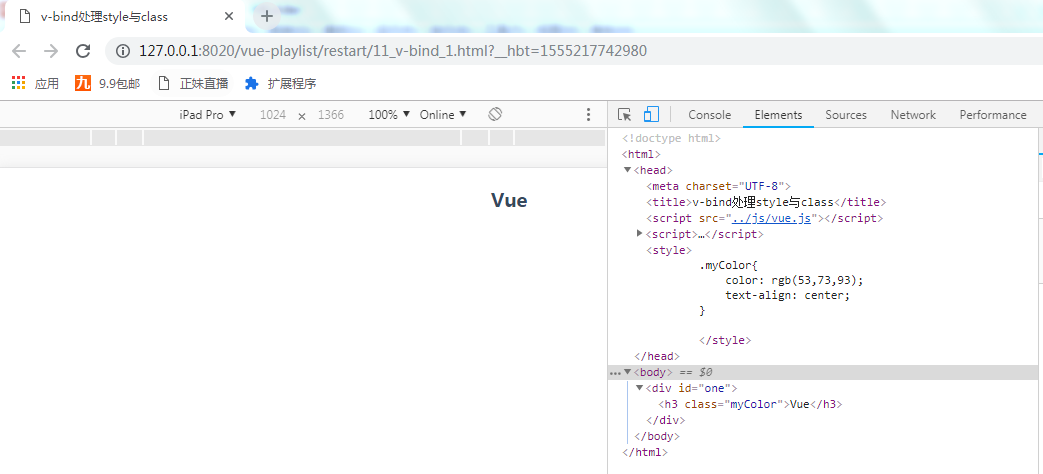
普通的css引入:
变量引入:
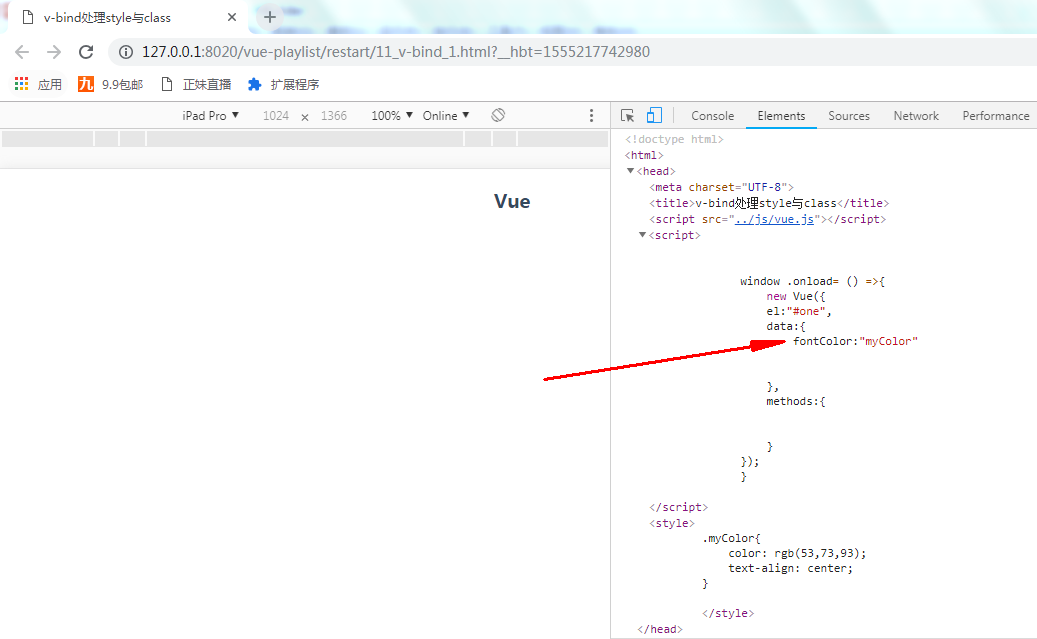
通过定义一个变量fontColor来通过v-bind来进行绑定在h3z的class中
<!--变量引入-->

            <h3 :class="fontColor">Vue</h3>
注意:v-bind后面必须跟一个属性或者一个方法
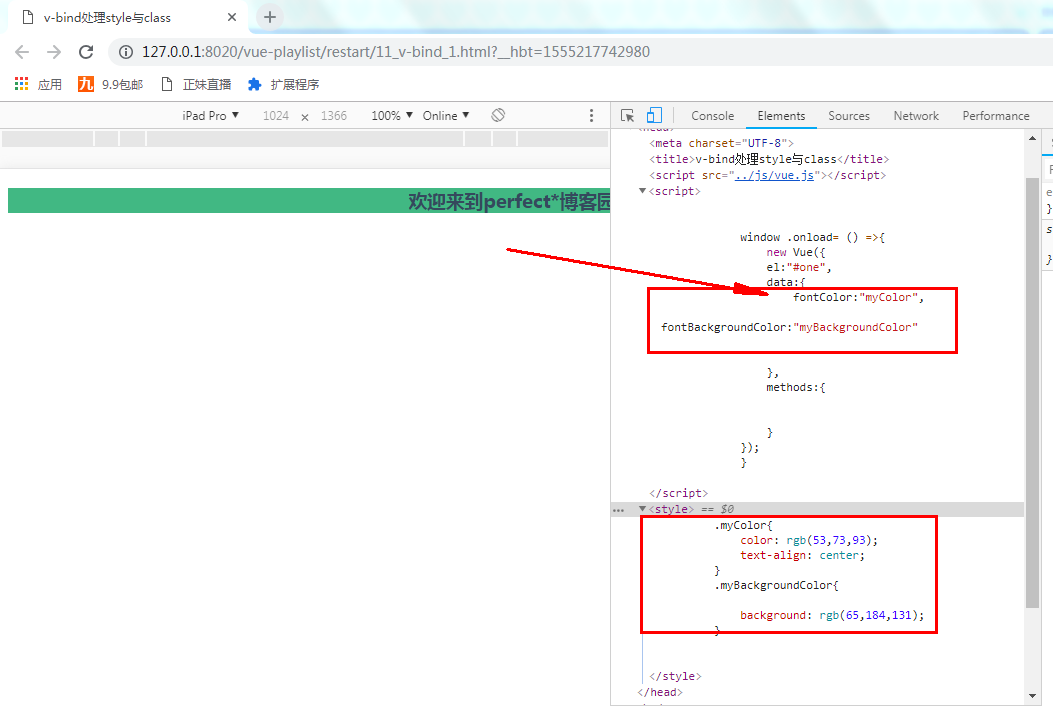
当然我们也可以通过数组的形式引入多个class:
html:
<!--以数组的形式引入多个-->

            <h3 :class="[fontColor,fontBackgroundColor]">欢迎来到perfect*博客园</h3>
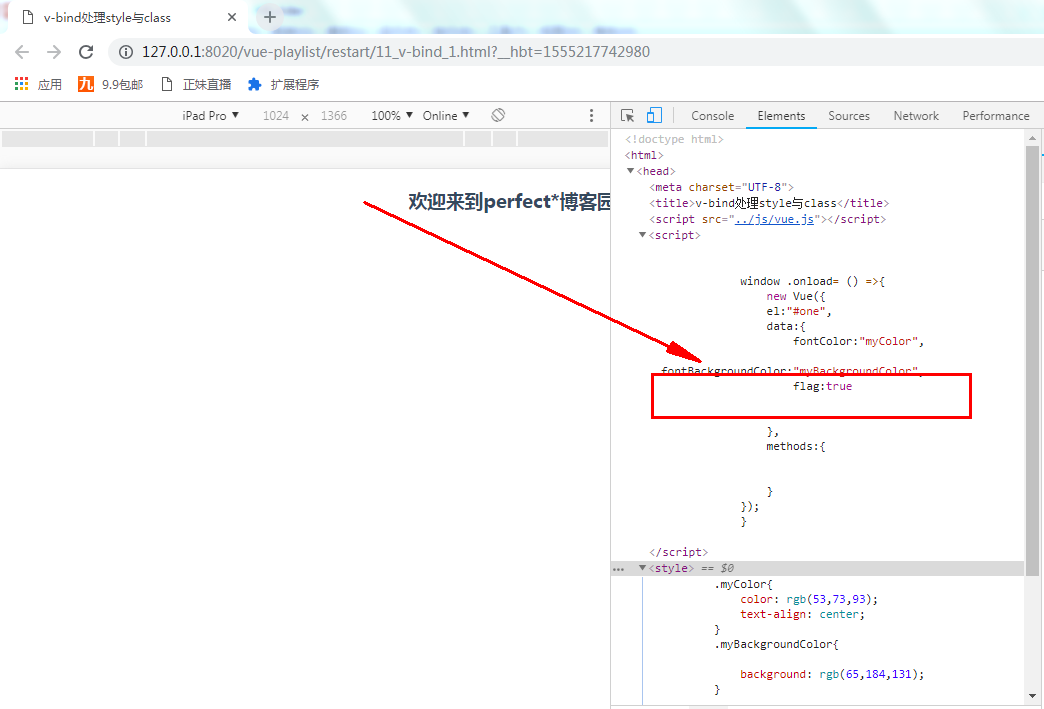
使用json对象的方式,在json中也可以使用多种方式
key是样式的名称,对应的值是一个boolean类型,相当于一个开关
HTML:
<!--使用json方式-->

            <h3 :class="{myColor:flag,myBackgroundColor:!flag}">欢迎来到perfect*博客园</h3>
使用数组+json方式;
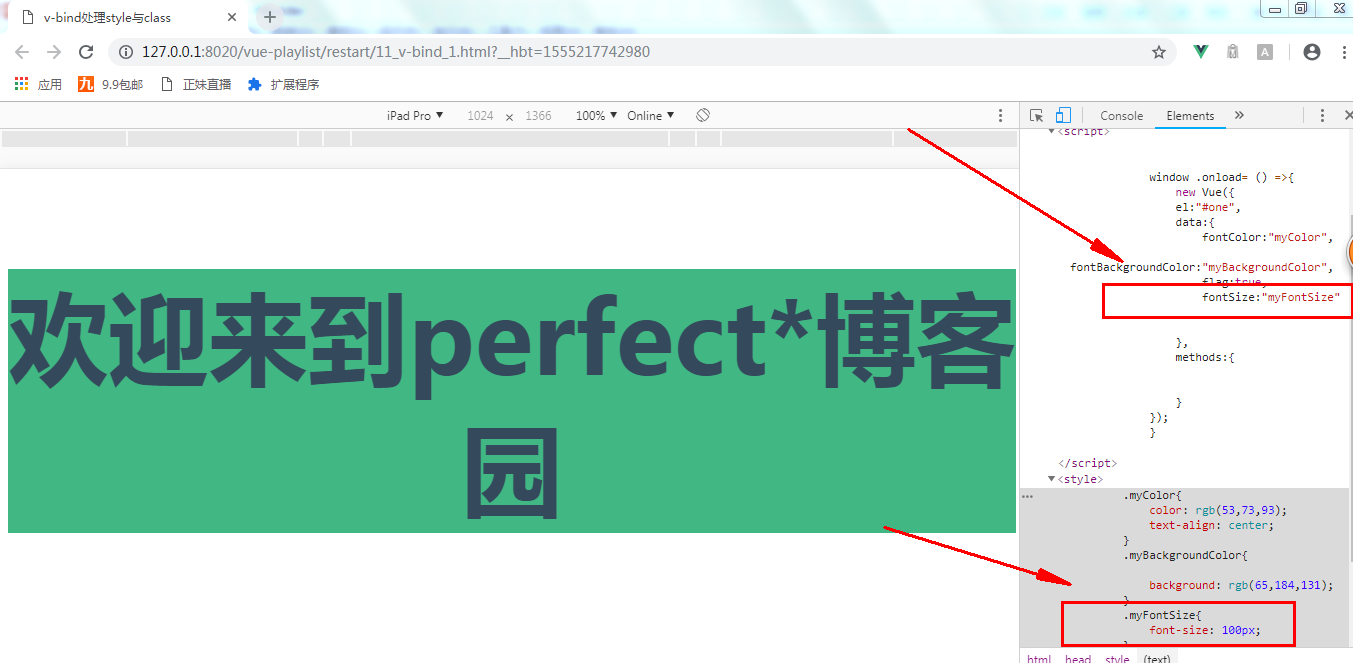
html:
<!--使用数组+json方式-->

            <h3 :class="[fontSize,{myColor:flag,myBackgroundColor:flag}]">欢迎来到perfect*博客园</h3>
class中 写的是变量引入和json对象
绑定style:
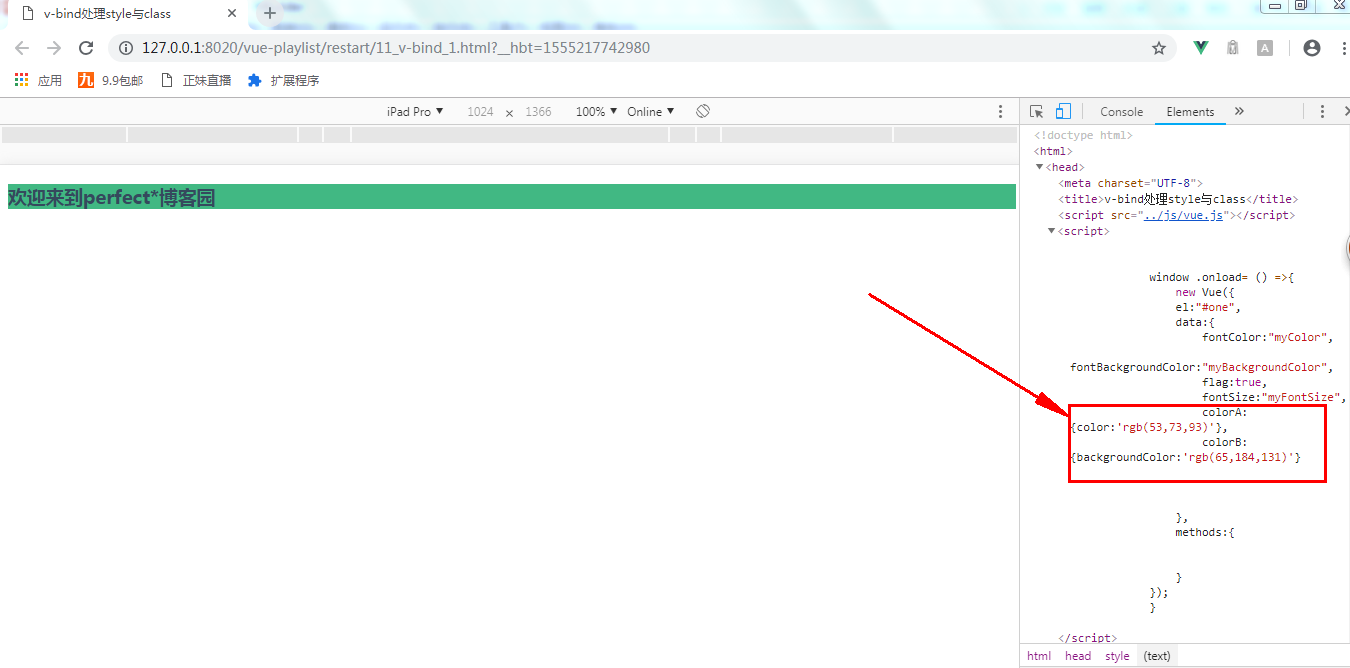
HTML:
<!--绑定style:-->

            <h3 :style="[colorA,colorB]">欢迎来到perfect*博客园</h3>
可以通过数组引入多个,引入一个时就不需要数组了,同绑定class相同,只是定义变量的值不一样。
以上示例所有代码:
 <!DOCTYPE html>

 <html>

     <head>

         <meta charset="UTF-8">

         <title>v-bind处理style与class</title>

         <script src="../js/vue.js"></script>

         <script>

             window .onload= () =>{

                 new Vue({

                 el:"#one",

                 data:{

                     fontColor:"myColor",

                     fontBackgroundColor:"myBackgroundColor",

                     flag:true,

                     fontSize:"myFontSize",

                     colorA:{color:'rgb(53,73,93)'},

                     colorB:{backgroundColor:'rgb(65,184,131)'}

                 },

                 methods:{

                 }

             });

             }

         </script>

         <style>

         .myColor{

             color: rgb(,,);

             text-align: center;

         }

         .myBackgroundColor{

             background: rgb(,,);

         }

         .myFontSize{

             font-size: 100px;

         }

         </style>

     </head>

     <body>

         <div id="one">

             <!--普通的css引入-->

             <!--<h3 class="myColor">Vue</h3>-->

             <!--变量引入-->

             <!--<h3 :class="fontColor">Vue</h3>-->

             <!--以数组的形式引入多个-->

             <!--<h3 :class="[fontColor,fontBackgroundColor]">欢迎来到perfect*博客园</h3>-->

             <!--使用json方式-->

             <!--<h3 :class="{myColor:flag,myBackgroundColor:!flag}">欢迎来到perfect*博客园</h3>-->

             <!--使用数组+json方式-->

             <!--<h3 :class="[fontSize,{myColor:flag,myBackgroundColor:flag}]">欢迎来到perfect*博客园</h3>-->

             <!--绑定style:-->

             <h3 :style="[colorA,colorB]">欢迎来到perfect*博客园</h3>

         </div>

     </body>

 </html>
使用v-bind处理class与style
使用v-bind处理class与style的更多相关文章
- v - bind
1. 用于处理html标签的动态属性,即动态赋值(动态地绑定一个或多个特性,或一个组件 prop 到表达式) 2. 官网API <!DOCTYPE html> <html lang= ...
- v:bind指令对于传boolean值的注意之处
1,
- 浅谈Jquery中的bind(),live(),delegate(),on()绑定事件方式
前言 因为项目中经常会有利用jquery操作dom元素的增删操作,所以会涉及到dom元素的绑定事件方式,简单的归纳一下bind,live,delegate,on的区别,以便以后查阅,也希望该文章日后能 ...
- 更新补丁Bind
1.查询补丁版本信息 (1) rpm -qa|grep bind (2) dig @localhost version.bind 2.下载安装 BIND最新漏洞和升级解决办法 现在有非常多的公司的都有 ...
- Bind开启IPv6功能
[root@localhost sbin]# ./named -v bind 9.5.1-p3-v3.0.9 1,服务器开启IPv6服务 网卡配置v6地址 [root@localhost ~]# if ...
- 在Resource中使用x:Bind
Build2015上,MS热情高涨的演示了x:Bind,一种新的Binding方式,新的方式有如下优点: 1更好的性能(内存占用,CPU占用) 2BuildTime的Binding 具体在Channe ...
- JavaScript(六)——实现图片上下或者左右无缝滚动
/*! jQuery v1.8.3 jquery.com | jquery.org/license */ (function(e,t){function _(e){var t=M[e]={};retu ...
- 通过百度echarts实现数据图表展示功能
现在我们在工作中,在开发中都会或多或少的用到图表统计数据显示给用户.通过图表可以很直观的,直接的将数据呈现出来.这里我就介绍说一下利用百度开源的echarts图表技术实现的具体功能. 1.对于不太理解 ...
- JavaScript----marquee滚动标签 图片无缝滚动 插入百度地图
页面的自动滚动效果,可由javascript来实现, 但是有一个html标签 - <marquee></marquee>可以实现多种滚动效果,无需js控制. 使用marquee ...
- marquee滚动,无缝连接的代码
页面的自动滚动效果,可由javascript来实现, 但是有一个html标签 - <marquee></marquee>可以实现多种滚动效果,无需js控制. 使用marquee ...
随机推荐
- 2018-2019-1 20189221 《Linux内核原理与分析》第六周作业
2018-2019-1 20189221 <Linux内核原理与分析>第六周作业 实验五 实验过程 将Fork函数移植到Linux的MenuOS fork()函数通过系统调用创建一个与原来 ...
- Count(广工14届竞赛)
题目链接:http://acm.hdu.edu.cn/showproblem.php?pid=6470 这道题目题解就扔了个矩阵快速幂啥都没写.....这题解是太看得懂我这个弱鸡了. 既然是矩阵快速幂 ...
- GO language for windows
我记得我们已经下载完成了windows 下Go 的安装包 go1.9.windows-amd64.msi下面接着说吧 GO 在Windows 上也是按照linux 惯例来编程的,所以,你还需要一个wi ...
- Cocos Creator 获取节点的方式
1.通过find方式获取//获取节点 var node=cc.find("Canvas/logo"); //获取精灵组件 var sprite=node.getComponent( ...
- 关于Stuck Archiver的疑问
客户使用crsctl stat res -t命令去查看RAC集群状态时,发现异常,知晓Stuck Archiver代表归档满,问我们为什么RAC是同一个库,只有实例1显示Stuck Archiver, ...
- linux c语言开发工具
---恢复内容开始--- C语言编译全过程剖析 编译的概念:编译程序读取源程序(字符流),对之进行词法和语法的分析,将高级语言指令转换为功能等效的汇编代码,再由汇编程序转换为机器语言,并且按照操作系统 ...
- 24.form表单提交的六种方式
form表单提交方式 1.无刷新页面提交表单 表单可实现无刷新页面提交,无需页面跳转,如下,通过一个隐藏的iframe实现,form表单的target设置为iframe的name名称,form提交目标 ...
- Flume:sink.type=hive
Flume以Kafka为Source,以Hive为Sink进行数据转存. 业务背景:公司要求将某四川城市的卡口数据实时接入大数据平台中,历史数据可以通过Hive进行Load,也就是增量数据的对接问题. ...
- HDU 1087 最长不下降子序列 LIS DP
Nowadays, a kind of chess game called “Super Jumping! Jumping! Jumping!” is very popular in HDU. May ...
- GeoJSON 和 TopoJSON
GeoJSON 和 TopoJSON 是符合 JSON 语法规则的两种数据格式,用于表示地理信息. 1. GeoJSON GeoJSON 是用于描述地理空间信息的数据格式.GeoJSON 不是一种新的 ...