
python识别图片生成字符模式
此python文件来自D7哥, 放在这里备份.
- 用法
python3 PIL\&argparse.py  1.jpg -o test.txt --width 300 --height 300

python3 	xxx.py		要识别的img	输出到文件	宽度		高度
- 程序
# coding:utf-8

from PIL import Image

import argparse

#命令行输入参数处理

parser = argparse.ArgumentParser()

parser.add_argument('file')     #输入文件

parser.add_argument('-o', '--output')   #输出文件

parser.add_argument('--width', type = int, default = 60) #输出字符画宽

parser.add_argument('--height', type = int, default = 10) #输出字符画高

args = parser.parse_args()

IMG = args.file

WIDTH = args.width

HEIGHT = args.height

OUTPUT = args.output

ascii_char = list("$@B%8&WM#*oahkbdpqwmZO0QLCJUYXzcvunxrjft/\|()1{}[]?-_+~<>i!lI;:,\"^`'. ")

def get_char(r,g,b,alpha = 256):

    if alpha == 0:

        return ' '

    length = len(ascii_char)

    gray = int(0.2126 * r + 0.7152 * g + 0.0722 * b)

    unit = (256.0 + 1)/length

    return ascii_char[int(gray/unit)]

if __name__ == '__main__':

    im = Image.open(IMG)

    im = im.resize((WIDTH,HEIGHT), Image.NEAREST)

    txt = ""

    for i in range(HEIGHT):

        for j in range(WIDTH):

            txt += get_char(*im.getpixel((j,i)))

        txt += '\n'

    print(txt)

    #字符画输出到文件

    if OUTPUT:

        with open(OUTPUT,'w') as f:

            f.write(txt)

    else:

        with open("output.txt",'w') as f:

            f.write(txt)
- 展示
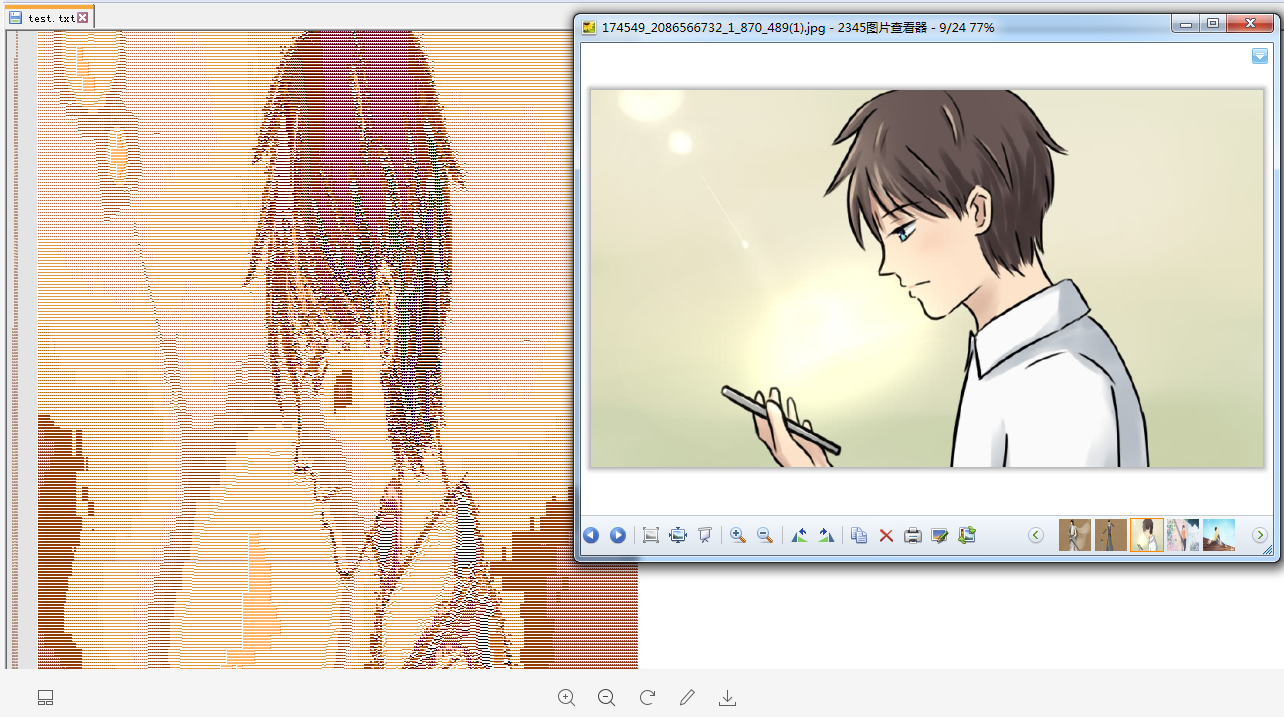
python识别图片生成字符模式的更多相关文章
- 通过python将图片生成字符画
基础知识: 1.python基础知识 快速学习链接:https://www.shiyanlou.com/courses/214 2.linux命令行操作 快速学习链接:https://www. ...
- python实战===图片转换为字符的源码(转)
#cmd执行命令为>>> python xx.py pic.png#-*- coding:utf-8 -*- from PIL import Image import argpars ...
- python 识别图片验证码报IOError
说一下困扰了我一周的问题:识别图片验证码 本来我按照安装步骤(http://www.cnblogs.com/yeayee/p/4955506.html?utm_source=tuicool&u ...
- python识别图片文字
因为学校要求要刷一门叫<包装世界>的网课,而课程里有200多道选择题,而且只能在手机完成,网页版无法做题,而看视频是不可能看视频的,这辈子都不可能看...所以写了几行代码来进行百度搜答案. ...
- python 识别图片上的数字
https://blog.csdn.net/qq_31446377/article/details/81708006 ython 3.6 版本 Pytesseract 图像验证码识别 环境: (1) ...
- OpenCV+Python识别车牌和字符分割的实现
本篇文章主要基于python语言和OpenCV库(cv2)进行车牌区域识别和字符分割,开篇之前针对在python中安装opencv的环境这里不做介绍,可以自行安装配置! 车牌号检测需要大致分为四个部分 ...
- python爬虫20 | 小帅b教你如何使用python识别图片验证码
当你在爬取某些网站的时候 对于你的一些频繁请求 对方会阻碍你 常见的方式就是使用验证码 验证码的主要功能 就是区分你是人还是鬼(机器人) 人 想法设法的搞一些手段来对付技术 而 技术又能对付人们的想法 ...
- python 识别图片文字
今天群里有兄弟问如何把图片的文字给识别出来 对于python来说这不是小菜一碟吗,于是乎让pupilheart狠狠的吹了一波(哈哈,竟然没懂),下面将整个实现过程给大家实现下: 方法一:自己搞定ORC ...
- python验证码图片生成
环境:win10(64位)+pycharm2018+pillow5.4+python3.7 对Django的跨站请求保护的有所了解的同学会知道{%csrf_token%}在实际上作用并不是那么大,只要 ...
随机推荐
- Elasticsearch5.x创建索引(Java)
索引创建代码使用官方给的示例代码,我把它在java项目里实现了一遍. 官方示例 1.创建索引 /** * Java创建Index */ public void CreateIndex() { int ...
- visual studio 2017 (vs2017安装)
vs2017要找到控制台模板,要安装模块: 安装完之后: 新建控制台项目: 不使用预编译头: 推荐安装官方扩展: https://marketplace.visualstudio.com/items? ...
- react native 初识生命周期
关于生命周期这块,我是看到慕课堂的一个视频,觉得将的很好,引入很容易理解,地址是:https://www.imooc.com/video/14288 如果你们想了解一下,也可以去看看 RN 组件的生 ...
- MyBatis基础入门《五》核心配置文件
MyBatis基础入门<五>核心配置文件 描述: 在前面的章节中,简单的学习使用了一下mybatis,对于配置文件没有过多详细说明. 这里先描述项目中的一个核心配置文件:mybatis-c ...
- Koa中设置中文Cookie值
默认情况下, 如果 ctx.cookies.set('user', '杨过', { domain: 'xxxx', path: 'xxxx', maxAge: 24 * 60 * 60 * 1000, ...
- 将Web项目War包部署到Tomcat服务器基本步骤
参考来源: http://www.cnblogs.com/pannysp/archive/2012/03/07/2383364.html 1. 常识: 1.1 War包 War包一般是在进行Web ...
- python pandas模块,nba数据处理(1)
pandas提供了使我们能够快速便捷地处理结构化数据的大量数据结构和函数.pandas兼具Numpy高性能的数组计算功能以及电子表格和关系型数据(如SQL)灵活的数据处理能力.它提供了复杂精细的索引功 ...
- Yii GridView
- uva 11183 Teen Girl Squad
题意: 有一个女孩,需要打电话让所有的人知道一个消息,消息可以被每一个知道消息的人传递. 打电话的关系是单向的,每一次电话需要一定的花费. 求出打电话最少的花费或者判断不可能让所有人知道消息. 思路: ...
- django中操作cookie与session
cookie 什么是Cookie Cookie具体指的是一段小信息,它是服务器发送出来存储在浏览器上的一组组键值对,下次访问服务器时浏览器会自动携带这些键值对,以便服务器提取有用信息. Cookie的 ...