
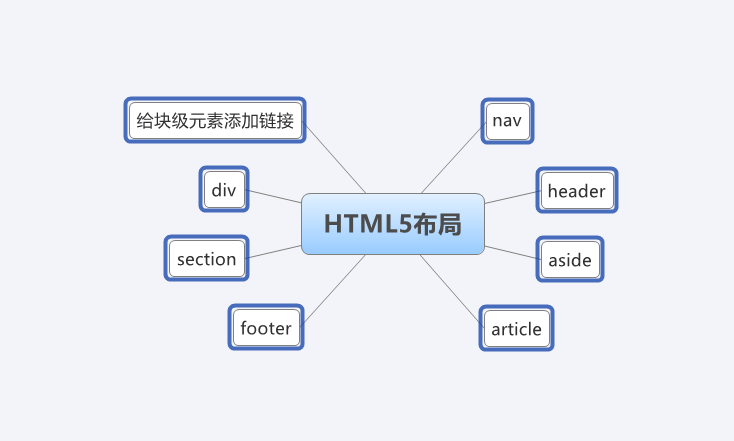
HTML5布局
完整示例

<!DOCTYPE html>

<html lang="en">

<head>

    <meta charset="UTF-8">

    <title>HTML5布局</title>

    <style type="text/css">

        header, section, footer, aside, nav, article, figure, figcaption{

            display: block;}

        body{

            color:#666666;

            background-color: #f9f8f6;

            background-image: url("images/dark-wood.jpg");

            background-position: center;

            font-family: Georgia, Times, Serif;

            line-height: 1.4em;

            margin: 0px;}

        .wrapper{

            width: 940px;

            margin: 20px auto 20px auto;

            border: 2px solid #000000;

            background-color: #ffffff;}

        header{

            height: 160px;

            background-image: url("images/header.jpg");}

        h1{

            text-indent: -9999px;

            width: 940px;

            height: 130px;

            margin: 0px;}

        nav, footer{

            clear: both;

            color: #ffffff;

            background-color: #aeaca8;

            height: 30px;}

        nav ul{

            margin: 0px;

            padding: 5px 0px 5px 30px;}

        nav li{

            display: inline;

            margin-right: 40px;}

        nav li a{

            color: #ffffff;}

        nav li a:hover, nav li a.current{

            color: #000000;}

        section.courses{

            float: left;

            width: 659px;

            border-right: 1px solid #eeeeee;}

        article{

            clear: both;

            overflow: auto;

            width: 100%}

        hgroup{

            margin-top: 40px;}

        figure{

            float: left;

            width: 290px;

            height: 220px;

            padding: 5px;

            margin: 20px;

            border: 1px solid #eeeeee;}

        figcaption{

            font-size: 90%;

            text-align: left;}

        aside{

            width: 230px;

            float: left;

            padding: 0px 0px 0px 20px;}

        aside section a{

            display: block;

            padding: 10px;

            border-bottom: 1px solid #eeeeee;}

        aside section a:hover{

            color: #985d6a;

            background-color: #efefef;}

        a{

            color: #de6581;

            text-decoration: none;}

        h1, h2, h3{

            font-weight: normal;}

        h2{

            margin: 10px 0px 5px 0px;

            padding: 0px;}

        h3{

            margin: 0px 0px 0px 0px;

            color: #de6581;}

        aside h2 {

            padding: 30px 0px 10px 0px;

            color: #de6581;}

        footer{

            font-size: 80%;

            padding: 7px 0px 0px 20px;

        }

    </style>

    <!--[if lt IE 9]>

    <script src="http://html5shiv.googlecode.com/svn/trunk/html5.js"></script>

    <![endif]-->

</head>

<body>

<div class="wrapper">

    <header>

        <h1>Yoko's Kitchen</h1>

        <nav>

            <ul>

                <li><a href="" class="current">home</a></li>

                <li><a href="">classes</a></li>

                <li><a href="">catering</a></li>

                <li><a href="">about</a></li>

                <li><a href="">contact</a></li>

            </ul>

        </nav>

    </header>

    <section class="courses">

        <article>

            <figure>

                <img src="data:images/bok-choi.jpg" alt="Bok Choi" />

                <figcaption>Bok Choi</figcaption>

            </figure>

            <hgroup>

                <h2>Japanese Vegetarian</h2>

                <h3>Five week course in London</h3>

            </hgroup>

            <p>A five week introduction to traditional Japanese vegetarian meals, teaching you a selection of rice and noodle dishes.</p>

        </article>

        <article>

            <figure>

                <img src="data:images/teriyaki.jpg" alt="Teriyaki sauce" />

                <figcaption>Teriyaki Sauce</figcaption>

            </figure>

            <hgroup>

                <h2>Sauces Masterclass</h2>

                <h3>One day workshop</h3>

            </hgroup>

            <p>An intensive one-day course looking at how to create the most delicious sauces for use in a range of Japanese cookery.</p>

        </article>

    </section>

    <aside>

        <section class="popular-recipes">

            <h2>Popular Recipes</h2>

            <a href="">Yakitori (grilled chicken)</a>

            <a href="">Tsukune (minced chicken patties)</a>

            <a href="">Okonomiyaki (savory pancakes)</a>

            <a href="">Mizutaki (chicken stew)</a>

        </section>

        <section class="contact-details">

            <h2>Contact</h2>

            <p>Yoko's Kitchen<br />

                27 Redchurch Street<br />

                Shoreditch<br />

                London E2 7DP</p>

        </section>

    </aside>

    <footer>

        © 2011 Yoko's Kitchen

    </footer>

</div><!-- .wrapper -->

</body>

</html>
页眉和页脚
<header>

        <h1>Yoko's Kitchen</h1>

        <nav>

            <ul>

                <li><a href="" class="current">home</a></li>

                <li><a href="">classes</a></li>

                <li><a href="">catering</a></li>

                <li><a href="">about</a></li>

                <li><a href="">contact</a></li>

            </ul>

        </nav>

    </header>
<footer>

        © 2011 Yoko's Kitchen

    </footer>
导航
<nav>

            <ul>

                <li><a href="" class="current">home</a></li>

                <li><a href="">classes</a></li>

                <li><a href="">catering</a></li>

                <li><a href="">about</a></li>

                <li><a href="">contact</a></li>

            </ul>

        </nav>
文章
<article>

            <figure>

                <img src="data:images/bok-choi.jpg" alt="Bok Choi" />

                <figcaption>Bok Choi</figcaption>

            </figure>

            <hgroup>

                <h2>Japanese Vegetarian</h2>

                <h3>Five week course in London</h3>

            </hgroup>

            <p>A five week introduction to traditional Japanese vegetarian meals, teaching you a selection of rice and noodle dishes.</p>

        </article>

        <article>

            <figure>

                <img src="data:images/teriyaki.jpg" alt="Teriyaki sauce" />

                <figcaption>Teriyaki Sauce</figcaption>

            </figure>

            <hgroup>

                <h2>Sauces Masterclass</h2>

                <h3>One day workshop</h3>

            </hgroup>

            <p>An intensive one-day course looking at how to create the most delicious sauces for use in a range of Japanese cookery.</p>

        </article>
附属信息
 <aside>

        <section class="popular-recipes">

            <h2>Popular Recipes</h2>

            <a href="">Yakitori (grilled chicken)</a>

            <a href="">Tsukune (minced chicken patties)</a>

            <a href="">Okonomiyaki (savory pancakes)</a>

            <a href="">Mizutaki (chicken stew)</a>

        </section>

        <section class="contact-details">

            <h2>Contact</h2>

            <p>Yoko's Kitchen<br />

                27 Redchurch Street<br />

                Shoreditch<br />

                London E2 7DP</p>

        </section>

    </aside>
部分
    <section class="courses">

        <article>

            <figure>

                <img src="data:images/bok-choi.jpg" alt="Bok Choi" />

                <figcaption>Bok Choi</figcaption>

            </figure>

            <hgroup>

                <h2>Japanese Vegetarian</h2>

                <h3>Five week course in London</h3>

            </hgroup>

            <p>A five week introduction to traditional Japanese vegetarian meals, teaching you a selection of rice and noodle dishes.</p>

        </article>

        <article>

            <figure>

                <img src="data:images/teriyaki.jpg" alt="Teriyaki sauce" />

                <figcaption>Teriyaki Sauce</figcaption>

            </figure>

            <hgroup>

                <h2>Sauces Masterclass</h2>

                <h3>One day workshop</h3>

            </hgroup>

            <p>An intensive one-day course looking at how to create the most delicious sauces for use in a range of Japanese cookery.</p>

        </article>

    </section>
标题组
<hgroup>

                <h2>Japanese Vegetarian</h2>

                <h3>Five week course in London</h3>

 </hgroup>
图形
<figure>

                <img src="data:images/bok-choi.jpg" alt="Bok Choi" />

                <figcaption>Bok Choi</figcaption>

            </figure>

            <hgroup>

                <h2>Japanese Vegetarian</h2>

                <h3>Five week course in London</h3>

            </hgroup>

            <p>A five week introduction to traditional Japanese vegetarian meals, teaching you a selection of rice and noodle dishes.</p>

        </article>

        <article>

            <figure>

                <img src="data:images/teriyaki.jpg" alt="Teriyaki sauce" />

                <figcaption>Teriyaki Sauce</figcaption>

            </figure>
分节元素
<div class="wrapper">

    <header>

        <h1>Yoko's Kitchen</h1>

        <nav>

            <ul>

                <li><a href="" class="current">home</a></li>

                <li><a href="">classes</a></li>

                <li><a href="">catering</a></li>

                <li><a href="">about</a></li>

                <li><a href="">contact</a></li>

            </ul>

        </nav>

    </header>

    <section class="courses">

        <article>

            <figure>

                <img src="data:images/bok-choi.jpg" alt="Bok Choi" />

                <figcaption>Bok Choi</figcaption>

            </figure>

            <hgroup>

                <h2>Japanese Vegetarian</h2>

                <h3>Five week course in London</h3>

            </hgroup>

            <p>A five week introduction to traditional Japanese vegetarian meals, teaching you a selection of rice and noodle dishes.</p>

        </article>

        <article>

            <figure>

                <img src="data:images/teriyaki.jpg" alt="Teriyaki sauce" />

                <figcaption>Teriyaki Sauce</figcaption>

            </figure>

            <hgroup>

                <h2>Sauces Masterclass</h2>

                <h3>One day workshop</h3>

            </hgroup>

            <p>An intensive one-day course looking at how to create the most delicious sauces for use in a range of Japanese cookery.</p>

        </article>

    </section>

    <aside>

        <section class="popular-recipes">

            <h2>Popular Recipes</h2>

            <a href="">Yakitori (grilled chicken)</a>

            <a href="">Tsukune (minced chicken patties)</a>

            <a href="">Okonomiyaki (savory pancakes)</a>

            <a href="">Mizutaki (chicken stew)</a>

        </section>

        <section class="contact-details">

            <h2>Contact</h2>

            <p>Yoko's Kitchen<br />

                27 Redchurch Street<br />

                Shoreditch<br />

                London E2 7DP</p>

        </section>

    </aside>

    <footer>

        © 2011 Yoko's Kitchen

    </footer>

</div>
为块级元素添加链接
<a href-"introduction.html">
<article>
    <figure>
        <img src="data:images/bok-choi.jpg" alt="Bok Choi"/>
        <figcaption>Bok Choi</figcaption>
    </figure>
    <hgroup〉
    <h2>Japanese Vegetarian</h2>
    <h3>Five week course in London</h3>
    </hgroup〉
    <p>A five week introduction to traditional
        Japanese vegetarian meals,teaching
        you a selection of rice and noodle
        dishes.</p〉
</article>
</a〉
HTML5布局的更多相关文章
- Html5 布局方式
在Html5之前,统一采用的是Div+css的方式进行布局,但是却和开发人员的命名方式,喜好有关.在新的Html5中,布局却显得更加人性化,更易理解了.如增加了Header,Footer,Sectio ...
- HTML5 布局标签
HTML5是HTML标准的下一个版本.越来越多的程序员开始HTML5来构建网站,相对HTML4,HTML5新增的带有语义化的标签可以代替div进行页面布局(与html5.js结合起来时可以放心使用 ) ...
- 解决HTML5布局,兼容IE问题
当我们使用h5的新标签,header,footer,aside,section,article...时,会遇到低版本IE不兼容问题,如下图: 解决方案:引入如下JS代码,即可 (这里我就直接放源码了, ...
- Html5 布局经验分享-第1集
移动端的布局与pc端的布局相比 移动端的布局就简单的多,兼容性不必考虑那么多,css3各种特性基本上是可以放肆的写:(个人看法) 本人做移动web 布局一段时间了,把这其中遇到的一些问题总结下来,均是 ...
- 简单的html5布局
<!DOCTYPE html><html><meta charset="utf-8"><head><style>html ...
- 一张图知道HTML5布局(图)
- HTML5布局篇
<!DOCTYPE html> <html> <head> <meta charset="utf-8"/> <title> ...
- HTML5基本布局
HTML4布局 HTML5布局 基本的HTML5文档的模式为: <!DOCTYPE html> <html lang = "en"> <head> ...
- html5新标签布局应用指南
html5中为了便于设计者的网站布局新添加了一些标签,本文主要讲解这些标签的实际应用方法. 大多数前端的朋友在设计网站时主要应用<div>标签构造盒子进行布局,这是种非常高效的方法,可以将 ...
随机推荐
- python---正则中的(?P<name>group)
application=tornado.web.Application([ (r"/index/(?P<num>\d*)/(?P<nid>\d*)",hom ...
- Python复习笔记(一)高级变量类型
目标 列表元组 字典 字符串 公共方法 变量高级 01. 列表 02. 元组 03. 字典 04. 字符串 1)判断类型 - 9 2) 查找和替换 - 7 3) 大小写转换 - 5 4) 文本对齐 - ...
- 虚拟机下Linux(终端)配置网络的方法
这几天在虚拟机vmware上部署centos系统,想通过内部联网用yum命令安装必需的软件,但是一直不能静态地址联网,今天终于找到一个方法centos内部设置IP,对外联网.设置过程如下: .首先是网 ...
- Python基础-day01
写在前面 先后接触过很多编程语言,最喜欢的就是C和Python,相比其他语言,C 是神器,优点太多了:个人而言,C 最重要的一点就是能够让你在敲代码的时候是以一个计算机科学家的角度去思考,而不是仅仅停 ...
- 在O(n) 时间复杂度,O(1)空间复杂度内反转单链表
在LeetCode中看到判断回文的程序:https://leetcode.com/problems/palindrome-linked-list/ 里面用单链表来存储数据,先反转前半部分的单链表,然后 ...
- Linux - openssl 加密
openssl rand 15 -base64 # 口令生成 openssl sha1 filename # 哈希算法校验文件 openssl md5 filename # MD5校验文件 opens ...
- 运维数据库平台~inception审核规则详解
---恢复内容开始--- 一 简介:这次我们来介绍最核心的审核功能 二 讲解:简单来说 inception就是mysql的二次过滤,何谓二次过滤,我们知道,mysql本身都有自己的审核规则,为业界所通 ...
- Activity Window View WindowManager关系&Touch事件分发机制
http://www.cnblogs.com/linjzong/p/4191891.html https://www.cnblogs.com/kest/p/5141817.html https://b ...
- Freemarker导出带图片的word
1.新建一doc文档
- python cookbook 笔记三
分组: rows = [ {'address': '5412 N CLARK', 'date': '07/01/2012'}, {'address': '5148 N CLARK', 'date': ...