
weblogic创建domain教程
1.创建domain
[ls@ls ~]$ cd /weblogic/wlserver_10.3/common/bin/                                     #进入创建文件所在目录

[ls@ls bin]$ ./config.sh                                                              #执行创建脚本

Unable to instantiate GUI, defaulting to console mode.

<------------------- Fusion Middleware Configuration Wizard ------------------>

Welcome:

--------

Choose between creating and extending a domain. Based on your selection,

the Configuration Wizard guides you through the steps to generate a new or

extend an existing domain.

->1|Create a new WebLogic domain

    |    Create a WebLogic domain in your projects directory.

   2|Extend an existing WebLogic domain

    |    Use this option to add new components to an existing domain and modify     |configuration settings.

Enter index number to select OR [Exit][Next]>                                          #回车

<------------------- Fusion Middleware Configuration Wizard ------------------>

Select Domain Source:

---------------------

Select the source from which the domain will be created. You can create the

domain by selecting from the required components or by selecting from a

list of existing domain templates.

 ->1|Choose Weblogic Platform components

    |    You can choose the Weblogic component(s) that you want supported in

    |your domain.

   2|Choose custom template

    |    Choose this option if you want to use an existing  template. This

    |could be a custom created template using the Template Builder.

Enter index number to select OR [Exit][Previous][Next]>                                 #回车

<------------------- Fusion Middleware Configuration Wizard ------------------>

Application Template Selection:

-------------------------------

    Available Templates

    |_____Basic WebLogic Server Domain - 10.3.6.0 [wlserver_10.3]x

    |_____Basic WebLogic SIP Server Domain - 10.3.6.0 [wlserver_10.3] [2]

    |_____WebLogic Advanced Web Services for JAX-RPC Extension - 10.3.6.0 [wlserver_10.3] [3]

    |_____WebLogic Advanced Web Services for JAX-WS Extension - 10.3.6.0 [wlserver_10.3] [4]

Enter number exactly as it appears in brackets to toggle selection OR [Exit][Previous][Next]>

<------------------- Fusion Middleware Configuration Wizard ------------------>

Edit Domain Information:

------------------------

    |  Name  |    Value    |

   _|________|_____________|

   1| *Name: | base_domain |

Enter value for "Name" OR [Exit][Previous][Next]> ls_domain                                #直接输入domain名称

<------------------- Fusion Middleware Configuration Wizard ------------------>

Edit Domain Information:

------------------------

    |  Name  |   Value   |

   _|________|___________|

   1| *Name: | ls_domain |

Use above value or select another option:

    1 - Modify "Name"

    2 - Discard Changes

Enter option number to select OR [Exit][Previous][Next]>                                    #回车确定名称

<------------------- Fusion Middleware Configuration Wizard ------------------>

Select the target domain directory for this domain:

---------------------------------------------------

    "Target Location" = [Enter new value or use default

"/weblogic/user_projects/domains"]

Enter new Target Location OR [Exit][Previous][Next]>                                        #回车确定domain目录

<------------------- Fusion Middleware Configuration Wizard ------------------>

Configure Administrator User Name and Password:

-----------------------------------------------

Create a user to be assigned to the Administrator role. This user is the

default administrator used to start development mode servers.

    |          Name           |                  Value                  |

   _|_________________________|_________________________________________|

   1|         *Name:          |                weblogic                 |

   2|     *User password:     |                                         |

   3| *Confirm user password: |                                         |

   4|      Description:       | This user is the default administrator. |

Use above value or select another option:

    1 - Modify "Name"

    2 - Modify "User password"

    3 - Modify "Confirm user password"

    4 - Modify "Description"

Enter option number to select OR [Exit][Previous][Next]> 1

<------------------- Fusion Middleware Configuration Wizard ------------------>

Configure Administrator User Name and Password:

-----------------------------------------------

Create a user to be assigned to the Administrator role. This user is the

default administrator used to start development mode servers.

    |          Name           |                  Value                  |

   _|_________________________|_________________________________________|

   1|         *Name:          |                weblogic                 |

   2|     *User password:     |                                         |

   3| *Confirm user password: |                                         |

   4|      Description:       | This user is the default administrator. |

Enter value for "Name" OR [Exit][Previous][Next]> ls                                                #输入用户名

<------------------- Fusion Middleware Configuration Wizard ------------------>

Configure Administrator User Name and Password:

-----------------------------------------------

Create a user to be assigned to the Administrator role. This user is the

default administrator used to start development mode servers.

    |          Name           |                  Value                  |

   _|_________________________|_________________________________________|

   1|         *Name:          |                   ls                    |

   2|     *User password:     |                                         |

   3| *Confirm user password: |                                         |

   4|      Description:       | This user is the default administrator. |

Use above value or select another option:

    1 - Modify "Name"

    2 - Modify "User password"

    3 - Modify "Confirm user password"

    4 - Modify "Description"

    5 - Discard Changes

Enter option number to select OR [Exit][Previous][Next]> 2                                        #输入2修改控制台登录密码

<------------------- Fusion Middleware Configuration Wizard ------------------>

Configure Administrator User Name and Password:

-----------------------------------------------

Create a user to be assigned to the Administrator role. This user is the

default administrator used to start development mode servers.

    "*User password:" = []

Enter new *User password: OR [Exit][Reset][Accept]> abcd1234                                       #输入密码

<------------------- Fusion Middleware Configuration Wizard ------------------>

Configure Administrator User Name and Password:

-----------------------------------------------

Create a user to be assigned to the Administrator role. This user is the

default administrator used to start development mode servers.

    |          Name           |                  Value                  |

   _|_________________________|_________________________________________|

   1|         *Name:          |                   ls                    |

   2|     *User password:     |                ********                 |

   3| *Confirm user password: |                                         |

   4|      Description:       | This user is the default administrator. |

Use above value or select another option:

    1 - Modify "Name"

    2 - Modify "User password"

    3 - Modify "Confirm user password"

    4 - Modify "Description"

    5 - Discard Changes

Enter option number to select OR [Exit][Previous][Next]> 3                                         #输入3再次输入密码

<------------------- Fusion Middleware Configuration Wizard ------------------>

Configure Administrator User Name and Password:

-----------------------------------------------

Create a user to be assigned to the Administrator role. This user is the

default administrator used to start development mode servers.

    "*Confirm user password:" = []

Enter new *Confirm user password: OR [Exit][Reset][Accept]> abcd1234                                #再次输入密码

<------------------- Fusion Middleware Configuration Wizard ------------------>

Configure Administrator User Name and Password:

-----------------------------------------------

Create a user to be assigned to the Administrator role. This user is the

default administrator used to start development mode servers.

    |          Name           |                  Value                  |

   _|_________________________|_________________________________________|

   1|         *Name:          |                   ls                    |

   2|     *User password:     |                ********                 |

   3| *Confirm user password: |                ********                 |

   4|      Description:       | This user is the default administrator. |

Use above value or select another option:

    1 - Modify "Name"

    2 - Modify "User password"

    3 - Modify "Confirm user password"

    4 - Modify "Description"

    5 - Discard Changes

Enter option number to select OR [Exit][Previous][Next]>                                              #回车

<------------------- Fusion Middleware Configuration Wizard ------------------>

Domain Mode Configuration:

--------------------------

Enable Development or Production Mode for this domain.

 ->1|Development Mode

   2|Production Mode

Enter index number to select OR [Exit][Previous][Next]> 2

<------------------- Fusion Middleware Configuration Wizard ------------------>

Java SDK Selection:

-------------------

 ->1|Sun SDK 1.6.0_105 @ /opt/jdk1.6.0_105

   2|Other Java SDK

Enter index number to select OR [Exit][Previous][Next]>                                                  #回车,默认是安装weblogic时给的密码

<------------------- Fusion Middleware Configuration Wizard ------------------>

Select Optional Configuration:

------------------------------

   1|Administration Server [ ]

   2|Managed Servers, Clusters and Machines [ ]

   3|RDBMS Security Store [ ]

Enter index number to select OR [Exit][Previous][Next]> 1                                               #输入1

<------------------- Fusion Middleware Configuration Wizard ------------------>

Select Optional Configuration:

------------------------------

   1|Administration Server [x]

   2|Managed Servers, Clusters and Machines [ ]

   3|RDBMS Security Store [ ]

Enter index number to select OR [Exit][Previous][Next]>                                                 #回车确认

<------------------- Fusion Middleware Configuration Wizard ------------------>

Configure the Administration Server:

------------------------------------

Each WebLogic Server domain must have one Administration Server. The

Administration Server is used to perform administrative tasks.

    |       Name       |        Value        |

   _|__________________|_____________________|

   1|      *Name:      |     AdminServer     |

   2| *Listen address: | All Local Addresses |

   3|   Listen port:   |        7001         |

   4| SSL listen port: |         N/A         |

   5|   SSL enabled:   |        false        |

Use above value or select another option:

    1 - Modify "Name"

    2 - Modify "Listen address"

    3 - Modify "Listen port"

    4 - Modify "SSL enabled"

Enter option number to select OR [Exit][Previous][Next]> 1                                             #输入1,修改server名

<------------------- Fusion Middleware Configuration Wizard ------------------>

Configure the Administration Server:

------------------------------------

Each WebLogic Server domain must have one Administration Server. The

Administration Server is used to perform administrative tasks.

    |       Name       |        Value        |

   _|__________________|_____________________|

   1|      *Name:      |     AdminServer     |

   2| *Listen address: | All Local Addresses |

   3|   Listen port:   |        7001         |

   4| SSL listen port: |         N/A         |

   5|   SSL enabled:   |        false        |

Enter value for "Name" OR [Exit][Previous][Next]> lsAdm                                                 #输入server名

<------------------- Fusion Middleware Configuration Wizard ------------------>

Configure the Administration Server:

------------------------------------

Each WebLogic Server domain must have one Administration Server. The

Administration Server is used to perform administrative tasks.

    |       Name       |        Value        |

   _|__________________|_____________________|

   1|      *Name:      |        lsAdm        |

   2| *Listen address: | All Local Addresses |

   3|   Listen port:   |        7001         |

   4| SSL listen port: |         N/A         |

   5|   SSL enabled:   |        false        |

Use above value or select another option:

    1 - Modify "Name"

    2 - Modify "Listen address"

    3 - Modify "Listen port"

    4 - Modify "SSL enabled"

    5 - Discard Changes

Enter option number to select OR [Exit][Previous][Next]> 3                                                 #输入3,修改控制台监听端口

<------------------- Fusion Middleware Configuration Wizard ------------------>

Configure the Administration Server:

------------------------------------

Each WebLogic Server domain must have one Administration Server. The

Administration Server is used to perform administrative tasks.

    |       Name       |        Value        |

   _|__________________|_____________________|

   1|      *Name:      |        lsAdm        |

   2| *Listen address: | All Local Addresses |

   3|   Listen port:   |        7001         |

   4| SSL listen port: |         N/A         |

   5|   SSL enabled:   |        false        |

Enter value for "Listen port" OR [Exit][Previous][Next]> 9000                                               #输入监听端口

<------------------- Fusion Middleware Configuration Wizard ------------------>

Configure the Administration Server:

------------------------------------

Each WebLogic Server domain must have one Administration Server. The

Administration Server is used to perform administrative tasks.

    |       Name       |        Value        |

   _|__________________|_____________________|

   1|      *Name:      |        lsAdm        |

   2| *Listen address: | All Local Addresses |

   3|   Listen port:   |        9000         |

   4| SSL listen port: |         N/A         |

   5|   SSL enabled:   |        false        |

Use above value or select another option:

    1 - Modify "Name"

    2 - Modify "Listen address"

    3 - Modify "Listen port"

    4 - Modify "SSL enabled"

    5 - Discard Changes

Enter option number to select OR [Exit][Previous][Next]>                                                    #回车确认

<------------------- Fusion Middleware Configuration Wizard ------------------>

Creating Domain...

0%          25%          50%          75%          100%

[------------|------------|------------|------------]

[***************************************************]

**** Domain Created Successfully! ****

[ls@ls bin]$
2.设置启动用户名密码文件boot.properties
weblogic可以将应用部署在控制台的server上(本配置中是上一步骤中建的lsAdm),在本配置中将另建立一个受控server--lsApp11(控制台server在上一步中用命令创建,受控server不需要命令建直接写文件就行)
在ls_domian主目录下执行(将其中的in后改为自己所要创的server,username和password改成自己在上一步设定的控制台用户名和密码):
for var_domain in lsAdm lsApp11

do

mkdir -p servers/$var_domain/security

cat > servers/$var_domain/security/boot.properties << EOF

username=ls

password=abcd1234

EOF

done
3.设置配置脚本setDomainEnv.sh
主要是设置weblogic的占用内存(要视机器具体情况修改)和java选项:
cd bin

sed -i 's/WLS_MEM_ARGS_64BIT=\"-Xms256m -Xmx512m\"/WLS_MEM_ARGS_64BIT=\"-Xms2048m -Xmx2048m\"/' setDomainEnv.sh

sed -i 's/MEM_MAX_PERM_SIZE_64BIT=\"-XX:MaxPermSize=256m\"/MEM_MAX_PERM_SIZE_64BIT=\"-XX:MaxPermSize=512m\"/' setDomainEnv.sh

sed -i 's/JAVA_OPTIONS=\"${JAVA_OPTIONS}\"/JAVA_OPTIONS=\"${JAVA_OPTIONS} -Djava.net.preferIPv4Stack=true\"/' setDomainEnv.sh
如果页面中文乱码,在JAVA_OPTIONS再追加选项-Duser.language=zh -Duser.region=CN -Dfile.encoding=GBK
4.设置启动脚本
startman.sh/stopman.sh中要注意修改server名、控制台IP和控制台端口
cat > startadm.sh <<EOF

nohup ./startWebLogic.sh & > /dev/null &

EOF

cat > stopadm.sh <<EOF

./stopWebLogic.sh

EOF

cat > startman.sh << EOF

nohup ./startManagedWebLogic.sh lsApp11 t3://193.168.220.128:9000 &>/dev/null &

EOF

cat > stopman.sh << EOF

./stopManagedWebLogic.sh lsAapp11 t3://192.168.220.128:9000

EOF

chmod u+x *.sh
5.启动控制台并添加受控服务器
./startadm.sh
说明:如果启动不成功那么直接使用./startWeblogic.sh来查看输出日志
控制台启动错误: java.lang.AssertionError: Could not obtain the localhost address
解决方法:此错误一般是没将主机名和IP对应关系写入/etc/hosts文件所致,在/etc/hosts中追加“IP--hostname”组即可(至于是只加127.0.0.1就行还是所有Ip都得加没还没确认,建议全加)
受控服务器启动错误:The server name lsApp11 specified with -Dweblogic.Name does not exist. The configuration includes the following servers {lsAdm}
解决方法:受控服务器要先到控制台中建立,否则启动报此错
默认控制台地址:http://192.168.220.128:9000/console
说明:有时控制启动后直接以192.168.220.128:9000/console不能访问,那是浏览器没自动加上http://手动加上访问即可
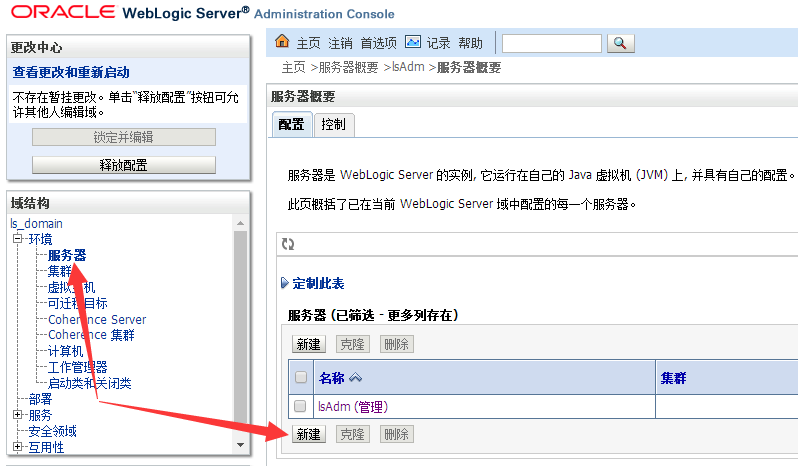
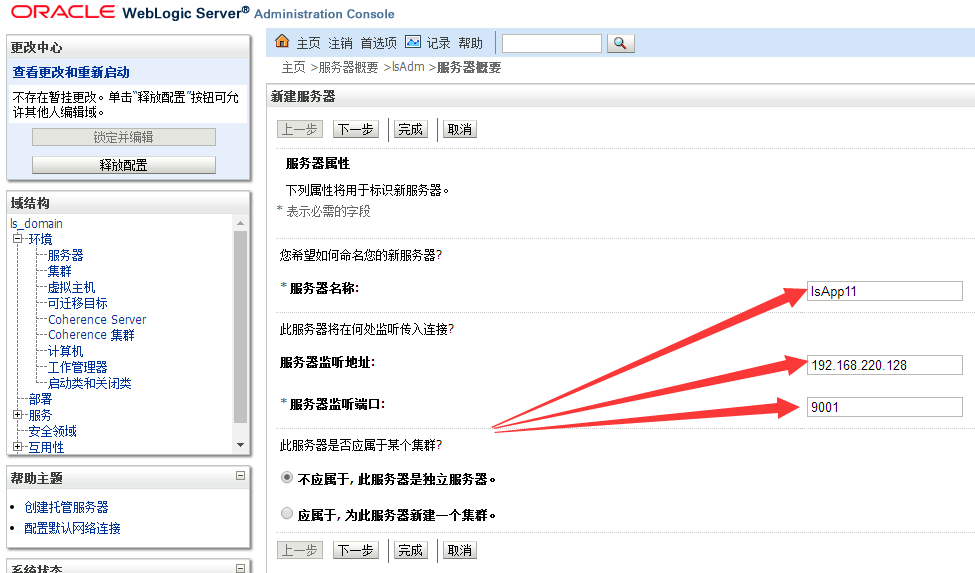
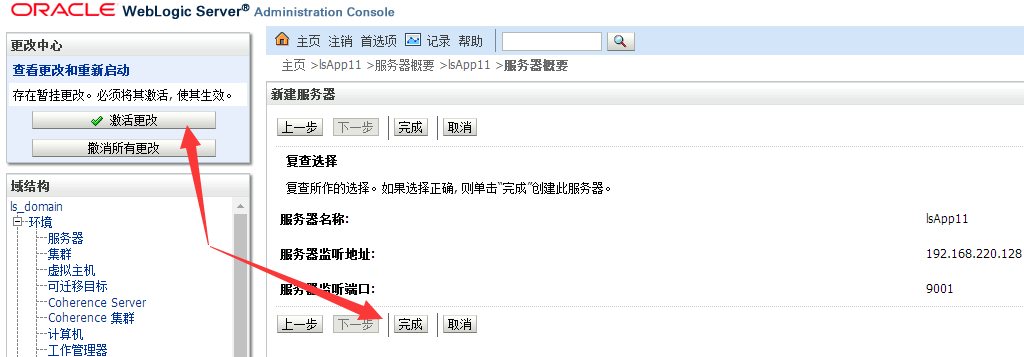
启动受控服务器:
./startman.sh
6.修改日志等配置【优化步骤,可选】
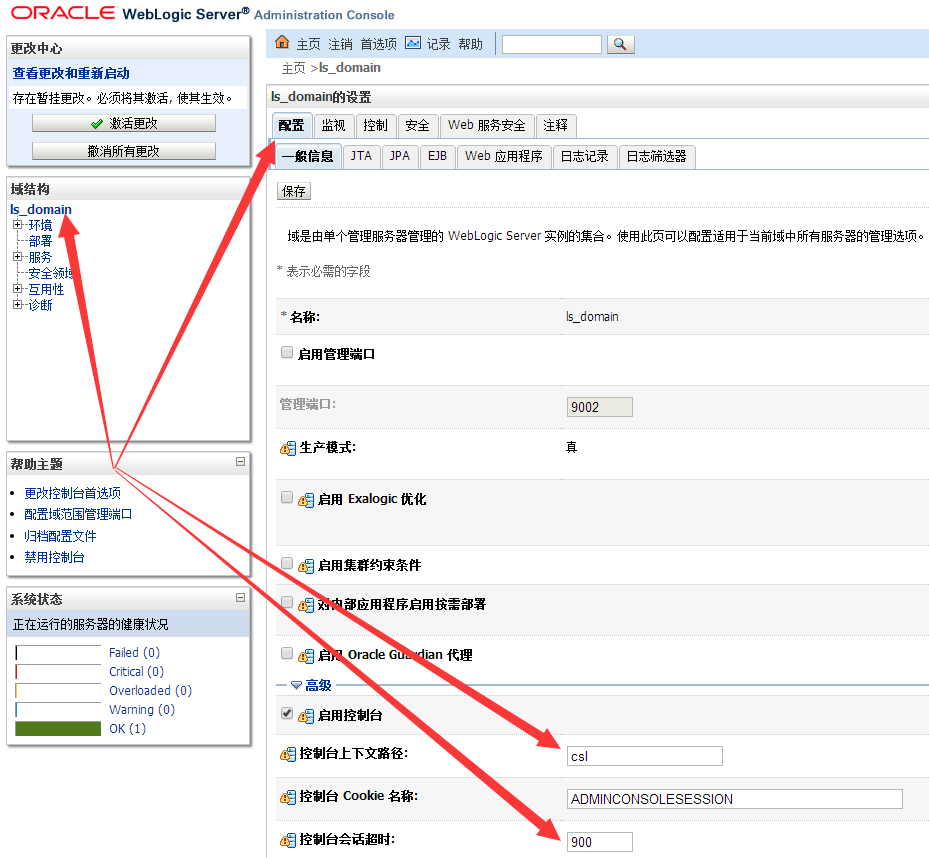
修改控制台地址和会话超时时间(控制台重启后地址变为http://192.168.220.128:9000/csl)
修改domain日志配置
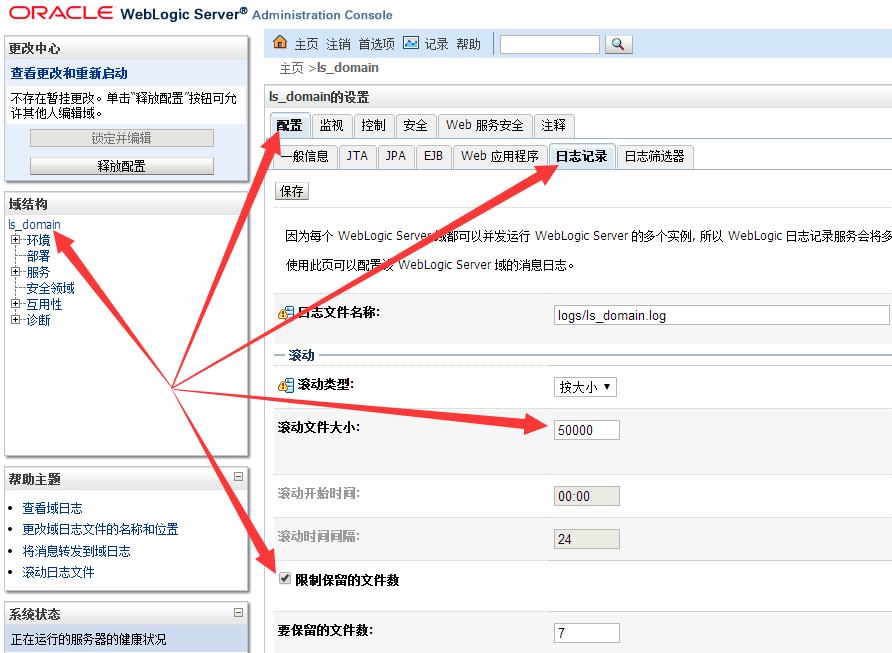
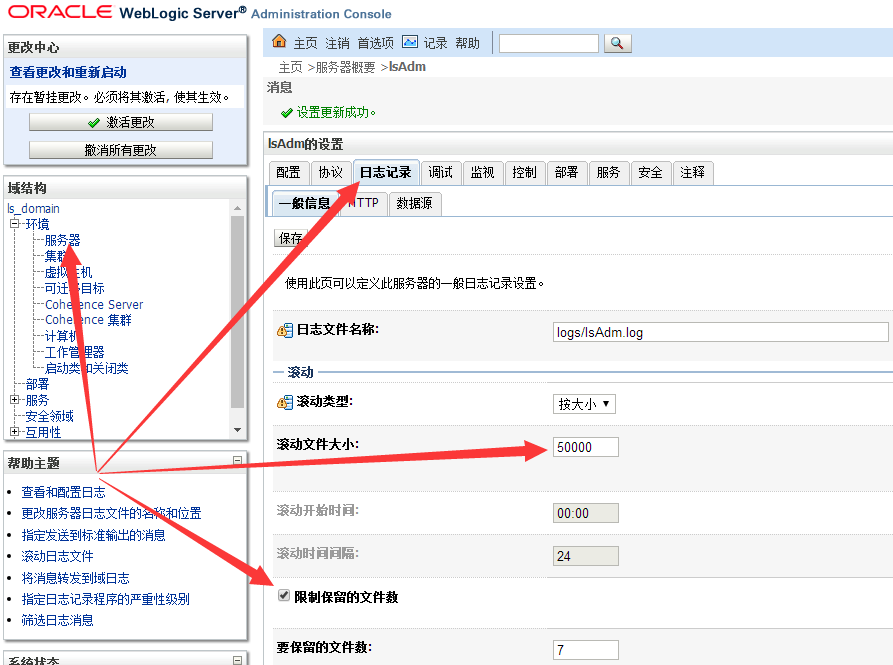
修改一般信息日志配置
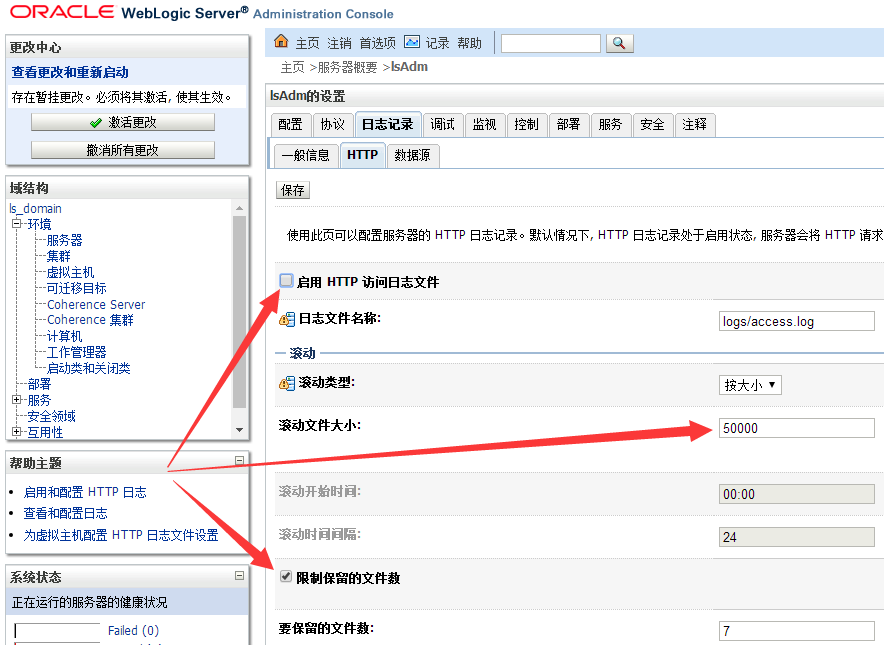
修改http日志配置;http会产生大量日志所以一般不启用
修改数据源日志配置
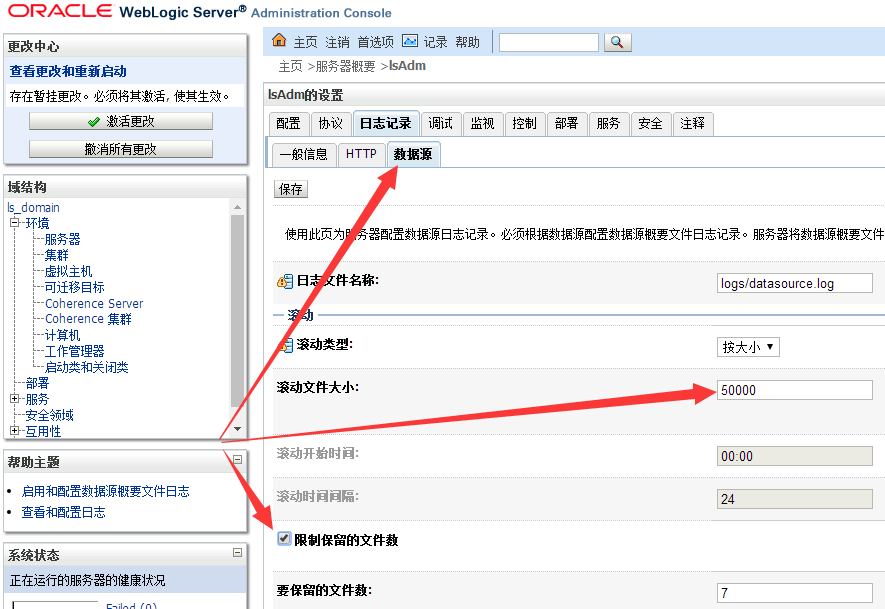
对于控制台server(这里是lsAdm)和所有受控server(这里是lsApp11)都要如此配置“一般信息”、“HTTP”和“数据源”三项。
至此weblogic创建domain并配置已经完成,重启受控服务器和控制台服务器使配置生效即可。
weblogic创建domain教程的更多相关文章
- 实战weblogic集群之创建domain,AdminServer
在weblogic安装完后,接下来就可以创建domain,AdminSever了. 第1步: $ cd /app/sinova/Oracle/wlserver_10./common/bin $ ./c ...
- WebLogic Developer版创建domain
1.直接在cmd命令窗口中运行%MW_HOME%目录下的configure.cmd文件,这个过程会解压一些jar文件,知道提示是否配置domain: 2.可以通过执行%MW_HOME%\oracle_ ...
- Linux下Weblogic创建域方法和步骤
Weblogic 创建域 以weblogic帐号登录(与创建域目录相对应账户) cd /home/weblogic/bea/weblogic92/common/bin 执行./config.sh进入配 ...
- weblogic配置domain和删除domain
weblogic创建域的过程比较简单,但是在创建域之前一定要注意不能存在重名的domain. Domain简单定义为:是一个逻辑管理单元,Domain下面包含着weblogic应用服务器中的所有东西, ...
- hibernate(四)__由表逆向创建Domain对象和对象关系映射文件
之前我们是手写Domain对象和对象关系映射文件->然后生成数据库中的Table. 现在我们反过来先在数据库中建好Table->然后用工具生成Domain对象和对象关系映射文件. 步骤: ...
- WebLogic使用总结(六)——WebLogic创建虚拟主机和修改启动端口号
一.在WebLogic中创建一个虚拟主机 找到虚拟主机面板,如下图所示:
- weblogic创建域生产模式,输入用户名闪退
weblogic创建域,生产模式,报错 <2017-12-29 下午04时53分59秒 CST> <Info> <Security> <BEA-090065& ...
- Altium 中异形焊盘异形封装的创建图文教程
Altium 中异形焊盘异形封装的创建图文教程 一般不规则的焊盘被称为异型焊盘,典型的有金手指.大型的器件焊盘或者板子上需要添加特殊形状的铜箔(可以制作一个特殊封装代替). 如图27所示,此处我们以一 ...
- Oracle创建用户教程
计算机-->管理-->应用程序与服务-->(OracleOraDb11g_home1TNSListener 和 OracleServiceORCL 服务)->启动服务 打开Or ...
随机推荐
- virtualbox中的虚拟机和windows共享文件夹
http://www.jianshu.com/p/4e3c8b06cb06 为什么要共享文件夹? 在工作的过程当中会使用到不同的软件开发环境,php的,python的,nodejs的为了隔离这些应用环 ...
- Centos7 安装python3.7.2
下载python3.7.2源码 wget https://www.python.org/ftp/python/3.7.2/Python-3.7.2.tgz 下载完后对压缩包解压缩 tar -xf Py ...
- Oracle其他简单查询
范例:查询公司中所有雇员的职位信息 SELECT job FROM emp; 实际在公司里面,一个职位会有多个人员.如果查询全部职位,肯定会存在重复.要消除掉重复,利用DISTINCT完成.(dist ...
- 排序——冒泡排序(java描述)
百度百科:冒泡排序(Bubble Sort),是一种计算机科学领域的较简单的排序算法. 它重复地走访过要排序的元素列,依次比较两个相邻的元素,如果他们的顺序(如从大到小.首字母从A到Z)错误就把他们交 ...
- vscode 常用扩展推荐
1.扩展推荐 Beautify Beautify code in place for VS Code CSS Formatter Formatter for CSS ESLint ...
- MYSQL的基本函数 (加密函数)
AES_ENCRYPT(str,key) 返回用密钥key对字符串str利用高级加密标准算法加密后的结果,调用AES_ENCRYPT的结果是一个二进制字符串,以BLOB类型存储 AES_DECRYP ...
- 在docker 容器中安装命令
apt-get update ##跟新 //vi apt install vim //weget apt install weget //yum apt install yum //ifconfig ...
- Import Projects from git
1:工具栏window -->show view -->Other
- sublime编辑器
1.完全卸载sublime的方法. 打开preferences->browse packages 这个包,打开的那个目录,然后删除完整的sublime Text3目录就行. 2.sublime的 ...
- css特效博客
1. 前端网上: e344657992 http://www.qdfuns.com/notes/15477/02cb463c28d9fe69ee0bc804448b8316.html