
Docker 搭建开源 CMDB平台 之 “OpsManage”
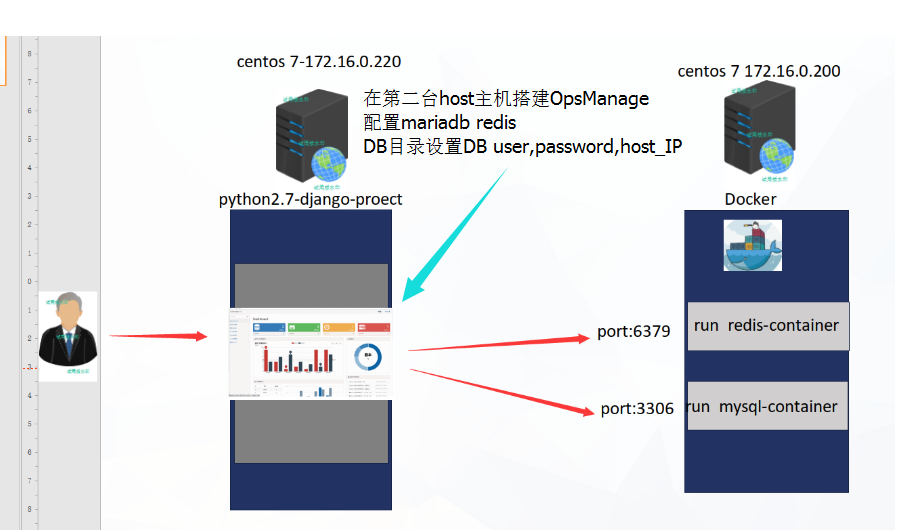
说明: 我一次build 完 所以images 包 有1G多 可分层build bash 环境一层 应用程序及启动脚本(shell.sh) 一层
步骤:
1 基础 Images 镜像 sairamnusetty/centos6.8-python2.7.13
2 从github 上 git proect 下来并修改配置文件
3 运行 install-project.sh 自动下载 git proect 在次运行 自动构建docker-images 然后 run proect
整个目录文件
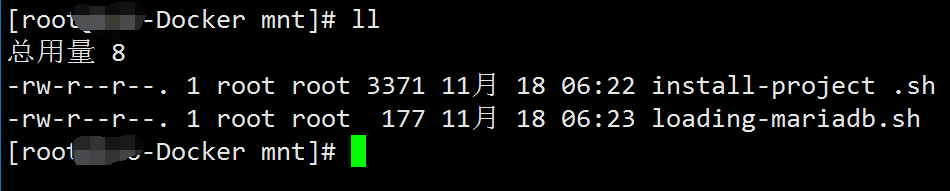
install-project.sh 代码如下: 第一次运行检查当下目录是否存在OpsManage 项目文件 如没有自动从github上git 下来
#!/bin/bash

#author  Mrchen 237356573@qq.com

PROCJECT="./OpsManage"

DOCKERFILE="./dockerfile"

run_start() {

#run build-project-image

echo -e  "\033[41;30m正在----Run build-Images-----\033[0m"

docker build -t python-django:opsmanage-v1 .

#run docker-images

echo -e  "\033[41;30m正在----Docker---Run-Images-----\033[0m"

docker run --name project -p 80:8000 -d python-django:opsmanage-v1

}

echo -e "\033[41;30m 正在检查文件 \033[0m"

if [ ! -d "$PROCJECT" ]; then

   echo -e "\033[41;30m正在-----git clone https://github.com/welliamcao/OpsManage.git----\033[0m"

   yum install wget git -y &&

   git clone https://github.com/welliamcao/OpsManage.git

   echo -e "\033[41;30m请先修改modify Redis-host-IP Mysql-host-IP user password db---\033[0m"

   echo -e  "\033[41;30m文件位置---./OpsManage/OpsManage/settings.py---\033[0m"

   echo -e  "\033[41;30m 在运行该脚本 \033[0m"

else

	if [[ ! -f "$DOCKERFILE" ]]; then

		cat > ./Dockerfile <<\EOF

# MAINTAINER        Mrchen <237356573@qq.com>

# DOCKER-VERSION    1.0

FROM sairamnusetty/centos6.8-python2.7.13

MAINTAINER The CentOS Project <237356573.qq.com>

RUN yum install  wget  gcc -y

RUN wget -O /etc/yum.repos.d/CentOS-Base.repo http://mirrors.aliyun.com/repo/Centos-6.repo

RUN yum clean all

RUN yum install epel-release -y

RUN yum repolist

#install django-base-server

RUN yum install zlib zlib-devel readline-devel sqlite-devel bzip2-devel openssl-devel gdbm-devel libdbi-devel ncurses-libs kernel-devel libxslt-devel libffi-devel python-devel mysql-devel zlib-devel mysql-server sshpass gcc wget git openssl-devel -y

#install python-django-pip-base

COPY ./requirements.txt  /mnt

RUN pip install -r /mnt/requirements.txt -i https://pypi.tuna.tsinghua.edu.cn/simple/

#mount proect OpsManage

VOLUME ["/mnt/OpsManage"]

COPY  OpsManage  /mnt

#run .sh .py

COPY  ./loading-mariadb.sh   /mnt

COPY  ./start-proect.sh   /mnt

#开放8000端口

EXPOSE  8000

#load data

RUN chmod +x /mnt/start-proect.sh

#ENTRYPOINT ["/mnt/start-proect.sh"]

CMD ["/mnt/start-proect.sh"]

EOF

echo -e "new pip config"

cat >  ./requirements.txt  <<\EOF

django==1.8.17

Celery==3.1.20

django-celery

celery-with-redis

djangorestframework==3.5.3

paramiko

ansible==2.2.2

redis

xlrd

supervisor

MySQL-python

DBUtils

EOF

cat > ./start-proect.sh <<\EOF

#!/bin/bash

#237356573

OPS_DIR=/mnt

#--------------RUN---Opsmange---------------------------

if [[ ! -d  ${OPS_DIR}/OpsManage ]];then

echo "not proectj-DIR "

else

cd ${OPS_DIR}/OpsManage

python ${OPS_DIR}/manage.py migrate

STR=$?

if [[ ! STR -ne 0 ]];then

chmod +x /mnt/loading-mariadb.sh

bash  /mnt/loading-mariadb.sh

sleep 1

python ${OPS_DIR}/manage.py runserver 0.0.0.0:8000

else

echo "----------------mysql----loading-----ERROR-------"

fi

fi

EOF

#---------------------------RUN----------------------------------

echo -e  "...new--all--files..................."

read -r -p "ls it running?[Y/n]" PROECT

case $PROECT in

   [yY][eE][sS]|[yY])

              run_start

        ;;

   [nN][oO]|[nN])

   echo "-----exit-----"

   exit

        ;;

esac

else

read -r -p "all files exis ls it running?[Y/n]" PROECT

case $PROECT in

   [yY][eE][sS]|[yY])

              run_start

       ;;

   [nN][oO]|[nN])

   echo "-----exit-----"

   exit

       ;;

esac

fi

fi
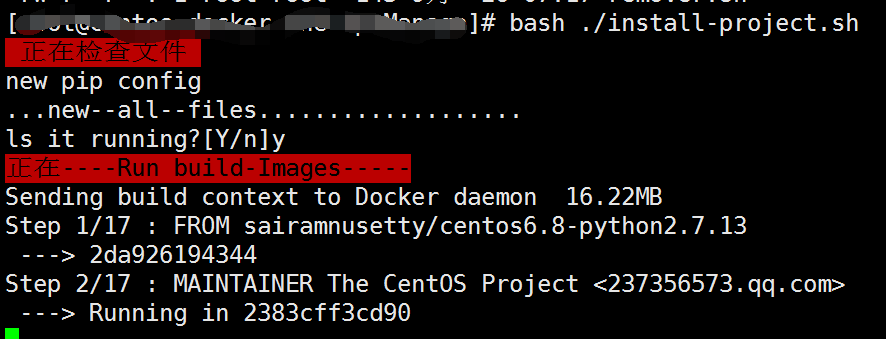
运行: bash ./install-project.sh


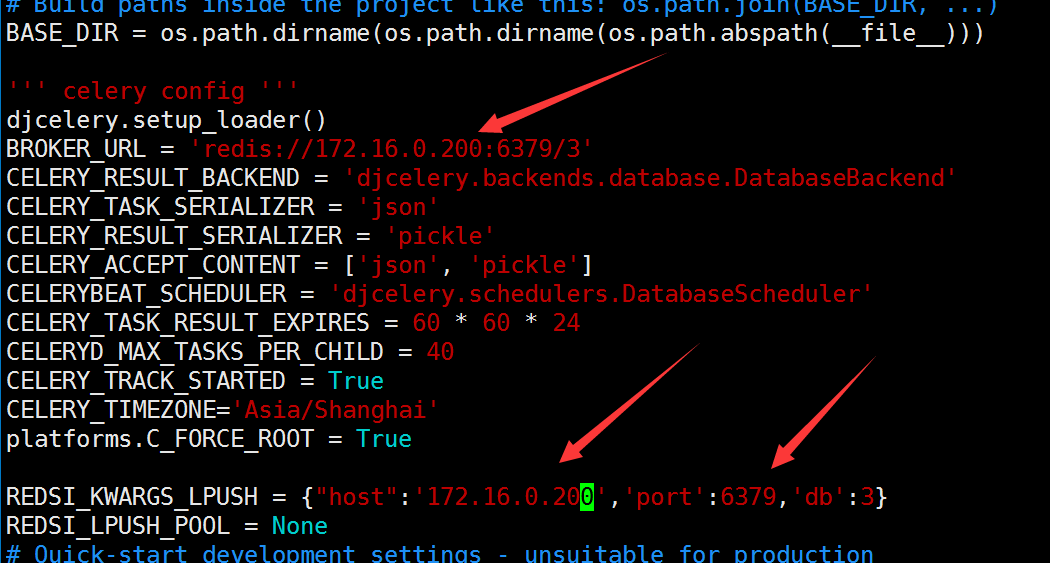
vim ./OpsManage/OpsManage/settings.py 修改 redis mariadb 及 port 我们修改为 172.16.0.200
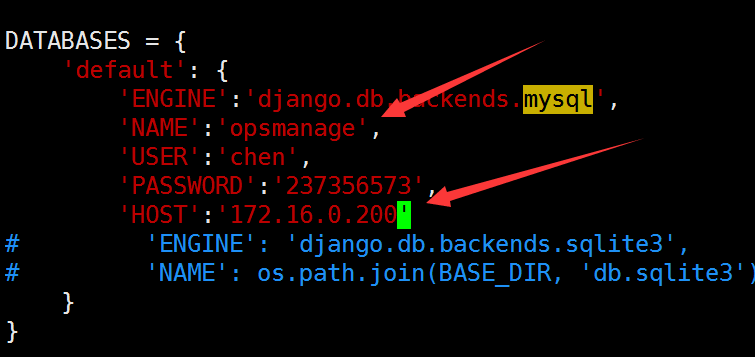
mariadb 我们修改为:
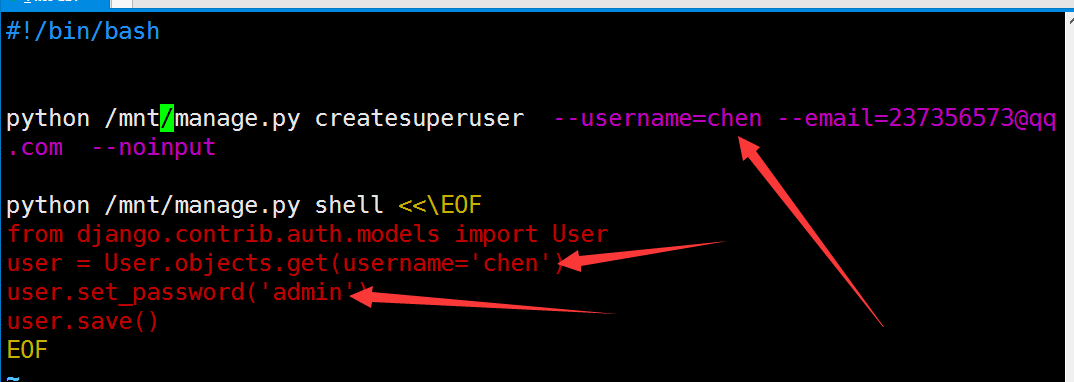
修改完我们在来看一下 loading-mariadb.sh 该文件为启动时修改python-django 登陆时帐号及密码:
在次运行 bash ./install-project.sh
坐等 查看:
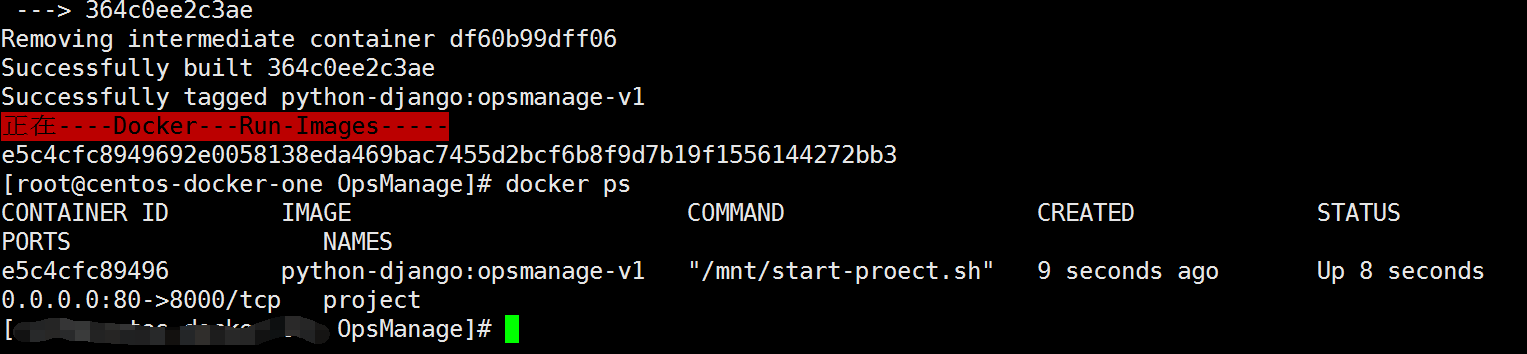

访问 172.16.0.220 user: chen password : admin


images 打包 docker save e5c4cfc89496 > /mnt/opsmanage.ims
images loading进本地 仓库 docker load < /mnt/opsmanage.ims
Tag docker tag e5c4cfc89496 python-django_opsmanage_v1
push 到私有仓库 docker push 172.16.0.230:5000/python-django_opsmanage_v1
还可以写个 compose 在加 swarm集群 也是我接下去要研究学习 还有 k8s 哦!
container (redis,mariadb,Opsmanages)下载地址:
Docker 搭建开源 CMDB平台 之 “OpsManage”的更多相关文章
- Docker 搭建开源 CMDB平台 “OpsManage” 之 Mariadb
整理了一下文档 今天来构建mariadb 主机还是 centos 172.16.0.200 构建第二个images 直接shell.sh 完成 #!/bin/bash echo " ...
- Docker 搭建开源 CMDB平台 “OpsManage” 之 Redis
整体结构如下图 先来在 172.16.0.200 安装docker-ce (新)或 docker-io(旧) 0: Docker-ce (新版本 Docker version 17. ...
- 【译文】用Spring Cloud和Docker搭建微服务平台
by Kenny Bastani Sunday, July 12, 2015 转自:http://www.kennybastani.com/2015/07/spring-cloud-docker-mi ...
- Spring Cloud和Docker搭建微服务平台
用Spring Cloud和Docker搭建微服务平台 This blog series will introduce you to some of the foundational concepts ...
- 基于docker搭建开源扫描器——伏羲
基于docker搭建开源扫描器——伏羲 1.简介 项目地址 伏羲是一款开源的安全检测工具,适用于中小型企业对企业内部进行安全检测和资产统计. 功能一览: 基于插件的漏洞扫描功能(类似于巡风) 漏洞管理 ...
- Docker搭建代码检测平台SonarQube并检测maven项目
1 前言 良好的代码习惯是一个优秀程序员应该具备的品质,但靠人的习惯与记忆来保证代码质量,始终不是一件靠谱的事.在计算机行业应该深知,只要是人为的,都会有操作风险.本文讲解如何通过Docker搭建代码 ...
- 企业安全建设之搭建开源SIEM平台
https://www.freebuf.com/special/127172.html https://www.freebuf.com/special/127264.html https://www. ...
- 企业安全建设之搭建开源SIEM平台(上)
前言 SIEM(security information and event management),顾名思义就是针对安全信息和事件的管理系统,针对大多数企业是不便宜的安全系统,本文结合作者的经验介绍 ...
- Docker 搭建开源跳板机_jumpserver (运维开源堡垒机_jumpserver) Centos_7.0
最近看到一个开源项目(jumpserver) 很不错 还是用Docker 部署得 ... 抽了点时间拿来学习一下 部署 分析 简单使用一下 ....好了先搭起来 准备 工作: ...
随机推荐
- 学习笔记(6)- pytext训练会话助手
https://github.com/facebookresearch/pytext https://pytext.readthedocs.io/en/master/ https://pytext.r ...
- rem与部分手机 字体偏大问题
原因是部分手机自己设置了巨无霸字体.
- C# String 字符串一些关键理解
#1 :在.Net Framework中,字符总是表示成16位Unicode的代码#2 :String 和string 其实是一样的只是表现形式上不同#3 :string类型被视为基元类型,也就是编译 ...
- Codeforces1300D. Aerodynamic
本题题目有点绕,结合图例大概可知,P(x,y)是以点给出的一个凸包,T是一个点集合,也构成一个凸包,构成的方法就是将原点(0,0)在P(x,y)的边上跑,移动坐标轴,其构成的最远点是个凸包,我们可以画 ...
- Ubuntu 解决TXT文本乱码问题
只要依次在终端输入这两行指令即可: gsettings set org.gnome.gedit.preferences.encodings auto-detected "['GB18030' ...
- F: Fabulous Race Between Tortoise And Rabbit 扩展欧几里得
http://oj.jxust.edu.cn/contest/Problem?id=1561&pid=5 题目描述 经历了上次的惨败,兔子一直心怀不满,又策划了一场比赛,但这次不再是简单的跑步 ...
- day09-Python运维开发基础(函数收集参数、命名关键字参数与返回值、函数名的特殊使用及 全局/局部变量详解)
1. 函数收集参数.命名关键字参数与返回值.函数名的特殊使用 # ### 默认形参 和 关键字实参 # 默认形参和 关键字实参 在写法上是一样 # 函数的定义处 """默 ...
- Jsp有哪些内置对象?作用分别是什么?
Page,pageContext,request,response,session,application,out,config,exception Page指的是JSP被翻译成Servlet的对象的 ...
- IP、TCP、DNS
负责传输的IP协议 按层次分,IP网际协议位于网络层.几乎所有使用网络的系统都会用到 IP 协议. “IP”和“IP地址不同”,“IP”是一种协议的名称.IP 协议的作用是把各种数据包传送给对方.而要 ...
- Celery的常用知识
什么是Clelery Celery是一个简单.灵活且可靠的,处理大量消息的分布式系统.专注于实时处理的异步任务队列.同时也支持任务调度. Celery的架构由三部分组成,消息中间件(message ...