
Android的界面组件使用之ImageButton和ImageView,ImageSwitcher和GridView
(一)ImageButton和ImageView
ImageButton与Button的功能完全相同,只是ImageButton上显示的是图像,并且每个ImageButton组件都必须指定一个id,以便在程序中使用该按钮,
android:src属性则是用来设置它显示的图像
ImageView是一个显示图像的组件,同样的他的src也是用来设置显示的图像的,在程序中可以调用ImageView的setImageResource()方法,来从项目资源类R中加载指定的图像文件。
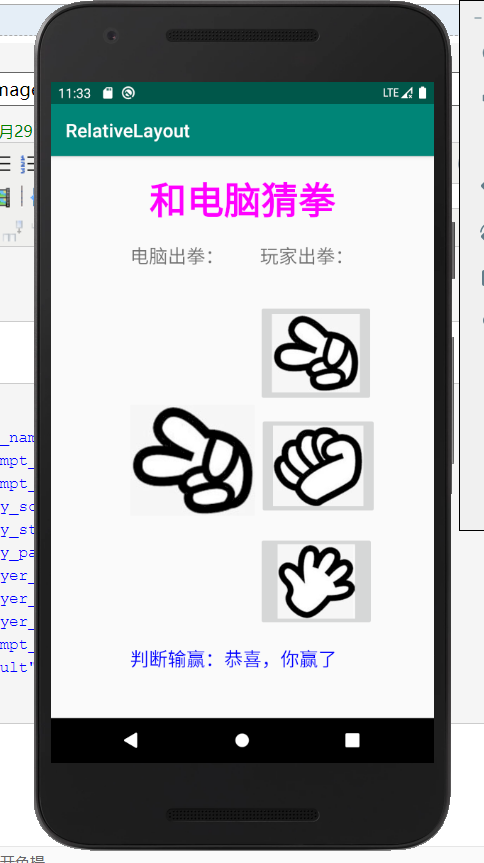
接下来,完成昨天“猜拳游戏的美化版”,从网上找了三张石头剪子布的图片,放到drawable文件下。
界面布局文件:
<?xml version="1.0" encoding="utf-8"?>

<RelativeLayout xmlns:android="http://schemas.android.com/apk/res/android"

    xmlns:app="http://schemas.android.com/apk/res-auto"

    xmlns:tools="http://schemas.android.com/tools"

    android:layout_height="match_parent"

    android:layout_width="400dp"

    android:layout_gravity="center_horizontal"

    tools:context=".MainActivity">

    <TextView

        android:id="@+id/txtTitle"

        android:layout_width="wrap_content"

        android:layout_height="wrap_content"

        android:text="@string/prompt_title"

        android:textColor="#FF00FF"

        android:textSize="40sp"

        android:textStyle="bold"

        android:layout_centerHorizontal="true"

        android:paddingLeft="20dp"

        android:paddingRight="20dp"

        android:layout_marginTop="20dp"

        android:layout_marginBottom="20dp"/>

    <TextView

        android:id="@+id/txtCom"

        android:layout_width="wrap_content"

        android:layout_height="wrap_content"

        android:text="@string/prompt_com_play"

        android:layout_below="@+id/txtTitle"

        android:layout_alignLeft="@+id/txtTitle"

        android:textSize="20sp"

        android:layout_marginBottom="20dp"

        android:layout_alignStart="@+id/txtTitle" />

    <TextView

        android:id="@+id/txtMyPlay"

        android:layout_width="wrap_content"

        android:layout_height="wrap_content"

        android:text="@string/prompt_my_play"

        android:layout_below="@id/txtTitle"

        android:layout_alignRight="@id/txtTitle"

        android:textSize="20sp"

        android:layout_marginBottom="20dp"

        android:layout_alignEnd="@id/txtTitle" />

    <ImageButton

        android:id="@+id/imgBtnScissors"

        android:layout_width="124dp"

        android:layout_height="107dp"

        android:layout_below="@id/txtMyPlay"

        android:layout_alignLeft="@id/txtMyPlay"

        android:layout_marginLeft="-2dp"

        android:layout_marginTop="17dp"

        android:paddingLeft="15dp"

        android:paddingRight="15dp"

        android:scaleType="centerInside"

        android:src="@drawable/scissors" />

    <ImageView

        android:id="@+id/imgViewComPlay"

        android:layout_width="134dp"

        android:layout_height="123dp"

        android:layout_below="@id/imgBtnScissors"

        android:layout_alignLeft="@id/txtCom" />

    <ImageButton

        android:id="@+id/imgBtnStone"

        android:layout_width="127dp"

        android:layout_height="107dp"

        android:layout_below="@id/imgBtnScissors"

        android:layout_alignLeft="@id/imgBtnScissors"

        android:layout_marginLeft="1dp"

        android:layout_marginTop="14dp"

        android:paddingLeft="15dp"

        android:paddingRight="15dp"

        android:scaleType="fitCenter"

        android:src="@drawable/stone" />

    <ImageButton

        android:id="@+id/imgBtnPaper"

        android:layout_width="125dp"

        android:layout_height="99dp"

        android:layout_below="@id/imgBtnStone"

        android:layout_alignLeft="@id/imgBtnStone"

        android:layout_marginLeft="-1dp"

        android:layout_marginTop="21dp"

        android:paddingLeft="15dp"

        android:paddingRight="15dp"

        android:scaleType="fitCenter"

        android:src="@drawable/paper" />

    <TextView

        android:id="@+id/txtResult"

        android:layout_width="wrap_content"

        android:layout_height="wrap_content"

        android:text="@string/result"

        android:layout_below="@id/imgBtnPaper"

        android:layout_alignLeft="@id/txtCom"

        android:textSize="20sp"

        android:textColor="#0000FF"

        android:layout_marginTop="20dp"

        android:layout_alignStart="@id/txtCom" />

</RelativeLayout>
程序文件:
package com.example.relativelayout;

import androidx.appcompat.app.AppCompatActivity;

import android.os.Bundle;

import android.view.View;

import android.widget.Button;

import android.widget.ImageButton;

import android.widget.ImageView;

import android.widget.TextView;

import org.w3c.dom.Text;

public class MainActivity extends AppCompatActivity {

    private TextView mTxtResult;

    private ImageView mImgViewComPlay;

    private ImageButton mImgBtnScissors,mImgBtnStone,mImgBtnPaper;

    @Override

    protected void onCreate(Bundle savedInstanceState) {

        super.onCreate(savedInstanceState);

        setContentView(R.layout.activity_main);

        mImgViewComPlay=(ImageView)findViewById(R.id.imgViewComPlay);

        mTxtResult=(TextView)findViewById(R.id.txtResult);

        mImgBtnStone=(ImageButton)findViewById(R.id.imgBtnStone);

        mImgBtnPaper=(ImageButton)findViewById(R.id.imgBtnPaper);

        mImgBtnScissors=(ImageButton)findViewById(R.id.imgBtnScissors);

        mImgBtnScissors.setOnClickListener(imgBtnScissorsOnClick);

        mImgBtnStone.setOnClickListener(imgBtnStoneOnClick);

        mImgBtnPaper.setOnClickListener(imgBtnPaperOnClick);

    }

    private View.OnClickListener imgBtnScissorsOnClick=new View.OnClickListener(){

        @Override

        public void onClick(View v) {

            int iComPlay=(int)(Math.random()*3+1);

            //1.剪刀,2.石头,3.布

            if(iComPlay==1)

            {

                mImgViewComPlay.setImageResource(R.drawable.scissors);

                mTxtResult.setText(getString(R.string.result)+getString(R.string.player_draw));

            }

            else if(iComPlay==2)

            {

                mImgViewComPlay.setImageResource(R.drawable.stone);

                mTxtResult.setText(getString(R.string.result)+getString(R.string.player_lose));

            }

            else

            {

                mImgViewComPlay.setImageResource(R.drawable.paper);

                mTxtResult.setText(getString(R.string.result)+getString(R.string.player_win));

            }

        }

    };

    private View.OnClickListener imgBtnStoneOnClick=new View.OnClickListener(){

        @Override

        public void onClick(View v) {

            int iComPlay=(int)(Math.random()*3+1);

            //1.剪刀,2.石头,3.布

            if(iComPlay==1)

            {

                mImgViewComPlay.setImageResource(R.drawable.scissors);

                mTxtResult.setText(getString(R.string.result)+getString(R.string.player_win));

            }

            else if(iComPlay==2)

            {

                mImgViewComPlay.setImageResource(R.drawable.stone);

                mTxtResult.setText(getString(R.string.result)+getString(R.string.player_draw));

            }

            else

            {

                mImgViewComPlay.setImageResource(R.drawable.paper);

                mTxtResult.setText(getString(R.string.result)+getString(R.string.player_lose));

            }

        }

    };

    private View.OnClickListener imgBtnPaperOnClick=new View.OnClickListener(){

        @Override

        public void onClick(View v) {

            int iComPlay=(int)(Math.random()*3+1);

            //1.剪刀,2.石头,3.布

            if(iComPlay==1)

            {

                mImgViewComPlay.setImageResource(R.drawable.scissors);

                mTxtResult.setText(getString(R.string.result)+getString(R.string.player_lose));

            }

            else if(iComPlay==2)

            {

                mImgViewComPlay.setImageResource(R.drawable.stone);

                mTxtResult.setText(getString(R.string.result)+getString(R.string.player_win));

            }

            else

            {

                mImgViewComPlay.setImageResource(R.drawable.paper);

                mTxtResult.setText(getString(R.string.result)+getString(R.string.player_draw));

            }

        }

    };

}
字符串资源文件:
<resources>

    <string name="app_name">RelativeLayout</string>

    <string name="prompt_com_play">电脑出拳:</string>

    <string name="prompt_my_play">玩家出拳:</string>

    <string name="play_scissors">剪刀</string>

    <string name="play_stone">石头</string>

    <string name="play_paper">布</string>

    <string name="player_win">恭喜,你赢了</string>

    <string name="player_lose">很可惜,你输了</string>

    <string name="player_draw">双方平手!</string>

    <string name="prompt_title">和电脑猜拳</string>

    <string name="result">判断输赢:</string>

</resources>
应用截图:
(二)ImageSwitcher和GridView
网格试图(GridView)用于在界面上按行,列分布的方式来显示多个组件。
GridView和ListView有共同的父类:AbsListView,因此GridView和ListView具有一定的相似性。GridView和ListView的主要区别在于:ListView只是一个方向上的分布;而GridView则会在两个方向上分布。
与ListView相似的是,GridView也需要通过Adapter来提供显示数据:可以通过SimpleAdapter来为GridView提供数据,也可以通过开发BaseAdapter的子类来问GridView提供数据,不管使用那种方式,GridView和ListView的用法基本是一致的。
GridView中提供了常用的XML属性:
| XML属性 | 相关方法 | 说明 |
| android:columnWidth | setColumnWidth(int) | 设置列的宽度 |
| android:gravity | setGravity(int) | 设置对齐方式 |
| android:horizontalSpacing | setHorizontalSpac(int) | 设置各个元素之间的水平间距 |
| android:numColumn | setNumColumn(int) | 设置列数 |
| android:stretchMode | setStretchMode(int) | 设置拉伸模式 |
| android:verticalSpacing | setVerticalSpacing(int) | 设置各个元素之间的垂直间距 |
注意:使用GridView时一般都应该指定numColumn大于1,否则该属性默认值为1,如果将属性设置为1,则意味着该Gridview只有一列,那Gridview就变成了Listview。
在上面表中提到的android:stretchMode属性支持如下几个属性值:
- NO_STRETCH : 不拉伸
- STRETCH_SPACING:仅拉伸元素之间的间距
- STRETCH_SPACING_UNIFORM:表格元素本身、元素之间的间距一起拉伸
- STRETCH_COLUMN_WIDTH:仅拉伸元素表格元素本身。
图片切换器(ImageSwitcher)是由FrameLayout派生而出,ImageSwitcher组件和ImageView很相似,他们都可用于显示图片,但是ImageView比ImageView多了一个功能:它所显示的图片切换是可以设置动画效果。
使用ImageSwitcher时往往需要为它设置一个ImageSwitcher.ViewFactory,来实现ImageSwitcher.ViewFactory时需要实现一个makeView()方法,该方法通常会返回一个Imageview而ImageSwitcher则负责显示这个ImageView。
Android的界面组件使用之ImageButton和ImageView,ImageSwitcher和GridView的更多相关文章
- Android 自学之基本界面组件(下)
按钮(Button)与图片按钮(ImageButton)组件的功能和用法 Button继承了TextView,ImageButton继承了Button.不管是Button还是ImageButton,他 ...
- Android界面组件的四种启动方式
Android界面组件启动有四种方式 standard,singleTop,singleTask,singleInstance. standard:每次调用都会都会产生新的组件. singletop: ...
- Android的四大组件之Activity
Android的四大组件之Activity Activity:是Android组件中最基本也是最为常见用的四大组件(Activity,Service服务,Content Provider内容提供者,B ...
- android中四大组件之间相互通信
好久没有写有关android有关的博客了,今天主要来谈一谈android中四大组件.首先,接触android的人,都应该知道android中有四大组件,activity,service,broadca ...
- Android四大基本组件介绍与生命周期
Android四大基本组件介绍与生命周期 Android四大基本组件分别是Activity,Service服务,Content Provider内容提供者,BroadcastReceiver广播接收器 ...
- Android中Intent组件详解
Intent是不同组件之间相互通讯的纽带,封装了不同组件之间通讯的条件.Intent本身是定义为一个类别(Class),一个Intent对象表达一个目的(Goal)或期望(Expectation),叙 ...
- Android编程: 界面组成、事件监听器
学习知识:界面组成.事件监听器 ====界面组成==== 1.用户界面的基本组件叫做View,都是继承android.view.View类,Android里面预定义很多基本的界面组件,比如 Butto ...
- Android典型界面设计——ViewPage+Fragment实现区域顶部tab滑动切换
一.问题描写叙述 本系列将结合案例应用,陆续向大家介绍一些Android典型界面的设计,首先说说tab导航,导航分为一层和两层(底部区块+区域内头部导航).主要实现方案有RadioGroup+View ...
- Android之桌面组件AppWidget
转载:Android之桌面组件App Widget初探 Android开发应用除了程序应用,还有App Widget应用.好多人会开发程序应用而不会开发App Widget应用.本帖子就是帮助大家学习 ...
随机推荐
- 8.14-T1村通网(pupil)
题目大意 要建设一个村庄的网络 有两种操作可选 1.给中国移动交宽带费,直接连网,花费为 A. 2.向另外一座有网的建筑,安装共享网线,花费为 B×两者曼哈顿距离. 题解 显然的最小生成树的题 见 ...
- 公有IP和私有IP的区别
什么是IP? 在网络中,每台计算机都有一个唯一的地址,方便别人找到它,这个地址称为IP地址 IP地址是一个网络编码,用来确定网络中的一个节点,是由32位的二进制组成 IP地址的组成? IP地址由网络部 ...
- bugku 点击1000000次
首先看一下题目发现进入网页之后是这个样的 然后点击一下发现是有变化 然后用F12 然后选择post data 然后输入clicks=1000000 然后就会发现答案 (clicks 是点击的意思)
- HBase 启动后HMaster进程自动消失
原因分析 1.hadoop 与 hbase 版本不兼容,导致的异常. 2.log日志信息显示 org.apache.hadoop.hbase.TableExistsException: hbase:n ...
- swiper移动端全屏播放动态获取数据
html: <link rel="stylesheet" href="css/swiper.min.css"> <div class=& ...
- 其他 - 阻塞 & 同步 的基本认识
1. 概述 有些概念, 老是弄不清楚 同步异步 阻塞非阻塞 2. 准备 场景 角色 client 发起请求 接受请求 server 接受请求 执行操作 返回响应 行为 大致是一个 C/S 模式的模型 ...
- 09-Docker-Volumes数据管理
目录 09-Docker-Volumes数据管理 参考 数据卷类型 数据卷操作 bind数据卷 volume数据卷 tmpfs数据卷 09-Docker-Volumes数据管理 Docker Vers ...
- 阿里云服务器-2.使用putty连接
1.下载PuTTY 进入官网 点击我跳转 点击here 看自己电脑是多少位选择下载 2.安装 一直点击下一步就行 这里可以选择也可以不选择,这会在创建桌面快捷文件 看图注意事项 这里也可以用密匙,先去 ...
- webpack初学踩坑记
注意事项: 1. webpack不用装在全局环境下,在哪个项目中使用,就安装在该项目下即可 1. 问题一:npm init 初始化一个项目后,添加webpack.config.js文件,在该项目中通过 ...
- IMDB-TOP_250-爬虫
这个小学期Python大作业搞了个获取IMDB TOP 250电影全部信息的爬虫.第二次写爬虫,比在暑假集训时写的熟练多了.欢迎大家评论. ''' ************************** ...