
IdentityServer4专题之七:Authorization Code认证模式
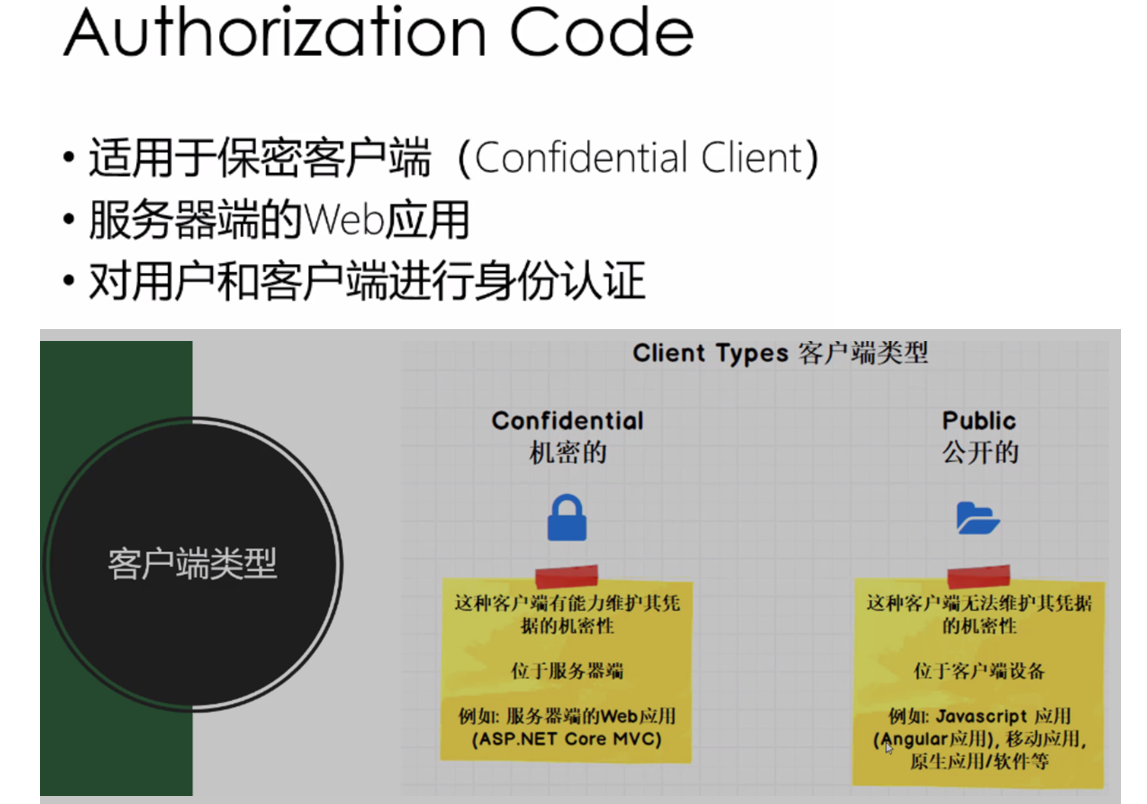
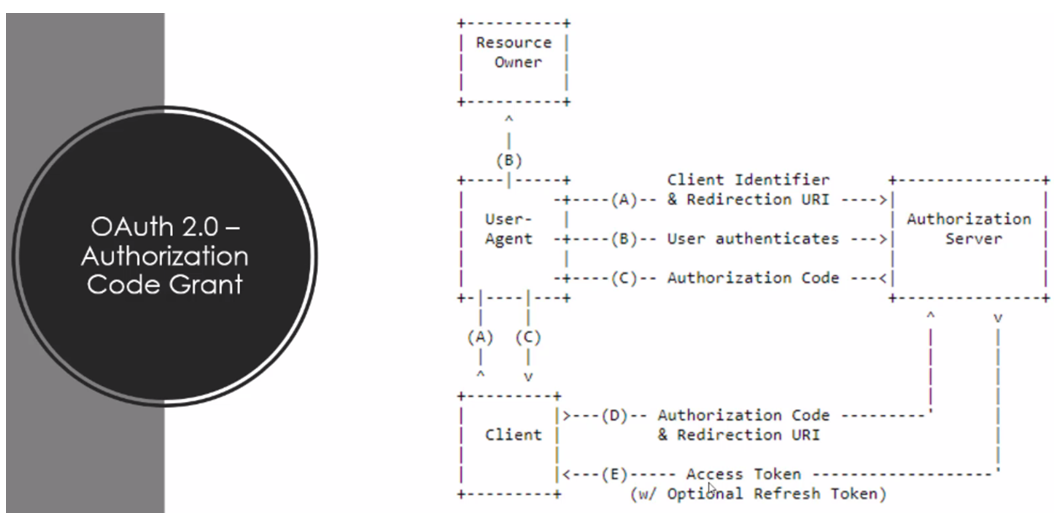
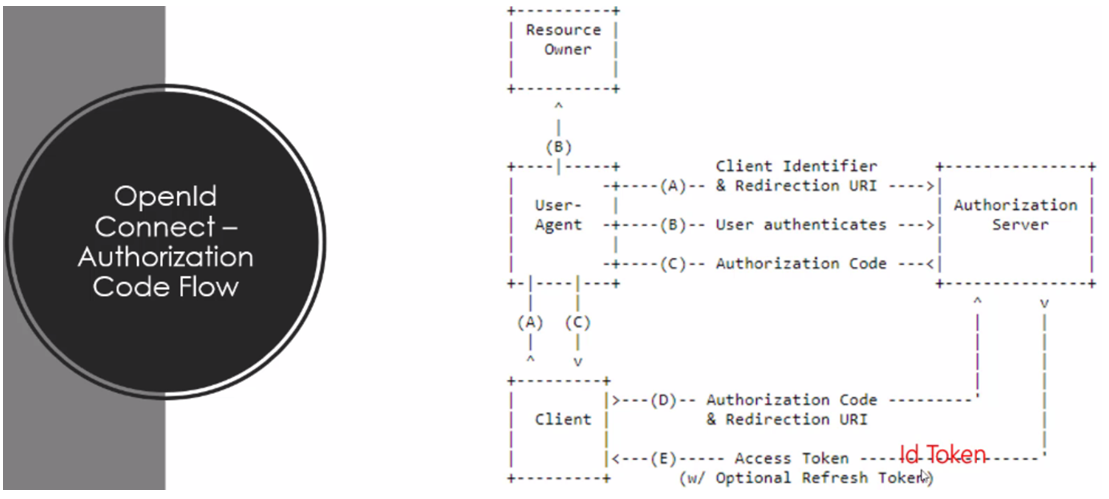
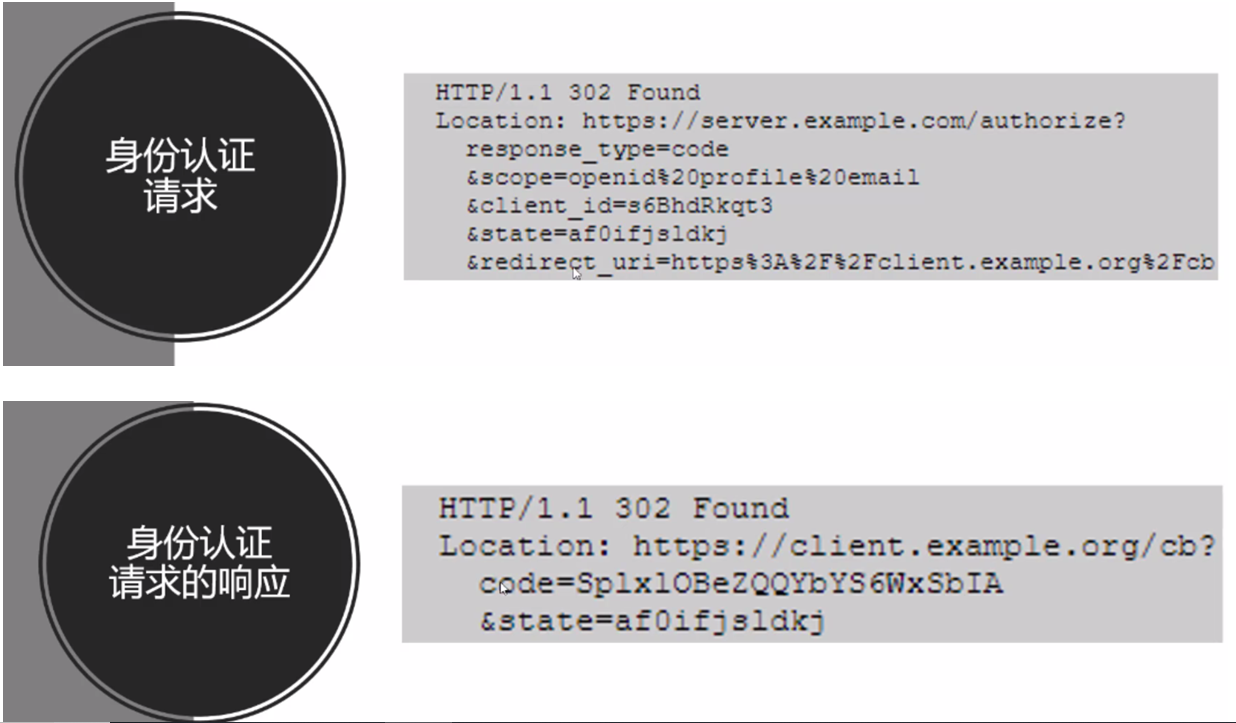

(1)identityserver4授权服务器端
public static class Config
{
public static IEnumerable<IdentityResource> GetIdentityResources()
{
return new IdentityResource[]
{
new IdentityResources.OpenId(),
new IdentityResources.Profile(),
new IdentityResources.Email(),
new IdentityResources.Phone(),
new IdentityResources.Address(),
};
}
public static IEnumerable<ApiResource> GetApis()
{
return new ApiResource[]
{
new ApiResource("api1", "My API #1")
};
}
public static IEnumerable<Client> GetClients()
{
return new[]
{
new Client
{
ClientId="mvc client",
ClientName="ASP.NET Core MVC Client",
AllowedGrantTypes=GrantTypes.CodeAndClientCredentials,
ClientSecrets={new Secret( "mvc secret".Sha256())},
RedirectUris={"http://localhost:5002/signin-oidc"},
FrontChannelLogoutUri="http://localhost:5002/signout-oidc",
PostLogoutRedirectUris={"http://localhost:5002/signout-callback-oidc"},
AlwaysIncludeUserClaimsInIdToken=true,//将用户所有的claims包含在IdToken内
AllowOfflineAccess=true,//offline_access,其实指的是能否用refreshtoken重新申请令牌
AllowedScopes =
{
"api1",
IdentityServerConstants.StandardScopes.OpenId,
IdentityServerConstants.StandardScopes.Profile,
IdentityServerConstants.StandardScopes.Address,
IdentityServerConstants.StandardScopes.Phone,
IdentityServerConstants.StandardScopes.Email
}
}
};
}
}
(2)客户端,还是需要安装IdentityModel库,
在startup.cs的ConfigurServices一节,需要做如下添加:
//关闭默认映射,否则它可能修改从授权服务返回的各种claim属性
JwtSecurityTokenHandler.DefaultInboundClaimTypeMap.Clear();
//添加认证服务,并设置其有关选项
services.AddAuthentication(options =>
{
//客户端应用设置使用"Cookies"进行认证
options.DefaultScheme =CookieAuthenticationDefaults.AuthenticationScheme ;
//identityserver4设置使用"oidc"进行认证
options.DefaultChallengeScheme =OpenIdConnectDefaults.AuthenticationScheme ;
}).AddCookie(CookieAuthenticationDefaults.AuthenticationScheme)
//对使用的OpenIdConnect进行设置,此设置与Identityserver的config.cs中相应client配置一致才可能登录授权成功
.AddOpenIdConnect(OpenIdConnectDefaults.AuthenticationScheme, options=> {
options.SignInScheme = CookieAuthenticationDefaults.AuthenticationScheme;
options.Authority = "http://localhost:5000";
options.RequireHttpsMetadata = false;
options.ClientId = "mvc client";
options.ClientSecret = "mvc secret";
options.SaveTokens = true;
options.ResponseType = "code";
options.Scope.Clear();
options.Scope.Add("api1");
options.Scope.Add(OidcConstants.StandardScopes.OpenId);//"openid"
options.Scope.Add(OidcConstants.StandardScopes.Profile);//"profile"
options.Scope.Add(OidcConstants.StandardScopes.Address);
options.Scope.Add(OidcConstants.StandardScopes.Email);
options.Scope.Add(OidcConstants.StandardScopes.Phone);
// 与identity server的AllowOfflineAccess=true,对应。offline_access,指的是能否用refreshtoken重新申请令牌
options.Scope.Add(OidcConstants.StandardScopes.OfflineAccess);
});
在Confiure一节,app.UseMvc之前添加如下内容:
app.UseAuthentication();
然后,在controller中使用时,按如下方式: 通常需如下引用
using System;
using System.Collections.Generic;
using System.Diagnostics;
using System.Linq;
using System.Net.Http;
using System.Threading.Tasks;
using IdentityModel.Client;
using Microsoft.AspNetCore.Authentication;
using Microsoft.AspNetCore.Authentication.Cookies;
using Microsoft.AspNetCore.Authentication.OpenIdConnect;
using Microsoft.AspNetCore.Authorization;
using Microsoft.AspNetCore.Mvc;
using Microsoft.IdentityModel.Protocols.OpenIdConnect;
using MvcClient.Models;
//获取AccessToken、IdToken、RefreshToken时:
[Authorize]
public async Task<IActionResult> Privacy()
{
var accessToken = await HttpContext.GetTokenAsync(OpenIdConnectParameterNames.AccessToken);
var idToken = await HttpContext.GetTokenAsync(OpenIdConnectParameterNames.IdToken);
var refreshToken = await HttpContext.GetTokenAsync(OpenIdConnectParameterNames.RefreshToken);
var authorizationCode = await HttpContext.GetTokenAsync(OpenIdConnectParameterNames.Code);
ViewData["idToken"] = idToken;
ViewData["refreshToken"] = refreshToken;
ViewData["accessToken"] = accessToken;
return View();
}
//访问Api资源时
public async Task<IActionResult> AccessApi()
{
var client = new HttpClient();
var disco = await client.GetDiscoveryDocumentAsync("http://localhost:5000");
ViewData["disco"] = disco.Error;
if (disco.IsError)
{
ViewData["disco"] = disco.Error;
return View();
}
var accessToken = await HttpContext.GetTokenAsync(OpenIdConnectParameterNames.AccessToken);
client.SetBearerToken(accessToken);
var response = await client.GetAsync("http://localhost:5001/api/values");
if (!response.IsSuccessStatusCode)
{
ViewData["response_error"] = response.StatusCode;
return View();
}
ViewData["response-content"] = await response.Content.ReadAsStringAsync();
return View();
}
从客户端及identityserver4登出时:
public async Task<IActionResult> Logout()
{
await HttpContext.SignOutAsync(CookieAuthenticationDefaults.AuthenticationScheme);
await HttpContext.SignOutAsync(OpenIdConnectDefaults.AuthenticationScheme);
return View();
}
如果登出需要跳转回到客户端应用网站,则需在将IdentityServer4的命名空间IdentityServer4.Quickstart.UI下的AccountOptions类中
public static bool AutomaticRedirectAfterSignOut = true;
这样,从identityserver登出后,将自动跳转到客户应用页面。
IdentityServer4专题之七:Authorization Code认证模式的更多相关文章
- 微信支持的Authorization code授权模式(公众号开发)(开放平台资料中心中的代公众号发起网页授权)
链接:https://blog.csdn.net/ASZJBGD/article/details/82838356 主要流程分为两步: 1.获取code 2.通过code换取accesstoken 流 ...
- OAuth2.0和企业内部统一登录,token验证方式,OAuth2.0的 Authorization code grant 和 Implicit grant区别
统一登录是个很多应用系统都要考虑的问题,多个项目的话最好前期进行统一设计,否则后面改造兼容很麻烦: cas认证的方式:新公司都是老项目,用的是cas认证的方式,比较重而且依赖较多,winform的项目 ...
- OAuth2.0安全设计之Authorization Code
OAuth 2.0 有 4 种认证流程: 授权码模式(authorization code) 简化模式(implicit) 密码模式(resource owner password credentia ...
- IdentityServer4 (3) 授权码模式(Authorization Code)
写在前面 1.源码(.Net Core 2.2) git地址:https://github.com/yizhaoxian/CoreIdentityServer4Demo.git 2.相关章节 2.1. ...
- asp.net权限认证:OWIN实现OAuth 2.0 之授权码模式(Authorization Code)
asp.net权限认证系列 asp.net权限认证:Forms认证 asp.net权限认证:HTTP基本认证(http basic) asp.net权限认证:Windows认证 asp.net权限认证 ...
- 基于OWIN WebAPI 使用OAUTH2授权服务【授权码模式(Authorization Code)】
之前已经简单实现了OAUTH2的授权码模式(Authorization Code),但是基于JAVA的,今天花了点时间调试了OWIN的实现,基本就把基于OWIN的OAUHT2的四种模式实现完了.官方推 ...
- IdentityServer4之Authorization Code(授权码)相对更安全
前言 接着授权模式聊,这次说说Authorization Code(授权码)模式,熟悉的微博接入.微信接入.QQ接入都是这种方式(这里说的是oauth2.0的授权码模式),从用户体验上来看,交互方式和 ...
- OAuth2.0学习(1-4)授权方式1-授权码模式(authorization code)
参与者列表: (1) Third-party application:第三方应用程序,又称客户端(client),如:"云冲印".社交应用. (2)HTTP service:HTT ...
- .Net Core身份认证:IdentityServer4实现OAuth 2.0 客户端模式 - 简书
原文:.Net Core身份认证:IdentityServer4实现OAuth 2.0 客户端模式 - 简书 一.客户端模式介绍 客户端模式(Client Credentials Grant)是指客户 ...
随机推荐
- ipfs 资料汇集
目录 js ipfs u can use wikipeida here js ipfs https://github.com/ipfs/js-ipfs u can use wikipeida here ...
- VUE父子组件相互传值
passer.vue中代码 首先在文件中引入组件 import canvasDraw from '@/components/CanvasDraw/canvasDraw' 局部注册组件:componen ...
- Spring MVC 解读——@Autowired、@Controller、@Service从原理层面来分析
目录(?)[+] Spring MVC 解读Autowired 一Autowired 二BeanPostProcessor 三磨刀砍柴 四Bean 工厂 五实例化与装配 六执行装配 七一切的开始 ...
- arcPy实现要素图层数据的复制(选择特定字段填写属性)
>>> import arcpy>>> fc=r"D:\楚雄州数据\testdata.gdb">>> editor=arcpy ...
- crm系统和e_store商场的比较总结
e_store用了:Java.Servlet.JSP.Oracle.JQuery.Mybatis,tomcat技术 crm用了 :Java.JSP.Oracle.JQuery,Mybatis,spri ...
- JS闭包(1)
1.首先看一段代码: var a = 1; function fn1(){ var b = 2; function fn2(){ console.log(a); console.log(b); } } ...
- ANSYS-MFC生成APDL
目录 1. 简介 2. APDL生成 3. 调用ANSYS批处理 1. 简介 对于ANSYS-MFC二次开发,两者之间的关系非常明确,从界面中读取参数并转换成APDL语言,然后调用批处理操作. 对于简 ...
- Java记录4--string
1.toString所有的类都默认自动继承了Objiect类 2.Object类中的toString方法返回的时类的名字和该哈希表码组成的一个字符串, System.out.println(类对象名) ...
- docker基础镜像ubuntu添加jdk1.8
首先pull ubuntu18.04 docker pull ubuntu:18.04 下载jdk1.8 jdk-8u191-linux-x64.tar.gz 创建Dockerfile文件 编写文件如 ...
- vscode调试开发C/C++程序
https://www.cnblogs.com/TAMING/p/8560253.html