
Centos7.5 firewalld防火墙配置
CentOS 7.0默认使用的是firewall作为防火墙
1、查看firewall服务状态
systemctl status firewalld

2、查看firewall的状态
firewall-cmd --state

3、开启、重启、关闭、firewalld.service服务
#查看linux哪些程序正在使用互联网
firewall-cmd --permanent --list-services ssh dhcpv6-client
# 开启
service firewalld start
# 重启
service firewalld restart

# 关闭
service firewalld stop
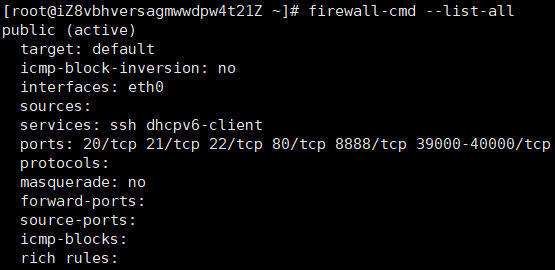
4、查看防火墙规则
firewall-cmd --list-all
停止firewall
systemctl stop firewalld.service
禁止firewall开机启动
systemctl disable firewalld.service
5、查询、开放、关闭端口
# 查询端口是否开放
firewall-cmd --query-port=8080/tcp

# 开放80端口
firewall-cmd --permanent --add-port=80/tcp
firewall-cmd --permanent --add-port=8080-8085/tcp

# 移除端口
firewall-cmd --permanent --remove-port=8080/tcp
查看防火墙的开放的端口
firewall-cmd --permanent --list-ports
#重启防火墙(修改配置后要重启防火墙)
firewall-cmd --reload
# 参数解释
1、firwall-cmd:是Linux提供的操作firewall的一个工具;
2、--permanent:表示设置为持久;
3、--add-port:标识添加的端口;
常用命令配置白名单,限制指定ip只能访问服务器指定的端口和去掉开通的端口
#配置规则

firewall-cmd --permanent --add-rich-rule="rule family="ipv4" source address="指定的ip地址" port protocol="tcp" prot="指定的端口" accept"

#配置所有端口都可以访问

firewall-cmd --permanent --zone=public --add-port=8080/tcp

#批量配置规则

firewall-cmd --permanent --add-rich-rule="rule family="ipv4" source address="指定的ip地址段(192.168.1.0/24)" port protocol="tcp" prot="指定的端口" accept"

#reload配置生效

firewall-cmd --reload

#关闭端口

firewall-cmd --zone=public --remove-port=80/tcp --permanent

#批量添加区间端口

firewall-cmd --zone=public --add-port=4400-4600/udp --permanent

#查看防火墙排除端口

firewall-cmd --permanent --list-port

#查看所有开放的端口

iptables -L -n
Centos7.5 firewalld防火墙配置的更多相关文章
- CentOS7使用firewalld防火墙配置端口
安装启用firewalld防火墙 CentOS7默认的防火墙是firewalld 如果没有firewalld防火墙,可以执行yum install firewalld 命令进行安装 firewalld ...
- Centos7下Firewalld防火墙配置命令
前 言 服务端口日常被拦截,记录一下常用的命令便于查询 Firewalld服务管理 查看防火墙状态 1 systemctl status firewalld 开机启用/禁用防火墙 1 s ...
- CentOS7下Firewall防火墙配置用法详解
官方文档地址: https://access.redhat.com/documentation/en-US/Red_Hat_Enterprise_Linux/7/html/Security_Guide ...
- centos7 开启端口防火墙配置(如开启3306或者80端口)
转载自https://blog.csdn.net/codepen/article/details/52738906 https://www.cnblogs.com/hantianwei/p/57362 ...
- CentOS7使用firewalld防火墙
firewalld的基本使用 启动: systemctl start firewalld 关闭: systemctl stop firewalld 查看状态: systemctl status fir ...
- centos7之firewalld防火墙的配置与使用
firewalld是centos7开始提供的管理防火墙工具,提供了一个动态管理的防火墙,当然低层仍然调用的是 netfilter . 一.区域(zone)firewalld将网卡对应到不同的区域(zo ...
- Centos7 iptables firewalld防火墙与selinux配置
一.iptables防火墙 1.基本操作 # 查看防火墙状态 service iptables status # 停止防火墙 service iptables stop # 启动防火墙 service ...
- CentOS7 firewalld防火墙配置
[root@ecs ~]# firewall-cmd --version //查看版本0.3.9 [root@ecs ~]# firewall-cmd --state //查 ...
- 02.Linux-CentOS系统Firewalld防火墙配置
1.firewalld的基本使用 启动: systemctl start firewalld关闭: systemctl stop firewalld查看状态: systemctl status fir ...
随机推荐
- 文献阅读报告 - 3DOF Pedestrian Trajectory Prediction
文献 Sun L , Yan Z , Mellado S M , et al. 3DOF Pedestrian Trajectory Prediction Learned from Long-Term ...
- CSU2004:Finding words(含指定不相交前后缀的模式串计数)
题:http://acm.csu.edu.cn/csuoj/problemset/problem?pid=2004 题意:给定n个模式串,m个询问,每个询问是“前缀+‘*’+后缀 ”的组合的串S,输出 ...
- VS2013 配置Mysql
1.添加mysql.h 对着项目右键,选择properties 双击C/C++,选择General,看到Additional Include Directories 编辑 点击文件夹的按钮 点击... ...
- [备忘]js表单序列化代码
function serialize(form) { var parts = [], elems = form.elements, i = 0, len = elems.length, filed = ...
- CTF密码学常见加密解密总结
https://blog.csdn.net/qq_40837276/article/details/83080460
- JavaScript 之 原型及原型链
对象[回顾] 通过字面量创建对象 //通过字面量创建对象 var obj1 = { name:'Jack', age: 18 } 通过系统自带的构造函数构造对象 // 通过系统自带的构造函数构造对象 ...
- (转)ERROR : The processing instruction target matching "[xX][mM][lL]" is not allowed.
现象:ERROR : The processing instruction target matching "[xX][mM][lL]" is not allowed. 异常解 ...
- SQL基础教程(第2版)第5章 复杂查询:5-3 关联子查询
第5章 复杂查询:5-3 关联子查询 ● 关联子查询会在细分的组内进行比较时使用.● 关联子查询和GROUP BY子句一样,也可以对表中的数据进行切分.● 关联子查询的结合条件如果未出现在子查询之中就 ...
- JavaScipt 动画引擎
队列操作 jquery中有一个Queue队列的接口,这个模块没有单独拿出来作为一个章节是因为这个是内部专门为动画服务的,Queue队列如同data数据缓存与Deferred异步模型一样,都是jQuer ...
- vue 动画原理 part1
Vue动画原理 增加和删除css增加样式实现一个过渡效果也就是动画效果 1.需要动画效果的标签外包裹一个transition标签 会被自动分析css样式,然后自动构建一个动画流程 transition ...