
shell-Startup-Files
shell-Startup-Files
1. 相关阅读

2. 主流shell

3. shell实例类型

4. Shell启动文件的必要元素

  4.1 路径: 命令路径,

  4.2 提示符

5. 主流shell的配置文件

6. 默认的bash

  6.1 手册

  6.2 bash启动文件

  6.3 提示符

7. 友好的fish

  7.1 简介

  7.2 查看帮助文档

  7.3 fish的配置

8. zsh
1. 相关阅读
https://www.cnblogs.com/sztom/p/11349159.html
shell脚本
https://szosoft.blogspot.com/2019/07/console-terminal-tty-shell-kernel.html
https://www.cnblogs.com/sztom/p/11247883.html
Console-terminal-tty-shell-kernel
Shell在计算机系统中的位置
http://hyperpolyglot.org/unix-shells
常用shell语法对照(Unix Shells: Bash, Fish, Ksh, Tcsh, Zsh)
https://en.wikipedia.org/wiki/Comparison_of_command_shells
https://opensource.com/business/16/3/top-linux-shells
Linux的前5个开源命令shell
https://www.ibm.com/developerworks/cn/aix/library/au-spunix_fish/index.html
Friendly Interactive Shell(fish)对于 UNIX 新手和专家都很适合
https://wiki.archlinux.org/index.php/Command-line_shell
https://wiki.archlinux.org/index.php/Command-line_shell#POSIX_compliant
https://wiki.archlinux.org/index.php/Command-line_shell#Alternative_shells
https://en.wikipedia.org/wiki/Unix_shell
https://en.wikipedia.org/wiki/Unix_shell#Configuration_files
https://wiki.gentoo.org/wiki/Shell
https://wiki.gentoo.org/wiki/Shell#Available_software
https://en.wikibooks.org/wiki/Bash_Shell_Scripting
https://developer.ibm.com/tutorials/l-linux-shells/
2. 主流shell
| Name | Description | POSIX | License | user |
| bash (默认) |
The Bourne Again Shell, is the default shell on Gentoo. It is used by Portage, Gentoo's default package manager. | 符合 compliant | GPLv3 | 54% |
| fish (友好) |
The Friendly Interactive Shell. (2005) | Alternative 替代 | GPLv2… | 12% |
| zsh (极客) |
An advanced shell that is the chosen interactive shell for many users. | 符合 compliant | MIT, GPL | 23% |
| tcsh | an enhanced version of the Berkeley C Shell (csh). | Alternative 替代 | BSD | 3% |
| ksh | The Original Korn Shell, 1993 revision (ksh93). | 符合 compliant | Eclipse Public | 3% |
| Other | 5% |

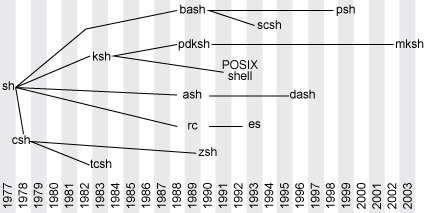
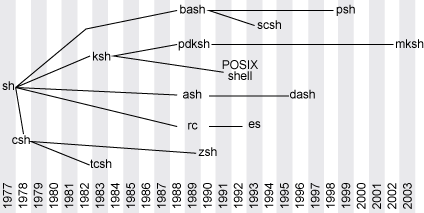
https://developer.ibm.com/tutorials/l-linux-shells/#unix-shells-since-1977
https://developer.ibm.com/developer/tutorials/l-linux-shells/images/figure1.gif
3. shell实例类型
| 大类 | 小类 | 系统配置文件 | 用户配置文件 |
| 交互式 | 登录shell (初始shell) | /etc/profile | .bash_profile; .bash_login; .profile … |
| 交互式 | 非登录shell | /etc/bash.bashrc | .bashrc |
| 非交互式 | 运行shell脚本的shell等 | 通常不读取启动文件 |
4. Shell启动文件的必要元素
路径,提示符,别名alias,权限掩码(077;022)
4.1 路径: 命令路径,
/usr/local/bin
/usr/bin
/bin
这个顺序可以确保/usr/local中的特定变体覆盖默认程序。
大多数Linux发行版中,几乎所有软件包都会被安装到/usr/bin中。也有少数情况(游戏: /usr/games; 图形应用还有另外的地方)
可以将一些分散程序的符号链接放到/usr/local/bin中。
若对系统工具感兴趣(traceroute,ping,lsmod...),可以为路径加上sbin目录。
/usr/local/sbin
/usr/sbin
/sbin
帮助手册的路径: 建议不要修改。
传统的帮助手册路径来自环境变量MANPATH. /etc/manpath.config
4.2 提示符
PS1='[\u@\h \w]\n\A \!-\#\$ '
5. 主流shell的配置文件
| files | bash | sh | ksh | zsh | tcsh |
| /etc/.login | login | ||||
| /etc/csh.login | login | ||||
| ~/.login | login | ||||
| ~/.logout | login | ||||
| /etc/csh.cshrc | yes | ||||
| ~/.tcshrc ; ~/.cshrc | yes[a] | ||||
| ~/etc/ksh.kshrc | int. | ||||
| /etc/sh.shrc | int.[b] | ||||
| $ENV (typically ~/.kshrc) | int.[e] | int.[c][d] | int. | ||
| ~/.bashrc | int.+n/login | ||||
| ~/.bash_profile | login[g] | ||||
| ~/.bash_login | login[g] | ||||
| ~/.bash_logout | login | ||||
| ~/.profile | login[g] | login | login | login[f] | |
| /etc/profile | login | login | login | login[f] | |
| /etc/zshenv | yes | ||||
| /etc/zprofile | login | ||||
| /etc/zlogin | login | ||||
| /etc/zlogout | login | ||||
| /etc/zshrc | int. | ||||
| ~/.zshenv | yes | ||||
| ~/.zprofile | login | ||||
| ~/.zlogin | login | ||||
| ~/.zshrc | int. |
| n/login | 表示如果shell不是登录shell,则读取文件。 |
| login | 表示如果shell是登录shell,则读取文件。 |
| int. | 表示如果shell是交互式的,则读取文件。 |
| yes | 表示shell在启动时始终读取文件。 |
| " " | 空白表示shell根本不读取文件。 |
| [a] | 仅在找不到~/.tcshrc时 |
| [b] | 仅限Bourne Shell的较新版本 |
| [c] | 适用于支持"用户可移植性实用程序"选项的系统; 变量的值必须是绝对路径,如果用户的真实有效用户ID或真实有效的组ID不同,则忽略它。 |
| [d] | $ENV是在Bourne Shell中的较新版本$HOME/.shrc |
| [e] | 与 sh相同的行为,但仅在调用为 sh(bash 2+)或者自bash 4.2时,如果在POSIX兼容模式中显式调用(使用选项 --posix或 -o posix). |
| [f] | a,b仅在sh/ksh兼容模式下(当调用为bash,sh,ksh时) |
| [g] | 实际上是b,c,~/ .bash_profile的第一个可读,~/ .bash_login和~/ .profile ; 并且只有~/ .profile如果被调用为sh或者,至少在Bash 4.2中,如果在POSIX兼容模式中显式调用(带有选项--posix或-o posix) |
6. 默认的bash
Bash主页是 http://www.gnu.org/software/bash/
https://wiki.archlinux.org/index.php/Bash
https://wiki.archlinux.org/index.php/Bash#Configuration_files
https://wiki.gentoo.org/wiki/Bash
6.1 手册
https://www.gnu.org/software/bash/manual/bash.html
file:///usr/share/doc/bash/bashref.html
6.2 bash启动文件
https://www.gnu.org/software/bash/manual/bash.html#Bash-Startup-Files
| 文件 | 描述 | 登录shell | 交互, 非登录shell |
| /etc/profile | 来源在应用程序设置/etc/profile.d/*.sh和/etc/bash.bashrc。 | Yes | No |
| ~/.bash_profile | 用户,之后/etc/profile。如果这个文件不存在,~/.bash_login并~/.profile按照此顺序检查。骨架文件/etc/skel/.bash_profile也来源~/.bashrc。 | Yes | No |
| ~/.bash_logout | 退出登录shell后。 | Yes | No |
| /etc/bash.bashrc | 取决于-DSYS_BASHRC="/etc/bash.bashrc"编译标志。来源/usr/share/bash-completion/bash_completion。 | No | Yes |
| ~/.bashrc | 每用户,之后/etc/bash.bashrc。 | No | Yes |
https://zhuanlan.zhihu.com/p/33833752
如何列出所有的 Bash Shell 内置命令
6.3 提示符
PS1='[\u@\h \w]\n\A \!-\#\$ '
PS1='\e[0;36m\][\u@\h \w]\e[0m\] \e[0;32m\]\n\A \!-\#\$\e[0m\] '
PS1='\e[0;36m\][\u@\h \w] \e[0;32m\]\n\A \!-\#\$\e[0m\] '
CodeColor
\e[0;30m\]Black
\e[0;31m\]Red
\e[0;32m\]Green
\e[0;33m\]Yellow
\e[0;34m\]Blue
\e[0;35m\]Magenta 品红
\e[0;36m\]Cyan 青色
\e[0;37m\]White
\e[0m\]Reset to standard colors 重置为标准色
7. 友好的fish
7.1 简介
https://en.wikipedia.org/wiki/Friendly_interactive_shell
https://zh.wikipedia.org/wiki/Fish
fish的设计目标是以易于发现,记忆和使用的方式为用户提供丰富的强大功能。
它的语法既不来自Bourne shell(ksh,bash,zsh)也不是C shell(csh,tcsh)。
与以前的shell(默认情况下禁用某些功能以节省系统资源)不同,fish默认启用所有功能。
https://wiki.archlinux.org/index.php/Fish
https://wiki.archlinux.org/index.php/Fish_(简体中文)
fish被有意设计成不完全与POSIX兼容。
fish的作者们认为POSIX中存在一些缺陷和矛盾,并通过fish简化的或不同的语法解决这些问题。
因此,即使简单的POSIX兼容的脚本也可能需要较多的修改,甚至完全重写,才能在fish中运行。
https://wiki.archlinux.org/index.php/Fish#Setting_fish_as_interactive_shell_only
只把fish设为交互式shell
https://wiki.gentoo.org/wiki/Fish
fish是OS X,Linux和其他家族的智能且用户友好的命令行shell。
fish包含语法突出显示,自动提示类型和精美的选项卡完成等功能,无需配置。
Fish不是POSIX 1003.1兼容的shell。它不读取/etc/profile,/etc/profile.env或/etc/profile.d/*目录。
建议不要将fish设置为默认登录shell.
这里有其中一位鱼类开发者和Arch wiki建议的技巧。这使得fish shell能够继承bash环境(写入并应该由bash shell 执行)
详见: https://wiki.gentoo.org/wiki/Fish#.bashrc_safety_net
https://github.com/fish-shell/fish-shell
7.2 查看帮助文档
$ help
file:///usr/share/doc/fish/index.html#docs
与其他shell不同,这里直接打开web页面文档,更方便查看,还能使用网页翻译。与下方官网页面相同。
https://fishshell.com/docs/current/index.html
官网的教学及常见问题
https://fishshell.com/docs/current/tutorial.html
https://fishshell.com/docs/current/faq.html
7.3 fish的配置
$ fish_config
Web config started at 'file:///home/toma/.cache/fish/web_config-S2EKS6.html'. Hit enter to stop.
不需要编写脚本,不需要手动修改配置文件,使用 fish_config 命令打开网页即可。
比如: http://localhost:8000/6d9de3bf1bf313e974c9738471da505c/#/colors
- colors 配色模式 (我选择了省电的黑色背景,彩色文字模式)
- prompt 提示符号 (我选择了完整路径显示加时间,加换行模式)
- functions 功能
- variables 变量
- history 历史 (这里可以看到所有已经使用过的历史命令,可以手动删除不需要的命令)
- bindings 绑定
- abbreviations 缩写
8. zsh
这个可以吧shell玩的很酷炫,有非常多的插件可以选择。
也要话时间适应研究,这里就直接跳过了。
网络上有非常多的相关文章可共参考。
shell-Startup-Files的更多相关文章
- System startup files
System startup files When you log in, the shell defines your user environment after reading the init ...
- Update startup files更新安装文件
The service request did not complete because access to the service configuration manager was not gra ...
- Linux环境变量设置
修改环境变量PATH 最近为root添加一个环境变量发现sudo su进去没有变化所以总结了一下所有设置环境变量的方法: 查看PATH:echo $PATH 直接在命令行修改,就可以使用,但是只有在当 ...
- Ubuntu 12.04 安装MySQL
本文地址:http://www.cnblogs.com/yhLinux/p/4012689.html 本文适合新手入门. 本文是对 Ubuntu 12.04 环境下安装 MySQL 的记录,通过这两天 ...
- 【ecos学习1】wmware运行redboot[方法一]--脚本实现配置
背景: 远程服务器Ubuntu生成软盘镜像,通过Mac下wmware运行. 1- 环境及版本: uname -a 2.6.38-8-generic #42-Ubuntu SMP Mon Apr 11 ...
- Unix Shells: Bash, Fish, Ksh, Tcsh, Zsh
Hyperpolyglot Unix Shells: Bash, Fish, Ksh, Tcsh, Zsh grammar | quoting and escaping | charactersvar ...
- 设置Linux环境的欢迎登陆信息
1.编辑/etc/profile文件添加如下内容: for i in /etc/profile.d/*.sh ; do if [ -r "$i" ]; then if [ &quo ...
- tmux手册中文翻译
man tmux可以看到最详细的tmux介绍,本文翻译自tmux手册. tmux全名叫"terminal multiplexer",终端多路复用器. tmux的命令格式为: tmu ...
- module使用和设置
Modules environmentDescription This is a system that allows you to easily change between different v ...
- 从LFS官方文档构建完整Linux系统
从LFS官方文档构建完整Linux系统 http://www.cnblogs.com/sonofdark/p/4962609.html 这不是新手教程!!! Parallels Desktop (为防 ...
随机推荐
- CSS - 表格细线边框
通过 border-collapse: collapse cellpadding="0", cellspacing= "0" 实现 <!DOCTYPE h ...
- Solr搜索引擎服务器学习笔记
Solr简介 采用Java5开发,基于Lucene的全文搜索服务器.同时对其进行了扩展,提供了比Lucene更为丰富的查询语言,同时实现了可配置.可扩展并对查询性能进行了优化,并且提供了一个完善的功能 ...
- 6 JavaScript函数&内置构造&函数提升&函数对象&箭头函数&函数参数&参数的值传递与对象传递
JavaScript函数:使用关键字function定义,也可以使用内置的JavaScript函数构造器定义 匿名函数: 函数表达式可以存储在变量中,并且该变量也可以作为函数使用. 实际上是匿名函数. ...
- 安卓LED跑马灯 超炫酷的表白神器破解版
链接:https://pan.baidu.com/s/11Wxll4iLdcEPq0wUBK6Ong 提取码:all4
- spring boot 整合 Camunda
官网:https://camunda.com/ 论坛:https://forum.camunda.org/ 一. 创建 spring boot 项目,添加项目依赖 <?xml version=& ...
- VS Code 入门
将VSCode设置成中文语言环境 快捷键[Ctrl+Shift+P]—输入[Configure Display Language]—将“en”改为“zh-CN”—打开extention输入[Chine ...
- [经验] Java Web 项目怎么部署到 Linux 系统上
废话少说, 直奔主题 第一步: 将 web 项目打成 war 包 1: 打开项目的 pom.xml 文件 如果是迭代后的项目, 记得修改项目的版本号, 这里我的是第二版所有就把 1 改成了 2 2: ...
- Session 'app': Error Installing APKs app 在手机或虚拟机上调试报错
解决方案: build --clean project
- Day11 - L - 邂逅明下 HDU - 2897
当日遇到月,于是有了明.当我遇到了你,便成了侣.那天,日月相会,我见到了你.而且,大地失去了光辉,你我是否成侣?这注定是个凄美的故事.(以上是废话)小t和所有世俗的人们一样,期待那百年难遇的日食.驻足 ...
- Django线上部署代码修改失效问题
记一次django项目的线上部署维护问题,django+nginx 关于nginx反向代理服务器的介绍这里有一篇博客介绍的比较好:nginx的相关介绍 以及当一次客户端请求发出后,uwsig以及uWS ...