
SpringMVC_Day01
项目结构
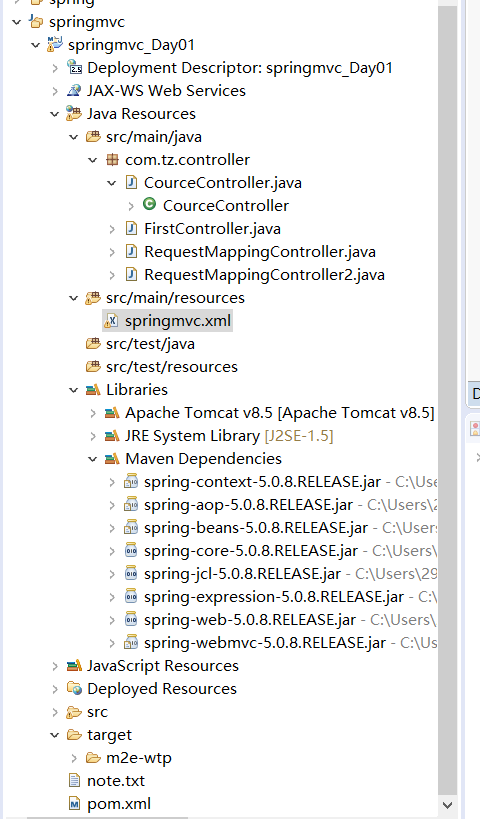
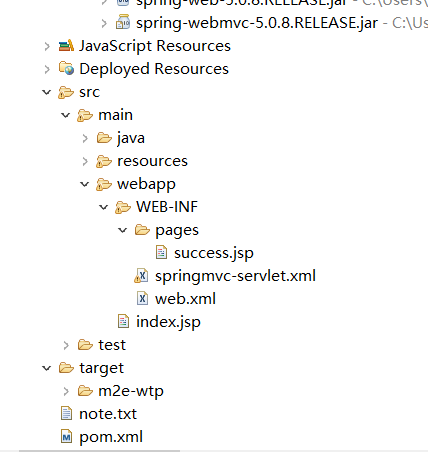
//SpringMVC配置文件

<?xml version="1.0" encoding="UTF-8"?>

<!-- spring的配置文件 -->

<beans xmlns="http://www.springframework.org/schema/beans"

    xmlns:xsi="http://www.w3.org/2001/XMLSchema-instance"

    xmlns:context="http://www.springframework.org/schema/context"

    xsi:schemaLocation="http://www.springframework.org/schema/beans

        https://www.springframework.org/schema/beans/spring-beans.xsd

        http://www.springframework.org/schema/context

        https://www.springframework.org/schema/context/spring-context.xsd

        ">

          <!-- 扫描注解组件 -->

	<context:component-scan base-package="com.tz"></context:component-scan>

	 <!-- 配置视图解析器:能够帮助拼接页面地址 -->

	<bean class="org.springframework.web.servlet.view.InternalResourceViewResolver">

		<property name="prefix" value="/WEB-INF/pages/"></property>

		<property name="suffix" value=".jsp"></property>

	</bean>

</beans>

//index.jsp

<%@ page language="java" contentType="text/html; charset=UTF-8"

    pageEncoding="UTF-8"%>

<!DOCTYPE html PUBLIC "-//W3C//DTD HTML 4.01 Transitional//EN" "http://www.w3.org/TR/html4/loose.dtd">

<html>

<head>

<meta http-equiv="Content-Type" content="text/html; charset=UTF-8">

<title>Insert title here</title>

</head>

<body>

	<a href="hello">hello</a>

	<h1>requestMappring</h1>

	<a href="coco/handle01">注解</a>

	<h1>requestMappring属性</h1>

	<a href="coco/handle02">method属性</a>

	<a href="coco/handle03?userName=xixi">params属性</a>

	<form action="" ></form>

</body>

</html>
//web.xml

<?xml version="1.0" encoding="UTF-8"?>

<web-app xmlns:xsi="http://www.w3.org/2001/XMLSchema-instance" xmlns="http://java.sun.com/xml/ns/javaee" xsi:schemaLocation="http://java.sun.com/xml/ns/javaee http://java.sun.com/xml/ns/javaee/web-app_2_5.xsd" version="2.5">

  <display-name>springmvc_Day01</display-name>

  <welcome-file-list>

    <welcome-file>index.html</welcome-file>

    <welcome-file>index.htm</welcome-file>

    <welcome-file>index.jsp</welcome-file>

    <welcome-file>default.html</welcome-file>

    <welcome-file>default.htm</welcome-file>

    <welcome-file>default.jsp</welcome-file>

  </welcome-file-list>

  <servlet>

  	<servlet-name>springmvc</servlet-name>

  	<servlet-class>org.springframework.web.servlet.DispatcherServlet</servlet-class>

  	<!-- <init-param>

  		<param-name>contextConfigLocation</param-name>

  		指定springmvc配置文件的位置

  		<param-value>classpath:springmvc.xml</param-value>

  	</init-param> -->

  	<!-- 如果在web.xml不指定文件位置,也会找默认的文件

  	/WEB-INF/xxx-servlet.xml

  	 -->

  	<!-- 启动加载时期 -->

  	<!-- servlet是当服务器启动的时候加载创建对象,值越小,代表优先级越高,就越先创建对象 -->

<!--   	<init-param>

  		<param-name>contextConfigLocation</param-name>

  		<param-value>classpath:springmvc.xml</param-value>

  	</init-param> -->

  	<!-- 如果在web.xml中找不到文件位置,也会默认找文件

  		/WEB-INF/xxx-servlet.xml

  	 -->

  	<load-on-startup>1</load-on-startup>

  </servlet>

  <servlet-mapping>

  	<servlet-name>springmvc</servlet-name>

  	<url-pattern>/</url-pattern>

  		<!--

  	/和/*都是用来拦截所有请求,但是/*的范围更大,还会拦截到*.jsp请求,一旦拦截,则访问jsp页面就不会显示了

  	/也会拦截所有请求,但是不会拦截.jsp,可以保证jsp页面访问正常

  	*.do *.action *.hah

  	/:不拦截jsp *.jsp

  	/*:拦截jsp

  	 -->

  </servlet-mapping>

  <filter>

  	<filter-name>HiddenHttpMethodFilter</filter-name>

  	<filter-class>org.springframework.web.filter.HiddenHttpMethodFilter</filter-class>

  </filter>

  <filter-mapping>

  	<filter-name>HiddenHttpMethodFilter</filter-name>

  	<!-- 这里将.jsp也过滤掉 -->

  	<url-pattern>/*</url-pattern>

  </filter-mapping>

</web-app>
package com.tz.controller;

import org.springframework.stereotype.Controller;

import org.springframework.web.bind.annotation.RequestMapping;

/**

一个普通的java类想要变成一个控制器

就需要告诉springmvc,通过@Controller

 *

 */

@Controller

public class FirstController {

	/**

	 * 定义方法接收请求

	 * 一个普通的方法怎么知道是处理什么样的请求?

	 * 通过@RequestMapping()来声明要处理什么样的请求

	 *

	 * @RequestMapping:

	 *   告诉springmvc这个方法用来处理什么样的请求,

	 */

	@RequestMapping("/hello")

	public String fController(){

		System.out.println("0.0");

//		return "/WEB-INF/pages/success.jsp";//页面的地址

		return "success";//转发操作

		//最终 前缀 +返回值+后缀

//		/WEB-INF/pages/success/.jsp

	}

}
package com.tz.controller;

import org.springframework.stereotype.Controller;

import org.springframework.web.bind.annotation.RequestMapping;

import org.springframework.web.bind.annotation.RequestMethod;

@Controller

@RequestMapping("/coco")

public class RequestMappingController {

/*

  method:限定方法请求方式:get post

  ,method=RequestMethod.POST,只接收这种类型的请求,默认是什么类型请求都可以接受

  params:规定请求参数

  headers:规定请求头

  consumes:只接收内容类型是那种的请求

  produces:告诉浏览器返回的内容类型是什么,

 */

	@RequestMapping("/handle01")

	public String handle01(){

		System.out.println("RequestMappingController....handle01");

		return "success";

	}

	@RequestMapping(value="/handle02",method=RequestMethod.GET)

	public String handle02(){

		System.out.println("RequestMappingController....handle01");

		return "success";

	}

	@RequestMapping(value="/handle03",params={"userName!=xixi","pwd","!age"})

	public String handle03(){

		System.out.println("RequestMappingController....handle03");

		return "success";

	}

	//User-Agent: Mozilla/5.0 (Windows NT 10.0; WOW64) AppleWebKit/537.36 (KHTML, like Gecko) Chrome/77.0.3865.90 Safari/537.36

	@RequestMapping(value="/handle04",headers={"User-Agent=Mozilla/5.0 (Windows NT 10.0; WOW64) AppleWebKit/537.36 (KHTML, like Gecko) Chrome/77.0.3865.90 Safari/537.36"})

	public String handle04(){

		System.out.println("RequestMappingController....handle03");

		return "success";

	}

}
package com.tz.controller;

import org.springframework.stereotype.Controller;

import org.springframework.web.bind.annotation.PathVariable;

import org.springframework.web.bind.annotation.RequestMapping;

@Controller

public class RequestMappingController2 {

	/**

	 * ANT风格的url:将url地址可以写模糊的通配符

	 *

	 *   ?:能够替代任意一个字符

	 *    *:能够替代任意多个字符和一层路径

	 *     **:能替代多层路径

	 */

	@RequestMapping("/antURL01")//精确url

	public String antURL01(){

		System.out.println("antURL01");

		return "success";

	}

	//模糊和精确匹配多个情况下,精确优先

	@RequestMapping("/antURL0?")

	public String antURL02(){

		System.out.println("antURL02");

		return "success";

	}

	@RequestMapping("/antURL0*")

	public String antURL03(){

		System.out.println("antURL03");

		return "success";

	}

	@RequestMapping("/c*/antURL04")

	public String antURL04(){

		System.out.println("antURL04");

		return "success";

	}

	@RequestMapping("/c/**/antURL05")// /c/x/x/x/x/x/x  /antURL05

	public String antURL05(){

		System.out.println("antURL05");

		return "success";

	}

	/*

	 *@PathVariable:路径变量  /user/coco  /user/admin

	 *

	 *路径上可以有占位符,可以在任意路径下写{变量名}

	 */

	@RequestMapping("/user/{userName}")

	public String variable(@PathVariable("userName") String userName){

		System.out.println(userName);

		return "success";

	}

}
      *  /cource  get请求 --->查询

	 *  /cource  put请求 --->修改

	 *  /cource  delete请求-->删除

	 *  /cource  post请求-->新增
package com.tz.controller;

import org.springframework.stereotype.Controller;

import org.springframework.web.bind.annotation.PathVariable;

import org.springframework.web.bind.annotation.RequestMapping;

import org.springframework.web.bind.annotation.RequestMethod;

@Controller

public class CourceController {

	//rest:资源的状态转化,规定url地址,增删改查

	/*

	 * 修改课程:

	 * 	 updateCource?id=1&name=java

	 * 查询

	 * 	 getCource?id=1

	 * 新增:

	 *   insertCource

	 * 删除:

	 * 	 deleteCource

	 *

	 * get post put delete

	 *

	 *  /cource  get请求 --->查询

	 *  /cource  put请求 --->修改

	 *  /cource  delete请求-->删除

	 *  /cource  post请求-->新增

	 *

	 * 希望以非常简洁的url地址来发送请求,怎么样表示对一个资源的增删改查

	 * 可以直接用请求方式来区分

	 *

	 * 以简洁的url地址提交请求,以请求方式来区分对资源的操作

	 *

	 *

	 *

	 * 页面无法直接发送delete或者put请求,

	 * 1.springmvc中有一个过滤器Filter,可以吧普通的请求转化为规定形式的请求

	 * 2.怎么发送其他形式的请求?

	 *  2.1 创建post类型的表单,

	 *  2.2 表单项中携带一个参数:_method

	 *  2.3 这个参数的值就是delete或者put

	 */

	//查询课程

	@RequestMapping(value="/cource/{cid}",method=RequestMethod.GET)

	public String getCource(@PathVariable("cid")Integer cid){

		System.out.println("查询了课程");

		return "success";

	}

	@RequestMapping(value="/cource",method=RequestMethod.POST)

	public String insertCource(){

		System.out.println("新增了课程");

		return "success";

	}

	@RequestMapping(value="/cource/{cid}",method=RequestMethod.PUT)

	public String updateCource(@PathVariable("cid")Integer cid){

		System.out.println("修改了课程");

		return "success";

	}

	@RequestMapping(value="/cource/{cid}",method=RequestMethod.DELETE)

	public String deleteCource(@PathVariable("cid")Integer cid){

		System.out.println("删除了课程");

		return "success";

	}

}
//rest.jsp
<%@ page language="java" contentType="text/html; charset=UTF-8"

    pageEncoding="UTF-8"%>

<!DOCTYPE html PUBLIC "-//W3C//DTD HTML 4.01 Transitional//EN" "http://www.w3.org/TR/html4/loose.dtd">

<html>

<head>

<meta http-equiv="Content-Type" content="text/html; charset=UTF-8">

<title>Insert title here</title>

</head>

<body>

	<a href="cource/1">查询课程</a>

	<form action="cource" method="post">

		<input type="submit" value="新增课程">

	</form>

	<form action="cource/1" method="post">

		<input name="_method" value="put">

		<input type="submit" value="修改课程">

	</form>

	<form action="cource/1" method="post">

		<input name="_method" value="delete">

		<input type="submit" value="删除课程">

	</form>

</body>

</html>
总结:
前端控制器,拦截所有的请求,并且进行智能派发

1.导入依赖

2.在web.xml配置前端控制器DispatcherServlet

3.写控制器和处理请求方法

流程:

1.在浏览器点击超链接发送hello请求

http://localhost:8080/springmvcday01/hello

2.来到了tomcat服务器

3.前端控制器收到请求进行处理

4.前端控制器根据请求地址和控制器中@RequestMapping注解标注的地址哪个匹配,

就找到哪个类的哪个方法来进行处理

5.前端控制器找到了目标处理器类和目标方法,利用反射技术执行目标方法

6.方法执行完之后,有返回值,springmvc认为这个返回值就是要去的页面地址

7.拿到方法的返回值之后,用视图解析器进行拼接字

为什么直接访问html访问不到?

1.服务器的web.xml中有个默认配置

  <servlet-mapping>

        <servlet-name>default</servlet-name>

        <url-pattern>/</url-pattern>(父) 用来处理静态资源

        如果我们项目中有html,交给tomcat进行处理的话,那么找到对应的资源

    </servlet-mapping>

 2.我们项目中的前端控制器    <url-pattern>/</url-pattern>(子)

 子和父都有相同的配置情况下,最终指定的子,那么不会请求到tomcat中去,

 前端控制器会去找哪个方法上的RequestMapping

 注解上声明的 index.html

 为什么jsp可以访问到

 1.tomcat。web.xml配置

    <servlet-mapping>

        <servlet-name>jsp</servlet-name>

        <url-pattern>*.jsp</url-pattern>(父)

 2.项目配置

  <url-pattern>/</url-pattern>(子)

  子没有覆盖父,子处理不了的,交给父进行处理,父找到相应的资源直接进行返回

  而如果项目配置成这样:

 <url-pattern>*.jsp</url-pattern>(子)

    子和父都有相同的配置情况下,最终指定的子,那么不会请求到tomcat中去,

 前端控制器会去找哪个方法上的RequestMapping注解上声明的 index.jsp
SpringMVC_Day01的更多相关文章
- SpringMVC--入门案例
一.SpringMVC介绍 SpringMVC和Struts都属于表现层框架, 是Spring的一部分,Spring的整体结构如下: 1.1 SpringMVC的处理流程 下图是SpringMVC的执 ...
- SpringMVC之springmvc原始api,请求中文乱码问题
先搞一波效果图 1.Controller package com.tz.controller; import javax.servlet.http.HttpServlet; import javax ...
随机推荐
- 决策树分类回归,ID3,c4.5,CART,及其Python代码
决策树模型 内部节点表示一个特征或者属性,叶子结点表示一个类.决策树工作时,从根节点开始,对实例的每个特征进行测试,根据测试结果,将实例分配到其子节点中,这时的每一个子节点对应着特征的一个取值,如此递 ...
- HDU - 4578 线段树+三重操作
这道题自己写了很久,还是没写出来,也看了很多题解,感觉多数还是看的迷迷糊糊,最后面看到一篇大佬的才感觉恍然大悟. 先上一篇大佬的题解:https://blog.csdn.net/aqa20372995 ...
- Long型转ZonedDateTime型
/** * 将Long类型转化成0 * @author yk * @param time * @return */public static ZonedDateTime toZonedDateTime ...
- linux(centos 7)安装及使用yum
yum介绍: Yum(全称为 Yellow dog Updater, Modified)是一个在Fedora和RedHat以及CentOS中的Shell前端软件包管理器.基于RPM包管理,能够从指定的 ...
- Win10用Windows照片查看程序(照片查看器)打开图片
以上方法只能一个个添加,也有人说不好使,这里给出一个我写的批处理程序,反正我一直用着很好. ::复制以下内容到记事本: @echo off&cd\&color 0a&cls ...
- 爬虫笔记(三)——HTTP协议请求实战
如果要进行客户端与服务器端之间的消息传递,我们可以使用HTTP协议请求进行. HTTP协议请求主要分为6种类型,各类型的主要作用如下: GET请求:GET请求会通过URL网址传递信息,可以直接在URL ...
- [学习笔记]set的使用
set默认进行升序排列,通过结构体可以改. 维护一个比主人公分数高的set 降序排列,比主人公高就进入set 比主人公低就不进去,或者在删除操作里删掉. 然后血的教训 https://blog.csd ...
- MRP运算报错-清除预留
MRP运算报错-清除预留
- Linux常用指令(三)
进入京东运维组实习,收到了很多同事的热心指导,自己也努力学习,按照他们给出的学习计划,真的很充实,学到了很多不只是开发方面的知识. 以下简单记录下自己的笔记,方便以后查阅. 1.文件系统 Linux系 ...
- rest framework-版本-长期维护
############### 版本 ############### # # 版本的问题: # rest_framework.versioning.URLPathVersioning # 一般就 ...