
JSF 2 multiple select listbox example
In JSF, <h:selectManyListbox /> tag is used to render a multiple select listbox – HTML select element with “multiple” and “size” attribute.
//JSF...

<h:selectManyListbox value="#{user.favFood1}">

   	<f:selectItem itemValue="Fry Checken" itemLabel="Food1 - Fry Checken" />

   	<f:selectItem itemValue="Tomyam Soup" itemLabel="Food1 - Tomyam Soup" />

   	<f:selectItem itemValue="Mixed Rice" itemLabel="Food1 - Mixed Rice" />

</h:selectManyListbox>
//HTML output...

<select name="j_idt6:j_idt8" multiple="multiple" size="3">

	<option value="Fry Checken">Food1 - Fry Checken</option>

	<option value="Tomyam Soup">Food1 - Tomyam Soup</option>

	<option value="Mixed Rice">Food1 - Mixed Rice</option>

</select>
h:selectManyListbox example
A JSF 2.0 example to show the use of “h:selectManyListbox” tag to render multiple select listbox, and populate the data in 3 different ways :
- Hardcoded value in “
f:selectItem” tag. - Generate values with a
Mapand put it into “f:selectItems” tag. - Generate values with an
Objectarray and put it into “f:selectItems” tag, then represent the value with “var” attribute.
1. Backing Bean
A backing bean to hold and generate data for the multiple select listbox values. The property to hold the multi-selected listbox value, must be a type of Collection or Array; Otherwise it will hits the following error message
WARNING: Target model Type is no a Collection or Array

javax.faces.FacesException: Target model Type is no a Collection or Array
package com.mkyong;

import java.io.Serializable;

import java.util.Arrays;

import java.util.LinkedHashMap;

import java.util.Map;

import javax.faces.bean.ManagedBean;

import javax.faces.bean.SessionScoped;

@ManagedBean(name="user")

@SessionScoped

public class UserBean implements Serializable{

	public String[] favFood1;

	public String[] favFood2;

	public String[] favFood3;

	//getter and setter methods...

	public String getFavFood1InString() {

		return Arrays.toString(favFood1);

	}

	public String getFavFood2InString() {

		return Arrays.toString(favFood2);

	}

	public String getFavFood3InString() {

		return Arrays.toString(favFood3);

	}

	//Generated by Map

	private static Map<String,Object> food2Value;

	static{

		food2Value = new LinkedHashMap<String,Object>();

		food2Value.put("Food2 - Fry Checken", "Fry Checken"); //label, value

		food2Value.put("Food2 - Tomyam Soup", "Tomyam Soup");

		food2Value.put("Food2 - Mixed Rice", "Mixed Rice");

	}

	public Map<String,Object> getFavFood2Value() {

		return food2Value;

	}

	//Generated by Object array

	public static class Food{

		public String foodLabel;

		public String foodValue;

		public Food(String foodLabel, String foodValue){

			this.foodLabel = foodLabel;

			this.foodValue = foodValue;

		}

		public String getFoodLabel(){

			return foodLabel;

		}

		public String getFoodValue(){

			return foodValue;

		}

	}

	public Food[] food3List;

	public Food[] getFavFood3Value() {

		food3List = new Food[3];

		food3List[0] = new Food("Food3 - Fry Checken", "Fry Checken");

		food3List[1] = new Food("Food3 - Tomyam Soup", "Tomyam Soup");

		food3List[2] = new Food("Food3 - Mixed Rice", "Mixed Rice");

		return food3List;

	}

}
2. JSF Page
A JSF page to demonstrate the use “h:selectManyListbox” tag.
<?xml version="1.0" encoding="UTF-8"?>

<!DOCTYPE html PUBLIC "-//W3C//DTD XHTML 1.0 Transitional//EN"

"http://www.w3.org/TR/xhtml1/DTD/xhtml1-transitional.dtd">

<html xmlns="http://www.w3.org/1999/xhtml"

      xmlns:h="http://java.sun.com/jsf/html"

      xmlns:f="http://java.sun.com/jsf/core"

      >

    <h:body>

    	<h1>JSF 2 multi-select listbox example</h1>

    	<h:form>

	    1. Hard-coded with "f:selectItem" :

   		<h:selectManyListbox value="#{user.favFood1}">

   			<f:selectItem itemValue="Fry Checken" itemLabel="Food1 - Fry Checken" />

   			<f:selectItem itemValue="Tomyam Soup" itemLabel="Food1 - Tomyam Soup" />

   			<f:selectItem itemValue="Mixed Rice" itemLabel="Food1 - Mixed Rice" />

   		</h:selectManyListbox>

		<br /><br />

	    2. Generated by Map :

   		<h:selectManyListbox value="#{user.favFood2}">

   			<f:selectItems value="#{user.favFood2Value}" />

   		</h:selectManyListbox>

	    <br /><br />

	    3. Generated by Object array and iterate with var :

   		<h:selectManyListbox value="#{user.favFood3}">

   			<f:selectItems value="#{user.favFood3Value}" var="f"

   			itemLabel="#{f.foodLabel}" itemValue="#{f.foodValue}" />

   		</h:selectManyListbox>

	    <br /><br />

    	    <h:commandButton value="Submit" action="result" />

	    <h:commandButton value="Reset" type="reset" />

    	</h:form>

    </h:body>

</html>
result.xhtml…
<?xml version="1.0" encoding="UTF-8"?>

<!DOCTYPE html PUBLIC "-//W3C//DTD XHTML 1.0 Transitional//EN"

"http://www.w3.org/TR/xhtml1/DTD/xhtml1-transitional.dtd">

<html xmlns="http://www.w3.org/1999/xhtml"

      xmlns:h="http://java.sun.com/jsf/html"

      >

    <h:body>

    	<h1>JSF 2 multi-select listbox example</h1>

    	<h2>result.xhtml</h2>

    	<ol>

    		<li>user.favFood1 : #{user.favFood1InString}</li>

    		<li>user.favFood2 : #{user.favFood2InString}</li>

    		<li>user.favFood3 : #{user.favFood3InString}</li>

    	</ol>

    </h:body>

</html>
3. Demo

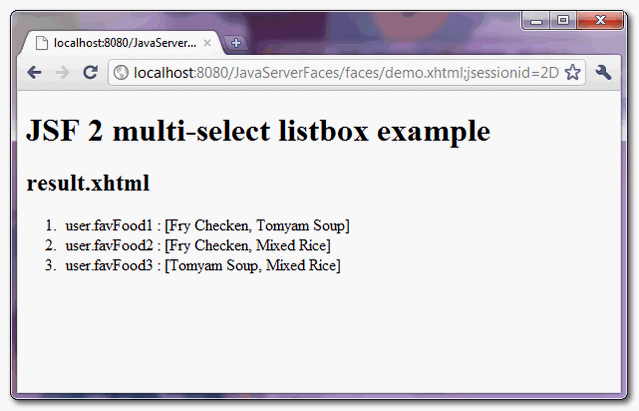
When “submit” button is clicked, link to “result.xhtml” page and display the submitted multi-selected listbox values.
How to pre-select multiple listbox values ?
The value of “f:selectItems” tag is selected if it matched to the “value” of “h:selectManyListbox” tag. In above example, if you set favFood1 property to “Fry Checken” and “Tomyam Soup” :
@ManagedBean(name="user")

@SessionScoped

public class UserBean{

	public String[] favFood1 = {"Fry Checken", "Tomyam Soup"};

	//...
The “favFood1″ listbox values, “Fry Checken” and “Tomyam Soup” are selected by default.
JSF 2 multiple select listbox example的更多相关文章
- JSF 2 multiple select dropdown box example
In JSF, <h:selectManyMenu /> tag is used to render a multiple select dropdown box – HTML selec ...
- 目录窗口多选Multiple Select in Catalog Window or arccatalog
目录窗口多选Multiple Select in Catalog Window or arccatalog 商务合作,科技咨询,版权转让:向日葵,135-4855__4328,xiexiaokui#q ...
- html multiple select option 分组
普通html方式展示<select name="viewType" style="width: 100%;height: 300px;" multiple ...
- JSF 2 listbox example
In JSF, <h:selectOneListbox /> tag is used to render a single select listbox – HTML select ele ...
- ListBox控件例子
<%@ Page Language="C#" AutoEventWireup="true" CodeBehind="ListBox.aspx.c ...
- Web页面中两个listbox的option的转移
Html: <div><span>所选时间:</span><select id="xuanyongTimelb" style=" ...
- 前端插件之Bootstrap Dual Listbox使用
工欲善其事,必先利其器 对于很多非专业前端开发来说写页面是非常痛苦的,借助框架或插件往往能够达到事半功倍的效果,本系列文章会介绍我在运维系统开发过程中用到的那些顺手的前端插件,如果你是想写XX管理系统 ...
- select框宽度与高度设置(实用版)
在IE中只能使用 font-size: 限制 select 的高度. 同时使用 width:200px 限制宽度 size="20" 表示最多显示20个选项,超过20的需要 ...
- js select级联,上面分类,下面是内容
js select级联,上面分类,下面是内容. js级联效果如下: 分类: 请选择 水果 蔬菜 其他 内容: // html和js代码如下: <html> <hea ...
随机推荐
- myeclipse2014破解版本链接
myeclipse2014破解版本下载链接 http://www.my-eclipse.cn/#download myeclipse2014破解版本汉化链接 https://blog.my-eclip ...
- java8 十大新特性
这篇文章是对Java 8中即将到来的改进做一个面向开发者的综合性的总结,JDK的这一特性将会在2013年9月份发布. 在写这篇文章的时候,Java 8的开发工作仍然在紧张有序的进行中,语言特新和API ...
- BZOJ2626: JZPFAR
题目:http://www.lydsy.com/JudgeOnline/problem.php?id=2626 题解:裸K-Dtree,最大值?自己yy一下估价函数就好了. 两题居然是同一个错误,真是 ...
- Ajax、Comet与Websocket
从 http 协议说起 1996年IETF HTTP工作组发布了HTTP协议的1.0版本 ,到现在普遍使用的版本1.1,HTTP协议经历了17 年的发展.这种分布式.无状态.基于TCP的请求/响应式 ...
- acdream 1408 "Money, Money, Money" (水)
题意:给出一个自然数x,要求找两个自然数a和b,任意多个a和b的组合都不能等于x,且要可以组合成大于x的任何自然数.如果找不到就输出两个0.(输出任意一个满足条件的答案) 思路:x=偶数时,无法构成, ...
- LeetCode Contains Duplicate II (判断重复元素)
题意:如果有两个相同的元素,它们之间的距离不超过k,那么返回true,否则false. 思路:用map记录每个出现过的最近的位置,扫一边序列即可.扫到一个元素就判断它在前面什么地方出现过.本题数据有点 ...
- $('div','li')
要搞清楚$('div','li') 和 $('div , li') 和 $('div li') 区别$('div','li')是$(子,父),是从父节点里找子,而不是找li外面的div $('div ...
- noip2000提高组题解
事实再次向我证明了RP的重要性... 第一题:进制转换 是我最没有把握AC的一道题目却是我唯一一道AC的题目,真是讽刺.看完题目几乎完全没有往正常的解法(取余倒序)去想,直接写了搜索,因为数据范围在2 ...
- PHP最佳实践(译)
原文: PHP Best Practices-A short, practical guide for common and confusing PHP tasks 译者:youngsterxyf 最 ...
- 【转】【Android】对话框 AlertDialog -- 不错不错
原文网址:http://blog.csdn.net/feng88724/article/details/6171450 本讲介绍一下Android基本组件:对话框AlertDialog. API: j ...