
学习Spring——两个你熟悉的不能再熟悉的场景使用
最近公众号受邀获取了留言和赠送模板的权限,小开心(欢迎去公众号JackieZheng围观)。
我们大致的了解了Spring这个框架对于依赖注入的使用和诠释可谓是淋漓尽致。因为有了Spring的这个IOC也好DI也好,我们把上街买菜的事情变成了菜主动送上门的活,这样的“生活方式”大大的提高了我们对于Spring框架的用户体验。
今天主要说两件事,想必凡是稍稍接触过Spring框架开发的对于这些场景肯定都是眼熟透了——Spring如何使用多个外部属性文件以及基于注解方式配置Bean。
1. Spring使用多个外部属性文件
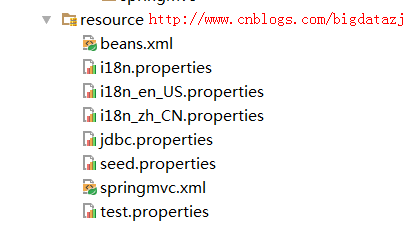
这个截图并不稀奇,甚至完全看不出什么逻辑,下面分别贴出各个配置文件的内容
beans.xml
...

<bean id="dataSource" class="org.apache.commons.dbcp.BasicDataSource" destroy-method="close">

    <property name="driverClassName" value="${jdbc.driver}"/>

    <property name="url" value="${jdbc.url}"/>

    <property name="username" value="${jdbc.username}"/>

    <property name="password" value="${jdbc.password}"/>

</bean>

...
jdbc.properites
jdbc.driver=com.mysql.jdbc.Driver

jdbc.url=jdbc:mysql://localhost:3306/shake?useUnicode=true&characterEncoding=utf-8

jdbc.username=root

jdbc.password=admin
没错,这就是你绝对见过的,在Spring中最常见对于数据源的配置
- 你完全可以把jdbc.driver的值写在beans.xml文件中,但是对于大型项目,某一天你需要该其中的配置,那就必须从庞大而臃肿的beans.xml文件找到你要修改的位置,并且胆战心惊的确认是不是还有遗漏的地方。
- 你完全可以把这些针对性的配置提取到一个外部属性文件当中。写成jdbc.properties的模样,这样修改起来,省时省心省力。
- 光有以上的配置还是无法工作的,因为spring的beans.xml文件并不知道该去哪里查找相应的变量,并为变量赋值。所以还需要在beans.xml中添加如下标签<context:property-placeholder location="jdbc.properties"/>
测试代码
写上如下的测试方法,可以用来验证上述配置是否正确
@Test

public void testJDBCConfiguration() throws SQLException {

    ApplicationContext act=new ClassPathXmlApplicationContext("beans.xml");

    DataSource dataSource = (DataSource) act.getBean("dataSource");

    System.out.println(dataSource.getConnection());

}

显然我们得到了理想的结果
那么问题来了,如果我们需要使用多个外部属性文件,怎么做?
直接按照上面的套路再拷贝一份试试
beans.xml
...

<context:property-placeholder location="test.properties"/>

<bean id="dataSource1" class="org.apache.commons.dbcp.BasicDataSource" destroy-method="close">

    <property name="driverClassName" value="${test.driver}"/>

    <property name="url" value="${test.url}"/>

    <property name="username" value="${test.username}"/>

    <property name="password" value="${test.password}"/>

</bean>

...
test.properties
test.driver = com.mysql.jdbc.Driver

test.url = jdbc:mysql://localhost:3306/shake

test.username=root

test.password=admin
测试方法
@Test

public void testJDBCConfiguration() throws SQLException {

    ApplicationContext act=new ClassPathXmlApplicationContext("beans.xml");

    DataSource dataSource = (DataSource) act.getBean("dataSource1");

    System.out.println(dataSource.getConnection());

}
以下是报错信息
org.springframework.beans.factory.BeanDefinitionStoreException: Invalid bean definition with name 'dataSource1' defined in class path resource [beans.xml]: Could not resolve placeholder 'test.driver' in string value "${test.driver}"; nested exception is java.lang.IllegalArgumentException: Could not resolve placeholder 'test.driver' in string value "${test.driver}"

	at org.springframework.beans.factory.config.PlaceholderConfigurerSupport.doProcessProperties(PlaceholderConfigurerSupport.java:211)

	at org.springframework.beans.factory.config.PropertyPlaceholderConfigurer.processProperties(PropertyPlaceholderConfigurer.java:223)

	at org.springframework.beans.factory.config.PropertyResourceConfigurer.postProcessBeanFactory(PropertyResourceConfigurer.java:86)

	at ...org.springframework.context.support.ClassPathXmlApplicationContext.<init>(ClassPathXmlApplicationContext.java:83)

	at com.jackie.springmvc.TestCollections.testJDBCConfiguration(TestCollections.java:186)

	at sun.reflect.NativeMethodAccessorImpl.invoke0(Native Method)

	at sun.reflect.NativeMethodAccessorImpl.invoke(NativeMethodAccessorImpl.java:62)

	at sun.reflect.DelegatingMethodAccessorImpl.invoke(DelegatingMethodAccessorImpl.java:43)

	at org.junit.runners.model.FrameworkMethod$1.runReflectiveCall(FrameworkMethod.java:47)

	at org.junit.internal.runners.model.ReflectiveCallable.run(ReflectiveCallable.java:12)

	at org.junit.runners.model.FrameworkMethod.invokeExplosively(FrameworkMethod.java:44)

	at org.junit.internal.runners.statements.InvokeMethod.evaluate(InvokeMethod.java:17)

	at org.junit.runners.ParentRunner.runLeaf(ParentRunner.java:271)

	at org.junit.runners.BlockJUnit4ClassRunner.runChild(BlockJUnit4ClassRunner.java:70)

	at org.junit.runners.BlockJUnit4ClassRunner.runChild(BlockJUnit4ClassRunner.java:50)

	at org.junit.runners.ParentRunner$3.run(ParentRunner.java:238)

	at org.junit.runners.ParentRunner$1.schedule(ParentRunner.java:63)

	at org.junit.runners.ParentRunner.runChildren(ParentRunner.java:236)

	at org.junit.runners.ParentRunner.access$000(ParentRunner.java:53)

	at org.junit.runners.ParentRunner$2.evaluate(ParentRunner.java:229)

	at org.junit.runners.ParentRunner.run(ParentRunner.java:309)

	at org.junit.runner.JUnitCore.run(JUnitCore.java:160)

	at com.intellij.junit4.JUnit4IdeaTestRunner.startRunnerWithArgs(JUnit4IdeaTestRunner.java:74)

	at com.intellij.rt.execution.junit.JUnitStarter.prepareStreamsAndStart(JUnitStarter.java:211)

	at com.intellij.rt.execution.junit.JUnitStarter.main(JUnitStarter.java:67)

	at sun.reflect.NativeMethodAccessorImpl.invoke0(Native Method)

	at sun.reflect.NativeMethodAccessorImpl.invoke(NativeMethodAccessorImpl.java:62)

	at com.intellij.rt.execution.application.AppMain.main(AppMain.java:134)

Caused by: java.lang.IllegalArgumentException: Could not resolve placeholder 'test.driver' in string value "${test.driver}"

	at org.springframework.util.PropertyPlaceholderHelper.parseStringValue(PropertyPlaceholderHelper.java:174)

	at ...

	at org.springframework.beans.factory.config.PlaceholderConfigurerSupport.doProcessProperties(PlaceholderConfigurerSupport.java:208)

	... 35 more
报错的主要原因来源于不识别test.driver这个变量。
究其原因是因为beans.xml对于<context:property-placeholder location="jdbc.properties"/>这样的标签,如果有多个这样的定义,只会生效第一个,后面的都会忽略,这就造成了spring没有办法找到test.driver是在哪个文件中定义的。
解决方法
采用通配符的方式,只定义一次,但是可以匹配多个外部属性文件
<context:property-placeholder location="classpath*:*.properties"/>
这样就能够正常运行上面的测试方法。
2.基于注解的方式配置Bean
与之经常同时出场的还有基于XML的方式配置Bean,我想大家都见过或了解autowired=byName和autowired=byType。这两种都是基于XML方式对于Bean采用基于名字和基于类型进行匹配的。
但是这种方式有他的不足之处,所以在实际的项目中应用的不多。
- 在 Bean 配置文件里设置 autowire 属性进行自动装配将会装配 Bean 的所有属性. 然而, 若只希望装配个别属性时, autowire 属性就不够灵活了.
- autowire 属性要么根据类型自动装配, 要么根据名称自动装配, 不能两者兼而有之.
- 一般情况下,在实际的项目中很少使用自动装配功能,因为和自动装配功能所带来的好处比起来,明确清晰的配置文档更有说服力一些
所以你看到以及用到比较多的应该是基于注解的方式配置Bean
beans.xml
<?xml version="1.0" encoding="UTF-8"?>

<beans xmlns="http://www.springframework.org/schema/beans"

	xmlns:xsi="http://www.w3.org/2001/XMLSchema-instance"

	xmlns:context="http://www.springframework.org/schema/context"

	xsi:schemaLocation="http://www.springframework.org/schema/beans http://www.springframework.org/schema/beans/spring-beans.xsd

		http://www.springframework.org/schema/context http://www.springframework.org/schema/context/spring-context-4.0.xsd">

	<context:component-scan base-package="com.jackie.spring.annotation.generic"></context:component-scan>

</beans>
该spring配置文件及其简洁,我们甚至看不到声明bean,只有Context:component-scang该标签意为spring会扫描com.jackie.spring.annotation.generic包下面的所有相关类。相关类是指具有以下字样的注解:
@Component: 基本注解, 标识了一个受 Spring 管理的组件
@Respository: 标识持久层组件
@Service: 标识服务层(业务层)组件
@Controller: 标识表现层组件
标注了如上注解的类都是受Spring管辖的。
同时我们还需要如下几个类
BaseBao.java
public class BaseDao<T> {

	public void save(T entity){

		System.out.println("Save:" + entity);

	}

}
BaseService.java
public class BaseService<T> {

	private BaseDao<T> dao;

	public void addNew(T entity){

		System.out.println("addNew by " + dao);

		dao.save(entity);

	}

}
UserBao.java
@Repository

public class UserDao extends BaseDao<User>{

}
UserService.java
@Service

public class UserService extends BaseService<User>{

}
Main.java
public class Main {

	public static void main(String[] args) {

		ApplicationContext ctx = new ClassPathXmlApplicationContext("beans.xml");

		UserService userService = (UserService) ctx.getBean("userService");

		userService.addNew(new User());

	}

}
1. 这里BaseBao和UserBao以及BaseService和UserService有一个简单的继承关系。
2. UserBao类上加上了注解@Repository表示其为持久层的bean,UserService类上加上了注解@Service表示其为业务层的bean
3. 这时候执行main方法,会报错
Exception in thread "main" addNew by null
java.lang.NullPointerException
at com.jackie.spring.annotation.generic.BaseService.addNew(BaseService.java:12)
at com.jackie.spring.annotation.generic.Main.main(Main.java:13)
原因很简单,BaseService中不识别BaseBao这个bean,因为我们并没有声明过这个类,也没有注入,这时候需要在该类前加上注解
@Autowired

private BaseDao<T> dao;
加上@Autowired表示Spring装配了该bean,从而就不会报空指针异常了。最终执行结果:
addNew by com.jackie.spring.annotation.generic.UserDao@32d2fa64

Save:com.jackie.spring.annotation.generic.User@1d8d30f7
4. Spring 还支持 @Resource 和 @Inject 注解,这两个注解和 @Autowired 注解的功用类似
至此,我们熟悉了不能再熟悉的两大场景
- Spring如何调用外部属性文件
- Spring如何调用多个外部属性文件
- Spring基于注解的方式注入bean的使用场景(反正我是一直在用,你们呢???)
如果您觉得阅读本文对您有帮助,请点一下“推荐”按钮,您的“推荐”将是我最大的写作动力!如果您想持续关注我的文章,请扫描二维码,关注JackieZheng的微信公众号,我会将我的文章推送给您,并和您一起分享我日常阅读过的优质文章。

友情赞助
如果你觉得博主的文章对你那么一点小帮助,恰巧你又有想打赏博主的小冲动,那么事不宜迟,赶紧扫一扫,小额地赞助下,攒个奶粉钱,也是让博主有动力继续努力,写出更好的文章^^。
1. 支付宝 2. 微信


学习Spring——两个你熟悉的不能再熟悉的场景使用的更多相关文章
- 我该如何学习spring源码以及解析bean定义的注册
如何学习spring源码 前言 本文属于spring源码解析的系列文章之一,文章主要是介绍如何学习spring的源码,希望能够最大限度的帮助到有需要的人.文章总体难度不大,但比较繁重,学习时一定要耐住 ...
- 学习Spring——依赖注入
前言: 又开始动笔开了“学习Spring”系列的头…… 其实一开始写“学习SpringMVC”的几篇文章是出于想系统的了解下Spring以及SpringMVC,因为平时在公司中虽然每天都在使用Spri ...
- 菜鸟学习Spring——60s配置XML方法实现简单AOP
一.概述. 上一篇博客讲述了用注解的形式实现AOP现在讲述另外一种AOP实现的方式利用XML来实现AOP. 二.代码演示. 准备工作参照上一篇博客<菜鸟学习Spring--60s使用annota ...
- 深入浅出学习Spring框架(四):IoC和AOP的应用——事务配置
在前文 深入浅出学习Spring框架(一):通过Demo阐述IoC和DI的优势所在. 深入浅出学习Spring框架(三):AOP 详解 分别介绍了Spring的核心功能——IoC和AOP,光讲知识远远 ...
- 学习Spring Boot:(二十六)使用 RabbitMQ 消息队列
前言 前面学习了 RabbitMQ 基础,现在主要记录下学习 Spring Boot 整合 RabbitMQ ,调用它的 API ,以及中间使用的相关功能的记录. 相关的可以去我的博客/RabbitM ...
- 跟着刚哥学习Spring框架--AOP(五)
AOP AOP(Aspect Oriented Programming),即面向切面编程,可以说是OOP(Object Oriented Programming,面向对象编程)的补充和完善.OOP引入 ...
- 跟着刚哥学习Spring框架--通过XML方式配置Bean(三)
Spring配置Bean有两种形式(XML和注解) 今天我们学习通过XML方式配置Bean 1. Bean的配置方式 通过全类名(反射)的方式 √ id:标识容器中的bean.id唯一. √ cl ...
- 跟着刚哥学习Spring框架--Spring容器(二)
Spring容器 启动Spring容器(实例化容器) -- IOC容器读取Bean配置创建Bean实例之前,必须对它进行实例化(加载启动),这样才可以从容器中获取Bean的实例并使用. Bean是S ...
- 【转】Spring学习---Spring IoC容器的核心原理
[原文] Spring的两个核心概念:IoC和AOP的雏形,Spring的历史变迁和如今的生态帝国. IoC和DI的基本概念 IoC(控制反转,英文含义:Inverse of Control)是Spr ...
随机推荐
- expect用法
1. [#!/usr/bin/expect] 这一行告诉操作系统脚本里的代码使用那一个shell来执行.这里的expect其实和linux下的bash.windows下的cmd是一类东西. 注意: ...
- JavaScript 对象属性介绍
本篇主要介绍JS中对象的属性,包括:属性的分类.访问方式.检测属性.遍历属性以及属性特性等内容. 目录 1. 介绍:描述属性的命名方式.查找路径以及分类 2. 属性的访问方式:介绍'.'访问方式.'[ ...
- 按需加载.js .css文件
首先,理解按需加载当你需要用到某个js里面的函数什么鬼,或者某个css里的样式的时候你才开始加载这个文件. 然后是怎样实现的,简单来说就是在js中动态的createElem<script> ...
- ASP.NET MVC5+EF6+EasyUI 后台管理系统(55)-Web打印
系列目录 前言 1.本次主要弥补工作流,用户表单数据的打印 2.使用JQprint做为web打印插件 3.兼容:FireFox,Chrome,IE. 4.没有依赖也没有配置,使用简单 代码下载:htt ...
- Visual Studio 2012远程调试中遇到的问题
有的时候开发环境没问题的代码在生产环境中会某些开发环境无法重现的问题,或者需要对生产环境代码进行远程调试该怎么办? Vs已经提供给开发者远程调试的工具 下面简单讲讲该怎么用,前期准备:1.本地登录账户 ...
- Javascript 代理模式模拟一个文件同步功能
<!DOCTYPE html> <html lang="en"> <head> <meta charset="UTF-8&quo ...
- 基于window7+caffe实现图像艺术风格转换style-transfer
这个是在去年微博里面非常流行的,在git_hub上的代码是https://github.com/fzliu/style-transfer 比如这是梵高的画 这是你自己的照片 然后你想生成这样 怎么实现 ...
- C#使用Aspose.Cells导出Excel简单实现
首先,需要添加引用Aspose.Cells.dll,官网下载地址:http://downloads.aspose.com/cells/net 将DataTable导出Xlsx格式的文件下载(网页输出) ...
- springmvc SSM shiro redis 后台框架 多数据源 代码生成器
A集成代码生成器 [正反双向(单表.主表.明细表.树形表,开发利器)+快速构建表单 下载地址 ; freemaker模版技术 ,0个代码不用写,生成完整的一个模块,带页面.建表sql脚本,处理类 ...
- java观察者模式
像activeMQ等消息队列中,我们经常会使用发布订阅模式,但是你有没有想过,客户端时如何及时得到订阅的主题的信息?其实就里就用到了观察者模式.在软件系统中,当一个对象的行为依赖于另一个对象的状态 ...