
Android:密码显示隐藏
效果:

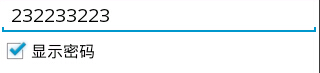
<?xml version="1.0" encoding="utf-8"?>

<LinearLayout xmlns:android="http://schemas.android.com/apk/res/android"

    android:layout_width="match_parent"

    android:layout_height="match_parent"

    android:orientation="vertical" >

    <EditText

        android:id="@+id/editText1"

        android:layout_width="match_parent"

        android:layout_height="wrap_content"

        android:ems="10"

        android:inputType="textPassword" >

        <requestFocus />

    </EditText>

    <CheckBox

        android:id="@+id/checkBox1"

        android:layout_width="wrap_content"

        android:layout_height="wrap_content"

        android:text="显示密码" />

</LinearLayout>
package com.example.test;

import android.app.Activity;

import android.os.Bundle;

import android.text.method.HideReturnsTransformationMethod;

import android.text.method.PasswordTransformationMethod;

import android.widget.CheckBox;

import android.widget.CompoundButton;

import android.widget.CompoundButton.OnCheckedChangeListener;

import android.widget.TextView;

public class MainActivity extends Activity {

private TextView editText1;

private CheckBox checkBox1;

    @Override

    protected void onCreate(Bundle savedInstanceState) {

        super.onCreate(savedInstanceState);

        setContentView(R.layout.test);

        editText1 =(TextView) findViewById(R.id.editText1);

        checkBox1=(CheckBox) findViewById(R.id.checkBox1);

        checkBox1.setOnCheckedChangeListener(new OnCheckedChangeListener() {

            @Override

            public void onCheckedChanged(CompoundButton buttonView, boolean isChecked) {

                // TODO Auto-generated method stub

                if(isChecked){

                    //如果选中,显示密码

                    editText1.setTransformationMethod(HideReturnsTransformationMethod.getInstance());

                }else{

                    //否则隐藏密码

                    editText1.setTransformationMethod(PasswordTransformationMethod.getInstance());

                }

            }

        });

    }

}
关键是:
editText1.setTransformationMethod(HideReturnsTransformationMethod.getInstance());
editText1.setTransformationMethod(PasswordTransformationMethod.getInstance());
Android:密码显示隐藏的更多相关文章
- JS控制文本框中的密码显示/隐藏功能
<html> <head> <title>[荐]JS控制文本框中的密码显示/隐藏功能_网页代码站(www.6a8a.com)</title> <s ...
- android密码显示和隐藏
if (showPwd){ //设置EditText文本为可见的 password.setTransformationMethod(HideReturnsTransformationMethod.ge ...
- js点击 密码输入框密码显示隐藏
很多密码框都有个眼睛标记,点击能显示密码.原理就是点击切换password为text等显示 下面上代码 <!DOCTYPE html> <html> <head> ...
- vue+element-ui实现显示隐藏密码
<template> <el-form :model="cuser_info" label-width="115px" label-posit ...
- 【Android初级】教你用两行代码实现“显示/隐藏密码”的效果
Android里面要使用密码的场景是非常多的,支付宝.微信.淘宝以及各大银行APP,都跟用户的密码有关.用户的密码是极为隐私的,用户在输入时不希望密码被别人看到,所以几乎所有需要输入密码的场景下都会把 ...
- EditTextPreference点击后输入框显示隐藏内容,类似密码输入(转)
http://bbs.anzhuo.cn/thread-928131-1-1.html EditTextPreference点击后输入框显示隐藏内容,类似密码输入... [复制链接] aski ...
- input 显示/隐藏密码
js代码: // 显示/隐藏密码 $('.open').on('click',function(){ if($("#psw").prop('type')=='password'){ ...
- Android上实现各种风格的隐藏菜单,比如左右滑动菜单、上下滑动显示隐藏菜单
Android上的菜单展示风格目前是各式各样的,但用的最多且体验最好的莫过于左右滑动来显示隐藏的菜单本示例实现了各种方式的菜单展示效果,只有你想不到的源码:https://github.com/Sim ...
- JS组件系列——显示隐藏密码切换的jQuery插件
<!DOCTYPE html> <html lang="zh-CN"> <head> <meta charset="utf-8& ...
随机推荐
- 每日一“酷”之bisect
作用:维护有序列表,而不必在每次想列表增加一个元素时调用sort排序 bisect 模块实现了一个算法用于向列表中插入元素,同时仍保持列表有序.有些情况下,这比反复对一个了表序列更高效,另外也比构建一 ...
- margin负值在页面布局中的应用
http://www.w3school.com.cn/tiy/t.asp 预览工具 一.左右列固定,中间列自适应布局 此例适用于左右栏宽度固定,中间栏宽度自适应的布局.由于网页的主体部分一般在中间,很 ...
- kruskal --- c++ (2)
#include <cstdio> #include <algorithm> using namespace std; struct aaa{ int l,r,w; bool ...
- python学习小结2:if和while控制语句
if语句 if语句中,代码块是按缩进的空格数量来判断的,也就是说空格数量一致的相邻行会被当作一个代码块,当if的条件成立的时候它就会得到执行. x = 100 if x > 50: print ...
- Java工程转换为Maven工程-b
1. 前言 在开发中经常要建立一个Maven的子工程,对于没有模板的同学来说从Java工程来转换也是一个不错的选择.本文就如何从一个Java工程创建一个Maven工程做了一个介绍,相信对于将一个Jav ...
- WPF 多线程处理(1)
WPF 多线程处理(1) WPF 多线程处理(2) WPF 多线程处理(3) WPF 多线程处理(4) WPF 多线程处理(5) WPF 多线程处理(6) 废话不多说,先上图: 多线程处理数据后在th ...
- Django 学习笔记之五 Django中数据库中ManyToManyField及ForeignKey
1.model里面的代码: from __future__ import unicode_literalsimport django.utils.timezone as timezonefrom dj ...
- [转载]点评阿里云、盛大云等国内IaaS产业
免责声明: 本文转自网络文章,转载此文章仅为个人收藏,分享知识,如有侵权,请联系博主进行删除. 原文作者:刘黎明 原文地址:http://www.chinacloud.org ...
- 【POJ】【3308】Paratroopers
网络流/二分图最小点权覆盖 sigh……这题……TLE&RE了好几发 建一个二分图,左边的每个结点代表行,右边的代表列,如果在(i,j)这个位置有一个外星人,那么我们就连一条边 (左 i -& ...
- MySQL 5.7原生JSON格式支持
在MySQL与PostgreSQL的对比中,PG的JSON格式支持优势总是不断被拿来比较.其实早先MariaDB也有对非结构化的数据进行存储的方案,称为dynamic column,但是方案是通过BL ...