
docker + nginx 部署vuejs3.0项目
1:用指令 npm run build 打包vusjs项目(该项目是在github上下载的)。打包成功后会生成一个目录dist。
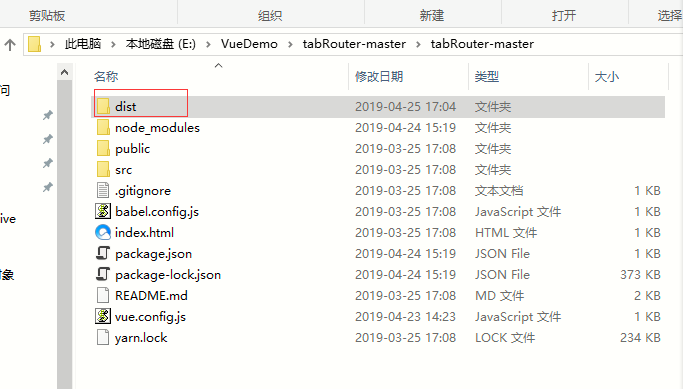
2:把该文件夹拷贝到腾讯云服务器(操作系统 centos7)下的/usr/share目录下。
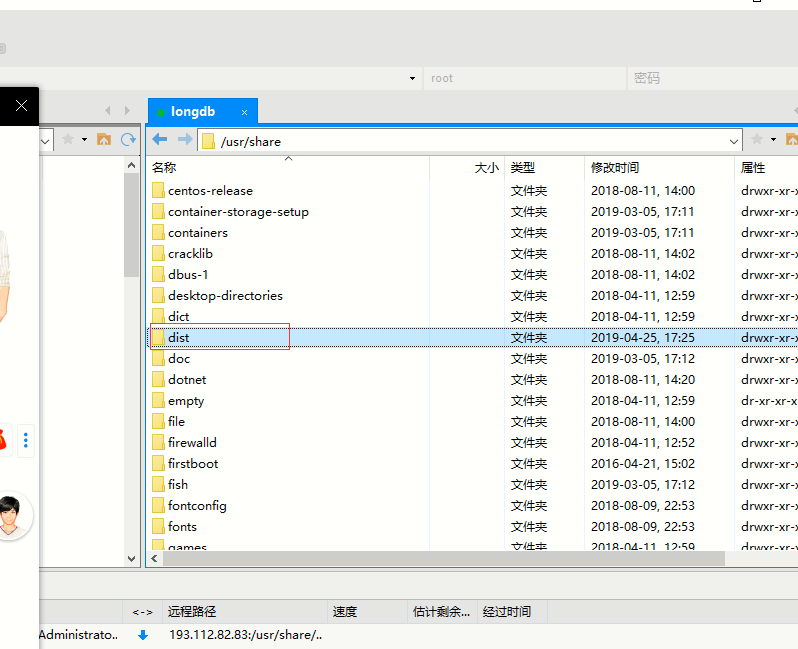
3:在/usr/share目录下新建Dockerfile文件
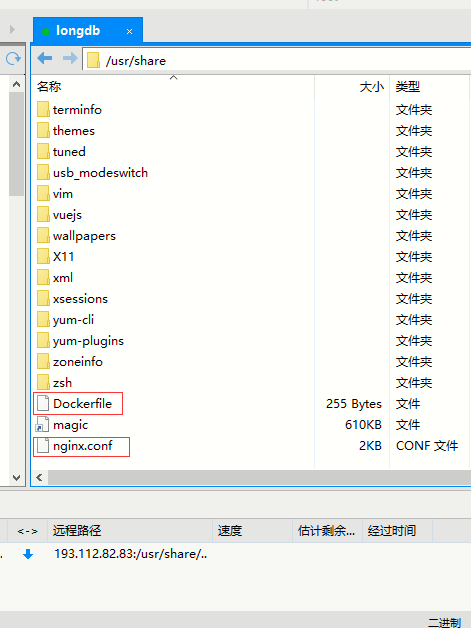
dockerfile文件内容:
# 设置基础镜像

FROM nginx

# 定义作者

MAINTAINER longdb

# 将dist文件中的内容复制到 /usr/share/nginx/html/ 这个目录下面

COPY dist/  /usr/share/nginx/html/

COPY nginx.conf /etc/nginx/nginx.conf

RUN echo 'echo init ok!!'
4:新建文件 nginx.conf。
文件内容:
worker_processes auto;

#error_log  logs/error.log;

#error_log  logs/error.log  notice;

#error_log  logs/error.log  info;

#pid        logs/nginx.pid;

events {

    worker_connections  1024;

}

http {

    include       mime.types;

    default_type  application/octet-stream;

    #log_format  main  '$remote_addr - $remote_user [$time_local] "$request" '

    #                  '$status $body_bytes_sent "$http_referer" '

    #                  '"$http_user_agent" "$http_x_forwarded_for"';

    #access_log  logs/access.log  main;

    sendfile        on;

    #tcp_nopush     on;

    #keepalive_timeout  0;

    keepalive_timeout  65;

    #gzip  on;

    client_max_body_size   20m;

    server {

        listen       80;

        server_name  www.longdb.com;

        #charset koi8-r;

        #access_log  logs/host.access.log  main;

     location / {

        root   /usr/share/nginx/html;

        index  index.html index.htm;

        try_files $uri $uri/ /index.html;

        }

        #error_page  404              /404.html;

        # redirect server error pages to the static page /50x.html

        #

        error_page   500 502 503 504  /50x.html;

        location = /50x.html {

            root   html;

        }

        # proxy the PHP scripts to Apache listening on 127.0.0.1:80

        #

        #location ~ \.php$ {

        #    proxy_pass   http://127.0.0.1;

        #}

        # pass the PHP scripts to FastCGI server listening on 127.0.0.1:9000

        #

        #location ~ \.php$ {

        #    root           html;

        #    fastcgi_pass   127.0.0.1:9000;

        #    fastcgi_index  index.php;

        #    fastcgi_param  SCRIPT_FILENAME  /scripts$fastcgi_script_name;

        #    include        fastcgi_params;

        #}

        # deny access to .htaccess files, if Apache's document root

        # concurs with nginx's one

        #

        #location ~ /\.ht {

        #    deny  all;

        #}

    }

    # another virtual host using mix of IP-, name-, and port-based configuration

    #

    #server {

    #    listen       8000;

    #    listen       somename:8080;

    #    server_name  somename  alias  another.alias;

    #    location / {

    #        root   html;

    #        index  index.html index.htm;

    #    }

    #}

}
5:cd 进入share目录,然后 用括号里指令(docker build -t longdb-vue:V1.0.0 . )构建镜像。(注意最后的 . )
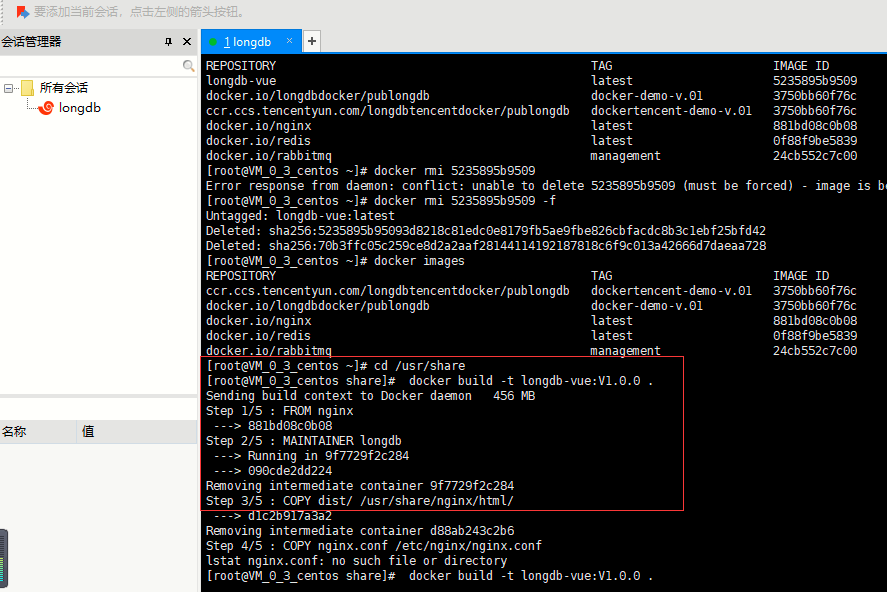
6:运行生成成功的镜像:docker run -p 3000:80 -d --name longdbvuejs 34d9e8770f1b
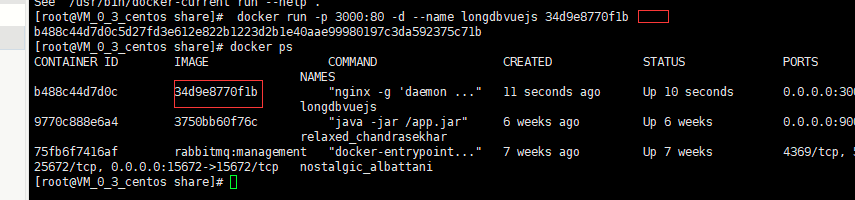
参数讲解:
run: 创建一个新的容器并运行一个命令
-d: 后台运行容器,并返回容器ID
-p: 端口映射,格式为:主机(宿主)端口:容器端口
--name="longdbvuejs": 为容器指定一个名称
34d9e8770f1b --为生成好的images_id.
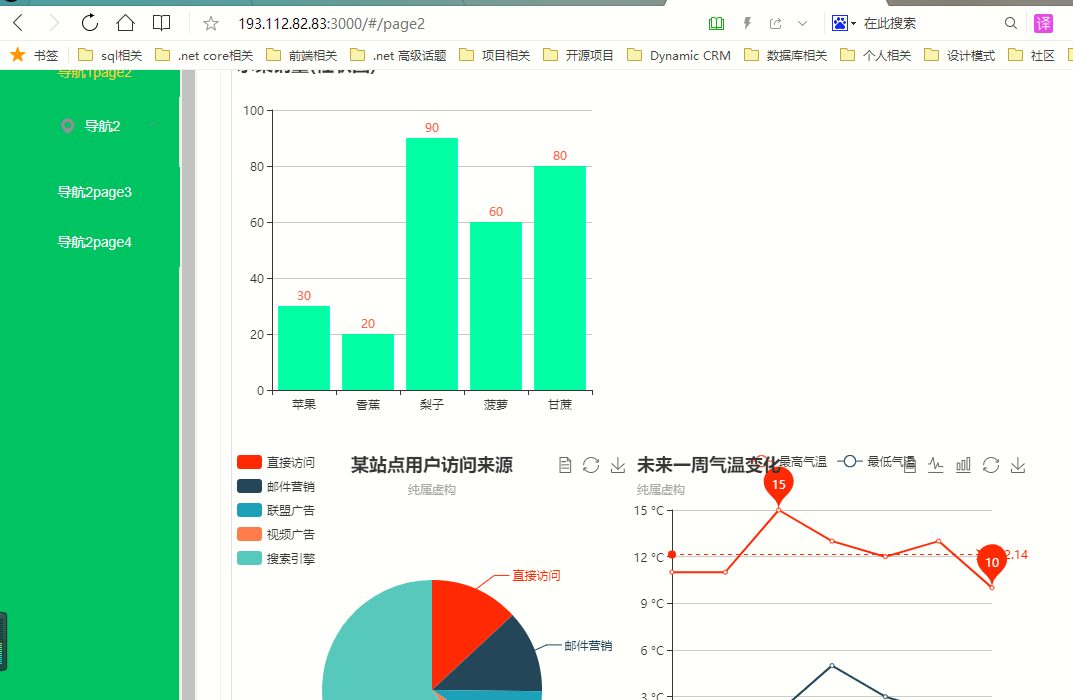
7:docker ps 指令查看有哪些在运行,上图中看到longvuejs在运行。(测试 http://193.112.82.83:3000/#/page2)
结果如下:
参考文章:https://blog.csdn.net/g631521612/article/details/82841282
2019.8.10 added:部署好后,目录dist下的内容可以删掉。
docker + nginx 部署vuejs3.0项目的更多相关文章
- docker 中部署一个springBoot项目
docker 中部署一个springBoot项目 (1)介绍 springBoot项目 1.项目结构 2.pom.xml <?xml version="1.0" encodi ...
- Linux 集群概念 , wsgi , Nginx负载均衡实验 , 部署CRM(Django+uwsgi+nginx), 部署学城项目(vue+uwsgi+nginx)
Linux 集群概念 , wsgi , Nginx负载均衡实验 , 部署CRM(Django+uwsgi+nginx), 部署学城项目(vue+uwsgi+nginx) 一丶集群和Nginx反向代理 ...
- Centos7 部署.netCore2.0项目
最近在学习.netCore2.0,学习了在Centos上部署.netCore的方法,中间遇到过坑,特意贴出来供大家分享,在此我只是简单的在CentOS上运行.NETCore网站,没有运用到nginx等 ...
- Linux +Docker +Nginx 部署代理转发初探
很多开发人员仅仅只会码代码,如果让开发人员部署一些深入点的东西,或者做负载均衡等,很多开发人员估计就懵逼了,作为一个专业的开发还需要懂一些基本的运维知识:虽然说在互联网行业中,中小企业都有一个牛逼的运 ...
- jenkins+docker+nginx+tomcat实现vue项目部署
一.项目准备 1.新建一个vue的项目,确保能在浏览器正常访问.然后在项目的根目录下新建一个Dockerfile的文件,内容如下 FROM nginx COPY dist /usr/share/ngi ...
- 在centos7.4 nginx mysql php部署 thinkphp5.0 项目
系统 centos7 环境 php 7.1.3 nignx 1.12.2 mysql 5.5.6 我是通过lnmp 集成环境安装 fastcgi.conf 末尾添加 vim fastcig.conf ...
- Docker+Nginx部署Angular
在部署Angular生产环境之前,需要电脑已经安装docker. 添加Dockerfile在已经完成的Angular项目的项目根目录下添加Dockerfile文件. Dockerfile文件内容: F ...
- Centos8 Docker+Nginx部署Asp.Net Core Nginx正向代理与反向代理 负载均衡实现无状态更新
首先了解Nginx 相关介绍(正向代理和反向代理区别) 所谓代理就是一个代表.一个渠道: 此时就涉及到两个角色,一个是被代理角色,一个是目标角色,被代理角色通过这个代理访问目标角色完成一些任务的过程称 ...
- 在Docker中部署Spring Boot项目
想要获取更多文章可以访问我的博客 - 代码无止境. 微服务现在在互联网公司可谓非常流行了,之前找工作的的时候很多HR电话约面试的时候都会问对微服务是否有过接触.而微服务和Docker可以非常完美的结合 ...
随机推荐
- DataStage 错误集(持续更新)
DataStage 错误集(持续更新) DataStage序列文章 DataStage 一.安装 DataStage 二.InfoSphere Information Server进程的启动和停止 D ...
- DataStage 六、安装和部署集群环境
DataStage序列文章 DataStage 一.安装 DataStage 二.InfoSphere Information Server进程的启动和停止 DataStage 三.配置ODBC Da ...
- 多个docker 挂载VOLUME的心得
假如有一个mysql镜像 在Dockerfile中制定VOLUME /var/lib/mysql 那么当执行: docker run -d -e MYSQL_ROOT_PASSWORD=root -- ...
- android虚拟机的垃圾收集
Dalvik :http://zh.wikipedia.org/wiki/Dalvik%E8%99%9A%E6%8B%9F%E6%9C%BA ART :http://source.android.co ...
- zookeeper zoo.cfg配置文件
一.zookeeper的配置文件 zoo.cfg 配置文件是我们安装zookeeper的时候复制 重命名出来的文件 命令: cp zoo_smaple.cfg zoo.cfg zkSe ...
- [c# 20问] 2.如何转换XML文件
添加System.Xml引用 使用XmlReader转换字符串 DEMO #region Parse Xml private static void ParseXml(string xmlString ...
- asp.net 类头部描述
这里教大家怎么在新建类的时候默认有头部描述,先看效果: 像这样的内容我们要怎么进行添加呢? 前方高能...... 找到VS的安装目录-->比如我自己的安装目录D:\VS2013\Common7\ ...
- C#中==操作符存在的缺陷
==操作符因为语法简洁而备受欢迎,但它本身也存在着局限性,比如继承或泛型问题.下面让我们依次来看看吧. 1.==和继承性问题 关于==运算符在继承时存在的问题,我们以String类型为例进行说明. s ...
- python单引号和双引号的区别
今天在网上爬虫的时候,很奇怪的发现python的字符串既可以用双引号又可以用单引号,于是就上网百度了一下原因. 原来由于字符串中有可能既有双引号又有单引号,例如: 字符串:demo'1'. 这时候就可 ...
- Spark Streaming初步使用以及工作原理详解
在大数据的各种框架中,hadoop无疑是大数据的主流,但是随着电商企业的发展,hadoop只适用于一些离线数据的处理,无法应对一些实时数据的处理分析,我们需要一些实时计算框架来分析数据.因此出现了很多 ...