
C#8.0中的 await foreach
AsyncStreamsInCShaper 8.0
C# 8.0中支持异步返回枚举类型async Task<IEnumerable<T>>
sync Streams这个功能已经发布很久了,在去年的Build 2018 The future of C#就有演示
C# 5引入了 Async/Await,用以提高用户界面响应能力和对 Web 资源的访问能力。换句话说,异步方法用于执行不阻塞线程并返回一个标量结果的异步操作。
常规示例
要了解问什么需要Async Streams,我们先来看看这样的一个示例,求出5以内的整数的和.
static int SumFromOneToCount(int count)
{
ConsoleExt.WriteLine("SumFromOneToCount called!");
var sum = 0;
for (var i = 0; i <= count; i++)
{
sum = sum + i;
}
return sum;
}
调用方法.
static void Main(string[] args)
{
const int count = 5;
ConsoleExt.WriteLine($"Starting the application with count: {count}!");
ConsoleExt.WriteLine("Classic sum starting.");
ConsoleExt.WriteLine($"Classic sum result: {SumFromOneToCount(count)}");
ConsoleExt.WriteLine("Classic sum completed.");
ConsoleExt.WriteLine("################################################");
}
输出结果.

可以看到,整个过程就一个线程Id为1的线程自上而下执行,这是最基础的做法.
Yield Return
接下来,我们使用yield运算符使得这个方法编程延迟加载,如下所示.
static IEnumerable<int> SumFromOneToCountYield(int count)
{
ConsoleExt.WriteLine("SumFromOneToCountYield called!");
var sum = 0;
for (var i = 0; i <= count; i++)
{
sum = sum + i;
yield return sum;
}
}
主函数
static void Main(string[] args)
{
const int count = 5;
ConsoleExt.WriteLine("Sum with yield starting.");
foreach (var i in SumFromOneToCountYield(count))
{
ConsoleExt.WriteLine($"Yield sum: {i}");
}
ConsoleExt.WriteLine("Sum with yield completed.");
ConsoleExt.WriteLine("################################################");
ConsoleExt.WriteLine(Environment.NewLine);
}
运行结果如下.
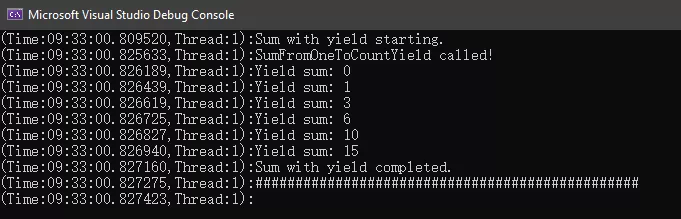
正如你在输出窗口中看到的那样,结果被分成几个部分返回,而不是作为一个值返回。以上显示的累积结果被称为惰性枚举。但是,仍然存在一个问题,即 sum 方法阻塞了代码的执行。如果你查看线程ID,可以看到所有东西都在主线程1中运行,这显然不完美,继续改造.
Async Return
我们试着将async用于SumFromOneToCount方法(没有yield关键字).
static async Task<int> SumFromOneToCountAsync(int count)
{
ConsoleExt.WriteLine("SumFromOneToCountAsync called!");
var result = await Task.Run(() =>
{
var sum = 0;
for (var i = 0; i <= count; i++)
{
sum = sum + i;
}
return sum;
});
return result;
}
主函数
static async Task Main(string[] args)
{
const int count = 5;
ConsoleExt.WriteLine("async example starting.");
// Sum runs asynchronously! Not enough. We need sum to be async with lazy behavior.
var result = await SumFromOneToCountAsync(count);
ConsoleExt.WriteLine("async Result: " + result);
ConsoleExt.WriteLine("async completed.");
ConsoleExt.WriteLine("################################################");
ConsoleExt.WriteLine(Environment.NewLine);
}
运行结果.
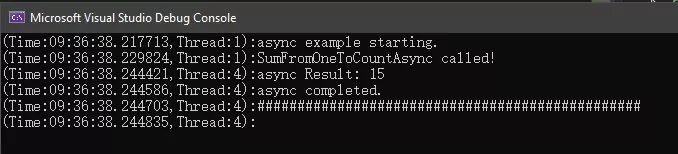
我们可以看到计算过程是在另一个线程中运行,但结果仍然是作为一个值返回!任然不完美.
如果我们想把惰性枚举(yield return)与异步方法结合起来,即返回Task<IEnumerable,这怎么实现呢?
IAsyncEnumerable
其实,在C# 8.0中Task<IEnumerable>这种组合称为IAsyncEnumerable。
这个新功能为我们提供了一种很好的技术来解决拉异步延迟加载的问题,例如从网站下载数据或从文件或数据库中读取记录,与 IEnumerable 和 IEnumerator 类似,Async Streams 提供了两个新接口 IAsyncEnumerable 和 IAsyncEnumerator,定义如下:
public interface IAsyncEnumerable<out T>
{
IAsyncEnumerator<T> GetAsyncEnumerator();
}
public interface IAsyncEnumerator<out T> : IAsyncDisposable
{
Task<bool> MoveNextAsync();
T Current { get; }
}
// Async Streams Feature 可以被异步销毁
public interface IAsyncDisposable
{
Task DiskposeAsync();
}
AsyncStream
下面,我们就来见识一下AsyncStrema的威力,我们使用IAsyncEnumerable来对函数进行改造,如下.
static async Task ConsumeAsyncSumSeqeunc(IAsyncEnumerable<int> sequence)
{
ConsoleExt.WriteLineAsync("ConsumeAsyncSumSeqeunc Called");
await foreach (var value in sequence)
{
ConsoleExt.WriteLineAsync($"Consuming the value: {value}");
// simulate some delay!
await Task.Delay(TimeSpan.FromSeconds(1));
};
}
private static async IAsyncEnumerable<int> ProduceAsyncSumSeqeunc(int count)
{
ConsoleExt.WriteLineAsync("ProduceAsyncSumSeqeunc Called");
var sum = 0;
for (var i = 0; i <= count; i++)
{
sum = sum + i;
// simulate some delay!
await Task.Delay(TimeSpan.FromSeconds(0.5));
yield return sum;
}
}
主函数
static async Task Main(string[] args)
{
const int count = 5;
ConsoleExt.WriteLine("Starting Async Streams Demo!");
// Start a new task. Used to produce async sequence of data!
IAsyncEnumerable<int> pullBasedAsyncSequence = ProduceAsyncSumSeqeunc(count);
// Start another task; Used to consume the async data sequence!
var consumingTask = Task.Run(() => ConsumeAsyncSumSeqeunc(pullBasedAsyncSequence));
await Task.Delay(TimeSpan.FromSeconds(3));
ConsoleExt.WriteLineAsync("X#X#X#X#X#X#X#X#X#X# Doing some other work X#X#X#X#X#X#X#X#X#X#");
// Just for demo! Wait until the task is finished!
await consumingTask;
ConsoleExt.WriteLineAsync("Async Streams Demo Done!");
}
如果一切顺利,那么就能看到这样的运行结果了.
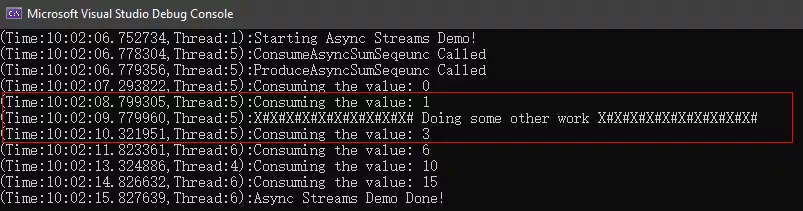
最后,看到这就是我们想要的结果,在枚举的基础上,进行了异步迭代.
可以看到,整个计算过程并没有造成主线程的阻塞,其中,值得重点关注的是红色方框区域的线程5!线程5!线程5!线程5在请求下一个结果后,并没有等待结果返回,而是去了Main()函数中做了别的事情,等待请求的结果返回后,线程5又接着执行foreach中任务.
我们已经讨论过 Async Streams,它是一种出色的异步拉取技术,可用于进行生成多个值的异步计算。
Async Streams 背后的编程概念是异步拉取模型。我们请求获取序列的下一个元素,并最终得到答复。
Async Streams 提供了一种处理异步数据源的绝佳方法,希望对大家能够有所帮助。
C#8.0中的 await foreach的更多相关文章
- 聊一聊C# 8.0中的await foreach
AsyncStreamsInCShaper8.0 很开心今天能与大家一起聊聊C# 8.0中的新特性-Async Streams,一般人通常看到这个词表情是这样. 简单说,其实就是C# 8.0中支持aw ...
- 小心C# 5.0 中的await and async模式造成的死锁
平时在使用C# 5.0中的await and async关键字的时候总是没注意,直到今天在调试一个ASP.NET项目时,发现在调用一个声明为async的方法后,程序老是莫名其妙的被卡住,就算声明为as ...
- [转]小心C# 5.0 中的await and async模式造成的死锁
原文链接 https://www.cnblogs.com/OpenCoder/p/4434574.html 内容 UI Example Consider the example below. A bu ...
- VS2015 C#6.0 中的那些新特性(转载)
自动属性初始化 (Initializers for auto-properties) 以前我们是这么写的 为一个默认值加一个后台字段是不是很不爽,现在我们可以这样写 只读属性的初始化(Getter-o ...
- C#6.0 中的那些新特性
C#6.0 中的那些新特性 前言 VS2015在自己机器上确实是装好了,费了老劲了,想来体验一下跨平台的快感,结果被微软狠狠的来了一棒子了,装好了还是没什么用,应该还需要装Xarmain插件,配置一些 ...
- [译] C# 5.0 中的 Async 和 Await (整理中...)
C# 5.0 中的 Async 和 Await [博主]反骨仔 [本文]http://www.cnblogs.com/liqingwen/p/6069062.html 伴随着 .NET 4.5 和 V ...
- [C#] .NET4.0中使用4.5中的 async/await 功能实现异
好东西需要分享 原文出自:http://www.itnose.net/detail/6091186.html 在.NET Framework 4.5中添加了新的异步操作库,但是在.NET Framew ...
- C#同步,异步的理解,包括5.0中await和async(学习笔记)
之前在工作中一直用的是同步线程,就是先进入画面的load事件,然后在里面进行数据库调用的处理.后面又遇到了公司软件中一些比较古老的代码,一开始在那块古老代码中增加机能的时候,我想用到数据库的数据给画面 ...
- [C#] .NET4.0中使用4.5中的 async/await 功能实现异步
在.NET Framework 4.5中添加了新的异步操作库,但是在.NET Framework 4.0中却无法使用.这时不免面临着抉择,到底是升级整个解决方案还是不使用呢? 如果你的软件还没发布出去 ...
随机推荐
- MySQL LIMIT 如何改写成Oracle limit
mysql代码 SELECT * FROM tablename LIMIT 100,15 首先,Oracle是不支持limit的.个人感觉分页方面mysql比Oracle要好些.处理代码如下: sel ...
- 怎样统计分析CSDN博客流量
第一.IP.PV和UV各自是什么意思? IP.实际上也就是指独立IP,它的英文为Internet ***otocol,是独立IP数的意思.00:00-24:00同样IP地址记录一次.即使你有多台电脑. ...
- ansible debug模块学习笔记
- name: Print debug infomation eg hosts: test2 gather_facts: F tasks: - name: Command run line shell ...
- LoadRunner性能分析指标解释
Transactions(用户事务分析) 用户事务分析是站在用户角度进行的基础性能分析. 1.Transation Sunmmary(事务综述) 对事务进行综合分析是性能分析的第一步,通过分析测试时间 ...
- Oracle 10g通过创建物化视图实现不同数据库间表级别的数据同步
摘自:http://blog.csdn.net/javaee_sunny/article/details/53439980 目录(?)[-] Oracle 10g 物化视图语法如下 实例演示 主要步骤 ...
- e553. 作为浏览器访问URL
// See also e551 精简的Applet try { URL url = new URL(getDocumentBase(), "http://hostname.com/page ...
- 不可在 for 循环体内修改循环变量,防止 for 循环失去控制
不可在 for 循环体内修改循环变量,防止 for 循环失去控制. #include <iostream> /* run this program using the console pa ...
- pyqt的setObjectName()/findChild()
根据设置的Name标示查找组件的对象,关键函数:setObjectName()/findChild() findChild()/2:需要两个参数, 参数一:组件的类型,如QLineEdit.QPush ...
- 一些 Linux 常用命令说明
目前由于自己接触到的是 Windows 的操作系统,所以会经常使用 git bash 来提交代码到 github上. git bash 是 Windows 下模拟 Linux 的命令行工具. 在此总结 ...
- myeclipse 配置
1.配置java 新建系统变量JAVA_HOME 和CLASSPATH 变量名:JAVA_HOME 变量值:C:\Program Files\Java\jdk1.7.0变量名:CLASSPATH 变量 ...