
[翻译] HTKDragAndDropCollectionViewLayout
HTKDragAndDropCollectionViewLayout

Custom UICollectionViewLayout that works together with a custom UICollectionViewCell to provide drag and drop for a UICollectionView. Works just like UITableView drag and drop. What's unique about this approach is that it does not need to create a "ghost" or "dummy" cell to provide the drag and drop functionality. I believe this method is simpler and less complex for the majority of use cases.
自定义UICollectionViewLayout,与UICollectionViewCell一起使用,提供拖拽功能。就像UITableView的拖拽功能一样。有点特别的地方就是你不需要创建出替代的cell来满足供你拖拽的动能。我相信,这个方法会简化你所写的代码。
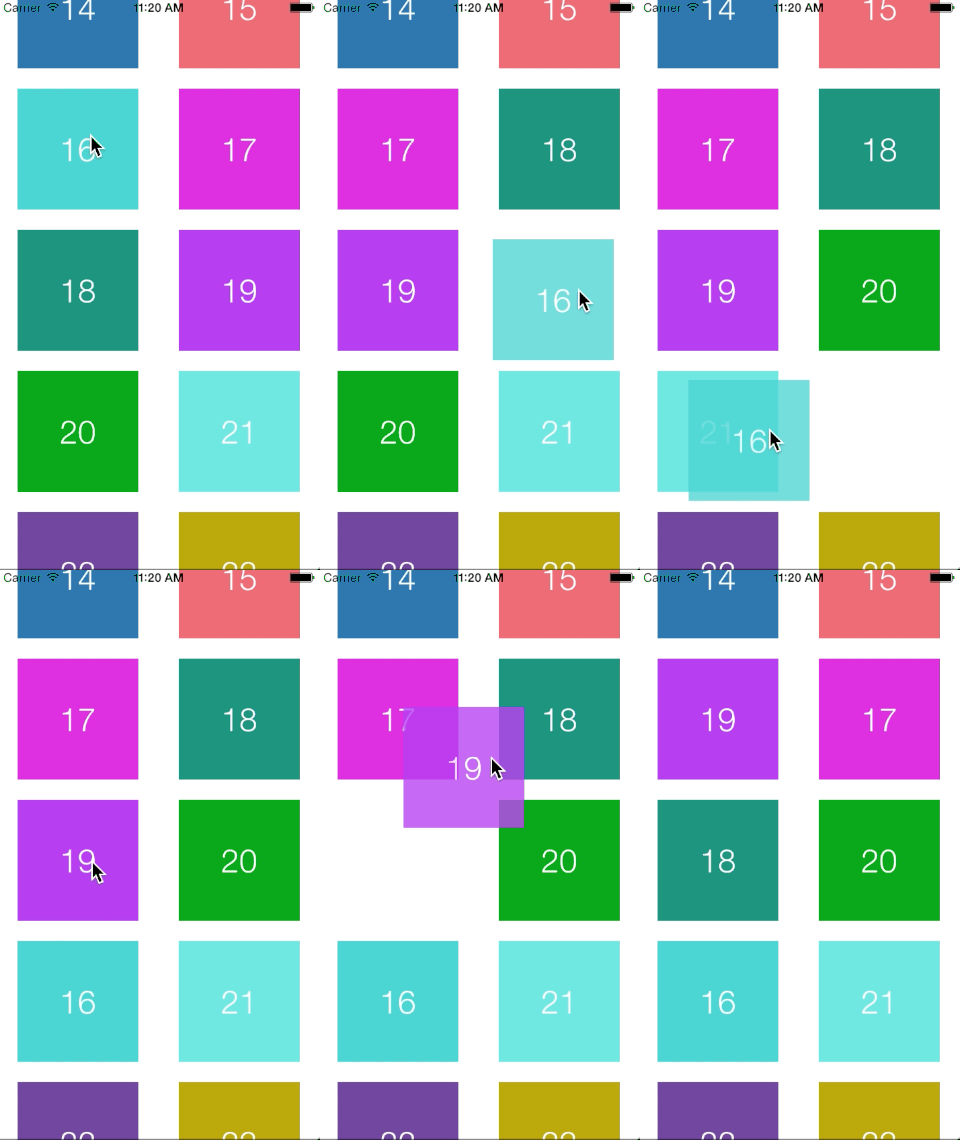
Adding to your project: 添加到你的工程当中
Cocoapods
CocoaPods is the recommended way to add HTKDragAndDropCollectionViewLayout to your project.
建议你用CocoaPods来导入到你的工程当中。
- Add a pod entry for HTKDragAndDropCollectionViewLayout to your Podfile
pod 'HTKDragAndDropCollectionViewLayout', '~> 0.0.1' 添加'HTKDragAndDropCollectionViewLayout', '~> 0.0.1'到pod中 - Install the pod(s) by running
pod install. 执行安装 - Subclass
HTKDragAndDropCollectionViewController. 创建出HTKDragAndDropCollectionViewController子类 - Setup
HTKDragAndDropCollectionViewLayoutproperties (itemSize, lineSpacing, etc). 设置HTKDragAndDropCollectionViewLayout属性 - Subclass and use
HTKDraggableCollectionViewCellwhich implements the gestures for dragging. 创建出HTKDraggableCollectionViewCell子类然后实现手势与拖拽 - Implement
- (void)userDidEndDraggingCell:(UICollectionViewCell *)celland if theHTKDragAndDropCollectionViewLayoutfinalIndexPath is not nil, insert the draggedIndexPath into the finalIndexPath's position. See example in project. 实现方法- (void)userDidEndDraggingCell:(UICollectionViewCell *)cell,如果theHTKDragAndDropCollectionViewLayout最后的indexPath为nil,将draggedIndexPath插入到最后的位置上。请看demo工程。
[翻译] HTKDragAndDropCollectionViewLayout的更多相关文章
- 《Django By Example》第五章 中文 翻译 (个人学习,渣翻)
书籍出处:https://www.packtpub.com/web-development/django-example 原作者:Antonio Melé (译者@ucag注:大家好,我是新来的翻译, ...
- 《Django By Example》第四章 中文 翻译 (个人学习,渣翻)
书籍出处:https://www.packtpub.com/web-development/django-example 原作者:Antonio Melé (译者注:祝大家新年快乐,这次带来<D ...
- [翻译]开发文档:android Bitmap的高效使用
内容概述 本文内容来自开发文档"Traning > Displaying Bitmaps Efficiently",包括大尺寸Bitmap的高效加载,图片的异步加载和数据缓存 ...
- 【探索】机器指令翻译成 JavaScript
前言 前些时候研究脚本混淆时,打算先学一些「程序流程」相关的概念.为了不因太枯燥而放弃,决定想一个有趣的案例,可以边探索边学. 于是想了一个话题:尝试将机器指令 1:1 翻译 成 JavaScript ...
- 《Django By Example》第三章 中文 翻译 (个人学习,渣翻)
书籍出处:https://www.packtpub.com/web-development/django-example 原作者:Antonio Melé (译者注:第三章滚烫出炉,大家请不要吐槽文中 ...
- 《Django By Example》第二章 中文 翻译 (个人学习,渣翻)
书籍出处:https://www.packtpub.com/web-development/django-example 原作者:Antonio Melé (译者注:翻译完第一章后,发现翻译第二章的速 ...
- 《Django By Example》第一章 中文 翻译 (个人学习,渣翻)
书籍出处:https://www.packtpub.com/web-development/django-example 原作者:Antonio Melé (译者注:本人目前在杭州某家互联网公司工作, ...
- 【翻译】Awesome R资源大全中文版来了,全球最火的R工具包一网打尽,超过300+工具,还在等什么?
0.前言 虽然很早就知道R被微软收购,也很早知道R在统计分析处理方面很强大,开始一直没有行动过...直到 直到12月初在微软技术大会,看到我软的工程师演示R的使用,我就震惊了,然后最近在网上到处了解和 ...
- ASP.NET MVC with Entity Framework and CSS一书翻译系列文章之第一章:创建基本的MVC Web站点
在这一章中,我们将学习如何使用基架快速搭建和运行一个简单的Microsoft ASP.NET MVC Web站点.在我们马上投入学习和编码之前,我们首先了解一些有关ASP.NET MVC和Entity ...
随机推荐
- 使用Thumbnailator处理gif图片时遇到java.lang.ArrayIndexOutOfBoundsException: 4096异常处理
环境 1.7.0_80 在使用Thumbnailator处理gif图片时,遇到问题: Exception in thread "main" java.lang.ArrayIndex ...
- exe4j生成的exe反编译成java代码
很早以前写了一个java串口小程序,现在只有exe4j打包后的源程序了,最近又要用,折腾了一下发现其实要找回来也很简单,这里记录一下,以免以后忘记. exe4j只是将java程序,使用自己的方式打包了 ...
- 2-9 js基础 cookie封装
// JavaScript Document 'use strict'; function setCookie(sName,sValue,iDay){ if(iDay){ var oDate = ne ...
- leetcode4:Permutation
#include <utility> #include <iostream> #include <vector> #include <algorithm> ...
- SpringCloud - RestTemplate 的三种使用方式
1. 直接使用 RestTemplate restTemplate = new RestTemplate(); String result = restTemplate.getForObject(&q ...
- centos7中安装mongodb3.6
centos7中安装mongodb3.6 首先更新系统 yum -y update 1.安装Mongodb 编辑Mongodb安装源 vim /etc/yum.repos.d/mongodb-org- ...
- SVG 旋转图形实例
本实例展示如何在SVG中画出一个正方形并使之旋转.运行结果如下图所示: 在文本框中输入时间间隔,单位是毫秒.点击Start按钮,蓝色方块就会开始转动,每个时间间隔变化一度.变换的角度在下面的Angle ...
- [转] 如何应用设计模式设计你的足球引擎(一和二)----Design Football Game(Part I and II)
原文地址: http://www.codeproject.com/KB/architecture/applyingpatterns.aspx 作者:An 'OOP' Madhusudanan 译者:赖 ...
- Sublime Text - 在浏览器打开当前文件
有没有办法通过快捷键在指定的浏览器中打开当前文件? 有点怀念Dreamweaver的F12? 其实Sublime也可以实现这一效果,而且不需要安装任何插件. 进入Tools -> Build S ...
- flask笔记三:flask-login插件的使用
flask-login插件的使用 安装: pip install flask-login 初始化LoginManager ##############LoginManager设置########### ...