
Oracle案例08——xx.xx.xx.xx,表空间 SYSAUX 使用率>95%%
本实例主要针对Oracle表空间饱满问题处理方法做个步骤分享。
一、告警信息
收到zabbix告警信息,表空间 SYSAUX 使用率>95%%,系统表空间sysaux使用率超过了95%。

二、处理步骤
1.登录具体数据库做相应的数据库空间使用率查询
set line 200;

set pagesize 20000;

set feedback off;

col tablespace_name for a20;

col c_free_percent for a12;

col c_used_percent for a12;

col m_free_percent for a12;

col m_USED_PERCENT for a12;

select d.tablespace_name,round(d.MB_current_Bytes,2) Curr_Size_MB,round(f.free_mb_bytes,2) Free_Szie_MB,round(d.MB_maxbytes,2) MAX_Size_MB,round((f.free_mb_bytes/d.MB_current_Bytes)*100,2)  c_free_percent,round((d.MB_current_Bytes-f.free_mb_bytes)/d.MB_current_Bytes,4)*100 || '%' c_used_percent,round(((d.MB_maxbytes-d.MB_current_Bytes+f.free_mb_bytes)/d.MB_maxbytes)*100,2)   m_free_percent,round((d.MB_current_Bytes-f.free_mb_bytes)/d.MB_maxbytes,4)*100 || '%' m_used_percent
from  (select tablespace_name,sum(bytes/1024/1024) MB_current_Bytes,sum(maxbytes/1024/1024) MB_maxbytes from dba_data_files group by tablespace_name ) d,(select tablespace_name,sum(bytes/1024/1024) free_mb_bytes from dba_free_space group by tablespace_name) f
where d.tablespace_name=f.tablespace_name
order by c_free_percent ;

2.查询表空间对应的对象占用情况
select OWNER,segment_name,segment_type,PARTITION_NAME,bytes/1024/1024/1024 Size_GB from dba_segments where tablespace_name='SYSAUX' order by Size_GB desc

3.根据具体大对象做排查,对可以清理的相关数据清理
根据上述SQL查到的大对象主要是
1    SYS    WRH$_LATCH_CHILDREN        WRH$_LATCH__1153813778_29290    TABLE PARTITION    29.927734375
2    SYS    WRH$_LATCH_CHILDREN_PK      WRH$_LATCH__1153813778_29290    INDEX PARTITION    14.984375
3    SYS    WRH$_ACTIVE_SESSION_HISTORY   WRH$_ACTIVE_1153813778_29290    TABLE PARTITION    3.6474609375
4    SYS    WRH$_SQLSTAT            WRH$_SQLSTA_1153813778_29290    TABLE PARTITION    1.2529296875
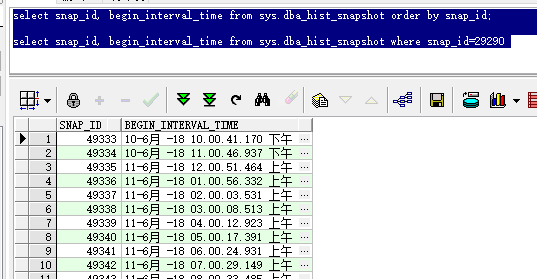
WRH$_LATCH_CHILDREN 表示快照使用的,其中分区1153813778是DBID, 29290是快照ID
查看29290的快照ID是什么时间的
select snap_id, begin_interval_time from sys.dba_hist_snapshot order by snap_id;

select snap_id, begin_interval_time from sys.dba_hist_snapshot where snap_id=29290
4.清空分区WRH$_LATCH__1153813778_29290
select * from   WRH$_LATCH_CHILDREN partition ( WRH$_LATCH__1153813778_29290);

alter table WRH$_LATCH_CHILDREN truncate partition WRH$_LATCH__1153813778_29290;
5.清理后表空间查看
select d.tablespace_name,round(d.MB_current_Bytes,2) Curr_Size_MB,round(f.free_mb_bytes,2) Free_Szie_MB,round(d.MB_maxbytes,2) MAX_Size_MB,round((f.free_mb_bytes/d.MB_current_Bytes)*100,2)  c_free_percent,round((d.MB_current_Bytes-f.free_mb_bytes)/d.MB_current_Bytes,4)*100 || '%' c_used_percent,round(((d.MB_maxbytes-d.MB_current_Bytes+f.free_mb_bytes)/d.MB_maxbytes)*100,2)   m_free_percent,round((d.MB_current_Bytes-f.free_mb_bytes)/d.MB_maxbytes,4)*100 || '%' m_used_percent

from  (select tablespace_name,sum(bytes/1024/1024) MB_current_Bytes,sum(maxbytes/1024/1024) MB_maxbytes from dba_data_files group by tablespace_name ) d,(select tablespace_name,sum(bytes/1024/1024) free_mb_bytes from dba_free_space group by tablespace_name) f

where d.tablespace_name=f.tablespace_name  and f.tablespace_name='SYSAUX'

order by c_free_percent ;

三、脚本附录
1.表空间segment大小查询
select OWNER,segment_name,PARTITION_NAME,segment_type,bytes/1024/1024/1024 Size_GB from dba_segments where tablespace_name='SYSAUX' order by Size_GB desc
2.表空间使用率查询
set line 200;

set pagesize 20000;

set feedback off;

col tablespace_name for a20;

col c_free_percent for a12;

col c_used_percent for a12;

col m_free_percent for a12;

col m_USED_PERCENT for a12;

select d.tablespace_name,round(d.MB_current_Bytes,2) Curr_Size_MB,round(f.free_mb_bytes,2) Free_Szie_MB,round(d.MB_maxbytes,2) MAX_Size_MB,round((f.free_mb_bytes/d.MB_current_Bytes)*100,2)  c_free_percent,round((d.MB_current_Bytes-f.free_mb_bytes)/d.MB_current_Bytes,4)*100 || '%' c_used_percent,round(((d.MB_maxbytes-d.MB_current_Bytes+f.free_mb_bytes)/d.MB_maxbytes)*100,2)   m_free_percent,round((d.MB_current_Bytes-f.free_mb_bytes)/d.MB_maxbytes,4)*100 || '%' m_used_percent
from  (select tablespace_name,sum(bytes/1024/1024) MB_current_Bytes,sum(maxbytes/1024/1024) MB_maxbytes from dba_data_files group by tablespace_name ) d,(select tablespace_name,sum(bytes/1024/1024) free_mb_bytes from dba_free_space group by tablespace_name) f
where d.tablespace_name=f.tablespace_name
order by c_free_percent ;
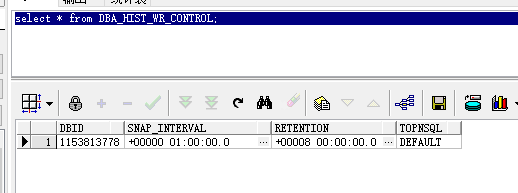
3.查看快照ID、查看快照设置信息、设置快照信息
select snap_id, begin_interval_time from sys.dba_hist_snapshot order by snap_id;
select * from DBA_HIST_WR_CONTROL;
begin

    DBMS_WORKLOAD_REPOSITORY.MODIFY_SNAPSHOT_SETTINGS(retention =>43200,interval =>30, topnsql =>'MAXIMUM');

end;

/
4.统计信息清理
exec dbms_stats.purge_stats(systimestamp -11);
Oracle案例08——xx.xx.xx.xx,表空间 SYSAUX 使用率>95%%的更多相关文章
- 基础概念:Oracle数据库、实例、用户、表空间、表之间的关系
基础概念:Oracle数据库.实例.用户.表空间.表之间的关系 数据库: Oracle数据库是数据的物理存储.这就包括(数据文件ORA或者DBF.控制文件.联机日志.参数文件).其实Oracle数据库 ...
- oracle service name sid , 用户 和 表空间
oracle 的四个概念: 数据库: 就是一堆静态的数据文件.注意是静态的 instance 实例: 可以类比数据库连接. 实例就是为了操作数据库而开辟的进程和内存空间,有了这个实例你才能操作数据库. ...
- oracle数据库_实例_用户_表空间之间的关系
基础概念:Oracle数据库.实例.用户.表空间.表之间的关系 数据库:Oracle数据库是数据的物理存储.这就包括(数据文件ORA或者DBF.控制文件.联机日志.参数文件).其实Oracle数据库的 ...
- Oracle学习笔记—数据库,实例,表空间,用户、表之间的关系
之前一直使用的关系型数据库是Mysql,而新公司使用Oracle,所以最近从网上搜集了一些资料,整理到这里,如果有不对的地方,欢迎大家讨论. 基本概念: 数据库:Oracle 数据库是数据的物理存储. ...
- Oracle 删除用户和表空间////Oracle创建删除用户、角色、表空间、导入导出、...命令总结/////Oracle数据库创建表空间及为用户指定表空间
Oracle 使用时间长了, 新增了许多user 和tablespace. 需要清理一下 对于单个user和tablespace 来说, 可以使用如下命令来完成. 步骤一: 删除user drop ...
- 老生常谈:关于undo表空间的使用率
就在前几天,又有一个客户向我咨询undo表空间使用率的问题. 这让我想起几年前曾经有个省份的案例,客户的实际运维人员是一位刚毕业不久的女孩,几乎不懂Oracle原理,项目经理交给她的任务也是基础运维工 ...
- 数据库实例: STOREBOOK > 表空间 > 编辑 表空间: SYSAUX
ylbtech-Oracle:数据库实例: STOREBOOK > 表空间 > 编辑 表空间: SYSAUX 表空间 > 编辑 表空间: SYSAUX 1. 一般信息返 ...
- Oracle中关于清除数据和释放表空间
一.表的重命名 flashback table test2 to before drop rename to test3;--[to test3]将表重命名 drop table test3 purg ...
- (总结)Oracle 11g常用管理命令(用户、表空间、权限)
1.启动oracle数据库: 从root切换到oracle用户进入:su - oracle 进入sqlplus环境,nolog参数表示不登录:sqlplus /nolog 以管理员模式登录:sqlpl ...
随机推荐
- javascript绑定事件addEventListener与attachEvent
1.eleObj.addEventListener(eventName,handle,useCapture); eleObj:DOM元素: eventName:事件名称.注意,这里的事件名称没有“ o ...
- Hadoop Gateway 部署
1.集群的 hadoop-current hive-current spark-current copy 到 gateway 机器 2.集群的 hadoop-conf hive-conf ...
- Strut2 ognl取出存放在request,session,application和对象栈的中的值
1.取出request,session,applicaiton中的值 a.往里面加入request,session,application中加入值 public String testServlet( ...
- %notfound的理解——oracle存储过程 .
文档中的解释:It returns TRUE if an INSERT, UPDATE, or DELETE statement affected no rows, or a SELECT INTO ...
- 解决 swap file “*.swp”already exists!问题
用vim编辑文件实际上是先copy一份临时文件,病映射到内存给你编辑,编辑的是临时文件,当执行:w后才保存临时文件到原文件,执行:q后才删除临时文件. 每次启动检索是否有临时文件,有就询问如何处理, ...
- [转载]Vue 2.x 实战之后台管理系统开发(一)
2. 开发前须知 我的后台管理系统项目运用了如下框架/插件: Vue 2.x —— 项目所使用的 js 框架,我所使用的版本是:2.1.10 vue-router 2 —— Vue 2.x 配套路由, ...
- IIS利用X-Forwarded-For获得来访者的真实IP
https://help.aliyun.com/knowledge_detail/37948.html
- Vue 多路由文件的合并
Vue 多路由文件的合并 1.使用的是ES6 数组的合并方法 let routes = new Set([...routes1, ...homerouters]);2.两个路由文件,导出的实际上就是一 ...
- C#Json数据类型
引用所对应框架的类库文件,下载地址:http://json.codeplex.com/ 在一般处理程序axhx中: 引用的命名空间: using System.IO;using Newtonsoft. ...
- 【Chromium】GPU进程启动流程
本篇文档以gpu进程的创建和启动为例,讲述chormium如何启动一个browser进程的子进程 PS:本文使用的chromium代码版本为71 前言 GPU进程的启动时机是由browser进程负责的 ...