
NHibernate实例
1. 下载相关资源:
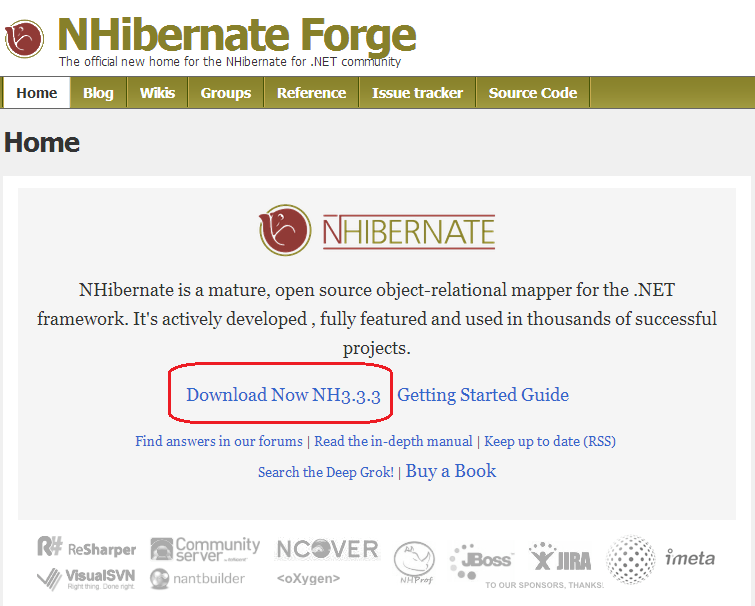
- 下载NHibernate。下载地址: http://nhforge.org/Default.aspx
- 下载微软Northwind示例数据库,下载地址:http://www.microsoft.com/en-us/download/details.aspx?id=23654
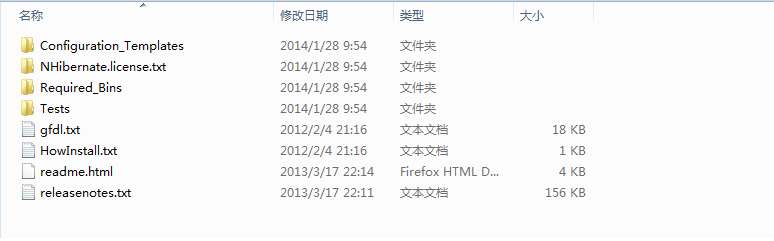
2. 下载NHibernate后解压缩文件,看到如下文档结构。本示例会用到Required_Bins目录下的文件。
- 下载微软Northwind,打开SQL Server 直接运行instnwnd.sql文件的脚本就可以了。
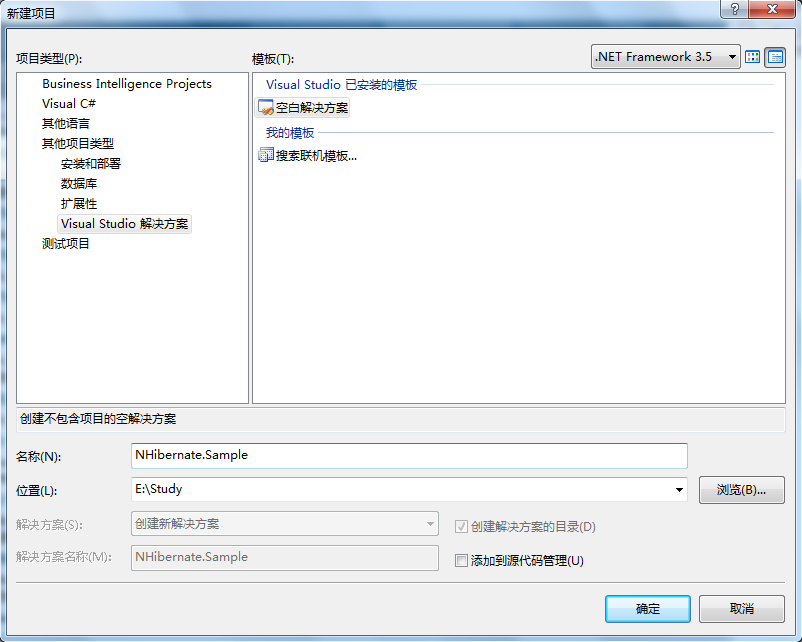
3. 打开Visual Studio 2008。新建NHibernate.Sample解决方案。
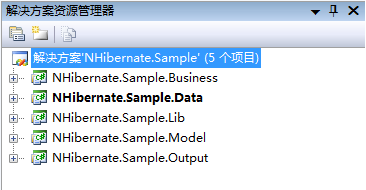
4. 在新建的解决方案下创建如下新项目:
- NHibernate.Sample.Business 【模板:类库】;处理业务逻辑
- NHibernate.Sample.Data 【模板:类库】;处理数据访问
- NHibernate.Sample.Lib 【模板:类库】;存放外部资源
- NHibernate.Sample.Model 【模板:类库】;处理业务模型
- NHibernate.Sample.Output 【模板:控制台应用程序】;测试输出
创建好以后,解决方案目录如下:
5. NHibernate.Sample.Lib项目,用来统一存放本示例用到的所有外部资源。创建三个个文件夹,分别为Dll、Schema、DBScript;分别用来存放NHibernate相关Dll文件、Schema文件和示例用到的数据库脚本文件。下面需要把相应的文件拷贝到对应的文件夹下。【这一步可以做,也可以不做。一般在真实的项目都会做,方便统一管理】。
完成的NHibernate.Sample.Lib项目结构如下:
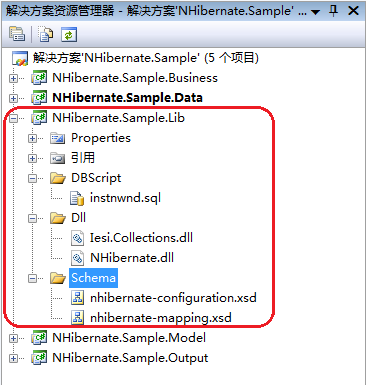
instnwnd.sql文件来自下, 载微软Northwind示例数据库。第一步已经提供了下载地址。Iesi.Collections.dll、NHibernate.dll、nhibernate-configuration.xsd、nhibernate-mapping.xsd四个文件都来自下载的NHibernate,Required_Bins文件目录下。
6. NHibernate.Sample.Model项目,用来创建模型,对应于数据库中的表。添加Customer类,添加Mapping文件夹。
- 在Mapping文件夹下创建Customer.hbm.xml文件:

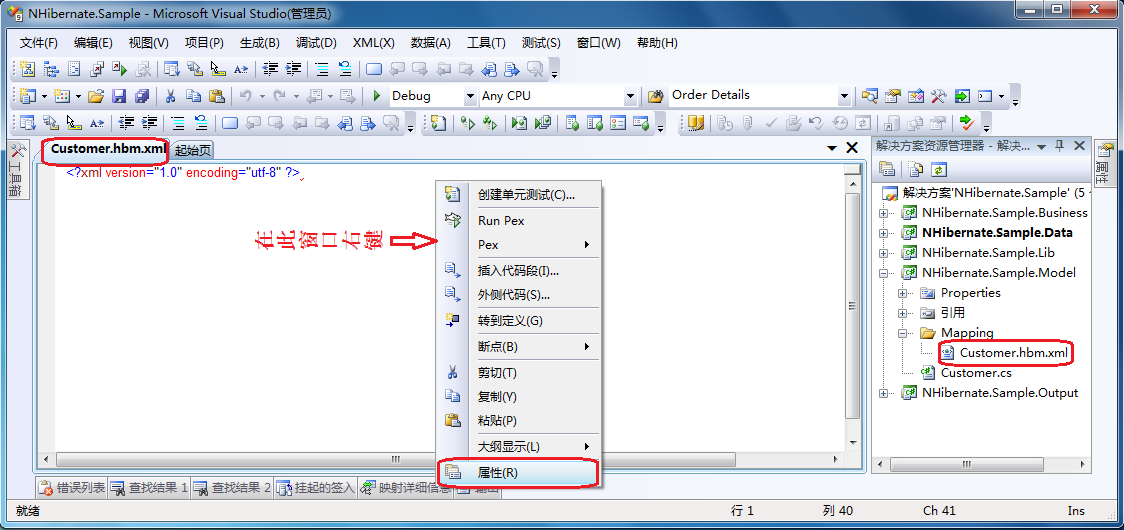
- 创建好Customer.hbm.xml文件以后,在打开的编辑界面内,右键=》属性。
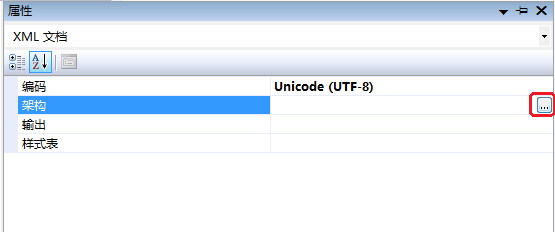
- 打开属性管理窗口:
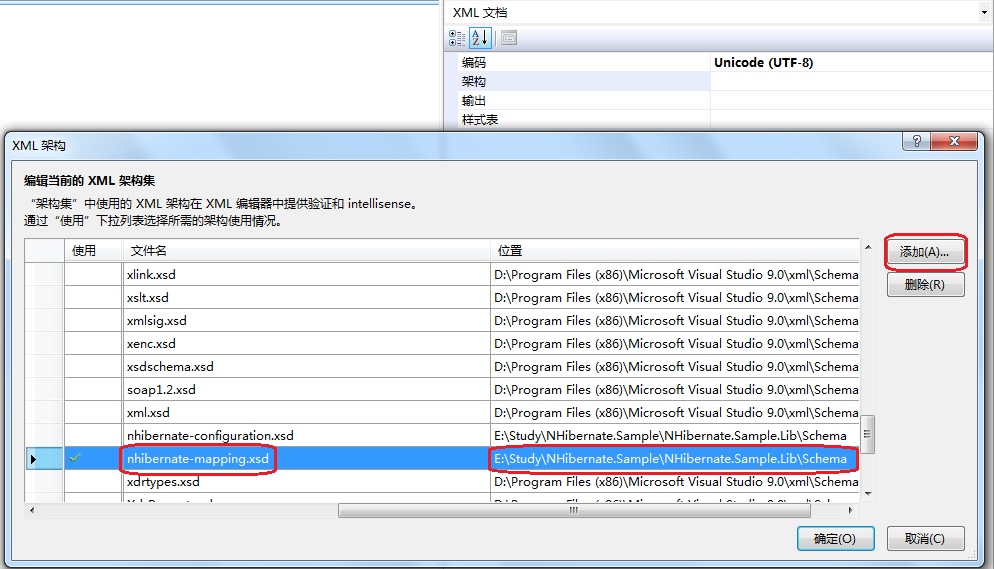
- 在属性管理窗口的架构一项,选择架构文件。架构文件的地址,就是我们上一步已经拷贝到NHibernate.Sample.Lib项目中的nhibernate-mapping.xsd文件。添加好以后编辑Customer.hbm.xml文件,就更够通过Visual Studio智能所用到的配置项。
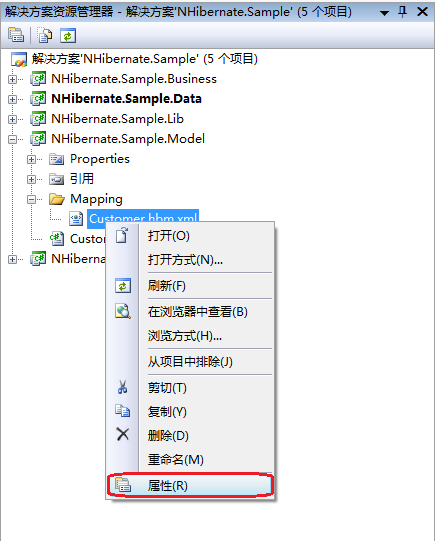
- 在解决方案管理器中找到Customer.hbm.xml文件,右键=》属性
- 把“生成操作”属性改为:嵌入的资源。
- 完成Customer.hbm.xml文件内容:【注意:assembly和namespace属性】

<?xml version="1.0" encoding="utf-8" ?>

<hibernate-mapping xmlns="urn:nhibernate-mapping-2.2"  assembly="NHibernate.Sample.Model" namespace="NHibernate.Sample.Model">

  <class name="Customer" table="Customers" lazy="true">

    <id name="CustomerID" column="CustomerID" type="string"/>

    <property name="CompanyName" type="string">

      <column name="CompanyName" length=""/>

    </property>

    <property name="ContactName" type="string">

      <column name="ContactName" length=""/>

    </property>

    <property name="ContactTitle" type="string">

      <column name="ContactTitle" length=""/>

    </property>

    <property name="Address" type="string">

      <column name="Address" length=""/>

    </property>

    <property name="City" type="string">

      <column name="City" length=""/>

    </property>

    <property name="Region" type="string">

      <column name="Region" length=""/>

    </property>

    <property name="PostalCode" type="string">

      <column name="PostalCode" length=""/>

    </property>

    <property name="Country" type="string">

      <column name="Country" length=""/>

    </property>

    <property name="Phone" type="string">

      <column name="Phone" length=""/>

    </property>

    <property name="Fax" type="string">

      <column name="Fax" length=""/>

    </property>

  </class>

</hibernate-mapping>
- 添加Customer.cs文件,完成Customer类:
using System;

using System.Collections.Generic;

using System.Linq;

using System.Text;

namespace NHibernate.Sample.Model

{

    public class Customer

    {

        /// <summary>

        ///

        /// </summary>

        public virtual string CustomerID { get; set; }

        /// <summary>

        ///

        /// </summary>

        public virtual string CompanyName { get; set; }

        /// <summary>

        ///

        /// </summary>

        public virtual string ContactName { get; set; }

        /// <summary>

        ///

        /// </summary>

        public virtual string ContactTitle { get; set; }

        /// <summary>

        ///

        /// </summary>

        public virtual string Address { get; set; }

        /// <summary>

        ///

        /// </summary>

        public virtual string City { get; set; }

        /// <summary>

        ///

        /// </summary>

        public virtual string Region { get; set; }

        /// <summary>

        ///

        /// </summary>

        public virtual string PostalCode { get; set; }

        /// <summary>

        ///

        /// </summary>

        public virtual string Country { get; set; }

        /// <summary>

        ///

        /// </summary>

        public virtual string Phone { get; set; }

        /// <summary>

        ///

        /// </summary>

        public virtual string Fax { get; set; }

    }

}
- 创建好以后NHibernate.Sample.Model项目的目录结构如下:

7. NHibernate.Sample.Data项目,用来数据访问。创建文件夹Config,用来存放配置文件,创建数据访问基类,创建数据访问接口,创建数据访问类。
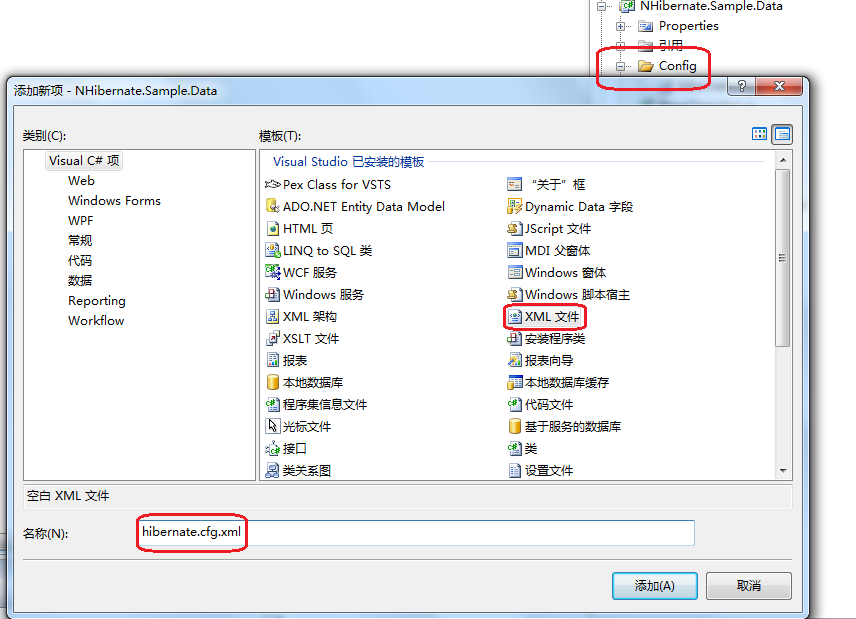
- 创建NHiberane的配置文件hibernate.cfg.xml:
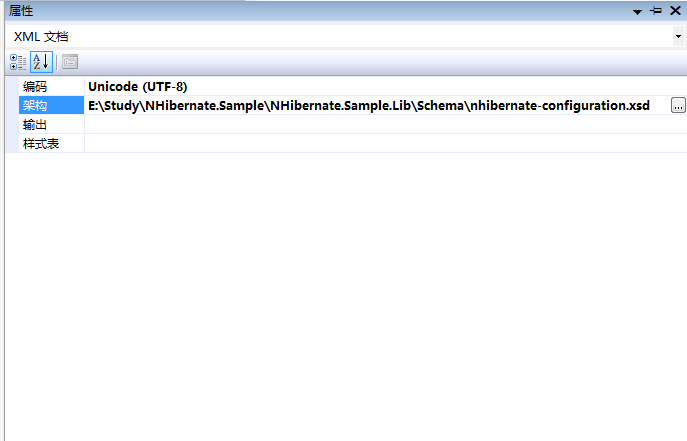
- 设定hibernate.cfg.xml文件的框架,在文件的编辑窗口右键=》属性=》添加=》选择Schema文件(NHibernate.Sample.Lib项目中的nhibernate-configuration.xsd文件)。
- 完成hibernate.cfg.xml文件的内容:
<?xml version="1.0" encoding="utf-8" ?>

<hibernate-configuration xmlns="urn:nhibernate-configuration-2.2">

  <session-factory>

    <property name="dialect">NHibernate.Dialect.MsSql2008Dialect</property>

    <property name="connection.provider">NHibernate.Connection.DriverConnectionProvider</property>

    <property name="connection.driver_class">NHibernate.Driver.SqlClientDriver</property>

    <property name="connection.connection_string_name">Connection String</property>

    <property name="connection.isolation">ReadCommitted</property>

    <property name="show_sql">false</property>

    <mapping assembly="NHibernate.Sample.Model"/>

  </session-factory>

</hibernate-configuration>
- 添加BaseOperator.cs文件,完成BaseOperator类:
using System;

using System.Collections.Generic;

using System.Linq;

using System.Text;

using NHibernate;

using NHibernate.Cfg;

namespace NHibernate.Sample.Data

{

    public class BaseOperator

    {

        private ISession m_Session;

        public ISession Session

        {

            get { return m_Session;}

        }

        private ISessionFactory m_SessionFactory;

        public BaseOperator()

        {

            var config = new Configuration().Configure("Config/hibernate.cfg.xml");

            m_SessionFactory = config.BuildSessionFactory();

            m_Session = m_SessionFactory.OpenSession();

        }

    }

}
- 添加CustomerOperator.cs文件,完成CustomerOperator类:
using System;

using System.Collections.Generic;

using System.Linq;

using System.Text;

using NHibernate.Linq;

using NHibernate.Sample.Model;

namespace NHibernate.Sample.Data

{

    public class CustomerOperator : BaseOperator

    {

        public object Save(Customer customer)

        {

            var id = Session.Save(customer);

            Session.Flush();

                return id;

        }

        public void Update(Customer customer)

        {

            Session.Update(customer);

            Session.Flush();

        }

        public void Delete(Customer customer)

        {

            Session.Delete(customer);

            Session.Flush();

        }

        public Customer Get(object id)

        {

            return Session.Get<Customer>(id);

        }

        public IList<Customer> GetAll()

        {

            return Session.Query<Customer>().ToList();

        }

    }

}
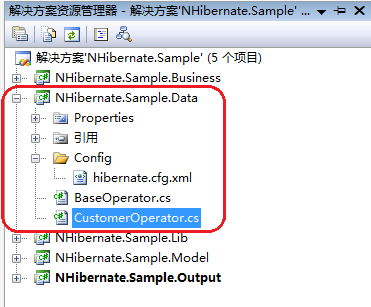
- 完成后的NHibernate.Sample.Data目录结构如下:
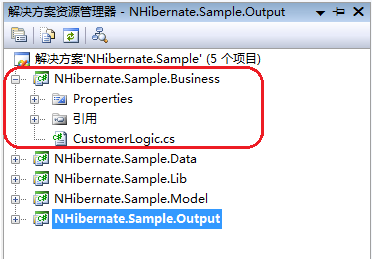
8. NHibernate.Sample.Business项目用来,处理业务逻辑;本示例比较简单,我们只添加一个逻辑处理类CustomerLogic,内容如下:
using System;

using System.Collections.Generic;

using System.Linq;

using System.Text;

using NHibernate.Sample.Data;

using NHibernate.Sample.Model;

namespace NHibernate.Sample.Business

{

    public class CustomerLogic

    {

        public IList<Customer> GetAll()

        {

            CustomerOperator oper = new CustomerOperator();

            return oper.GetAll();

        }

    }

}
- 完成以后项目结构如下:
9. NHibernate.Sample.Output为控制台项目,用来测试输出。添加一个配置文件App.config用于连接数据库,内容视个人环境而定。
App.config内容如下:
<?xml version="1.0" encoding="utf-8" ?>

<configuration>

  <connectionStrings>

    <add name="Connection String" connectionString="Data Source=.\SQLExpress;Initial Catalog=Northwind;Integrated Security=SSPI;" />

  </connectionStrings>

</configuration>
- Program文件内容如下:
using System;

using System.Collections.Generic;

using System.Linq;

using System.Text;

using NHibernate.Sample.Business;

using NHibernate.Sample.Model;

namespace NHibernate.Sample.Output

{

    class Program

    {

        static void Main(string[] args)

        {

            GetAll();

        }

        private static void GetAll()

        {

            CustomerLogic logic = new CustomerLogic();

            IList<Customer> cList = logic.GetAll();

            foreach (Customer item in cList)

            {

                Console.WriteLine(item.CustomerID.ToString());

            }

            Console.Read();

        }

    }

}
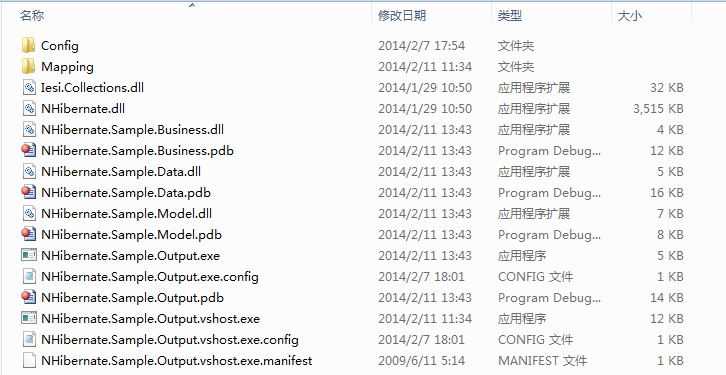
- NHibernate.Sample.Output为控制台项目下,E:\Study\NHibernate.Sample\NHibernate.Sample.Output\bin\Debug应包含如下文件。否则无法运行成功;如果缺少去其他项目中拷贝一份过来就可以了。
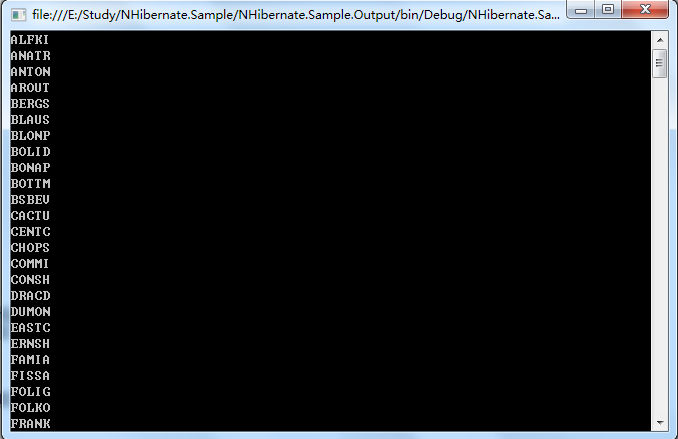
10. 运行结果如下:
11. 【代码下载】
NHibernate实例的更多相关文章
- Nhibernate的第一个实例
第一个NhIbernate程序 1.目的: a) 链接到oracle数据库 b) 增删改 c) 基本查询.sql查询 d) 视图查询 e) 使用存储过程 f) 多表查询.级联查询 g) 级联增删改 2 ...
- NHibernate简单使用介绍
1.在数据库中新建表格,并插入记录,SQL如下: USE WFC_DB GO create table Students ( Id ,) not null, Name ), Age int, Scor ...
- NHibernate之旅系列文章导航
NHibernate之旅系列文章导航 宣传语 NHibernate.NHibernate教程.NHibernate入门.NHibernate下载.NHibernate教程中文版.NHibernate实 ...
- NHibernate 基础教程
NHibernate之旅系列文章导航 宣传语 NHibernate.NHibernate教程.NHibernate入门.NHibernate下载.NHibernate教程中文版.NHibernate实 ...
- NHibernate初学一之简单增删改查
以前有简单了解NHibernate,但因项目一直没有运用所以也没有机会进行一个详细了解:最近利用一点空闲的时间认真学习它:同样希望把学习过程进行简单记录,今天简单写一个针对MSSQL数据库的增删改查的 ...
- 最近学习工作流 推荐一个activiti 的教程文档
全文地址:http://www.mossle.com/docs/activiti/ Activiti 5.15 用户手册 Table of Contents 1. 简介 协议 下载 源码 必要的软件 ...
- 关于NHibernate中存在于Session中实例的3种状态的简单分析
在使用NHibernate的时候.在Session中会有3种状态. 1. 瞬时状态 (Transient) 由 new 命令开辟内存空间的对象,也就是平时所熟悉的普通对象. 如: Student st ...
- NHibernate初学三之条件查询(Criteria Queries)与AspNetPager分页实例
NHibernate除了SQL与HQL两种查询操作外,还有一种就是条件查询Criteria,本文将从网上整理一些Criteria的理论及小实例,最后通过一个结合AspNetPager分页来加深理解,必 ...
- NHibernate N+1问题实例分析和优化
1.问题的缘起 考察下面的类结构定义 public class Category { string _id; Category _parent; IList<Category> _chil ...
随机推荐
- JDK Logger 简介 (zhuan)
http://antlove.iteye.com/blog/1924832 ******************************************* 一 简述 java.util.log ...
- SharePoint自动化系列——通过PowerShell创建SharePoint Web
转载请注明出自天外归云的博客园:http://www.cnblogs.com/LanTianYou/ 代码如下(保存到本地ps1文件中,右键run with PowerShell即可): Add-PS ...
- c++之五谷杂粮4---explicit
4.1在要求隐式转换的程序上下文中,我们可以通过将构造函数声明为explicit加以阻止. 关键字explicit只对一个实参的构造函数有效.需要多个实参的构造函数不能用于执行隐式转换,所以无需将这些 ...
- python基础系列教程——Python中的编码问题,中文乱码问题
python基础系列教程——Python中的编码问题,中文乱码问题 如果不声明编码,则中文会报错,即使是注释也会报错. # -*- coding: UTF-8 -*- 或者 #coding=utf-8 ...
- java Spring 事务的初次使用与验证
事务,只要是为了保证数据的原子性.避免出现脏数据. 下面来讲解下spring是如何使用事务的. 1.配置事务.这里采用的是注解的模式 <!-- 配置事务管理器 ,如果你暂时未使用到事务可以不配置 ...
- idea中maven依赖不能下载的解决办法
使用maven 命令 maven install 在项目所在文件夹 执行.
- hbase计数器
1 计数器 计数器可以方便.快速地进行计数操作,而且避免了加锁等保证了原子性的操作. 1.1 Java API 操作 HBase 计数器 public Result increment(final ...
- centos 7 上配置mysql 开机启动详解
之前多次在centos7环境下配置mysql开机自启动出现了错误.现留下篇文章已做记录 一.centos7与centos6相比有什么不同: 1 在centos7中服务不在是用service这个命令来启 ...
- Winform RsaProtectedConfigurationProvider 加密数据库连接字符串
private static string _strProvider = "RsaProtectedConfigurationProvider"; /// <summary& ...
- 制作Windows Server 2008安装启动U盘
昨天刚下了Windows server 2008因为没有刻录机,所以我就用2G U盘把Windows server 2008光盘镜像做成U盘安装效果和光盘安装一样. 下面就是制作方法: UltraIS ...