
python 网络爬虫requests模块
一、requests模块
requests模块是python中原生的基于网络请求的模块,其主要作用是用来模拟浏览器发起请求。功能强大,用法简洁高效。
1.1 模块介绍及请求过程
requests模块模拟浏览器发送请求
请求流程:指定url --> 发起请求 --> 获取响应对象中存储的数据 --> 持久化存储
1.2 爬取百度首页
#!/usr/bin/env python

# -*- coding:utf-8-*-

import requests

headers = {

    'User-Agent': 'Mozilla/5.0 (Windows NT 6.1; Win64; x64) AppleWebKit/537.36 (KHTML, like Gecko) Chrome/72.0.3626.121 Safari/537.36'

}

url = 'https://www.baidu.com/'

response = requests.get(url=url)

response.encoding = 'utf-8'                         # 修改字符编码

page_text = response.text                           # 获取的类型为字符型<class 'str'>

with open('./baidu.html', mode='w', encoding='utf-8') as f:

    f.write(page_text)

# page_text = response.content                       # 返回二进制数据类型 <class 'bytes'>

# response.status_code                               # 获取响应状态码

# response.headers['Content-Type'] == 'text/json'    # 类型是 'text/json' 则可以使用response.json方法

# response.json                                      # 如果响应头中存储了json数据,该方法可以返回json数据
1.3 爬取百度指定词条搜索后的页面数据
#!/usr/bin/env python

# -*- coding:utf-8-*-

import requests

headers = {

    'User-Agent': 'Mozilla/5.0 (Windows NT 6.1; Win64; x64) AppleWebKit/537.36 (KHTML, like Gecko) Chrome/72.0.3626.121 Safari/537.36'

}

url = 'https://www.baidu.com/s?ie=utf-8&f=8&rsv_bp=1&rsv_idx=1&tn=baidu&'

kw = input('请输入要搜索的内容:')

param = {'wd': kw}

response = requests.get(url=url, params=param, headers=headers)

page_text = response.content

fileName = kw+'.html'

with open(fileName, 'wb') as fp:

    fp.write(page_text)

    print(fileName+'爬取成功。')
1.4 获取百度翻译的翻译结果使用post方法
页面使用的ajax的请求方式,通过浏览器抓包得到请求的地址和提交From表单的内容。

#!/usr/bin/env python

# -*- coding:utf-8-*-

import requests

headers = {

    'User-Agent': 'Mozilla/5.0 (Windows NT 6.1; Win64; x64) AppleWebKit/537.36 (KHTML, like Gecko) Chrome/72.0.3626.121 Safari/537.36'

}

url = 'https://fanyi.baidu.com/sug'

kw = input('请输入要翻译的内容:')

data = {

    'kw': kw

}

response = requests.post(url=url, data=data, headers=headers)

dic = response.json()

print(dic['data'])

-----------------------------------执行结果--------------------------------------

请输入要翻译的内容:美女

[{'k': '美女', 'v': '[měi nǚ] beauty; belle; beautiful woman; femme fat'}, {'k': '美女与野兽', 'v': '名 Beauty and the Beast;'}, {'k': '美女蛇', 'v': 'merino;'}]

--------------------------------------------------------------------------------
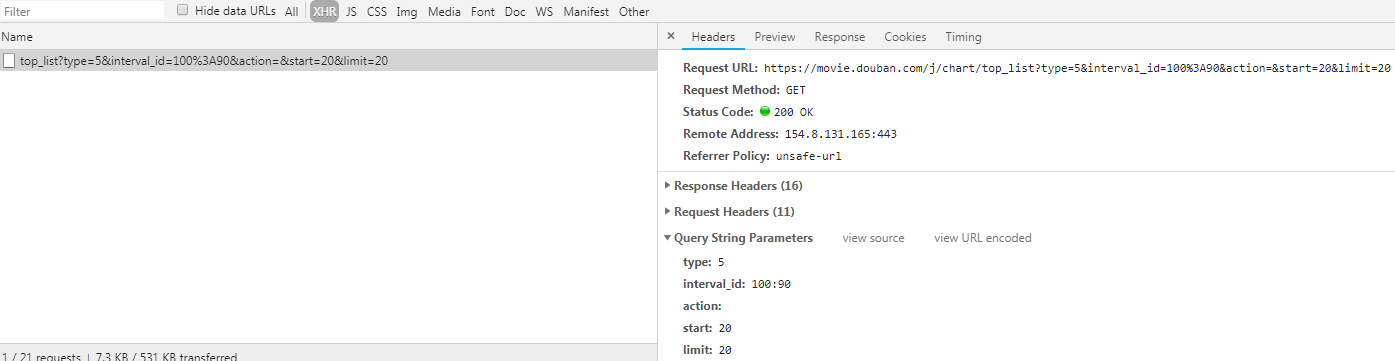
1.5 爬取豆瓣电影排名电影
#!/usr/bin/env python

# -*- coding:utf-8-*-

import requests

headers = {

    'User-Agent':'Mozilla/5.0 (Windows NT 10.0; WOW64) AppleWebKit/537.36 (KHTML, like Gecko) Chrome/70.0.3538.77 Safari/537.36'

}

url = 'https://movie.douban.com/j/chart/top_list'

param = {

    'type': '',

    'interval_id': '100:90',

    'action': '',

    'start': '',

    'limit': ''

}

json_data = requests.get(url=url, headers=headers, params=param).json()

print(json_data)
python 网络爬虫requests模块的更多相关文章
- Python网络爬虫-requests模块
requests模块 requests模块是python中原生的基于网络请求的模块,其主要作用是用来模拟浏览器发起请求.功能强大,用法简洁高效.在爬虫领域中占据着半壁江山的地位. 如何使用reques ...
- Python网络爬虫-requests模块(II)
有些时候,我们在使用爬虫程序去爬取一些用户相关信息的数据(爬取张三“人人网”个人主页数据)时,如果使用之前requests模块常规操作时,往往达不到我们想要的目的,例如: #!/usr/bin/env ...
- python网络编程----requests模块
python访问网站可以用标准模块--urllib模块(这里省略),和requests(安装-pip install requests)模块,requests模块是在urllib的基础上进行的封装,比 ...
- 06 Python网络爬虫requets模块高级用法
一. 基于requests模块的cookie操作 - cookie概念: 当用户通过浏览器访问一个域名的时候,访问的web服务器会给客户端发送数据,以保持web服务器与客户端之间的状态保持,这些数据就 ...
- Python网络爬虫-xpath模块
一.正解解析 单字符: . : 除换行以外所有字符 [] :[aoe] [a-w] 匹配集合中任意一个字符 \d :数字 [0-9] \D : 非数字 \w :数字.字母.下划线.中文 \W : 非\ ...
- Python网络爬虫:空姐网、糗百、xxx结果图与源码
如前面所述,我们上手写了空姐网爬虫,糗百爬虫,先放一下传送门: Python网络爬虫requests.bs4爬取空姐网图片Python爬虫框架Scrapy之爬取糗事百科大量段子数据Python爬虫框架 ...
- 【python网络爬虫】之requests相关模块
python网络爬虫的学习第一步 [python网络爬虫]之0 爬虫与反扒 [python网络爬虫]之一 简单介绍 [python网络爬虫]之二 python uillib库 [python网络爬虫] ...
- python 网络爬虫全流程教学,从入门到实战(requests+bs4+存储文件)
python 网络爬虫全流程教学,从入门到实战(requests+bs4+存储文件) requests是一个Python第三方库,用于向URL地址发起请求 bs4 全名 BeautifulSoup4, ...
- 《实战Python网络爬虫》- 感想
端午节假期过了,之前一直在做出行准备,后面旅游完又休息了一下,最近才恢复状态. 端午假期最后一天收到一个快递,回去打开,发现是微信抽奖中的一本书,黄永祥的<实战Python网络爬虫>. 去 ...
随机推荐
- mongodb2.X添加权限
1.连接mongodb数据库(如果mongo命令没有做环境变量配置,需要定位到有mongo命令的目录) root@AY140709212620347s22Z:~# mongo MongoDB shel ...
- 转战JS(1) 初探与变量类型、运算符、常用函数与转换
转战JS(1)初探与变量类型.运算符.常用函数与转换 做为一名.NET后台开发人员,正考滤向Web前端开发转型,之前也写过一代前端代码,可是当再回头看JS,并有转向它的意愿的时候,突然发现:原来JS不 ...
- mysql-client 与mysql-server的区别
mysql-server 与 mysql-client是DBMS的两个面向不同操作对象的工具. server是DBMS面向物理层次,包含存储数据的一系列机制.处理方法的集成: client是DBMS面 ...
- python + pyqt5 QlineEdit QMessageBox实现信息录入和消息弹框提醒
本人现在在做自动化工具开发的工作,因此,记录下自己平时遇到的问题和解决之道,还有一些简单的小工具 以下为主代码 # --*-- coding:utf-8 --*-- from first import ...
- [2018HN省队集训D9T1] circle
[2018HN省队集训D9T1] circle 题意 给定一个 \(n\) 个点的竞赛图并在其中钦定了 \(k\) 个点, 数据保证删去钦定的 \(k\) 个点后这个图没有环. 问在不删去钦定的这 \ ...
- Django商城项目笔记No.14用户部分-用户中心邮箱绑定
保存邮箱界面如下 接口设计如下 视图逻辑: 因为url是不接受pk参数的,所以UpdateApiView无法确定要更新哪个模型类,所以要重写get_object,告诉他更新哪个模型类.这里更新的是us ...
- 解决ThinkPHP中开启调试模式无法加载模块的问题。
刚开始学习ThinkPHP就遇到这种问题,还是自己粗心. 错误如下: 原因:开启调试模式,区分大小写的,要把模块名首字母大写就OK了.也就是: [plain] view plain copy http ...
- 邮局加强版:四边形不等式优化DP
题目描述 一些村庄建在一条笔直的高速公路边上,我们用一条坐标轴来描述这条公路,每个村庄的坐标都是整数,没有两个村庄的坐标相同.两个村庄的距离定义为坐标之差的绝对值.我们需要在某些村庄建立邮局.使每个村 ...
- 【转】开篇python--明白python文件如何组织,理解建立源文件
在Python 中引用是非常简单的事情,这里需要清楚三个概念就可以了包.模块.类.类这个就不用说了. 模块对应的是一个.py 文件,那么module_name 就是这个文件去掉.py 之后的文件名,p ...
- js判断360浏览器 兼容模式IE版本
var ms_ie = false; var ua = window.navigator.userAgent.toLowerCase(); var old_ie = ua.indexOf('MSIE' ...