
C#利用Zxing.net生成条形码和二维码并实现打印的功能
开篇:zxing.net是.net平台下编解条形码和二维码的工具。
下载地址:http://pan.baidu.com/s/1kTr3Vuf
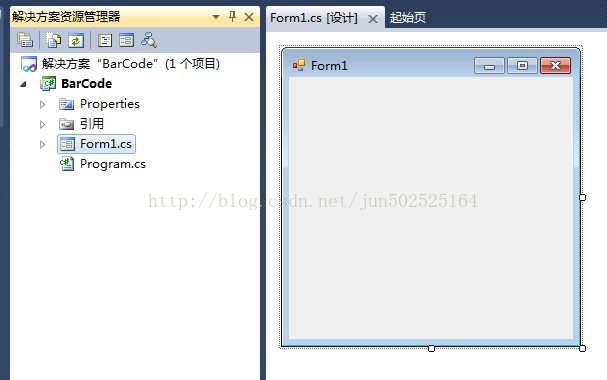
Step1:使用VS2010新建一个窗体程序项目:
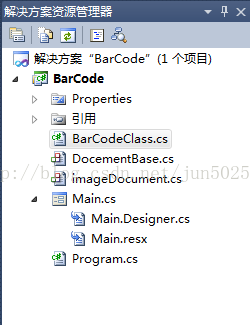
Step2:添加三个类:分别是BarCodeClass.cs、DocementBase.cs、imageDocument.cs。(下一步贴出这些类的代码);;;;添加下载回来的引用zxing.dll。
》说明:
《1》 BarCodeClass.cs主要用来实现条形码和二维码的生成和解析。
《2》 DocementBase.cs、imageDocument.cs这两个类是用来实现对生成的条形码和二维码进行打印。
Step3:编写上一步的三个类的代码:
》BarCodeClass.cs
using System;
using System.Collections.Generic;
using System.Linq;
using System.Text;
using ZXing.Common;
using ZXing;
using System.Windows.Forms;
using System.Drawing;
using System.Text.RegularExpressions;
using ZXing.QrCode;
namespace BarCode
{
class BarCodeClass
{
///<summary>
///生成条形码
///</summary>
///<paramname="pictureBox1"></param>
///<paramname="Contents"></param>
public void CreateBarCode(PictureBoxpictureBox1,string Contents)
{
Regexrg = new Regex("^[0-9]{12}$");
if(!rg.IsMatch(Contents))
{
位数字");
return;
}
EncodingOptionsoptions =null;
BarcodeWriterwriter =null;
options = newEncodingOptions
{
Width = pictureBox1.Width,
Height = pictureBox1.Height
};
writer = newBarcodeWriter();
writer.Format = BarcodeFormat.ITF;
writer.Options = options;
Bitmapbitmap = writer.Write(Contents);
pictureBox1.Image = bitmap;
}
///<summary>
///生成二维码
///</summary>
///<paramname="pictureBox1"></param>
///<paramname="Contents"></param>
public void CreateQuickMark(PictureBoxpictureBox1,string Contents)
{
if(Contents == string.Empty)
{
MessageBox.Show("输入内容不能为空!");
return;
}
EncodingOptionsoptions =null;
BarcodeWriterwriter =null;
options = newQrCodeEncodingOptions
{
DisableECI = true,
CharacterSet = "UTF-8",
Width = pictureBox1.Width,
Height = pictureBox1.Height
};
writer = newBarcodeWriter();
writer.Format = BarcodeFormat.QR_CODE;
writer.Options = options;
Bitmapbitmap = writer.Write(Contents);
pictureBox1.Image = bitmap;
}
///<summary>
///解码
///</summary>
///<paramname="pictureBox1"></param>
public void Decode(PictureBoxpictureBox1)
{
BarcodeReaderreader =new BarcodeReader();
Resultresult = reader.Decode((Bitmap)pictureBox1.Image);
}
}
}
》DocementBase.cs
using System;
using System.Collections.Generic;
using System.Linq;
using System.Text;
using System.Drawing.Printing;
using System.Drawing;
using System.Windows.Forms;
namespace BarCode
{
class DocementBase : PrintDocument
{
//fields
public Font Font = new Font("Verdana",10, GraphicsUnit.Point);
//预览打印
public DialogResult showPrintPreviewDialog()
{
PrintPreviewDialogdialog =new PrintPreviewDialog();
dialog.Document = this;
returndialog.ShowDialog();
}
//先设置后打印
public DialogResult ShowPageSettingsDialog()
{
PageSetupDialogdialog =new PageSetupDialog();
dialog.Document = this;
returndialog.ShowDialog();
}
}
}
》imageDocument.cs
using System;
using System.Collections.Generic;
using System.Linq;
using System.Text;
using System.Drawing;
using System.Drawing.Printing;
namespace BarCode
{
class imageDocument : DocementBase
{
privateImage _Image;
public Image Image
{
get
{
return_Image;
}
set
{
_Image = value;
if(_Image != null)
{
if(_Image.Size.Width > _Image.Size.Height)
DefaultPageSettings.Landscape = true;
else
DefaultPageSettings.Landscape = false;
}
}
}
publicimageDocument()
{
}
publicimageDocument(Image image)
{
this.Image= image;
}
protectedoverridevoidOnPrintPage(PrintPageEventArgs e)
{
if(Image == null)
{
thrownewInvalidOperationException();
}
RectanglebestFit = GetBestFitRectangle(e.MarginBounds, Image.Size);
e.Graphics.DrawImage(Image, bestFit);
e.Graphics.DrawRectangle(Pens.Black, bestFit);
e.Graphics.DrawRectangle(Pens.Black, e.MarginBounds);
}
// 保持高度比:参数为(打印边界的Rectangularle对象,图像大小的Size对象)
protectedRectangle GetBestFitRectangle(Rectangle toContain,SizeobjectSize)
{
//检查页面是水平还是竖直的。
boolcontainerLandscape =false;
if(toContain.Width > toContain.Height)
containerLandscape = true;
//高度比=图像的高/图像的宽
floataspectRatio = (float)objectSize.Height / (float)objectSize.Width;
//得到页面左上角的坐标
intmidContainerX = toContain.Left + (toContain.Width / 2);
intmidContainerY = toContain.Top + (toContain.Height / 2);
intx1 = 0, x2 = 0, y1 = 0, y2 = 0;
if(containerLandscape ==false)
{
//竖直图像
x1 = toContain.Left;
x2 = toContain.Right;
//调整之后的height
intadjustedHeight = (int)((float)toContain.Width * aspectRatio);
y1 = midContainerY -(adjustedHeight / 2);
y2 = y1 + adjustedHeight;
}
else
{
y1 = toContain.Top;
y2 = toContain.Bottom;
//调整之后的height
intadjustedWidth = (int)((float)toContain.Height/ aspectRatio);
x1 = midContainerX -(adjustedWidth / 2);
x2 = x1 + adjustedWidth;
}
returnnewRectangle(x1,y1, x2 - x1, y2 - y1);
}
}
}
Step4:修改界面。
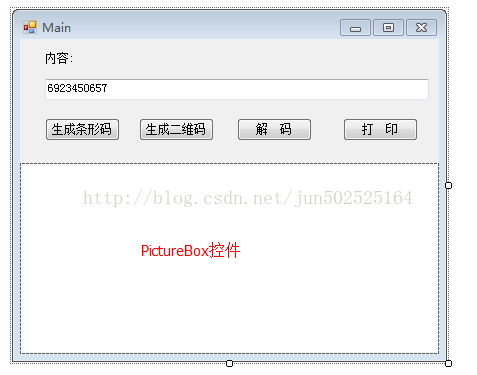
Step5:依次双击【生成条形码】、【生成二维码】、【解码】、【打印】等按钮,进入Click事件,编写后台代码。这里不再一一讲述如何实现。代码参照下一步:
Step6:贴出窗体的全部代码。
using System;
using System.Collections.Generic;
using System.ComponentModel;
using System.Data;
using System.Drawing;
using System.Linq;
using System.Text;
using System.Windows.Forms;
using System.Text.RegularExpressions;
using ZXing;
using ZXing.QrCode.Internal;
using ZXing.Common;
using System.IO;
using ZXing.QrCode;
namespace BarCode
{
public partial class Main : Form
{
publicMain()
{
InitializeComponent();
}
private BarCodeClass bcc = newBarCodeClass();
private DocementBase _docement;
//生成条形码
privatevoid button1_Click(objectsender,EventArgs e)
{
bcc.CreateBarCode(pictureBox1,txtMsg.Text);
}
//生成二维码
privatevoid button2_Click(objectsender,EventArgs e)
{
bcc.CreateQuickMark(pictureBox1, txtMsg.Text);
}
privatevoid Form1_Load(objectsender,EventArgs e)
{
txtMsg.Text = System.DateTime.Now.ToString("yyyyMMddhhmmss").Substring(0,12);
}
//解码
privatevoid button4_Click(objectsender,EventArgs e)
{
if(pictureBox1.Image ==null)
{
MessageBox.Show("请录入图像后再进行解码!");
return;
}
BarcodeReaderreader =new BarcodeReader();
Resultresult = reader.Decode((Bitmap)pictureBox1.Image);
MessageBox.Show(result.Text);
}
//打印
privatevoid button3_Click(objectsender,EventArgs e)
{
if(pictureBox1.Image ==null)
{
MessageBox.Show("You Must Load an Image first!");
return;
}
else
{
_docement=new imageDocument(pictureBox1.Image);
}
_docement.showPrintPreviewDialog();
}
}
}
Step7:剩下的就是演示了:本机演示结果如下:
》运行程序:点击【生成条形码】,结果如下:

》点击【解码】按钮,结果如下:

》点击《打印》按钮,结果如下:

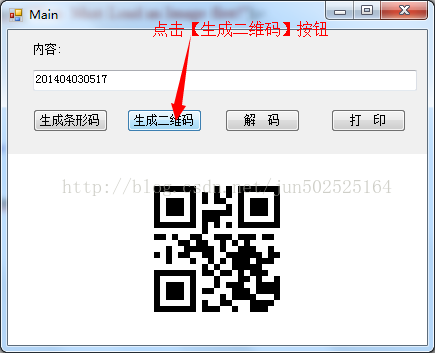
》点击【生成二维码】按钮,结果如下:
》点击【解码】按钮,结果如下:
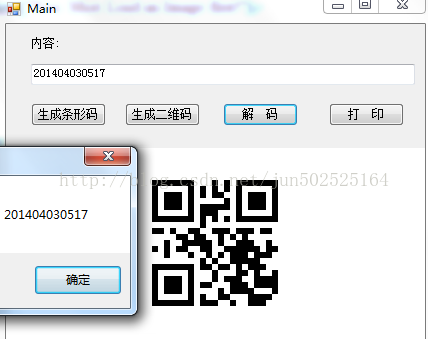
》点击【打印】按钮,结果如下:

C#利用Zxing.net生成条形码和二维码并实现打印的功能的更多相关文章
- C#Zxing.net生成条形码和二维码
下载Zxing.net官网:https://archive.codeplex.com/?p=zxingnet 或者去VS程序包下载 封装好的代码: using System; using System ...
- 利用ZXing.Net生成和识别二维码
ZXing.Net:ZXing是一个开放源码的,用Java实现的多种格式的1D/2D条码图像处理库. github:https://github.com/micjahn/ZXing.Net 直接将字符 ...
- C# 利用ZXing.Net来生成条形码和二维码
本文是利用ZXing.Net在WinForm中生成条形码,二维码的小例子,仅供学习分享使用,如有不足之处,还请指正. 什么是ZXing.Net? ZXing是一个开放源码的,用Java实现的多种格式的 ...
- 使用谷歌Z生成条形码以及二维码
下载地址:http://zxingnet.codeplex.com/ zxing.net是.net平台下编解条形码和二维码的工具,使用非常方便. 首先下载二进制dll文件,引入工程: using Sy ...
- 使用ZXing.Net生成与识别二维码(QR Code)
Google ZXing是目前一个常用的基于Java实现的多种格式的1D/2D条码图像处理库,出于其开源的特性其现在已有多平台版本.比如今天要用到的ZXing.Net就是针对微软.Net平台的版本.使 ...
- ZXing生成条形码、二维码、带logo二维码
采用的是开源的ZXing,Maven配置如下,jar包下载地址,自己选择版本下载,顺便推荐下Maven Repository <!-- https://mvnrepository.com/art ...
- winform生成条形码和二维码(ZXing.Net)
首先在项目添加ZXing.Net. 工具-->Nuget包管理器-->Nuget程序包 在所搜栏输入 ZXing.Net 如下图: 添加完成后会看见: 效果图: 所有代码: /// &l ...
- iOS开发——生成条形码,二维码
- (void)viewDidLoad { [super viewDidLoad]; self.imageView.image = [self generateBarCode:@"15248 ...
- ZXing.net 生成和解析二维码
nuget引用zxing.net包 public partial class Form1 : Form { public Form1() { InitializeComponent(); } priv ...
随机推荐
- Hadoop日记Day13---使用hadoop自定义类型处理手机上网日志
测试数据的下载地址为:http://pan.baidu.com/s/1gdgSn6r 一.文件分析 首先可以用文本编辑器打开一个HTTP_20130313143750.dat的二进制文件,这个文件的内 ...
- CCNode详解
cocos2d的所有类都以CC开头,那么实际上这个类的名字就是Node,类如其名,这个类的实例就是一个节点.Cocos2d的类是树状继承的,而在内存中,各个实例之间也是以“树”这种数据结构相关联的., ...
- 写个发邮件的功能php的(全代码)
---恢复内容开始--- 正好做了个项目,需要在线留言,一般在线留言发邮件是很常见的方式,一开始从网上搜了很久都没有很全的,也有全一点的,但是也不能用,运行不成功,下面给大家分享一下运行成功了的全部代 ...
- docker 部署Spring Boot:Docker化Spring Boot应用程序
第一章 1.创建项目存放目录 mkdir /root/sproot -p 2.准备好Spring Boot应用程序 jar 包 testrest.jar 第二章 1. 安装docker 在所有节点执行 ...
- linux systemctl 命令
目录 预热 管理单个 unit 查看系统上的 unit 管理不同的操作环境(target unit) 检查 unit 之间的依赖性 相关的目录和文件 systemctl daemon-reload 子 ...
- 现代OpenGL渲染管线介绍
原文摘选自 现代OpenGL渲染管线介绍 此文对最新的OpenGL做一个简单的介绍,如有理解错误,敬请指正.英文原文: https://glumpy.github.io/modern-gl.html ...
- spring boot 2.0 源码分析(五)
在上一篇文章中我们详细分析了spring boot是如何准备上下文环境的,今天我们来看一下run函数剩余的内容.还是先把run函数贴出来: /** * Run the Spring applicati ...
- Arcengine效率探究之一——属性的读取(转载)
http://blog.csdn.net/lk103852503/article/details/6566652 在写一个对属性表的统计函数时,发现执行速度奇慢无比,百思不得其解,其实算法并不复杂,后 ...
- PAT甲题题解-1048. Find Coins (25)-水
给n,m以及n个硬币 问,是否存在两个硬币面值v1+v2=m 因为面值不会超过500,所以实际上最多500个不同的硬币而已 #include <iostream> #include < ...
- windows 64bit 服务器下安装32位oracle database 11g 问题集
1.中文乱码 问题描述: 利用vs2008调试的时候正常,发布到IIS8.5上的时候,当查询语句中包含中文的时候会乱码,比如"select * from tb where name='小s' ...